
Table of Contents
Some links on The Justifiable are affiliate links, meaning we may earn a small commission at no extra cost to you. Read full disclaimer.
Doba features overview for beginners can feel a little overwhelming at first because the platform is trying to help you do several jobs at once: product research, supplier sourcing, listing, inventory sync, and order routing.
The good news is that once you understand the workflow, it becomes much easier to see how everything fits together.
In this guide, I’ll walk you through what Doba actually does, which features matter most when you’re just starting, how to set up your account, and what to focus on so you can move from account setup to your first sale without getting buried in extra tools or unnecessary complexity.
What Doba Is And Why Beginners Use It
Doba is best understood as a dropshipping platform that brings products and suppliers together in one place, then adds store connection, listing, and order-management features on top.
For a beginner, that matters because you are not starting from scratch with separate supplier outreach, spreadsheets, and manual stock checks.
What Problem Doba Solves For New Sellers
If you are new to dropshipping, the hardest part usually is not building a store. It is figuring out where your products come from, whether stock is reliable, and how to avoid selling something that goes out of stock right after a customer pays.
Doba positions itself as a supplier aggregator, meaning it connects retailers with hundreds of suppliers through one interface instead of forcing you to manage each supplier relationship separately.
That is the beginner-friendly part. You get one dashboard for product discovery, inventory monitoring, and purchase orders rather than a patchwork system stitched together with trial and error.
What I like about this setup is that it reduces the number of moving pieces early on. When most people quit, it is usually because the workflow feels messy. Doba tries to clean that up.
A practical example: imagine you launch a small home-and-garden store with 20 products. Without a central platform, you may need to track stock manually, copy product data one by one, and check orders across multiple sources. With Doba, the platform is built to centralize much of that process.
- Beginner takeaway: Doba is less about “magic profits” and more about simplifying operations.
- What it helps with: Product sourcing, store integration, listing, syncing, and order handling.
- What it does not replace: Good niche selection, pricing judgment, and strong product pages.
How Doba Fits Into A Real Dropshipping Workflow
A lot of beginners think the first step is “find a winning product.” In reality, the better first step is understanding the order of operations. Doba works best when you follow its natural workflow instead of jumping around.
First, you connect a store or marketplace account. Doba supports connections across channels such as Shopify, Amazon, eBay, WooCommerce, BigCommerce, Wix, TikTok, Newegg, and even certain Temu seller options through its help documentation.
That means your store becomes the place customers buy, while Doba becomes the operational backend that helps you source and fulfill.
Next, you research products and add them to your inventory list. After that, you list products to your store, connect SKUs properly, and monitor price or stock changes.
When a customer places an order in your connected store, that order can appear inside Doba under Store Orders, where you can move it toward purchase and fulfillment.
That flow matters because beginners often reverse it. They upload products first, then realize later they did not set margins, shipping expectations, or SKU connections properly.
- Simple workflow: Connect store, research product, add to inventory list, list product, verify mapping, monitor orders, place purchase order.
- Why this matters: Each step reduces one common beginner mistake.
- My advice: Treat Doba like an operations system, not just a product catalog.
Core Doba Features Beginners Should Understand First
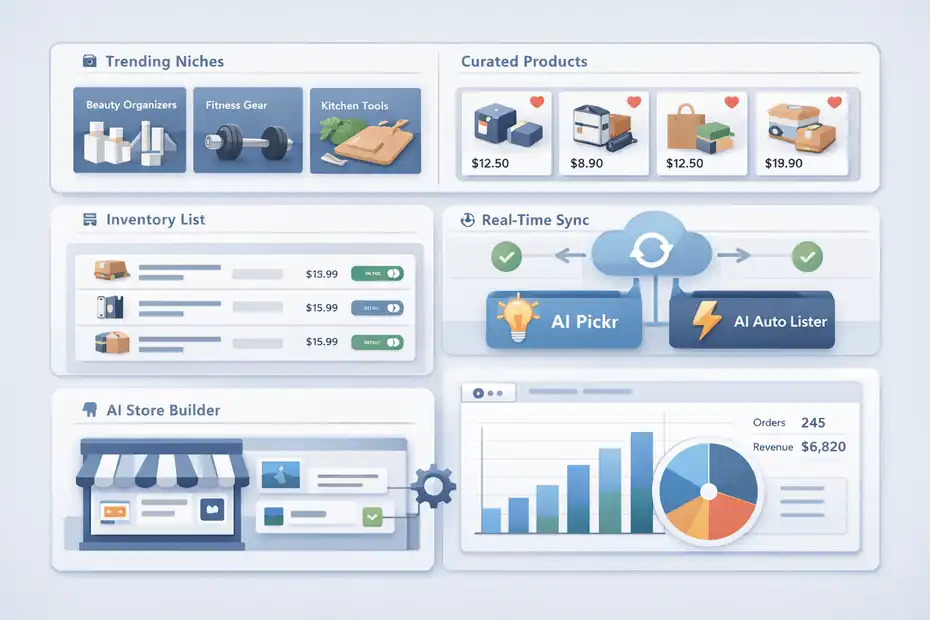
Before you worry about automation, advanced plans, or scaling, you need to understand the core features that directly affect whether you can launch cleanly.
These are the features that shape your first month.
Product Discovery And Curated Selection
Doba highlights expert product selection and says it uses more than 20 years of market data plus AI-driven analytics to help surface products. For beginners, the key point is not the marketing language.
The real value is that the platform is trying to narrow the field so you are not sorting through endless random products with no structure.
This matters because one of the fastest ways to waste time is browsing huge catalogs without criteria. A beginner usually needs filters, niche direction, and some signal of demand or suitability.
In practice, product discovery on Doba should be used as a shortlist tool, not a final decision-maker. I would not trust any platform’s recommendations blindly. Instead, use Doba’s curated products, niche groupings, and AI-assisted suggestions to build a candidate list.
Then narrow by shipping practicality, margin room, product quality perception, and whether you can write a convincing product page.
Imagine you are selling beauty organizers, portable fitness gear, and kitchen tools. Doba can help you spot products in those categories faster, but your judgment is still what determines whether the product makes sense for your audience.
- Use it for: Finding categories, trend ideas, and starting points.
- Do not use it for: Assuming every featured item will sell.
- Best beginner filter: Favor products that solve a simple, visible problem and are easy to explain in one sentence.
Inventory List, Listings, And Real-Time Sync
The inventory list is one of the most practical beginner features in Doba. According to Doba’s help documentation, it acts as a portal where the products you add can be viewed and managed, with sorting options such as add time, inventory, and price.
On the main site, Doba also says it monitors inventory and pricing 24/7 and keeps product data and orders synchronized to help prevent out-of-stock issues.
For beginners, this is where the platform starts becoming operational instead of just informational.
Think of the inventory list as your working shelf. You are not committing to every product forever. You are building a controlled list of products you may list, test, monitor, or remove. That is much better than flooding your store with 300 random products and hoping something works.
The one-click listing feature is tied closely to this. Depending on your plan, you get a capped number of one-click product listings, and higher plans raise that ceiling significantly. This is useful, but only if you stay selective. Too many beginners confuse speed with strategy.
- What to watch: Stock level, supplier pricing changes, and listing status.
- What to avoid: Uploading large batches without editing titles, descriptions, and pricing logic.
- My view: Real-time sync is valuable, but it is most valuable when your catalog is small enough to manage well.
AI Features And Store-Building Shortcuts
Doba now promotes an AI hub with features such as AI Store Builder, AI Pickr, and AI Auto Lister. The AI Store Builder is described as a way to get one online store, one theme, and 10 winning products ready quickly, while AI Pickr and AI Auto Lister focus on product discovery and automated listing.
Some of these features vary by plan or are sold as add-ons.
I think beginners should treat these as accelerators, not substitutes for decision-making.
AI tools can save time when you are stuck on setup or product sourcing, but they can also tempt you into launching a generic store that looks like everyone else’s. That is the trade-off. Fast setup is helpful. Copy-paste sameness is not.
A better use case is this: Let AI help you create a draft store framework or shortlist products, then step in manually to improve positioning, branding, and product-page clarity. You want help with the boring parts, not outsourcing your entire business identity.
- Good use: Draft setup, early product ideation, and saving time on repetitive tasks.
- Bad use: Publishing everything exactly as generated.
- Best beginner mindset: Use AI to reduce friction, then add human judgment before anything goes live.
Choosing The Right Plan Without Overspending
Doba’s pricing structure matters more than many beginners expect because your available listings, integrations, inventory capacity, and some AI or automation features depend directly on the plan.
Choosing too low can box you in. Choosing too high too early can burn cash before you validate anything.
What The Main Doba Plans Include
At the time of writing, Doba’s pricing page shows four primary plans: Limited, Basic, Standard, and Enterprise. The Limited plan includes 1 store integration, 30 one-click product listings, and 20 inventory list capacity.
Basic increases that to 2 integrations, 250 one-click listings, 600 inventory capacity, 450 monthly product downloads, and access to tools such as AI Auto Lister and advanced product research.
Standard increases those caps again and adds API access, featured product selection, a dedicated account manager, and Doba Elite Academy. Enterprise goes further with higher limits and more API capacity.
For beginners, this tells you something important: Doba is structured around capacity. The more products, stores, and automation you need, the more the plan matters.
I would not choose based on the word “best choice” shown on a pricing page. I would choose based on your actual stage.
- Limited: Best for learning the dashboard and testing a very small catalog.
- Basic: Better for a serious beginner who wants enough room to test products properly.
- Standard: More appropriate when you already have traction and need scale or workflow efficiency.
Which Plan Makes Sense For A First Store
Here is the honest answer: most beginners should avoid paying for features they cannot use yet.
If you are launching your first store and still validating a niche, the sweet spot is usually the lowest plan that gives you enough room to test deliberately. The challenge is that very low caps can make proper testing difficult.
Twenty inventory slots and 30 listings are enough to learn, but they may feel tight if you want to compare multiple variants or seasonal products.
That is why I think your plan decision should depend on one question: are you exploring, or are you executing?
If you are exploring, keep costs down and work with a small product set. If you are executing with a clear niche and ready-to-run store, Basic may make more sense because it gives more breathing room for listings and research.
A realistic scenario: If you are testing a compact pet niche store with 12 to 18 carefully chosen products, Limited can work. If you want a broader store with category clusters, bundle testing, and backup product options, Basic is easier to operate.
- My recommendation: Start as lean as possible, but not so lean that it ruins your testing.
- Budget rule: Spend more only when the next feature will directly remove a bottleneck.
- Profit rule: Do not “scale” your software bill before you scale your sales.
Setting Up Doba The Right Way
The difference between a smooth launch and a frustrating one is usually setup discipline.
Doba can save time, but only when the account structure, store connection, and catalog flow are built in the right order.
Connect Your Store Before You Build Your Catalog
Doba’s help documentation for Shopify says you start by going to the Stores tab, clicking Connect a New Store, choosing Shopify, and entering your store domain. Doba’s store connection guide also lists connections for platforms like Amazon, eBay, WooCommerce, BigCommerce, Wix, TikTok, and Newegg.
This is the first thing I suggest doing because it forces your workflow to stay grounded in the place where actual sales happen.
A common beginner mistake is spending hours building a product shortlist before connecting the store. Then, when it is time to publish, they run into connection issues, marketplace constraints, or listing mismatches.
By connecting first, you confirm the channel is live, authorized, and ready to receive products. You also make it easier to think in terms of catalog relevance. Products stop being abstract and start becoming “things I might actually sell in this specific storefront.”
- Step 1: Connect your primary selling channel first.
- Step 2: Confirm the store appears correctly in Doba.
- Step 3: Only then begin building your product pipeline.
Build A Small Inventory List Instead Of A Huge Catalog
Doba’s inventory list functions as a management portal for the products you add, including sorting by add time, inventory, and price. That is a strong sign that the platform expects you to treat product selection as an active management process, not a one-time dump of products.
I strongly recommend starting with a small list of around 10 to 25 products, depending on your plan and niche.
Why so small? Because your first job is not maximizing SKU count. It is learning which products deserve better positioning, stronger creative angles, and pricing room. A smaller list gives you more control over titles, descriptions, shipping expectations, and profitability.
A giant catalog feels productive, but it often creates the opposite result. You end up with weak product pages, inconsistent branding, and no clear sense of what deserves ad spend or homepage placement.
Try this simple approach:
- Group 1: Three to five “hero” products with clear problem-solution angles.
- Group 2: Five to ten complementary products that support the niche.
- Group 3: A few backups in case stock or pricing shifts.
That structure gives you enough variety to test without creating chaos.
Configure Margins, SKU Mapping, And Order Flow Early
This is the part beginners often skip, then regret later. Doba’s help pages mention handling Store SKU to Item Number connections before using quick purchase-order workflows, and the store settings page references options such as automatic tracking upload and minimum expected profit margin.
That tells you Doba is not only a listing tool. It is also a fulfillment bridge. And bridges fail when the identifiers do not match.
In plain English, SKU mapping means making sure the product sold in your store matches the product Doba expects to fulfill. If that mapping is sloppy, orders become messy fast.
I would set these pieces early:
- Margin rules: Decide your minimum acceptable gross profit per product.
- SKU connections: Verify each listed product points to the correct source item.
- Tracking behavior: Enable automatic updates where appropriate so customers are not left guessing.
A beginner with five correctly mapped products is in a stronger position than a beginner with 100 messy listings.
Moving From Product Research To Live Listings
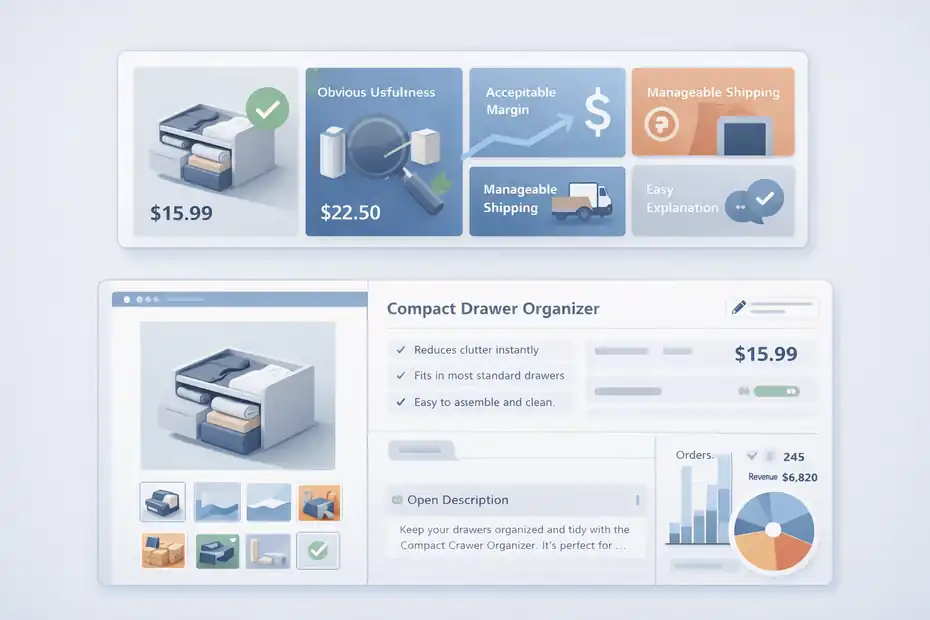
This is the stage where Doba starts feeling real. You are no longer exploring the dashboard. You are building the exact product experience that shoppers will see, judge, and decide on.
How To Choose Products That Can Actually Reach A First Sale
A first sale rarely comes from the “coolest” product. It usually comes from the clearest one.
When evaluating products in Doba, I suggest using four filters: obvious usefulness, acceptable margin room, manageable shipping expectations, and easy-to-explain value. If a product needs a long video just to make sense, it is usually not ideal for a beginner store.
A strong beginner product often has these traits:
- Clear problem solved: The benefit is visible in seconds.
- Low explanation burden: You can write the hook in one line.
- Reasonable perceived value: The customer sees why the price makes sense.
- Low return risk: Fewer size, fit, or expectation problems.
Imagine two options: a novelty gadget with unclear use versus a compact drawer organizer that visibly reduces clutter. The organizer may look less exciting, but it is often easier to market, easier to describe, and easier for a customer to justify buying.
That is what beginners need: simplicity that converts.
Edit Listings Before Publishing Them
Doba allows you to list products to stores from the product detail page or inventory list page, including to Shopify and eBay according to its help materials. That makes publishing fast, but speed is not the goal by itself. The goal is a listing that looks trustworthy and specific.
Never assume an imported listing is ready.
At minimum, rewrite these elements:
- Title: Make it clear, readable, and benefit-aware.
- Opening description: Explain who it helps and why it matters.
- Bullets: Focus on outcomes, dimensions, materials, and use cases.
- Pricing: Leave enough room for fees, returns, and promotions.
- Images: Prioritize clean visuals and remove anything that feels generic or low quality.
This is where you separate your store from a copied catalog store. Even small edits can improve conversion because they make the product feel chosen rather than dumped into the store.
In my experience, beginners underestimate how much trust comes from better wording alone.
How Orders, Fulfillment, And Tracking Work Inside Doba
Your first sale is exciting, but the real test starts right after payment. This is where beginners learn whether their backend is organized or fragile.
Doba’s order flow is designed to help centralize that backend.
What Happens After A Customer Places An Order
Doba’s help documentation explains that if your online stores are connected, orders can sync automatically into your Doba account under the Store Orders tab, where you can place purchase orders. The platform also supports manual ordering routes and even bulk order processes in some workflows.
That means your customer buys from your storefront first, then you use Doba to route the order toward the supplier side.
For a beginner, the main lesson is simple: fulfillment is not passive. Even with synced orders, you need to monitor the flow, confirm product mapping, and watch for exceptions such as address issues or supplier delays.
A good first-sale checklist looks like this:
- Check the synced order: Confirm the correct product and quantity came through.
- Verify the purchase path: Make sure the linked Doba item is correct.
- Watch payment and shipping details: Catch mistakes before fulfillment starts.
- Track completion: Follow the order until tracking is available.
That rhythm builds confidence and helps you spot weak points early.
Tracking Uploads And Customer Experience
Doba’s store settings help content references automatic tracking upload, which is more important than it sounds. Tracking is not just logistics data. It is customer reassurance.
When beginners think about the first sale, they usually focus on the thrill of conversion. The customer, meanwhile, quickly shifts to a different question: “Where is my order?”
That is why I recommend treating post-purchase communication as part of the sale, not something separate. If tracking updates flow cleanly back to the storefront, support tickets drop and trust rises.
A simple scenario: You get one order a day. Manual updates feel manageable. Then you get eight orders in one weekend and suddenly tracking follow-up becomes messy. Automating this early removes friction before it becomes a support problem.
- Best practice: Enable tracking sync where your store setup supports it.
- Customer benefit: Fewer “where is my order?” emails.
- Business benefit: Less manual admin and fewer preventable complaints.
Common Beginner Mistakes That Slow Down First Sales
A lot of sellers blame the platform when the real issue is process. Doba can simplify the backend, but it cannot fix weak product selection, vague branding, or rushed listing quality.
The good news is that most first-month mistakes are fixable.
Listing Too Many Products Too Fast
This is probably the biggest beginner mistake. Doba’s one-click listing capacity makes it easy to publish products quickly, especially on higher plans. But easy publishing can create a false sense of progress.
A bloated catalog usually leads to three problems: shallow product pages, weak store identity, and scattered customer attention. When everything is available, nothing feels important.
I suggest focusing on a tighter catalog where each product has a reason to exist. Your homepage, collections, and product pages become easier to shape. You also learn faster because each sale or non-sale gives clearer feedback.
Quality beats quantity at the beginning. Always.
Ignoring Margins, Shipping, And Product Fit
Beginners often see a low source price and assume the margins will work. But first-sale math is rarely that simple.
You still have to account for platform fees, discounts, possible returns, ad spend, and the reality that some products look more premium than they are. A product can be cheap to source and still be hard to sell profitably if shipping is slow or the perceived value is weak.
That is why I suggest checking every product against a simple margin-and-fit framework before listing it. Ask:
- Can I explain the value clearly?
- Is there enough room above cost for a healthy margin?
- Will the shipping expectation disappoint buyers?
- Does this product make sense with the rest of my store?
That kind of discipline is not flashy, but it protects you from bad first impressions and thin profits.
Optimization Strategies After Your Store Goes Live
Once your products are live, your next goal is not adding more complexity. It is improving signal quality. In other words, you want to learn what customers respond to and make cleaner decisions from there.
Doba’s syncing, inventory controls, and plan-based automation can support that, but the thinking still has to come from you.
Improve Your Catalog Based On Real Behavior
Your live catalog will start giving you clues quickly, even before your first sale. Some products get clicks but no purchases. Some get no attention at all. Some become favorites, add-to-carts, or support tickets.
This is where a compact store helps. You can actually see patterns.
I recommend reviewing your store weekly and making decisions product by product:
- Keep: Products with strong interest or clear fit.
- Revise: Products with traffic but weak conversion.
- Remove: Products that do not support your niche or look off-brand.
- Replace: Products affected by stock instability or poor perceived value.
Doba’s inventory management and synchronization features matter here because they reduce the risk of optimizing around products that later become unavailable or unstable.
Optimization is not glamorous. It is mostly quiet pruning.
Use Automation Only After The Basics Work
Doba’s higher plans include features like AI Auto Lister, broader listing limits, and API access. Those are useful, but only after you already know what a good product looks like in your business.
I believe this is where many beginners go wrong. They chase automation before they have proof of concept.
Automation multiplies systems. If your system is weak, automation just scales the mess.
A better path is this:
- Phase 1: Manual selection, careful listing edits, simple order monitoring.
- Phase 2: Small catalog optimization based on customer response.
- Phase 3: More listings, faster workflows, and selective automation.
- Phase 4: Higher plan features once volume justifies them.
That progression is slower on paper, but usually faster in real business terms because it prevents expensive confusion.
A Simple Beginner Roadmap From Setup To First Sale
At this point, the workflow should feel much less abstract. Doba is not just a product marketplace.
It is a structured system for sourcing, listing, syncing, and routing orders. The trick is to use it in the right sequence.
Your First 14 Days On Doba
If I were helping a beginner personally, I would keep the first two weeks very simple.
- Days 1–2: Connect your main store and confirm it works.
- Days 3–4: Research products and build a shortlist of 10 to 20 items.
- Days 5–7: Add the best candidates to your inventory list and narrow further.
- Days 8–10: Publish a small number of polished listings, not your whole shortlist.
- Days 11–14: Check order settings, SKU mapping, margins, and tracking behavior.
That is enough to move from setup into a real selling position without overwhelming yourself.
What To Focus On For The First Sale
Your first sale usually comes from clarity, not complexity.
Focus on these three things:
- A tight niche: Make your store feel specific.
- A small set of strong products: Make each listing intentional.
- A clean backend: Make order flow and tracking dependable.
That is the real doba features overview for beginners in practical terms. The feature set can absolutely help you, but only if you use it to support a focused store instead of building a giant, messy catalog.
If you keep the process lean, Doba gives you a usable path from product research to listing to fulfillment. And for most beginners, that is exactly what matters most: not endless features, but a straightforward route to the first real sale.
FAQ
What is Doba and how does it work for beginners?
Doba is a dropshipping platform that connects you with suppliers and lets you manage products, listings, and orders from one dashboard. Beginners use it to avoid manual sourcing and inventory tracking, making it easier to launch an online store without holding physical stock.
Is Doba good for beginners starting dropshipping?
Yes, Doba is beginner-friendly because it centralizes product sourcing, inventory syncing, and order fulfillment. It reduces the need to work with multiple suppliers separately, allowing new sellers to focus on building their store, choosing products, and making their first sale faster.
How do I start using Doba step by step?
To start using Doba, connect your online store first, then research and select a small number of products. Add them to your inventory list, edit listings carefully, and publish them. After setup, monitor orders and ensure proper SKU mapping and tracking updates.
What are the main features of Doba for beginners?
Doba offers product discovery tools, inventory management, real-time stock syncing, one-click listing, and order processing. These features help beginners streamline operations, reduce manual work, and manage their store more efficiently from product selection to fulfillment.
How do you make your first sale using Doba?
To make your first sale with Doba, focus on a small niche, choose products with clear value, and create optimized listings. Ensure pricing, descriptions, and images are strong, then drive traffic to your store while keeping fulfillment and tracking processes smooth.

I’m Juxhin, the voice behind The Justifiable.
I’ve spent 6+ years building blogs, managing affiliate campaigns, and testing the messy world of online business. Here, I cut the fluff and share the strategies that actually move the needle — so you can build income that’s sustainable, not speculative.
Related posts:
 CJdropshipping Shopify Integration: Quick & Easy Setup!
 Dropshipping Business Model Success: Tips for Long-Term Growth
 How to Use Dsers Shopify for Seamless Dropshipping
 Start Dropshipping Today: A Simple Guide for Complete Beginners
 Creating an Online Store: What You Need for Your First 50 Orders
 Spocket Pricing Plans Explained For Beginners: Full Guide