
Table of Contents
Some links on The Justifiable are affiliate links, meaning we may earn a small commission at no extra cost to you. Read full disclaimer.
Leadpages review for coaches and consultants is really a question about speed, simplicity, and client acquisition.
If you want a tool that helps you launch landing pages fast, collect leads, test offers, and push more discovery calls or applications into your pipeline, Leadpages is still very relevant in 2026.
The catch is that it is not a full business operating system. It is best when you already know your offer and need a cleaner way to turn traffic into booked conversations.
Based on Leadpages’ current plans and feature set, I think it fits many coaches and consultants well, but not all of them.
What Leadpages Is And Who It Is Best For
Leadpages is a landing page and lead capture platform built to help you create conversion-focused pages without custom coding.
For coaches and consultants, that usually means one thing: turning cold or warm traffic into email subscribers, consultation requests, webinar signups, or paid strategy sessions.
What Leadpages Actually Does For A Coaching Or Consulting Business
At its core, Leadpages helps you build pages designed around one action. That action might be booking a discovery call, downloading a lead magnet, registering for a workshop, or applying for a higher-ticket offer.
The reason that matters is simple: most service businesses lose conversions when they send visitors to a general website with too many choices. A focused landing page removes that clutter.
HubSpot reports the average landing page conversion rate across industries is 5.89%, and 10% is considered a strong benchmark, which is why specialized pages matter so much for offer-based businesses.
For coaches and consultants, I believe Leadpages is strongest when your business already has a clear promise. Think “book a 30-minute executive coaching consult,” “apply for a brand strategy intensive,” or “download the 5-step framework before the sales call.” In those cases, Leadpages does not need to be flashy.
It just needs to reduce friction between interest and action. Leadpages says its platform supports landing pages, A/B testing, analytics, lead capture, integrations, and lead enrichment, which is a solid mix for service-based lead generation.
Where I would be cautious is if you expect it to replace your CRM, email platform, course platform, scheduling stack, or full website ecosystem. It is a conversion layer, not your entire backend. That distinction matters before you buy.
Who Should Use Leadpages And Who Probably Should Not
From what I’ve seen, Leadpages is a strong fit for four types of businesses. First, solo coaches who need pages live quickly without hiring a designer. Second, consultants running paid traffic to a specific offer. Third, experts testing multiple lead magnets or webinar angles.
Fourth, small agencies or multi-brand consultants who want to manage landing pages without a heavy dev workflow. Leadpages’ current Pro plan includes unlimited landing pages and support for multiple custom domains, which makes testing and client-facing use much easier than a one-page setup.
It is a weaker fit if you are still unclear on your niche, message, or sales process. A landing page tool cannot fix a fuzzy offer. It can only expose that fuzziness faster. I also would not choose Leadpages if your main need is advanced automation logic, deep CRM workflows, or a highly customized site experience. In that situation, you may outgrow it and start stitching together too many tools.
A practical rule I use is this: If you already close clients through calls, applications, workshops, or email follow-up, Leadpages can help. If you are still figuring out what you sell and to whom, spend more time on positioning first. That will improve conversions more than any template ever will.
How Leadpages Works To Help You Book More Clients Faster
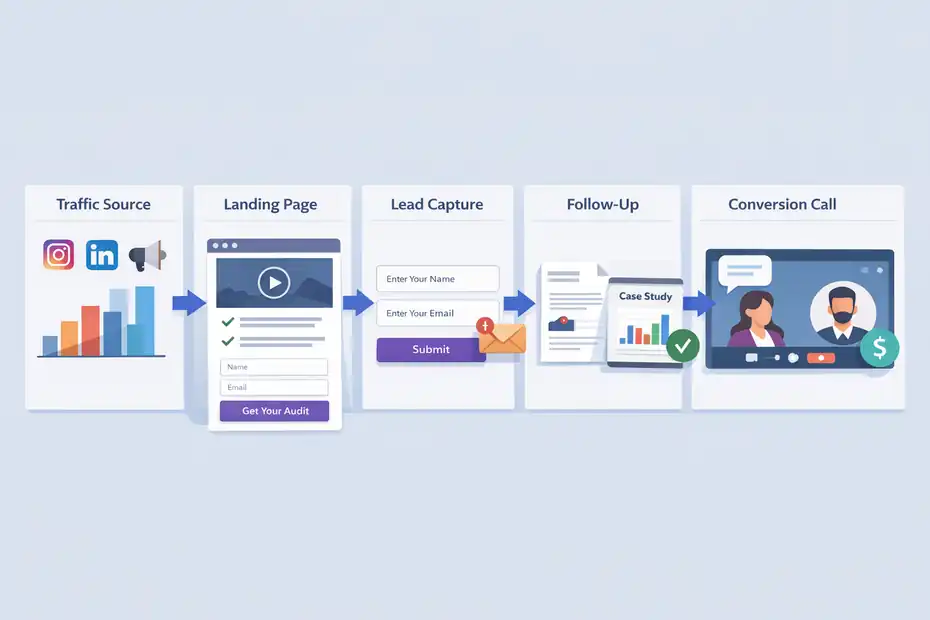
The real promise in this Leadpages review for coaches and consultants is not “more pages.” It is a shorter path from visitor to qualified lead.
That only happens when the funnel is simple enough for people to say yes quickly.
The Basic Funnel Most Coaches Should Build
A lot of coaches overcomplicate this. They create a homepage, services page, about page, podcast page, and blog, then wonder why nobody books. A better flow is much tighter: one traffic source, one landing page, one offer, one next step.
HubSpot’s survey found lead generation is the top goal for 43.6% of marketers using landing pages, and email marketing is one of the leading tactics for driving landing page traffic.
That lines up perfectly with a coaching funnel that turns clicks into subscribers, then subscribers into calls.
Here is the simple version I recommend:
- Traffic source: Instagram bio, LinkedIn posts, podcast interviews, ads, or email.
- Landing page: One clear promise tied to one pain point.
- Lead capture: Email form, application form, or direct CTA.
- Follow-up: Email nurture, case study, and invitation to book.
- Conversion event: Strategy call, audit, consultation, or paid session.
Imagine you help burned-out founders improve leadership performance. Instead of linking people to your homepage, you send them to a page offering a “Founder Burnout Recovery Audit.” They enter their details, get the resource, then receive a short email sequence that invites them to a call. That is how you use Leadpages strategically, not cosmetically.
Why A Focused Landing Page Usually Converts Better Than A General Website Page
Most websites try to explain everything. Good landing pages do the opposite. They narrow attention. Leadpages is built around that narrower action, and its platform emphasizes landing pages, pop-ups, alert bars, A/B testing, and conversion tools rather than broad site complexity.
This matters because coaching and consulting buyers are often skeptical. They do not need ten navigation options. They need proof, clarity, and a next step that feels low-risk.
HubSpot also reports that 38.6% of marketers say video is the landing page element with the biggest effect on conversion, and 30.7% say around four form questions tends to perform best. In practice, that means a good coach landing page often includes a short video, concise proof, and a form that qualifies without exhausting the visitor.
I suggest thinking in terms of momentum. Every extra menu link, vague sentence, or unnecessary section slows momentum. A dedicated Leadpages page can keep that motion going because it is built for one job.
That does not guarantee bookings, but it gives your message a fair shot. And honestly, that is often the real bottleneck.
Setting Up Leadpages For A Coaching Or Consulting Funnel
This is where Leadpages becomes useful or disappointing.
The platform itself is straightforward, but your setup choices will decide whether it books clients or just collects random email addresses.
Step-By-Step: Build Your First Client-Booking Page
Let me break it down in the simplest useful order.
- Pick one offer: Do not start with “work with me.” Start with one outcome-driven entry point like a clarity call, free roadmap, mini workshop, or audit.
- Write one headline tied to a pain point: “Get A 3-Step Plan To Fill Your Coaching Calendar” is stronger than “Welcome To My Website.”
- Add a trust block: Include client results, a short bio, media mentions, or a testimonial that sounds believable.
- Use one CTA throughout the page: Book, apply, download, or register. Not all four.
- Keep the form tight: HubSpot’s research suggests around four questions is a useful benchmark, though simpler often wins for top-of-funnel offers.
A realistic example: If you are a career coach, your first page could offer a “Salary Negotiation Prep Checklist.” The CTA is email signup, not direct coaching. After signup, the thank-you page invites people to book a paid or free consult. That sequence works because it matches commitment level. People who are not ready to hire may still be ready to opt in. Leadpages gives you the structure to build that progression quickly.
One mistake I see often is putting too much biography above the fold. Your visitor is not asking who you are first. They are asking whether you understand their problem. Lead with that.
How To Match The Page Type To The Offer
Not every coaching or consulting offer should use the same kind of page. That is where many reviews get lazy. They say a page builder is “easy,” but they do not explain what page you should actually create.
Here is a better match-up:
- Lead magnet page: Best for colder traffic and list building.
- Webinar or workshop registration page: Best when you need education before the sale.
- Application page: Best for high-ticket consulting where qualification matters.
- Sales page with payment: Best for paid strategy sessions, audits, or smaller fixed-scope offers.
- Thank-you page with a booking CTA: Best for increasing call volume from existing leads.
Leadpages’ pricing page shows support for sales and payments, while its broader feature set includes landing pages, conversion tools, analytics, and integrations. That means it can support more than just email opt-ins when your business is ready for direct-response offers.
In my experience, consultants selling premium retainers should start with an application page instead of a generic booking page. It filters out poor-fit leads and improves sales call quality.
Coaches with broader audiences usually do better starting with a resource or workshop page, then warming people into a call. Same platform, different strategy. That difference matters more than the template.
Features That Matter Most In A Leadpages Review For Coaches And Consultants
A long feature list is not helpful unless it connects to how you actually sell. So instead of listing everything, I want to focus on the parts that genuinely affect bookings, lead quality, and speed of execution.
The Features That Pull Their Weight
The most useful Leadpages capabilities for coaches and consultants are landing page creation, A/B testing, analytics, lead capture, integrations, and lead enrichment. On the homepage and pricing materials, Leadpages also highlights unlimited traffic and leads, custom domains, and testing tools depending on plan level.
Why these matter:
- Landing pages: You can spin up offer pages quickly without waiting on a developer.
- A/B testing: Useful when you want to test different headlines, CTAs, or hero sections.
- Analytics: You can tell whether the traffic problem is the page or the source.
- Lead capture: Essential for moving people into email follow-up.
- Lead enrichment: Helpful when you want better context on who is opting in.
- Sales and payments: Useful if you sell workshops, intensives, or paid consults directly.
I especially like the testing angle for consultants running LinkedIn ads or newsletter sponsorships. If a page converts at 9% instead of 3%, that difference changes your acquisition cost fast. Since HubSpot pegs average landing page conversion at 5.89%, even small improvements can materially affect pipeline performance.
The practical takeaway is this: The best Leadpages features are the ones that shorten the time between idea and test. That is where service businesses usually win.
What Leadpages Does Not Replace
This is the part I wish more reviews said clearly. Leadpages is not your strategy. It is not your close rate. It is not your client onboarding system. And unless your workflow is very simple, it is not the only platform you will use.
Leadpages’ own feature positioning centers on lead generation, conversion, analytics, and integrations, which tells you exactly what lane it is trying to own.
That means you will still need other pieces for some combination of email nurture, appointment scheduling, CRM, delivery, proposals, invoices, and client management. For many coaches, that is fine. In fact, I think it is healthier to judge Leadpages by whether it does its narrow job well, not whether it replaces five other tools.
Where people get frustrated is when they buy it hoping for a complete front-end and back-end business stack. That expectation mismatch creates most negative experiences. If you buy it to publish focused pages fast, test messaging, and push leads into your existing process, the fit is much better.
So yes, it can help book more clients faster. But only because it improves the conversion stage, not because it magically fixes your whole funnel.
Leadpages Pricing And Whether It Is Worth It For Service Businesses
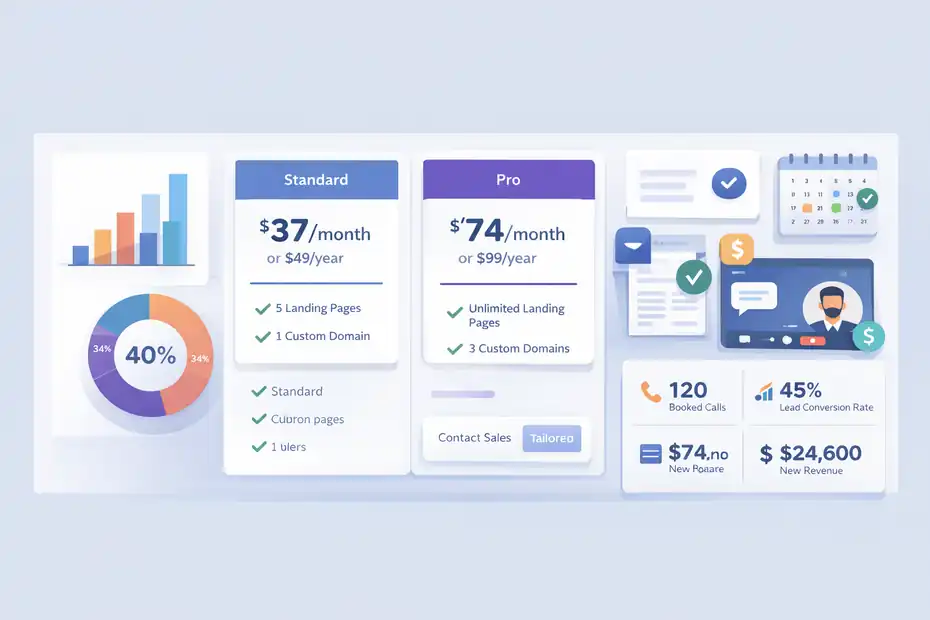
Pricing matters more for coaches and consultants than many SaaS reviews admit. You are not measuring software against page views.
You are measuring it against booked calls, closed retainers, and how much friction it removes from your marketing.
Current Leadpages Pricing In 2026
Based on the official pricing page, Leadpages currently offers a Standard plan at $37 per month billed monthly or $49 per month billed annually, and a Pro plan at $74 per month billed monthly or $99 per month billed annually.
Standard includes 5 landing pages, unlimited traffic and leads, 1 custom domain, standard integrations, and unlimited A/B testing.
Pro includes everything in Standard plus unlimited landing pages and 3 custom domains. Leadpages also advertises a 14-day free trial and a Custom tier for more tailored needs.
Here is the quick view:
| Plan | Monthly Price | Annual Price Shown | Best Fit | Key Practical Limit |
|---|---|---|---|---|
| Standard | $37/mo | $49 billed annually | Solo coach testing one main funnel | 5 landing pages, 1 domain |
| Pro | $74/mo | $99 billed annually | Consultant or coach running multiple offers | Higher cost, but unlimited pages |
| Custom | Contact sales | Custom | Agencies or multi-brand teams | Requires sales conversation |
My honest take: Standard is enough if you have one offer and one brand. Pro becomes easier to justify when you run multiple funnels, want separate domains, or test more aggressively. For a consultant who closes even one extra qualified client from a better page flow, the cost can be trivial. For a brand-new coach with no traffic and no offer validation, it can feel expensive fast.
Is The Return Worth It For Coaches And Consultants?
I think the ROI question should be framed like this: how many extra booked calls or qualified leads would this need to create to pay for itself? For most coaching and consulting businesses, the answer is “not many.”
One additional paid consult, one workshop sale, or one client from a better-performing page can cover months of software cost. That is especially true if you already publish content or run traffic consistently.
But there is a second ROI layer people miss: time. If Leadpages helps you launch a page in a day instead of waiting two weeks on custom design, that time has value. It also encourages testing.
And testing matters because average landing page performance is not elite performance. HubSpot’s benchmark of 5.89% shows there is real room to improve with better offers, proof, copy, and page structure.
I would personally call Leadpages “worth it” when these three conditions are true:
- You already have a working offer.
- You need pages live quickly.
- You will actually use testing and follow-up.
If those are missing, cheaper or simpler options may feel just as effective because the real problem is upstream.
Common Mistakes Coaches Make With Leadpages
This is where software gets blamed for strategy errors. Most low-converting Leadpages pages are not failing because of the builder.
They are failing because the page asks too much, says too little, or attracts the wrong person.
Mistakes That Kill Conversions
The first big mistake is sending people to a page with an unclear promise. “Transform Your Life Today” sounds inspiring, but it does not tell anyone what they are getting. Compare that with “Book A 45-Minute Sales Process Audit For Your Consulting Firm.” Specificity almost always wins because it lowers uncertainty.
The second mistake is overbuilding the form. HubSpot’s data suggests around four questions is a strong benchmark for conversion, and many top-of-funnel pages do better with even less friction. If you ask for company size, revenue, phone, niche, website, goals, timeline, budget, and favorite color before offering a checklist, you are not qualifying leads. You are scaring them away.
The third mistake is using a weak CTA. “Submit” is lazy. “Get The Audit,” “Save My Seat,” or “Apply For Coaching” tells the visitor what happens next. The fourth mistake is hiding proof too low on the page or making testimonials too vague. “Amazing coach!” is not persuasive. “Helped me raise my consulting rates from $150 to $300 an hour in 60 days” is better.
The fifth mistake is expecting the page to close the sale without follow-up. Leadpages can capture the lead, but you still need a nurture sequence, retargeting, or a call process.
Troubleshooting A Page That Is Getting Traffic But Not Leads
When a page is underperforming, I like to diagnose in layers.
- Layer 1: Message match. Does the page headline match the promise from the ad, post, or email that sent the click? If not, conversions drop immediately.
- Layer 2: Offer strength. Is the thing you are offering compelling enough for this audience right now? A generic PDF rarely excites a premium buyer. A scorecard, audit, or live training often performs better.
- Layer 3: Friction. Is the form too long? Is the CTA weak? Is the page slow, cluttered, or unclear?
- Layer 4: Proof. Are you giving enough evidence that you understand the problem and can help solve it?
- Layer 5: Traffic quality. Sometimes the page is fine and the wrong people are arriving. HubSpot’s traffic breakdown for landing pages shows marketers commonly rely on social, email, paid ads, SEO, and internal links, which means source quality can vary wildly.
If I had to pick one fast fix, it would be rewriting the first screen. Tight headline. One outcome. One CTA. One proof element. One visual. That alone can change the feel of a page more than a full redesign.
How To Optimize Leadpages Once The Basics Are Working
Once you have a working funnel, the goal shifts from “get something live” to “improve lead quality and conversion efficiency.” That is where Leadpages can become more valuable over time.
What To Test First For Better Lead Quality
Do not test random button colors because a blog told you to. Start with the elements most tied to intent and trust.
I usually test in this order:
- Headline: Problem-led vs outcome-led.
- Offer angle: Checklist vs audit vs workshop.
- CTA language: Book vs apply vs get access.
- Hero section: With video vs without video.
- Form length: Short vs medium qualification.
- Proof placement: Early testimonial vs later case study.
That order is practical because it targets the biggest levers first. HubSpot reports that video is the top conversion-driving element for 38.6% of marketers, so testing a short intro video for warmer audiences can be worth it. And with average landing page conversion rates sitting well below elite levels, there is usually room for meaningful gains.
For a consultant selling a premium offer, I might test an application page against a workshop registration page. The application page may convert lower but produce better-fit leads. That is why I always separate lead volume from lead quality. More leads is not automatically better if half of them cannot afford you.
Leadpages’ testing tools are useful here because they help you compare not just opt-ins, but downstream outcomes.
Scaling From One Page To A Real Lead Generation System
A lot of businesses stop after one decent landing page. I think that leaves money on the table. Once one page works, the next step is not to redesign it endlessly. It is to build a small conversion ecosystem around the best-performing message.
Leadpages’ Pro plan supports unlimited landing pages, which is helpful when you want to create focused pages for different audiences, offers, or traffic sources.
Here is what that can look like:
- One lead magnet page for colder traffic.
- One webinar page for nurture-stage prospects.
- One application page for premium leads.
- One thank-you page with a booking CTA.
- One reactivation page for old email subscribers.
Imagine you are a business coach who serves freelancers, agencies, and consultants. Instead of forcing all three groups onto one generic page, you create separate pages around each segment’s pain point.
That is often where scaling starts to feel real. Not because the software got smarter, but because your positioning did. Leadpages simply gives you enough flexibility to publish those targeted paths without rebuilding your whole site each time.
Final Verdict: Can Leadpages Help Coaches And Consultants Book More Clients Faster?
Yes, Leadpages can help coaches and consultants book more clients faster, but only in the specific way a good landing page platform should. It helps you publish focused pages quickly, test what is working, collect leads efficiently, and reduce the confusion that usually kills conversions.
Its current plans, A/B testing, lead capture tools, analytics, and multi-page support make it a practical option for service businesses that already know their offer and need a faster path to action.
My honest verdict is this: Leadpages is not the best choice for every coach or consultant, but it is a very solid choice for the ones who are past the “figuring it out” stage.
If you already have traffic, content, referrals, or an audience and want to turn that attention into consult calls, applications, or workshop registrations, I think Leadpages earns a real recommendation.
If you are still trying to define your niche or you need a full backend system more than a conversion layer, I would hold off.
So, does it book more clients faster? Potentially yes. But the real answer is more precise: Leadpages can help you remove friction between interest and inquiry. And in a coaching or consulting business, that friction is often where your next client is getting lost.
FAQ
What is Leadpages and how does it help coaches and consultants?
Leadpages is a landing page builder designed to capture leads and convert visitors into clients. For coaches and consultants, it simplifies creating focused pages that drive actions like booking calls, signing up for webinars, or downloading lead magnets without needing technical skills.
Is Leadpages worth it for coaches and consultants in 2026?
Leadpages is worth it if you already have a clear offer and need to convert traffic into leads faster. It helps streamline your funnel and improve conversion rates, but it is less useful if you are still figuring out your niche or offer.
Can Leadpages actually help you book more clients?
Yes, Leadpages can help you book more clients by reducing friction in your funnel. It creates focused pages that guide visitors toward a single action, which increases the chances of turning interest into consultation calls or applications.
What are the main features of Leadpages for service businesses?
Key features include landing page creation, A/B testing, lead capture forms, analytics, and integrations. These tools help coaches and consultants test offers, track performance, and improve conversion rates without relying on complex website setups.
What are the biggest drawbacks of Leadpages?
The main drawback is that Leadpages is not a complete business system. It does not replace tools for email marketing, CRM, or scheduling. If you expect an all-in-one platform, you may need additional tools to manage your full client journey.

I’m Juxhin, the voice behind The Justifiable.
I’ve spent 6+ years building blogs, managing affiliate campaigns, and testing the messy world of online business. Here, I cut the fluff and share the strategies that actually move the needle — so you can build income that’s sustainable, not speculative.
Related posts:
 MailerLite Landing Page: Step-By-Step Setup for Beginners
 Leadpages Review For Bloggers Building Email Lists: Grow Faster Or Not?
 Top 10 Leadpages Competitors You Need to Know!
 Astra Schema Pro Warning: What You Must Know Before Buying
 ManyChat Bot Benefits No One Talks About
 LearnWorlds Shopify Setup: What Works, What Fails