
Table of Contents
Some links on The Justifiable are affiliate links, meaning we may earn a small commission at no extra cost to you. Read full disclaimer.
If you’re searching for a real clickmagick link tracking review, you probably want one thing: to figure out whether this tool will actually help you track clicks better, cut wasted ad spend, and improve conversions without turning setup into a technical headache.
I get it. Link tracking software can look amazing on a sales page and still feel clunky in real use.
In this review, I’ll walk you through what ClickMagick does well, where it feels strongest, where it has limits, and who I genuinely think should use it in 2026.
What ClickMagick Is And Who It Is Best For
ClickMagick started as a link tracker, but the current product is clearly positioned as a broader ad tracking and attribution platform. That matters because the tool is no longer just about shortening links and counting clicks.
It is built around first-party tracking, funnel visibility, attribution, conversion reporting, and feeding cleaner data back into ad platforms.
What The Platform Actually Does
At its core, ClickMagick tracks what happens after someone clicks a link. That sounds simple, but in practice it means you can see which ad, keyword, email, traffic source, landing page, and funnel step led to a conversion.
The platform also pushes hard on “single source of truth” positioning, which is their way of saying you should not rely only on ad platform reporting or basic site analytics when you are spending serious money.
I think that pitch makes sense for a very specific type of user. If you run paid traffic, affiliate offers, webinars, lead funnels, or multi-step checkout journeys, a normal analytics setup often leaves gaps.
Someone clicks on mobile, buys later on desktop, or converts offline after a phone call, and suddenly your ad dashboard tells an incomplete story. ClickMagick is designed to fill that gap with cross-device tracking, offline conversion tracking, deeper reporting, and CAPI-style data feedback to ad platforms.
This is not a casual blogger’s first plugin. It is better for performance-minded marketers, agencies, info product businesses, affiliates, coaches, and ecommerce operators who care about attribution enough to act on it. If you never run campaigns, never split test, and mostly publish content organically, it may be more tool than you need.
Who Will Get The Most Value
Here is my honest take: ClickMagick becomes valuable when inaccurate tracking is already costing you money.
A few examples make that clearer:
- Paid Social Advertisers: If Meta shows one number, your checkout shows another, and your CRM shows something else, you need cleaner attribution.
- Affiliate Marketers: If you rotate offers, cloaked links, and traffic sources, better click-level data can quickly pay for itself.
- Lead Generation Businesses: If leads turn into sales later by phone or offline, ClickMagick’s offline tracking angle is genuinely useful.
- Agencies And Media Buyers: If you manage several campaigns and need reporting, fraud filtering, and data sharing, the platform starts to look more attractive.
For many of us, the real question is not “does link tracking matter?” It is “am I losing enough data that better tracking would change decisions?” If the answer is yes, ClickMagick is worth a serious look.
How ClickMagick Works In Plain English
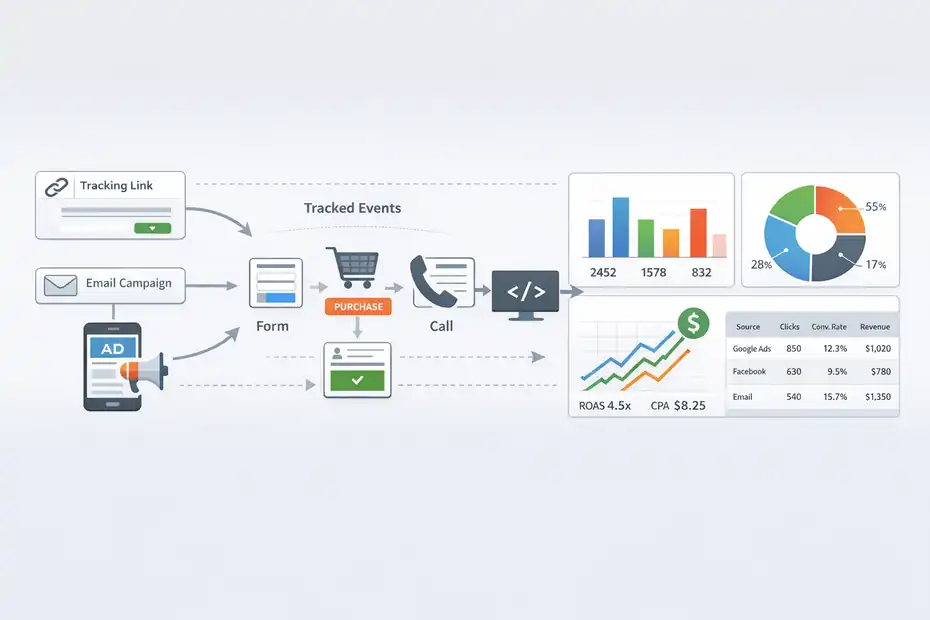
The big idea behind ClickMagick is simple: instead of trusting fragmented platform-level reporting, you create tracking links, install tracking code, define conversions, and let the system record the journey from click to outcome.
The more complete your setup, the more useful the reporting becomes.
The Tracking Flow From Click To Conversion
Let me break it down in plain language.
First, you create a tracking link for a campaign, ad, email, or traffic source. That tracking link acts like a measurement layer between the click and the destination page. Then you add ClickMagick’s tracking code to your site, store, or funnel so it can record actions after the click, like opt-ins, purchases, button clicks, add-to-cart events, or even phone orders.
Once that is in place, ClickMagick starts connecting the dots. It can show which source brought the click, what happened inside the funnel, and whether the user converted later.
Their product pages emphasize first-party tracking domains, cross-device tracking, and audience optimization through conversion data passed back to ad platforms. In practical terms, the goal is to give you better visibility and better optimization signals than a basic pixel-only setup.
I like this approach because it matches how real campaigns work now. A customer rarely clicks once and buys instantly. They may visit on mobile, return through email, purchase on desktop, and call your team before finalizing.
A review tool has to handle messy reality, not just neat demo cases. That is where ClickMagick feels strongest.
Why This Matters For Conversions
Good tracking is not just about reporting. It affects decision-making.
Imagine you are spending $300 a day on ads. One ad set looks weak in the platform dashboard, so you pause it. But your backend data shows that same audience converts later at a much higher average order value. Without better attribution, you cut the wrong campaign. That is the kind of mistake link tracking is meant to prevent.
ClickMagick also leans into real-time stats and reporting, which is useful when you need to make same-day decisions. If you are testing landers, offers, hooks, or upsells, waiting too long to see clean data costs money.
The platform also includes a daily insights email and AI-based ad insights in current plans, which appears intended to shorten the gap between collecting data and acting on it.
In my experience, better tracking does not magically fix bad offers. But it does help you stop guessing. And that alone can improve conversion rates faster than most marketers expect.
The Best Features In This ClickMagick Link Tracking Review
This is where ClickMagick earns most of its reputation. The feature set is broad, but not every feature matters equally.
I believe the real value comes from a handful of functions that directly affect campaign accuracy, optimization speed, and wasted spend.
Accurate Tracking, Attribution, And Funnel Visibility
The strongest part of ClickMagick is its positioning around accurate tracking and attribution.
Officially, it offers real-time stats, deep funnel reporting, cross-device tracking, advanced attribution models on higher plans, and the ability to track many types of conversions, including buttons, opt-ins, sales, and offline actions.
What I like here is the practical depth. This is not just “clicks in, clicks out.” You can track specific funnel stages and see where conversion friction is happening. If your opt-in page converts well but your upsell page collapses, that is a different problem than weak traffic. If one checkout path performs better by device or source, that changes how you scale.
A few standout strengths:
- Cross-Device Tracking: Useful when people click on one device and buy on another.
- Offline Sales Tracking: Helpful for service businesses, sales teams, and higher-ticket funnels.
- Attribution Depth: Standard plans add advanced attribution models, which is important once journeys get longer.
- Real-Time Reporting: Better for active campaign management than delayed dashboards.
This is the section of the platform I would pay for first. Not the cosmetic tools. Not the shortcuts. The attribution layer.
Split Testing, Smart Links, And Optimization Tools
ClickMagick also includes built-in split testing and smart links, and I think those features are more useful than they first appear. The product page says you can split test pages or funnel steps without coding, plugins, or spreadsheets, which is exactly how most marketers want testing to work.
That matters because testing often dies in execution. People say they will test headlines, offers, or landers, but then the setup gets messy and the test never launches. A tool that reduces that friction has real value. If you can rotate traffic between two pages and see which one actually drives better downstream results, you make faster decisions.
The smart links angle is also practical. ClickMagick highlights “bitly-style short links” plus affiliate-oriented link management. For affiliate campaigns, solo ads, or any channel where ugly links hurt click-through rate, cleaner tracked links are useful.
I would not buy ClickMagick just for smart links. Plenty of tools shorten URLs. But bundled into a full tracking setup, smart links become part of a better workflow. You create, test, monitor, compare, and optimize from one system instead of patching five lighter tools together.
Setup Experience: Easy Enough Or Too Technical?
After each H2, I want to answer the real search intent question. Here, the question is simple: can a normal marketer set this up without needing a developer? Mostly, yes, but it depends on how advanced your stack is.
What Getting Started Looks Like
ClickMagick says setup is guided by a step-by-step wizard and URL builder, and the product page frames implementation as copying and pasting tracking code into your site, store, or funnel.
For basic campaigns, that sounds realistic. For more complex stacks, you will still need patience and a clear event plan.
Here is the setup path I would recommend:
- Start With One Funnel: Do not track everything on day one. Pick one traffic source and one core conversion.
- Create A First-Party Tracking Domain: This helps improve data ownership and reliability.
- Install The Base Tracking Code: Put it on the main pages involved in the journey.
- Define Conversions Clearly: Opt-in, lead, sale, booked call, add-to-cart, or purchase.
- Test Before Sending Budget: Click through the full path yourself and validate events.
- Only Then Expand: Add more offers, ads, sources, and stages after the first setup works.
In my opinion, the setup challenge is not the software alone. It is your clarity. If you do not know exactly what counts as a conversion, which pages matter, and how your funnel really works, any tracker will feel confusing.
Where New Users May Struggle
The easiest way to get frustrated with ClickMagick is to expect instant clarity without planning the measurement structure first.
Beginners often hit these issues:
- Too Many Features Too Early: They try to use split testing, attribution, offline events, and automations all at once.
- Weak Funnel Mapping: They are not sure which pages belong to which campaign.
- Event Confusion: They track page views but forget revenue events or lead quality signals.
- Platform Mismatch: Their checkout, CRM, and ad platform all use different naming and reporting logic.
The good news is that ClickMagick appears to invest heavily in onboarding resources. Standard includes a one-on-one onboarding call, and the support area claims a searchable knowledge base with 500-plus articles and tutorials.
That support angle actually matters more than most reviews admit. Tracking tools are rarely “hard” because the software is terrible. They are hard because attribution is messy. If the support team understands real campaigns, that lowers the learning curve a lot.
Pricing, Plans, And Overall Value
Pricing can make or break a tracking tool because the user usually compares it to “doing nothing” or “using whatever analytics already came with the platform.”
ClickMagick is not the cheapest option, but it is clearly aimed at buyers who believe better data can improve ad ROI enough to justify the spend.
Current ClickMagick Pricing Snapshot
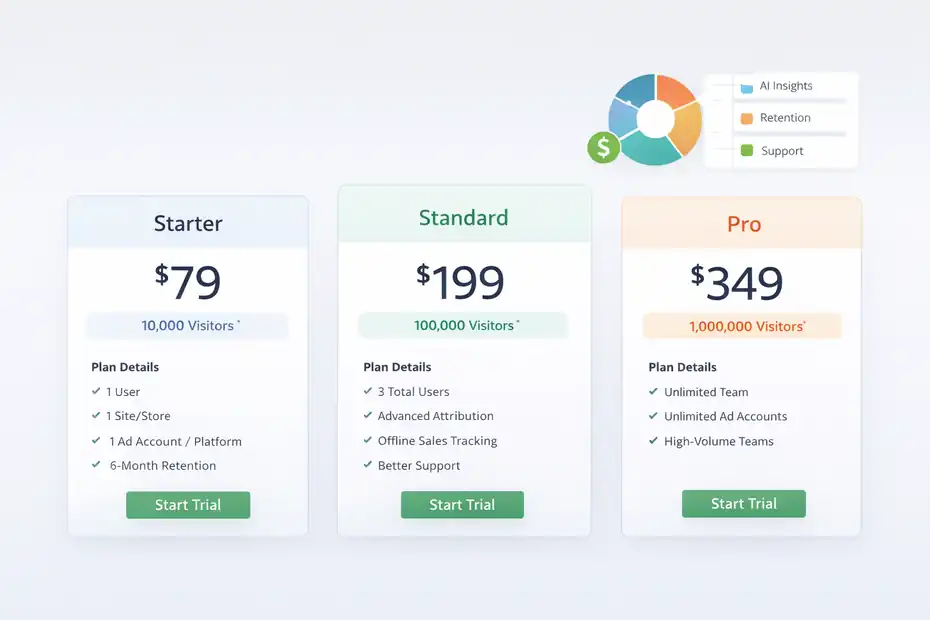
As of the current official pricing page, ClickMagick offers a 14-day free trial and three main tiers: Starter, Standard, and Pro. Starter begins at $79 monthly or $66 monthly billed yearly, Standard at $199 monthly or $166 yearly equivalent, and Pro at $349 monthly or $291 yearly equivalent.
The platform also includes AI insights allowances, tracked visitor limits, retention limits, and support differences by plan.
| Plan | Monthly Price | Tracked Visitors | Standout Limits/Extras |
|---|---|---|---|
| Starter | $79 | 10,000 | 1 user, 1 site/store, 1 ad account per platform, 6-month retention |
| Standard | $199 | 100,000 | 3 total users, advanced attribution, offline sales tracking, better support |
| Pro | $349 | 1,000,000 | Unlimited team members, unlimited ad accounts, high-volume teams |
I would frame the pricing like this: expensive if you are dabbling, reasonable if you are already buying traffic. If better tracking helps you save even one bad ad test per month or recover profitable scale faster, the math can work.
Which Plan Makes Sense For Different Users
Here is how I would choose.
- Starter: Best for solo marketers, affiliates, or small paid campaigns that need serious tracking but not team workflows.
- Standard: Best for active scaling, agencies, or brands that need offline tracking, attribution depth, and stronger support.
- Pro: Best for agencies, teams, and heavy spenders who need large volume and collaboration.
Personally, I think Standard is where the product starts to feel fully realized. That is where you get advanced attribution, phone or offline sales tracking, and better support. If your business depends on lead quality or backend revenue, those are not cosmetic upgrades. They are decision-making upgrades.
If your monthly ad budget is small, the software can feel pricey. If your ad budget is meaningful, weak attribution is often more expensive than the subscription.
Pros, Cons, And Honest Tradeoffs
No review is useful without friction. ClickMagick has real strengths, but it also asks more from the user than simple analytics tools do.
That is not necessarily a flaw. It is just part of the deal when you move into serious tracking.
What ClickMagick Does Very Well
The biggest advantages are not flashy. They are operational.
- It Focuses On Attribution, Not Vanity Metrics: You are paying for cleaner decision data, not prettier charts.
- It Supports Real Marketing Journeys: Cross-device and offline tracking are especially valuable in messy funnels.
- It Helps Reduce Waste: The bot filtering and Click Shield positioning are clearly aimed at protecting paid traffic budgets. The product page says the system blocks 99% of bots.
- It Includes Useful Infrastructure: Webhooks, Zapier, API access, mobile app, and shareable stats all expand how the data can be used.
I also like that the platform appears designed for marketers, not just analysts. That sounds small, but it changes the experience. The language, workflows, and examples feel centered on revenue and campaign action.
Where The Tool May Not Be Ideal
Now the downsides.
First, ClickMagick is overkill for many users. If your site gets mostly organic traffic and you only want simple analytics, you do not need this. Second, while setup is manageable, the strategy behind setup still takes thought. A powerful tracker can feel confusing when the funnel itself is confusing.
Third, the pricing means mistakes are more noticeable. If you subscribe and then never finish implementation, the tool will feel like a waste. I have seen this happen with many marketing platforms. People buy capability before they buy process.
Finally, some claims on the official site are very strong, especially around accuracy, ROI improvement, and bot blocking. Those may be directionally meaningful, but your results will still depend on your own setup quality, traffic type, and funnel complexity.
That is why my recommendation is practical, not emotional: use ClickMagick when tracking problems are already slowing decisions or hiding revenue.
Best Use Cases And Realistic Results
The reader intent here is usually, “Will this work for my type of business?” That is the right question, because a good tool in the wrong business model still underperforms.
ClickMagick is strongest where the customer journey is longer than one click and one page.
Where ClickMagick Shines Most
I believe ClickMagick is best in these scenarios:
- Affiliate Marketing: Track traffic quality, offer performance, and landing page tests without relying on affiliate network reporting alone.
- Lead Generation: Track ad to form to call to closed sale, including offline attribution.
- Info Products And Coaching: See which ad angles, webinar steps, or upsells really produce sales.
- Ecommerce With Paid Traffic: Better first-party signals and reporting can help improve ad optimization loops.
- Agencies: Share public stats, use multiple users, and centralize reporting across campaigns.
One realistic scenario: Imagine you run a lead-gen funnel for a local service. The platform ad dashboard says cost per lead is fine, but your closing team says most leads are junk.
With ClickMagick, you can often restructure tracking so better downstream outcomes get tied back to the actual campaigns that produced them. That means you optimize for quality, not just volume.
What Kind Of Lift You Can Reasonably Expect
I would be careful with miracle promises here.
ClickMagick itself highlights case-study style outcomes including a launch scaling from roughly $700,000 to over $1.5 million, an advertiser adding $200,000 in new sales in 60 days, and an affiliate media buyer scaling spend dramatically.
Those are impressive stories, but they should be read as examples, not guaranteed outcomes.
For most businesses, the more realistic gains come from four places:
- Cutting spend on bad traffic faster.
- Finding winning pages or offers faster.
- Sending better conversion data back to ad platforms.
- Measuring true funnel performance more accurately.
That may show up as lower CPA, higher ROAS, better lead quality, or simply more confidence. Sometimes the biggest win is not a huge percentage increase. It is finally knowing what is actually happening.
Advanced Optimization Tips To Get More From ClickMagick
A lot of users buy tracking tools and then use maybe 20% of what actually moves results.
If you want this tool to earn its keep, you need to treat it as a decision system, not just a reporting dashboard.
How To Use The Data To Improve Conversions Faster
My advice is to optimize in layers.
Start with traffic quality. Use bot filtering and click protection features to clean obvious waste before you obsess over conversion pages. If you are paying for poor traffic, page optimization alone will not save the economics.
Then move into page and funnel tests using ClickMagick’s split testing. Once you know the traffic is reasonably clean, testing results become more trustworthy.
Next, define micro-conversions, not just purchases. That means tracking email clicks, button clicks, add-to-cart actions, or booked calls alongside sales.
Officially, ClickMagick supports a wide range of conversion events, and that matters because many funnels fail before the final conversion point.
A compact process I recommend:
- Step 1: Track the primary conversion.
- Step 2: Add two or three supporting events.
- Step 3: Compare traffic by source and device.
- Step 4: Test the weakest funnel step first.
- Step 5: Feed clean event data back to ad platforms where possible.
That sequence keeps you from drowning in dashboards.
Mistakes That Usually Kill Results
I see the same mistakes again and again with advanced tracking tools.
- Mistake 1: Tracking too many events with no ranking of importance.
- Mistake 2: Looking at click volume before revenue quality.
- Mistake 3: Trusting one-day results in low-volume campaigns.
- Mistake 4: Failing to validate the funnel after edits.
- Mistake 5: Ignoring offline sales or delayed conversions.
The offline point matters more than many people realize. If even 15% to 30% of your revenue happens after a call, invoice, or delayed close, optimizing only on front-end events can send your budget in the wrong direction.
ClickMagick’s offline sales tracking is one of the reasons it stands out for service businesses and higher-ticket offers.
In other words, the software helps, but your measurement discipline is what turns it into profit.
Final Verdict: Is ClickMagick Worth It In 2026?
For the right user, yes. This clickmagick link tracking review comes down to a simple conclusion: ClickMagick is worth it when you need clearer attribution, better conversion visibility, and faster optimization decisions than your ad platform or basic analytics setup can provide.
It is especially compelling for paid traffic, affiliate campaigns, lead funnels, service businesses, and teams that care about both front-end and offline outcomes.
My Bottom-Line Recommendation
I would not recommend ClickMagick to everyone.
I would recommend it to you if these statements sound familiar:
- You do not trust the numbers inside your ad platform.
- You need to know which traffic source actually produces revenue.
- Your funnel spans multiple steps, devices, or platforms.
- You want to split test more seriously.
- You need first-party data and cleaner reporting to scale.
I would not prioritize it if you are still validating your first offer, have almost no traffic, or mainly want a lightweight analytics view. In those cases, your next dollar may be better spent on traffic, copy, or offer improvement first.
But once your business reaches the point where hidden attribution gaps are costing real money, ClickMagick starts to make a lot of sense. It is not cheap, and it is not magic. Still, from what I’ve seen, it is one of the more serious options for marketers who need tracking that goes beyond basic clicks and shallow platform reports.
And that is exactly why it can help boost conversions faster: not because it creates demand on its own, but because it helps you stop making blind decisions.
FAQ
What is ClickMagick and how does it work?
ClickMagick is a link tracking and attribution tool that monitors what happens after someone clicks your link. It tracks user behavior, conversions, and traffic sources across devices, helping you understand which campaigns actually generate results and where your funnel needs improvement.
Is ClickMagick worth it for beginners?
ClickMagick can be useful for beginners, but it is best suited for users running paid traffic or conversion-focused funnels. If you are just starting with minimal traffic, it may feel overwhelming. However, once you need accurate tracking and better data, it becomes much more valuable.
How accurate is ClickMagick tracking?
ClickMagick uses first-party tracking, cross-device tracking, and advanced attribution methods to improve accuracy. While no tool is perfect, it provides more reliable data than basic analytics or ad platform dashboards, especially for complex funnels and multi-step customer journeys.
Can ClickMagick improve conversion rates?
ClickMagick does not directly increase conversions, but it helps you identify what is working and what is not. By tracking funnel performance and traffic quality, you can make better decisions, optimize campaigns faster, and reduce wasted ad spend, which often leads to higher conversions.
What are the main benefits of using ClickMagick?
The main benefits include accurate link tracking, better attribution, split testing capabilities, and improved visibility into funnel performance. It also helps filter bot traffic and track offline conversions, making it easier to scale campaigns with confidence and clearer data.

I’m Juxhin, the voice behind The Justifiable.
I’ve spent 6+ years building blogs, managing affiliate campaigns, and testing the messy world of online business. Here, I cut the fluff and share the strategies that actually move the needle — so you can build income that’s sustainable, not speculative.
Related posts:
 How To Create Passive Income Online: 10 Best Ways
 10 Reasons Your Website Traffic Checker is Your Best Growth Hack
 How RedTrack API Transforms Affiliate Tracking
 ClickMagick ClickBank Integration – Track, Optimize & Profit!
 15 Must-Have Affiliate Marketing Tools to Grow Faster
 Is SurveyMonkey Worth It For Affiliate Marketing: Hidden Potential