
Table of Contents
Some links on The Justifiable are affiliate links, meaning we may earn a small commission at no extra cost to you. Read full disclaimer.
CallRail call tracking software review starts with a simple question: will this tool actually help you see which marketing drives phone calls, or will it just add another monthly bill?
I’ve gone through CallRail’s current plans, core features, help documentation, and third-party review signals to answer that honestly.
My view is pretty clear: If your business depends on inbound phone leads, CallRail is one of the easiest platforms to justify.
But whether it is worth it for you depends on call volume, attribution needs, and how much you’ll really use its AI features.
What CallRail Is And Who It Is For
CallRail has grown beyond basic call tracking.
Today it positions itself as a lead engagement platform that tracks calls, texts, and forms, then layers attribution and AI analysis on top.
What CallRail Actually Does
At its core, CallRail helps you connect inbound phone calls to the marketing source that generated them. That means you can see whether a lead came from Google Ads, organic search, direct traffic, a landing page, or another campaign source instead of treating all calls like mystery conversions.
CallRail’s call tracking product also includes call recording, routing, transcription, attribution, and automation rules, which pushes it beyond a simple “tracking number” tool.
That matters more than many businesses realize. If you run a service company, law firm, clinic, agency, home services brand, or any local business where phone calls are still high-intent leads, you probably already know this pain: form fills are easy to count, but calls often carry the highest close rate.
Without call tracking, you can spend heavily on SEO, PPC, or Local Services Ads and still not know which channel actually produced booked revenue. CallRail is designed to close that visibility gap.
The Ideal Customer For CallRail
In my experience, CallRail makes the most sense for businesses where a call is not just support, but part of the sales process. That includes businesses where someone needs to talk before buying, scheduling, or getting a quote. Think HVAC, plumbing, legal, med spas, roofing, dental offices, franchises, and agencies managing local lead gen accounts.
It is also a strong fit for marketing teams that care about attribution accuracy. Dynamic number insertion, or DNI, lets CallRail swap phone numbers on your website based on the visitor source so you can connect a call to the campaign that drove it. That is the feature that turns CallRail from “phone software” into “marketing measurement software.”
Where it becomes less compelling is for businesses that rarely receive phone leads, have extremely simple attribution needs, or already operate inside a larger enterprise contact center stack. If calls are a tiny slice of conversions, the ROI may be harder to prove.
My Quick Take On Positioning
I believe CallRail sits in a sweet spot between simplicity and useful depth. It is not just for enterprise teams with dedicated ops people, but it also is not a toy.
The platform gives small and mid-sized teams enough data to improve budget allocation, lead handling, and reporting without forcing them into a very heavy implementation. That “practical middle” is a big part of its appeal.
How CallRail Works In Practice
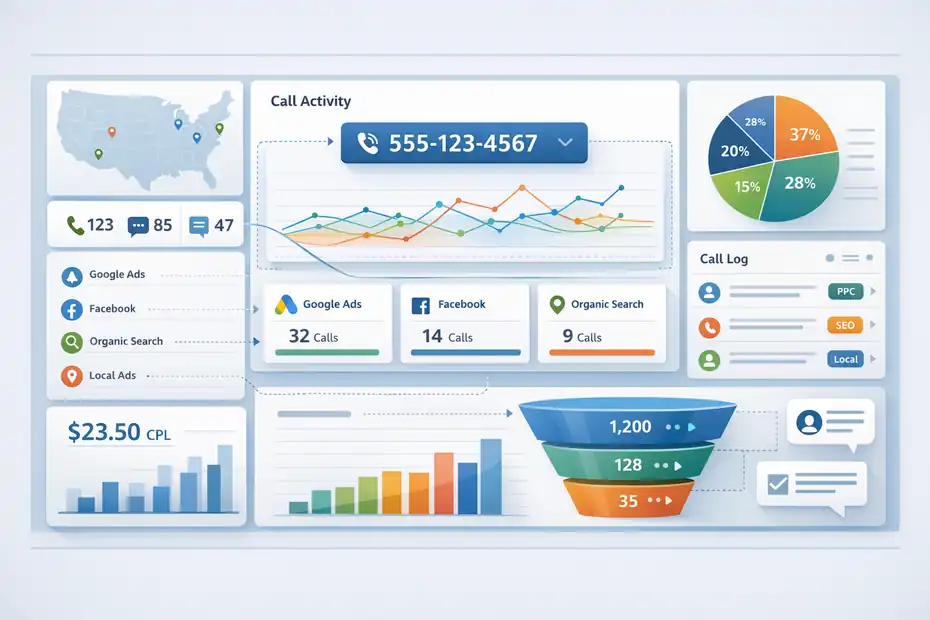
Before you can decide whether CallRail is worth it, you need to understand the workflow. The value does not come from owning tracking numbers.
It comes from tying conversations back to marketing, then acting on that data.
Dynamic Number Insertion And Source Tracking
Dynamic number insertion is one of CallRail’s most important features. CallRail places a JavaScript snippet on your site, then swaps the visible phone number based on where the visitor came from.
A Google Ads click might see one number, an organic visitor another, and a direct visitor another. When someone calls, CallRail knows which source, campaign, and in some cases keyword or landing page influenced that call.
That sounds technical, but the business outcome is simple. Instead of guessing which campaign “probably” drove the call, you get attribution tied to the actual session path. For many local businesses, that is the difference between cutting the wrong ad channel and protecting the right one.
A realistic example: Imagine you spend $3,000 a month across SEO, Google Ads, and Local Services Ads. Without call tracking, all you may know is that the phone rings. With CallRail, you can start separating “calls from branded organic,” “calls from non-brand PPC,” and “calls from LSAs,” then compare cost per lead and sales quality with much more confidence.
Call Recording, Routing, And Transcription
CallRail’s standard call tracking plans include call recording and routing, plus call transcription and analysis. That means you are not limited to source reporting. You can also listen to calls, see what happened, and route calls to the right person or team.
This is where the platform becomes operational, not just analytical. If your front desk misses leads, if calls go to the wrong location, or if the quality of phone handling varies by staff member, CallRail gives you visibility into that. I suggest thinking about it this way: attribution tells you what created demand, while recordings and routing show you whether your team converted that demand.
For teams that want more context before answering, CallRail also supports whisper messages. These brief pre-connect prompts can tell your staff where the caller came from, and CallRail’s support docs show that you can insert contextual data like source into the whisper message itself. That is a small feature, but in the right workflow it can improve call handling a lot.
AI Layers And Lead Qualification
CallRail has pushed deeper into AI-driven analysis through features like call transcripts, keyword analysis, call summaries, sentiment analysis, conversation trend reporting, and automatic conversion tagging on higher-tier plans. It also offers Voice Assist as an add-on focused on missed-call coverage and lead intake.
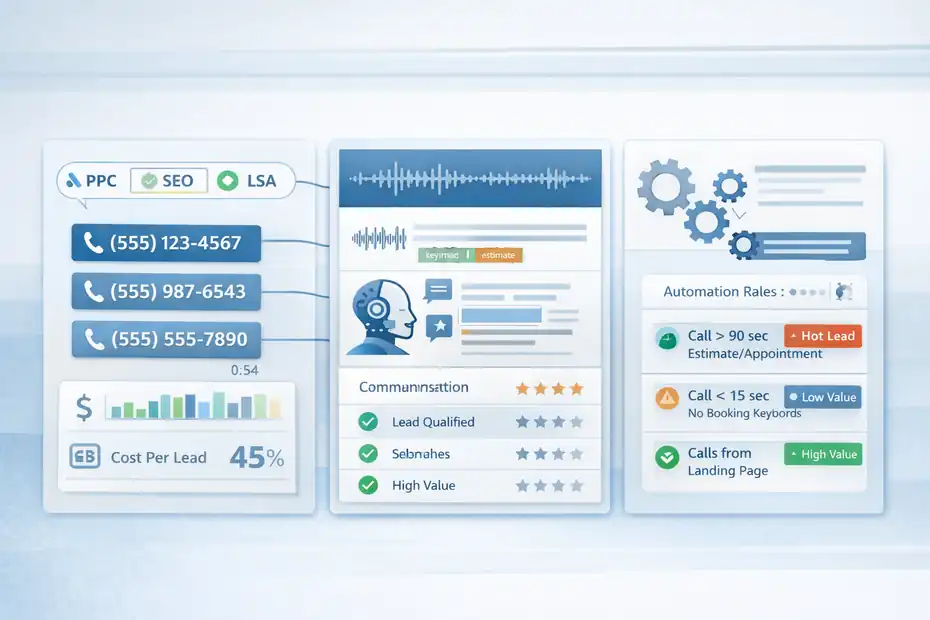
Automation Rules are another practical piece here. According to CallRail’s support documentation, you can classify interactions based on criteria such as call length, campaign association, and words spoken in the conversation, then automatically qualify, score, tag, or assign values to those interactions.
That is useful because not all calls deserve equal weight. A 12-second wrong-number call should not look identical to a 6-minute estimate request. When automation is set up well, your reports become cleaner, your ad platform conversion imports get smarter, and your team spends less time manually reviewing calls.
CallRail Pricing: What You Actually Pay For
Pricing is where a lot of software reviews become fuzzy. So let me keep this grounded. CallRail starts at $50 per month for Lead Tracking, and that base plan includes 5 numbers, 250 local minutes, 25 SMS messages, call and text tracking, call recording and routing, transcription and analysis, and automation rules.
There is also a 14-day free trial with no credit card required.
Current Plans At A Glance
Here is the current structure based on CallRail’s pricing page.
| Plan | Starting Price | Best For | Key Inclusions |
|---|---|---|---|
| Lead Tracking | $50/month + usage | Businesses focused on calls and texts | 5 numbers, 250 minutes, attribution, call recording, routing, transcription, automation rules |
| Lead Tracking Complete | $95/month + usage | Teams needing form tracking too | Everything in Lead Tracking plus form tracking, custom form builder, multi-touch CPL reporting |
| Lead Conversion | $150/month + usage | Teams wanting deeper AI analysis | Everything in Lead Tracking plus transcripts, keyword analysis, call summaries, sentiment, trend reports, automatic conversion tagging |
| Lead Conversion Complete | $195/month + usage | Businesses needing full tracking plus AI | Call tracking, form tracking, conversation intelligence, conversion tagging, journey analysis |
| Voice Assist | Starts at $95/month add-on | Businesses missing calls | AI-assisted lead intake and missed-call coverage |
Source data for features and pricing comes from CallRail’s official pricing page.
Where The Real Cost Can Increase
The phrase to pay attention to is “plus additional usage.” CallRail includes a base allotment, but as your call volume, numbers, forms, or other tracked interactions grow, your bill can grow too. That does not make the pricing bad. It just means this is not a flat-fee unlimited system for most businesses.
Voice Assist also comes with a separate add-on structure. CallRail says it starts at $95 per month, all plans require Lead Tracking starting at an additional $55, and there is an additional per-call fee after the included threshold for qualifying calls over 15 seconds.
My advice is simple: Do not judge CallRail only by the entry price. Judge it by expected volume and how many advanced features you will actually use. A $50 starting plan can be a bargain if it helps you cut wasted ad spend. It can also become an underused expense if you only log into the dashboard once a quarter.
Is The Pricing Fair?
I think the pricing is fair for businesses where one booked job, consultation, or case can cover a large part of the monthly cost. For a roofer, lawyer, orthodontist, or agency client account, it does not take many better-attributed calls to justify the spend.
For a low-ticket business with very few inbound calls, the math may be weaker.
This is where ROI thinking matters more than software-price thinking. If CallRail helps you identify a channel producing poor leads, improve your intake process, or recover missed-call opportunities, it can pay for itself quickly. If you just want a spare business number, it is overkill.
Setup Experience: How Easy It Is To Get Started
One reason CallRail remains popular is that the setup path is much more approachable than many attribution tools.
The platform is built around getting numbers live, adding site tracking, and connecting integrations without turning the process into a full analytics project.
Basic Setup Flow
Here is the general flow most businesses will follow:
- Step 1: Create a company and tracking numbers. CallRail’s base plan includes 5 local numbers, which is enough to get started for many small businesses.
- Step 2: Add the JavaScript snippet. This enables dynamic number insertion for website attribution.
- Step 3: Configure call routing. Decide where calls go, who answers, and what should happen during business hours or after hours.
- Step 4: Set up reporting and integrations. Connect Google Ads, Google Analytics, HubSpot, Salesforce, or other systems if they matter to your workflow.
- Step 5: Review call quality. Use recordings, transcriptions, tags, and automation to separate real leads from noise.
In my view, the main technical hurdle is not the dashboard. It is making sure DNI is deployed correctly on the site and that your number placement is compatible with CallRail’s replacement logic. CallRail’s support docs specifically note formatting requirements for visible phone numbers and provide troubleshooting and manual testing guides, which tells you this is a common implementation point.
What Usually Goes Smoothly
Most teams can get the account structure, number setup, and basic attribution working fairly quickly. The interface gets positive marks from reviewers for ease of use, and G2’s review summaries repeatedly highlight straightforward setup and reporting.
That matters because adoption is half the battle. A platform can be powerful, but if no one on the team wants to touch it, it does not really exist in practice.
What Can Trip You Up
The harder part is advanced configuration. Multi-location businesses, agencies with many clients, businesses mixing website calls and offline campaigns, and teams trying to pipe conversion data into ad platforms may need more care during implementation.
Another thing I suggest watching is internal process alignment. If your front desk does not know how whisper messages work, if nobody reviews call logs, or if sales and marketing disagree on what counts as a qualified lead, software alone will not fix the problem.
CallRail gives you better data. It still needs an operating process around it.
The Best Features That Make CallRail Worth Considering
This is where the review gets more practical. Plenty of platforms can assign a tracking number.
The better question is which features create decisions, efficiency, or revenue that would not happen otherwise.
Attribution That Actually Helps Marketing Decisions
For me, the most valuable part of CallRail is source-level call attribution powered by dynamic number insertion.
This is the feature that lets you answer real budget questions, such as whether branded PPC is cannibalizing organic demand, whether Local Services Ads are outperforming standard search campaigns, or whether SEO traffic is generating more qualified phone leads than your paid channels.
A lot of small businesses still make marketing decisions based on forms alone. That creates blind spots, especially in call-heavy industries. When calls are invisible, good channels can look bad and bad channels can survive too long. CallRail reduces that distortion.
Conversation Intelligence And AI Summaries
On higher plans, CallRail adds Premium Conversation Intelligence features like transcripts, keyword analysis, call summaries, sentiment analysis, and trend reporting. These are not just “nice dashboard extras.” Used correctly, they help teams review more calls in less time and surface patterns they would otherwise miss.
One example: If you discover through call summaries that a large share of PPC calls ask about a service you do not actually offer, you may need to tighten match types, update ad copy, or filter keywords. That is a marketing fix created by sales-conversation data. I think that is where CallRail becomes especially powerful.
Automation Rules And Lead Qualification
Automation Rules deserve more attention than they usually get. CallRail says you can use criteria like call length, campaign association, and words spoken to automatically score, tag, assign value, or qualify interactions.
That is a practical workflow upgrade. Instead of manually listening to every call, you can create logic such as:
- Example 1: Tag calls over 90 seconds mentioning “estimate” or “appointment” as likely qualified.
- Example 2: Mark calls under 15 seconds as low value unless a booking keyword appears.
- Example 3: Assign higher value to calls from specific campaigns or service pages.
These rules help clean up reporting, improve downstream conversion imports, and reduce noise in marketing analysis.
The Weaknesses And Tradeoffs You Should Know
No honest CallRail call tracking software review should act like this platform is perfect.
It is strong, but it comes with tradeoffs that matter depending on your business model.
Usage-Based Costs Can Sneak Up
The biggest practical downside is variable cost. CallRail’s pricing includes base allowances, but additional usage can expand your spend as volume grows. That is not unusual in this category, but it does mean cost planning needs more attention than with a flat SaaS tool.
If you manage several campaigns, multiple offices, or many client accounts, number management and usage charges can become a real budgeting conversation. I recommend forecasting with expected volume rather than picking a plan based only on the entry price.
Advanced Features Require Process Maturity
Another drawback is that the smarter features only create value when your team uses them consistently.
Transcripts, summaries, sentiment, and lead tags sound great on paper, but they do not automatically improve performance. Someone still has to review patterns, adjust campaigns, coach staff, or refine routing logic.
In other words, CallRail can become shelfware if your business wants “better insight” but does not have a habit of acting on insight.
Integrations And Edge Cases May Need Care
Third-party reviews mention integration challenges in some cases, even while overall usability remains strong. That lines up with what I would expect: basic use is easy, but edge cases can introduce friction.
CallRail’s help center shows common integrations like Google Ads, Google Analytics, HubSpot, Salesforce, and Google Business-related workflows, which is helpful, but not every stack behaves cleanly out of the box.
This does not make the platform unreliable. It just means you should be realistic. If your reporting ecosystem is already complex, CallRail will still need thoughtful setup and QA.
Real-World Use Cases Where CallRail Shines
The easiest way to judge software is to imagine it inside a real workflow. That is where CallRail becomes more than a feature list.
Local Service Businesses
For plumbers, HVAC companies, roofers, restoration companies, and electricians, the phone is often the conversion point. Form fills matter, but urgent buyers call.
In these businesses, CallRail can identify which campaigns create not just traffic, but calls that turn into jobs. Whisper messages can also prepare staff before the call connects, and routing can help move leads to the correct team faster.
A simple scenario: Your PPC agency says Google Ads is driving leads, but your owner believes referrals are carrying the business. CallRail can help separate calls by source so you can judge both claims with cleaner evidence.
Agencies Managing Multiple Clients
Agencies often love CallRail because attribution is easier to show than explain. Instead of telling a client “SEO is helping,” you can show how many calls came from organic search, which campaigns drove them, and how lead quality looked after reviewing transcripts or tags.
G2 reviewer feedback also points to CallRail as useful for tracking and reporting across client work.
This can reduce client skepticism, especially in local SEO where calls are often the KPI that matters most.
Businesses With Missed-Call Problems
If your team misses calls after hours or during peak periods, Voice Assist is worth a hard look. CallRail markets it as a way to turn missed calls into revenue with 24/7 coverage and smarter lead intake, though this adds cost on top of a tracking plan.
I would not treat this as a default add-on. But if missed calls are common and each lead is valuable, it could materially change revenue capture.
Common Mistakes That Make CallRail Underperform
Most underwhelming outcomes with call tracking come from bad implementation, not bad software. That is important because many buyers blame the tool when the real issue is setup or process.
Mistake 1: Treating It Like A Passive Dashboard
The worst way to use CallRail is to install it, glance at a report once a month, and expect magic.
Call tracking becomes valuable when you connect the data to actual actions: pausing weak campaigns, reallocating budget, improving scripts, refining call handling, or reviewing missed opportunities.
Mistake 2: Ignoring Qualified Lead Definitions
Not every call is equal. If you never define what counts as a sales-qualified call, your reports stay noisy. This is exactly why automation rules, tags, and call review matter.
I suggest agreeing on a few simple rules early. For example:
- Qualified lead: First-time caller, relevant service, meaningful duration, clear buying intent.
- Low-quality lead: Wrong number, existing customer support issue, spam, recruiter, vendor.
- Needs review: Short call with uncertain outcome.
That small framework makes the rest of the reporting much more useful.
Mistake 3: Failing To Test DNI Properly
Dynamic number insertion is powerful, but only when it works correctly across templates, devices, and traffic sources. CallRail has dedicated guides for troubleshooting and manual testing, which tells you this is not something to skip.
If attribution looks oddly low or inconsistent, DNI setup is one of the first things I would inspect.
Advanced Optimization Strategies After Setup
Once the basics are live, this is where CallRail starts producing stronger ROI. Optimization is less about adding more numbers and more about improving the quality of what you measure and how you respond.
Use Call Data To Improve Paid Search
If you run Google Ads, call review can expose keyword intent problems faster than surface-level conversion data. You may find terms that drive lots of calls but poor-fit prospects, or fewer calls that convert better because the search intent is cleaner.
That is why I like pairing source attribution with transcript review. Numbers tell you where the call came from. The conversation tells you whether that click was worth buying in the first place.
Connect Marketing And Front-Desk Coaching
One overlooked benefit of call recording and summaries is operational coaching. If your ads are working but your staff is weak at intake, you do not have a marketing problem. You have a conversion process problem.
CallRail gives you enough visibility to separate those two issues. That alone can save months of confusion.
Track More Than Calls
CallRail’s more complete tiers add form tracking and custom form builder functionality, and the company positions forms, texts, and calls as part of the same lead journey.
That matters because many businesses unintentionally optimize for whichever conversion is easiest to measure. Unified lead tracking reduces that bias.
If you only optimize to calls, you may under-credit channels that assist through forms first. If you only optimize to forms, you may under-credit channels producing high-intent phone leads. Better measurement usually produces better budget decisions.
Final Verdict: Is CallRail Worth It?
Yes, for the right business, CallRail is worth it. The platform offers a strong mix of call attribution, call management, conversation analysis, and practical automation without forcing most small and mid-sized teams into an overly complex setup.
Current pricing starts at $50 per month for Lead Tracking, with more advanced tiers at $95, $150, and $195 per month plus usage, and a 14-day free trial lowers the risk of testing it.
What I like most is that CallRail solves a real measurement problem. It helps you stop guessing which campaigns produce phone leads, and it gives you enough call-level detail to improve not just attribution but also handling, qualification, and follow-up.
Review signals on G2 are also strong, with CallRail holding a 4.5-star rating across more than 1,650 reviews and appearing as a leading product in inbound call tracking on G2’s category pages.
What I would watch closely is usage-based cost and feature adoption. If your team will actively use call tracking, routing, transcripts, and lead classification, the value can be obvious. If you just want a basic business phone solution, you are likely paying for more than you need.
My bottom line is this: CallRail is not the cheapest possible way to track calls, but it is one of the clearest and most business-useful ways to connect marketing spend to actual phone leads. If calls are a real revenue channel for your business, that is exactly the kind of software I would take seriously.
FAQ
What is CallRail call tracking software used for?
CallRail call tracking software is used to track inbound phone calls and identify which marketing channels generate them. It helps businesses connect calls to campaigns like Google Ads or SEO, allowing better budgeting decisions and clearer insight into which channels drive high-quality leads.
Is CallRail worth the cost for small businesses?
CallRail can be worth it for small businesses that rely on phone leads to generate revenue. If even a few tracked calls turn into paying customers, the platform can quickly pay for itself by improving marketing attribution and reducing wasted ad spend.
How accurate is CallRail call tracking?
CallRail is highly accurate when set up correctly, especially with dynamic number insertion on websites. It tracks call sources, campaigns, and sometimes keywords. However, accuracy depends on proper installation and testing to ensure phone numbers are displayed and replaced correctly.
Does CallRail offer AI features for call analysis?
Yes, CallRail offers AI-powered features like call transcription, summaries, keyword tracking, and sentiment analysis. These tools help businesses understand conversations at scale, identify trends, and improve both marketing performance and customer handling processes.
What are the main drawbacks of CallRail?
The main drawbacks of CallRail include usage-based pricing that can increase with call volume and the need for proper setup to get full value. Some advanced features also require consistent use and internal processes to deliver meaningful insights and ROI.

I’m Juxhin, the voice behind The Justifiable.
I’ve spent 6+ years building blogs, managing affiliate campaigns, and testing the messy world of online business. Here, I cut the fluff and share the strategies that actually move the needle — so you can build income that’s sustainable, not speculative.
Related posts:
 CallRail Platform Walkthrough Guide: Setup To Insights
 CallRail Call Tracking: How It Works and Why It Matters
 CallRail Pros And Cons For Businesses: What Matters Most
 CallRail Real Marketing Attribution Case Study: ROI
 Is CallRail Worth It For Local Businesses Or Agencies?
 LearnWorlds Shopify Setup: What Works, What Fails