Table of Contents
Some links on The Justifiable are affiliate links, meaning we may earn a small commission at no extra cost to you. Read full disclaimer.
Create online courses LearnWorlds can feel like a big project when you are staring at a blank dashboard, wondering what to build first, what to upload, and how to make people actually buy.
The good news is that LearnWorlds gives you a structured course creation wizard, flexible learning activities, drip scheduling, built-in selling options, and a customizable course player, so you can go from idea to launch without patching together five different systems.
Understand What LearnWorlds Is Really Best For
Before you build anything, it helps to know what kind of platform you are working with.
LearnWorlds positions itself as an AI-powered LMS for course creators, with tools for creating, selling, and hosting digital learning products in one place.
Who LearnWorlds Fits Best
If you are trying to create a polished online school rather than just upload a few videos, LearnWorlds makes sense. The platform is built for creators, educators, coaches, consultants, trainers, and businesses that need structured learning experiences, not just simple file delivery.
Its official materials also show support for courses, learning programs, assessments, certificates, live sessions, interactive video, ebooks, PDFs, SCORM, and course player customization.
What that means in plain English is this: You can teach in more than one format. You are not boxed into “talking head video plus quiz.” You can mix text, downloads, forms, exams, certificates, and live components, which is useful when your course needs to feel more guided and complete.
I believe this matters more than most beginners realize. A course often fails because the creator thinks only about content, while the learner cares about momentum. The more clearly you can guide someone from lesson one to completion, the better your results usually are.
A simple example: If you teach fitness, language learning, design, or client acquisition, your students usually need a sequence, practice, and milestones. LearnWorlds is stronger in those cases than a barebones download page because it supports structured progression and learner-facing course environments.
What Beginners Often Get Wrong About Course Platforms
A lot of people start by asking, “Can this platform host my videos?” That is the wrong first question. Almost every course platform can host videos. The better question is, “Can this platform help my student finish and help me sell?”
LearnWorlds includes features tied to both learning delivery and commerce, such as course access settings, direct payment links, bundle offers, coupons, affiliate management, and player customization.
In my experience, beginners also overestimate how much tech their first course needs. You do not need every feature switched on. You need a clear promise, logical lessons, a clean offer, and a straightforward checkout path. LearnWorlds gives you enough room to grow, but your first win usually comes from simplicity.
That matters even more in a growing online education market. Recent industry reporting has estimated the global eLearning market near the $400 billion mark by 2026, while creator-economy market estimates also show rapid growth, which means there is opportunity, but also more competition. A confusing course no longer gets forgiven just because it exists.
So before you dive into setup, decide what kind of product you are creating: a beginner course, a cohort-style training, a certification path, a resource library, or a bundle. That decision shapes everything else.
Plan Your Course Before You Touch The Dashboard
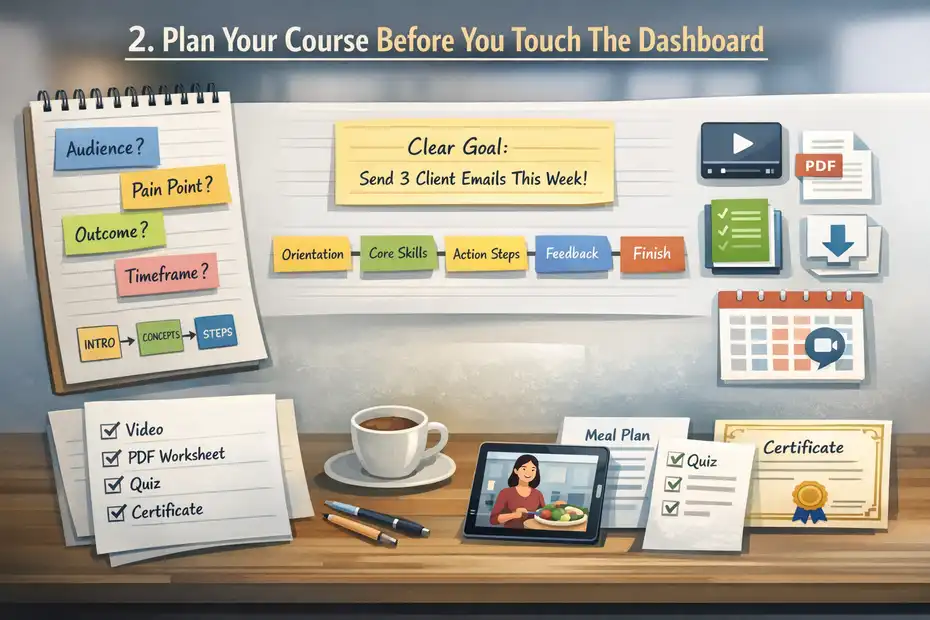
LearnWorlds has a course creation wizard, but no wizard can fix a weak course plan. The best setup work happens before you upload a single file.
Define One Clear Transformation
Your course should solve one meaningful problem for one specific learner. That sounds obvious, but this is where many first-time creators get stuck. They try to build a course that helps “everyone,” and the result is vague, bloated, and hard to market.
Start with a sentence like this: “By the end of this course, you will be able to…” Then finish it in one practical outcome. Not ten. One.
Here is a simple framework that works:
- Audience: Who is this for?
- Pain point: What are they struggling with?
- Outcome: What will they be able to do after finishing?
- Timeframe: How quickly should they expect progress?
- Format: What kind of experience will help them most?
Imagine you are teaching beginner freelance designers how to sign their first client. Your promise is not “learn freelancing.” Your promise might be “build a simple offer, price it confidently, and send your first three outreach messages this week.” That is specific, believable, and marketable.
I suggest keeping your first course tightly scoped. Smaller courses are easier to finish, easier to validate, and easier to improve from real student feedback. LearnWorlds can handle bigger product ecosystems later through bundles and learning programs, but your first launch should probably focus on one result, not a mini-university.
Map The Learning Journey In Sections
Once your promise is clear, sketch the learning path. LearnWorlds organizes courses through sections and learning activities, so it helps to think in those terms from the start. The support documentation also ties drip-feed scheduling to course sections, which makes your outline even more important.
A practical structure for beginners looks like this:
- Section 1: Orientation and quick win
- Section 2: Core concept or framework
- Section 3: Implementation steps
- Section 4: Practice, feedback, or assessment
- Section 5: Next steps and completion milestone
This is where I see a lot of course creators overcomplicate things. They think more lessons automatically create more value. Usually the opposite is true. Learners do better when lessons feel bite-sized, logically ordered, and clearly connected to an outcome.
A good test is this: If someone completed only one section, would they still feel progress? If the answer is no, your course may be too theory-heavy.
For example, in a photography course, section one could help the student choose their camera settings for one reliable indoor shot. That tiny win builds confidence. Then later sections can cover lighting, editing, and client workflow.
The smoother your outline, the easier your LearnWorlds setup becomes. You will know what type of activity to add, what to drip later, and what should be assessed versus simply read or watched.
Choose Delivery Formats Before Production Starts
LearnWorlds supports a wide mix of learning activities, including video, ebooks, PDFs, audio, YouTube embeds, assessments, certificates, and live sessions. That flexibility is useful, but it can also tempt you into creating too much.
Instead of asking, “What can I upload?” ask, “What format helps this lesson land fastest?”
Use a simple rule:
- Use video when tone, demonstration, or walkthrough matters.
- Use text or ebooks when the learner needs reference material.
- Use downloadable templates when they need to apply something quickly.
- Use assessments when they need reinforcement or proof of understanding.
- Use live sessions only when feedback or accountability truly changes the result.
I recommend planning this on paper first. It saves time and prevents messy rework later.
A realistic beginner scenario: say you are teaching nutrition coaching basics. You might record short videos for concepts, include a PDF meal-planning worksheet, add one self-assessment quiz, and issue a completion certificate. That feels complete without becoming exhausting to build. LearnWorlds explicitly supports those activity categories, so the platform can match that delivery mix well.
This planning stage is not glamorous, but it is where strong courses are usually won.
Set Up Your Course Inside LearnWorlds The Right Way
Now you can move into the platform with confidence. LearnWorlds provides a Course Creation Wizard, and this is where your pre-work starts paying off.
Create The Course And Configure Core Details
According to LearnWorlds support, you can create a course from the main admin dashboard or from Courses & Programs, and both routes lead to the Course Creation Wizard.
In the wizard, you add the course name, description, cover image, public URL, and access type. The platform also notes that AI assistance can help generate a title and description.
That setup sounds straightforward, but a few small decisions matter a lot.
Your course title should be benefit-led, not clever. “Freelance Launchpad” sounds nice, but “Get Your First Freelance Design Client” will usually convert better because it tells people exactly what they get.
Your description should answer three things quickly: who it is for, what result they will get, and what is inside. Do not write like a brochure. Write like a helpful guide talking to one person.
Your URL matters too. Keep it short and readable. If the course title changes later, you may still want the URL to stay stable for cleaner links and easier promotion.
Access type is another strategic choice. You need to decide whether the course is free, paid, private, or part of a broader offer. This is not just a technical setting. It affects how you position the course, generate leads, and structure your sales funnel.
I recommend naming files, modules, and sections clearly from day one. A tidy backend sounds boring, but it becomes a gift to your future self when you start duplicating, bundling, or updating content later.
Add Sections And Learning Activities With A Clean Flow
Once the shell of the course exists, start adding sections and learning activities. LearnWorlds’ help center organizes course-building guidance around sections, learning activities, assessments, interactive video, ebooks, multimedia content, live sessions, and course settings.
This is where course design becomes real.
A good course flow usually follows this pattern:
- Start: Welcome lesson, expectations, and quick win
- Middle: Core teaching and implementation
- Reinforcement: Worksheet, quiz, or practice prompt
- Completion: Summary, next step, certificate, or offer
The biggest beginner mistake here is dumping content in the order it was created. Learners do not care what you recorded first. They care what helps them understand and apply fastest.
I also suggest mixing activity types so the course does not feel flat. If every lesson is a 20-minute video, even good content can feel heavy. But a lesson followed by a worksheet, a short self-check, or a downloadable example keeps energy up.
A hands-on example: If you are teaching Etsy SEO, one section could include a short strategy video, a PDF keyword worksheet, a product-title template, and then a short self-assessment asking the student to optimize one listing before moving on. That is practical, not passive.
LearnWorlds gives you enough content variety to build that kind of learning path without sending students elsewhere.
Build With Completion In Mind, Not Just Content In Mind
Course creators often obsess over what to include, but the better question is what will help the learner finish. Completion is not just a vanity metric. A finished student is more likely to leave a testimonial, buy your next product, refer someone else, or qualify for a higher-ticket offer.
There is some context worth remembering here: one recent analysis of online learning completion rates highlighted a median completion rate of 12.6% across certain online course contexts, which is a reminder that engagement is a serious design issue, not an afterthought.
That does not mean your course is doomed. It means structure matters.
Inside LearnWorlds, build for momentum:
- Keep early lessons short.
- Give one immediate win.
- Use sections that feel finite.
- Add assessments only where they help.
- Avoid locking learners into long theory blocks before action.
I have seen simple, focused courses outperform larger “premium” courses because they respect the learner’s time. That is the energy you want when you create online courses LearnWorlds users will actually complete.
If you want a helpful internal benchmark, ask this after each section: “Would a busy student still continue from here?” If not, tighten it.
Design A Better Learning Experience From Day One
A course is not just information. It is an experience. LearnWorlds gives you features that can make that experience feel more structured, interactive, and professional when used carefully.
Use The Right Activity Type For The Right Lesson
One of LearnWorlds’ biggest strengths is variety. The platform documentation shows support for interactive video, ebooks, PDFs, SCORM/HTML5 packages, assessments, certificates, audio, YouTube, and live sessions.
That does not mean you should use all of them.
I recommend matching the format to the learning job:
- Explaining a concept: Short video or text lesson
- Demonstrating a process: Video with examples
- Giving a reusable reference: Ebook or PDF
- Checking understanding: Assessment
- Marking progress: Certificate
- Offering direct support: Live session
This sounds simple, but it dramatically improves learner experience. Many weak courses fail because the creator uses one content format for everything.
Think about a beginner coding course. A dense PDF might work for command references, but setup walkthroughs almost always work better as video. On the other hand, a checklist for debugging is more useful as a downloadable resource than another video.
What I like about LearnWorlds here is the range. You can design a course that feels more like a guided program than a folder of files. That flexibility also helps you adapt your style to your audience instead of forcing one teaching method on everyone.
Add Assessments, Certificates, And Milestones Thoughtfully
LearnWorlds supports assessments and certificates, including certificate-of-completion activity creation and settings for assessment builders. It also offers AI-assisted assessment creation in newer documentation.
These are useful, but they are easy to misuse.
Assessments should reinforce progress, not interrupt it. A short quiz after a critical module can help learners check whether they really understood the concept. But too many quizzes can make a practical course feel like school in the bad way.
Certificates are more powerful than some creators think. They add perceived value, create a finish line, and can support B2B, coaching, or professional development use cases. But they only help if the course itself leads somewhere meaningful.
A practical approach:
- Use one short self-check after an important section.
- Use one final assessment only if the course outcome justifies it.
- Add a certificate when completion has real emotional or professional value.
For instance, in a customer-service training course, a final certificate makes sense because teams may want proof of completion. In a tiny mini-course about Instagram bio tweaks, it probably does not.
In my experience, milestones matter most when students are busy. They need to feel progress quickly. LearnWorlds gives you the mechanics; your job is deciding where those mechanics genuinely improve learning.
Customize The Player And Reduce Friction
LearnWorlds has documentation specifically for customizing the course player and navigation. The goal is not just aesthetic. The course player is the learning environment, and small usability issues can quietly hurt completion.
I suggest thinking about friction in three ways:
- Visual friction: Too much clutter, poor hierarchy, distracting elements
- Cognitive friction: Unclear lesson order, weak instructions, confusing labels
- Action friction: Too many clicks, missing next steps, unclear progress cues
A lot of creators spend hours on brand colors and almost no time on clarity. I would rather have a plain, obvious player than a stylish one that leaves students wondering where to click next.
Here is a useful mental model: each lesson should answer, “What is this? Why does it matter? What should I do next?” If the player and lesson structure make those answers obvious, the course feels easier to follow.
This is especially important if your audience is not highly technical. Coaches, wellness educators, consultants, and local experts often serve students who want simple navigation, not a flashy digital maze.
Build Your Website, Sales Pages, And Checkout Path
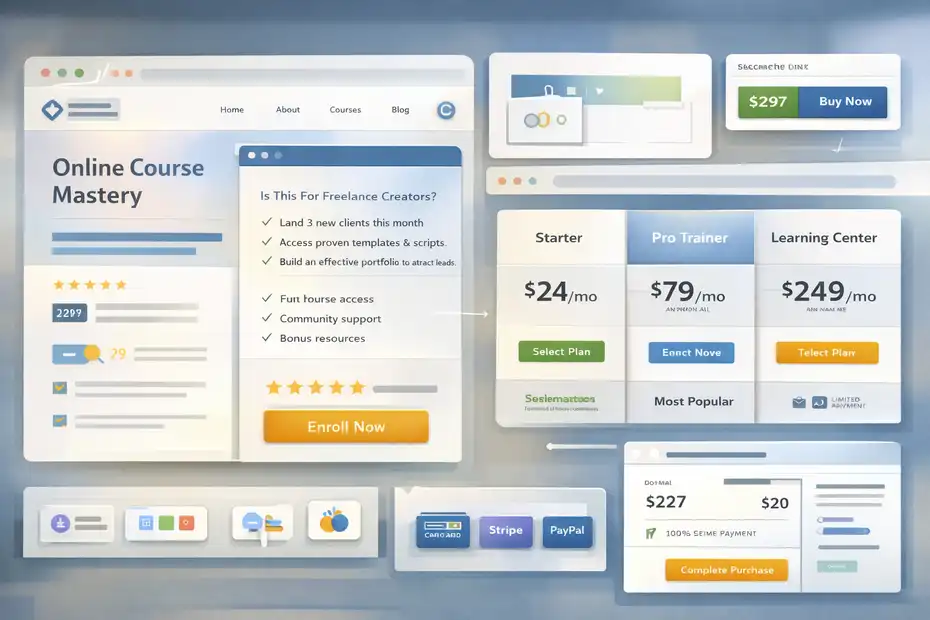
Creating the course is only half the job. You also need a buying path that feels simple and trustworthy.
LearnWorlds includes website and page-building options, plus direct payment links and offer types for selling.
Create A Course Page That Answers Buyer Questions
LearnWorlds support notes that you can create website pages from templates including landing pages, pricing pages, thank-you pages, blogs, and one-click sales funnels.
That is useful, but the page itself still needs to do real conversion work.
A strong course sales page should answer these questions fast:
- Who is this for?
- What result will I get?
- What is included?
- Why should I trust this?
- How much is it?
- What should I do next?
I recommend writing the page in the language your students actually use, not the language experts use with each other. If your audience says “I keep overthinking my offers,” do not replace that with “resolve strategic positioning paralysis.”
A practical structure that works well:
- Problem and promise
- Who it is for
- What is inside
- What result they can expect
- Proof, examples, or testimonials
- Price and call to action
Imagine someone lands on your page from Instagram. They do not know your whole story. Your page has to do the trust-building work quickly. LearnWorlds gives you the page framework, but your copy does the conversion.
Simplify Checkout And Reduce Drop-Off
LearnWorlds has direct payment links that take users straight to checkout and can include pre-applied discount coupons. The platform documentation frames this as a way to skip unnecessary landing-page steps and make buying easier.
That is a bigger advantage than it sounds.
The more decisions you force before purchase, the more people drop off. If a warm lead clicks from an email and already knows they want the course, sending them to a long page again can slow the sale.
I suggest using two paths:
- A full sales page for cold or skeptical traffic
- A direct checkout link for warm traffic from email, DMs, webinars, or retargeting
This is especially useful for launches. You can mention a deadline or a coupon in your email and send subscribers directly to the checkout with the discount already applied. That removes friction and keeps momentum high.
For beginners, this is one of the easiest conversion wins inside LearnWorlds. You do not always need a more persuasive page. Sometimes you need fewer clicks.
Use Pricing, Bundles, And Offers Strategically
LearnWorlds supports coupon-based offers, bundle offers, and other promotional structures through its e-commerce tools.
Its public pricing page also lists key plan tiers such as Starter at $24 per month annually, Pro at $79 per month annually, and Learning Center at $249 per month annually, with higher plans available for larger organizations.
Here is a simple plan comparison for course creators evaluating setup scope:
| Plan | Public Annual Price | Good Fit For | Useful Notes |
|---|---|---|---|
| Starter | $24/mo | Testing a first paid product | Entry-level option; transaction-fee details should be checked before launch |
| Pro Trainer | $79/mo | Most solo creators and coaches | Strong middle ground for course selling |
| Learning Center | $249/mo | Growing schools and teams | Includes more advanced learning, analytics, and branding features |
| High Volume & Corporate | Custom | Enterprise or large training ops | Sales-led plan for larger needs |
Pricing strategy matters because creators often underprice beginner offers and then try to “fix” weak sales with more content. I think that usually backfires. A better move is aligning price with transformation, support level, and urgency.
Bundles are especially powerful when you start expanding. Instead of stuffing everything into one course, you can keep products focused and then package related courses together later. LearnWorlds documents bundle offers specifically for that use case.
Launch Without Overcomplicating Your First Release
A great first launch is rarely the fanciest one. It is the one that gets real students, real feedback, and real momentum.
LearnWorlds gives you enough tools to launch lean and improve fast.
Start With A Minimum Viable Course
I strongly recommend building a minimum viable course first. That means enough content to create a real result, but not every possible lesson you might someday want.
A minimum viable course usually includes:
- A clear promise
- A clean outline
- Core lessons
- One or two support resources
- A simple sales page
- A working checkout flow
This approach protects you from one of the biggest beginner traps: building for six months before anybody proves they want the course.
Imagine you are teaching beginner bookkeeping for freelancers. You do not need 80 lessons to validate demand. You need a course that helps students organize income, track expenses, and prepare basic records confidently. That is enough to test the offer.
LearnWorlds is well suited to this because you can create the course shell, upload core activities, publish a page, and sell through direct links or standard product pages without engineering a huge stack first.
That is how many successful course businesses actually start: not with perfection, but with a focused promise and fast iteration.
Use Drip Feed When It Supports The Outcome
LearnWorlds supports drip-feed course sections by date or by days after signup, letting you release content gradually instead of all at once.
Drip feed is useful, but only in the right situations.
It works well when:
- The course needs pacing
- You want learners to implement between modules
- You are reducing overwhelm
- You want to align lessons to a timeline
- You are running a guided challenge or transformation
It works poorly when students need instant access to solve a time-sensitive problem.
I have seen creators use drip schedules just because they sound more “premium.” That is not a good reason. If your student bought the course to fix something today, locking core material behind future dates may annoy them more than help them.
A good beginner rule is this: Drip only when pacing improves implementation. If pacing does not improve implementation, open the course.
For example, a four-week habit-building course may benefit from weekly module release. A software tutorial where students need one solution right now probably should not drip.
Build A Simple Promotion Loop
Once your course is live, you need traffic. LearnWorlds can support the buying mechanics, but your promotion message still matters most.
For a first launch, I suggest a simple loop:
- Share a useful content idea
- Connect that idea to a specific pain point
- Show the next step
- Link to the course page or checkout
That can happen through email, social content, communities, workshops, or partnerships. If you want others promoting for you later, LearnWorlds also offers affiliate management, including setup and affiliate-link options with coupon combinations.
I would not start with affiliates on day one unless you already have relationships. Start with direct audience contact first. You need to hear objections, questions, and hesitations yourself before outsourcing promotion.
Optimize Your Course After The First Students Join
Your first version is not the final version. The smartest course creators treat early enrollments like research, not just revenue.
LearnWorlds includes analytics-oriented features on higher tiers, course insights references on pricing pages, and detailed course settings that support iteration.
Watch Behavior, Not Just Sales
A sale tells you the offer was interesting. It does not tell you the course worked.
What you really want to know is:
- Where are students dropping off?
- Which lessons get skipped?
- Which resources get used most?
- Which questions repeat?
- Who finishes?
This is where course businesses often separate. Some creators stop at “someone bought.” Better creators look at what students do next and improve the course around that reality.
If students keep abandoning module three, something is wrong. Maybe the lesson is too long. Maybe the assignment is unclear. Maybe the promised result came too late. Those are design issues, not “student motivation” issues.
LearnWorlds’ higher plans specifically mention advanced user progress reports, course insights, scheduled reports, and report templates, which suggests stronger visibility for growing schools that want more measurement.
Even without complex reporting, you can learn a lot from support emails, learner comments, and completion trends.
Improve Weak Lessons Instead Of Adding More Lessons
One of my strongest opinions on course building is this: improvement usually beats expansion.
When creators feel disappointed by sales or engagement, they often add more content. But if the existing lessons are unclear, longer courses usually make the problem worse.
A better process looks like this:
- Find the lesson where momentum drops.
- Rewrite the lesson goal more clearly.
- Shorten or split the lesson if needed.
- Add an example, template, or walkthrough.
- Re-test with new students.
This is where realistic examples help. If a student is learning how to write ad copy, theory alone may not unlock progress. But one annotated example, one template, and one before-and-after rewrite often can.
LearnWorlds supports multiple activity formats, which makes this kind of improvement easier. You can reinforce a weak video lesson with a worksheet, quick assessment, or downloadable reference instead of re-recording the entire course.
Turn Feedback Into Better Conversion
Student feedback does not just improve the course. It improves your marketing.
The phrases learners use in questions, wins, and objections often become your best copy:
- “I finally understand this”
- “This saved me hours”
- “I stopped overthinking”
- “The checklist made it easy”
- “I wish I had found this sooner”
Those are not just nice comments. They are market language.
I recommend collecting feedback at three points:
- After the first quick win
- Near course completion
- A few weeks after completion
LearnWorlds also supports forms, including marketing and course forms with AI assistance, which can help collect structured feedback inside your broader learning setup.
That feedback can improve your sales page, email sequence, onboarding, and future bundles. In other words, optimization is not separate from growth. It is growth.
Scale Beyond One Course Without Losing Focus
Once your first course works, the next challenge is scaling intelligently. That does not mean creating ten random courses. It means expanding around learner needs and business logic.
LearnWorlds supports bundles, learning programs, content sync on higher tiers, and more advanced sales and reporting features for growing academies.
Expand Through Product Ladders, Not Content Chaos
A smart creator business usually grows through a product ladder:
- Entry product
- Core course
- Advanced program
- Bundle or membership-style offer
- Higher-ticket support or training
This works because students rarely need “more content.” They need the next right step.
For example, if your first product teaches beginner email marketing, your next products might logically cover list growth, automation, and campaign optimization. That is a stronger path than jumping randomly into web design just because you can.
LearnWorlds’ support for bundles and learning programs makes this kind of ladder more practical. You can combine related offers, structure progression, and release content in staged ways rather than rebuilding from scratch each time.
I suggest keeping each new course narrow enough that it is easy to sell, then using bundles when overlap becomes meaningful.
Use Automation And Partnerships Carefully
As you grow, automation becomes more attractive. LearnWorlds supports direct payment links, coupons, affiliate management, and a broader e-commerce layer that can reduce manual work.
Still, automation should not hide weak messaging.
Here is the order I recommend:
- Prove the offer manually.
- Refine the onboarding experience.
- Streamline checkout and promotions.
- Add affiliate or partner distribution when your conversion basics are already working.
Too many creators try to scale noise. They add affiliates, discounts, and funnels before they know why students buy in the first place.
That said, once the offer is validated, affiliate tools can become powerful. LearnWorlds documents affiliate setup and affiliate links that can optionally include coupon codes, which can help creators run cleaner partner campaigns.
Know When To Upgrade Your Plan
A lot of creators ask this too early. The answer is usually simple: upgrade when the next tier solves a real bottleneck.
If you need more advanced analytics, stronger branding control, interactive video depth, unlimited SCORMs, content sync, or broader academy management, the higher LearnWorlds tiers may justify themselves.
The pricing page specifically highlights advanced reporting, branding removal, unlimited page funnels, advanced affiliate marketing, and richer learning features in upper plans.
Here is how I think about it:
- Stay lean when testing demand.
- Upgrade when complexity is earning money, not before.
- Let student volume and business model drive the decision.
That mindset keeps your margins healthier and your tech stack calmer.
Avoid The Most Common LearnWorlds Course Creation Mistakes
Most course problems are predictable. If you avoid a few common traps, your first launch will already be stronger than a lot of what is out there.
Mistake 1: Building The Platform Before Building The Promise
It is easy to get excited about templates, pages, certificates, and player design. But if your course promise is fuzzy, none of that matters.
A pretty school with a weak offer still struggles.
I suggest writing your transformation sentence before you even open LearnWorlds. Then let every page, lesson, and checkout choice support that promise. The platform gives you structure, but the promise gives you demand.
Mistake 2: Uploading Content Without Instructional Design
Beginners often mistake information volume for course quality. They upload recordings, worksheets, slides, and links, but never shape them into a guided path.
LearnWorlds makes it possible to organize content into sections, activities, assessments, and schedules. Use that structure. Learners need direction, not a content dump.
A course should feel like a journey, not cloud storage with branding.
Mistake 3: Treating Selling As A Separate Problem
Many creators work on the course first and “worry about selling later.” I understand the instinct, but it causes a lot of wasted effort.
Your course topic, format, bonuses, page structure, pricing, and checkout path all influence sales. LearnWorlds supports selling mechanisms like offers, direct payment links, and bundles, so your revenue model should be considered during setup, not after.
In practice, this means asking early:
- Will this course be standalone or part of a ladder?
- Should it lead to a bundle later?
- Is a coupon strategy useful?
- Do I need a direct checkout path for email traffic?
Those questions save time and improve launches.
Final Thoughts On Creating Online Courses In LearnWorlds
If your goal is to create online courses LearnWorlds can absolutely support a serious beginner launch, especially if you want structured learning, multiple content formats, built-in selling options, and room to grow into a larger course business.
The platform’s official resources show a clear course-creation workflow, flexible learning activities, drip feed, page creation, assessments, certificates, affiliate tools, and scalable plan options.
The real key, though, is not the dashboard. It is the decisions you make before and during setup: choosing one clear promise, building a clean learning path, removing friction, and launching before perfection slows you down.
If I were starting from scratch, I would keep the first version focused, practical, and slightly smaller than my ego wants. That usually leads to better completion, better testimonials, and better long-term growth.
A course business scales best when the first course actually works.
FAQ
What is LearnWorlds and how does it help create online courses?
LearnWorlds is an all-in-one platform that lets you create, host, and sell online courses. It provides tools for building lessons, adding videos, creating quizzes, and designing course pages. You can manage everything in one place, making it easier to launch and grow your online education business.
Is LearnWorlds good for beginners creating their first course?
Yes, LearnWorlds is beginner-friendly because it includes a course creation wizard and ready-to-use templates. You can start with simple lessons and expand later. It removes the need for technical skills, so you can focus on building content and delivering a clear learning experience.
How long does it take to create an online course on LearnWorlds?
The time depends on your content and preparation. A simple course can be created in a few days if your materials are ready. More advanced courses with videos, assessments, and structured modules may take a few weeks to fully build and refine.
Can you sell courses directly through LearnWorlds?
Yes, LearnWorlds includes built-in selling features like checkout pages, coupons, and payment links. You can sell courses without needing external tools. This makes it easier to manage pricing, promotions, and customer access all from one platform.
What type of content can you include in a LearnWorlds course?
You can include videos, PDFs, quizzes, ebooks, audio files, and live sessions. LearnWorlds also supports interactive content and certificates. This flexibility helps you create engaging courses that match different learning styles and improve completion rates.

I’m Juxhin, the voice behind The Justifiable.
I’ve spent 6+ years building blogs, managing affiliate campaigns, and testing the messy world of online business. Here, I cut the fluff and share the strategies that actually move the needle — so you can build income that’s sustainable, not speculative.