
Table of Contents
Some links on The Justifiable are affiliate links, meaning we may earn a small commission at no extra cost to you. Read full disclaimer.
Sellfy features overview searches usually come from creators who are tired of juggling too many tools just to sell one product.
Maybe you have an ebook, presets, merch, a membership idea, or a video product, and you want to know whether Sellfy gives you enough without turning your simple business into a tech project.
I’ll walk you through the features that matter, what they actually do, and where they fit in a real creator workflow.
My goal is simple: Help you decide whether Sellfy gives you the tools you need to launch, sell, protect, promote, and grow your products.
Understand What Sellfy Is Built To Do
Sellfy is an ecommerce platform made mainly for creators who want to sell digital products, physical products, subscriptions, and print-on-demand merchandise from one simple storefront.
Instead of building a full custom website first, you can create a store, add products, connect payments, and start selling with fewer moving pieces.
What Makes Sellfy Different For Creators
Sellfy’s biggest strength is that it brings several creator-focused selling tools into one place. You can sell digital downloads, subscriptions, physical products, and print-on-demand items from the same store, which matters if your business is not limited to one product type.
Sellfy’s own feature page lists support for ebooks, videos, audio, music, PSD files, AI files, video streaming, subscriptions, physical products, and built-in print on demand.
That mix is useful because many creator businesses grow sideways. A photographer may start with Lightroom presets, then add a paid tutorial library, then sell branded shirts.
A musician may sell sample packs, offer monthly exclusive content, and add physical merch. With some platforms, each of those steps requires another plugin, integration, or separate store.
In my experience, creators usually do not fail because they lack advanced ecommerce theory. They get stuck because setup takes too long, product delivery feels risky, or the store looks “almost ready” for weeks. Sellfy tries to solve that by keeping the workflow direct: Add product, customize storefront, connect payment, publish.
That simplicity is also the tradeoff. Sellfy is not trying to be a giant enterprise commerce engine. If you want endless theme control, deep checkout customization, or a massive app marketplace, you may outgrow it.
But if your goal is to sell creator products without building a complicated tech stack, the platform makes a lot of sense.
Who Sellfy Is Best Suited For
Sellfy is best for creators who want to sell directly to an audience they already have or are actively building. Think YouTubers, designers, writers, coaches, musicians, educators, photographers, illustrators, streamers, and small digital brands.
It works especially well when your business model is simple but your product mix is flexible.
For example, imagine you run a small design account on Instagram. You could sell a Canva template pack, a monthly design resource subscription, and a hoodie using print on demand. You would not need to manage file delivery manually or coordinate fulfillment yourself for the merch side.
Sellfy is also a good fit for creators who value speed over total control. You can connect your own domain, customize the store, use a shopping cart, and accept payments through PayPal or Stripe. Sellfy says PayPal can accept payments from customers in more than 200 countries, and Stripe adds credit card payment support.
I would be more cautious if you are building a large retail catalog with complex inventory rules, advanced shipping logic, or heavy marketplace-style filtering. Sellfy can sell physical products, but its sweet spot is creator-led selling, not warehouse-scale ecommerce.
The Core Problem Sellfy Tries To Solve
The main problem Sellfy solves is not “How do I build the most advanced online store?” It is “How do I start selling my creative work without stitching together five tools?”
Let me break it down. A creator selling a digital product usually needs:
- A storefront: Somewhere customers can view and buy products.
- Payment processing: A way to collect money securely.
- Digital delivery: Automatic file access after purchase.
- Product protection: Basic controls like PDF stamping or download limits.
- Marketing tools: Discounts, emails, upsells, and recovery options.
- Analytics: Enough data to see what is working.
Sellfy puts those pieces into one beginner-friendly system. That matters because every extra tool adds another place where something can break. A broken checkout, missing file link, or confusing delivery email can damage trust fast.
From what I’ve seen, the best use case is a creator with a clear audience and a product that can be explained quickly. Sellfy removes friction from the selling process. It does not create the demand for you, but it helps you capture demand once your audience is ready to buy.
Review Sellfy’s Product Selling Features
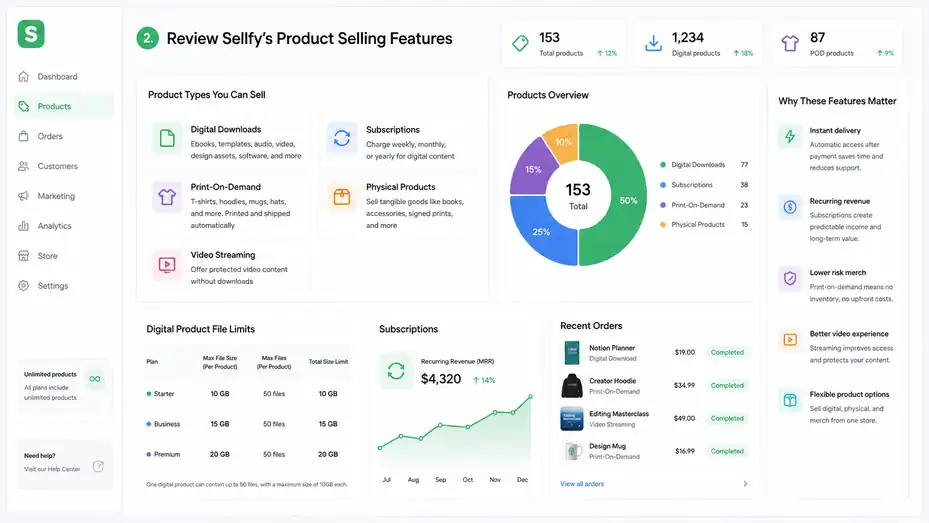
Sellfy’s product features are the heart of the platform.
Before looking at marketing, design, or pricing, you need to know whether it supports the kind of product you actually want to sell.
Digital Downloads And File-Based Products
Digital downloads are one of Sellfy’s strongest use cases. You can sell ebooks, templates, audio files, video files, design assets, software files, presets, documents, or almost any downloadable file type. Sellfy states that creators can sell ebooks, videos, audio and music, PSD, AI, and other file types.
This matters because digital products have a different delivery problem than physical products. Once someone pays, they expect instant access. If you manually email files, you create delays and support issues. Sellfy automates that handoff so customers can receive access after payment without you watching your inbox.
A practical example: Imagine you sell a $19 Notion planner to students. Your product page explains the planner, the customer pays, and Sellfy handles the download access. You can focus on improving the product and marketing it instead of sending links manually.
Sellfy’s pricing page also notes that plans include unlimited products, with maximum digital product file sizes varying by plan: 10GB on Starter, 15GB on Business, and 20GB on Premium. It also says one digital product can contain up to 50 files, with an overall maximum size of 10GB each in its FAQ section.
That is plenty for most ebooks, templates, presets, graphics, and audio packs. For large video-heavy libraries, you will want to check file size needs before committing.
Subscriptions And Recurring Revenue Products
Sellfy lets creators create digital subscription products and charge customers weekly, monthly, or yearly. This is one of the more valuable features if you want predictable income instead of relying only on one-time launches.
Subscriptions work well when you can deliver ongoing value. A musician might release monthly sample packs. A fitness educator might sell a private monthly program. A designer might offer fresh templates every month. The key is that subscribers need a reason to stay.
I suggest treating subscriptions differently from one-off products. A one-off product can solve one clear problem. A subscription needs a rhythm, promise, and retention plan. Before launching one, ask yourself: “What will members receive every month, and why would they still care after month three?”
A simple subscription structure could look like this:
- Monthly resource drop: New templates, files, lessons, or assets every month.
- Member-only archive: Access to past resources while subscribed.
- Clear cancellation expectation: Make the value obvious without trapping people.
Subscriptions can be powerful, but they also create responsibility. If you are still testing your audience, start with a one-time digital product first. Once you know what people buy, package recurring value around that demand.
Print-On-Demand Merchandise
Sellfy includes built-in print on demand for products like t-shirts, hoodies, mugs, and hats. The platform says it automatically prints incoming orders and ships them to customers.
This is useful for creators because merch can be risky when you buy inventory upfront. You may order 100 shirts, sell 17, and end up with boxes in your room. Print on demand lowers that risk because products are made after customers order.
A realistic creator scenario: You run a small YouTube channel about drawing. Instead of opening a full merch operation, you upload a design, create a hoodie, and add it to your store. When a viewer buys it, the order goes into production without you packing anything yourself.
The smart move is to keep print-on-demand products focused. Do not launch 40 items just because you can. Start with two or three products that match your brand and audience. A strong hoodie with a phrase your audience already uses will usually beat a random catalog of generic designs.
Print on demand is not magic, though. Margins can be thinner than digital products, production times can vary, and customer expectations around shipping matter. Use clear product descriptions and avoid promising unrealistic delivery speeds.
Physical Products And Tangible Goods
Sellfy also supports physical products, meaning you can sell tangible items from your storefront. This helps if you sell books, handmade items, signed prints, small accessories, or limited-edition creator products.
Physical products require more planning than digital downloads. You need to think about stock, packaging, shipping, returns, and customer questions. Sellfy can help you list and sell the item, but you still own the operational side unless you use print on demand.
I recommend using physical products when they strengthen your brand rather than distract from it. For example, a writer selling a digital writing course might offer a physical workbook. A photographer selling presets might offer a limited print collection. These products feel connected instead of random.
The key question is simple: Does this product make your audience’s experience better, or are you adding it because you feel like your store needs more stuff? More products do not always mean more revenue. Sometimes a focused catalog converts better because visitors understand what to buy.
Video Streaming For Protected Viewing
Sellfy includes video streaming, which lets creators offer videos on demand while reducing piracy risk and avoiding download issues. This is important if you sell courses, tutorials, workshops, music lessons, fitness lessons, or premium video content.
A downloadable video file can be useful, but it also creates problems. Large files are harder for customers to download, and once downloaded, they are easier to share. Streaming gives buyers a smoother viewing experience and gives you more control over how the content is consumed.
Imagine you sell a $49 editing masterclass. If the file is 8GB, some buyers may struggle to download it. With streaming, they can watch without dealing with storage or slow file transfers. That small convenience can reduce support messages.
I would still be thoughtful with video product structure. Break long lessons into smaller modules, name each lesson clearly, and explain what buyers will learn before purchase. A strong video product page should answer: Who is this for, what is included, how long is it, and what result should the buyer expect?
Build A Storefront That Feels Branded
A creator store does not need to look like a giant retail website. It needs to feel trustworthy, easy to navigate, and aligned with the creator’s brand.
Store Customization And Visual Branding
Sellfy’s customization tools let you add your logo, change colors, and create a layout that matches your brand. This is enough for many creators who want a clean storefront without hiring a designer.
Your visual choices matter because people decide quickly whether a store feels legitimate. A messy color scheme, blurry product image, or unclear homepage can make even a great product feel risky. You do not need fancy design, but you do need consistency.
I suggest starting with three brand basics:
- Logo or wordmark: Use the same name people already recognize from your social profile.
- Two main colors: One background or neutral color, one action color for buttons.
- Consistent product images: Use the same style for thumbnails, mockups, or previews.
A beginner mistake is trying to make the store look “creative” before making it clear. Clarity wins. The product title should be obvious, the call-to-action should stand out, and visitors should understand what you sell within a few seconds.
A good creator storefront feels like an extension of your content. If your YouTube channel, newsletter, or Instagram page has a calm minimalist style, your Sellfy store should feel similar. That continuity builds trust.
Custom Domain And Store Credibility
Sellfy lets you connect your own domain, which helps strengthen your brand. A custom domain is not required to sell, but it can make your store feel more professional.
For example, “shop.yourbrand.com” usually feels more trustworthy than a generic store URL. It also makes links easier to share in videos, email signatures, podcast descriptions, and social bios. Small details like this can improve buyer confidence.
That said, I would not let the domain decision delay your launch. If you have a product ready and an audience asking for it, launch first and improve branding after. A custom domain is valuable, but it is not more important than validating demand.
Use a custom domain when:
- You already have a recognizable brand: A domain keeps the buying experience consistent.
- You run paid campaigns: Branded URLs often feel cleaner in ads.
- You sell higher-priced products: Professional presentation matters more as price increases.
If you are just starting, use the store URL available to you, make the page clear, and focus on getting your first customers. You can always upgrade the presentation once sales prove the idea.
Mobile Optimization And Checkout Experience
Sellfy says stores are optimized for mobile devices and designed to create a smooth checkout experience on desktop and mobile. This matters because many creator purchases happen from social platforms where people browse on phones.
Think about the journey. Someone sees your TikTok, taps your bio, lands on your store, scans your product, and decides whether to buy. If the page loads poorly, images are hard to read, or checkout feels awkward, you lose the sale.
Mobile optimization is not just a technical feature. It changes how you write and design your product pages. Keep your product title clear, put the strongest benefit near the top, and avoid giant blocks of text before the buy button.
A simple mobile-friendly product page structure:
- Top section: Product name, image, price, and clear buying button.
- Benefit section: Explain what the buyer gets and why it helps.
- Included section: List files, formats, bonuses, or access details.
- Trust section: Add refund info, usage notes, or common questions.
I recommend testing your store from your own phone before sharing it. Go through the customer journey like a stranger. If anything makes you pause, rewrite or simplify it.
Shopping Cart And Multi-Product Buying
Sellfy includes a shopping cart so customers can buy multiple items at once. This sounds basic, but it matters when you have related products.
For example, a designer might sell a logo template pack, an Instagram post kit, and a brand guidelines template. If buyers can add all three to cart, your average order value can increase. Without a cart, each purchase feels separate, and customers may stop after one product.
The cart feature becomes more useful as your catalog grows. You can structure products around natural bundles even before creating formal bundles. If someone buys a beginner ebook, they may also want the worksheet. If someone buys a music sample pack, they may also want presets.
The important thing is not to overwhelm visitors. Use related products thoughtfully. A store with 12 focused products is easier to shop than a store with 80 unrelated items.
In my experience, the best creator stores make the next purchase feel obvious. They do not push random add-ons. They suggest products that genuinely help the buyer get a better outcome.
Set Up Payments, Security, And Buyer Trust
A good store is not only about what you sell. It also needs to make customers feel safe when they pay and confident that they will receive what they bought.
PayPal And Stripe Payment Options
Sellfy supports PayPal and Stripe. Its feature page says PayPal can be used to accept payments from customers in more than 200 countries, while Stripe lets creators offer credit card payments.
This gives buyers familiar ways to pay. Familiarity matters. Many customers are more comfortable entering payment details when they recognize the payment method. For international creators, PayPal can be especially useful because many buyers already have accounts.
Sellfy’s pricing FAQ says you receive money instantly after a purchase, with payments sent directly to your PayPal or Stripe account depending on the payment gateway used. That direct payout model can be appealing if you want simpler cash flow.
However, remember that payment processors have their own rules, fees, and country availability. Sellfy’s pricing page says Sellfy does not charge transaction fees, but you still need to cover PayPal or Stripe processing fees, typically 2.9% + 30¢ depending on the gateway.
Here is the practical takeaway: Sellfy may not take an extra platform transaction fee on paid plans, but payment processing is still a real cost. Price your products with that in mind.
Secure Payments And Customer Confidence
Sellfy states that it uses SSL secure payments and that buyer payment information is handled by trusted payment processors. It also describes itself as PCI-DSS-ready, which relates to payment card security standards.
For a creator, the simpler explanation is this: You do not want to personally handle sensitive card data. You want established processors to manage the risky payment part. That is what systems like Stripe and PayPal are built for.
Security also affects how your store feels. Even if your product is affordable, buyers still need confidence before paying. Add clear product descriptions, realistic previews, refund or support expectations, and a professional contact method.
A small trust checklist:
- Clear product preview: Show what the buyer receives.
- Simple support info: Tell buyers how to contact you.
- Delivery explanation: Explain whether they get a download, stream, shipment, or subscription access.
- Usage terms: Clarify personal use, commercial use, or license limits when relevant.
I believe creators often underestimate trust signals. Your audience may like you, but liking your content is not always the same as trusting a checkout page. Make the buying process feel safe and predictable.
Pricing Plans And Sales Limits
Sellfy currently lists three main paid plans: Starter, Business, and Premium. Monthly pricing is shown as $29/month for Starter, $79/month for Business, and $159/month for Premium. Yearly pricing is listed as $22/month, $59/month, and $119/month respectively, with Sellfy describing the yearly option as a 25% saving.
Each plan also has an annual sales volume limit. Starter supports up to $10k in sales per year, Business up to $50k, and Premium up to $200k.
| Plan | Monthly Price | Yearly Price | Annual Sales Volume | Best Fit |
|---|---|---|---|---|
| Starter | $29/mo | $22/mo | Up to $10k/year | New creators validating products |
| Business | $79/mo | $59/mo | Up to $50k/year | Growing creators needing more sales tools |
| Premium | $159/mo | $119/mo | Up to $200k/year | Established creators needing priority support and advanced options |
Sellfy’s pricing page says all three plans include 0% transaction fees, unlimited products, digital products, physical products, subscriptions, and print-on-demand products. It also says Business and Premium include growth features such as product upselling, cart abandonment, and affiliate marketing.
One thing I would watch carefully is the annual sales cap. Sellfy says if you exceed your plan limit, you are expected to upgrade, and if the account has not upgraded, Sellfy may charge a 2% overage fee on revenue above the plan limit.
That does not make Sellfy bad. It just means you should choose a plan based on realistic revenue, not only monthly subscription cost.
Protect Digital Products And Reduce Support Issues
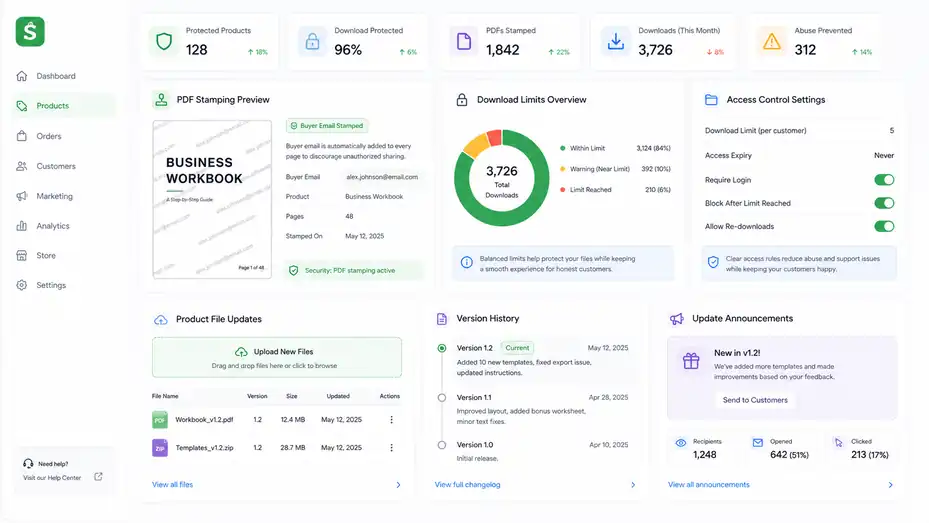
Digital products are profitable because they can be delivered instantly and sold repeatedly.
But they also need protection, clear access rules, and smooth customer delivery.
PDF Stamping And Buyer Identification
Sellfy includes PDF stamping, which automatically adds buyer email addresses to every page of a PDF product file. This helps discourage casual sharing because each file is uniquely marked.
This feature is especially useful for ebooks, guides, planners, worksheets, educational PDFs, and premium written resources. It will not stop every form of piracy, but it adds accountability. Most buyers are less likely to share a file publicly if their email appears inside it.
Here’s a realistic example. Suppose you sell a $39 business workbook. Without stamping, someone could upload the PDF into a public group with no identifying mark. With stamping, the file includes buyer information, which creates a stronger reason not to distribute it.
I suggest using PDF stamping for premium files, commercial-use templates, and educational resources where the value is mostly inside the document. For free lead magnets, it may not be necessary. You do not want to add friction where protection does not matter.
Also, do not rely on protection alone. Good customer experience reduces unauthorized sharing too. When buyers feel they received strong value, clear access, and helpful support, they are less likely to treat your product like a disposable file.
Limited Downloads And Access Control
Sellfy lists limited downloads as one of its digital protection features. Download limits can help reduce abuse, especially when selling files that could be shared or repeatedly downloaded from different places.
The goal is balance. If limits are too strict, honest customers get frustrated. If there are no limits, file access can become easier to misuse. A good download policy protects your work without making normal buyers feel punished.
For most creator products, a reasonable approach is to allow enough downloads for real-life use. People change devices, lose files, or need to download again. Your support policy should explain what happens if someone needs help accessing their purchase.
A practical customer-friendly wording might be: “You’ll receive access to download your files after purchase. If you run into trouble, contact us with your order email and we’ll help.”
That wording feels better than sounding suspicious before someone has even bought. Protection should work quietly in the background. Your sales page should still feel welcoming.
Updating Digital Product Files
Sellfy’s help documentation explains that to change a digital product file, you go to the Products section, select the product, upload the new files, and delete the old file if it is no longer needed.
This matters because digital products are rarely perfect forever. You may fix typos, add new templates, update lessons, improve file organization, or add bonus resources. A product that improves over time can become more valuable and earn better reviews.
I recommend keeping a simple version log for your own records. You do not need anything fancy. A note like “Version 1.2: Added 10 new templates, fixed export issue, updated instructions” is enough. This helps you answer customer questions and market improvements.
Product updates can also become a sales asset. Instead of launching something once and forgetting it, you can tell your audience: “I updated the pack with new examples and cleaner instructions.” That gives previous buyers a better experience and gives new buyers another reason to purchase.
Just be careful not to overpromise lifetime updates unless you truly plan to maintain the product. A better phrase is often “includes future improvements when available,” which feels honest without locking you into endless work.
Use Marketing Features To Increase Sales
Sellfy’s marketing features help creators turn traffic into revenue. The important thing is to use them strategically instead of adding discounts and upsells randomly.
Email Marketing For Customer Follow-Up
Sellfy includes email marketing in its plan structure, and its pricing page currently lists email marketing across Starter, Business, and Premium. Email matters because not every customer buys the first time they see your product.
Email marketing works best when you think beyond “send a promo.” You can use it to announce product launches, educate buyers, share updates, offer discounts, and re-engage customers. Since creators often have trust-based audiences, a good email can feel more personal than a social post.
A simple creator email flow could be:
- Email 1: Welcome buyers and explain how to use the product.
- Email 2: Share a quick win or tutorial related to the product.
- Email 3: Recommend a related product or upgrade when it makes sense.
Do not email only when you want money. That trains your audience to ignore you. Mix helpful content with offers so people feel like staying subscribed is worth it.
In my experience, email becomes more valuable as your catalog grows. One digital product might sell from social traffic alone. But once you have multiple products, email helps connect the dots and bring people back.
Discounts, Coupons, And Planned Sales
Sellfy’s help center groups marketing features around planning sales, creating coupons, sending emails, and working with affiliates. Coupons are useful when you need a timely reason for buyers to act.
The biggest mistake is discounting too often. If your audience learns that every product will be 40% off next week, they wait. Instead, use discounts with a clear purpose: launch week, seasonal promotion, customer appreciation, bundle offer, or limited-time campaign.
A smart coupon strategy:
- Launch discount: Reward early buyers and create momentum.
- Subscriber discount: Give your email list a reason to stay engaged.
- Bundle discount: Increase average order value without cheapening one product.
- Recovery discount: Bring back visitors who showed interest but did not buy.
Keep discount rules simple. A confusing offer can reduce conversions because buyers pause to understand it. “20% off this week” is easier than “17% off selected items with exclusions after checkout.”
I suggest testing smaller discounts first. Sometimes 10–15% is enough to move buyers who were already interested. Deep discounts should be saved for strategic moments, not used as your default sales engine.
Product Upselling
Product upselling is listed as a Business and Premium growth feature on Sellfy’s pricing page. Upselling means offering a related product or upgrade during the buying journey.
This works when the upsell helps the buyer get a better result. It fails when it feels like a random cash grab. For example, if someone buys a beginner photo preset pack, an upsell for a short editing tutorial makes sense. An unrelated hoodie probably does not.
A good upsell should be:
- Relevant: It connects directly to the original purchase.
- Easy to understand: The buyer instantly sees why it helps.
- Lower friction: It does not require a huge second decision.
- Fairly priced: It feels like a helpful add-on, not pressure.
Imagine you sell a $29 ebook on building a content calendar. A $9 worksheet bundle is a natural upsell. The ebook teaches the system, and the worksheet helps buyers implement it. That is the kind of offer customers appreciate.
I recommend building upsells from customer behavior. Look at which products people buy together or which questions they ask after purchase. The best upsell often solves the next obvious problem.
Cart Abandonment Recovery
Cart abandonment is available on Sellfy’s Business and Premium plans. This feature helps recover shoppers who start checkout but do not complete the purchase.
Cart abandonment happens for many reasons. A buyer gets distracted, needs to check their budget, loses connection, or wants to think. A recovery message reminds them to come back.
The tone matters. You do not need to sound desperate. A simple message like “Still interested? Your cart is waiting” can be enough. If you include a small incentive, make sure it does not train everyone to abandon carts just to get a discount.
A practical recovery sequence might include:
- Reminder 1: A gentle reminder shortly after abandonment.
- Reminder 2: A benefit-focused message explaining what they will get.
- Reminder 3: A final nudge, possibly with a limited discount if margins allow.
From what I’ve seen, recovery works best when the product page was already strong. If people abandon because the offer is unclear, reminders alone will not fix it. Improve the product page and use recovery as support, not a bandage.
Affiliate Marketing
Sellfy lists affiliate marketing as a Business and Premium feature. Affiliate marketing lets other people promote your product and earn a commission when they generate sales.
This can work extremely well for creator products because trust travels through communities. A design teacher can promote your template pack. A YouTuber can recommend your editing presets. A niche newsletter can share your ebook.
But affiliate marketing only works if the product already converts. Do not recruit affiliates before your offer is clear, your checkout works, and your customer experience is solid. Affiliates will not fix a weak product page.
A simple affiliate setup should define:
- Commission: Choose a rate that leaves you profitable.
- Allowed promotion methods: Clarify what affiliates can and cannot do.
- Core messaging: Give them accurate product benefits and examples.
- Creative assets: Provide images, descriptions, or demo links.
I believe affiliate marketing is best used after you have proof. Once your product sells consistently from your own audience, affiliates can help you scale. Before that, focus on making the offer stronger.
Compare Sellfy Features By Plan
Choosing a Sellfy plan is less about picking the cheapest option and more about matching features to your current business stage.
Starter Plan Feature Fit
The Starter plan is positioned for creators starting to sell online. It currently costs $29/month monthly or $22/month on yearly billing, supports up to $10k in annual sales, and includes unlimited products, downloads, subscriptions, merch, email marketing, and core marketing features.
Starter is a sensible entry point if you are validating your first products. You can sell digital products, subscriptions, and merch without immediately paying for higher-tier growth tools.
This plan is best if:
- You are launching your first store: You need the basics more than advanced automations.
- You sell low to moderate volume: Your annual revenue is still under the $10k cap.
- You want to test product demand: You are not ready to build a full marketing machine yet.
The limitation is that you may miss features like product upselling, cart abandonment, and affiliate marketing. If your store already has traffic, those features can pay for themselves. If your store has little traffic, they may not matter yet.
My advice is simple: Do not overbuy tools before you have buyers. Starter can be enough when your main job is launching, learning, and getting real customer feedback.
Business Plan Feature Fit
The Business plan is aimed at growing brands and currently costs $79/month monthly or $59/month with yearly billing. It supports up to $50k in annual sales and adds features such as custom fields, growth features, product upselling, cart abandonment, and affiliate marketing.
Business is often the plan that makes sense once your store is no longer an experiment. If you have consistent traffic, repeat buyers, or several products, the growth features become more useful.
For example, cart abandonment can recover lost orders. Upsells can increase average order value. Affiliate marketing can help other creators promote your products. These features matter more when you already have enough activity for optimization to make a difference.
A realistic upgrade signal: You are getting regular product page visits and sales, but you know buyers could purchase more if the journey were better. That is when upsells and recovery tools become practical, not just nice to have.
The $50k annual cap also gives more breathing room than Starter. If your product is priced at $49, that is roughly 1,020 sales per year before hitting the cap. For many solo creators, that is a meaningful stage.
Premium Plan Feature Fit
The Premium plan is currently listed at $159/month monthly or $119/month yearly. It supports up to $200k in annual sales and includes advanced options, product and design migration, and priority support.
Premium is for creators who already have meaningful revenue or need more support. If your store is central to your income, priority support matters more than it does for a side project. Downtime, migration issues, or setup delays can cost real money.
This plan makes sense if you are moving from another platform, have a larger catalog, need migration help, or are approaching the Business plan’s sales cap. Sellfy’s FAQ also mentions different migration services, including email migration across plans, product migration for Business and Premium, and store design migration for Premium.
I would not start on Premium unless you have a clear reason. Higher price does not automatically mean better results. The plan is valuable when your business complexity justifies it.
The best plan is the one that removes the next real bottleneck. If your bottleneck is traffic, Premium will not solve that. If your bottleneck is migration, support, or scaling past $50k, Premium becomes easier to justify.
Optimize Your Sellfy Store For Conversions
Once your store is live, the next job is improving how well it turns visitors into buyers.
Small changes in product positioning, page structure, and offer clarity can make a real difference.
Write Product Pages That Sell Clearly
A strong product page does not just describe the file. It explains the result the buyer gets. This is especially important for digital products because buyers cannot hold them or inspect them physically.
Start with the buyer’s problem. If you sell a budget spreadsheet, do not lead with “includes 12 tabs.” Lead with “Plan your monthly spending without building formulas from scratch.” Then explain what is included.
A simple product page structure:
- Problem: What is the buyer struggling with?
- Promise: What outcome does the product help create?
- Contents: What files, lessons, templates, or resources are included?
- Use case: How should they use it after purchase?
- Trust: Add FAQs, refund notes, license terms, or support details.
Let’s say you sell a social media content calendar. A weak description says, “This is a content calendar template.” A stronger one says, “Plan 30 days of content in one sitting, organize post ideas by platform, and stop guessing what to publish next.”
That second version paints a result. People buy outcomes, not file formats.
Improve Product Images And Previews
Your product image is often the first trust signal. For digital products, previews are even more important because buyers need to understand what they are getting.
Use mockups, screenshots, sample pages, before-and-after examples, or short preview videos. If you sell templates, show the inside. If you sell presets, show edited examples. If you sell an ebook, show the table of contents and a few page spreads.
Avoid misleading previews. If the product is beginner-friendly, say that. If it requires software, mention it clearly. The fastest way to create refund requests is to let buyers assume something that is not true.
I recommend creating at least three visuals for important products:
- Main product mockup: A clean image showing the product.
- Inside preview: A screenshot or sample of what buyers receive.
- Result example: A real or realistic outcome created with the product.
Good previews reduce hesitation. They answer the quiet question every buyer has: “Will this actually be useful for me?”
Build Bundles And Product Ladders
A product ladder is a set of offers that move buyers from entry-level to higher-value products. Sellfy’s multi-product support and shopping cart make this easier to structure.
For example, a creator could build this ladder:
- Entry product: $9 checklist or mini-template.
- Core product: $39 full template pack.
- Premium product: $99 course or resource library.
- Recurring product: $19/month subscription.
This works because not every buyer is ready for your most expensive product. A smaller offer lets them experience your work with lower risk. If they like it, they may come back for more.
Bundles can also increase order value. If three separate templates cost $19 each, you might offer all three for $39. The buyer gets a deal, and you earn more than a single-item purchase.
The key is to bundle around a shared goal. “Creator Starter Kit” is stronger than “Random Files Bundle.” Make the bundle feel like a complete solution.
Use Metrics To Decide What To Improve
Do not optimize based only on vibes. Look at simple signals: visits, conversion rate, abandoned carts, email clicks, product sales, refund requests, and customer questions.
Even without advanced analytics, customer behavior tells a story. If many people visit but few buy, your offer may be unclear or overpriced. If people buy but ask the same question afterward, your instructions need work. If one product sells far more than others, your audience is telling you what they value.
A practical improvement rhythm:
- Week 1: Launch and collect first reactions.
- Week 2: Improve product page clarity.
- Week 3: Add better previews or FAQs.
- Week 4: Test a bundle, discount, or upsell.
I suggest changing one major thing at a time. If you rewrite the page, change the price, add a discount, and swap images all at once, you will not know what helped.
Avoid Common Sellfy Mistakes
Sellfy makes setup easier, but creators can still hurt sales with unclear offers, poor product structure, or weak customer communication.
Mistake 1: Treating The Store Like The Business
A store is not the business. It is the checkout and delivery system. Your actual business is the audience, offer, trust, and repeat value you build around it.
Some creators publish a product and expect the platform to create sales. That rarely works. Sellfy gives you the selling infrastructure, but you still need traffic and demand. Your social content, email list, search strategy, community, and partnerships bring people to the store.
Think of Sellfy as the place where interest turns into purchase. If no one knows your product exists, even a perfect store will sit quietly.
A better approach is to plan launch content before publishing. Create posts that show the problem, demonstrate the product, share behind-the-scenes development, answer objections, and show examples. Then send people to your store when they already understand the value.
In my opinion, the creators who win are not always the ones with the prettiest stores. They are the ones who explain the product clearly and repeatedly.
Mistake 2: Adding Too Many Products Too Soon
Unlimited products can be useful, but it can also tempt you into clutter. A store with too many unrelated items can confuse buyers.
When visitors land on your store, they should quickly understand what you are known for. If you sell design templates, productivity planners, random merch, audio loops, and coaching PDFs all on one page, people may not know where to start.
Start with a focused catalog. One strong product is better than ten half-finished ones. Once you understand what buyers want, expand around that category.
A good expansion pattern:
- Core offer: Your main product solving one clear problem.
- Support offer: A worksheet, template, or bonus that helps implementation.
- Advanced offer: A deeper version for buyers who want more.
- Brand offer: Merch or physical products only when audience demand exists.
This keeps your store coherent. Every new product should make the overall brand easier to understand, not harder.
Mistake 3: Ignoring Post-Purchase Experience
Many creators focus heavily on the sales page and forget what happens after purchase. But the post-purchase experience affects reviews, referrals, repeat sales, and refund rates.
After someone buys, they should know exactly what to do next. For digital downloads, explain how to access files. For templates, include setup instructions. For subscriptions, explain where new content appears and how often. For physical items, set expectations around shipping.
A simple post-purchase note can reduce support messages: “Thanks for your purchase. Download your files using the link below. Start with the Quick Start PDF first, then open the template folder.”
That one sentence can prevent confusion.
I also suggest creating a short “read this first” file for complex digital products. It does not need to be long. Just tell buyers what is included, what tool they need, and the first three steps.
Customers remember how easy or frustrating it was to use your product. A smoother experience makes them more likely to buy again.
Decide Whether Sellfy Has The Features You Actually Need
The best platform is not the one with the longest feature list. It is the one that supports your business model without making your work harder than it needs to be.
When Sellfy Is A Strong Choice
Sellfy is a strong choice if you want one simple place to sell digital downloads, subscriptions, print-on-demand merch, and physical products. It is especially appealing when you care about speed, built-in product delivery, and creator-friendly selling tools.
It also makes sense if you do not want to manage a complicated plugin stack. You can create a storefront, connect payment processing, customize branding, and use built-in marketing features without building everything from scratch.
I would seriously consider Sellfy if you are:
- A digital creator: You sell files, templates, presets, guides, videos, or audio.
- A content creator: You already have an audience on social, video, podcast, or email.
- A merch-curious creator: You want print on demand without inventory.
- A subscription seller: You want recurring digital access.
- A simple-store builder: You prefer ease over endless customization.
The platform’s value is convenience. If convenience helps you launch faster and spend more time creating, that can be worth far more than having every possible advanced setting.
When Sellfy May Not Be Enough
Sellfy may not be the best choice if you need deep design freedom, advanced ecommerce customization, complex shipping workflows, large-scale physical inventory management, or a huge app ecosystem.
This does not mean Sellfy is weak. It means it is focused. Focused tools are great when your needs match the focus. They become limiting when your business model moves outside it.
For example, if you are building a large fashion store with hundreds of SKUs, advanced filtering, warehouse integrations, and heavy inventory controls, you may want a more traditional ecommerce platform. If you are building a creator store with digital products, memberships, and merch, Sellfy is much closer to the target.
Also pay attention to sales caps. Starter, Business, and Premium each have annual sales volume limits, and going over may require an upgrade or potentially lead to overage fees if not upgraded. If you expect fast revenue growth, factor that into your plan choice.
A Simple Decision Framework
Here’s how I would decide.
First, list your product types. If you plan to sell digital downloads, subscriptions, print-on-demand items, or simple physical products, Sellfy fits the core need. If your product model is more complex, compare carefully.
Second, estimate your first-year revenue. Do not pick a plan only by monthly price. Match the plan to realistic sales volume and needed features.
Third, identify your biggest bottleneck. If it is launching quickly, Sellfy’s simplicity helps. If it is advanced customization, Sellfy may feel limiting. If it is marketing, the Business plan’s upsells, cart abandonment, and affiliate tools may matter.
Fourth, test with one strong product. Do not build a huge store before proving demand. Launch something clear, promote it, study buyer behavior, and improve from there.
My honest take: Sellfy is best when you want to spend less time managing ecommerce mechanics and more time creating products people want. It will not replace strategy, audience building, or a compelling offer. But it can give you the practical tools to sell without turning your creator business into a technical maze.
Conclusion: Sellfy Gives Creators A Practical Feature Set Without Too Much Noise
A good Sellfy features overview should not just list tools. It should help you understand whether those tools support the way you actually sell.
Sellfy covers the creator essentials: Digital downloads, subscriptions, print on demand, physical products, mobile-friendly storefronts, PayPal and Stripe payments, PDF stamping, email marketing, discounts, upsells, cart recovery, affiliate marketing, and plan options for different revenue stages.
For many creators, that is enough to launch a serious store without overcomplicating the process. The biggest advantage is not that Sellfy has every feature imaginable. It is that the features are aligned with common creator workflows.
Start with the product your audience already wants. Build a clear page. Use previews. Make delivery easy. Add marketing features once traffic exists. Then optimize based on real buyer behavior.
That is how Sellfy becomes more than a storefront. It becomes a practical selling system that helps you turn creative work into revenue.
FAQ
What is included in a Sellfy features overview?
A Sellfy features overview explains the main tools creators can use to sell digital products, subscriptions, physical products, and print-on-demand merchandise. It usually covers storefront customization, payment options, product delivery, marketing tools, security features, pricing plans, and ways to optimize sales.
Is Sellfy good for selling digital products?
Yes, Sellfy is a strong option for selling digital products because it supports instant file delivery, digital downloads, video streaming, subscriptions, and product protection tools. It is especially useful for creators selling ebooks, templates, presets, courses, music files, or design assets.
What are the most useful Sellfy features for creators?
The most useful Sellfy features for creators include digital product sales, print-on-demand merchandise, subscriptions, custom storefronts, PayPal and Stripe payments, discount codes, email marketing, cart abandonment recovery, upsells, affiliate marketing, PDF stamping, and basic analytics for tracking performance.
Does Sellfy help with marketing products?
Yes, Sellfy includes built-in marketing features that help creators promote and increase sales. Depending on the plan, you can use email marketing, coupons, discounts, product upsells, cart abandonment recovery, and affiliate marketing to bring customers back and increase average order value.
Who should use Sellfy?
Sellfy is best for creators, educators, designers, musicians, writers, photographers, and small online brands that want a simple way to sell products online. It works well for people who need an easy storefront without managing complicated ecommerce plugins or custom development.

I’m Juxhin, the voice behind The Justifiable.
I’ve spent 6+ years building blogs, managing affiliate campaigns, and testing the messy world of online business. Here, I cut the fluff and share the strategies that actually move the needle — so you can build income that’s sustainable, not speculative.
Related posts:
 Sellfy Pros And Cons For Digital Sellers: Honest Breakdown
 How the Salehoo Catalog Helps You Spot Winning Items Quickly
 How the Salehoo App Works and Why It Speeds Up Product Research
 Top Ecommerce Platforms That Make Selling Simple
 Doba Alternatives: Better Dropshipping Platforms Compared
 Sellfy Pricing Explained: Real Costs Creators Must Know