
Table of Contents
Some links on The Justifiable are affiliate links, meaning we may earn a small commission at no extra cost to you. Read full disclaimer.
Freshsales features overview sounds simple on the surface, but I think that is exactly why so many teams miss what makes this CRM genuinely useful.
On paper, Freshsales looks like another sales platform with pipelines, emails, and reports. In practice, it combines sales CRM, multichannel communication, automation, AI assistance, and optional marketing tools in ways that can remove a lot of daily friction.
If you are trying to figure out what Freshsales actually does, which features matter most, and where the hidden value really is, this guide will walk you through it clearly.
What Freshsales Actually Is And Why Its Feature Set Matters
Freshsales is built by Freshworks as an AI-powered CRM for sales teams, and the broader Freshsales Suite can also bring sales and marketing into one shared system.
Freshworks positions it around pipeline growth, productivity, multichannel engagement, and AI-assisted selling rather than just contact storage.
Freshsales Is More Than A Contact Database
A lot of people evaluate CRMs too narrowly. They look for contact records, deal stages, and maybe a dashboard, then stop there. That misses the point.
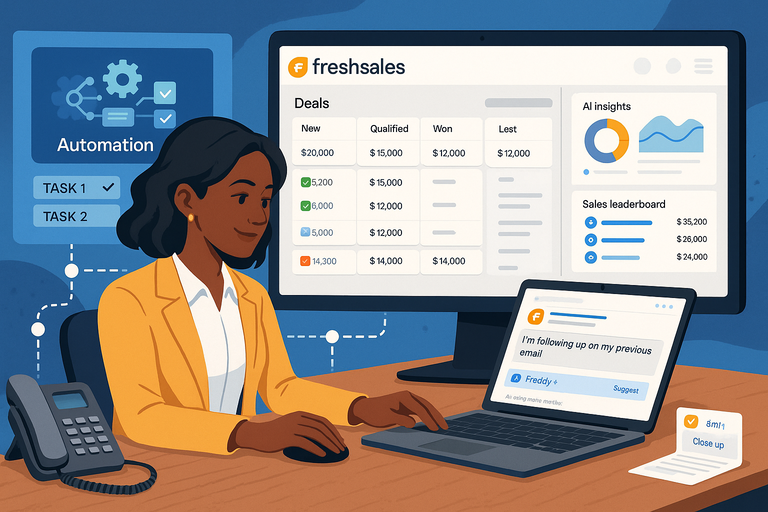
Freshsales is designed around a full selling workflow. The official product pages emphasize a single view of the customer, built-in communication channels, automation, AI support through Freddy, and end-to-end pipeline management. That means the platform is not just where you store data. It is meant to be where your team works deals, runs follow-ups, and decides what to do next.
That distinction matters in real life. Imagine you are managing a small B2B sales team. If your CRM only stores records, reps still jump between inboxes, phone tools, spreadsheets, and Slack messages. Freshsales tries to reduce that switching cost by putting email, phone, chat, WhatsApp, activity history, and automation closer to the deal record itself.
I believe that is one of the biggest reasons Freshsales feels stronger in day-to-day execution than in feature checklists. The obvious features are useful, but the real advantage is how many of them sit close together in one workflow.
The Platform Is Trying To Solve Speed, Context, And Consistency
When I look at Freshsales, I see three core problems it is trying to solve.
- Speed: It includes task management, auto-assignment, sales sequences, workflows, and AI assistance to reduce manual work and help reps move faster.
- Context: It offers a 360-degree customer view with activity timeline, details sections, highlight cards, and auto-profile enrichment so reps are not starting cold.
- Consistency: It supports structured pipeline tracking, forecasting, goals, standard reports, and deal monitoring features like rotten deals so managers can keep process quality high.
That combination is stronger than it sounds. A lot of teams do not lose deals because they lack “more software.” They lose them because follow-up is uneven, handoffs are messy, and nobody has a clean signal for what deserves attention right now.
Freshsales is at its best when you use it as an operating system for sales discipline, not just as a digital address book.
Core CRM Features Most Teams Use First
The foundation of Freshsales is still classic CRM functionality, but some of the most practical wins come from how these basics are presented and connected.
Freshworks includes contact and account management, lifecycle stages, activity timelines, Kanban views, and sales dashboards across its plan structure.
Contact And Account Management Give You A Usable Customer View
Every CRM promises a customer view. What matters is whether that view helps you act.
Freshsales includes contact management, account management, lifecycle stages, and activity timelines in its core CRM setup. In practice, that gives sales teams a way to organize people and companies, see where they are in the journey, and review what has happened recently.
The more useful layer is the contextual layout around that data. Freshworks highlights a summary section, detailed sections across modules and touchpoints, an activity timeline, and highlight cards that surface recent and relevant information.
That sounds small, but it changes how reps behave. Let’s say a lead replies after two quiet weeks. A weak CRM forces you to hunt through notes and old email threads. A better setup shows you last contact, active sequences, recent activities, and account details in one place. That shortens response time and usually improves message quality too.
In my experience, this is one of the most underestimated parts of any CRM buying decision. Fancy AI gets the headline, but clear context inside a record is what saves your team hours every week.
Auto-Profile Enrichment Is One Of The Quiet Productivity Wins
Auto-profile enrichment is easy to overlook because it is not flashy. Freshworks says Freshsales automatically enriches contacts with social and publicly listed information.
For a sales team, that matters more than it first appears. Manual enrichment is one of those annoying jobs that steals time in tiny pieces. Reps do not usually complain about it because each record only takes a few minutes. But spread across dozens or hundreds of leads, those minutes add up fast.
There is also a consistency benefit. When enrichment is automated, your records tend to be more complete and more standardized. That improves segmentation, routing, and personalization later. A sales manager can trust the database a bit more, and reps can start outreach without doing detective work first.
A realistic example: If you are inbound-heavy and getting form fills every day, enriched records help your team triage faster. You are not wasting the first touch asking questions you could have inferred from company or public profile data. You can move directly into relevance.
I suggest treating enrichment as leverage, not as a nice extra. It rarely sells the software on its own, but it often improves adoption because the CRM becomes less annoying to maintain.
Kanban Views And Activity Management Help Reps Stay On Track
Freshworks includes Kanban views for records, along with tasks, appointments, notes, and an activity home dashboard. It also supports custom sales activities in higher configurations.
This is where Freshsales becomes practical for busy reps. A visual Kanban board makes it easier to see pipeline movement and spot stalled deals. Meanwhile, the activity dashboard gives reps a simple way to manage what needs attention today.
That pairing matters because many pipelines fail from neglect, not strategy. A deal is not lost because the pitch was terrible. It is lost because no one followed up after the call, or because the next task lived in someone’s memory instead of the CRM.
I like systems that make the right action obvious. Freshsales leans in that direction. Reps can move opportunities visually, schedule next steps, and keep notes close to the deal. Managers can also see whether the pipeline is active or just cosmetically full.
For teams moving from spreadsheets or lighter CRMs, this usually becomes one of the first felt improvements. The work stops living in scattered places and starts living inside a process.
Automation Features That Save More Time Than You Expect
Automation is one of the strongest parts of the Freshsales value proposition.
The platform includes task management, auto-assignment rules, sales sequences, workflows, internal notifications, and broader automated engagement tools in the suite.
Auto-Assignment Rules Reduce Lead Response Chaos
Freshworks says Freshsales can automatically assign leads across territories based on lead-routing rules.
That is a deceptively important feature. When teams are small, lead assignment feels manageable by hand. Once volume grows, manual routing gets messy fast. Leads sit unclaimed, the wrong rep follows up, or managers become traffic controllers instead of leaders.
Auto-assignment fixes that by creating a predictable path from lead capture to owner. You can route by geography, segment, source, or territory logic, depending on how your sales motion works.
Here is where the real value shows up: Speed and accountability. The moment a lead enters the system, somebody owns it. That reduces internal confusion and shortens time to first response, which often has a bigger effect on conversion than another dashboard ever will.
I have seen teams underestimate this because it sounds operational rather than strategic. But operations shape outcomes. A clean routing system prevents hidden pipeline leaks. If your current process includes “Who is handling this?” more often than it should, this feature deserves more attention.
Sales Sequences Turn Follow-Up Into A Repeatable System
Freshsales supports sales sequences that automate actions like emails, calls, and SMS while still allowing personalized interactions.
This is one of the features I would place near the top of the list for most sales teams. Not because automation should replace human selling, but because it protects consistency.
Most reps are pretty good at first-touch enthusiasm. The drop-off happens later. Follow-up becomes uneven, especially when pipelines get crowded. Sequences solve that by turning your outreach cadence into a system rather than a personal memory test.
A useful way to think about this is simple:
- Cold outreach: Build a structured multi-step cadence.
- Inbound follow-up: Trigger quick responses and reminders.
- Post-demo nurture: Keep prospects warm without manual babysitting.
The smart approach is not to automate everything. It is to automate the scaffolding. Let the CRM handle timing and task prompts while the rep focuses on tailoring the message when intent is high.
If you are running even a modest inside sales team, sequences usually create an immediate lift in process quality. They do not magically make bad messaging good, but they stop good opportunities from dying because nobody remembered step three.
Workflows And Internal Notifications Clean Up The Messy Middle
Freshsales includes workflows to automate key tasks and business processes, plus internal notifications for custom actions like sign-ups, upgrades, and cancellations. It also offers contextual collaboration with Slack.
This is where many teams unlock the “hidden” value. Sales operations are full of messy middle moments: a lead hits a score threshold, a demo gets booked, a proposal is sent, a renewal looks shaky, or a customer action should alert another team.
Without workflows, those moments depend on people noticing things manually. With workflows, the system can trigger tasks, alerts, assignments, or next-step processes automatically.
That has two big effects. First, you reduce human error. Second, you make the business more scalable because outcomes rely less on individual memory.
A simple example: When a lead books a demo, you might automatically assign the correct rep, create a prep task, notify a manager for strategic accounts, and add the contact to a relevant follow-up path. None of that is glamorous, but all of it improves execution.
I recommend viewing workflows as process insurance. They are not exciting in a sales deck, but they are often the difference between a CRM everyone logs into and a CRM that actually drives behavior.
Communication Features That Keep Conversations Inside The CRM
Freshsales puts a lot of emphasis on multichannel selling. Freshworks lists email, phone, chat, WhatsApp Business, Apple Business Chat, and SMS-related capabilities as part of the communication layer.
Email, Phone, And Chat Are Not Just Add-Ons Here
Freshworks says users can connect an email inbox to send, track, and manage emails; make calls from the CRM with call logs and recordings; and respond to website chats directly from the CRM.
That matters because a CRM becomes dramatically more useful when conversations happen inside it instead of around it. If email activity, calls, and chats are linked to records, your team has better visibility and less admin work.
The immediate payoff is cleaner history. A rep opening a deal can understand what happened before without asking around. A manager can coach from actual communication activity instead of vague pipeline notes. And if somebody leaves the team, the relationship history does not leave with them.
This is especially important for smaller teams where one person might handle inbound, outbound, and renewals in the same week. You do not want communication context split across three separate tools if you can avoid it.
I would not call built-in communication a “nice extra.” I would call it a major adoption driver. The more work the rep can do without leaving the CRM, the more likely the CRM becomes the center of the process.
Messaging Channels Like WhatsApp And SMS Matter More Than Many Buyers Admit
Freshworks also highlights WhatsApp Business support, Apple Business Chat, and SMS integrations.
A lot of articles gloss over these channels, but I think that is a mistake. Depending on your market, messaging may be where buyers actually respond fastest. Email still matters, of course, but many teams now need channel flexibility, especially in SMB, international, and service-led sales environments.
The hidden value here is not just convenience. It is continuity. When alternate channels are captured close to the CRM, your outreach does not become fragmented. You can switch channels without losing context.
Imagine a prospect who ignores three emails but replies on WhatsApp within ten minutes. If that message sits outside your sales record, the deal history gets messy. If it lives inside your CRM workflow, your team keeps a clearer picture of what is happening.
For companies selling into regions or segments where messaging apps are part of normal business communication, this feature can matter far more than a prettier dashboard.
A 360-Degree View Works Best When Communication Data Feeds It
Freshworks describes Freshsales as providing a 360-degree customer view through shared customer data, details sections, activity timelines, and channel-aware context.
This is where the communication layer connects back to CRM value. A “customer view” is only useful if it reflects actual customer behavior. That means your CRM should not just store profile data. It should also reflect contact activity, conversation history, and engagement signals.
Freshsales appears designed with that idea in mind. Communication and context are not separate modules philosophically. They reinforce each other.
For you as a buyer, that means the question is not “Does it have phone?” or “Does it have chat?” The better question is, “Do these channels improve record quality, team visibility, and next-step execution?”
When the answer is yes, the CRM becomes smarter without needing more manual input. That is usually where adoption starts feeling natural instead of forced.
AI And Insight Features That Many Buyers Underuse
Freshsales leans heavily into Freddy AI. Freshworks says Freddy helps users find potential customers, create personalized emails, highlight promising leads and deals, and deliver insights to help close deals faster.
The features pages also list contact scoring, deduplication, out-of-office detection, and lead-generation bots.
Freddy AI Helps With Prioritization, Not Just Content Generation
A lot of CRM buyers hear “AI” and immediately think, “Okay, so it writes emails.” Freshsales does support AI-assisted email creation, but the more practical value is prioritization and decision support. Freshworks says Freddy highlights the best leads and deals, provides insights, and helps users identify sales-ready opportunities.
That is important because sales teams usually do not struggle from a lack of activity. They struggle from misdirected activity. Reps work the wrong accounts, chase weak opportunities too long, or miss the signals that matter.
If AI can narrow attention toward higher-likelihood leads and active opportunities, it saves more than writing time. It saves opportunity cost.
I suggest thinking about Freddy as a prioritization layer first and a content layer second. Generated copy is useful. Knowing where to spend the next hour is usually more valuable.
That is also where AI becomes more believable inside sales software. Not as a magic closer, but as a system that helps your team focus and move with better judgment.
Contact Scoring, Deduplication, And Out-Of-Office Detection Solve Real Friction
Freshworks lists several AI-powered operational features that often get buried in high-level overviews: contact scoring, deduplication, and out-of-office detection. Freddy can score contacts from historical data, detect duplicate records based on identifiers, and analyze incoming emails to flag when a contact is unavailable.
These are exactly the kinds of features teams miss, even though they improve daily execution.
Contact scoring helps with triage. Deduplication improves data hygiene. Out-of-office detection stops reps from wasting effort chasing someone who is not even at their desk.
None of these features sounds glamorous on a comparison grid. But together, they reduce friction at three important points:
- Before outreach: Better prioritization.
- Inside the database: Cleaner records.
- During follow-up: Smarter timing.
In my experience, CRM value compounds through little operational wins like this. The best software often feels “better than expected” because it quietly removes dozens of micro-problems your team was tolerating.
AI Bots And Intent Signals Can Improve Early Funnel Efficiency
Freshworks also highlights lead-generation bots and, in the broader suite, intent-aware engagement, behavioral segmentation, journeys, and website interaction features such as forms and conversion optimization tools.
For companies with inbound motion, this matters a lot. A CRM is more valuable when it can capture early buying signals before a prospect becomes a hand-raised lead. Bots can collect information, answer basic questions, and route the right prospects forward faster. Forms and behavior tools help qualify and segment that traffic.
This is one reason Freshsales Suite can make sense for teams that want sales and marketing closer together. Intent signals become easier to pass from marketing touchpoints into sales action.
The caution here is simple: Do not over-automate the first impression. Bots are helpful when they reduce friction, not when they trap visitors in robotic loops. But used well, they can make your funnel more responsive without increasing headcount.
Pipeline Management, Forecasting, And Reporting Features That Managers Appreciate
Freshsales includes end-to-end pipeline management, product catalog support, sales goals, forecasting, rotten-deal tracking, and built-in reporting.
These features are where managers typically start seeing more control over revenue operations.
Pipeline Visibility Is Better When It Is Tied To Action
Freshworks says sales teams can track deals from a single page, customize pipeline stages, forecast revenue, and get recommendations for closing deals.
That matters because many CRMs show pipelines visually but do not necessarily help teams do better pipeline management. Freshsales appears to connect pipeline view with actions, context, and insights, which is a stronger model.
A pipeline should answer three questions quickly:
- What is moving?
- What is stuck?
- What deserves action right now?
Freshsales supports that with stage-based deal tracking, Kanban visibility, sequences, timelines, and AI-assisted insight layers.
If I were setting it up for a growing team, I would keep pipeline stages brutally simple at first. Then I would use automation and reporting to improve discipline before adding too much complexity. A common mistake is building a beautiful pipeline that no rep wants to maintain.
Good pipeline management is not about having more stages. It is about making reality visible early enough to act on it.
Rotten Deals, Forecasting, And Goals Are More Useful Than They Sound
Freshworks lists sales goals, sales forecasting, and rotten deals among Freshsales capabilities. Rotten deals let teams assign a deal age so the CRM highlights opportunities that need more attention. Forecasting supports best-case estimates and committed deals.
I really like the rotten-deal idea because it addresses a classic pipeline illusion: deals that look alive because nobody has explicitly closed them out.
Every sales manager has seen this. A rep insists an opportunity is “still warm,” but the last real movement happened six weeks ago. Rotten-deal logic brings more honesty into the pipeline. That improves forecasts and coaching conversations.
Sales goals add another useful layer because they connect activity and outcomes. Instead of reviewing pipeline in isolation, you can compare progress against targets and timeframes. Forecasting then helps leadership judge whether expected revenue is grounded or optimistic.
These are not flashy features, but they shape decision-making. If your team is growing, or if forecasts currently feel like a confidence exercise, this part of Freshsales may matter more than the headline AI features.
Reporting Is One Of The Quiet Reasons Teams Stick With A CRM
Freshworks says Freshsales provides standard reports and visual analysis to track metrics and analyze performance across geographies and territories.
That might not sound exciting, but reporting is often why companies either stay with a CRM or outgrow it.
At minimum, managers need answers to practical questions: Which channels are creating pipeline? Which reps are following process? Where are deals stalling? Which segments convert best? If the CRM cannot answer those cleanly, trust declines fast.
Freshsales seems to aim for accessible reporting rather than making analytics feel like a separate BI project. I think that is a smart middle ground for many SMB and mid-market teams. You want enough visibility to run the business without turning reporting into a full-time admin job.
The best reports are not the fanciest ones. They are the ones leaders actually review every week and use to make better calls.
Freshsales Suite Features Most Buyers Overlook During Evaluation
This is where the “powerful tools most miss” part becomes real. Beyond standard sales CRM features, Freshsales Suite also includes marketing automation, forms, landing pages, journey building, list management, and conversion optimization features.
The Sales And Marketing Connection Is A Bigger Deal Than It Looks
Freshworks positions Freshsales Suite as a way to unite sales and marketing around a single customer view and shared intent signals. It also describes the suite as combining CRM, marketing automation, and AI.
For some buyers, this is irrelevant. If your marketing stack is already fixed and your team only wants a standalone sales CRM, you may not care.
But if your current problem is handoff quality between marketing and sales, this shared environment can be a major advantage. Marketing can capture behavior, segment audiences, run journeys, and surface intent in a system sales can see more directly. That often reduces the classic complaint that “marketing sends junk leads” while sales works from incomplete context.
In practical terms, it can mean faster qualification, better timing, and more coherent follow-up. Not because the software is magical, but because fewer signals get lost between systems.
I think this is one of the most commonly overlooked evaluation points. Buyers compare pipeline screens and email tools, then forget to ask whether the platform can improve how demand generation and sales actually connect.
Website Forms, Landing Pages, And Journeys Can Remove Extra Tools
Freshworks highlights code-free web forms, landing pages, marketing lists, and a journey builder with triggers, actions, delays, autoresponders, and more. It also mentions conversion rate optimization tools such as heatmaps, session replay, and A/B testing in the suite.
That can be a meaningful cost and complexity advantage if your current setup uses too many disconnected tools.
A realistic scenario: Imagine a lean SaaS team using one tool for forms, another for landing pages, a third for email nurture, and then trying to push everything into a CRM afterward. You can make that stack work, but it often creates sync issues, reporting gaps, and messy ownership rules.
Freshsales Suite will not replace every specialized growth tool for every company. But for many teams, it may replace enough of them to simplify operations. That matters because simpler stacks usually get adopted better.
This is also where Freshsales starts making more sense as a platform decision rather than just a CRM decision.
Pricing And Plan Structure: Which Features Unlock Where
Freshworks lists four core plan tiers on its pricing comparison page: Free at $0 for up to 3 users, Growth at $9 per user per month billed annually, Pro at $39 per user per month billed annually, and Enterprise at $59 per user per month billed annually.
The site also notes a free plan, a 21-day trial for the full CRM, and add-ons such as Configure, Price, Quote and Freddy AI Agent sessions.
Freshsales Pricing Snapshot
| Plan | Listed Price | Best Fit | What Stands Out |
|---|---|---|---|
| Free | $0 for up to 3 users | Very small teams testing CRM basics | Kanban views, email templates, built-in phone, live chat on the pricing page overview |
| Growth | $9/user/month annually | Small teams needing core sales process | Entry paid tier for stronger day-to-day CRM use |
| Pro | $39/user/month annually | Scaling teams wanting more control | Often the practical mid-market sweet spot |
| Enterprise | $59/user/month annually | Teams needing deeper governance and advanced capability | Best for more mature sales operations |
The pricing page and comparison page confirm the tier names and list prices above, while the main pricing page also describes the Free plan as including Kanban views, email templates, built-in phone, and live chat.
How To Think About Plan Selection Without Overbuying
I always recommend starting with workflow needs rather than feature envy.
If your team is tiny and mainly needs structure, the Free or Growth level may be enough to test adoption. If you need deeper automation, more advanced reporting, broader customization, or more sophisticated operational control, that is usually where buyers start moving upward.
The mistake many teams make is buying for imagined future complexity. They choose the top tier, create a complicated setup, and then wonder why the reps do not use it.
A better approach is this:
- Stage 1: Get the core pipeline, activities, and communication working.
- Stage 2: Add automation and AI where process friction is obvious.
- Stage 3: Expand into deeper reporting, governance, or suite-level marketing capabilities when the team is ready.
That keeps the system useful instead of overwhelming.
Common Mistakes People Make When Using Freshsales
Freshsales has a broad feature set, which is good, but it also means teams can set it up badly.
The platform can handle a lot, yet the strongest results usually come from disciplined use of a few high-impact features first.
Mistake One: Treating It Like Storage Instead Of A Working System
This is the biggest one. Teams buy Freshsales, import contacts, build a pipeline, and stop there.
That underuses the platform badly. If you are not using activities, routing, sequences, communication logging, and some form of workflow automation, you are missing much of the reason to use Freshsales in the first place. The official features pages make clear that the product is built around action, not just storage.
A CRM that just stores information becomes a chore. A CRM that tells people what to do next becomes part of the workflow.
Mistake Two: Building Too Much Complexity Too Early
Freshsales gives you enough flexibility to overbuild. You can create too many stages, too many automations, too many custom processes, and too many dashboards before the team has even adopted the basics.
I suggest keeping early implementation simple. One pipeline. Clear definitions. A few required fields. Basic assignment rules. One or two sequences. A short manager dashboard. Then expand.
The goal is not to show how powerful the tool is. The goal is to make the team better next week.
Mistake Three: Ignoring Data Hygiene Until Reporting Breaks
Features like auto-profile enrichment and Freddy deduplication help, but they still need a process around them.
If your lifecycle stages are inconsistent, record ownership is unclear, or reps skip activity logging, reporting quality falls apart fast. Then leadership stops trusting the CRM, and adoption slides with it.
This is why I recommend a simple monthly CRM hygiene review. Nothing fancy. Just duplicate records, stale deals, missing next steps, and stage accuracy.
How To Get The Most Value From Freshsales Features
Freshsales becomes much more powerful when you use features in combination rather than one by one.
The product pages show that its real strength is how CRM context, automation, communication, and AI connect.
Start With One Revenue-Critical Workflow
If you are implementing Freshsales now, pick one workflow that directly affects revenue. For many teams, that is inbound lead response. For others, it is demo follow-up or pipeline follow-up after proposal stage.
Then build the basics around it:
- Capture: Form, chat, email, or manual entry.
- Assign: Auto-route to the right rep.
- Respond: Sequence or task trigger.
- Track: Timeline, stage movement, and notes.
- Review: Dashboard and manager checks.
This gives the CRM a job. It stops being abstract software and starts solving a visible problem.
Let AI Support Judgment, Not Replace It
Freddy AI can help surface leads, generate emails, score contacts, and provide insights.
Use that support where it saves time or improves prioritization. But do not hand strategy over to automation. Your team still needs clear qualification criteria, strong messaging, and real sales judgment.
The best use of AI in a CRM, in my view, is reducing waste. Less wasted attention, less wasted data cleanup, less wasted outreach to the wrong person at the wrong time.
Build For Rep Adoption First, Reporting Second
This may sound backwards, but it is not. Reporting only matters if the inputs are real. So your first design goal should be making Freshsales easy for reps to use during actual selling.
That means fewer required clicks, clearer next actions, communication inside the CRM, and automations that remove admin work. Once adoption is healthy, reporting becomes trustworthy and far more useful.
Freshworks says the platform is used by 74,000+ businesses worldwide, and its customer examples on the pricing page highlight reductions in no-show rates, lower admin time, and strong customer growth. That does not guarantee your outcome, of course, but it does reinforce the point that process adoption is where value shows up.
Final Thoughts
If you came here wanting a real freshsales features overview, here is my honest takeaway: the platform is more capable than many buyers assume, but the value is not evenly distributed across every feature. The biggest wins usually come from the combination of clean CRM context, multichannel communication, automation, AI-assisted prioritization, and stronger pipeline visibility.
The tools most people miss are not always the glamorous ones. They are things like auto-assignment, sequences, deduplication, rotten-deal tracking, messaging continuity, and shared customer context. Those are the features that quietly make a sales team faster, cleaner, and more consistent.
If I were evaluating Freshsales today, I would not ask only, “What features does it have?” I would ask, “Which features will remove the most friction from how we already sell?” That is usually where the best CRM decisions get made.
FAQ
What is included in a freshsales features overview?
A freshsales features overview includes core CRM tools like contact management, pipeline tracking, automation, AI insights, and multichannel communication. It also covers reporting, forecasting, and optional marketing features in the suite, helping teams manage leads, track deals, and improve sales performance from one centralized platform.
How does freshsales automation improve sales performance?
Freshsales automation improves sales performance by handling repetitive tasks such as lead assignment, follow-ups, and workflow triggers. This reduces manual work, ensures faster response times, and helps sales reps focus on high-value activities like closing deals and building relationships with qualified prospects.
Is freshsales suitable for small businesses or only large teams?
Freshsales is suitable for both small businesses and larger teams because it offers flexible pricing and scalable features. Smaller teams can start with basic CRM tools, while growing companies can unlock advanced automation, AI insights, and reporting as their sales process becomes more complex.
What are the most overlooked features in freshsales?
The most overlooked features in Freshsales include auto-assignment rules, sales sequences, contact enrichment, rotten deal tracking, and AI-based prioritization. These features may seem simple but significantly improve consistency, reduce manual effort, and help sales teams focus on the right opportunities.
Does freshsales include marketing and sales tools together?
Freshsales Suite combines marketing and sales tools into one platform, allowing teams to manage leads, run campaigns, and track customer journeys in a unified system. This helps improve alignment between marketing and sales, resulting in better lead quality and more efficient conversion processes.

I’m Juxhin, the voice behind The Justifiable.
I’ve spent 6+ years building blogs, managing affiliate campaigns, and testing the messy world of online business. Here, I cut the fluff and share the strategies that actually move the needle — so you can build income that’s sustainable, not speculative.
Related posts:
 Freshsales CRM Explained: How It Helps You Close Faster
 Freshsales Review For Small Business: Hidden Power Or Hype?
 Social Media Marketing for Small Business – Best Tips
 How to Start a Blog and Make Money
 Freshworks Vs HubSpot Comparison: Which Drives More Revenue
 Monday Limitations For Small Teams That Can Slow You Down