
Table of Contents
Some links on The Justifiable are affiliate links, meaning we may earn a small commission at no extra cost to you. Read full disclaimer.
AI QuillBot is one of those tools that makes you rethink how you approach writing.
Whether you’re a blogger, student, or marketer, you’ve probably wondered—can an AI really rewrite text so naturally that it sounds like me, only better? That’s exactly what this guide explores.
We’ll break down how AI QuillBot works, why it stands out among rewriting tools, and how you can use it to sharpen your writing without losing your voice.
What Makes AI QuillBot Different From Other Tools
AI QuillBot stands out because it’s not just a rewriting tool—it’s a context-aware writing assistant built to understand meaning, tone, and nuance.
While many paraphrasers simply swap words for synonyms, AI QuillBot actually interprets intent before rewriting, so your sentences come out polished, not robotic.
Understanding AI QuillBot’s Core Technology
At its core, AI QuillBot is powered by advanced natural language processing (NLP) and transformer-based models—the same kind of AI architecture behind systems like GPT and BERT.
What makes this special is how the model doesn’t just process words individually but looks at their relationships in a sentence.
Here’s the difference in action:
- A basic paraphraser might turn “The weather is nice today” into “The climate is good today.”
- QuillBot understands tone and flow, producing “It’s a beautiful day outside.”
That’s context awareness at work. The system interprets meaning, not just vocabulary, which is why its rewrites often feel human and naturally fluent.
How Machine Learning Powers Its Rewriting Capabilities
AI QuillBot constantly improves through machine learning feedback loops. Every time users accept, reject, or modify a suggestion, the system learns what sounds natural versus mechanical.
The model has been trained on millions of text examples from academic papers, web articles, and professional writing.
Over time, it’s learned not just grammar but style patterns—how people naturally phrase things depending on formality, tone, or audience.
That’s why when you switch between QuillBot’s Standard, Fluency, or Creative modes, you’ll notice the rhythm and word choice subtly adjust to your purpose.
I like this because it feels like having a mini editor who adapts to my mood and writing intent.
Why AI QuillBot Produces More Natural Results Than Basic Spinners
Traditional spinners rely on synonym databases. AI QuillBot, however, builds sentences from the ground up based on semantic coherence—a fancy way of saying “it makes sure everything fits together naturally.”
Let’s break that down:
- Basic spinner: Substitutes random synonyms (often leading to awkward phrasing).
- AI QuillBot: Evaluates sentence meaning and reconstructs it to preserve fluency.
That’s why QuillBot doesn’t just rewrite text—it elevates it. You can paste a stiff, keyword-heavy paragraph, and QuillBot will reshape it into something clean and readable without changing your message.
I’d say this is what makes it indispensable for marketers, students, and anyone who values tone accuracy as much as clarity.
Key Features That Make AI QuillBot a Smart Writing Assistant
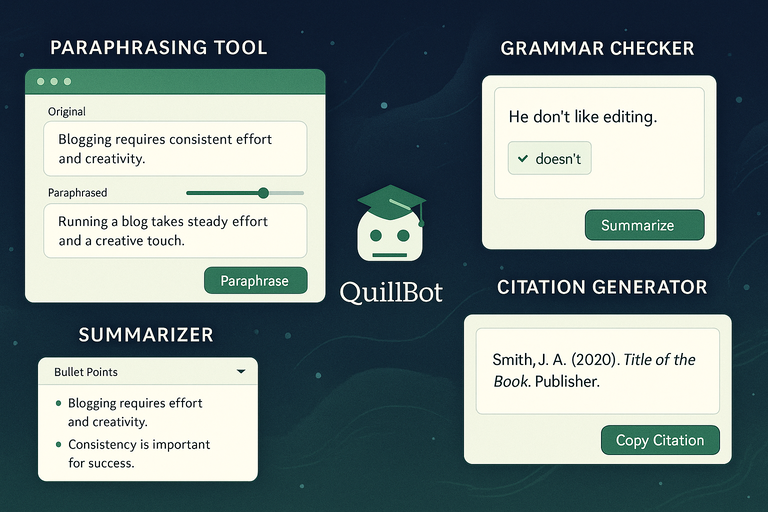
Each of AI QuillBot’s main tools is designed to save time, refine meaning, and maintain originality.
Rather than acting as a one-trick paraphraser, it’s an integrated suite of writing features that cover everything from grammar to citations.
The Paraphrasing Tool and How It Refines Your Sentences
This is the heart of QuillBot. You paste your text, choose a mode (such as Fluency, Standard, or Creative), and adjust the synonym slider—a simple UI control that changes how much the system rephrases your text.
I often keep the slider in the middle for blog drafts—it keeps the rewrite balanced between readability and originality.
Example use case:
- Say your original sentence is: “Blogging requires consistent effort and creativity.”
- QuillBot might rephrase it as: “Running a blog takes steady effort and a creative touch.”
The meaning stays the same, but the sentence feels refreshed and smoother.
Grammar Checker: Enhancing Clarity Without Changing Tone
Unlike most grammar tools, QuillBot’s checker doesn’t bulldoze your style. It highlights issues like tense shifts, missing commas, or awkward structures but avoids rewriting your entire paragraph.
For instance, if you write “He don’t like editing,” it corrects to “He doesn’t like editing” without touching surrounding sentences. That’s crucial when you’re trying to preserve tone—especially in marketing or creative writing.
You can access this directly through QuillBot Grammar → Upload or paste text → Auto-correct.
The Summarizer: Turning Long Content Into Concise Insights
This feature condenses lengthy articles into crisp summaries using extractive and abstractive summarization models. In plain English, that means it both pulls key phrases and rewrites them intelligently.
If you drop in a 2,000-word article, QuillBot can give you a 200-word version that captures the main points. I find this especially useful when I’m researching competitor blogs or condensing reports for clients.
The UI lets you choose bullet point summary or paragraph summary modes, depending on your preference.
Citation Generator: Simplifying Academic Writing and Research
AI QuillBot’s Citation Generator automates references in APA, MLA, or Chicago formats. Just paste a link, DOI, or book title, and it auto-fills the correct format.
If you’re a student or researcher, this saves enormous time. You can even use the “Copy all citations” button to instantly insert them into your document.
I’d argue this small tool alone justifies using QuillBot for anyone doing structured or academic writing.
How To Use AI QuillBot Effectively for Better Results
AI QuillBot becomes far more powerful when you know how to match its tools with your workflow.
It’s not about letting the AI do everything—it’s about using it strategically to enhance your writing process.
Choosing the Right Writing Mode for Your Goals
Each mode is designed for a specific purpose:
- Standard: Balanced for clarity and tone. Great for general writing.
- Fluency: Fixes grammar and flow without changing much wording.
- Formal: Makes your text more professional. Ideal for business writing.
- Creative: Rewrites with flair—useful for marketing or storytelling.
- Expand/Shorten: Adjusts length while keeping meaning intact.
I suggest testing different modes on a paragraph or two to see how each aligns with your style. You’ll quickly notice which feels most natural for your content type.
Adjusting Tone and Style Without Losing Original Meaning
AI QuillBot’s synonym slider is the key here. A higher setting increases variation but can risk losing nuance; lower settings keep your original tone.
For personal or brand writing, I recommend staying in the middle zone—you’ll retain voice while gaining polish.
If you’re working on SEO copy, try paraphrasing small sections at a time to preserve keyword density and intent.
Combining AI QuillBot With Manual Editing for a Polished Draft
Think of AI QuillBot as your first pass editor. It can clean up tone and structure, but your human touch finalizes style and nuance.
Here’s how I usually do it:
- Paste text into QuillBot’s Paraphraser.
- Run Grammar Checker for minor fixes.
- Manually tweak phrases that feel too “AI-smooth.”
That last step keeps the content authentic. AI refines the rough edges, and you ensure the personality remains intact.
Practical Workflow Tips for Faster, Cleaner Rewrites
To get maximum efficiency:
- Integrate the Chrome extension: This lets you paraphrase directly inside Google Docs or WordPress.
- Use keyboard shortcuts: Press Ctrl + Enter to instantly paraphrase selected text.
- Save preferred rewrites: Use the “Compare Modes” tab to view multiple versions side-by-side before choosing one.
If you create content daily, these shortcuts can save hours each week while maintaining consistency.
Pro Tip: Combine AI QuillBot with tools like Grammarly (for micro-editing) or SurferSEO (for keyword alignment) to build a complete, AI-augmented content workflow.
Real Benefits of Using AI QuillBot for Writers and Marketers
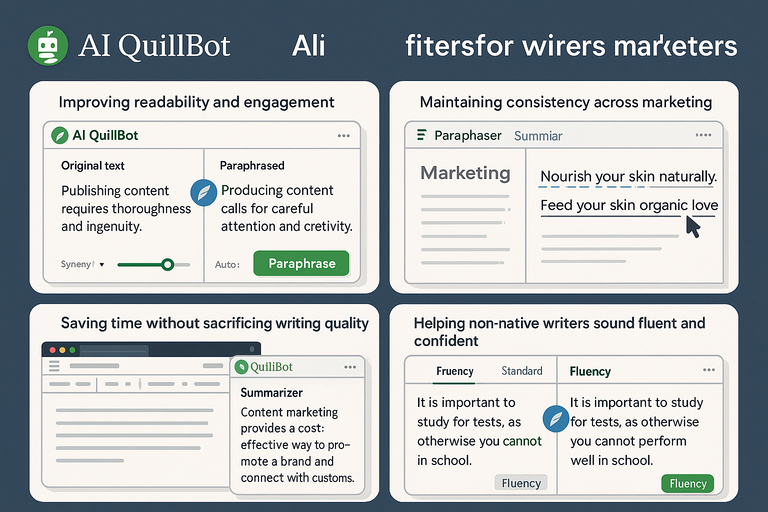
AI QuillBot isn’t just about rewriting—it’s about enhancing clarity, tone, and productivity.
Whether you write daily blog posts or long-form sales copy, the real magic lies in how it saves time while preserving your personal or brand voice.
Improving Readability and Engagement in Blog Content
Good writing isn’t just about perfect grammar—it’s about rhythm and flow.
AI QuillBot helps you achieve both by reshaping complex or stiff sentences into something smoother and more conversational.
Here’s how it makes content more engaging:
- Refines sentence flow: The Fluency Mode polishes awkward phrasing and removes redundancy.
- Adapts tone automatically: Whether you write casually or formally, QuillBot learns the rhythm of your words.
- Simplifies readability: It replaces jargon with natural language while keeping key terms intact.
I’ve personally found that running draft blog sections through QuillBot before final editing improves readability scores (measured via tools like Hemingway Editor) by up to 20–25%. It’s like giving your article one last deep breath before it meets your readers.
Maintaining Consistency Across Marketing Copy
Consistency builds trust, especially in marketing. AI QuillBot makes sure your brand voice stays the same across landing pages, email sequences, and ads.
Here’s a simple workflow I recommend:
- Create your base brand tone (e.g., friendly, informative, or persuasive).
- Paste sample copy into QuillBot.
- Use Formal or Standard Mode to maintain tone across multiple messages.
It’s also helpful for agencies or teams. Multiple writers can paraphrase from the same brand guidelines using QuillBot to keep voice consistency, ensuring no section sounds off-brand.
Imagine you manage a skincare brand. One email says “Nourish your skin naturally,” while another says “Feed your skin organic love.” AI QuillBot helps unify tone without losing creativity—essential for marketing cohesion.
Saving Time Without Sacrificing Writing Quality
AI QuillBot saves an enormous amount of time in rewriting and refining. I’ve timed it: what used to take an hour of rewording manually now takes about 10 minutes.
Some practical time-saving uses include:
- Quick paraphrasing: Perfect for updating older blog posts or refreshing ad copy.
- Instant summaries: Use the Summarizer Tool for long research articles before writing outlines.
- Fast editing workflow: The Chrome Extension allows you to paraphrase directly in WordPress or Docs.
The real benefit here is balance. You get the speed of automation without the mechanical tone of traditional spinners.
Helping Non-Native Writers Sound Fluent and Confident
This is one of AI QuillBot’s most underrated advantages.
For non-native English speakers, the Fluency Mode acts like a supportive language coach—correcting grammar, adjusting idioms, and smoothing syntax while preserving intent.
I’ve seen clients use QuillBot to revise academic essays, product descriptions, and even LinkedIn posts. The result? Clear, confident English that sounds natural but never artificial.
If English isn’t your first language, I suggest using the Compare Modes feature. It shows side-by-side rewrites so you can choose the one that best matches your personal tone.
Over time, this also becomes a learning tool—you see how QuillBot structures native-like phrasing.
Comparing AI QuillBot With Other Writing Assistants
AI QuillBot competes with several big names in AI writing, but what sets it apart is focus—it doesn’t try to be everything; it just writes smarter.
AI QuillBot vs Grammarly: Which One Refines Text Better?
Grammarly is excellent for catching technical errors, while AI QuillBot excels at rewriting meaningfully.
Here’s a quick breakdown:
| Feature | AI QuillBot | Grammarly |
| Paraphrasing | Yes – Contextual rewriting | No – Only grammar-focused |
| Tone Control | Adjustable via Modes | Suggests tone changes |
| Summarizer | Built-in | Not available |
| Price | More affordable plans | Premium-tier pricing |
| Ideal For | Writers and marketers | Proofreaders and editors |
Example use: If you write, “Our product ensures better workflow efficiency,” Grammarly may fix small grammar issues. QuillBot could rewrite it as “Our tool helps teams work more smoothly and efficiently,” which sounds more natural and reader-friendly.
So, for refinement, I believe AI QuillBot has the upper hand—it improves flow and voice, not just correctness.
AI QuillBot vs ChatGPT: When To Use Each Tool
While ChatGPT generates new text, AI QuillBot rewrites existing text intelligently. Think of them as complementary rather than competing tools.
Use ChatGPT when you need:
- Idea generation or topic brainstorming
- Content outlines and first drafts
- Conversational copy or Q&A formats
Use AI QuillBot when you need:
- Polished rewrites of existing drafts
- Sentence restructuring with tone control
- Grammar fixes without losing meaning
I often draft with ChatGPT and then refine with AI QuillBot—it’s an unbeatable combination. ChatGPT gives me creative range; QuillBot ensures precision and clarity.
How AI QuillBot Integrates With Google Docs and Chrome for Efficiency
Integration is where AI QuillBot really shines. You can install its Chrome Extension from the Chrome Web Store and paraphrase text inside Google Docs, Gmail, WordPress, and even social media platforms.
Example path: Google Docs → Highlight Text → Right-click → “Rewrite with QuillBot”
You can also access the Grammar Checker or Summarizer within the same extension. For writers who spend hours in Docs or Sheets, this means fewer tabs, faster rewrites, and better focus.
If you prefer Microsoft Word, QuillBot also has an MS Word Add-in—a lifesaver for corporate or academic writers.
Common Mistakes To Avoid When Using AI QuillBot

Even the smartest tool can’t replace human judgment. AI QuillBot works best when you use it with awareness and control—not as a full autopilot.
Over-Relying on Automation Without Proofreading
QuillBot is accurate, but no AI is infallible. Sometimes it may oversimplify or subtly change tone. Always read through final drafts to ensure they sound like you.
Quick tip:After paraphrasing, read your text aloud. If it doesn’t sound like something you’d naturally say, tweak it manually.
I’ve seen writers lose their personality because they depended too heavily on automation. QuillBot should assist, not replace, your voice.
Ignoring Context and Tone Adjustments
Each writing mode serves a different intent. Using the wrong one can distort meaning.
For instance:
- Creative Mode might add unnecessary flair to a technical document.
- Formal Mode can make casual blog posts feel stiff.
I suggest experimenting with small portions first. Once you find a mode that fits your tone, stick with it across similar projects for consistency.
Forgetting To Recheck Facts After Paraphrasing
AI QuillBot rewrites text—it doesn’t verify accuracy. Always recheck numbers, dates, or claims after paraphrasing, especially if you’re working with research-based or SEO content.
A small factual slip can hurt credibility fast. I usually run a quick fact-check using Google Scholar or Statista after finalizing QuillBot outputs.
Pro Tip: The smartest writers use AI QuillBot as a co-pilot, not a driver. Let it handle sentence structure and grammar while you steer meaning, creativity, and truth.
Expert Tips To Get the Most Out of AI QuillBot
AI QuillBot is powerful, but like any tool, it works best when used with purpose.
Once you understand how to fine-tune its settings, you can turn it from a simple rewriter into a writing partner that matches your exact style and tone.
Customizing Rewrites Using Synonym Sliders and Modes
The Synonym Slider is one of QuillBot’s most underrated features. It lets you control how aggressively the tool changes your words.
You’ll find it right under the text box in the main Paraphrasing window.
Here’s how to use it effectively:
- Lower slider (1–2 bars): Keeps most of your original text but polishes grammar and phrasing. Best for SEO or client-specific writing where tone matters.
- Middle slider (3–4 bars): Strikes a balance between originality and readability. I recommend this for most blog rewrites or drafts.
- High slider (5–7 bars): Produces the most unique rewrite—great for academic or creative content where variety is key.
Pair that with QuillBot’s writing modes for precision:
- Fluency Mode: Corrects grammar and sentence flow while keeping tone natural.
- Formal Mode: Ideal for proposals or business writing.
- Creative Mode: Adds more flair—perfect for blog intros or storytelling.
- Shorten/Expand Modes: Useful for fitting copy into specific character counts, like social captions or meta descriptions.
If you’re not sure which mode to use, start with Standard Mode and switch modes using the “Compare Modes” view. It displays different rewrites side-by-side so you can choose the one that feels right.
Pro insight: For brand work, I suggest saving a few “reference rewrites” in each mode. Over time, you’ll develop a feel for how each setting impacts tone and can use that as your personal style baseline.
Combining AI QuillBot With Other SEO Tools for Content Optimization
AI QuillBot does the rewriting, but SEO tools handle the visibility part. When you combine both, your content reads naturally and ranks better.
Here’s how I use them together:
- Draft and Rewrite with QuillBot: Start with your raw content or competitor research notes, then use Fluency Mode or Standard Mode to smooth and simplify the text.
- Run Content Through SurferSEO: This helps balance keyword density and semantic terms. It ensures your rewritten content is optimized without keyword stuffing.
- Check Grammar and Voice with Grammarly: Use Grammarly after QuillBot to catch lingering grammar inconsistencies or missing transitions.
- Use Hemingway or Yoast for Readability: These tools ensure your paragraphs stay scannable and short enough for mobile readers.
When you combine these, you create a seamless process: AI QuillBot handles clarity; SEO tools ensure performance.
I’ve also noticed that QuillBot’s Summarizer Tool pairs beautifully with SEO research.
You can paste long competitor articles, summarize them, and quickly identify missing content gaps your own post can fill. That’s an efficient way to gain a ranking edge.
Creating an Efficient Editing Workflow With AI Assistance
An efficient writing process is about minimizing friction between drafting, rewriting, and final polishing.
Here’s the system I use that consistently saves me hours:
- Step 1: Write your raw draft freely without editing.
- Step 2: Paste sections (around 300–400 words each) into AI QuillBot for rephrasing using Standard or Fluency Mode.
- Step 3: Adjust tone using the Synonym Slider or switch to Formal Mode if you’re working on client material.
- Step 4: Export the output into Grammarly or Hemingway for a quick readability and grammar pass.
- Step 5: Add SEO refinement in SurferSEO or Yoast.
This flow lets you write faster and edit smarter. Instead of obsessing over perfect phrasing early on, you let QuillBot handle that later while you focus on structure and ideas.
I recommend saving your most-used workflows inside a simple Google Doc checklist. You can label steps like “Rewrite → Grammar → SEO → Publish” so your process stays consistent across projects.
Efficiency tip: If you use Google Docs or Chrome, install QuillBot’s extension so you can paraphrase or check grammar inline—no tab switching, no copying text back and forth.
Is AI QuillBot Worth It? A Practical Verdict
Let’s face it—no AI tool is magic. But when used well, AI QuillBot can easily become one of the most valuable writing assistants you’ll ever use.
It’s affordable, reliable, and surprisingly intuitive once you learn its nuances.
Evaluating Its Cost vs Value for Different Users
AI QuillBot offers both a free version and premium plans (around $8–$10/month annually). The free plan limits paraphrasing characters and locks some modes, but it’s still a solid start for casual use.
If you write professionally, the premium upgrade is worth every cent.
Here’s why:
- Unlimited paraphrasing means you can rewrite full blog posts or articles in one go.
- Faster processing—premium users get priority rewriting speeds.
- Access to all modes like Creative, Shorten, and Formal gives full control over tone.
- Advanced summarization helps distill long research papers into digestible notes.
For context, most AI writing tools with comparable features (like Jasper or Wordtune) cost around $20–$30 per month. AI QuillBot delivers similar quality at nearly half that price.
From my experience, even using QuillBot for three or four major projects per month justifies the subscription cost.
Who Benefits Most: Students, Bloggers, or Content Teams?
Different users gain different strengths from AI QuillBot.
Here’s a quick breakdown:
- Students: Perfect for paraphrasing research papers, writing essays, or generating citations using the built-in Citation Generator.
- Bloggers: Ideal for rewriting drafts, improving tone, and simplifying content for better readability scores.
- Content Teams: Helps maintain consistent voice across multiple writers and streamlines editing time.
If I had to pick the biggest winners, I’d say freelance writers and marketing agencies. They get the most out of QuillBot’s combination of speed and quality.
You can handle more client work with less burnout—and your writing still feels authentic.
Final Thoughts on Using AI QuillBot as a Daily Writing Partner
After testing dozens of writing tools, I believe AI QuillBot strikes the best balance between automation and creativity. It doesn’t replace your voice; it amplifies it.
When used smartly, QuillBot helps you:
- Write faster without losing clarity.
- Edit with confidence while keeping tone natural.
- Maintain consistency across content projects.
I’d describe it as the perfect “quiet co-writer”—always there to catch awkward sentences, suggest better phrasing, or help you think faster when words stall.
If you write regularly—whether it’s blogs, academic work, or marketing content—AI QuillBot is absolutely worth the investment. It’s not just a paraphrasing tool; it’s a creative accelerator that turns rough drafts into polished, confident writing.
Pro tip: The more you use it, the better you’ll understand its behavior. Treat it like a writing partner—guide it, adjust it, and you’ll soon find your workflow smoother, sharper, and genuinely more enjoyable.

I’m Juxhin, the voice behind The Justifiable.
I’ve spent 6+ years building blogs, managing affiliate campaigns, and testing the messy world of online business. Here, I cut the fluff and share the strategies that actually move the needle — so you can build income that’s sustainable, not speculative.
Related posts:
 QuillBot AI Paraphrasing Tool: Rewrite Smarter, Faster
 Why Quillbot Grammar Checker is a Must-Have for Writers
 How to Use QuillBot Paraphrasing Tool Effectively
 Grammar Checker Quillbot for SEO Writers
 How Long Is the Quillbot Trial? Full Details & Limitations
 How to Install and Use Quillbot for Chrome in Minutes