
Table of Contents
Some links on The Justifiable are affiliate links, meaning we may earn a small commission at no extra cost to you. Read full disclaimer.
Apollo IO features overview searches usually come from one simple question: “Can this platform actually help me find leads, contact them, and manage outreach without juggling five tools?”
That is the right question to ask.
Apollo is not just a contact database, and it is not only an email sequencing tool either. It brings sales intelligence, prospecting, enrichment, outreach, automation, and deal support into one workspace.
In this guide, I’ll walk you through what Apollo actually does, where it shines, where you still need judgment, and how to use its features without turning your sales process into a messy automation machine.
Understand What Apollo IO Is Built To Do
Apollo is designed as an AI-powered sales platform for B2B teams that need to find the right people, understand those people, reach out to them, and track the results.
The easiest way to understand it is this: Apollo helps you move from “Who should we contact?” to “What should we do next?”
What Apollo Actually Is
Apollo describes itself as an AI sales platform that helps teams build pipeline, close deals faster, and simplify their sales tech stack. Its core product areas include outbound prospecting, inbound lead handling, data enrichment, and deal execution.
That means it sits across several parts of the revenue process instead of solving only one narrow task.
In practical terms, Apollo gives you access to a large B2B database, filters to find companies and people, contact data such as emails and phone numbers, sequencing tools for outreach, workflow automation, CRM integrations, analytics, and AI-assisted features.
If you have ever used one tool for finding leads, another for email outreach, another for enrichment, and another for tracking performance, Apollo’s main promise is consolidation.
I like to think of Apollo as a sales operating desk. You open one platform and ask, “Who matches my ideal customer profile, what do I know about them, how can I contact them, and what happened after I contacted them?”
That makes it especially useful for founders, sales development reps, account executives, growth marketers, and revenue operations teams.
The important thing is not to treat Apollo as magic. It gives you data and execution tools, but your targeting, offer, message quality, and follow-up discipline still matter. A weak sales strategy does not become strong just because it is automated.
Who Apollo Is Best For
Apollo is best for B2B teams that sell to specific job titles, industries, company sizes, locations, technologies, or buying signals.
For example, imagine you sell cybersecurity training to mid-sized finance companies. Instead of manually searching LinkedIn, company websites, and scattered directories, you can build a filtered list of security leaders at finance companies with 100–1,000 employees.
That is where Apollo becomes practical. It helps you turn a vague market into a searchable audience. Then it lets you save those prospects, enrich missing data, add people to sequences, and monitor replies.
Apollo tends to fit these use cases well:
- Outbound sales: Finding accounts and contacts, then launching personalized outreach.
- Lead generation: Building targeted lists for sales or marketing campaigns.
- Data enrichment: Filling missing CRM fields and refreshing outdated records.
- Sales engagement: Running email, call, and social touchpoint sequences.
- Inbound routing: Qualifying and routing form fills or website visitors.
- Deal support: Preparing for meetings, reviewing conversations, and following up.
In my experience, Apollo is most valuable when your team already knows who it wants to sell to. If your ideal customer profile is still fuzzy, Apollo can give you too many options. More data is not always better. Better-fit data is what creates revenue.
Where Apollo Fits In The Sales Workflow
Apollo usually fits between strategy and sales conversations. It does not replace your CRM completely in most teams, and it does not replace human selling. Instead, it supports the middle layer where prospecting, research, outreach, and follow-up happen.
Here’s how the workflow often looks:
- Define the target: Decide which industries, company sizes, titles, locations, and buying triggers matter.
- Find accounts and contacts: Use Apollo’s filters to build lists.
- Verify and enrich data: Reveal emails, phone numbers, job details, and company information.
- Prioritize prospects: Sort by fit, intent, engagement, or account value.
- Launch outreach: Use sequences, calls, tasks, and personalization.
- Track performance: Review opens, replies, meetings, conversions, and pipeline impact.
- Sync systems: Push clean data and activities into your CRM when needed.
That structure matters because Apollo can become chaotic if you skip the planning stage. I have seen teams build huge lists first and ask questions later. That usually leads to low reply rates, poor deliverability, and wasted credits.
The better approach is to start narrow, test one audience, learn from the response, and scale only after the signal looks promising.
Explore Apollo’s Prospecting And B2B Database Features
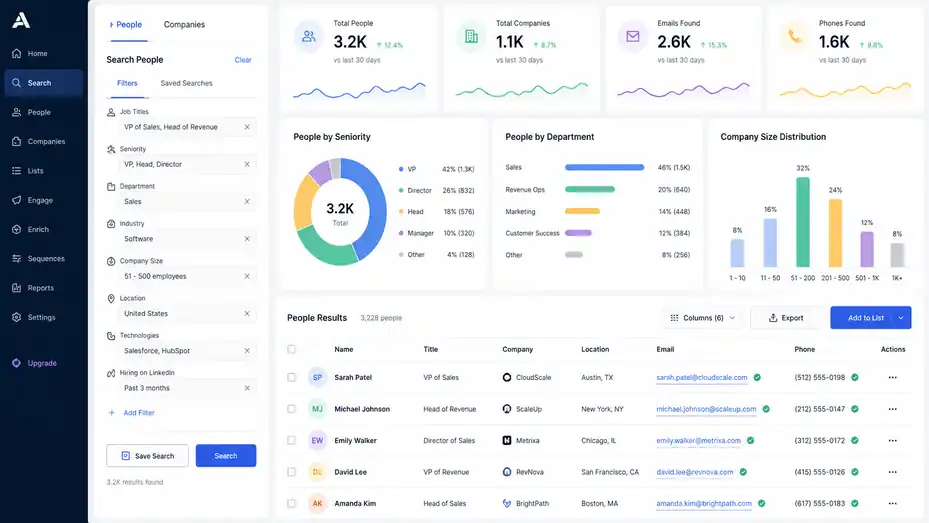
Apollo’s prospecting features are the starting point for most users.
This is where you search for companies and contacts that match your ideal buyers, then organize them into lists for outreach or enrichment.
How Contact And Company Search Works
Apollo’s search lets you filter people and companies using firmographic and demographic data. Firmographic data means company-level information, such as industry, employee count, revenue range, location, funding, and technology used.
Demographic data, in a sales context, usually means person-level information, such as job title, seniority, department, location, and role.
For example, you might search for “VP of Sales” or “Head of Revenue” at software companies in the United States with 51–500 employees. You can then narrow the results by keywords, technologies, hiring signals, or other attributes depending on what is available in your plan and data view.
This is useful because most sales problems begin with poor targeting. If you sell to the wrong person, even the best email will struggle. Apollo’s database features help you create a more precise list before you spend time writing messages or making calls.
A simple beginner workflow looks like this:
- Step 1: Choose one target segment, such as SaaS companies with 50–200 employees.
- Step 2: Pick one buyer role, such as Head of Sales or Revenue Operations.
- Step 3: Add location, industry, and company-size filters.
- Step 4: Save the list and review a sample manually before exporting or sequencing.
- Step 5: Remove poor-fit contacts before launching outreach.
I suggest reviewing the first 25–50 results by hand. It is not glamorous, but it prevents you from scaling a bad list. Automation should multiply good judgment, not replace it.
Using Filters To Build Better Lead Lists
Filters are where Apollo becomes powerful, but they are also where beginners can overcomplicate things. The goal is not to use every filter. The goal is to use the few filters that clearly separate good-fit prospects from bad-fit prospects.
Start with your ideal customer profile. Ask: What do our best customers have in common? Maybe they are in a certain industry. Maybe they use a certain software category. Maybe they recently hired sales reps, raised funding, opened a new location, or changed leadership.
Then translate those patterns into search filters. If your best customers are growing, use growth signals. If they need your product because of compliance pressure, use industry and company-size filters. If they usually buy after hiring a new executive, look for title changes or leadership-related signals when available.
Here’s a practical mini scenario. Imagine you sell onboarding software to customer success teams. A broad search for “Customer Success Manager” may produce too many individual contributors.
A sharper search might focus on “VP Customer Success,” “Head of Customer Success,” and “Director of Customer Experience” at B2B software companies with 100–1,000 employees. That gives you a list closer to budget owners and strategic influencers.
A good Apollo list should feel almost boring because the logic is clear. You should be able to explain it in one sentence: “We are targeting RevOps leaders at mid-market SaaS companies that are likely struggling with data handoffs.” If you cannot explain the list that simply, your filters may need work.
Saving Lists And Organizing Accounts
Once you find relevant prospects, Apollo lets you save contacts and companies into lists. Lists are more than folders. They become working groups for enrichment, sequences, workflows, exports, and campaign planning.
I recommend separating account lists from contact lists when possible. An account list might contain target companies, while a contact list contains the people you want to reach inside those companies. This helps you avoid contacting random individuals without understanding the company context.
For example, you might create:
- Account List: “US Fintech 100–500 Employees”
- Contact List: “Fintech VP Finance And CFO Contacts”
- Campaign List: “Q2 Finance Automation Outreach”
This kind of structure keeps your team from accidentally mixing different campaigns. It also makes reporting easier because you can compare list quality, reply rates, and meeting rates by segment.
In my experience, messy list organization becomes a real problem after the first few campaigns. At the beginning, everyone thinks they will remember what each list means. Two months later, names like “Test List 3” and “New Leads Final Final” start causing confusion. Use clear naming from day one.
Using Search Without Overbuilding Your Audience
One of the biggest mistakes with Apollo is building lists that are too large too soon. Large lists feel productive because the numbers look impressive. But if the audience is not tight, you may burn through credits, hurt email deliverability, and collect weak responses.
A better approach is controlled testing. Build a small list of 100–300 highly relevant contacts. Send thoughtful outreach. Measure reply quality, not just open rates. Then decide whether the segment deserves expansion.
For many teams, the first goal should not be “send 10,000 emails.” It should be “prove that this audience cares about this problem.” Once you know that, Apollo’s database becomes much more valuable because you can scale with confidence.
I would rather see a team contact 200 carefully selected prospects with a strong message than 5,000 loosely matched contacts with generic copy. Apollo gives you the ability to move fast, but speed only helps when your direction is right.
Review Apollo’s Data Enrichment And Contact Accuracy Features
Data enrichment is one of Apollo’s most important feature categories because sales teams often suffer from incomplete, outdated, or inconsistent records.
Apollo’s enrichment tools help fill missing details and keep contact and account data more useful.
What Data Enrichment Means In Simple Terms
Data enrichment means taking a record you already have and adding missing information to it. For example, you may have someone’s name and company, but you need their job title, verified email, phone number, company size, industry, or LinkedIn-style profile details. Enrichment helps complete that record.
Apollo positions data enrichment as a way to cleanse and complete records with always-fresh data for smarter targeting. Its platform materials connect enrichment with better sales and marketing execution because cleaner records make segmentation, routing, and outreach more accurate.
Let’s say a visitor downloads your pricing guide and gives you only their business email. Enrichment can help identify their company, role, seniority, and whether they match your ideal customer profile. That extra context can change what happens next. A student researching a school project should not get the same follow-up as a VP at a target account.
The value is not just “more fields.” The value is better decisions. Good enrichment helps you answer questions like: Is this lead worth calling today? Should they go to sales or marketing nurture? Are they in our target market? Which message should we send?
Email And Phone Data Credits
Apollo uses a credit system for accessing certain data. According to Apollo’s credits page, accessing a contact’s personal email, business email, or both is capped at one credit per contact, while a verified phone number costs eight credits. Phone numbers can include mobile, direct, office extensions, and similar verified numbers.
This matters because not all contact data has the same cost. If your team heavily relies on phone outreach, you need to plan credit usage differently than a team that mostly uses email. A calling-heavy SDR team may use credits faster than a marketing team enriching emails for segmentation.
Here is a simple planning example. If you reveal 500 emails and 100 phone numbers, your credit usage is very different from revealing only emails. That does not mean phone data is bad. It means you should reserve phone reveals for higher-fit prospects, target accounts, or contacts showing intent.
I suggest creating internal rules such as:
- Email reveal: Use for qualified contacts in tested segments.
- Phone reveal: Use for high-priority accounts, warm leads, or active opportunities.
- Bulk enrichment: Use after cleaning duplicates and removing poor-fit records.
Credits are easy to spend when the team is excited. A little governance keeps your data budget from disappearing into low-value records.
CRM Enrichment And Data Hygiene
Apollo can integrate with CRMs and other sales tools, and its pricing page mentions integrations with Salesforce, HubSpot, Outreach, Salesloft, Marketo, SendGrid, LinkedIn, and email providers. Apollo also offers API access on custom plans for more advanced integration needs.
CRM enrichment is useful when your CRM has missing fields, outdated job titles, duplicate records, or incomplete company information. But I recommend treating enrichment as a controlled process, not a one-click fix. If your CRM is already messy, enriching everything without rules can make the mess bigger.
Before syncing enriched data, decide which fields Apollo is allowed to update.
For example, you may want Apollo to fill missing company size, industry, and title fields, but not overwrite manually verified account ownership or lifecycle stage. This is especially important for teams with sales territories, account ownership rules, or compliance requirements.
A clean enrichment workflow might look like this:
- Audit existing data: Identify missing fields, duplicates, and stale records.
- Choose update rules: Decide which fields can be filled, overwritten, or left untouched.
- Test on a small sample: Enrich 100 records and review quality.
- Sync carefully: Apply enrichment rules to a larger segment.
- Monitor changes: Check whether updates improve routing, scoring, and outreach.
In most cases, enrichment should support your revenue process, not quietly rewrite it.
How To Judge Data Quality
No B2B database is perfect. People change jobs, companies rebrand, domains shift, departments reorganize, and phone numbers go stale. Apollo may provide a lot of useful data, but smart teams still validate quality through outcomes.
Instead of asking only, “How many contacts can we access?” ask, “How many of these contacts are accurate, reachable, relevant, and likely to respond?” Those are different questions.
Track practical quality metrics:
- Bounce rate: High bounces may signal poor email quality or bad list hygiene.
- Connect rate: Low phone connection may suggest weak phone coverage or poor timing.
- Reply rate: Low replies may reflect targeting, messaging, or data relevance.
- Meeting rate: Meetings show whether the audience has real commercial potential.
- CRM match rate: This shows how many records enriched correctly against existing data.
A realistic benchmark depends on your market, offer, and outreach quality. But if a list produces high bounces and no meaningful replies, do not blame only the copy. Go back to the source data, filters, and segment assumptions.
I believe the best Apollo users think like data editors. They do not blindly trust every record, and they do not dismiss a database because one contact is wrong. They test, clean, segment, and improve.
Use Apollo’s Sales Engagement And Outreach Features
Apollo’s sales engagement features help you turn lead lists into actual conversations.
This includes sequences, email outreach, calls, tasks, social touches, templates, personalization, and tracking.
How Sequences Work
A sequence is a planned series of touchpoints sent or assigned over time. In Apollo, sales engagement features are built around the idea that you can contact prospects through coordinated steps instead of relying on one manual email.
Apollo’s sales engagement product page describes its outbound channels as being in one place and powered by an AI sales assistant to help automate and personalize outreach. It also shows strong review positioning, listing a 4.7/5 rating based on 9,015 reviews on that page at the time accessed.
A basic sequence might include:
- Day 1: Personalized email.
- Day 3: Follow-up email with a different angle.
- Day 5: Call task.
- Day 7: Social touch or profile view.
- Day 10: Final value-based email.
The purpose is not to annoy people. The purpose is to give relevant prospects multiple chances to notice a useful message. Many busy buyers miss the first email, not because they hate your offer, but because their inbox is chaos.
A good sequence has one clear goal. For cold outbound, that goal might be starting a conversation. For warm inbound, it might be booking a demo. For renewal expansion, it might be getting a stakeholder meeting. Do not mix goals inside one sequence, or your messaging will feel scattered.
Writing Outreach That Does Not Sound Automated
Apollo can help you send outreach at scale, but the words still matter. The fastest way to waste a good lead list is to send a message that sounds like it was written for everyone and no one.
A strong cold email usually has four parts: relevance, problem, reason to believe, and a simple ask. You do not need a long essay. You need enough context to show the prospect why the message is for them.
Example structure:
- Opening: Mention a relevant company, role, trigger, or pain point.
- Problem: Name the issue you believe they may care about.
- Value: Explain the outcome you help create.
- Ask: Suggest a small next step.
Imagine you sell analytics cleanup services to RevOps teams. A weak message says, “We help companies improve analytics.” A stronger message says, “Many RevOps teams I speak with are trying to clean up campaign attribution before planning next quarter.
We help teams find where CRM and marketing data stop matching, then fix the reporting gaps before leadership reviews.”
That feels more specific. It does not require pretending you know everything about the prospect. It simply connects your offer to a real situation.
Balancing Automation And Manual Personalization
Automation works best when the audience is narrow and the message is relevant. Manual personalization works best when the account value is high. The trick is knowing which approach to use.
For lower-value or early testing campaigns, you might use light personalization, such as industry, role, and pain point variables. For enterprise accounts, you may want deeper research, including company news, hiring trends, product launches, or strategic initiatives.
A practical rule I like:
- Tier 1 accounts: Manual research and highly personalized outreach.
- Tier 2 accounts: Semi-personalized sequences using strong segment logic.
- Tier 3 accounts: Scaled campaigns with strict fit filters and simple messaging.
Apollo can support all three, but your process should define the difference. Otherwise, every contact gets treated the same, which is rarely ideal.
Personalization does not mean writing a paragraph about someone’s college or hobby. In B2B sales, useful personalization often means showing that you understand the buyer’s business context.
A CFO cares less that you saw their podcast and more that you understand cost control, forecasting pressure, or board reporting.
Tracking Outreach Performance
Apollo’s engagement tools help track activity and performance, but the numbers need interpretation. Open rates can be misleading because privacy changes and inbox behavior affect tracking. Reply rates are better, but even reply rates need context.
A lot of “not interested” replies may mean your targeting is off or your message is too broad.
Focus on funnel metrics:
| Metric | What It Tells You | What To Check If It Is Weak |
|---|---|---|
| Email bounce rate | Data and deliverability quality | Contact accuracy, domains, sending setup |
| Open rate | Subject line and inbox placement directionally | Deliverability, sender reputation, subject clarity |
| Reply rate | Message relevance | Targeting, pain point, offer, personalization |
| Positive reply rate | Real buyer interest | Segment fit, timing, value proposition |
| Meeting rate | Conversion strength | CTA, follow-up, qualification |
| Opportunity rate | Pipeline quality | ICP accuracy, sales handoff, deal fit |
In my experience, positive reply rate is one of the most useful early metrics. A campaign with fewer total replies but more relevant conversations may be stronger than a campaign full of polite rejections.
Understand Apollo’s Automation, AI, And Workflow Features
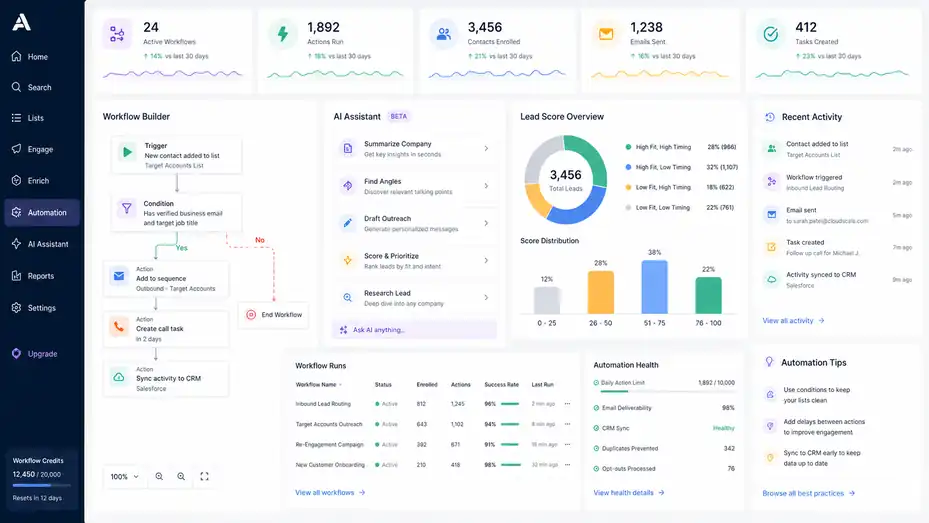
Apollo’s newer positioning leans heavily into AI and workflow automation.
These features are meant to reduce manual work across prospecting, research, outreach, enrichment, routing, and follow-up.
What Workflow Automation Does
Workflow automation means setting rules so certain actions happen automatically when conditions are met. For example, if a contact matches your ideal customer profile and has a verified email, Apollo could help trigger a sequence, assign a task, enrich the record, or sync data depending on setup and plan.
Apollo’s 2026 release notes mention updates where imported companies can be automatically added to a list, making it easier to take action with sequences, workflows, enrichment, and Apollo’s AI Assistant. The same release note also describes using Google Maps in Apollo on paid plans to find and import local businesses as accounts.
The value of workflows is consistency. Humans forget steps. Workflows do not, assuming you set them correctly. If every inbound lead needs enrichment, scoring, routing, and a follow-up task, automation prevents leads from sitting untouched.
However, I advise starting simple. A complex workflow that nobody understands can create silent problems. You may accidentally enroll poor-fit leads, overwrite fields, duplicate records, or send messages at the wrong time.
A beginner-friendly workflow might be:
- Trigger: New contact added to a specific list.
- Condition: Contact has verified business email and target job title.
- Action: Add to a relevant sequence.
- Action: Create a call task after two days.
- Action: Sync activity to CRM.
That is enough to save time without creating a monster.
How Apollo’s AI Features Fit Into Prospecting
Apollo has positioned AI across prospecting, enrichment, engagement, and deal execution. Its AI prospecting content describes AI as helping with lead research, scoring, personalization, and outreach, while modern sales prospecting tools identify high-intent prospects and generate more relevant messaging.
In plain English, AI features can help you summarize information, find useful angles, draft messages, prioritize leads, and reduce repetitive research. This can be helpful when you are working through many accounts and need a faster way to understand what matters.
But I would not let AI fully define your sales strategy. AI can suggest patterns, but you still need to know your buyer. It may draft a decent email, but it will not always understand your market nuance, compliance concerns, product positioning, or competitive context.
Use AI like a smart assistant, not the head of sales. Let it speed up research and first drafts. Then have a human check accuracy, tone, and relevance before sending anything important.
A good AI-assisted workflow might be:
- Research: Summarize company context and possible pain points.
- Prioritize: Identify which accounts look most relevant.
- Draft: Create a first version of outreach copy.
- Review: Edit for accuracy, specificity, and brand voice.
- Send: Launch only after quality control.
That human review step is where many teams protect their reputation.
Lead Scoring And Prioritization
Lead scoring means ranking prospects based on fit, behavior, or likelihood to convert. In Apollo-style workflows, scoring can help you decide who deserves immediate attention and who should stay in a nurture or lower-priority campaign.
The best scoring models usually combine two ideas: fit and timing. Fit asks whether the company and person match your ideal customer profile. Timing asks whether there is a reason they may care now.
For example, a perfect-fit company with no buying signal may still be worth contacting, but a good-fit company that just hired a new VP, raised funding, visited your pricing page, or expanded its team may deserve faster action.
A simple scoring framework could look like this:
- High fit, high timing: Sales should act quickly.
- High fit, low timing: Add to thoughtful outbound or nurture.
- Low fit, high timing: Review manually before spending time.
- Low fit, low timing: Exclude from active outreach.
The mistake I see often is scoring based only on activity. Someone opening three emails does not automatically mean they are a great buyer. They may simply be curious. Fit still matters.
Avoiding Automation Mistakes
Automation mistakes usually happen when teams move from “manual and slow” to “automated and uncontrolled.” Apollo gives you tools to move faster, but speed magnifies everything. Good targeting scales. Bad targeting scales too.
Common automation mistakes include enrolling unqualified contacts, sending too many touches too quickly, using generic personalization tokens, ignoring opt-outs, syncing bad data into the CRM, and failing to monitor deliverability.
A safer automation checklist looks like this:
- Check audience logic: Make sure every contact belongs in the campaign.
- Review message variables: Confirm personalization fields do not create awkward sentences.
- Set daily limits: Avoid sudden sending spikes.
- Exclude customers and open opportunities: Prevent embarrassing outreach.
- Monitor replies manually: Look for patterns in objections and confusion.
- Pause weak campaigns early: Do not let a bad sequence run for weeks.
I believe automation should make your sales process feel calmer, not more chaotic. If the team feels nervous every time a workflow runs, simplify it.
Compare Apollo’s Main Feature Categories
Apollo can feel broad, so it helps to group the platform into feature categories.
This makes evaluation easier, especially if you are deciding whether Apollo can replace or reduce other tools.
Apollo Feature Overview Table
Here is a practical breakdown of what Apollo’s main feature areas do and why they matter.
| Feature Category | What It Does | Best For | Watch-Out |
|---|---|---|---|
| B2B Database | Helps you find companies and contacts by filters | Prospecting and list building | Needs careful targeting |
| Contact Data | Provides access to emails and phone numbers | Outreach and calling | Credit usage can add up |
| Data Enrichment | Fills missing CRM or lead fields | Cleaner segmentation and routing | Requires field update rules |
| Sequences | Automates multi-step outreach | Cold outbound and follow-up | Generic messages can hurt replies |
| Workflow Automation | Triggers actions based on rules | Saving manual work | Bad logic scales mistakes |
| AI Assistant | Helps with research, drafting, and execution | Faster prospecting and personalization | Human review is still needed |
| Inbound Features | Qualifies and routes leads | Faster response to hand-raisers | Setup must match sales ownership |
| Analytics | Tracks activity and campaign results | Optimization and reporting | Metrics need interpretation |
| Integrations | Connects with CRM, email, and sales tools | Data flow and team adoption | Sync rules must be clear |
Apollo’s pricing page also states that it integrates with major systems such as Salesforce, HubSpot, Outreach, Salesloft, Marketo, SendGrid, LinkedIn, and email providers, with API access available on custom plans.
The key takeaway is that Apollo is not one feature. It is a bundle of connected capabilities. That is useful if you want fewer disconnected tools. It can feel heavy if you only need one narrow function.
Outbound Features
Apollo’s outbound features are probably the most familiar to new users. They help you search for prospects, reveal contact data, save lists, write messages, build sequences, call leads, and track outcomes.
Outbound works best when your offer has a clear audience. If you sell a niche solution, Apollo’s filters can help you find the right people quickly. If you sell something broad and undefined, you may still struggle because the platform cannot decide your positioning for you.
For outbound, I recommend starting with a campaign brief before touching the software:
- Audience: Who exactly are we targeting?
- Pain point: What problem do they likely recognize?
- Offer: What useful outcome can we credibly promise?
- Proof: Why should they believe us?
- CTA: What low-friction next step do we want?
Once those answers are clear, Apollo becomes much easier to use. You are not randomly searching. You are building a campaign around a real hypothesis.
Inbound Features
Apollo’s homepage describes inbound capabilities as capturing, qualifying, and routing leads quickly so hot leads do not go cold. Its pricing result also references inbound-related features such as website visitors, real-time form enrichment, meeting events, inbound routers, and CRM integrations on a listed plan view.
Inbound features are useful because speed matters when someone shows interest. If a high-fit lead fills out a form, visits a pricing page, or requests information, waiting two days can reduce your chances of starting a good conversation.
A basic inbound process might be:
- Capture: A visitor submits a form or shows identifiable interest.
- Enrich: Apollo adds company and contact context.
- Qualify: The lead is checked against your ideal customer profile.
- Route: The lead goes to the right owner or team.
- Follow up: A rep receives a task or automated sequence starts.
The biggest inbound mistake is treating every lead equally. A student, vendor, small business, and enterprise buyer may all fill out the same form. Enrichment and routing help separate curiosity from commercial opportunity.
Deal Execution Features
Apollo’s homepage lists deal execution as one of its main product areas, describing it as keeping deals moving with AI-powered prep, meeting insights, and follow-up.
This part matters because sales does not stop after the first meeting. A lot of revenue is lost after discovery calls because follow-up is weak, stakeholders are not mapped, next steps are vague, or reps forget important context.
Deal execution features can help teams prepare for meetings, capture insights, and keep momentum. For example, before a call, a rep may review account context, recent engagement, and known pain points. After the call, the team may use notes or insights to send a stronger follow-up.
My advice is to connect deal execution to your sales methodology. If your team uses qualification criteria, stakeholder mapping, or mutual action plans, make sure Apollo-supported notes and workflows reinforce that process. Otherwise, meeting insights become another pile of information nobody uses.
Set Up Apollo The Right Way From Beginner To Advanced
A good Apollo setup starts with strategy, not software clicks. You want your data, lists, sequences, automations, and reporting to match how your team actually sells.
Beginner Setup: Start With One Use Case
If you are new to Apollo, start with one clear use case. Do not try to implement prospecting, enrichment, inbound routing, AI workflows, CRM sync, and analytics all in the same afternoon.
A good beginner use case might be: “Build a list of 200 operations leaders at logistics companies and test a three-email sequence.” That is specific enough to learn from.
Here’s how you can get started:
- Define your ICP: Choose industry, company size, location, and buyer role.
- Build a small list: Use filters to find a manageable group.
- Review records manually: Remove obvious bad fits.
- Reveal only needed data: Start with email unless phone is essential.
- Write a short sequence: Keep messaging focused on one pain point.
- Launch slowly: Send in controlled daily batches.
- Measure replies: Look for positive reply patterns and objections.
This keeps your first Apollo experience clean. You will learn how the database feels, how accurate the targeting is, and how your audience responds.
Intermediate Setup: Connect CRM And Outreach Rules
Once your first campaigns work, the next step is connecting Apollo more deeply into your sales process. This usually includes CRM sync, field mapping, ownership rules, exclusion lists, and reporting.
Field mapping means deciding which Apollo fields match which CRM fields. For example, Apollo’s company size field may map to your CRM’s employee count field. This sounds boring, but it matters. Bad field mapping can create reporting problems and messy records.
You should also create exclusion logic. For example, do not enroll current customers, active opportunities, competitors, unsubscribed contacts, or existing open conversations into cold sequences.
A healthy intermediate setup includes:
- CRM sync rules: What gets created, updated, and logged?
- Ownership rules: Who owns new contacts and accounts?
- Suppression lists: Who should never receive outbound campaigns?
- Lifecycle stages: How do records move from lead to opportunity?
- Reporting views: Which campaign and pipeline metrics matter?
This is where revenue operations becomes important. A sales rep can run a campaign. A RevOps-minded setup makes sure campaigns do not damage the database.
Advanced Setup: Segment By Buying Motion
Advanced Apollo users do not just segment by job title. They segment by buying motion. A buying motion is the pattern of how a buyer becomes aware, evaluates, and purchases.
For example, a founder-led startup, a mid-market department head, and an enterprise procurement team may all need the same product, but they buy differently. Their pain points, proof needs, sales cycle, and outreach style differ.
You can build different Apollo motions for:
- Founder-led deals: Short, direct messaging focused on speed and outcomes.
- Department-led deals: Pain-point messaging with team productivity angles.
- Enterprise deals: Account research, multi-threading, compliance proof, and longer nurturing.
- Expansion deals: Existing customer data, usage signals, and stakeholder mapping.
This is where Apollo becomes more than a lead tool. It becomes part of a go-to-market system. You are not just asking, “Who can we email?” You are asking, “Which motion should this account enter?”
Advanced teams also review campaign learnings regularly. They compare segments, adjust scoring, refine messaging, and update automation rules. The platform gives them the operating system, but the learning loop creates the advantage.
Team Governance And Permissions
As your team grows, governance matters. Governance simply means having rules for how people use Apollo. Without it, one person may create messy lists, another may overwrite CRM fields, and another may send risky campaigns.
Create basic standards:
- Naming conventions: Use clear names for lists, sequences, and workflows.
- Approval rules: Review new sequences before launch.
- Credit policies: Define when to reveal emails or phone numbers.
- Data rules: Decide who can export, enrich, or sync records.
- Performance reviews: Check campaign quality, not just activity volume.
I know governance sounds like corporate paperwork. But in sales tools, light governance prevents heavy cleanup later. You do not need a 40-page policy. You need simple rules people can remember and follow.
Evaluate Apollo Pricing, Plans, And Cost Considerations
Apollo’s pricing can change, so always confirm current plan details before buying.
Still, you can evaluate the cost by looking at seats, credits, feature access, integrations, and how many separate tools Apollo may replace.
How To Think About Apollo Pricing
Apollo has publicly listed pricing and a free plan path, according to its pricing and related pages. Its pricing page says users can convert to a paid plan or downgrade to a free Starter plan, and it explains that some features depend on Apollo’s newer credit system.
When comparing cost, do not look only at the monthly seat price. Look at total workflow cost. If Apollo replaces a separate database tool, email sequencing tool, enrichment tool, and basic automation tool, the value calculation changes.
But be honest. If your team only needs occasional contact lookup, an all-in-one platform may be more than you need. If your team runs outbound seriously, enriches CRM data, handles inbound, and tracks sequences, consolidation may save money and reduce tool-switching.
A practical cost evaluation includes:
- Seats: How many users need access?
- Credits: How much contact data will you reveal or export?
- Integrations: Do you need CRM or advanced sync features?
- Automation: Are workflows essential or optional?
- Support and governance: Who will own setup and maintenance?
- Replacement value: Which current tools could Apollo reduce or replace?
In my experience, the cheapest plan is not always the cheapest system. A slightly higher plan that prevents manual work may be worth it if your team actually uses the features.
Credit Planning And Usage Control
Credits deserve special attention because they connect directly to data access. Apollo’s credit page explains different credit costs for emails and phone numbers, including the higher credit cost for verified phone numbers.
The smartest teams treat credits like budget, not candy. They do not reveal everything just because they can. They reveal based on fit and campaign priority.
Here is a simple credit-control framework:
| Prospect Type | Suggested Data Action | Why |
|---|---|---|
| Poor fit | Do not reveal | Saves credits and avoids bad outreach |
| Possible fit | Reveal email only after review | Keeps testing efficient |
| Strong fit | Reveal email and enrich key fields | Supports targeted outreach |
| High-value account | Reveal email and phone if calling is part of motion | Supports multi-channel selling |
| Warm inbound lead | Enrich quickly | Speed and context matter |
This kind of policy keeps your team from wasting credits on low-quality prospects. It also helps managers forecast usage.
Comparing Apollo To A Multi-Tool Stack
Apollo’s homepage emphasizes simplifying the sales tech stack, and one customer metric shown there references lower tech stack costs. The site also positions Apollo as combining outbound, inbound, enrichment, and deal execution in one platform.
A multi-tool stack might include one database provider, one enrichment provider, one email sequencing tool, one dialer, one meeting intelligence tool, and several integrations. That can work well for larger teams with specialized needs, but it can also become expensive and hard to manage.
Apollo’s all-in-one approach is attractive when your team values speed, simplicity, and connected workflows. The tradeoff is that specialized tools may offer deeper features in one narrow area. For example, a dedicated enterprise conversation intelligence tool may have more advanced coaching analytics than a broader sales platform.
I would evaluate Apollo with this question: “Do we need the deepest standalone tool in every category, or do we need one connected system that covers most of the workflow well?” For many small and mid-sized B2B teams, the connected system wins.
When Apollo May Not Be Worth It
Apollo is not automatically the right fit for everyone. It may not be worth it if you sell mainly to consumers, rely almost entirely on referrals, have no clear target audience, do not do outbound or enrichment, or lack the time to set up workflows properly.
It may also be a poor fit if your team wants to automate huge outreach volumes without caring about list quality, compliance, or personalization. That is not a platform problem. That is a strategy problem.
Apollo works best when you bring a clear market, a real value proposition, and disciplined execution. The platform can accelerate those things. It cannot create them from nothing.
Avoid Common Apollo IO Mistakes
Most Apollo mistakes are not technical.
They come from weak targeting, rushed setup, over-automation, poor data hygiene, and shallow messaging. The good news is that these mistakes are fixable.
Mistake 1: Treating Apollo Like A Magic Lead Machine
Apollo can help you find leads, but it cannot decide your best market for you. If your ICP is vague, your lead lists will be vague too.
For example, “marketing managers at technology companies” is probably too broad. “Demand generation leaders at B2B SaaS companies with 50–300 employees using a sales-led motion” is much sharper. The second audience gives you better messaging angles and cleaner qualification.
Before building lists, write down your ICP in plain language. Include industry, company size, buyer role, pain point, trigger, and disqualifiers. Disqualifiers matter because they prevent waste. A company may technically match your filters but still be wrong because it is too small, too large, in the wrong region, or outside your service model.
I suggest creating a one-page Apollo campaign brief for every major campaign. It should explain who you are targeting, why they care, what message you will test, and what success looks like. This turns Apollo from a search tool into a controlled growth experiment.
Mistake 2: Sending Generic Sequences
Generic sequences are easy to spot. They mention “your company” but nothing specific. They talk about “helping businesses grow” without naming a real pain. They ask for 30 minutes before earning attention.
Apollo makes it easy to send sequences, so you need to be extra careful about message quality. A generic message sent manually is weak. A generic message sent to 5,000 people is damaging.
Improve your sequences by using segment-specific pain points. If you target HR leaders, talk about hiring, retention, onboarding, or workforce planning. If you target finance leaders, talk about forecasting, cost control, cash flow, or reporting. If you target RevOps, talk about handoffs, attribution, CRM accuracy, or pipeline visibility.
A useful test is this: Could the same email be sent to five different job functions without changing anything? If yes, it is probably too generic.
Mistake 3: Ignoring Deliverability
Deliverability means whether your emails actually reach inboxes instead of spam folders. Apollo can help with outreach execution, but your sending reputation still matters.
Bad deliverability often comes from sending too much too quickly, using poor-quality lists, getting high bounce rates, ignoring unsubscribes, using spammy language, or having weak domain setup. You do not need to be a technical email expert, but you do need basic discipline.
Start with lower sending volume. Use verified contacts. Avoid misleading subject lines. Keep emails simple. Remove bounced or unengaged contacts. Monitor reply quality. Make unsubscribing easy where required.
I recommend treating deliverability like trust. It is slow to build and easy to damage. A few reckless campaigns can hurt future performance, even if your next message is better.
Mistake 4: Measuring Activity Instead Of Outcomes
Apollo can show a lot of activity: emails sent, calls made, tasks completed, contacts added, and sequences launched. Activity matters, but outcomes matter more.
If a rep sends 1,000 emails and books no qualified meetings, the activity number is not impressive. It is a clue that something is wrong. Maybe the list is poor. Maybe the message is weak. Maybe the offer is unclear. Maybe the timing is off.
Focus on outcome metrics:
- Positive replies: Are people showing interest?
- Meetings booked: Are conversations happening?
- Qualified opportunities: Are meetings turning into pipeline?
- Revenue influenced: Are campaigns contributing to deals?
- Segment learnings: Which audiences respond best?
The best teams use Apollo data to learn. They do not just report numbers upward. They ask what the numbers reveal.
Optimize And Scale Apollo For Better Results
Once Apollo is set up and your first campaigns are running, optimization becomes the difference between “we use Apollo” and “Apollo helps us create pipeline.”
Scaling should happen after you find repeatable signal.
Build A Testing Rhythm
A testing rhythm means you regularly test audiences, messages, offers, and sequence structures. Without testing, you are guessing. With testing, your outbound system improves over time.
Start with one variable at a time. If you change the audience, subject line, offer, CTA, and sequence length all at once, you will not know what caused the result.
A simple monthly testing plan could include:
- Week 1: Test two audience segments with the same message.
- Week 2: Keep the winning audience and test two pain-point angles.
- Week 3: Test CTA style, such as direct meeting ask versus permission-based question.
- Week 4: Review positive replies, meetings, and opportunity quality.
This approach makes Apollo a learning engine. You are not just sending more. You are getting smarter.
Use Segmentation To Improve Personalization
Segmentation is the bridge between scale and relevance. Instead of writing one message for everyone, you group similar prospects and write messages that match their situation.
Good segmentation can be based on:
- Role: CFOs, sales leaders, RevOps, HR leaders, founders.
- Industry: SaaS, healthcare, logistics, finance, manufacturing.
- Company stage: Startup, mid-market, enterprise.
- Trigger: Hiring, funding, expansion, leadership change, technology adoption.
- Pain point: Cost control, pipeline growth, compliance, reporting, efficiency.
Let’s say you sell customer onboarding software. A VP of Customer Success may care about activation and retention. A COO may care about efficiency and margin. A founder may care about reducing manual work before the next growth stage. Same product, different message.
Apollo helps you build these segments, but you need to decide what each segment means. That is where strategy meets execution.
Create Feedback Loops Between Sales And Marketing
Apollo becomes more valuable when sales and marketing share what they learn. Sales sees objections and reply patterns. Marketing sees content engagement and campaign performance. Together, they can refine targeting and messaging.
For example, if outbound replies show that CFOs care most about reporting accuracy, marketing can create content around reporting problems. If marketing sees strong engagement from a specific industry, sales can build Apollo lists around that segment.
A simple feedback loop could be a 30-minute weekly review:
- Sales shares: Best replies, objections, and meeting quality.
- Marketing shares: Content engagement, conversion data, and lead sources.
- RevOps shares: Data quality, routing issues, and funnel metrics.
- Team decides: Which segment or message to test next.
This makes Apollo part of a bigger revenue system instead of a tool used in isolation.
Scale Only After You Find Signal
Scaling too early is one of the easiest ways to ruin a promising campaign. Before increasing volume, look for signal. Signal means evidence that a specific audience and message combination is working.
Signs of signal include positive replies, clear pain recognition, booked meetings, qualified opportunities, and repeated objections you can address. If people say, “This is relevant, but timing is bad,” that is still useful. If people seem confused or irritated, pause and fix the message.
When you do scale, scale in layers:
- Expand the same audience: Add more contacts that match the same filters.
- Expand adjacent roles: Add related buyer roles or influencers.
- Expand adjacent industries: Test similar markets with adjusted messaging.
- Add channels: Include calls, social touches, or inbound retargeting where appropriate.
- Automate more: Add workflows only after the process is stable.
Good scaling feels controlled. Bad scaling feels like pushing a button and hoping nothing breaks.
Conclusion: What Apollo IO Actually Does
Apollo is a broad B2B sales platform that helps you find prospects, enrich data, run outreach, automate workflows, manage inbound signals, and support deal execution.
The real value is not one single feature. It is the way those features connect the messy middle of sales: finding the right people, understanding them, contacting them, tracking what happens, and improving the process.
The best way to use Apollo is to start with a clear target audience, build small and focused lists, test thoughtful messaging, manage credits carefully, and connect automation only after your process makes sense.
Used well, Apollo can reduce tool-switching and help your team create more qualified conversations. Used carelessly, it can simply help you send bad outreach faster.
My honest take: Apollo is strongest when you treat it as a revenue workflow platform, not just a lead database. Bring strategy, patience, and clean execution. The features are useful, but your judgment is still the multiplier.
FAQ
What is Apollo IO used for?
Apollo IO is used to find B2B leads, access contact data, enrich records, run email sequences, automate outreach, and track sales activity. It helps sales teams move from prospect research to outreach in one platform, making it useful for outbound sales, lead generation, and pipeline building.
What are the main Apollo IO features?
The main Apollo IO features include a B2B contact database, company search, email and phone data, lead enrichment, sales sequences, workflow automation, CRM integrations, analytics, and AI-assisted prospecting. These features help teams identify ideal buyers, contact them, and manage follow-up more efficiently.
Is Apollo IO only a lead database?
No, Apollo IO is more than a lead database. While it includes a large B2B contact database, it also offers outreach sequences, data enrichment, automation, reporting, and CRM syncing. This makes it closer to a sales engagement and revenue workflow platform than a simple contact lookup tool.
Who should use Apollo IO?
Apollo IO is best for B2B sales teams, founders, marketers, SDRs, account executives, and revenue teams that need to find targeted prospects and contact them at scale. It works especially well when you already know your ideal customer profile and want to build repeatable outbound campaigns.
Is Apollo IO good for sales outreach?
Apollo IO can be good for sales outreach because it combines prospect search, verified contact data, email sequencing, call tasks, and performance tracking. However, results depend on your targeting, message quality, deliverability, and follow-up strategy. The platform helps execution, but it does not replace good sales judgment.

I’m Juxhin, the voice behind The Justifiable.
I’ve spent 6+ years building blogs, managing affiliate campaigns, and testing the messy world of online business. Here, I cut the fluff and share the strategies that actually move the needle — so you can build income that’s sustainable, not speculative.
Related posts:
 Apollo IO Pros And Cons For Outbound Sales: What Teams Learn Fast
 Apollo IO Platform Walkthrough Guide: From Signup To First Leads
 Apollo IO Pricing Explained: Every Plan, Limit, And Real Cost
 Apollo IO B2B Lead Generation Tool Review: Hidden Power or Hype?
 Apollo IO Sales Intelligence Platform Review: Data Depth Test
 10 Similar Sites To Apollo IO Every Marketer Should Try