
Table of Contents
Some links on The Justifiable are affiliate links, meaning we may earn a small commission at no extra cost to you. Read full disclaimer.
Apollo IO pros and cons for outbound sales matter more than most teams realize when they are trying to build pipeline without wasting months on messy prospecting.
I’ve seen teams get excited because Apollo can help them find leads, enrich contacts, and run sequences from one place. I’ve also seen teams hit limits fast when data quality, credits, deliverability, or workflow discipline are ignored.
So in this guide, we’ll walk through what Apollo does well, where it can frustrate outbound teams, and how to decide whether it fits your sales motion before you build your whole prospecting engine around it.
Understand What Apollo IO Actually Does For Outbound Sales
Apollo is not just a contact database. For outbound sales teams, it acts like a combined prospecting, enrichment, sequencing, and sales engagement platform.
What Apollo IO Is In Simple Terms
Apollo IO is a sales intelligence and engagement platform, which means it helps you find potential buyers, uncover their contact details, organize them into lists, and reach out through outbound campaigns.
Instead of using one tool for lead data, another for email sequencing, another for enrichment, and another for CRM syncing, many teams use Apollo as a more centralized outbound workspace.
In plain English, Apollo helps answer three core outbound questions: Who should we contact, how can we reach them, and how do we follow up consistently?
That is why the platform attracts founders, sales development representatives, small sales teams, and revenue operations teams. Apollo says millions of sellers at more than 600,000 companies use the platform, which gives you a sense of how widely adopted it has become in the B2B sales space.
For outbound sales, Apollo usually sits near the beginning of the revenue process. You use filters to find companies and people, unlock contact information, save those contacts, and then add them to a campaign or sequence.
A sequence is simply a planned set of outreach steps, such as email one, email two, a call task, and a LinkedIn touch.
The important thing to understand is this: Apollo can speed up outbound, but it does not magically create a strong sales strategy. It gives you infrastructure. You still need a sharp ideal customer profile, clean messaging, sensible sending volume, and a clear follow-up process.
How Apollo Fits Into A Typical Outbound Workflow
A normal outbound workflow starts with targeting. You decide which types of companies are worth pursuing, then narrow that audience by industry, company size, location, technology used, job title, seniority, funding stage, hiring signals, or other buying clues.
Apollo helps with that first step by giving teams searchable contact and company data. Once you find a target account or contact, you can save the lead, reveal email or phone data, and move the person into your outreach flow.
Here’s how the workflow often looks in practice:
| Outbound Stage | What The Team Does | Where Apollo Helps |
|---|---|---|
| Targeting | Defines ideal accounts and buyer personas | Search filters, company data, contact database |
| List Building | Finds contacts matching the target profile | Saved searches, lead lists, enrichment |
| Outreach | Sends emails and schedules follow-ups | Sequences, templates, mailbox connection |
| Follow-Up | Tracks replies, opens, meetings, and tasks | Activity tracking and basic engagement data |
| CRM Sync | Pushes contact and activity data to sales systems | Integrations and export workflows |
| Optimization | Reviews what works and improves campaigns | Reporting, list refinement, reply analysis |
In my experience, the teams that get the most from Apollo treat it as a workflow system, not just a lead vending machine. They build tight lists, verify their assumptions, test messaging, and protect domain reputation.
The teams that struggle usually do the opposite. They export huge lists, send broad generic emails, ignore bounce rates, and blame Apollo when prospects do not respond.
Apollo can make outbound faster, but speed without focus can make bad outbound fail faster too.
Why Teams Evaluate Apollo IO Pros And Cons Before Buying
The phrase “Apollo IO pros and cons for outbound sales” usually comes from someone who is close to making a decision.
They may already know Apollo is popular, but they want to understand the trade-offs before committing budget, migrating workflows, or asking the sales team to change habits.
That is a smart instinct. Outbound software affects more than prospecting. It affects your budget, email deliverability, sales productivity, CRM hygiene, reporting, and team behavior.
For example, a founder may care most about whether Apollo can replace several tools at a lower cost. A sales manager may care about whether representatives can build lists quickly and book meetings.
A revenue operations person may care about data governance, CRM sync rules, duplicate management, field mapping, and credit usage.
The pros and cons also change by team size. A solo founder might love Apollo because it gives them a practical way to start outbound without building a complicated stack.
A larger sales team may find that Apollo needs stricter controls, clearer governance, and extra verification before it becomes reliable at scale.
That is why this review is not a simple “yes” or “no.” Apollo can be very useful for outbound sales, but only when its strengths match your process and its weaknesses are managed before they become expensive.
Review The Biggest Apollo IO Pros For Outbound Sales
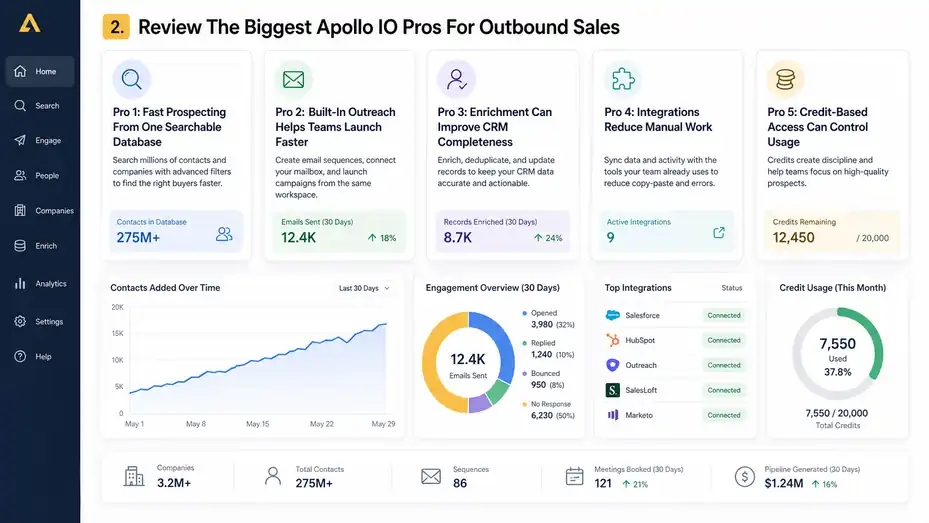
Apollo’s biggest strength is convenience. It brings several outbound tasks into one platform, which can reduce tool switching and help teams move faster.
Pro 1: Fast Prospecting From One Searchable Database
The first obvious advantage is speed. Instead of manually searching company websites, LinkedIn profiles, directories, and old spreadsheets, your team can search for prospects inside one platform.
That matters because outbound sales often fails before the first email is even sent. Many teams spend too much time building lists and too little time speaking with qualified buyers. Apollo helps reduce that friction by letting you search based on buyer characteristics.
Imagine you sell cybersecurity software to finance teams at mid-market companies. Instead of saying “we need finance leads,” you can build a tighter search around company size, department, job title, seniority, industry, and region. That gives your outbound motion a much better starting point.
I suggest treating Apollo searches like experiments. Start narrow, check the quality of the first 25 to 50 contacts, then expand only after the list looks right. This simple habit can save you from burning credits on contacts that never matched your target account profile in the first place.
Apollo’s database is especially helpful when your team is still learning the market. You can explore patterns, identify common titles, spot account segments, and build a first version of your total addressable market.
Total addressable market, or TAM, simply means the full group of companies and buyers that could realistically become customers.
Pro 2: Built-In Outreach Helps Teams Launch Faster
Apollo can also help teams send outbound email campaigns directly from the same workspace where they build lists. This is a big reason small teams like it.
Instead of buying a database, exporting contacts, importing them into a separate sequencing tool, and then connecting that tool to another system, you can move from search to outreach more quickly.
Apollo’s pricing page states that email campaigns are included on every account, although non-paying plans are limited to Gmail account connections, while paid accounts can connect Microsoft Office or other providers.
That setup is useful for early-stage outbound because it lowers the barrier to action. A founder or first sales hire can build a list, write a simple sequence, connect a mailbox, and test messaging without building a complex tech stack.
Here’s the practical benefit: You learn faster. If your offer, audience, or messaging is off, you will usually see weak replies quickly. That is painful, but useful. Early feedback helps you adjust the targeting and copy before hiring a full sales team or spending heavily on automation.
I would still avoid blasting large campaigns on day one. Start with small batches. Send to 50 or 100 carefully selected prospects, then review replies, bounces, opens, and meetings. Outbound works better when you treat every campaign as a controlled test rather than a volume contest.
Pro 3: Enrichment Can Improve CRM Completeness
Data enrichment means adding missing information to records you already have. For example, if your CRM has a company name and a contact name but no title, email, phone number, industry, or employee count, enrichment can fill in those gaps.
Apollo offers data enrichment features that can update contacts and accounts, detect duplicates, enrich CSV files, and keep CRM data fresher over time. Apollo describes features such as Data Health Center, deduplication, CRM enrichment, CSV enrichment, and API enrichment on its enrichment product page.
This matters because outbound sales depends on clean data. If your CRM is full of stale titles, duplicate contacts, missing domains, and wrong company sizes, your reps waste time and your reporting becomes unreliable.
A realistic example: Imagine your CRM has 8,000 old contacts from past campaigns. Some changed jobs. Some companies were acquired. Some email addresses are no longer valid. Instead of asking a sales representative to manually clean every record, enrichment can help update the database and reveal which records are worth reactivating.
I believe enrichment is one of Apollo’s most useful features for teams that already have some data. It is not just about finding new leads. It is about making your existing database more usable.
That said, enrichment should never be accepted blindly. You still need field rules, duplicate checks, and quality reviews before syncing large updates into your CRM.
Pro 4: Integrations Reduce Manual Work
Apollo integrates with widely used sales and marketing systems. Its pricing page specifically mentions integrations with Salesforce, HubSpot, Outreach, SalesLoft, Marketo, Sendgrid, LinkedIn, and email providers, with API access available on custom plans.
The benefit is simple: Less copy-pasting.
When outbound tools do not connect properly, representatives often create messy workarounds. They export CSV files, upload the wrong version, forget to update statuses, create duplicate contacts, or lose activity history. Over time, those little errors become a revenue operations headache.
With integrations, you can push contacts into your CRM, sync activity, update fields, and connect Apollo to the systems your team already uses.
For a small team, that might mean syncing Apollo with HubSpot. For a larger team, it might mean connecting Apollo to Salesforce and a dedicated sales engagement platform.
The key is to define sync rules before the team starts moving data around. I advise teams to answer questions like these early:
- Owner Rule: Who owns a contact after it enters the CRM?
- Duplicate Rule: What happens if the same email already exists?
- Lifecycle Rule: Which status should a new Apollo lead receive?
- Source Rule: How will you track that Apollo created or enriched the record?
- Suppression Rule: Which contacts should never be added to outbound?
Apollo can reduce manual work, but only if the integration is planned. Without rules, automation just creates cleaner-looking chaos.
Pro 5: Credit-Based Access Can Control Usage
Apollo uses credits for certain data actions, such as accessing contact information and exporting contacts. Apollo explains that export credits are consumed when you export a contact outside Apollo through CSV, CRM sync, enrichment, or similar workflows.
Credit systems can feel annoying, and we will talk about that in the cons. But there is a positive side: Credits force teams to think about data usage.
If every representative can reveal unlimited data with no guardrails, list quality often drops. People unlock contacts too casually. They build oversized lists. They target weak-fit prospects. They export data that never gets used.
A credit model can create discipline when managers use it well. For example, a sales manager might give each SDR a weekly credit budget and require list reviews before major exports. This turns prospecting into a quality exercise instead of a race to collect names.
Apollo’s credit page says accessing a contact’s personal email, business email, or both does not cost more than one credit per contact, while phone numbers cost more credits than emails. That difference matters because calling-heavy teams may spend credits faster than email-first teams.
My advice is simple: Track cost per usable contact, not just cost per seat. A cheap platform becomes less cheap if the team spends credits on poor-fit contacts, outdated records, or lists that never convert into conversations.
Review The Biggest Apollo IO Cons For Outbound Sales
Apollo’s weaknesses are not dealbreakers for every team, but they become serious when you ignore them.
Most issues appear around data quality, credit planning, deliverability, and operational control.
Con 1: Contact Data Can Be Inconsistent
No B2B database is perfect. People change jobs, companies restructure, titles shift, domains change, and inboxes disappear. Apollo is no exception.
G2’s Apollo review summary says users often praise Apollo for ease of use and accurate contact data, but some also report inconsistent data accuracy, especially with outdated contact information. That matches what many outbound teams experience with sales databases in general.
The practical issue is not that some records are wrong. The real issue is what wrong data does to your outbound system. A bad email can bounce. A stale title can make your message irrelevant. A wrong company size can push the prospect into the wrong segment. A duplicate record can confuse ownership.
Let me break it down for you. If your campaign sends 1,000 emails and 8% bounce, that is 80 failed sends. But the bigger cost is not just the 80 missed contacts. It is the possible damage to sender reputation, wasted credits, poor reporting, and lower trust from the sales team.
To manage this con, sample every list before you launch. Review 20 to 30 contacts manually. Check whether titles match your buyer persona, company websites look active, and emails seem reasonable.
For high-value accounts, add an extra verification step before sending. Apollo can help you move quickly, but your team still owns the quality bar.
Con 2: Credits Can Become Confusing As Usage Grows
Credits are useful for control, but they can become confusing when a team grows. This is especially true when different actions consume credits differently or when representatives do not understand what counts as an export, reveal, enrichment, or sync.
Apollo’s pricing page explains that export credits are used when contacts are exported outside Apollo, including through CSV, CRM, Person API enrichment, or syncing data to another system. That distinction is important because a team might think, “We are just syncing to our CRM,” while the platform treats that as credit usage.
This can create budget surprises. A founder may estimate cost based on user seats, then later realize actual usage depends on how many contacts the team reveals, enriches, exports, or syncs. Calling-heavy teams may also consume credits faster because phone data is typically more expensive than email data.
Here’s a simple scenario. A three-person SDR team wants each rep to add 1,000 new contacts per month. If they reveal emails, enrich missing fields, export records, and pull phone numbers for priority prospects, their real usage may look very different from the plan they originally priced.
I recommend creating a credit policy before rollout. Decide who can export, who can reveal phone numbers, when enrichment should run, and which campaigns deserve credit spend. This sounds boring, but it protects your budget.
Con 3: Built-In Sequencing May Not Fit Every Advanced Sales Team
Apollo’s built-in sequences are convenient, especially when you want prospecting and outreach in one place. But advanced teams may outgrow the native workflow or prefer dedicated sales engagement tools.
The issue is not that Apollo sequencing is bad. The issue is that outbound sales teams often develop more complex needs over time. They may want advanced routing, deeper task governance, strict manager approvals, multi-region sending rules, detailed analytics, custom coaching workflows, or more specialized reporting.
If your outbound team is small, Apollo’s built-in outreach can feel like a gift. If your team has 30 SDRs across multiple regions, layered account ownership, dedicated revenue operations support, and strict compliance workflows, you may need a more specialized system.
This is where teams need to be honest about maturity. A simple setup is not a weakness when your process is simple. It becomes a weakness only when the software cannot support your next operating model.
I usually suggest this rule: Use Apollo sequencing if your main goal is to test outbound quickly and keep your stack lean. Consider a dedicated engagement platform if your team already has mature outbound operations, complex reporting needs, and managers who need deeper control over every step.
Con 4: Deliverability Still Requires Separate Discipline
Email deliverability means your emails actually land in the inbox instead of bouncing, going to spam, or getting blocked. This is one of the most misunderstood parts of outbound sales.
Apollo can help you send campaigns, but it cannot save you from poor sending behavior. If you upload weak lists, send generic messages, use brand-new domains too aggressively, ignore unsubscribe rules, or send too many emails too quickly, your results can suffer.
Apollo’s release notes mention waterfall enrichment becoming a default experience and say teams saw more emails and phone numbers, better accuracy, and fewer bounces in that context. That is helpful, but list quality is only one part of deliverability.
You still need healthy domains, sensible daily sending limits, mailbox warm-up discipline, relevant messaging, and regular suppression cleanup.
Suppression simply means excluding people who should not receive outreach, such as unsubscribed contacts, customers, competitors, bounced emails, or people outside your target market.
A practical outbound rule I like: Never treat a sending tool as your deliverability strategy. The tool sends the email. Your process protects the inbox.
Before scaling any Apollo campaign, watch your bounce rate, spam complaints, reply quality, and domain health. If something looks off, pause and fix the cause instead of sending more volume.
Con 5: All-In-One Convenience Can Hide Weak Strategy
This is the con people do not talk about enough. Apollo makes outbound easier to launch, which can tempt teams to skip the hard thinking.
A team might say, “We have Apollo now, let’s send campaigns.” But who exactly are you targeting? Why them? What problem are you speaking to? What trigger makes them more likely to care now? What proof do you have? What does a good reply look like?
If those questions are unanswered, Apollo will not fix the campaign. It will simply help you send unfocused messages faster.
Imagine you sell HR software. A weak campaign targets “HR managers at companies with 50 to 500 employees.” That is broad.
A stronger campaign targets “Heads of People at 100 to 300-person software companies hiring more than 20 roles this quarter and likely struggling with onboarding consistency.” That second list gives you a sharper message.
Apollo is powerful when it supports a clear strategy. It is risky when it replaces strategy.
In my experience, the best teams write the campaign logic before touching the search filters. They define the audience, pain point, timing trigger, offer, proof, and follow-up path. Then they use Apollo to build the list. That order matters.
Compare Apollo IO Pros And Cons By Use Case
Apollo is not equally good for every outbound motion.
The right answer depends on how your team sells, how much data you need, and how mature your operations are.
For Solo Founders And Early Sales Hires
Apollo can be very helpful for solo founders and first sales hires because it reduces setup friction. You can find leads, test messaging, run simple sequences, and learn which market segments respond.
At this stage, the biggest benefit is speed to learning. You may not know which job titles care most, which industries convert, or which pain point gets replies. Apollo lets you run small, structured tests without hiring a full sales operations team.
But founders should avoid confusing activity with validation. Sending 2,000 emails does not prove outbound works. Getting qualified replies from the right accounts proves you are close to something useful.
Here’s how I would start:
- Define One Narrow Segment: Pick one buyer type, one industry, and one clear pain point.
- Build A Small List: Start with 100 to 200 contacts, not thousands.
- Write A Simple Sequence: Use short emails focused on relevance, not hype.
- Review Replies Manually: Look for patterns in objections, interest, and confusion.
- Adjust Before Scaling: Improve targeting and message before increasing volume.
For early teams, Apollo’s all-in-one setup can be a strong fit. Just keep the process small and intentional until the market tells you what is working.
For SDR Teams Building Repeatable Pipeline
Sales development teams use Apollo differently. They need repeatability. One good founder-led campaign is not enough. The team needs territory rules, persona definitions, sequence standards, reporting, and coaching.
Apollo can support SDR teams by standardizing list building and outreach. Representatives can work from saved searches, use approved templates, sync data to the CRM, and follow a consistent campaign structure.
The risk is inconsistent rep behavior. One SDR may build tight lists. Another may chase random titles. One may personalize emails thoughtfully. Another may send generic copy. Over time, the results become hard to compare.
That is why SDR managers need operating rules. Define your ideal customer profile clearly. Create list criteria. Approve sequence templates. Track reply rates and meeting rates by segment. Review sample leads weekly.
For example, if Rep A gets a 9% positive reply rate from finance directors in logistics companies and Rep B gets a 1% positive reply rate from operations managers across all industries, the lesson might not be “Rep A writes better.” It might be that Rep A targets a more urgent buyer.
Apollo helps reveal these patterns when your team uses it consistently. Without consistency, the data becomes noisy and coaching becomes guesswork.
For Revenue Operations And CRM Hygiene
Revenue operations teams usually care less about how easy Apollo feels and more about whether it keeps data clean, traceable, and controllable.
This is where Apollo’s enrichment, deduplication, integrations, and API options become more relevant. Apollo’s enrichment page describes CRM enrichment, CSV enrichment, duplicate management, and API enrichment workflows.
The main question for RevOps is not “Can Apollo find contacts?” It is “Can we trust how Apollo changes our systems?”
Before rolling Apollo out across a team, RevOps should define field mapping, duplicate logic, source attribution, sync direction, permission levels, and enrichment rules.
For example, should Apollo overwrite an existing job title in the CRM? Should it update company size automatically? Should it create new leads or update existing contacts? Should enrichment run weekly, monthly, or only on demand?
I suggest using a sandbox or small test group before large-scale syncing. Push a sample of records, inspect the results, and look for duplicate creation, bad formatting, missing required fields, and unexpected status changes.
Apollo can be useful for CRM hygiene, but the setup needs adult supervision, so to speak. Data automation is wonderful when rules are clear. When rules are vague, it can create a mess very efficiently.
For Cold Calling And Multi-Channel Teams
If your outbound motion depends heavily on phone calls, Apollo can still help, but you need to evaluate phone data carefully. Email-first teams and call-first teams experience databases differently.
Phone data is harder to maintain than email data. Direct dials change, mobile numbers may be unavailable for some contacts, and office lines may not reach the right person. Apollo’s credit information also indicates phone numbers consume more credits than email contact access.
That means cold calling teams should test phone coverage before committing. Do not assume a database that works for email will work equally well for calling.
A good test is simple. Choose 100 high-fit prospects in your target segment. Reveal phone data where available. Have reps call them using a consistent process. Track connect rate, wrong-number rate, voicemail rate, and meeting conversion.
If the numbers work, Apollo may be a useful source for call lists. If the phone data is thin or inaccurate in your niche, you may need a different source or a supplemental verification workflow.
Multi-channel teams should also coordinate touches carefully. If one rep emails, another calls, and another syncs CRM tasks without clear ownership, the buyer experience gets messy. Apollo can support multi-channel outbound, but the team still needs rules.
Evaluate Apollo IO Pricing, Credits, And Real Cost
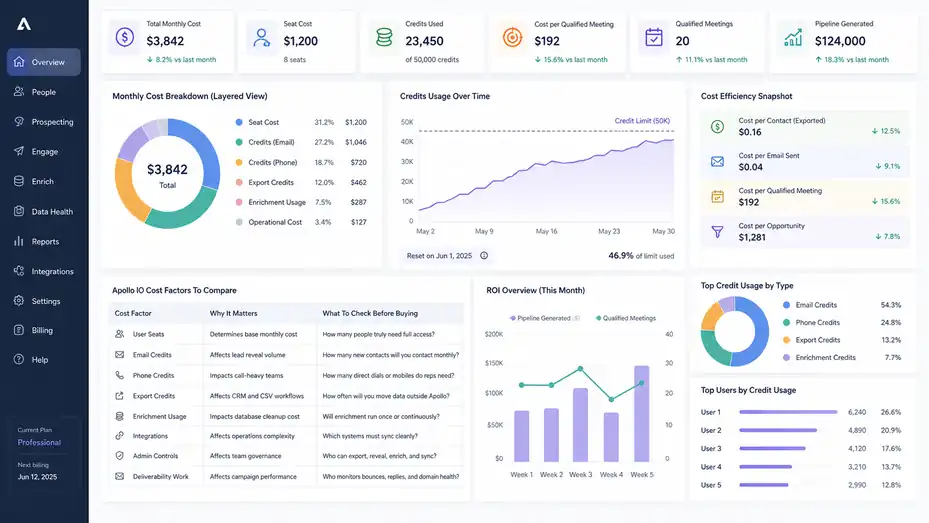
Apollo’s sticker price is only one part of the decision.
The real cost depends on seats, credits, data usage, exports, enrichment, and how efficiently your team turns contacts into pipeline.
How To Think About Pricing Beyond The Monthly Seat
When teams compare outbound tools, they often start with the monthly user price. That is understandable, but incomplete.
For Apollo, you should think about cost in layers. There is the seat cost, which is what you pay for users. Then there is data usage, which depends on how many contacts you reveal, export, enrich, or sync.
Then there is the operational cost, which includes time spent cleaning lists, reviewing data, fixing sync issues, and managing deliverability.
Apollo’s pricing page notes that users can add credits after signing up and that export credits are consumed when data moves outside Apollo through workflows such as CSV, CRM, or enrichment sync.
That means your real cost depends heavily on behavior. A disciplined team that builds small, high-fit lists may get strong value. A careless team that reveals and exports thousands of weak-fit contacts may spend more while producing worse results.
I recommend calculating cost per qualified meeting, not just cost per contact. If Apollo helps you book 20 qualified meetings from a carefully managed campaign, the platform may be very cost-effective.
If it helps you send 10,000 emails with low replies and messy CRM data, the lower software price will not feel like a win.
Apollo IO Cost Factors To Compare
Here is a practical comparison table you can use before choosing Apollo or expanding your plan.
| Cost Factor | Why It Matters | What To Check Before Buying |
|---|---|---|
| User Seats | Determines base monthly cost | How many people truly need full access? |
| Email Credits | Affects lead reveal volume | How many new contacts will you contact monthly? |
| Phone Credits | Impacts call-heavy teams | How many direct dials or mobiles do reps need? |
| Export Credits | Affects CRM and CSV workflows | How often will you move data outside Apollo? |
| Enrichment Usage | Impacts database cleanup cost | Will enrichment run once or continuously? |
| Integrations | Affects operations complexity | Which systems must sync cleanly? |
| Admin Controls | Affects team governance | Who can export, reveal, enrich, and sync? |
| Deliverability Work | Affects campaign performance | Who monitors bounces, replies, and domain health? |
This table is useful because Apollo’s value is not just about access. It is about controlled access. A strong outbound team does not need unlimited everything. It needs the right contacts, clean workflows, and measurable conversion.
When Apollo IO Feels Affordable
Apollo feels affordable when it replaces several tools, supports a focused outbound motion, and helps your team create pipeline without heavy operations support.
For many small teams, the appeal is obvious. You may not want separate subscriptions for lead data, email sequencing, enrichment, and basic prospecting workflows. Apollo’s combined platform can simplify buying decisions and reduce the time it takes to get started.
It also feels affordable when your target market is easy to define and well covered by the database.
For example, if you sell to common B2B roles like sales leaders, marketing leaders, founders, recruiters, finance leaders, or operations managers in well-indexed industries, Apollo may help you build usable lists quickly.
The strongest return usually comes when teams use Apollo to validate repeatable segments. Let’s say a small agency spends a month testing three niches. They discover that operations leaders at logistics companies reply at 6%, while two other segments barely respond.
That insight is valuable. It tells the agency where to focus messaging, case studies, ads, and future outreach.
Apollo is affordable when it shortens the learning loop. It is expensive when it creates more noise than knowledge.
When Apollo IO Can Become Expensive
Apollo can become expensive when usage is unmanaged. The platform may look simple from the outside, but costs can rise when teams reveal too many contacts, rely heavily on phone data, run large enrichment jobs, or export data without quality controls.
The hidden cost is often not the invoice. It is wasted effort.
If representatives spend hours chasing poor-fit contacts, if campaigns damage inbox performance, or if RevOps has to clean duplicate records every week, the real cost goes beyond software. It becomes productivity loss.
A practical warning sign is when your team talks mostly about volume. “We added 5,000 leads this week” sounds impressive, but it means little if those leads are not converting.
Better metrics include positive reply rate, meeting rate, opportunity creation rate, cost per opportunity, and revenue per outbound segment.
I advise teams to review Apollo usage monthly. Look at which searches created pipeline, which sequences produced replies, which reps used the most credits, and which exports actually became sales activity.
Cut anything that creates activity without learning or revenue.
Set Up Apollo IO For Better Outbound Results
Apollo works best when you set it up around a clear outbound system.
The platform gives you tools, but your process decides whether those tools create pipeline.
Build Your Ideal Customer Profile Before Searching
Your ideal customer profile, or ICP, is the type of company most likely to benefit from your product and become a good customer. Before you use Apollo search filters, write this profile down.
A weak ICP sounds like this: “We sell to SaaS companies.”
A stronger ICP sounds like this: “We sell to B2B SaaS companies with 50 to 300 employees, a sales-led motion, recent hiring for SDRs, and a sales leader responsible for pipeline generation.”
That second version gives you useful search criteria. You can filter by industry, employee count, department, title, and sometimes signals that suggest growth or need.
I recommend building your ICP in three layers:
- Company Fit: Industry, size, location, business model, growth stage, and relevant technology.
- Buyer Fit: Job title, seniority, department, responsibilities, and likely pain points.
- Timing Fit: Hiring, funding, expansion, compliance changes, new leadership, or visible business pressure.
Apollo becomes much more useful when these layers are clear. You stop searching for “leads” and start searching for specific people at specific accounts who have a believable reason to care.
Create Segmented Lists Instead Of Giant Lists
One of the fastest ways to ruin outbound performance is to build one giant list and send everyone the same message. Apollo makes it easy to build large lists, but large does not mean good.
Segmentation means grouping prospects by shared context. You might segment by industry, role, company size, pain point, geography, or buying trigger. The goal is to make your message feel relevant.
For example, a payroll software company might create separate lists for:
- Segment 1: Finance leaders at 50 to 200-person agencies.
- Segment 2: HR leaders at multi-location service businesses.
- Segment 3: Founders at fast-growing startups hiring their first operations team.
Each group may care about payroll, but for different reasons. Finance leaders may care about accuracy and reporting. HR leaders may care about employee experience. Founders may care about reducing administrative chaos.
Apollo helps you create these segments, but you need to resist the urge to over-expand. Start with one segment, test it, then build the next.
A good list should feel like you could write one relevant opening line for everyone on it. If you cannot explain why the whole list belongs together, it is probably too broad.
Write Sequences Around Buyer Pain, Not Tool Features
A common mistake is writing outbound emails about your product instead of the buyer’s problem. Apollo can send the sequence, but the message still needs to earn attention.
Your first email should quickly answer the prospect’s silent question: Why are you contacting me, and why should I care now?
A simple structure works well:
- Reason For Reaching Out: Mention a relevant role, company situation, or business trigger.
- Likely Pain Point: Name a problem the buyer may recognize.
- Specific Outcome: Explain the result you help with in plain language.
- Low-Friction CTA: Ask for a small next step, not a huge commitment.
For example, instead of saying, “We are an AI-powered platform that optimizes sales productivity,” you might say, “I noticed your team is hiring SDRs.
Many sales leaders add headcount before they have clean territory data, which makes ramp slower. We help teams clean up account targeting before reps start prospecting.”
That message is not perfect for every buyer, but it is grounded in a real situation. That is the point.
In my experience, Apollo campaigns perform better when the sequence is built around a narrow segment and one clear pain. More features usually create more confusion.
Set Permission Rules Before The Team Scales
Permissions matter because Apollo can affect data, budget, and buyer experience. If everyone has unrestricted access, you may end up with messy exports, duplicate CRM records, uncontrolled enrichment, and inconsistent outreach.
Before scaling, decide who can do what.
For a small team, this may be informal. For a larger team, it should be documented. Managers and RevOps should know who can create sequences, approve templates, reveal phone numbers, export contacts, sync to CRM, edit fields, and run enrichment jobs.
This is not about slowing reps down. It is about preventing expensive mistakes.
A simple permission model could look like this:
- SDRs: Build lists from approved saved searches and add contacts to approved sequences.
- Managers: Approve messaging, review performance, and control high-volume campaigns.
- RevOps: Manage CRM sync, field mapping, enrichment rules, deduplication, and exports.
- Admins: Control billing, credits, integrations, and user access.
Apollo can support a fast outbound motion, but fast systems need guardrails. Otherwise, the team learns bad habits before leadership notices.
Optimize Apollo IO Campaigns After Launch
Launching campaigns is only the beginning.
The real improvement comes from reviewing performance, finding patterns, and tightening the system over time.
Track The Metrics That Actually Matter
Outbound teams often obsess over open rates. Open rates can be useful, but they are not the best measure of success. Privacy changes and email client behavior can make opens noisy.
Better metrics include bounce rate, reply rate, positive reply rate, meeting booked rate, opportunity creation rate, and revenue influenced by outbound campaigns.
Here’s a practical measurement table:
| Metric | What It Tells You | Healthy Interpretation |
|---|---|---|
| Bounce Rate | Data and deliverability quality | High bounces mean list quality or verification needs work |
| Reply Rate | Message relevance and targeting | Replies show prospects are reacting |
| Positive Reply Rate | True interest level | This is more useful than total replies |
| Meeting Rate | Conversion from interest to action | Helps compare campaigns fairly |
| Opportunity Rate | Sales quality | Shows whether meetings are real pipeline |
| Segment ROI | Revenue by audience | Helps decide where to scale |
I suggest reviewing metrics by segment, not just overall. A 3% positive reply rate may look average, but one segment might be at 8% while another is at 0.5%. If you only review the blended number, you miss the insight.
Apollo gives you activity data, but the interpretation is your job. The question is not “Did the campaign send?” The question is “What did this campaign teach us about the market?”
Improve Lists Before Improving Copy
When a campaign underperforms, teams often rewrite the email immediately. Sometimes that helps. But in many cases, the list is the real problem.
A great email sent to the wrong person still fails.
Before rewriting copy, inspect the list. Are the job titles truly right? Are the companies the right size? Are the industries too broad? Are you contacting people with the authority to care? Is there a timing trigger? Are you mixing multiple personas in one campaign?
I like to run a simple list audit. Pull 25 contacts from the campaign and manually review them. Score each one from one to three:
- Poor Fit: Should not have been included.
- Possible Fit: Could be relevant, but the reason is weak.
- Strong Fit: Clearly matches the campaign logic.
If fewer than 70% are strong fit, fix the list before changing the message. This is especially important in Apollo because search filters can create a false sense of precision. A title filter may include people with similar titles but very different responsibilities.
Better targeting usually improves every downstream metric. Your copy feels more relevant. Your bounce risk drops. Your replies become clearer. Your sales calls improve because prospects actually match the problem you solve.
Use Replies As Market Research
One underrated benefit of outbound is learning. Even negative replies can help you improve positioning, targeting, and product messaging.
When prospects reply, tag their responses. You might create categories like “not a priority,” “already using competitor,” “wrong person,” “interested later,” “send info,” “booked meeting,” or “budget issue.”
Over time, these patterns become valuable. If many prospects say “wrong person,” your targeting needs work. If many say “already solved,” your differentiation needs work. If many say “not now,” your timing trigger may be weak.
Apollo helps you generate the conversations, but the insights come from reading replies carefully. I believe every outbound team should review actual reply language weekly.
Dashboards are useful, but they do not replace hearing the market in the buyer’s own words.
A mini scenario: A software company targets operations leaders and gets low positive replies. But several replies say, “This belongs with finance.” Instead of treating those as failures, the team builds a finance leader campaign. The new segment performs better because the market corrected the targeting.
That is how smart teams use Apollo. They do not just send. They listen.
Protect Deliverability As You Scale
Scaling outbound does not mean simply sending more emails. It means increasing volume while maintaining quality, inbox health, and buyer relevance.
If you scale too quickly, you can hurt your domain reputation. That can reduce inbox placement and make even good emails perform poorly.
To protect deliverability, use clean lists, avoid high bounce rates, suppress bad contacts, write relevant copy, and increase volume gradually. Keep an eye on domain health and mailbox behavior. If replies drop suddenly or bounces increase, investigate before sending more.
Apollo’s waterfall enrichment update is relevant here because better data coverage and fewer bounces can support healthier outreach, but no enrichment feature replaces responsible sending practices.
I recommend scaling in layers. First, prove one segment. Then add more contacts within that segment. Then test a second segment. Then add more representatives. This is slower than blasting thousands of emails, but it creates a more stable outbound engine.
Outbound sales is a trust game. Inbox providers need to trust your domain. Prospects need to trust your message. Sales leaders need to trust the data. Scaling should protect all three.
Avoid Common Apollo IO Mistakes
Most Apollo problems are preventable. The platform gets blamed for many issues that actually come from unclear targeting, poor governance, or rushed execution.
Mistake 1: Treating Apollo As A Shortcut Around Strategy
The biggest mistake is using Apollo before you know who you are trying to reach. This usually leads to broad lists, vague messages, and low-quality replies.
Apollo can help you discover prospects, but it cannot decide your positioning. It cannot tell you which pain point matters most to a specific buyer. It cannot replace customer interviews, sales calls, market research, or basic strategic thinking.
Before using Apollo at scale, write a one-page outbound brief. Include the target segment, buyer persona, problem, trigger, proof point, offer, and desired call to action. If your team cannot write that brief clearly, your campaign is not ready.
Here’s a useful test: Could a new sales rep read your brief and understand exactly who to target and why? If not, the strategy is still too fuzzy.
I know this feels like extra work, but it saves time. A clear brief makes Apollo searches cleaner, emails sharper, and reporting easier. It also helps managers coach the team because everyone understands what the campaign was supposed to test.
Mistake 2: Exporting Too Much Data Too Early
Exporting large lists feels productive, but it can create waste fast. Once contacts leave Apollo and enter your CRM or another tool, they need ownership, status rules, deduplication, suppression checks, and follow-up.
If you export too much too soon, your CRM can become cluttered with contacts that were never reviewed, never contacted properly, or never qualified.
A better approach is staged exporting. Build a list, sample it, send a small campaign, review results, then export or sync only the contacts that fit your operating process.
For example, instead of exporting 5,000 contacts from a new market, start with 200. If those 200 produce strong replies and clean data, expand to 1,000. If they perform badly, you just saved your team from polluting the CRM with a weak segment.
This also helps control credit usage. Since Apollo uses export credits when data is moved outside the platform, careless exporting can affect budget as well as data quality.
The best teams treat exports like commitments. If a contact enters the CRM, someone should know why it is there, what happens next, and how success will be measured.
Mistake 3: Ignoring CRM Sync Rules
CRM sync mistakes are sneaky. At first, everything looks fine. Then duplicates appear. Lead owners get overwritten. Old opportunities receive new activity. Lifecycle stages become inconsistent. Reports stop making sense.
This usually happens because teams connect tools before defining rules.
Before syncing Apollo with your CRM, answer practical questions. Should Apollo create leads or contacts? Should it update existing fields? Which system is the source of truth for job title, company size, owner, lifecycle stage, and email status? What happens when a contact already exists? What fields are required?
Apollo’s integration options are useful, but integrations need governance. The more systems you connect, the more important these rules become.
I advise running a small sync test. Choose 20 to 50 records, sync them, and inspect the results. Check formatting, ownership, duplicates, field values, and activity logging. Fix problems before giving the whole team access.
This is one of those boring steps that protects everyone later. Reps get cleaner records. Managers get better reports. RevOps gets fewer fires. Buyers get less duplicate outreach.
Mistake 4: Scaling Before You Have A Winning Segment
Apollo makes it tempting to scale quickly because the database is large and outreach tools are accessible. But scaling a weak campaign only makes the weakness more expensive.
A winning segment is not just a list that got opens. It is a segment that produced positive replies, qualified meetings, and real sales conversations. Ideally, it also shows a pattern you can explain.
For example, “VPs of Sales at B2B SaaS companies hiring SDRs replied because they are under pressure to generate pipeline” is a useful pattern. “Random executives replied to a clever subject line” is less useful.
Before scaling, confirm four things:
- List Quality: The contacts match your ICP.
- Message Relevance: The pain point fits the buyer.
- Conversion: Replies turn into meetings.
- Sales Acceptance: Meetings are actually worth taking.
If those are not true, improve the campaign before increasing volume.
In most cases, scaling should feel earned. You prove one motion, document it, train the team, then expand. Apollo can help you move fast, but the best teams move fast in the right direction.
Decide Whether Apollo IO Is Worth It For Your Team
The best decision depends on your outbound maturity, budget, data needs, and willingness to manage the system properly.
When Apollo IO Is A Strong Fit
Apollo is a strong fit when your team wants an efficient way to find leads, enrich data, and run outbound without building a complicated stack from day one.
It is especially useful for early-stage teams, lean sales teams, agencies, recruiters, founders, and SDR teams that need to test markets quickly. If your target buyers are common B2B roles and your outbound process is still developing, Apollo can give you a practical starting point.
Apollo is also a good fit when your team values speed and consolidation. Instead of stitching together multiple tools immediately, you can use one platform to build lists, reveal contact data, run sequences, and sync information into your workflow.
The strongest fit looks like this: You have a clear ICP, a narrow campaign idea, basic deliverability discipline, and someone responsible for data quality. In that environment, Apollo can help you learn quickly and build repeatable outbound motions.
I would consider Apollo seriously if your team is asking, “How do we start outbound in a structured way without overbuying software?” That is one of the situations where Apollo’s all-in-one model makes sense.
When Apollo IO May Not Be The Best Fit
Apollo may not be the best fit when your team needs highly specialized data, advanced enterprise governance, very deep phone coverage, or complex sales engagement workflows.
If your market is niche, contact data may need extra validation. If your team is call-heavy, you should test phone accuracy and coverage before relying on Apollo as your main source. If your RevOps environment is complex, you may need tighter controls than a simple setup provides.
Apollo may also be a poor fit if your team lacks outbound discipline. This sounds harsh, but it is true. If you do not have a defined ICP, clear messaging, clean CRM rules, or deliverability practices, Apollo can amplify the mess.
A tool cannot compensate for strategic laziness.
You may need a different setup if you already have a mature outbound organization with dedicated tools for engagement, conversation intelligence, routing, enrichment, and analytics. In that case, Apollo might still serve as one data source, but not necessarily the central system.
The decision should come down to fit, not popularity. Apollo is widely used and well-reviewed, with Apollo’s own review page citing a 4.7 out of 5 rating based on 9,015 G2 reviews. Still, your team’s workflow matters more than the average rating.
A Simple Decision Framework
Use this framework before buying or expanding Apollo.
| Question | Choose Apollo If… | Be Careful If… |
|---|---|---|
| Do you have a clear ICP? | Yes, and you can filter for it | No, you are still guessing broadly |
| Do you need speed? | You want fast prospecting and testing | You need highly customized workflows first |
| Is email your main channel? | You can validate emails and manage deliverability | You rely mostly on phone data |
| Is your team small or lean? | You want one platform to start | You already have a mature enterprise stack |
| Can you manage credits? | You can set usage rules | Everyone will export freely |
| Can RevOps govern sync? | Field rules and deduplication are defined | CRM hygiene is already messy |
| Will you review performance? | You track replies, meetings, and pipeline | You only track send volume |
My simple opinion: Apollo is often worth it for teams that want to launch or improve outbound sales quickly, but it works best with a thoughtful process. The software gives you leverage. Your strategy decides whether that leverage creates pipeline or noise.
Build A Practical Apollo IO Rollout Plan
If you decide to use Apollo, do not roll it out randomly.
A simple phased plan helps your team learn, control costs, and avoid messy data problems.
Phase 1: Run A Small Campaign Test
Start with one segment, one message, and one clear goal. Do not try to test five industries, six titles, and three offers at the same time.
Choose a specific buyer group. Build a list of 100 to 300 contacts. Review a sample manually. Write a short sequence. Send at a controlled pace. Track replies and meetings.
Your goal in phase one is not maximum pipeline. Your goal is proof of direction.
A strong first test might answer questions like these: Are we targeting the right persona? Does the pain point resonate? Are emails bouncing? Are prospects replying with interest? Are meetings qualified?
After the campaign, review actual replies. Do not just look at dashboard numbers. Read what people said. Their language will show you whether your message felt relevant, confusing, too generic, or well timed.
In my experience, the first campaign is rarely perfect. That is fine. What matters is whether it teaches you something specific enough to improve the second campaign.
Phase 2: Clean Up Data And Workflow Rules
Once you have a promising segment, tighten the workflow. This is where you define saved searches, CRM sync rules, permissions, naming conventions, and suppression logic.
For example, create a naming structure for lists and sequences so everyone can understand them later. A campaign called “Q2 VP Sales SaaS Hiring SDRs US” is more useful than “New outbound test.”
Set clear rules for what enters the CRM. Decide when contacts should sync, what fields Apollo can update, and how duplicates will be handled. If you use enrichment, decide whether it runs manually or automatically.
This phase may feel less exciting than sending emails, but it creates the foundation for scale.
Think of it like organizing a kitchen before a busy dinner service. You can cook without organization once or twice, but eventually everything slows down. Outbound is similar. Clean systems create faster execution later.
Phase 3: Scale Winning Segments Gradually
After one segment shows promise, expand carefully. You can add more accounts within the same segment, test a similar persona, or adapt the message for a nearby industry.
Do not jump from 200 contacts to 20,000. Increase volume in stages and watch deliverability, reply quality, and meeting conversion.
A sensible scaling path might look like this:
- Test 200 Contacts: Validate targeting and messaging.
- Expand To 750 Contacts: Confirm the result holds at a larger sample.
- Add A Second Segment: Test one new audience with adjusted copy.
- Document The Playbook: Save filters, messaging notes, objections, and qualification criteria.
- Train The Team: Make sure reps understand why the campaign works.
This is how Apollo becomes more than a tool. It becomes part of a repeatable outbound system.
Scaling should make the team smarter, not just louder. Every new campaign should improve your understanding of the market.
Phase 4: Review ROI And Decide What Apollo Should Own
After 60 to 90 days, review Apollo’s role in your outbound stack. Do not evaluate it only by activity. Evaluate it by business outcomes.
Look at qualified meetings, opportunities, pipeline value, closed revenue, cost per opportunity, credit usage, rep adoption, data quality, and CRM cleanliness.
Then decide what Apollo should own long term. It might be your main prospecting and sequencing platform. It might be your primary data enrichment tool. It might be one data source among several. Or it might be best for specific teams but not others.
This decision should be based on evidence. Which campaigns worked? Which segments converted? Where did data quality disappoint? Which workflows saved time? Which issues required manual cleanup?
I suggest creating a simple Apollo scorecard each month. Include cost, usage, meetings, opportunities, data issues, deliverability issues, and team feedback. The scorecard will show whether Apollo is improving your outbound engine or simply adding another layer of software.
Final Verdict: Apollo IO Pros And Cons For Outbound Sales
Apollo IO pros and cons for outbound sales come down to one big idea: Apollo can help teams move faster, but it rewards discipline.
The biggest pros are speed, convenience, searchable B2B data, built-in outreach, enrichment, integrations, and a lower-friction way to start outbound. For founders, lean sales teams, and SDR teams testing new markets, that can be incredibly useful.
The biggest cons are inconsistent data quality, credit complexity, deliverability responsibility, possible workflow limitations, and the danger of using automation before strategy is clear. Those issues are manageable, but only if you take them seriously.
My recommendation is to use Apollo as a structured outbound system, not a shortcut. Start narrow. Review list quality. Protect deliverability. Control credits. Sync carefully. Measure replies, meetings, and pipeline instead of celebrating send volume.
When teams do that, Apollo can become a practical engine for outbound learning and pipeline creation. When they skip those basics, it becomes another tool that creates activity without enough revenue behind it.
FAQ
What are the main Apollo IO pros and cons for outbound sales?
Apollo IO helps outbound sales teams find leads, enrich contact data, and run email sequences from one platform. The main pros are speed, convenience, and strong prospecting filters. The main cons are possible data inaccuracies, credit limits, deliverability risks, and the need for clear outbound strategy.
Is Apollo IO good for outbound sales teams?
Apollo IO can be good for outbound sales teams that need faster prospecting, lead enrichment, and simple outreach workflows. It works best when teams already know their ideal customer profile, review lead quality, and track replies, meetings, and pipeline instead of only focusing on email volume.
What are the biggest disadvantages of Apollo IO?
The biggest disadvantages of Apollo IO are inconsistent contact data, confusing credit usage, limited fit for advanced workflows, and the risk of sending poor-quality outbound campaigns too quickly. Teams also need to manage email deliverability carefully because Apollo does not replace a strong sending strategy.
Who should use Apollo IO for outbound sales?
Apollo IO is best for founders, SDR teams, small sales teams, agencies, and revenue teams that want one platform for prospecting, enrichment, and outreach. It is especially useful for teams testing new markets, building lead lists, or trying to create a repeatable outbound sales process.
Is Apollo IO worth it for outbound sales?
Apollo IO is worth it when your team has a clear target audience, controlled credit usage, clean CRM rules, and strong outreach messaging. It may not be worth it if you rely on random bulk emails, need highly specialized data, or lack a defined outbound sales process.

I’m Juxhin, the voice behind The Justifiable.
I’ve spent 6+ years building blogs, managing affiliate campaigns, and testing the messy world of online business. Here, I cut the fluff and share the strategies that actually move the needle — so you can build income that’s sustainable, not speculative.
Related posts:
 Apollo IO Platform Walkthrough Guide: From Signup To First Leads
 Apollo IO B2B Lead Generation Tool Review: Hidden Power or Hype?
 Apollo IO Sales Intelligence Platform Review: Data Depth Test
 Apollo IO Worth It For Startups: Real ROI Breakdown
 Apollo IO Pricing Explained: Every Plan, Limit, And Real Cost
 10 Similar Sites To Apollo IO Every Marketer Should Try