
Table of Contents
Some links on The Justifiable are affiliate links, meaning we may earn a small commission at no extra cost to you. Read full disclaimer.
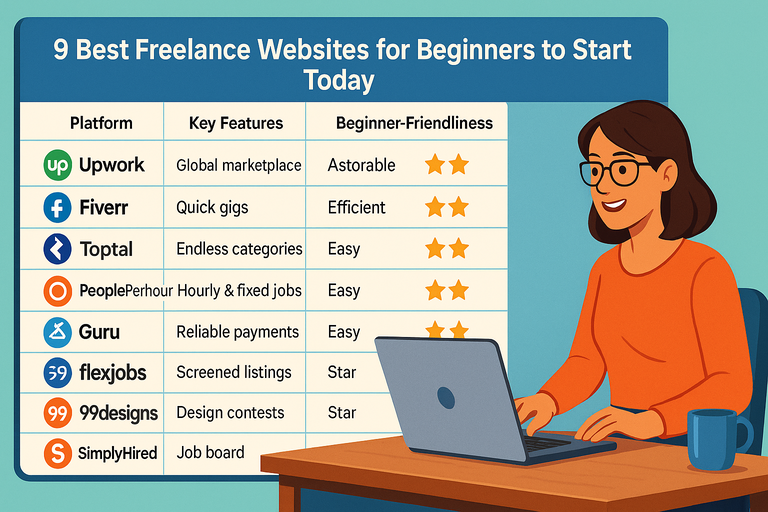
If you’ve been wondering where to find the best freelance websites for beginners that actually help you land work fast, you’re not alone. Everyone wants to skip the endless scrolling, the ghosted proposals, and start earning right away.
The truth is, not all platforms are beginner-friendly—some are overcrowded, others are built for seasoned pros. So which ones really give newcomers a fair shot at quick, consistent work? That’s exactly what this guide uncovers.
1. Upwork – Best for Building Long-Term Freelance Careers
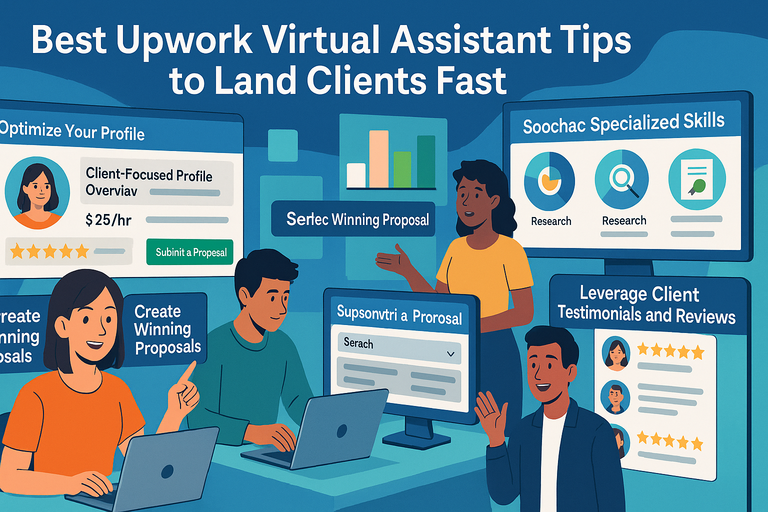
Upwork is one of the best freelance websites for beginners who want steady work and the chance to grow long-term relationships with clients.
It’s structured like a professional marketplace where businesses post jobs and freelancers submit proposals.
How Upwork Helps Beginners Get Quick Clients
I believe Upwork gives new freelancers one of the fairest shots at landing early clients. It’s because clients come with clear project descriptions, budgets, and deadlines—making it easier to pitch directly to what they need.
You can search projects using filters like entry-level, hourly, or fixed-price, which saves beginners from competing with top-rated pros right away.
A smart trick I suggest is to focus on “New Client” listings—these are from clients who have never hired before. They’re often more open to giving beginners a chance, especially if your proposal feels personalized and confident.
Smart Profile Strategies to Stand Out on Upwork
Your profile is your first impression, and Upwork’s algorithm favors complete, keyword-optimized profiles. Start by writing a headline that highlights what you do and who you help.
For example: “Beginner Graphic Designer Helping Small Businesses Create Eye-Catching Logos.”
Here’s what I recommend:
- Use a clear photo: Choose a friendly, professional headshot.
- Focus your title: Avoid generic phrases like “Hardworking Freelancer.” Be specific.
- Add portfolio items: Even mock projects count. Show examples of your best work using simple tools like Canva or Figma.
- Request testimonials: If you’ve done similar work outside Upwork, upload short feedback snippets from past clients.
What Types of Jobs Beginners Should Target on Upwork
Don’t start where everyone else is competing. Instead, go for niche jobs with lower applicant counts—things like data entry, simple WordPress edits, or blog formatting.
I suggest starting with hourly contracts between $10–$25/hr. These usually get accepted faster since clients take fewer risks hiring for short, low-budget tasks.
After completing 3–5 successful jobs, Upwork’s algorithm begins promoting your profile organically, making it easier to win higher-value projects later.
Upwork Connects System Explained for First-Time Freelancers
Upwork uses a credit system called Connects, which are tokens used to apply for jobs. You get 50 free Connects when you first sign up, and then 10 free ones each month. Each job proposal costs between 2–8 Connects, depending on competition.
If you run out, you can buy extra at $0.15 per Connect or subscribe to Upwork Plus ($14.99/month), which gives 80 Connects monthly and boosts profile visibility.
I usually advise beginners to apply only for jobs they’re confident they can win—quality beats quantity every time.
2. Fiverr – Best for Selling Quick, Skill-Based Services
Fiverr is the best platform for beginners who prefer offering pre-packaged services instead of chasing job posts.
You create a “gig” (your service listing), set your price, and wait for clients to order directly.
How Fiverr’s “Gig” System Works for Fast Income
Unlike Upwork, you don’t apply for jobs—clients come to you. A gig acts like a product page where you showcase your service (for example, “I will design a minimalist business logo in 24 hours”).
Each gig includes:
- A title (what you offer)
- Description (how you’ll deliver value)
- Tags (keywords clients search for)
- Packages (three tiers: Basic, Standard, Premium)
I suggest focusing on services that can be delivered quickly—like social media designs, proofreading, or short video edits. Fiverr rewards sellers who deliver fast, consistent results with higher rankings and repeat buyers.
Proven Tips to Rank Fiverr Gigs as a Beginner
Getting noticed on Fiverr takes some SEO finesse. I recommend these steps:
- Use long-tail keywords in your gig title (e.g., “Canva Instagram post design” instead of “graphic design”).
- Deliver your first few orders fast and overdeliver on quality—it boosts your response and completion rates.
- Ask for client reviews immediately after successful deliveries; they’re gold for ranking.
- Update gig images and tags every 30 days—Fiverr favors active listings.
One underrated tip: Use Fiverr’s Promoted Gigs feature once you have 10+ reviews. It’s a low-cost way to show your gig in search results faster.
Low-Competition Niches That Bring Fast Sales
I’ve seen beginners succeed fastest in micro-niches like:
- Pinterest pin design
- Podcast show notes
- YouTube thumbnail creation
- Resume redesign and formatting
These have fewer competitors but steady client demand. Start here, then expand into broader categories once you build reviews.
Fiverr Pro vs. Standard: What’s Best When Starting Out
Stick to the standard Fiverr setup until you’ve completed at least 20–30 orders. Fiverr Pro requires a strict application process, and while it attracts high-paying clients, beginners rarely get approved right away.
That said, I recommend studying Pro sellers in your niche. Look at their pricing, wording, and delivery setup—it’s one of the best ways to reverse-engineer what high-performing gigs look like.
3. Freelancer.com – Best for Competitive Short-Term Projects
Freelancer.com is ideal if you like bidding on fast-moving projects with defined scopes—logo designs, blog articles, app testing, and more.
It’s more competitive, but offers a wider range of quick-turnaround jobs than most platforms.
How the Bidding System Works for New Freelancers
Every project on Freelancer.com works like an auction. Clients post jobs, freelancers submit proposals, and clients choose the best match. You’ll get 6 free bids per month with a basic account.
My advice: focus on projects with fewer than 20 bids and budgets under $200. Big projects attract veteran freelancers with polished portfolios. Smaller jobs, however, often go to newcomers who respond quickly and write personal proposals.
When submitting bids, include a short sample or a 2–3 sentence outline of how you’d complete the project. Clients love specificity—it builds instant trust.
Setting Competitive Rates Without Undervaluing Yourself
Beginners often make the mistake of pricing too low. Instead of charging $5 when others charge $100, aim for 70–80% of the market average. It signals quality while still appealing to budget-conscious clients.
For example, if article writing jobs average $50, start around $35–$40. Once you’ve completed a few projects, gradually raise your rate every 2–3 jobs. I’ve found this approach helps balance speed and growth.
Profile Optimization Tips for Getting Hired Faster
Your Freelancer.com profile acts as both resume and storefront. To improve visibility:
- Complete all verification steps—clients filter for verified users.
- Add a detailed portfolio even if it’s made of personal projects.
- Write a short, powerful bio—explain what you do, why you’re reliable, and the results you deliver.
- Set relevant skills under your profile settings so you appear in search filters.
Pro tip: Freelancer.com ranks users higher when they stay active—log in daily, bid regularly, and update your profile every few weeks.
Avoiding Common Mistakes Beginners Make on Freelancer.com
Some pitfalls I see often:
- Overbidding or underbidding: Both can backfire. Stay within reasonable budget ranges.
- Generic copy-paste proposals: Clients can spot them instantly. Always personalize.
- Ignoring milestone payments: Always set clear milestones before starting. It ensures you get paid even if the client changes direction midway.
Freelancer.com rewards consistency and communication. Treat every small project like it’s worth $10,000—word travels fast, and reputation builds exponentially here.
4. Toptal – Best for Skilled Beginners Ready for Premium Work
Toptal isn’t your typical freelance marketplace—it’s built for serious professionals who want access to high-quality clients and premium pay.
While it’s known for being selective, I believe skilled beginners who prepare strategically can absolutely make it through the screening process and start strong.
How Toptal’s Screening Process Works (and Why It’s Worth It)
Toptal’s onboarding process is famously tough, but that’s exactly what makes it worth it. Only about 3% of applicants get accepted, which helps maintain high client trust.
The process includes:
- Language and communication test: A short chat-based interview where they check your English fluency.
- Skill review: A short coding or task-based test (depending on your niche—design, finance, writing, etc.).
- Live screening: A 1:1 video interview with a domain expert to review your approach and thought process.
- Test project: A paid, real-world project where you show your ability to meet deadlines and deliver top-tier work.
This may sound intense, but it’s designed to weed out spammy freelancers and showcase professionals who actually deliver.
I always suggest treating the test project like your dream client’s first assignment—it sets the tone for everything that follows.
Preparing a Winning Application as a New Freelancer
To stand out, focus less on quantity and more on depth. I recommend choosing one or two core skills and mastering them before applying.
For instance, if you’re a web developer, specialize in React or WordPress instead of listing ten programming languages.
When filling out your Toptal application:
- Be specific in your profile headline (e.g., “React Developer Building Fast, Scalable Web Apps for Startups”).
- Include measurable outcomes in your descriptions, such as “Helped increase client site speed by 40%.”
- Show proof of work through a personal website or GitHub portfolio.
- Be concise and confident—you’re applying to a curated network, not a job board.
What Kind of Clients Hire Through Toptal
Toptal attracts established startups, enterprise clients, and Fortune 500 companies. Think of names like Shopify, AirBnB, and Motorola—businesses that need reliability more than low cost.
This means even as a beginner, once accepted, you’re placed alongside highly skilled freelancers who command serious rates.
Most clients on Toptal look for:
- Long-term contract developers or designers
- Strategic consultants and project managers
- Financial experts for forecasting or analysis
- UX/UI professionals for product development
These clients value quality, not volume—so if you can deliver consistent, clear communication and on-time results, you’ll fit right in.
How to Build a Portfolio That Passes Toptal’s Standards
Even if you don’t have years of client work, you can still craft a strong portfolio that reflects skill and professionalism.
Here’s what I suggest:
- Create 2–3 high-quality sample projects. For example, build a simple app, design a landing page, or write a sample business report.
- Use storytelling. Explain what problem your project solved and how you approached it.
- Add visual proof. Include screenshots, mockups, or live demo links.
- Keep it clean and minimal. Toptal clients expect clarity—avoid cluttered layouts or excessive jargon.
I’ve seen beginners get accepted with only mock projects because they demonstrated solid thinking and execution.
5. PeoplePerHour – Best for Local and Global Freelance Projects
PeoplePerHour (PPH) blends automation with traditional freelancing. It’s particularly good for beginners who want both local opportunities and remote gigs from around the world.
How PeoplePerHour Matches You With Clients Automatically
PPH uses an AI-driven system to match freelancers with projects that fit their skills, rate, and availability.
Once you set up your profile, the platform automatically suggests job opportunities or connects you with clients through the “ProjectStream” dashboard.
I suggest filling out your Profile Strength Meter completely—PPH’s algorithm boosts freelancers with detailed profiles, verified skills, and uploaded work samples.
It’s a simple but powerful way to attract automatic invites without sending proposals every day.
Setting Up Hourlies to Get Quick Hires
An “Hourlie” on PPH is a pre-packaged service that clients can buy instantly—similar to Fiverr gigs. For example, “I will design a custom business card in 24 hours for $30.”
To create Hourlies that sell:
- Use search-friendly titles with your target keyword.
- Add clear visuals that show results, not just text.
- Write a short, benefit-driven description explaining what’s included.
- Offer fast turnaround times—speed sells on PPH.
Once you’ve completed 3–5 Hourlies with strong reviews, PPH often promotes you to higher visibility tiers like “Cert 5,” which helps you win projects faster.
Understanding Project Pricing and Fees on PeoplePerHour
PPH charges a service fee on each payment:
- 20% for the first $350 earned per client
- 7.5% for anything beyond that
I recommend setting slightly higher rates to balance these fees. For instance, if you want to earn $100 per project, list your Hourlie at $120.
Clients also pay securely through the Escrow System, which means funds are held safely until work is approved. This setup helps beginners avoid scams or unpaid work.
Building Trust Through Client Reviews Early On
Your first few reviews will make or break your success on PPH. Here’s what’s worked for me and others I’ve advised:
- Communicate proactively. Always message clients before starting to confirm project details.
- Deliver early when possible. Fast delivery often earns 5-star reviews.
- Request reviews politely. A simple “If you’re happy with my work, I’d really appreciate your feedback” goes a long way.
- Follow up post-project. A short check-in message 1–2 weeks later helps build repeat business.
Once you have 10+ positive reviews, you’ll notice a significant increase in invitations—trust builds momentum fast here.
6. Guru – Best for Freelancers Seeking Flexible Payment Options
Guru stands out for its flexibility in payments and collaboration tools.
It’s great for freelancers who want security and simplicity in managing projects, especially beginners testing the waters in different niches.
How Guru’s Workroom System Simplifies Projects
Guru’s Workroom is a built-in dashboard that acts like your personal project hub. You can chat with clients, upload files, track progress, and create milestones—all in one place.
I find this setup perfect for beginners because it reduces confusion about deliverables. For instance, if you’re doing a logo design, you can upload each revision directly into the Workroom and request client feedback before finalizing.
The structured layout keeps everything transparent, which helps avoid disputes or miscommunication.
Using SafePay to Secure Fast Payments
Guru’s SafePay feature is one of the best parts of the platform. Before you start any project, the client deposits funds into an escrow-style account. Once you deliver the work and the client approves it, payment is released immediately.
I advise never starting a project until you see the SafePay confirmation—this ensures you’re fully protected. If any disagreement arises, Guru’s resolution team steps in to mediate.
You can withdraw your funds via PayPal, Payoneer, or direct bank transfer, usually within 24–48 hours.
Writing Proposals That Win Projects Quickly
Guru projects often receive dozens of proposals, but quality beats quantity. Here’s my go-to formula for writing winning proposals:
- Start with a personalized greeting using the client’s name.
- Mention one specific detail from their project description to show you read it.
- Offer a quick outline of how you’d approach the job.
- Close with a confident, friendly note like “I can start today and deliver a first draft within 48 hours.”
I also suggest attaching one short work sample directly in your proposal—it instantly builds trust.
The Best Entry-Level Skills in Demand on Guru
If you’re new, focus on high-demand categories that don’t require years of experience. Some beginner-friendly options include:
- Data entry and virtual assistance
- Content writing and blog management
- Basic graphic design and social media posts
- Website maintenance or WordPress edits
Guru’s search filters let you sort projects by “Low Competition,” which helps beginners find opportunities faster. Once you’ve completed a few projects successfully, Guru’s algorithm starts prioritizing your bids automatically.
7. Workana – Best for Spanish and Latin American Freelancers
Workana is one of the best freelance websites for beginners in Spanish-speaking countries and across Latin America.
It bridges the gap between local demand and international opportunities, helping new freelancers build solid reputations quickly.
Why Workana Is Great for Regional Beginners
Workana shines because it understands local markets. Many Latin American freelancers struggle with English-dominant platforms like Upwork or Fiverr. Workana removes that barrier by allowing full Spanish-language profiles and projects.
The biggest advantage? Local clients are more likely to hire new freelancers who share their language and time zone. In practice, this means faster communication, clearer expectations, and a higher chance of repeat work.
I recommend Workana especially for:
- Spanish-speaking freelancers starting out in graphic design, writing, or customer support.
- Professionals seeking part-time remote work with local businesses or startups.
Many beginners find their first paying gig here within a week, simply because competition is less globalized.
Tips for Creating a Localized, High-Performing Profile
A strong Workana profile acts as your business card. It needs to reflect professionalism while feeling approachable to regional clients.
Here’s what I suggest focusing on:
- Write your bio in native Spanish. Use friendly but professional language. For example: “Soy diseñador gráfico especializado en branding y redes sociales.”
- Add relevant tags like “redacción,” “marketing digital,” or “traducción” to appear in more searches.
- Upload real samples from personal or past work, even if unpaid.
- Set a moderate hourly rate—around $8–$15/hour works best for beginners in Latin America.
Workana’s algorithm favors profiles with activity, so stay online, reply fast, and keep applying for new projects daily.
In-Demand Skills on Workana for New Freelancers
The most popular beginner-friendly categories on Workana include:
- Graphic design and branding
- Social media management
- Customer support and data entry
- Translation and transcription (Spanish–English)
- Basic web development or WordPress setup
I’ve noticed that local SMEs (small and medium businesses) often hire for short-term, repeatable work like social media content or blog posts.
This creates recurring income streams if you perform well consistently.
How to Get Repeat Clients on the Platform
The secret to stable income on Workana lies in relationship building. After completing your first few projects, message clients to thank them and ask if they need ongoing help.
You can also:
- Offer discounts for long-term work (e.g., 10% off for weekly tasks).
- Create bundled service packages like “5 Instagram posts per week + copywriting.”
- Respond to messages within an hour—Workana tracks responsiveness.
A few loyal clients can easily turn a beginner’s freelancing side gig into a full-time career.
8. SimplyHired – Best for Freelancers Looking for Remote Jobs Fast
SimplyHired is a job aggregator that pulls freelance, part-time, and remote listings from across the web.
For beginners, it’s one of the fastest ways to find available projects without manually checking multiple platforms.
How SimplyHired Aggregates Freelance Opportunities
SimplyHired collects job posts from dozens of sources like company websites, job boards, and LinkedIn. It’s like Google for freelance jobs—you type your keyword (e.g., “freelance content writer”), and it shows available listings from various sites.
Each listing includes the source website, job type, and salary estimate. You can apply directly on the client’s site or through SimplyHired if the option’s available.
This setup saves time for freelancers who want to explore different platforms without logging into each one.
Finding Niche Freelance Jobs Without Heavy Competition
The real magic of SimplyHired lies in its search filters. Beginners can easily find less competitive projects by narrowing down criteria such as:
- Remote only
- Entry-level or contract-based
- Specific industries like marketing, design, or education
I suggest searching for niche combinations, like “freelance blog writer fitness” or “remote WordPress content editor.” The narrower the search, the less competition you face.
To track results faster, set up job alerts—SimplyHired emails you new postings that match your keywords daily.
Applying Effectively Through SimplyHired’s Listings
Each job post includes the client’s preferred application method. Some direct you to external portals, while others allow one-click applications.
To stand out, I recommend preparing a base cover letter template you can personalize quickly.
Focus on three things:
- Mention a specific detail from the job description.
- Include a short success story or relevant result from your past work.
- End with a friendly, confident call-to-action like “I can start this week if you’re ready.”
How to Use Filters to Land Jobs That Match Your Skills
SimplyHired’s filters can significantly increase your chances of finding suitable gigs. I suggest refining your search by:
- Experience level: Choose “Entry” for faster responses as a beginner.
- Job type: Select “Contract” or “Freelance.”
- Salary range: Helps avoid unpaid or low-value projects.
You can also sort by date posted to catch fresh listings—many freelancers miss these because they apply late. The early applications usually get reviewed first.
9. FlexJobs – Best for Verified Remote and Freelance Work
FlexJobs is ideal for anyone tired of spammy job boards or fake listings. It’s one of the most trusted freelance websites for beginners who want verified, scam-free remote work.
Why FlexJobs Is Worth Paying For (Even as a Beginner)
FlexJobs charges a small subscription fee (around $24.95/month), but it’s worth every cent if you value safety and legitimate opportunities. The platform hand-screens every job posting, so you never deal with fake recruiters or shady “unpaid trial” offers.
I’ve known freelancers who landed full-time contracts through FlexJobs in under a month—especially in fields like writing, admin support, and marketing.
You can even preview listings for free before subscribing, giving you a sense of available jobs.
How to Navigate the Platform for Fast Job Matches
FlexJobs’ dashboard is simple: you browse by category, job type, or keyword. For example, selecting Freelance > Marketing Jobs instantly shows all open projects.
To speed up results:
- Save your favorite searches for one-click access later.
- Use the “New” filter to catch jobs posted in the last 24 hours.
- Turn on “Job Alerts” to get notifications tailored to your preferences.
FlexJobs also includes career coaching and résumé reviews—something few freelance platforms offer beginners.
Spotting Legitimate Freelance Gigs and Avoiding Scams
Since every listing on FlexJobs is verified, scams are rare. Still, I recommend watching for these red flags elsewhere:
- Requests for upfront payments or “training fees.”
- Jobs promising unrealistically high pay for little work.
- Clients avoiding official communication channels.
FlexJobs’ team manually removes such listings, making it one of the safest places for remote beginners.
Submitting Winning Applications With Less Competition
Competition on FlexJobs is lighter than on free platforms because fewer people are willing to pay the subscription. That’s a massive advantage.
When applying, personalize your cover letter for each role. Mention why you’re drawn to the company, not just the job. For instance: “I’ve followed your content marketing work on LinkedIn and love your storytelling approach—I’d be excited to contribute to your team.”
Keep applications short, under 200 words, and include one quantifiable result (like “I’ve grown a client’s newsletter list by 30% in two months”).
Workana, SimplyHired, and FlexJobs all serve beginners differently:
- Workana helps you start locally and build a foundation.
- SimplyHired gives you access to massive listings fast.
- FlexJobs ensures every opportunity you pursue is legitimate and worth your time.
Whichever you choose, the key is to focus on clarity, reliability, and speed—three traits clients always notice first.
10. SolidGigs – Best for Curated, Handpicked Freelance Leads
SolidGigs is one of the best freelance websites for beginners who are tired of spending hours scrolling through crowded job boards.
Instead of applying to hundreds of listings, SolidGigs sends you a curated list of real, high-quality leads every week—saving time and helping you focus on landing paying clients faster.
How SolidGigs Saves Time for Beginners
I believe SolidGigs is perfect for freelancers who want to skip the noise. Rather than manually searching across platforms, their team handpicks freelance opportunities from over 100 sources.
You receive a simple email or dashboard update with 30–40 vetted job leads that match your skill set.
This saves beginners hours of daily searching. For example, instead of spending two hours combing through Upwork listings, you’ll spend ten minutes reviewing opportunities already filtered for relevance and quality.
SolidGigs also includes templates for proposals, pricing, and client outreach. I often suggest using these to refine your pitch and close deals faster—especially when you’re new to freelancing and still building confidence.
What Makes SolidGigs Different From Job Boards
Traditional job boards operate like open markets—thousands of listings, even more freelancers, and endless competition. SolidGigs flips that model. It’s a subscription-based lead curation service, meaning:
- You get qualified job leads, not just public listings.
- Every opportunity is vetted by the SolidGigs team for legitimacy.
- You don’t compete with hundreds of applicants.
It’s not a platform where clients hire you directly. Instead, it’s a tool that delivers leads so you can pitch directly via email or the client’s preferred channel.
I find that beginners who use SolidGigs tend to build confidence faster because they spend more time applying to real jobs—and less time doubting themselves in high-competition spaces.
Tips for Turning SolidGigs Leads Into Long-Term Clients
Getting leads is one thing; turning them into loyal clients is where the real growth happens.
Here’s what I recommend:
- Personalize every pitch. Use the client’s name, mention their project goals, and reference something specific from their listing.
- Follow up politely. If you don’t get a response in three days, send a short, friendly follow-up. Many freelancers land gigs from the second email.
- Deliver more than promised. Add one extra touch—like a bonus mockup or strategic suggestion—to build trust fast.
- Ask for referrals. Once you’ve completed a project, ask if they know anyone else who needs similar help.
In my experience, SolidGigs users often land repeat clients because these leads come from businesses already ready to hire—not window shoppers.
How to Automate Your Client Outreach Using SolidGigs
SolidGigs integrates well with automation tools like Zapier and Google Sheets, letting you streamline how you track and follow up with leads. You can set up a simple workflow where:
- New SolidGigs leads are added automatically to a spreadsheet.
- You tag them by category (e.g., writing, design, marketing).
- Follow-up reminders are set using email automation tools like Mailtrack or Right Inbox.
I suggest using this setup if you’re applying to more than 5–10 leads per week. It keeps your outreach organized, helps you follow up consistently, and ensures you never miss an opportunity.
For beginners balancing freelancing with other commitments, this kind of system makes growth sustainable and stress-free.
Expert Tip: How to Choose the Right Platform for You
With so many freelance websites available, it’s easy to feel overwhelmed.
Choosing the right one depends less on popularity and more on alignment—your skills, goals, and preferred work style should guide where you start.
Matching Platforms to Your Skills and Goals
Here’s how I’d break it down based on different freelance paths:
- Creative professionals (writers, designers, video editors): Fiverr or PeoplePerHour are great for packaging services fast.
- Technical specialists (developers, finance experts, consultants): Toptal or Upwork provide higher-value projects and longer-term work.
- Beginners in support or admin roles: Workana and Guru often have easy-entry jobs with steady clients.
- Freelancers wanting verified listings: FlexJobs ensures safety and legitimate opportunities.
Think about what you want most—speed, security, or scalability. If you need quick cash flow, Fiverr or SolidGigs are ideal.
If you’re focused on career growth, Toptal or Upwork will help you build credibility and long-term income.
Why Diversifying Your Freelance Profiles Matters
Relying on one platform can limit your income and exposure. I
suggest creating profiles on at least two complementary platforms—for example, Upwork for long-term contracts and Fiverr for quick one-off projects.
Diversification also protects you from algorithm shifts or sudden account issues. I’ve seen freelancers lose access to one site and instantly recover because they had clients on another.
To keep things manageable, use a consistent brand across all platforms—same photo, title, and service descriptions. This builds recognition and trust, especially if clients research you across multiple websites.
How to Transition From Beginner Platforms to Premium Ones
As you gain experience, you’ll naturally outgrow beginner-friendly platforms. The transition to premium spaces like Toptal or FlexJobs happens when you have:
- A strong portfolio with 5–10 high-quality samples.
- Positive reviews or testimonials from satisfied clients.
- Clear niche expertise (e.g., SEO content writer for SaaS companies).
When you’re ready to upgrade, I suggest these steps:
- Refine your niche. Clients on premium sites want specialists, not generalists.
- Update your pricing. Gradually raise your rates to reflect your new skill level.
- Prepare case studies. Document results from past work—real metrics speak louder than words.
- Apply selectively. Focus on fewer, higher-paying projects where your experience matches perfectly.
Transitioning well means knowing your worth and choosing platforms that respect it.

I’m Juxhin, the voice behind The Justifiable.
I’ve spent 6+ years building blogs, managing affiliate campaigns, and testing the messy world of online business. Here, I cut the fluff and share the strategies that actually move the needle — so you can build income that’s sustainable, not speculative.
Related posts:
 Top 6 Freelancing Jobs That Promise Financial Freedom
 Best Upwork Virtual Assistant Tips to Land Clients Fast
 9 Best Freelance Websites for Beginners to Start Today
 Best Freelancing Sites for Beginners Who Want to Earn More
 Freelance Data Entry Jobs You Can Start From Home Today
 13 Top Freelance Websites to Land Jobs That Pay Well