
Table of Contents
Some links on The Justifiable are affiliate links, meaning we may earn a small commission at no extra cost to you. Read full disclaimer.
Bluehost WordPress hosting review searches usually come from one simple question: is this host actually good enough for a real website in 2026, or is it just a familiar brand with clever marketing? I think that is the right question to ask.
Bluehost is still one of the longest-running WordPress.org-recommended hosts, and its current plans include WordPress-focused features like automatic updates, free SSL, a CDN, NVMe storage on newer tiers, migration tools, and a 30-day refund window. But that does not automatically make it the best fit for every site owner.
What Bluehost WordPress Hosting Actually Is
Bluehost’s current WordPress hosting offer is, in practical terms, tightly connected to its standard hosting stack rather than a completely separate premium product line for most buyers.
On the official WordPress hosting page, Bluehost frames the service around WordPress-ready setup, managed WordPress updates, free SSL, a free domain for the first year on qualifying terms, a built-in CDN, migration tools, and security layers like malware scanning and DDoS protection.
That makes it beginner-friendly because much of the setup friction is removed.
The reason Bluehost still gets attention is not just branding. WordPress.org still lists Bluehost as a recommended host, and WordPress itself remains the dominant CMS on the web, powering 42.5% of all websites and 59.7% of sites with a known CMS as of March 30, 2026, according to W3Techs.
For a new blogger, freelancer, or small business owner, that matters because it means Bluehost is building for a very large, very mainstream WordPress audience rather than a niche setup.
What I would not do is confuse “WordPress hosting” here with elite managed hosting in the WP Engine or Kinsta sense. Bluehost is closer to accessible, mass-market WordPress hosting with helpful management features than to a high-touch premium DevOps-style platform.
That distinction matters because the value is strongest for simple business sites, blogs, portfolios, and early WooCommerce stores, not necessarily for complex enterprise builds. This is where many reviews get too vague, and I think clarity helps more than hype.
Who Bluehost Is Best For
Bluehost makes the most sense for three groups. First, beginners who want WordPress installed fast and do not want to piece together hosting, SSL, CDN, and domain registration separately.
Second, small businesses that need a brochure site, blog, or service site with predictable traffic. Third, content creators or side-project owners who want one dashboard and do not need ultra-advanced server control from day one.
Bluehost explicitly positions its WordPress plans for bloggers, small businesses, online stores, portfolios, and corporate sites.
Where I get more cautious is with developers, agencies managing demanding client fleets, or stores where every millisecond affects revenue. Bluehost does offer staging on relevant WordPress plans, managed updates, and support for higher-traffic tiers, but the product is still designed to serve a broad user base.
Broad user bases usually mean tradeoffs: easier onboarding, but less precision and less “boutique host” tuning.
A realistic example: if you are launching a local roofing company site with 25 pages, a quote form, and a few blog posts a month, Bluehost is probably enough.If you are running a large WooCommerce catalog with heavy plugins, custom filtering, and paid traffic campaigns, I would treat Bluehost as your starter or mid-tier option, not your forever host without testing first. That is the practical lens I recommend.
What You Get Out Of The Box
The current plan structure is more generous than older Bluehost plans many people still remember. Bluehost’s WordPress/shared stack now highlights tiers with 10 websites and 10 GB storage for entry-level, 50 websites and 50 GB for mid-tier, and 100 websites and 100 GB for eCommerce-oriented tiers, with estimated traffic guidance of roughly 40K, 200K, and 400K visits per month on those examples.
It also includes free CDN, managed WordPress updates, AI site tools, and global data centers across current marketing pages.
The security bundle is one of the better selling points at this price level. Official pages mention Let’s Encrypt SSL, malware scanning, a web application firewall, DDoS protection, and daily or weekly backups depending on plan context.
Higher tiers also include extras like domain privacy for the first year in some cases and stronger malware handling. That is useful because many cheap hosts look affordable until basic protections become paid add-ons.
I also like that Bluehost includes free migration tooling and emphasizes WordPress-specific support. That does not guarantee a perfect migration every time, but it lowers the barrier to switching. For many readers, that is the difference between “I’ll move this month” and “I’ll keep postponing this for six months.”
Pricing, Value, And What You Are Really Paying For
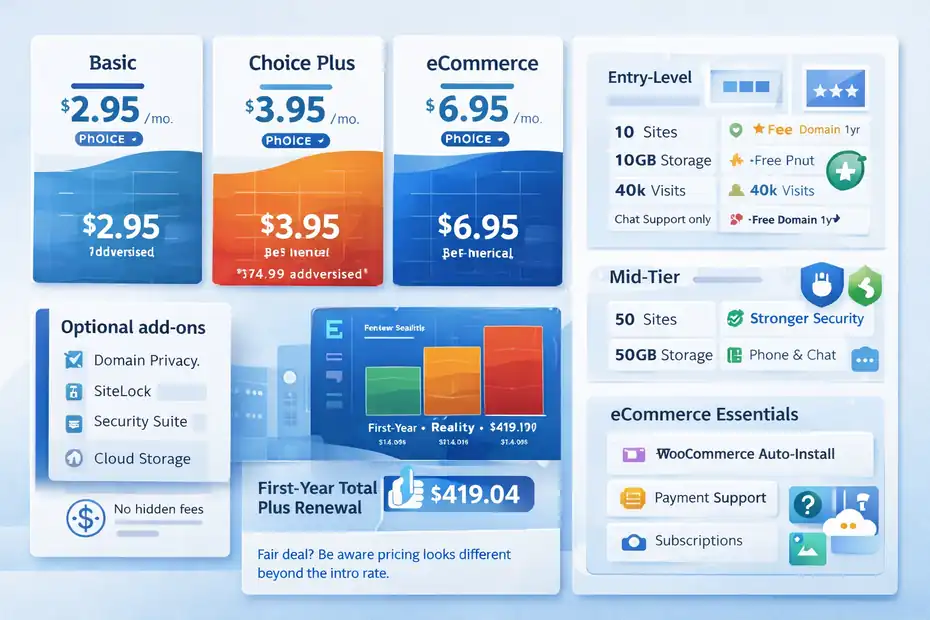
Pricing is one of the most confusing parts of any hosting review because intro prices, renewal rates, term lengths, and add-ons rarely fit neatly into a single sentence.
Bluehost’s own pages currently show WordPress hosting starting at $3.99 per month, while Bluehost content published in February 2026 also references plan examples at $2.95, $3.95, and $6.95 per month for Basic, Choice Plus, and eCommerce Essentials.
Bluehost also says there are no hidden fees in the sense that optional add-ons are shown before checkout, but optional extras can still raise the total.
That means the cheapest advertised number is not the only number that matters. In my experience, the smart way to judge Bluehost is by “first-year total plus renewal reality,” not by the hero banner price alone. A host can be a fair deal and still feel disappointing if you buy it expecting the intro price to last forever.
Bluehost does offer a 30-day money-back guarantee on eligible hosting services, but domain registration fees are not refundable, and if you keep a free domain after canceling, the domain fee is deducted from your refund.
Entry-Level Plan Value
The entry plan is strongest when you want to launch quickly and keep risk low. Bluehost’s recent plan descriptions frame the basic tier around up to 10 websites, 10 GB storage, around 40,000 monthly visits, AI setup tools, SSL, malware scans, firewall protection, free domain for year one, and chat support. For someone building a blog, consultant site, or local service site, that is a respectable bundle for the price.
Where this value can weaken is support channel access and growth headroom. Bluehost’s plan details indicate phone support is not included on some entry-level configurations, while higher tiers include it.
That may not matter if you are comfortable with chat and documentation, but it matters a lot when your site is down and you want a human voice. I always think support access deserves more attention than review scores give it.
A simple rule: Choose entry Bluehost only if your site is still in the “prove the concept” phase. If your website already brings in leads, appointments, or sales, the mid-tier plan is usually a safer buy because the storage, traffic allowance, and support options better match business use.
Mid-Tier And eCommerce Value
The Choice Plus-style mid-tier is where Bluehost starts looking more practical than merely cheap. Recent Bluehost materials describe it with 50 websites, 50 GB storage, around 200,000 monthly visits, managed WordPress updates, backups, stronger security, and both chat and phone support. That is the plan level I would usually point a growing content site or multi-site freelancer toward.
For stores, Bluehost’s eCommerce Essentials angle is more interesting than older generic shared hosting bundles. The company now markets WooCommerce-oriented features like auto-installation, payment processing support, subscriptions, memberships, and affiliate capabilities, with higher storage and traffic allowances.
If you are selling a few digital products or running a small physical product store, that is a cleaner starting point than forcing eCommerce onto a stripped-down basic plan.
Still, value depends on your tolerance for future migration. Bluehost is cost-effective early on, but advanced stores often outgrow generalist hosting. I would rather say that upfront than pretend one host is perfect from first blog post to full operational scale. Good reviews should help you avoid a wrong long-term fit, not just win a checkout click.
Speed Review: How Fast Bluehost Looks In Real Use
Bluehost’s current WordPress stack emphasizes NVMe storage on relevant tiers, HTTP/3, PHP 8+, object caching, a built-in CDN, and real-time resource monitoring for spikes.
On paper, that is the right language. Those are the same kinds of features you want any modern WordPress host to invest in because they directly affect time to first byte, static asset delivery, and resilience under traffic bursts.
The question, of course, is whether that translates into real speed. Bluehost cites WPShout’s November 2025 comparison and says Bluehost delivered 0.35s US load times in that context. Separately, Themeisle’s 2026 roundup placed Bluehost at number one in its “fastest web hosting” list based on its test methodology.
I would not treat any single benchmark as universal truth, but both signals support the idea that Bluehost is no longer relying only on brand recognition; it is actively competing on performance messaging too.
That said, shared-style WordPress hosting always has variability. Your theme, plugin stack, image optimization, caching setup, and region matter.
So my honest speed verdict is this: Bluehost looks capable of very good results for standard WordPress sites, but it is not magical. It will reward a clean build more than it will rescue a bloated one.
What Helps Bluehost Load Faster
Three things stand out. First, the built-in CDN matters because it reduces distance between your static assets and visitors. Second, newer storage and protocol improvements like NVMe and HTTP/3 reduce bottlenecks in normal WordPress delivery.
Third, object caching and server-level optimization can help dynamic pages feel less sluggish, especially when you are not using a giant plugin stack. Bluehost explicitly highlights these performance layers on its WordPress pages.
This becomes practical in a real scenario. Imagine you run a service business site with a homepage, location pages, blog posts, and contact forms. That kind of site usually performs well on a tuned mainstream host because the pages are mostly cacheable and traffic is modest.
Bluehost can shine here, especially if you enable the CDN, compress images, and avoid installing ten plugins that all inject scripts on every page.
I believe this is the fairest way to describe Bluehost speed: strong potential, especially for ordinary WordPress builds, but still dependent on how responsibly you build your site. If you expect hosting alone to fix poor site architecture, you will probably feel underwhelmed.
Where Speed Can Still Fall Apart
The complaints you still see around Bluehost usually cluster around resource contention, inconsistent support experiences during technical issues, or expectations mismatch. Some recent Trustpilot reviews praise fast help and easy issue resolution, while others complain about slow sites, frustrating support, or billing-related frustration.
That mixed pattern is a reminder that large-scale hosts can deliver many good experiences and still produce unhappy edge cases.
This matters because speed perception is emotional as much as technical. A site that loads in under two seconds most days can still feel “slow” to the owner if one plugin conflict wrecks checkout performance during a campaign.
On Bluehost, as with most hosts in this tier, good speed is very achievable, but consistent speed is partly your job too. That means better themes, image compression, fewer heavy plugins, and periodic Core Web Vitals checks.
So, no, I would not call Bluehost the fastest possible WordPress host for every use case. But yes, I do think it is fast enough to be a serious option for many sites in 2026, which is more than I would have said for some older cheap-host reputations.
Uptime, Reliability, And Stability
Bluehost’s official uptime documentation for shared hosting states a 99.99% uptime guarantee, and its live status page says SLA terms can vary by product. Current marketing pages for its WordPress/shared plans also repeat the 99.99% uptime SLA language.
On the surface, that is strong. A 99.99% target suggests Bluehost wants to compete on reliability, not just price.
In plain language, 99.99% uptime means very little downtime over a month or year if the service hits that mark consistently. For a small business website, reliability is often more important than tiny speed differences between hosts.
A site that is 200 milliseconds faster but periodically unavailable is usually the worse business choice. I think many buyers underestimate that until they miss leads.
Third-party review signals are also reasonably encouraging. Cybernews reported 100% uptime during its 30-day Bluehost test in a 2025 review, though that result should be read as one testing window, not a permanent guarantee.
It supports the broader impression that Bluehost reliability is solid enough for mainstream business use, even if individual user reviews remain mixed.
What The Uptime Guarantee Means In Practice
An uptime guarantee is not the same as a promise that your site will never blink offline. It is a service commitment with definitions, exclusions, and credit procedures.
Bluehost’s documentation makes that clear, and it also notes that uptime measured at the server or web-server layer may differ from what individual services report. That is normal in hosting, but it is something many site owners do not realize until they compare dashboard alerts with provider language.
From a practical standpoint, I suggest treating the uptime guarantee as reassurance, not as your whole resilience strategy. You still want uptime monitoring from your side, regular backups, and a clean plugin environment. In other words, host reliability matters, but site reliability is shared responsibility.
For many readers, that sounds less exciting than “never worry again,” but it is more useful. Bluehost appears reliable enough for serious small-business use, yet no host is a substitute for proper site maintenance. That is the honest version.
Setup Experience, Dashboard, And Ease Of Use
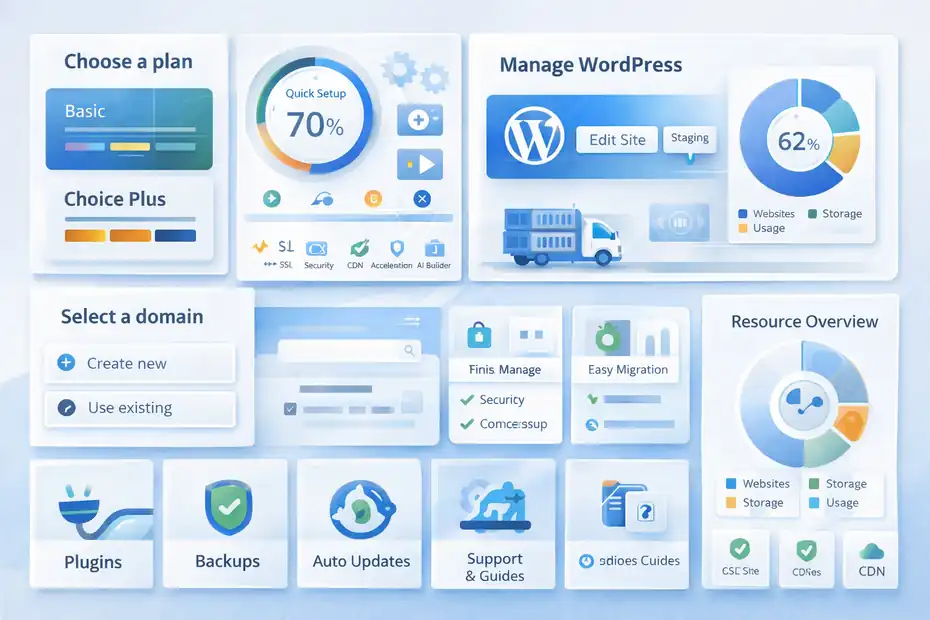
One of Bluehost’s biggest strengths is that it reduces the number of decisions a beginner has to make. WordPress installs automatically, the company pushes AI site-building tools, and the dashboard is designed around getting a site online quickly rather than exposing every technical option upfront.
For many first-time users, that is genuinely helpful. Hosting is confusing enough without making setup feel like server administration.
The bundled flow also helps because domain registration, SSL, hosting, and migration can live in one account. That is not glamorous, but it does reduce friction. When people say a host is “easy,” this is usually what they mean: fewer moving parts, fewer logins, fewer setup tasks that can go wrong. Bluehost leans hard into that convenience model.
I would still say the interface is best for people who want guidance, not for people who want maximum control. If you enjoy tweaking every server detail, Bluehost may feel a little productized. If you mostly want to publish, edit, and grow your site, it will probably feel refreshingly straightforward.
How A New User Would Launch A Site
- Step 1: Choose the right tier. For a blog or brochure site, the basic tier is enough. For a real business site or several small sites, the mid-tier is safer. For a WooCommerce setup, start with the eCommerce-oriented plan rather than hoping the cheapest tier stretches far enough.
- Step 2: Register or connect your domain during checkout. Bluehost confirms that the free domain applies on eligible annual plans and that the domain is managed through the Bluehost dashboard after purchase.This is convenient, though you should remember the domain fee is not refundable under the money-back policy.
- Step 3: Finish the basics right away. Turn on SSL, enable the CDN, install only the plugins you truly need, and create a staging copy before major changes if your plan includes staging. Those steps do more for early success than fancy optimization tricks.
Bluehost already includes the core pieces; your job is to use them well.
Migration And Everyday Management
Migration is one of the underappreciated reasons someone chooses Bluehost. The company advertises a free site migration tool and, in WordPress FAQ content, mentions free WordPress migration with zero downtime language and up to five sites within the first 30 days in that context.
Even if you treat the timing as situational, the larger point is useful: Bluehost is clearly trying to reduce switching pain.
For daily management, the important pieces are backups, updates, and support access. Bluehost includes managed WordPress updates and backup features in current plan descriptions, which is exactly what a non-technical user needs.
These are the quiet features that prevent panic later. Nobody buys hosting because backups sound exciting, but people stay loyal because backups save them when a plugin update breaks the site.
I would describe the day-to-day Bluehost experience as “low-friction but not ultra-premium.” That is not an insult. For the audience Bluehost serves, low-friction is often the better product choice.
Support, Security, And Trust Signals
Support is one of the most polarizing parts of Bluehost’s reputation. Officially, Bluehost offers 24/7 support, and current plan materials indicate chat on entry tiers with phone support included on higher tiers.
The company also positions its team as WordPress-focused. That baseline is good, especially for people who need a safety net.
The independent picture is mixed but not alarming. Trustpilot pages show many recent positive reviews praising support speed and issue resolution, alongside negative reviews about slow sites, billing frustrations, or inconsistent experiences.
That is pretty typical for a large host with a massive customer base: enough success stories to prove support can work well, enough bad stories to remind you scale creates unevenness.
My take is simple. Bluehost support seems more than adequate for standard site issues, account help, and beginner guidance. But if your business depends on white-glove troubleshooting during high-stakes events, you may prefer a host built around fewer customers and higher-touch engineering.
Security Features That Matter
Bluehost’s current WordPress/shared materials list free SSL, malware scanning, web application firewall protection, DDoS protection, and backups. Those are not minor extras. For a beginner, they cover most of the obvious hosting-layer risks without forcing a stack of separate purchases on day one.
This matters because WordPress security problems often come from ordinary mistakes: outdated plugins, weak passwords, and missing backups. Hosting cannot fix every one of those, but it can provide guardrails. Bluehost’s guardrails are solid for its price class.
I would still recommend adding two-factor authentication, using a reputable security plugin only if needed, and removing unused plugins and themes regularly. The host gives you a foundation, not immunity.
For a typical small business owner, that is enough. You probably do not need military-sounding hosting jargon. You need a setup that keeps common problems from becoming disasters, and Bluehost appears to deliver that fairly well in 2026.
Common Problems, Limitations, And Who Should Skip Bluehost
A good Bluehost WordPress hosting review should not stop at the strengths. The biggest limitation is that Bluehost is still a broad-market host. Broad-market hosting is convenient, affordable, and feature-rich, but it rarely feels as finely tuned as premium WordPress specialists for demanding workloads.
That does not make Bluehost bad. It just means you should buy it for the right reasons.
The second limitation is pricing psychology. Bluehost’s intro pricing can be attractive, but renewal rates and optional extras still require attention.
The company is transparent that add-ons affect total cost and that refunds have exclusions. Read that before checkout, not after. It sounds obvious, but it saves a lot of frustration.
The third limitation is support consistency. Recent public reviews include both strong praise and sharp criticism. For some users, Bluehost support is quick and helpful. For others, it is frustrating. That is not unique to Bluehost, but it is part of the buying risk with any scaled hosting brand.
Situations Where I Would Not Choose Bluehost
I would skip Bluehost for a mission-critical, high-revenue WooCommerce store where uptime and checkout performance directly affect daily profit and ad spend efficiency.
In that case, you usually want a host with a more premium support model and deeper commerce-specific performance tuning. Bluehost’s eCommerce plans are useful, but they are not automatically the best choice for large-scale store operations.
I would also skip it if you are an advanced developer who wants unusually granular hosting control, or if you know you are going to push the environment with custom stacks, aggressive plugin demands, or client workloads that need surgical support. Bluehost offers staging and useful tools, but it is built first for accessibility.
And finally, I would skip it if you already distrust mainstream hosts and know that a mixed-review support profile will bother you every time something breaks. Sometimes the best host decision is the one that helps you sleep, not the one with the most familiar name.
Final Verdict: Is Bluehost Worth It In 2026?
Yes, for the right user, Bluehost is still worth considering in 2026. It remains WordPress.org-recommended, includes the features most WordPress site owners actually need, offers a 99.99% uptime guarantee on relevant shared hosting documentation, and has modernized its stack with CDN, caching, HTTP/3, NVMe storage on newer tiers, security layers, and easier migration.
That is a much stronger package than the outdated “cheap host with a big name” stereotype suggests.
My personal verdict is this: Bluehost is a very reasonable choice for beginners, bloggers, freelancers, local businesses, and many growing content sites. It is especially appealing if you want one provider that handles setup, domain, WordPress onboarding, backups, and routine management without making you learn server engineering. For that job, it looks competitive and practical.
Where I would be more selective is with advanced stores, developer-heavy projects, and businesses that need ultra-consistent premium support. Bluehost can handle a lot, but it is not the automatic best answer for every serious WordPress workload.
So the cleanest conclusion I can give you is this: Bluehost is not the universal champion, but it is absolutely a legitimate WordPress hosting option in 2026, and for many users it will be the easiest “good enough to very good” decision they can make.
Quick Verdict Summary
Rating: Bluehost earns a strong “good fit for mainstream WordPress users” rating rather than a blanket recommendation for everyone.
Best for: Beginners, bloggers, local businesses, service sites, portfolios, and early-stage WooCommerce projects.
Main strengths: Easy setup, WordPress alignment, useful security features, respectable speed potential, migration help, and solid current feature depth for the price.
Main watch-outs: Renewal awareness, mixed support experiences, and limits for more advanced or revenue-critical projects.
FAQ
What is Bluehost WordPress hosting and how does it work?
Bluehost WordPress hosting is a hosting service designed specifically for WordPress websites. It includes pre-installed WordPress, automatic updates, built-in security, and performance tools like caching and CDN. This setup helps beginners launch and manage a website without needing technical server knowledge.
Is Bluehost WordPress hosting good for beginners?
Yes, Bluehost is beginner-friendly because it offers guided setup, an intuitive dashboard, and automatic WordPress installation. It also includes essential features like free SSL, domain registration, and customer support, making it easy for new users to build and manage a website without technical experience.
How fast is Bluehost WordPress hosting in 2026?
Bluehost delivers solid performance for most WordPress websites, with features like NVMe storage, CDN integration, and optimized caching. While it may not match premium managed hosts, it provides fast loading speeds for blogs, business sites, and small stores when properly optimized.
Does Bluehost provide reliable uptime for websites?
Bluehost offers a 99.99% uptime guarantee, which means your website should experience minimal downtime. In real-world use, it performs reliably for most small to medium websites, although occasional issues may still occur depending on traffic spikes or server load.
Is Bluehost worth it for WordPress hosting in 2026?
Bluehost is worth it for beginners, bloggers, and small businesses looking for affordable and easy-to-use WordPress hosting. It provides strong value with essential features, though advanced users or high-traffic sites may prefer more specialized hosting solutions.

I’m Juxhin, the voice behind The Justifiable.
I’ve spent 6+ years building blogs, managing affiliate campaigns, and testing the messy world of online business. Here, I cut the fluff and share the strategies that actually move the needle — so you can build income that’s sustainable, not speculative.
Related posts:
 InMotion WordPress Hosting: Fast, Secure, Reliable
 Is Bluehost Good for WordPress? (An Honest, Expert Breakdown)
 Why WordPress Hosting WPengine Boosts Site Performance
 Hosting WP Engine: Why Users Choose Premium Speed
 WPengine Startup Plan Review for New WordPress Sites
 HostGator Hosting Review: Speed, Support, And Real Costs