
Table of Contents
Some links on The Justifiable are affiliate links, meaning we may earn a small commission at no extra cost to you. Read full disclaimer.
Brand24 missing mentions troubleshooting usually comes down to a few very fixable issues: keyword setup, source limitations, filters, or platform rules you did not realize were hiding data.
I have seen a lot of teams assume the tool is broken when the real problem is that the project is simply too narrow, too filtered, or expecting coverage from places Brand24 cannot legally collect.
In this guide, I’ll walk you through the fast checks first, then the deeper fixes, so you can recover missed mentions, reduce blind spots, and build a cleaner monitoring setup that keeps working.
Confirm Whether Mentions Are Truly Missing Or Just Hidden
Before you change anything, make sure the mentions are actually missing and not just filtered out in the interface.
Brand24’s Mentions tab can narrow what you see by source, date, language, or Boolean search, so it is very possible for the data to exist while your current view makes it look empty.
Check The View Before You Blame The Collection
The first thing I suggest is painfully simple: reset your view. In Brand24, the Mentions tab is where all collected mentions appear, but the visible list can be narrowed by filters and search conditions. That means an empty-looking feed does not always mean an empty project.
Start with these checks:
- Date Range: Set it to a wider range so you are not reviewing only the last few hours.
- Source Filter: Switch back to all sources instead of looking only at one platform.
- Language Filter: Remove language restrictions unless you intentionally need one market.
- Search Bar: Clear any temporary query or Boolean condition.
This matters more than most people think. I have seen users search their own mentions with extra required words in the Mentions tab, then assume Brand24 never collected the post. In reality, the post existed but did not match the current view.
Brand24 itself notes that the search bar and advanced filtering can be used to narrow mentions, and these view-level filters can make your monitoring seem weaker than it is.
A good rule is this: If mention volume suddenly looks wrong, test the rawest possible view first. Only after that should you edit project settings.
Separate “No Results” From “Too Few Results”
There is a big difference between zero mentions and missing some mentions. Zero mentions usually points to setup errors, disconnected sources, or a keyword that is too restrictive.
Too few mentions usually points to incomplete keyword coverage, platform restrictions, or over-filtering. Brand24’s own help content frames incorrect or overly strict keyword setup as one of the most common reasons projects do not show results.
Here is the practical difference:
- No results at all: Think broken setup, misspelling, disconnected source, or an empty new project.
- Some results, but obvious gaps: Think missing keyword variants, source exclusions, privacy limitations, or platform-specific blind spots.
- Results dropped suddenly: Think source changes, X connectivity issues, new exclusions, or changed project settings.
I recommend keeping a short benchmark list of known mentions. For example, store five public posts or articles you know should match your project. If Brand24 catches three out of five, you are in a coverage problem. If it catches none, you are in a setup problem.
That distinction saves a lot of wasted time because the fix path is different.
Audit Your Keyword Setup First
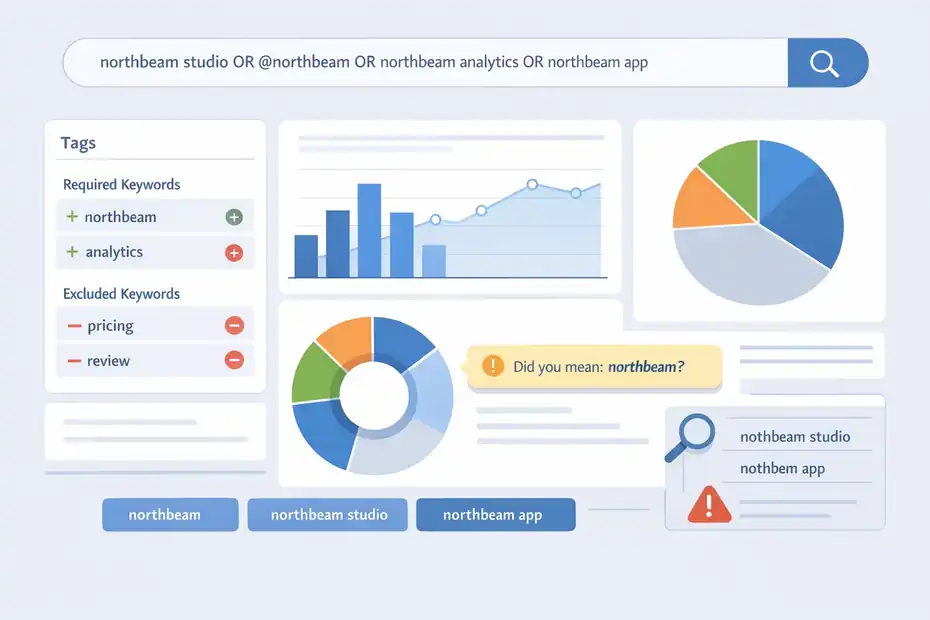
If you only fix one thing, fix this. Brand24 detects mentions based on the keywords you define, and the platform specifically recommends starting with a simple setup before adding complexity.
Overbuilt projects often miss more mentions than they save.
Start With A Simple Core Keyword Set
Brand24 explicitly recommends beginning with a basic phrase and then refining later with required and excluded keywords. I agree with that approach because it is how you avoid silently filtering out useful mention types.
A practical starter set for a brand project usually looks like this:
- Brand Name: Your plain company or product name.
- @Handle: Your X handle or social handle if people mention you that way.
- Hashtag: Campaign or branded hashtag if it gets real usage.
- Product Names: Distinct product lines or service names.
- People Terms: Founder, spokesperson, or CEO if they are part of brand discovery.
Imagine your brand is “Northbeam Studio.” A weak setup might track only "Northbeam Studio". A stronger setup might include Northbeam Studio, @northbeam, Northbeam analytics, northbeam app. That broader but still controlled structure catches real-world variation.
In my experience, the biggest keyword mistake is trying to be precise too early. People online do not speak in clean database language. They abbreviate, misspell, tag casually, and refer to products without your full official name. Your setup has to reflect human behavior, not internal brand guidelines.
Review Required And Excluded Keywords Carefully
Required and excluded keywords are useful, but they are also where many monitoring setups quietly break.
Brand24 allows required keywords and exclusions, and Boolean logic can be used for more precise searches. The danger is obvious: every extra condition reduces what qualifies as a mention.
Here is the common failure pattern:
- You track
brand name - You require
pricing - You exclude
review - You unintentionally remove complaints, comparisons, influencer posts, and casual recommendations
That project may look “clean,” but it is no longer listening broadly. It is listening only to one narrow slice of brand conversation.
A better approach is to keep the project wide and use saved views or temporary Mentions tab searches for analysis. That way, collection stays broad while reporting stays focused.
Brand24’s Boolean search is available in the search bar and advanced filters, so you do not always need to bake every condition into the permanent project logic.
One more important detail: Brand24 notes that updates to exclusions do not retroactively clean up older mentions in the same way future collection is affected. That means a project can look inconsistent after edits if you are comparing older and newer periods.
Check For Misspellings, Variants, And Ambiguity
Brand24 literally calls out misspelled keywords as a reason projects miss data, and that is not a trivial note. One wrong character, one missing space, or one overly formal brand name can strip out a huge share of natural mentions.
I recommend a three-layer keyword audit:
- Exact brand forms: Official company and product names.
- Common user variants: Misspellings, abbreviations, hashtags, and shorthand.
- Disambiguation terms: Extra context if your brand name overlaps with something generic.
For example, if your brand is “Apple Seed,” you may need to exclude gardening and food contexts while keeping software or ecommerce signals. On the other hand, if your brand is highly unique, do not overcomplicate it with extra required terms.
A useful test is to search the web manually and note how people actually write the name. If users write “northbeam” 80% of the time and your Brand24 project only tracks "Northbeam Studio", you have already explained your missing mentions.
For most teams, keyword coverage quality matters more than keyword quantity. A clean set of five realistic keyword variants will outperform a giant list of overly controlled rules.
Review Source Settings And Platform Coverage Limits
Sometimes Brand24 is not missing mentions because of your setup. Sometimes the mention lives in a place the platform cannot access, or you disabled the source without noticing.
This is where troubleshooting shifts from “fix the project” to “understand the data boundary.”
Make Sure The Right Sources Are Enabled
Brand24 allows source-based filtering and source-level project controls. If you or a teammate excluded a source, mentions from that source can disappear entirely.
Brand24’s help content specifically notes that excluding sources can be done in Project Settings, and accidental source blocking can cause sudden drops.
Check these first:
- Project Settings > Sources: Confirm the platforms you care about are still enabled.
- Mentions Tab Source Filter: Make sure you are not viewing only one category.
- Team Changes: Ask whether someone “cleaned up noise” by disabling a source.
This happens a lot in real workflows. A marketer gets annoyed by forum spam, unchecks forums, and two weeks later the PR team wonders why a thread never appeared. Nobody remembers the source was disabled.
Brand24’s source filter categories include major social platforms plus videos, news, podcasts, and other categories. So when someone says, “Brand24 missed it,” I usually ask a more precise question: “Was that mention in a source we actually collect and still have enabled?” That question solves half the mystery.
Understand Facebook And Instagram Collection Limits
This is one of the most important parts of Brand24 missing mentions troubleshooting. Brand24 says it collects Facebook and Instagram data through official APIs, and that creates very real limitations.
Public posts from personal Facebook profiles, Facebook groups, stories, promoted posts, and some country-restricted or privacy-changed posts may not be collectable.
Brand24 also states that it has never collected posts from Facebook groups or stories.
So if your team says, “We had a public Facebook post about us but Brand24 missed it,” check the source details:
- Was it from a personal profile rather than a page?
- Was it inside a Facebook group?
- Was it a story instead of a permanent public post?
- Was it previously private or geographically restricted?
- Was it a paid/promoted post?
I want to be blunt here: this is not usually a troubleshooting failure. It is a platform access rule. No amount of keyword tweaking will force official API access where it does not exist.
That is why I always recommend documenting expected blind spots in your monitoring SOP. It prevents false alarms and saves your team from chasing “bugs” that are really compliance boundaries.
Watch For X Connectivity And Sensitive Topic Gaps
Brand24’s help center also notes potential X-related mention issues, including temporary connectivity problems and platform-specific restrictions around sensitive or regulated topics. It additionally mentions that X may be accidentally disabled as a source.
Here is the practical takeaway:
- If X mentions drop to zero abruptly, inspect source activation and connection status first.
- If your keywords touch politics, regulated industries, or other sensitive categories, expect some data limitations.
- If the mention volume decline is isolated to one source, do not edit your entire keyword structure yet.
A healthy troubleshooting mindset is platform-by-platform. If blogs and news still look normal but X is flat, that points to an X issue. If every source drops together, that points back to project configuration.
In my experience, teams lose hours by treating all missing mentions like one problem. They are not. Source failure, access limitation, and keyword mismatch are three different problems with three different fixes.
Check Filters That Quietly Hide Good Mentions
Even a well-built project can feel inaccurate when the filters are too aggressive.
Brand24 includes filters for language, geography, source, sentiment, and more, and those are great for analysis but dangerous when left on during troubleshooting.
Reset Language And Geolocation Assumptions
Brand24 lets users include or exclude by language and geography. That is useful if your brand name overlaps with another topic in another market, but it can also remove valid mentions if your audience is more global than you thought.
A classic example is a SaaS company based in the US that assumes all meaningful conversation will be in English.
In practice, that company may be mentioned in Spanish, German, Polish, or Portuguese by affiliates, review sites, or international users. If you selected one language at setup, you may have created blind spots from day one.
Here is the simple test:
- Switch the project or view to all languages
- Remove excluded countries
- Compare mention volume over 7, 30, and 90 days
- Review whether the “missing” mentions now appear
I believe this is one of the most underrated fixes because the project often looks “mostly right” while still undercounting by 10% to 30%. That kind of quiet loss is dangerous because it distorts trend analysis, sentiment distribution, and campaign reporting.
Use filtering only after collection is healthy. That order matters.
Clear Saved Searches And Temporary Boolean Queries
Brand24’s Boolean search is powerful. It supports operators like AND, OR, NOT, and IS, and it can be used in the search bar, project setup, and advanced filters. That flexibility is useful, but it also means one old saved condition can confuse your whole audit.
I have seen analysts forget they were inside a narrowed search such as:
brand{AND}refund{NOT}trial
That is a fine analysis view, but it is not a coverage view. If you leave it active, most ordinary mentions vanish from the list.
During troubleshooting, temporarily remove:
- Saved searches
- Required view-level terms
- Negative Boolean exclusions
- Sentiment-only filters
- Source-specific filters
Then compare the total mention count against the narrowed count. That gap tells you whether you have a real collection problem or simply a visibility problem.
My rule is simple: Do not troubleshoot inside a segmented view. Troubleshoot in the rawest possible view, then reapply filters after you confirm collection quality.
Use A Fast Diagnostic Workflow To Find The Root Cause
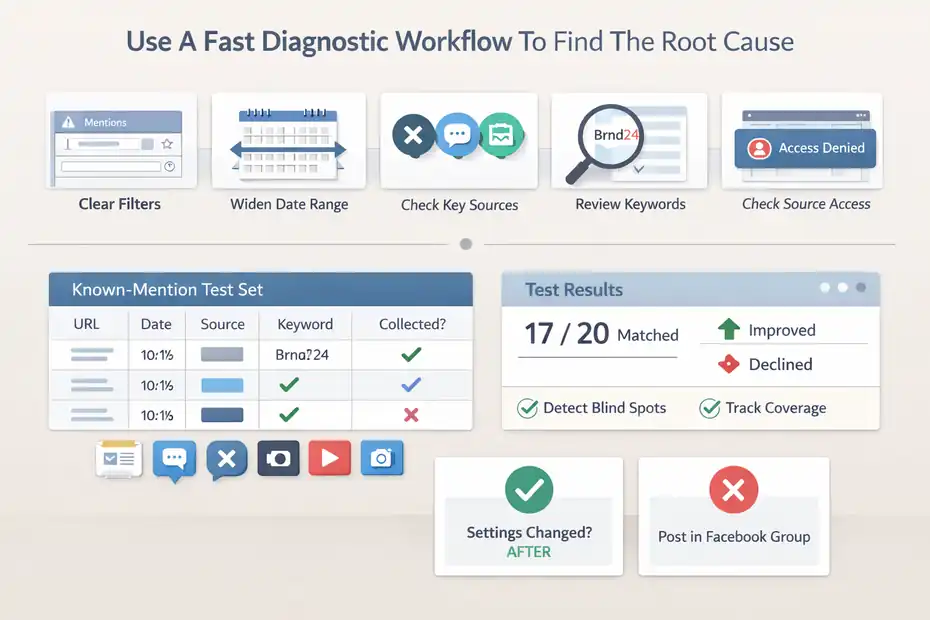
When Brand24 seems to miss mentions, speed matters. You do not need a giant audit first. You need a fast sequence that isolates the cause in minutes.
This is the process I would use for a client before touching anything complicated.
Run The Five-Minute Mention Recovery Checklist
Here is a compact workflow that works well:
- Step 1: Open the Mentions tab and clear all filters. This resets the visual layer.
- Step 2: Widen the date range. A narrow window creates false negatives.
- Step 3: Confirm all key sources are enabled. Especially X, forums, and news.
- Step 4: Review the keyword list for misspellings, overuse of required terms, or missing variants.
- Step 5: Check whether the missing post comes from a source Brand24 can legally collect. Facebook groups, personal profiles, stories, and promoted posts are common dead ends.
If the mention still does not appear, compare it against one more question: did the mention go live after you changed settings, or before? That matters because some project edits affect future collection more than past data.
This five-minute pass solves most cases without guesswork. It also gives you something useful to hand off internally: not just “Brand24 missed it,” but “the post was in a Facebook group, so it was outside official collection scope.”
Build A Known-Mention Test Set
A known-mention test set is one of my favorite practical tricks. It sounds basic, but it gives you a real benchmark instead of vibes.
Create a small spreadsheet with:
- Public URL
- Date published
- Source
- Exact text that mentions your brand
- Which keyword should have matched it
- Whether Brand24 collected it
Use 10 to 20 examples across sources: news, blogs, X, Instagram, YouTube, reviews, and forums. Then test your project against that list monthly.
This gives you three benefits. First, you detect blind spots early. Second, you stop arguing from anecdotes. Third, you can tell whether a project change improved coverage or damaged it.
For example, if your test set coverage moves from 12/20 to 17/20 after simplifying keywords, that is a measurable improvement. If it drops after adding exclusions, you know exactly what caused it.
For teams managing reputation or PR, this is far more useful than checking random mention counts.
Fix Common Real-World Scenarios
At this point, the broad causes are clear.
Now let’s talk about what the fixes look like in real situations, because troubleshooting becomes much easier when you can map the issue to a pattern.
Scenario One: Brand24 Misses Mentions Of A Common Brand Name
If your brand name is generic, short, or overlaps with another topic, your setup gets tricky fast. You may have added required keywords to clean the feed, but you probably removed valid mentions too.
A better method is this:
- Keep the core brand keyword in the project
- Add realistic variants and handles
- Use exclusions only for truly repetitive noise
- Segment analysis with temporary filters instead of permanent collection rules
Let’s say your brand is “Pilot.” That could refer to pens, software, aviation, or job roles. If you force every mention to include pilot software, you will miss articles that just say “Pilot launched a new feature.” Instead, collect broadly and use filtering to separate contexts later.
I suggest testing one week of simpler collection before you tighten anything. Most teams are surprised by how much valid signal they were removing in the name of cleanliness.
Scenario Two: A Mention Exists Publicly But Still Does Not Appear
This is where source limitations usually show up. If the missing mention lives on Facebook, Instagram, or X, do not assume all public content is equally collectible.
Brand24’s official documentation makes clear that collection depends on public access through official APIs and platform rules. Personal Facebook profiles, groups, stories, and paid/promoted posts are especially common reasons a mention will not appear.
Your fix is not always technical. Sometimes it is operational:
- Document the source limitation
- Add the mention manually if it qualifies and you need it in reporting
- Adjust your reporting notes so stakeholders know what coverage excludes
Brand24 does allow manually adding mentions through the Sources area, with fields for URL, title, content, category, sentiment, and date, and manually added items count in dashboard statistics. That is useful when you need complete campaign reporting or executive visibility.
I would not use manual additions as a crutch for constant collection gaps, but for important edge cases, it is a smart workaround.
Scenario Three: Mention Volume Suddenly Drops After A Cleanup
This usually happens after someone changes exclusions, disables a source, narrows languages, or edits project logic without documenting it. The fix is not glamorous: compare current settings against the last known good version.
Check:
- Source toggles
- Keyword list changes
- Language changes
- Excluded keywords
- Saved filters
- Team activity or admin edits
In my experience, sudden drops are rarely mysterious. They are usually self-inflicted by a reasonable decision made without understanding its downstream effect.
This is why I recommend a simple change log for Brand24 projects. Even a one-line note like “March 12: excluded forums due to spam” can save hours later.
Optimize Your Setup So Mentions Stop Going Missing
The goal is not just to fix today’s issue. The goal is to create a monitoring system that is resilient, realistic, and easier to trust.
Brand24 works best when the collection layer stays broad and the analysis layer does the narrowing.
Keep Collection Broad And Analysis Narrow
This is the single biggest strategy shift I recommend. Let the project collect widely, then use filters, tags, saved views, and temporary Boolean searches for reporting. Brand24’s own guidance leans toward starting simple and refining rather than overbuilding the project from the beginning.
Why this works:
- You preserve unexpected but useful mentions
- You reduce the chance of accidental blind spots
- You make future analysis easier
- You avoid rebuilding the project every time your needs change
Think of it this way. Collection is your net. Analysis is your sorting table. If you make the net too narrow, the sorting table never gets a chance.
I believe many teams use monitoring tools like search engines when they should use them like listening systems. Search wants precision. Listening needs coverage first.
Create A Monitoring Structure For Different Intent Types
One messy project can do too much. A smarter approach is to separate intent types across projects or at least across saved views.
For example:
- Brand Reputation View: Core brand terms, broad collection
- Support Pain View: Mentions narrowed by refund, broken, login, issue
- Campaign View: Hashtags, launch terms, influencer references
- Competitive View: Competitor terms in separate projects for cleaner comparison
Brand24 allows multiple keywords per project, but if you want cleaner analytics, separate projects can make comparisons and trend reading more accurate. Brand24’s own guidance notes that separate projects can be better when detailed analytics matter.
This is one of those structural decisions that pays off later. A tidy monitoring architecture reduces confusion, false alarms, and internal mistrust in the data.
Add A Simple Monthly Quality-Control Routine
A monthly QA routine keeps small problems from becoming reporting disasters. Here is the routine I recommend:
- Review your known-mention test set
- Audit top keyword variants
- Check source availability and toggles
- Test all-languages vs restricted-language volume
- Review exclusions added in the last 30 days
- Spot-check one mention type per source
This whole process can take 20 to 30 minutes once your template exists.
I also suggest tracking three quality metrics internally:
- Coverage Rate: Known mentions captured / known mentions expected
- Noise Rate: Irrelevant mentions / total mentions reviewed
- Trust Score: Internal confidence in the monitoring setup, rated monthly by the team
Those are not Brand24 metrics. They are operational metrics, and they help a lot. When monitoring quality drops, you catch it before the board deck or campaign recap exposes the issue.
Troubleshooting Mistakes That Make The Problem Worse
A lot of missed-mention problems get worse because the reaction is too aggressive. People start adding more rules, more exclusions, and more project edits when the real fix is simplification.
Do Not Overcorrect With Too Many Exclusions
When a project has noise, the instinct is to block aggressively. That feels productive, but it often creates a second problem: under-collection.
Brand24 even recommends avoiding too many advanced filters right from the start because they can limit reach. That is exactly the risk here.
I suggest this order:
- Remove obvious junk sources or domains only after you confirm they are consistently irrelevant
- Exclude repeated spam phrases, not broad contextual words
- Use temporary filters before permanent rule changes
- Review the effect one week later before adding more exclusions
A narrow project is harder to rescue than a noisy one. Noise can be filtered. Lost collection cannot always be recovered.
Do Not Assume “Public” Always Means “Collectable”
This is probably the most common misunderstanding in social listening. A post can be visible to you in a browser and still be unavailable through the official data access Brand24 uses.
Facebook and Instagram are the clearest examples here. Personal profiles, groups, stories, and promoted posts are frequent blind spots because the platform access itself is restricted.
So when troubleshooting, avoid saying, “But I can see it, so Brand24 should too.” That assumption causes endless confusion. The real question is whether the mention is available through the source’s permitted collection pathway.
Once you accept that distinction, troubleshooting becomes much more logical.
When To Use Manual Workarounds And Team Escalation
Sometimes the fastest solution is not another keyword edit. It is a documented workaround, a manual addition, or a support escalation with evidence.
Add Important Mentions Manually When Reporting Needs Them
Brand24 allows manual mention additions from the Sources area, with fields for URL, title, content, category, sentiment, and date. Manually added mentions are then included in dashboard statistics.
Use this when:
- An important campaign mention was not collectable due to platform restrictions
- A stakeholder needs a complete launch report
- A high-impact media hit must appear in your dashboard summary
- You need consistency across internal reporting
I would not fill the dashboard with manual entries every day. That defeats the point of monitoring automation. But for executive reports, PR recaps, or campaign wrap-ups, manual additions can close critical gaps without distorting the whole system.
Escalate With Evidence, Not A Vague Complaint
If you reach out to support or your internal ops team, be specific. The best escalation bundle includes:
- Public URL of the missing mention
- Screenshot
- Date and time posted
- Source platform
- Exact keyword it should match
- Whether the source is enabled
- Whether the mention falls into a documented platform limitation
That package turns “Brand24 missed this” into a solvable issue. It also helps support tell you quickly whether the problem is collection logic, source limitation, or account configuration.
I have found that evidence-based escalation gets better answers and much faster resolution.
The Best Long-Term Fix For Brand24 Missing Mentions Troubleshooting
The real long-term fix is not a hack. It is a mindset: build a monitoring system around how people actually mention brands online, how platforms actually expose data, and how your team actually uses the output.
Brand24 is very capable, but it depends on the right inputs. If your keyword setup is too rigid, your sources are partially disabled, your filters are too aggressive, or your expectations ignore platform limitations, missing mentions are almost guaranteed.
Official Brand24 guidance consistently points back to simpler keyword setup, source awareness, and understanding platform boundaries.
So here is my honest recommendation. Keep your project simpler than feels comfortable. Audit it more often than feels necessary. And judge it with a known test set instead of assumptions.
That is how you move from reactive troubleshooting to a monitoring setup you can actually trust.
FAQ
What causes missing mentions in Brand24?
Missing mentions in Brand24 are usually caused by incorrect keyword setup, overly strict filters, disabled sources, or platform data limitations. In many cases, the mentions exist but are hidden due to filters or were never collected because the keyword logic was too narrow or restrictive.
How do I fix Brand24 missing mentions quickly?
Start by clearing all filters in the Mentions tab, expanding your date range, and reviewing your keyword setup. Then check if the source is enabled and confirm whether the mention comes from a platform Brand24 can access, such as public pages instead of private groups.
Does Brand24 track all social media mentions?
Brand24 does not track every mention across all platforms due to API and privacy limitations. For example, it cannot collect data from private Facebook profiles, groups, or stories. This means some publicly visible mentions may still be unavailable for tracking within the tool.
Why are my Brand24 results suddenly lower?
A sudden drop in mentions is often caused by changes in project settings, such as new exclusions, disabled sources, or narrowed language filters. It can also result from platform-specific issues like temporary connectivity problems or restrictions affecting data collection from certain sources.
Can keyword setup affect Brand24 mention accuracy?
Yes, keyword setup directly impacts mention accuracy. If your keywords are too specific, misspelled, or missing common variations, Brand24 may fail to capture relevant mentions. A broader, more natural keyword structure typically improves coverage and reduces missed data.

I’m Juxhin, the voice behind The Justifiable.
I’ve spent 6+ years building blogs, managing affiliate campaigns, and testing the messy world of online business. Here, I cut the fluff and share the strategies that actually move the needle — so you can build income that’s sustainable, not speculative.
Related posts:
 Brand24 Pros And Cons For Businesses: Honest Breakdown
 Top Brand24 Competitors Offering Excellent Value
 Sprout Social Listening: How It Works for Brands
 Brand24 Pricing Explained: What You Really Pay For
 AI-Powered Ad Creative: Smarter Ads, Better ROI!
 Voluum Pricing: Which Plan Saves You the Most Money?