
Table of Contents
Some links on The Justifiable are affiliate links, meaning we may earn a small commission at no extra cost to you. Read full disclaimer.
This Sellfy digital product store review is written for creators who want a simple way to sell ebooks, templates, music, videos, courses, presets, memberships, or merch without building a complicated ecommerce setup.
I’ll walk you through what Sellfy does well, where it feels limited, and how the creator experience actually works from setup to optimization.
My goal is not to hype it up blindly. It is to help you decide whether Sellfy fits your workflow, audience, budget, and product strategy before you spend time moving your business onto it.
Understanding What Sellfy Is And Who It Is For
Sellfy is an ecommerce platform built around simplicity. It gives creators a storefront, product hosting, checkout, digital delivery, basic marketing tools, and optional print-on-demand features in one place.
What Sellfy Actually Does For Digital Creators
At its core, Sellfy helps you turn a digital file or content offer into something people can buy online. Instead of stitching together a website builder, checkout tool, file delivery app, email tool, and download protection system, you can manage most of that from one dashboard.
Sellfy supports digital downloads, physical products, subscriptions, and print-on-demand products across its paid plans. Its own pricing page lists digital products, physical products, subscriptions, and print-on-demand products as supported product types, with 0% Sellfy transaction fees on all current plans.
For a creator, that matters because most early-stage digital product stores do not fail because the idea is bad. They fail because setup feels annoying. You make a workbook, template pack, Notion dashboard, sample library, preset bundle, or mini course, then suddenly you need product pages, payment processing, tax settings, download delivery, order emails, refund handling, and basic analytics.
Sellfy reduces that friction. You upload the product, write the description, set the price, connect payment, and publish. That is the main appeal.
I would not describe Sellfy as the most advanced ecommerce system on the market. It is not trying to be a massive marketplace or enterprise store engine. It is better understood as a creator-first selling platform for people who want to launch quickly, keep ownership of their storefront, and avoid a pile of plugins.
The Best-Fit Creator Profile
Sellfy makes the most sense when you already have, or plan to build, an audience outside the platform. Think YouTubers, designers, photographers, musicians, educators, writers, coaches, streamers, newsletter creators, and niche experts.
Imagine you run a small YouTube channel teaching beginner video editing. You create a pack of LUTs, project files, and a short tutorial guide. You do not need a giant ecommerce site. You need a clean page, trusted checkout, instant file delivery, and a way to send buyers updates later. That is exactly the kind of situation where Sellfy feels practical.
It also works well for creators who want to mix product types. For example, a digital artist could sell brush packs, a monthly resource subscription, and print-on-demand posters from the same store.
Sellfy’s features page confirms support for digital files such as ebooks, videos, audio, music, PSD, AI, and other file types, plus subscriptions and built-in print-on-demand merchandise.
In my experience, Sellfy is strongest when your business model is simple but serious. You care about selling, branding, and delivery, but you do not want to spend weeks configuring a store.
Who May Feel Limited By Sellfy
Sellfy may feel too simple if you want deep ecommerce customization, advanced inventory workflows, large app ecosystems, complex course communities, or highly detailed website layouts.
A creator selling one ebook may love that simplicity. A seven-figure education brand with multiple instructors, learning paths, certificates, and advanced segmentation may outgrow it.
The biggest tradeoff is control. Sellfy gives you enough control to brand your store and sell smoothly, but not the same level of flexibility you would get from a custom WordPress stack or a more expandable ecommerce platform.
That does not make Sellfy bad. It just means you should pick it for the right reason. Pick Sellfy because you want a fast, clean, creator-friendly sales system. Do not pick it because you want unlimited technical customization.
Reviewing The Creator Setup Experience
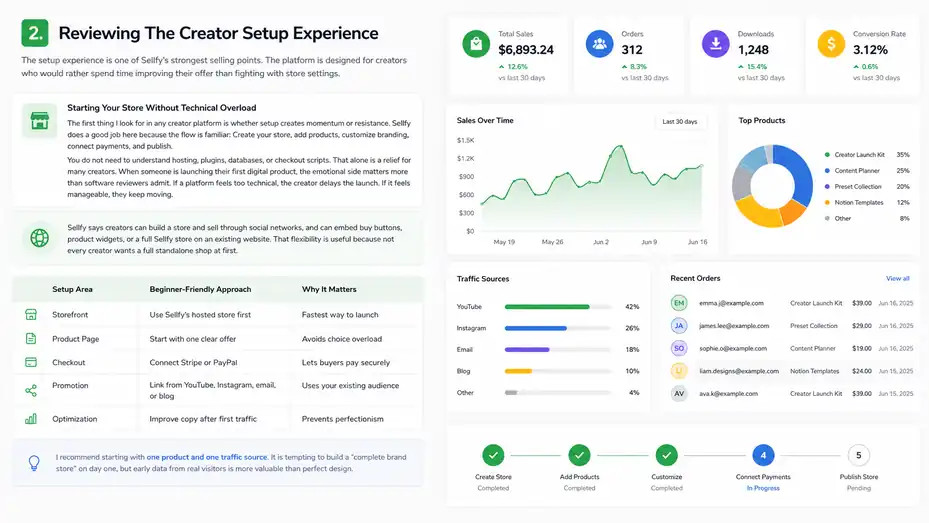
The setup experience is one of Sellfy’s strongest selling points. The platform is designed for creators who would rather spend time improving their offer than fighting with store settings.
Starting Your Store Without Technical Overload
The first thing I look for in any creator platform is whether setup creates momentum or resistance. Sellfy does a good job here because the flow is familiar: Create your store, add products, customize branding, connect payments, and publish.
You do not need to understand hosting, plugins, databases, or checkout scripts. That alone is a relief for many creators. When someone is launching their first digital product, the emotional side matters more than software reviewers admit. If a platform feels too technical, the creator delays the launch. If it feels manageable, they keep moving.
Sellfy says creators can build a store and sell through social networks, and can embed buy buttons, product widgets, or a full Sellfy store on an existing website. That flexibility is useful because not every creator wants a full standalone shop at first.
A practical beginner path might look like this:
| Setup Area | Beginner-Friendly Approach | Why It Matters |
|---|---|---|
| Storefront | Use Sellfy’s hosted store first | Fastest way to launch |
| Product Page | Start with one clear offer | Avoids choice overload |
| Checkout | Connect Stripe or PayPal | Lets buyers pay securely |
| Promotion | Link from YouTube, Instagram, email, or blog | Uses your existing audience |
| Optimization | Improve copy after first traffic | Prevents perfectionism |
I recommend starting with one product and one traffic source. It is tempting to build a “complete brand store” on day one, but early data from real visitors is more valuable than perfect design.
Adding Your First Digital Product
Sellfy’s digital product workflow is straightforward. According to Sellfy’s help documentation, adding a digital product involves going to Digital Products, choosing Add New Product, uploading a file or selecting an existing file, adding product details, using variants when needed, setting stock limits if relevant, adding media previews, and saving the product.
That sounds basic, but the details matter. The product upload stage is where many creators accidentally weaken their offer. They upload the file, write a short title, set a price, and expect the page to convert. In reality, your product page has to answer the buyer’s silent questions.
Those questions are usually simple:
- What exactly do I get?
- Is this made for someone like me?
- How fast can I use it?
- What problem does it solve?
- Why should I trust this creator?
- What happens after I pay?
For example, “Budget Spreadsheet” is weak. “Beginner Budget Spreadsheet For Freelancers With Irregular Income” is much stronger. It tells the buyer who it is for, what it helps with, and why it is different.
Sellfy lets you add previews, and I strongly suggest using them. If you sell templates, show screenshots. If you sell audio, include a sample. If you sell a PDF, show a few non-sensitive pages. Buyers are more confident when they can see the value before paying.
Handling Files, Bundles, And Product Variations
One creator-friendly detail is that Sellfy supports multiple files per product. Its help documentation says you can include up to 50 files in one product upload, and if you have more than 50 files or prefer folders, you can use a compressed ZIP or RAR folder.
This is helpful for bundles. Let’s say you sell a “Creator Launch Kit” that includes a PDF guide, Canva templates, caption prompts, spreadsheet tracker, and bonus checklist. You can package those files together as one product instead of creating separate products for each asset.
Variants are useful when the buyer needs options. For example, a photographer could sell:
- Personal License: Lower price for personal use only.
- Commercial License: Higher price for client or business use.
- Bundle Version: Includes extra presets, tutorials, or source files.
This is where I suggest thinking beyond basic file delivery. Digital products become more profitable when you package them around outcomes. A $9 template may sell, but a $39 bundle with instructions, examples, and bonus assets can feel much more complete.
A simple rule I like: If a buyer has to figure out how to use the product alone, add guidance. A short PDF, quick-start video, or “read me first” file can reduce confusion and refund requests.
Evaluating Sellfy’s Digital Product Features
Sellfy’s digital product features are practical rather than flashy. The platform focuses on hosting, delivery, product presentation, buyer access, and basic protection.
Digital Downloads, Video, And File-Based Offers
Sellfy supports many common creator product formats. Its features page specifically mentions ebooks, videos, audio, music, PSD, AI, and other files. It also offers video streaming for video-on-demand content, which can reduce download issues and lower piracy risk compared with giving buyers a raw video file.
That is useful because “digital product” is a broad phrase. For one creator, it means a 12-page PDF. For another, it means 8GB of video tutorials. For another, it means music loops, design assets, Lightroom presets, or 3D files.
In a Sellfy digital product store review, the key question is not simply “Can Sellfy upload files?” Most platforms can. The better question is “Can Sellfy deliver the product in a way that feels smooth for the buyer and manageable for the creator?”
For many simple and mid-level digital product stores, yes. Buyers purchase, receive access, and download or stream depending on the product format. You avoid manually emailing files or using messy shared folders.
Where I would be more cautious is with highly structured learning experiences. If your offer needs lesson progress tracking, quizzes, community discussion, certificates, and student dashboards, you may want a dedicated learning platform instead of treating Sellfy as a full course platform.
Sellfy can sell educational files and videos, but “selling course content” and “running a full learning environment” are not always the same thing.
Product Protection And Buyer Trust
Digital product protection is always a balancing act. You want to reduce casual sharing, but you do not want to punish legitimate buyers with a frustrating experience.
Sellfy includes PDF stamping and limited downloads. Its features page says PDF stamping can automatically add buyer email addresses to every page of a PDF product file, making each customer’s file uniquely marked. It also lists limited downloads as a protection feature.
PDF stamping is especially useful for ebooks, guides, worksheets, and templates delivered as PDFs. It will not stop every form of sharing, but it creates accountability. If someone shares a file publicly, the file can include information connected to the buyer.
Limited downloads can also help. For example, you might allow a buyer to download the file a few times rather than unlimited access forever. That said, I would be careful not to make limits too strict. People change devices, lose files, or need to re-download later. A buyer who paid honestly should not feel trapped.
My suggested balance is simple: Use protection features quietly, but keep the customer experience generous. Clear product terms, reasonable download access, and helpful support will usually protect your reputation better than aggressive restrictions.
Store Customization And Brand Feel
Sellfy lets you customize your store with logos, colors, layout, domain connection, cart functionality, mobile optimization, and automatic interface translation based on customer location.
For creators, brand feel matters. A buyer coming from your YouTube channel, TikTok profile, podcast, newsletter, or blog should feel like they are still buying from you, not from some random checkout page.
That said, do not obsess over design in the beginning. A clean store with a strong offer will beat a gorgeous store with vague positioning. I suggest focusing on these brand basics first:
- Header: Make it obvious what you sell and who it helps.
- Product Images: Show the outcome, not just a flat mockup.
- Colors: Match your existing creator brand or keep it simple.
- Domain: Use a custom domain when your store becomes a serious revenue channel.
- Mobile Layout: Check the buying flow on your phone before promoting.
Most creator traffic is mobile-heavy, especially from social platforms. If your product image, description, and checkout feel awkward on a phone, you will lose sales without realizing why.
Breaking Down Sellfy Pricing And Fees
Sellfy’s pricing is simple compared with many ecommerce setups, but you still need to understand the sales caps, payment processor fees, and feature differences before choosing a plan.
Current Sellfy Pricing At A Glance
As of the current Sellfy pricing page I reviewed, monthly plans are Starter at $29/month, Business at $79/month, and Premium at $159/month.
Annual billing lowers those displayed prices to $22/month, $59/month, and $119/month respectively. Sellfy also states that all three plans have 0% transaction fees, with annual sales volume limits of up to $10k, $50k, and $200k depending on the plan.
Here is the simplified view:
| Plan | Monthly Price | Annual-Billing Price | Annual Sales Volume | Best Fit |
|---|---|---|---|---|
| Starter | $29/month | $22/month | Up to $10k/year | New creators testing digital products |
| Business | $79/month | $59/month | Up to $50k/year | Growing stores needing upsells and recovery |
| Premium | $159/month | $119/month | Up to $200k/year | Established creators wanting priority support and migration help |
Sellfy’s pricing page also says there is a 14-day free trial and a 30-day money-back guarantee after upgrading.
My honest take: Starter is attractive if you already have a product idea and some audience. But if you have no product, no traffic, and no plan to promote, even $22/month can feel expensive over time. The tool does not create demand by itself. It helps you capture demand when you send the right people to the right offer.
Transaction Fees Versus Payment Processing Fees
The phrase “0% transaction fees” can be easy to misunderstand. Sellfy does not charge its own transaction fee on paid plans, but payment processors still charge fees. Sellfy’s pricing FAQ says sellers need to cover payment processing fees from PayPal or Stripe, typically listed as 2.9% + 30¢ depending on gateway choice.
That distinction matters for profit planning.
Imagine you sell a $29 digital template pack. If your payment processor fee is around 2.9% + 30¢, your processing cost is roughly $1.14 before considering refunds, taxes, software costs, affiliate commissions, or ads. That may seem small, but it adds up.
Here is a simple example:
| Product Price | Estimated Processor Fee | Approx. Net Before Platform Cost |
|---|---|---|
| $9 | $0.56 | $8.44 |
| $29 | $1.14 | $27.86 |
| $79 | $2.59 | $76.41 |
The takeaway is not that fees are bad. Payment processing is part of selling online. The takeaway is that creators should price with margin in mind. A $5 product can work as an entry offer, but you need volume. A $49 product with a strong outcome can be easier to grow sustainably.
Which Plan Offers The Best Value
For most creators, I would look at Sellfy plans based on stage rather than ego.
Starter is enough when you are validating your first offers. You get unlimited products, digital product selling, subscriptions, merch, email marketing, and core marketing features according to Sellfy’s pricing page.
Business becomes more interesting when your store has traffic. This plan adds growth features such as product upselling, cart abandonment, and affiliate marketing. Those features matter more once people are already visiting your checkout. A cart abandonment email is useless without carts to recover.
Premium is better for creators with established sales, larger product catalogs, or migration needs. Sellfy lists priority support, advanced options, and product/design migration on the Premium plan.
My practical recommendation: Start with the lowest plan that supports your current sales motion, then upgrade when a higher plan can clearly pay for itself. For example, if Business costs $37/month more than Starter on annual billing, and upsells help you generate at least that much extra profit, the upgrade becomes easier to justify.
Testing The Selling Experience From Buyer To Creator
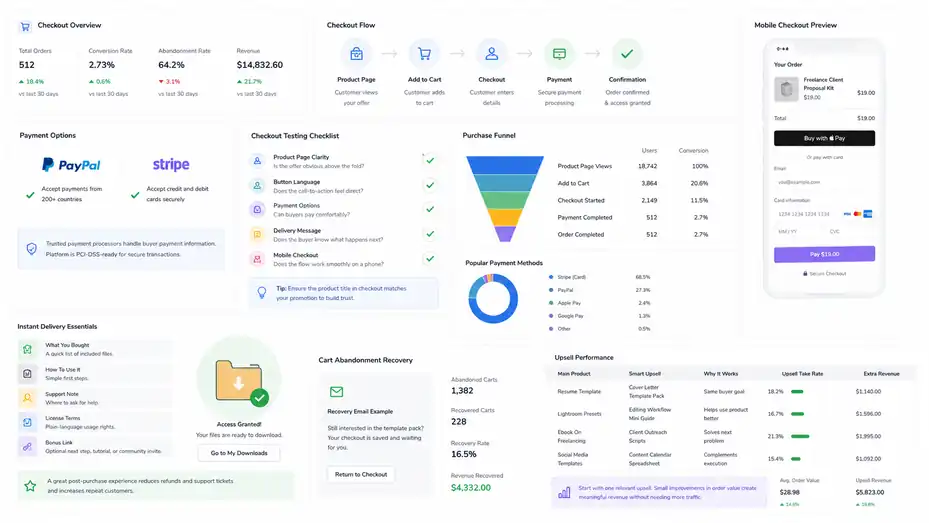
A digital product store lives or dies by the buying experience. If checkout feels confusing, slow, or untrustworthy, even a great product can underperform.
Checkout Flow And Payment Options
Sellfy supports PayPal and Stripe, with PayPal allowing sellers to accept payments from customers in over 200 countries and Stripe offering credit card payment options through the store. Sellfy also says trusted payment processors handle buyer payment information and that the platform is PCI-DSS-ready.
For buyers, the checkout experience should feel predictable. They click buy, enter payment details, receive confirmation, and get access to the product. That sounds obvious, but a lot of creator stores lose money because the path from interest to purchase has too many distractions.
I suggest testing your own checkout like a skeptical buyer. Use a low-priced test product or preview your flow carefully. Check:
- Product Page Clarity: Is the offer obvious above the fold?
- Button Language: Does the call-to-action feel direct?
- Payment Options: Can your likely buyers pay comfortably?
- Delivery Message: Does the buyer know what happens next?
- Mobile Checkout: Does the flow work smoothly on a phone?
One underrated point: Make sure your product title in checkout matches what you promoted. If your Instagram post says “Freelance Client Proposal Kit” but checkout says “Product 01,” trust drops fast.
Instant Delivery And Customer Expectations
Instant delivery is one of the biggest advantages of digital products. Buyers do not want to wait for you to email a file manually. They expect access right away.
Sellfy’s digital delivery system is designed around that expectation. The creator uploads files, and buyers can access them after purchase. For straightforward downloads, this is exactly what you want.
The creator’s job is to make the first five minutes after purchase feel reassuring. I recommend adding a short “Start Here” file inside bundles. It can include:
- What You Bought: A quick list of included files.
- How To Use It: Simple first steps.
- Support Note: Where to ask for help.
- License Terms: Plain-language usage rights.
- Bonus Link: Optional next step, tutorial, or community invite.
This small touch can reduce refunds and support questions. It also makes your product feel more professional. Many creators focus only on the sales page, but the post-purchase experience is where repeat customers are born.
Upsells, Cart Recovery, And Revenue Lift
Sellfy’s Business and Premium plans include product upselling and cart abandonment features. These features can improve revenue, but only when used with restraint.
An upsell should feel like a logical next step, not a random add-on. For example:
| Main Product | Smart Upsell | Why It Works |
|---|---|---|
| Resume Template | Cover Letter Template Pack | Same buyer goal |
| Lightroom Presets | Editing Workflow Mini Guide | Helps use product better |
| Ebook On Freelancing | Client Outreach Scripts | Solves next problem |
| Social Media Templates | Content Calendar Spreadsheet | Complements execution |
Cart abandonment works best when the buyer had real intent but got distracted. A simple reminder can bring them back. I would avoid sounding desperate. Something like “Still interested in the template pack? Your checkout is saved” feels better than fake urgency.
In my experience, creators often overcomplicate upsells. Start with one relevant add-on. If 100 people buy your main product and 15 add a $19 upsell, that is $285 extra revenue without needing new traffic. That is the kind of quiet optimization that makes digital product stores more profitable.
Comparing Sellfy With Other Digital Product Platforms
Sellfy is not the only option. The right platform depends on whether you value simplicity, marketplace discovery, customization, low upfront cost, or advanced learning features.
Sellfy Versus Marketplace-Style Selling
Marketplace platforms can help with discovery, but they often limit brand control. A standalone Sellfy store gives you more ownership over the buyer experience, but you are responsible for sending traffic.
That difference is huge.
If you sell on a marketplace, buyers may find you while searching. But they may also compare you instantly against cheaper competitors. Your brand sits inside someone else’s ecosystem. Fees, rules, ranking changes, and account policies can affect your income.
With Sellfy, you build your own store experience. You can link from your content, embed products, use your own domain, and create a more direct relationship with customers.
Capterra describes Sellfy as an ecommerce solution for creating a personalized online store to sell physical and digital products, with options like embedded buy buttons, product links, credit card payment offers, and discount coupons.
I believe this is better for creators who think long-term. Your store becomes part of your brand, not just a listing page.
Sellfy Versus Plugin-Based Ecommerce
A plugin-based setup can be powerful. For example, a creator might use a content management system, ecommerce plugin, digital delivery add-on, email provider, analytics scripts, checkout extensions, and security tools. That can work beautifully if you enjoy technical control.
But for many creators, that setup becomes maintenance work. Updates break things. Plugins overlap. Checkout issues become your problem. Security and backups become your responsibility.
Sellfy’s advantage is focus. It gives you the selling essentials in one place. You trade some flexibility for speed and simplicity.
Here is a practical comparison:
| Factor | Sellfy | Plugin-Based Store |
|---|---|---|
| Setup Speed | Faster | Slower |
| Technical Skill Needed | Low | Medium to high |
| Customization Depth | Moderate | High |
| Maintenance | Lower | Higher |
| App/Plugin Flexibility | Limited | Broad |
| Best For | Creators who want simple selling | Creators who want full control |
Neither option is universally better. I would choose Sellfy when launching and validating. I would consider a plugin-based setup when customization becomes a revenue requirement, not just a preference.
Sellfy Versus Course Platforms
This is where creators need to be careful. A digital product store and a course platform can overlap, but they are not identical.
Sellfy can sell video files, downloads, and subscription products. Its features page lists video streaming and digital subscriptions with weekly, monthly, or yearly billing. That can work well for simple training products, paid resource libraries, or recurring content access.
But a dedicated course platform may be better when the learning experience itself is the product. If students need structured modules, progress tracking, quizzes, certificates, private comments, assignments, or community features, you may feel limited using a storefront-first tool.
A good decision question is this: Are you selling files and access, or are you delivering a guided learning environment?
If it is files and access, Sellfy can fit. If it is a full student journey, compare it with learning-specific tools before committing.
Building A Sellfy Store That Converts
Launching a store is only the start. A Sellfy store converts when your product positioning, page structure, pricing, and traffic source all work together.
Writing Product Pages That Sell Without Hype
The best product pages are clear, specific, and honest. You do not need exaggerated claims. You need to help the buyer understand the transformation.
A strong digital product page usually includes:
- Outcome: What the buyer can do after purchase.
- Audience: Who the product is best for.
- Contents: What files, formats, or lessons are included.
- Use Case: When and how to use it.
- Preview: Screenshots, samples, or demo content.
- Trust Signal: Creator experience, testimonials, or realistic examples.
- Guarantee Or Policy: Clear refund or support expectations.
Let’s say you sell a “30-Day Content Planner.” A weak page says, “This planner helps you create content.” A stronger page says, “Plan 30 days of Instagram, TikTok, and email content in one afternoon, with prompts for product launches, personal stories, tutorials, and soft-selling posts.”
That second version is clearer because it shows the buyer what life looks like after buying.
I recommend using plain language. Do not say “strategic content ideation framework” when “content ideas you can actually post” works better. Buyers are not grading your vocabulary. They are deciding whether your product solves their problem.
Pricing Your Digital Products With Confidence
Digital product pricing is emotional. Many creators underprice because the product is “just a file.” But buyers are not paying for the file. They are paying for the shortcut, outcome, clarity, time saved, or skill transferred.
Here is a simple pricing framework:
| Product Type | Common Price Range | Pricing Logic |
|---|---|---|
| Simple Template | $5–$19 | Quick utility, low support |
| Advanced Template Pack | $19–$59 | More use cases and examples |
| Ebook Or Guide | $9–$49 | Depth, expertise, and clarity |
| Mini Course Or Workshop | $29–$149 | Transformation and instruction |
| Premium Bundle | $79–$299+ | Multiple assets plus guidance |
These ranges are not rules. They are starting points. Your niche, audience trust, product quality, and outcome matter more.
A helpful scenario: A designer sells a $12 icon pack and makes 30 sales per month, earning $360 before fees. Then they create a $49 “Brand Starter Kit” with icons, color palettes, social templates, and a usage guide. Even if it sells only 12 times, that is $588 before fees. Better packaging can beat more volume.
My advice is to test value-based pricing. If your product saves someone five hours, helps them win a client, improves their workflow, or gives them reusable assets, price it like a solution, not a download.
Using Bundles And Order Value Strategy
Average order value is one of the most important metrics in a digital product store. It tells you how much a buyer spends per order. When you increase it ethically, you can earn more from the same traffic.
Bundles are the easiest way to do this. Instead of selling five separate $9 products, you can sell a $39 bundle that feels like a better deal. The buyer gets more value, and you earn more per transaction.
A smart bundle has a theme. Do not throw random products together. Build around a goal.
Example bundle ideas:
- Creator Launch Bundle: Product idea worksheet, sales page template, launch email sequence, pricing calculator.
- Freelancer Client Bundle: Proposal template, onboarding checklist, invoice tracker, client email scripts.
- Photographer Editing Bundle: Presets, editing guide, before-and-after examples, client delivery checklist.
If your Sellfy plan includes upsells, you can also offer a small add-on after the main product is selected. Keep it relevant. If someone buys a budget spreadsheet, offer a debt payoff tracker or income planner. Do not offer an unrelated social media template pack.
Marketing A Sellfy Digital Product Store
Sellfy gives you the store, but marketing brings the buyers. The most successful creator stores connect the product directly to content people already trust.
Turning Existing Content Into Product Traffic
The easiest Sellfy marketing strategy is to connect your product to content that already teaches, entertains, or solves a problem.
If you are a YouTuber, mention the product naturally inside relevant videos. If you write blog posts, add contextual product links inside tutorials. If you post on TikTok or Instagram, show the product being used. If you have an email list, explain the problem the product solves and why you made it.
The mistake is promoting the product only when you launch. Digital products can sell for months or years when you place them inside evergreen content.
Example: Imagine you publish a blog post called “How To Plan A Month Of Content In One Day.” Inside that post, you explain the process for free. Then you offer your Sellfy content planner as the shortcut. That feels helpful because the product is connected to the reader’s immediate need.
I suggest building content around buyer moments:
| Buyer Moment | Content Idea | Product Connection |
|---|---|---|
| Beginner feels overwhelmed | “How To Start Budgeting With Irregular Income” | Budget spreadsheet |
| Creator lacks ideas | “30 Content Prompts For Product-Based Creators” | Content planner |
| Freelancer needs clients | “How To Send Better Proposals” | Proposal template |
| Photographer wants speed | “My 10-Minute Editing Workflow” | Preset pack |
This is how you avoid pushy selling. You help first, then offer the shortcut.
Email Marketing And Repeat Buyers
Sellfy includes email marketing in its plans, according to its pricing page. That matters because digital product businesses become stronger when you can contact buyers again.
A buyer is not just a transaction. They are someone who trusted you once. If your product delivers, they are more likely to buy another related offer.
A simple post-purchase email flow could look like this:
- Email 1: Deliver And Reassure: Thank the buyer, explain how to access the product, and suggest the first action.
- Email 2: Help Them Use It: Share a quick tip, example, or common mistake.
- Email 3: Ask For Feedback: Invite a reply or review.
- Email 4: Offer The Next Step: Recommend a related product only if it genuinely fits.
You do not need complicated automation at first. A few helpful emails can improve satisfaction and create repeat sales.
In my experience, creators often chase new buyers while ignoring existing ones. That is backwards. If someone bought your beginner template, they may later want the advanced version. If someone bought your ebook, they may want the workbook. If someone bought your presets, they may want your editing tutorial.
Discounts, Launches, And Promotions
Discounts can work, but they need a reason. Random discounts train people to wait. Purposeful promotions create momentum.
Good reasons for a discount include:
- Launch Week: Reward early buyers.
- Seasonal Use Case: Back-to-school, New Year planning, holiday campaigns.
- Bundle Promotion: Encourage higher order value.
- Audience Milestone: Celebrate a creator milestone with your community.
- Customer Winback: Bring back past buyers with a relevant offer.
Sellfy supports discount coupons, according to Capterra’s platform description. The key is not just having coupons. It is using them strategically.
For example, instead of “20% off everything,” try “Launch week: Get the full freelancer proposal kit for $39 before it moves to $49.” That gives context, urgency, and a clear product reason.
I would avoid constant discounts on your flagship product. It can reduce perceived value. Instead, use bonuses when possible. A limited-time bonus checklist, template, or mini training can feel more valuable than cutting the price.
Tracking Performance And Improving Results
A Sellfy store becomes easier to grow when you track the right numbers. You do not need a huge analytics setup at first, but you do need to know where sales are coming from and what buyers do.
The Metrics That Matter Most
Many creators track the wrong things. Store visits are useful, but visits alone do not pay you. Social likes feel good, but they do not always predict sales.
For a digital product store, I would start with these metrics:
| Metric | What It Tells You | Why It Matters |
|---|---|---|
| Product Page Conversion Rate | Percentage of visitors who buy | Shows offer-page fit |
| Average Order Value | Average revenue per order | Shows pricing and bundle strength |
| Refund Rate | Percentage of orders refunded | Signals mismatch or product issues |
| Traffic Source | Where buyers come from | Shows best promotion channel |
| Email Revenue | Sales from email campaigns | Shows audience trust |
| Repeat Purchase Rate | Buyers who return | Shows product ecosystem strength |
A realistic early benchmark might be modest. If 300 people visit your product page and 6 buy, that is a 2% conversion rate. Whether that is good depends on traffic quality, price, product type, and audience warmth. A warm email list may convert much higher than cold social traffic.
The goal is not to obsess over numbers daily. The goal is to spot bottlenecks. If traffic is low, you need promotion. If traffic is high but sales are low, you need better positioning, pricing, proof, or page clarity.
Diagnosing Low Sales Without Panicking
Low sales do not automatically mean your product is bad. It may mean the offer is unclear, the audience is wrong, or the traffic is not ready to buy.
Here’s how I would troubleshoot:
- Problem: People visit but do not buy: Improve the headline, preview images, product promise, and trust signals.
- Problem: People ask many questions: Add missing details to the product page.
- Problem: Buyers refund quickly: Check whether the product matches the sales page promise.
- Problem: No one clicks from content: Make the product link more contextual and benefit-driven.
- Problem: Sales happen only during discounts: Revisit pricing, perceived value, and urgency strategy.
A common example: A creator sells “Canva Templates” but does not say what kind. Are they for coaches, restaurants, realtors, students, fitness creators, or Etsy sellers? Generic positioning forces buyers to guess. Specific positioning helps buyers self-select.
I recommend changing one variable at a time. If you rewrite the page, change the price, redesign images, and switch traffic sources all in one week, you will not know what caused the result.
Using Customer Feedback As Optimization Data
Customer feedback is underrated because it sounds less exciting than analytics. But it can reveal the exact words your future buyers need to hear.
After someone buys, ask a simple question: “What made you decide to buy this?” Their answer may surprise you. You might think they bought your spreadsheet because it was pretty. They might say they bought it because it helped them stop avoiding their finances.
That language belongs on your product page.
Also ask what confused them. If three buyers ask how to open a file, add instructions. If people miss a bonus, change your folder structure. If buyers want a commercial license, create one.
This is how your Sellfy store gets better over time. Not by guessing, but by listening.
Avoiding Common Sellfy Store Mistakes
Most Sellfy mistakes are not technical. They are strategic. Creators launch too broadly, write vague pages, skip previews, underprice, or forget to build traffic.
Mistake 1: Treating Sellfy Like A Marketplace
Sellfy gives you a store, but it does not magically send a flood of buyers. This is one of the most important points in this Sellfy digital product store review.
If you expect marketplace-style discovery, you may be disappointed. Sellfy is strongest when you bring traffic from your own channels. That could be YouTube, search, social media, affiliates, email, communities, podcasts, or partnerships.
This is not a weakness if you understand it. In fact, it can be an advantage. You are building a direct sales asset instead of depending entirely on marketplace algorithms.
The fix is simple: Before launching, choose your first traffic path. For example:
- Search Path: Publish tutorials that naturally recommend your product.
- Social Path: Demonstrate the product in short-form content.
- Email Path: Launch to a warm list with a helpful story.
- Partner Path: Ask niche creators to promote as affiliates if your plan supports it.
Do not build the store first and ask “Where do buyers come from?” Build the store and traffic plan together.
Mistake 2: Uploading A Product Without Packaging The Outcome
A file is not automatically an offer. A Canva template, PDF, audio pack, or spreadsheet becomes valuable when the buyer understands the outcome.
Let’s say you sell a meal planning spreadsheet. The product is not really a spreadsheet. The product is saving time, reducing decision fatigue, and making grocery planning easier. That is what your copy should communicate.
- Weak offer: “Meal Planner Spreadsheet.”
- Better offer: “Meal Planner Spreadsheet For Busy Students Who Want Simple Weekly Grocery Lists.”
- Best offer: “Plan 7 Days Of Easy Meals, Auto-Build Your Grocery List, And Stop Guessing What To Eat After School Or Work.”
The file may be the same, but the offer feels different.
I advise creators to write the product page before finalizing the product. If you cannot explain the outcome clearly, the product may need better structure.
Mistake 3: Ignoring Support And Refund Prevention
Even simple digital products need support. Buyers may have trouble opening files, understanding licenses, finding downloads, or using templates.
You can reduce support by making the product easy to use. Add clear file names. Include a start-here guide. Explain required software. Mention whether the product works on mobile, desktop, or specific apps. Tell buyers exactly what is included and not included.
Refund prevention is mostly expectation management. If your product is a template, do not imply it is a custom service. If it is a beginner guide, do not market it as advanced. If it requires a paid third-party app, say that upfront.
Honesty may reduce a few unfit sales, but it increases buyer satisfaction. I would rather have fewer happy buyers than more disappointed ones.
Scaling A Sellfy Digital Product Business
Once your first product sells consistently, the next stage is building a product ecosystem. This is where Sellfy can become more than a checkout page.
Creating A Product Ladder
A product ladder gives buyers multiple ways to work with you at different price points. It also helps you stop relying on one product.
A simple ladder might look like this:
| Level | Product Type | Example |
|---|---|---|
| Free | Lead magnet or sample | Free checklist or mini template |
| Entry | Low-cost product | $9 planner |
| Core | Main product | $39 template bundle |
| Premium | Advanced offer | $149 workshop or complete system |
| Recurring | Subscription | Monthly resource library |
Sellfy supports digital products and subscriptions, so creators can build both one-time and recurring revenue offers.
The key is progression. Each product should solve the next problem. If someone buys your content planner, their next problem may be writing captions. If they buy caption templates, their next problem may be planning a launch. If they buy launch templates, they may want a full creator business system.
This is how you grow without constantly chasing new audiences. You deepen value for the people already listening.
Adding Subscriptions Carefully
Subscriptions can be powerful, but they are not automatic money. A subscription creates an ongoing promise. If you charge monthly, buyers expect fresh value, continued access, or recurring usefulness.
Sellfy lets creators create digital subscription products and charge weekly, monthly, or yearly. That can work well for stock assets, templates, music packs, paid newsletters, design resources, or member-only drops.
Before launching a subscription, ask yourself:
- Can I deliver consistently?
- Will buyers use this more than once?
- Is the value obvious after month one?
- Do I have a retention plan?
- Can I handle support over time?
A good subscription is not just “my products behind a paywall.” It is a clear recurring benefit. For example, “10 new social media templates every month for real estate agents” is more concrete than “access to my resource library.”
If you are new, I suggest starting with one-time products first. Then add subscriptions once you know what buyers repeatedly want.
Using Affiliates And Partnerships
Sellfy’s Business and Premium plans include affiliate marketing according to the pricing page. Affiliates can help you scale when other creators, bloggers, or educators already serve your ideal buyers.
The best affiliate partnerships are highly relevant. If you sell a Notion template for freelance designers, partner with someone who teaches freelance design. If you sell drum samples, partner with music production educators. If you sell budgeting worksheets, partner with personal finance creators.
Do not chase huge influencers first. Smaller creators with trust can outperform large audiences with weak fit.
A simple affiliate outreach message should explain:
- What the product does.
- Who it helps.
- Why their audience would care.
- What commission or incentive is available.
- How you will make promotion easy.
Give affiliates swipe copy, images, demo access, and a few honest talking points. The easier you make it, the more likely they are to promote well.
Final Verdict: Is Sellfy Worth It For Creators?
Sellfy is worth considering if you want a clean, creator-friendly way to sell digital products without building a complicated ecommerce stack.
It is especially strong for simple stores, digital downloads, bundles, subscriptions, and creators who already know how they will drive traffic.
What Sellfy Does Best
Sellfy’s biggest strength is removing friction. You can launch a product, host files, accept payments, deliver downloads, customize a store, and use basic marketing features without juggling several tools.
The pricing is also predictable because Sellfy currently advertises 0% platform transaction fees across its plans, though payment processor fees still apply. For creators who dislike surprise platform cuts, that clarity is helpful.
I especially like Sellfy for:
- First-Time Digital Product Sellers: Fast setup lowers launch resistance.
- Audience-Based Creators: Easy to link from content and social channels.
- Template And Asset Sellers: Simple file delivery and previews.
- Creators Selling Mixed Products: Digital downloads, subscriptions, and merch can live together.
- Lean Creator Businesses: Built-in essentials reduce tool overload.
From what I’ve seen, Sellfy is not trying to be everything. That is partly why it works. It gives creators enough structure to sell without turning ecommerce into a second job.
Where Sellfy Falls Short
Sellfy’s simplicity can become a limitation as your business gets more complex. If you need advanced site design, deep integrations, complex course delivery, large-scale ecommerce operations, or highly customized checkout logic, you may eventually want another setup.
It also will not solve the hardest part of digital product selling: Demand. You still need a clear niche, strong offer, trust-building content, and consistent traffic.
That is the honest line. Sellfy can make selling easier. It cannot make people want a product they do not understand or need.
My Practical Recommendation
I recommend Sellfy if you are a creator with a clear product idea and at least one realistic traffic channel. Start lean. Build one strong product page. Add previews. Price based on the outcome. Promote through content that already helps your audience. Then use feedback to improve.
I would avoid overbuilding at the start. You do not need ten products, a perfect homepage, and a complex funnel to make your first sales. You need a specific offer for a specific person with a simple path to buy.
For many creators, that is where Sellfy shines. It gives you a focused place to turn your knowledge, files, templates, videos, or creative assets into a real digital product store without making the tech feel heavier than the business itself.
FAQ
Is Sellfy good for selling digital products?
Sellfy is good for creators who want a simple way to sell ebooks, templates, videos, music, presets, subscriptions, or digital downloads without building a complex store. It works best if you already have an audience and want fast setup, secure checkout, file delivery, and basic marketing tools in one place.
What is the main advantage of using Sellfy?
The main advantage of Sellfy is simplicity. You can upload a digital product, create a product page, connect payments, and start selling quickly. It removes much of the technical work that usually comes with ecommerce, making it useful for creators who want to focus on products and promotion.
Does Sellfy charge transaction fees?
Sellfy does not charge platform transaction fees on its paid plans, but payment processors like Stripe or PayPal still charge their own processing fees. This means your final profit depends on your product price, payment method, refund rate, and monthly Sellfy plan cost.
Who should use Sellfy?
Sellfy is best for creators, designers, writers, musicians, educators, YouTubers, and small digital product sellers who want a simple storefront. It is especially useful for people selling templates, ebooks, videos, audio files, subscriptions, or print-on-demand products through their own audience.
Is Sellfy better than building your own store?
Sellfy is better if you want speed, simplicity, and fewer technical tasks. Building your own store gives more control and customization, but it often requires more setup, maintenance, and tools. For many creators, Sellfy is easier when launching or testing digital product ideas.

I’m Juxhin, the voice behind The Justifiable.
I’ve spent 6+ years building blogs, managing affiliate campaigns, and testing the messy world of online business. Here, I cut the fluff and share the strategies that actually move the needle — so you can build income that’s sustainable, not speculative.
Related posts:
 How to Start a Profitable Sellfy Store in 2025
 Sellfy Pricing Explained: Real Costs Creators Must Know
 Sellfy Features Overview: Tools Creators Actually Need
 Sellfy Worth It For Digital Products? Real Pros And Limits
 Debutify Theme Review For Shopify: Hidden Wins & Flaws
 Spocket Pricing Plans Explained For Beginners: Full Guide