
Table of Contents
Some links on The Justifiable are affiliate links, meaning we may earn a small commission at no extra cost to you. Read full disclaimer.
How to use Envato Elements for content creation starts with one simple shift: stop treating it like a giant download library and start treating it like your production system.
That is where most people get stuck. They grab random templates, stock photos, or music tracks, then wonder why their content still feels inconsistent.
In my experience, Envato works best when you use it to speed up planning, design, editing, and brand consistency all at once. In this guide, I’ll walk you through exactly how to use it like a pro, from setup and workflow to licensing, optimization, and scaling.
Understand What Envato Elements Is Really Good At
Envato Elements is not just a place to download “creative stuff.”
It works best as an all-in-one content production library for marketers, creators, freelancers, small brands, and in-house teams that need to create faster without looking cheap.
What You Actually Get Inside The Platform
A lot of people sign up for Envato Elements thinking it is mainly for templates. That is only part of the story. The platform gives you access to a very large asset library that includes stock photos, stock video, video templates, presentation templates, graphics, fonts, music, sound effects, mockups, 3D assets, Lottie animations, LUTs, and more.
Envato also now includes AI tools for things like image generation, image editing, video generation, voice, music, and graphics, depending on your plan. Envato says the library includes more than 27 million assets, with unlimited downloads for stock assets subject to fair use.
That matters because content creation is rarely one format anymore. You might need a blog featured image, YouTube thumbnail graphics, short-form video captions, a podcast intro track, and an Instagram carousel in the same week. Envato helps you source those pieces from one ecosystem instead of bouncing between five subscriptions.
In practice, this saves more time than most creators expect. The real win is not just download quantity. It is reducing decision fatigue. When your design, video, audio, and presentation assets live in one place, your workflow becomes more repeatable.
A good way to think about it is this: Canva is often where people assemble quickly, Adobe apps are where they refine deeply, and Envato is where they source professional-grade building blocks at scale.
Who Envato Elements Is Best For
Envato Elements is especially useful if your content output is steady and multi-format. If you publish one blog post every three months, it may be overkill. But if you are posting weekly or daily, it can become a serious production advantage.
I would recommend it most for these groups:
- Content marketers building blogs, lead magnets, social posts, and landing page visuals
- YouTubers and video editors who need b-roll, lower thirds, transitions, intro music, and thumbnail assets
- Freelancers managing client brands and needing reusable creative resources
- Agencies producing content for multiple clients with different visual styles
- Ecommerce teams creating product promos, ads, banners, and seasonal campaigns
- Podcasters and course creators who need intro music, slide decks, promo clips, and branded visuals
Imagine you run a small ecommerce store and need a spring sale campaign. In one week, you may need product ad templates, email header graphics, Instagram story designs, royalty-free music, and mockups for a new bundle. Envato is strong in exactly that kind of “one campaign, many formats” workflow.
The key is volume and variety. The more types of content you create, the more value you squeeze out of it.
Set Up Envato Elements For A Professional Workflow
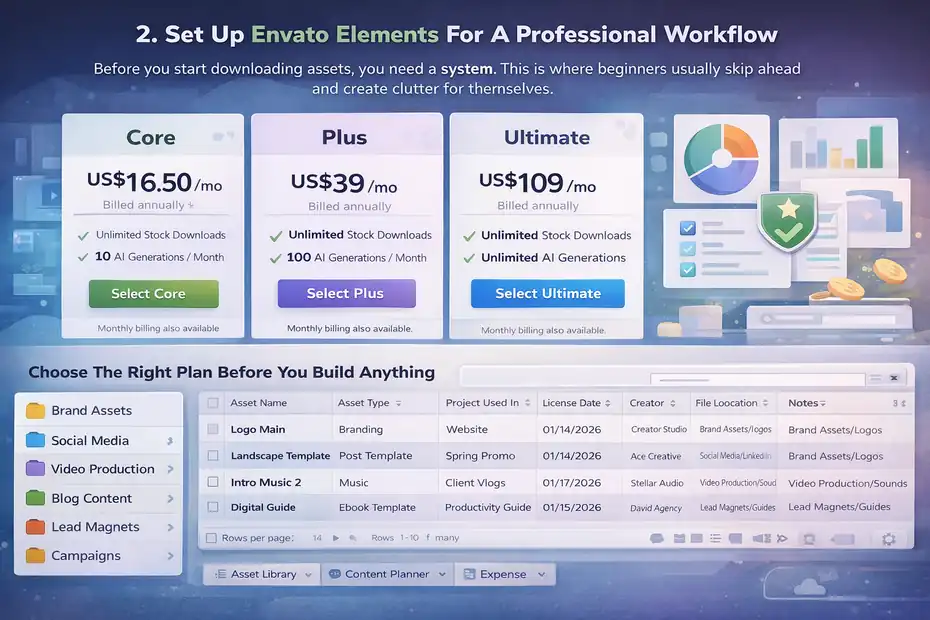
Before you start downloading assets, you need a system. This is where beginners usually skip ahead and create clutter for themselves.
Choose The Right Plan Before You Build Anything
Your plan affects how much value you can get, especially if you want the newer AI features. As of February 2026, Envato’s individual tiers include Core, Plus, and Ultimate.
Core starts at US$16.50 per month billed annually and includes unlimited stock downloads plus 10 AI generations a month. Plus starts at US$39 per month billed annually and includes 100 AI generations.
Ultimate starts at US$109 per month billed annually and includes unlimited AI generations. Monthly billing is also available, and pricing can vary by location and tax.
My advice is simple. Pick based on output volume, not ambition.
- Core: Best for writers, bloggers, social media managers, and creators who mostly need stock assets and occasional AI help.
- Plus: Best for content teams that actively use AI-assisted image, video, or audio creation as part of weekly production.
- Ultimate: Best for agencies, high-volume creators, or anyone producing constant variations at scale.
If you are unsure, start with the lowest plan that matches your current workload. Most people overestimate how much AI generation they will actually use in month one.
Build A Content Asset System On Day One
The fastest way to waste an Envato subscription is to download assets without organizing them. I suggest setting up a simple folder structure before you grab anything.
Use a structure like this:
- Brand Assets: Logos, fonts, color references, brand textures
- Social Media: Post templates, story templates, reels assets, thumbnail elements
- Video Production: Intro music, sound effects, b-roll, transitions, title packs
- Blog Content: Featured images, illustrations, mockups, infographics
- Lead Magnets: Ebook templates, presentation slides, worksheet layouts
- Campaigns: Black Friday, product launch, webinar, seasonal sales
This creates a reusable production library instead of a messy downloads folder with names like “final-v2-real-final.zip.”
I also recommend making a spreadsheet with these columns: Asset Name, Asset Type, Project Used In, License Date, Creator, File Location, and Notes. Even though Envato’s licensing process is now simpler, keeping your own record helps when you revisit old campaigns or client work later.
Envato says downloads now include a commercial license by default, which removes the old project-registration friction for creative stock library downloads.
Learn How To Search Like A Pro Instead Of Like A Beginner
Search skill is what separates people who “dabble” on Envato from people who get huge value from it.
Use Search Terms That Match Production Needs, Not Generic Ideas
Most users search too broadly. They type something like “marketing” or “podcast” and get overwhelmed. A better approach is to search for the actual format, intent, and style you need.
For example, instead of:
- “Instagram”
- “Business”
- “Video”
Search like this:
- “minimal instagram carousel template”
- “cinematic product promo opener”
- “warm neutral brand presentation”
- “tech youtube thumbnail pack”
- “handwritten signature font”
- “clean ecommerce mockup scene”
This works because the asset library is huge. Broad queries usually create noise. Precise queries surface better candidates faster.
I also suggest stacking search with these filters:
- Format: PSD, Premiere Pro, After Effects, Canva-compatible if relevant, PowerPoint, etc.
- Orientation: Portrait, landscape, square
- Style: Minimal, retro, bold, corporate, playful, luxury
- Color: Useful when matching a brand palette
- Software compatibility: Critical for templates
- Use case: Social, presentation, promo, intro, infographic
A practical shortcut I use is to search by audience reaction. Instead of describing the asset itself, describe the feeling you want the viewer to get. Search phrases like “premium product promo,” “friendly onboarding illustration,” or “clean authority presentation” often surface stronger results than literal terms.
Save Time By Building Repeatable Search Buckets
When you create content regularly, your search patterns repeat. That is why it helps to create “search buckets” for recurring jobs.
Here is a smart setup:
- Blog bucket: Hero images, mockups, infographic templates, article thumbnails
- Video bucket: Intro stings, lower thirds, subtitles, b-roll, music beds
- Social bucket: Carousel templates, story packs, reel overlays, callout graphics
- Lead gen bucket: Ebook layouts, workbook templates, webinar slides, landing page visuals
- Brand bucket: Fonts, textures, icons, logo reveal assets
Once you know your repeat categories, you stop searching from scratch every time. That is where speed comes from.
Let’s say you publish one YouTube video, two blog posts, and five social posts each week. With search buckets, you can build a consistent shortlist for each content type and refresh it only when you want a new look.
That is a much better system than hunting for inspiration every Monday morning.
Match The Right Envato Assets To The Right Content Format
This is where strategy matters. Great content creators do not use the same type of asset for every platform.
Use Envato For Blog Content And Lead Magnets
For written content, Envato is strongest when you use it to improve perceived value. Most blog posts are not held back by the writing alone. They are held back by weak presentation.
Here is how I recommend using Envato for blog and SEO content:
- Featured images that match the article angle and audience
- Mockups to display lead magnets, checklists, or digital products
- Infographic templates for data-heavy posts
- Icons and illustrations to break up long pages
- Presentation or document templates for downloadable PDFs and content upgrades
- Fonts and brand graphics for visual consistency across the site
A blog post about email marketing, for example, becomes more useful when it includes a custom header graphic, a visual process diagram, and a downloadable checklist shown in a realistic device mockup.
This matters for both users and conversions. A stronger visual experience can increase time on page, perceived authority, and lead magnet opt-ins. You are not just decorating the article. You are making it easier to trust and consume.
For lead magnets, I think Envato is one of the easiest ways to look far more established than you actually are. A well-chosen workbook or presentation template can make a solo creator look like a polished brand.
Use Envato For Social Media And Short-Form Video
Social content is where Envato can save hours every week. Instead of building everything from zero, you can start with a strong template, then adapt it to your brand.
Good use cases include:
- Instagram carousel templates for educational content
- Story templates for launches and promos
- Reels overlays, titles, and animated graphics
- YouTube thumbnail elements
- Lower thirds and transitions for short-form editing
- Background music and sound effects for social videos
The trick is not to publish the template exactly as downloaded. That is the beginner mistake. Use the template as a structural shortcut, then customize the typography, spacing, brand colors, and messaging.
A simple example: If you are posting a five-slide Instagram carousel about SEO mistakes, you can take a clean carousel template, swap in your colors, reduce decorative clutter, simplify the text hierarchy, and use your own icon style. Suddenly it feels branded, not borrowed.
That one step makes the difference between “generic content” and “professional content built efficiently.”
Use Templates Without Making Your Content Look Template-Based
This is where many people fail. They use high-quality assets in a low-quality way.
Customize More Than You Think You Need To
When you download a strong template, you are getting a layout system, not a finished brand asset. If you use it exactly as-is, people can often tell.
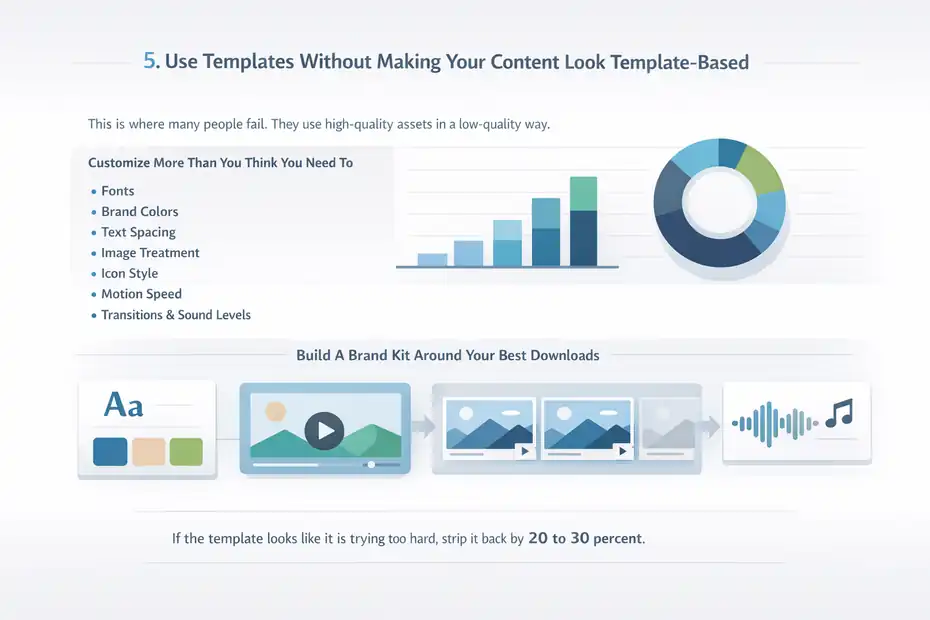
I suggest customizing these elements first:
- Fonts
- Brand colors
- Text spacing
- Image treatment
- Icon style
- Motion speed in video templates
- Transition intensity
- Sound levels in music-backed edits
Even changing just those basics can transform a recognizable stock template into something that feels original enough for your brand.
For example, with a YouTube intro template, I would almost always shorten the animation, simplify any flashy transitions, replace loud default music, and remove extra visual effects. Many templates are designed to impress in previews, not to retain viewers in real content.
That is a subtle but important point. Preview design and audience retention design are not the same thing.
A good rule: If the template looks like it is trying too hard, strip it back by 20 to 30 percent.
Build A Brand Kit Around Your Best Downloads
A pro workflow means fewer random choices over time. Once you find assets that fit your style, turn them into a repeatable brand system.
Your brand kit might include:
- Two headline fonts and one body font
- Three core brand colors and two accent colors
- One recurring thumbnail style
- One social carousel layout family
- One presentation template family
- One set of audio cues for video intros, transitions, and outros
This is how you stop every piece of content from feeling like it came from a different creator.
I believe consistency matters more than novelty for most content brands. People do not trust you more because your visuals change every week. They trust you more because your content becomes recognizable.
That is one of the best ways to use Envato Elements for content creation like a pro: use variety to build consistency, not chaos.
Understand Licensing Before You Publish Anything Important
Licensing is one of the biggest reasons people hesitate with stock platforms. The good news is Envato has made this simpler, but you still need to understand the basics.
Know What You Can And Cannot Do
Envato’s stock items come with broad commercial rights, but that does not mean “anything goes.” The license allows commercial use for work and client projects, but there are still limits.
Envato says you cannot re-sell or redistribute items as-is, use items in on-demand services, generally use items as the basis for merchandise without adding value, and music items cannot be used for broadcast presentations under the standard subscription license.
That means this is usually fine:
- Using a stock photo in a blog post
- Using a template in a client deck
- Using a video asset inside a marketing ad
- Using music in many online content projects, where permitted by the license terms
This is where you need more caution:
- Selling an unmodified template
- Printing a stock design onto merchandise with little transformation
- Treating downloadable assets as your own standalone product
- Using subscription music for broadcast contexts where the license excludes it
My advice is to be conservative anytime your use starts to resemble resale, redistribution, or standalone monetization of the asset itself.
Keep Your Licensed Uses Organized
Envato’s newer system makes downloads simpler by attaching a valid commercial license automatically when you download from the creative stock library, which is much easier than the older workflow.
Still, I would not rely on memory.
For client work especially, keep a clean record of:
- What asset you used
- When you downloaded it
- Where you used it
- Whether it was modified
- Which client or campaign it supported
If you ever unsubscribe, Envato says previously licensed uses remain covered for the completed projects they were licensed for, but you cannot use items for new projects after your subscription ends.
That is a strong reason to document usage properly. It protects you later, especially if a client asks for proof or you revisit an old campaign six months after canceling.
Build A Repeatable Content Workflow Around Envato
Once you understand the assets, templates, and licensing, the real value comes from process.
A Practical Weekly Workflow You Can Copy
Here is a workflow I would use for a solo creator or small team:
- Step 1: Plan the week’s content themes and formats before opening Envato.
- Step 2: Identify which assets are needed for each format, such as blog image, thumbnail, reel template, or audio track.
- Step 3: Search in focused batches instead of one asset at a time.
- Step 4: Save shortlisted assets to project folders immediately.
- Step 5: Customize templates in your editing app before publishing.
- Step 6: Document asset use for licensing and reuse clarity.
- Step 7: Review what performed well and update your shortlist library monthly.
The important part is batching. Do not search for one image, then one music track, then one slideshow template in random order all day. That kills momentum.
Instead, source in blocks. For example, spend 45 minutes gathering all visual assets for the week, then move into production. This mirrors how efficient editors and content ops teams work.
A weekly system like this is how you turn Envato from a “nice resource” into a real operating advantage.
Use Envato As A Speed Layer, Not A Creativity Crutch
I think this is the mindset that matters most. Envato should remove friction, not replace judgment.
Use it to:
- Speed up execution
- Improve polish
- Reduce repetitive design work
- Fill production gaps
- Maintain quality under deadline pressure
Do not use it to:
- Avoid learning basic content design
- Copy other creators
- Publish generic templates unchanged
- Build a brand with no visual identity of its own
In my experience, the best creators use stock platforms to amplify a creative point of view that already exists. They do not use them as a substitute for one.
That is why two people can download from the same platform and get completely different results. One gets “template content.” The other gets a fast, polished, consistent brand machine.
Avoid The Most Common Envato Elements Mistakes
You can get a lot from Envato, but there are some easy traps.
Mistakes That Make Your Content Look Cheap
The biggest mistakes are usually visual, not technical.
Watch out for these:
- Using overly flashy templates because they look impressive in previews
- Mixing too many visual styles in one brand
- Keeping default fonts and colors
- Overusing motion effects
- Using stock photos that feel staged or outdated
- Adding music that competes with voiceover instead of supporting it
- Choosing templates based on trendiness instead of usability
I have seen creators spend hours polishing content that still feels off because the asset choice itself was wrong from the beginning.
A better standard is this: choose assets that make your message easier to understand, not just prettier to look at.
For example, if your brand is practical and educational, a clean minimalist layout will often outperform a dramatic cinematic one. The right asset improves clarity. The wrong one distracts from it.
Mistakes That Waste Your Subscription Value
The second category of mistakes is operational.
These are common:
- Downloading without organizing
- Searching from scratch every time
- Using Envato for one-off tasks instead of recurring workflows
- Ignoring software compatibility before downloading templates
- Not checking license boundaries for sensitive use cases
- Treating unlimited downloads like a reason to collect, not create
Unlimited access sounds great, but it can lead to digital hoarding. You end up with 300 assets you never use and still feel unprepared.
I suggest measuring Envato value with one question: did this asset help me publish faster or better?
If the answer is no, it may have been a distraction rather than an asset.
Use Advanced Tactics To Get Better Results From The Platform
Once you have the basics down, you can start using Envato more strategically.
Create Content Systems, Not Just Individual Assets
A pro move is to think in systems. Instead of downloading one carousel template, build an educational carousel system. Instead of one thumbnail, build a thumbnail family. Instead of one lead magnet design, build a lead generation design language.
This helps in three ways:
- Faster future production
- Stronger brand recognition
- Easier delegation to editors or assistants
For example, you could create:
- One blog visual system for all SEO posts
- One YouTube packaging system for thumbnails, intros, and lower thirds
- One social repurposing system for quote posts, carousels, and short-form clips
- One sales campaign system for launches, discounts, and webinar promotion
Once those systems exist, each new piece of content becomes a light adaptation rather than a full design project.
That is how brands publish more without quality collapsing.
Combine Envato With Your Existing Stack Thoughtfully
Envato works best when paired with the tools you already use to edit and publish. The platform itself is the source layer. Your editing apps are the execution layer.
The main question is not “What tool is best?” It is “Where should this asset enter my workflow?”
For example:
- Blog visuals may move into your CMS or design editor
- Video templates may go into Premiere Pro or After Effects
- Presentation designs may go into PowerPoint or Keynote
- Mockups may be edited in Photoshop
- Social templates may be adapted in the design tool your team already uses
The important thing is to minimize friction between download and publication. If a template requires software you never touch, it is not a shortcut. It is a delay.
That is why I always check compatibility before downloading anything template-heavy.
Know When Envato Elements Is Worth It And When It Is Not
Not every creator needs it. Being honest about that helps you use it better.
When The Subscription Usually Pays For Itself
Envato Elements tends to be worth it when:
- You publish content weekly or more often
- You create in multiple formats
- You work across multiple client projects or campaigns
- You regularly need music, graphics, video, templates, and mockups
- You want one creative library instead of many smaller subscriptions
- You care about speed and consistency, not just raw originality
If one good template saves you two hours and one polished campaign brings in a new client, the subscription can pay for itself quickly.
This is especially true for service businesses. A designer, marketer, consultant, or agency owner can often recover the cost from a single project improvement.
When You May Not Need It Yet
It may be less useful if:
- You rarely publish
- You only need one type of asset occasionally
- You prefer to build every visual from scratch
- Your workflow depends on highly custom illustration or motion work
- You are still figuring out your brand style and would be overwhelmed by too many options
That last point matters. Too much access can slow beginners down.
If you are early in your content journey, I would focus first on defining your formats, brand basics, and publishing rhythm. Then use Envato to support that system. Otherwise, you may mistake browsing for progress.
Final Thoughts On Using Envato Elements Like A Pro
Using Envato Elements well is less about downloading more and more about deciding better. That is the part most tutorials miss.
If you want the simple version, here it is: Use Envato to standardize your content production, strengthen your visual brand, speed up repetitive work, and make your output look more polished without reinventing everything each time.
The people who get the most from it usually do five things well:
- They search with intent.
- They customize aggressively.
- They organize every asset.
- They understand the license.
- They build repeatable systems around recurring content formats.
That is how to use Envato Elements for content creation in a way that actually feels professional.
My honest opinion is that Envato becomes powerful the moment you stop seeing it as a stock library and start using it as a workflow multiplier. Once that clicks, you create faster, stay more consistent, and spend far less energy staring at blank canvases.
FAQ
What is Envato Elements used for in content creation?
Envato Elements is used to access ready-made digital assets like templates, stock images, videos, music, and graphics. These resources help creators produce professional content faster without starting from scratch, making it easier to maintain quality, consistency, and efficiency across blogs, videos, and social media platforms.
How to use Envato Elements for content creation effectively?
To use Envato Elements effectively, start by planning your content needs, then search for specific assets like templates or media. Customize everything to match your brand instead of using default designs. Organize downloads into folders and reuse selected assets to build a consistent and efficient content workflow.
Is Envato Elements worth it for content creators?
Envato Elements is worth it for creators who produce content regularly across multiple formats. The subscription provides unlimited downloads, which can save time and money compared to buying individual assets. It becomes especially valuable when used as part of a repeatable content production system.
Can you use Envato Elements assets commercially?
Yes, Envato Elements allows commercial use of its assets, but you must follow its licensing terms. You can use items in client work, marketing materials, and online content, but you cannot resell or redistribute them as standalone products without significant modification or added value.
Do you need design skills to use Envato Elements?
You do not need advanced design skills to use Envato Elements because many assets come as editable templates. However, basic customization skills like adjusting colors, fonts, and layouts will help you create more professional and unique content instead of publishing generic designs.

I’m Juxhin, the voice behind The Justifiable.
I’ve spent 6+ years building blogs, managing affiliate campaigns, and testing the messy world of online business. Here, I cut the fluff and share the strategies that actually move the needle — so you can build income that’s sustainable, not speculative.
Related posts:
 10 Similar Sites To Apollo IO Every Marketer Should Try
 LearnWorlds Shopify Setup: What Works, What Fails
 Why CallRail Cost Might Be Worth the Investment
 Inside Freshworks Inc: Products, Vision, and Growth Story
 Omnisend for WooCommerce: Boost Store Sales Instantly
 Why Businesses Love Freshworks Freshdesk for Service