
Table of Contents
Some links on The Justifiable are affiliate links, meaning we may earn a small commission at no extra cost to you. Read full disclaimer.
How to use MailerLite for email marketing starts with a simple idea: build a list you actually understand, then send emails that feel relevant instead of random. That is why so many small businesses, creators, and growing ecommerce brands choose MailerLite.
It gives you the core pieces in one place: campaigns, automation, signup forms, landing pages, segmentation, and reporting.
In this guide, I’ll walk you through the full process step by step, from account setup to optimization, so you can stop guessing and start building an email system that grows with you.
What MailerLite Actually Does For Your Email Marketing
MailerLite is not just a newsletter sender. It is an email marketing platform built to help you collect subscribers, organize them, send campaigns, automate follow-ups, and track results from one dashboard.
That matters because email marketing breaks down fast when your forms, lists, and automations all live in separate places.
Why So Many Beginners Start With MailerLite
If you are new to email marketing, MailerLite is easier to learn than many heavier platforms because the setup path is straightforward.
You can create an account, import subscribers, build forms, make campaigns, and launch simple automations without needing a developer.
Its current free plan includes up to 500 active subscribers and up to 12,000 emails every 30 days, while paid plans move into Growing Business, Advanced, and Enterprise tiers.
A big reason this matters is cost control. Many email tools get expensive once your list grows or when you need landing pages and automations.
MailerLite positions itself around a lighter learning curve and a feature set that includes a drag-and-drop editor, signup forms, pop-ups, landing pages, websites, automation, and reporting.
In my experience, that makes it a strong fit for businesses that want momentum without a huge operations layer. Think creators selling a digital download, a local service business collecting leads, or an ecommerce store that wants welcome emails and basic post-purchase flows.
A realistic example: Imagine you run a small skincare brand. You do not need twenty dashboards. You need one form on your site, one welcome sequence, one product education email, one promo campaign, and basic performance reporting. MailerLite covers that stack well.
The Core Features You Will Use Most
Before you do anything inside the platform, it helps to know the handful of features that carry most of the work. MailerLite’s homepage and pricing pages highlight the essentials most email marketers use daily.
- Campaigns: One-time emails such as newsletters, launches, promotions, and announcements.
- Automations: Trigger-based email workflows that send based on actions or timing.
- Groups: Manual or trigger-based subscriber collections, similar to tags in other tools.
- Segments: Dynamic subscriber collections built from rules and conditions.
- Custom Fields: Data points such as first name, plan type, country, or lead source.
- Forms And Pop-Ups: Tools for collecting email addresses and preferences.
- Landing Pages And Websites: Useful when you need a simple lead capture page fast.
- Reports: Performance data that helps you improve subject lines, clicks, and conversions.
If you understand those seven pieces, you understand most of MailerLite.
When MailerLite Is The Right Tool And When It Is Not
I believe MailerLite is strongest when you want practical email marketing without turning your stack into a full-time job.
It shines for newsletters, lead magnets, creator businesses, service businesses, simple ecommerce funnels, digital product sales, and basic lifecycle automation.
MailerLite also supports additional growth tools such as booking, digital products, paid newsletters, and ecommerce-related workflows on its broader platform.
It may not be the best fit if your business depends on very deep enterprise CRM logic, highly customized multi-branch customer journeys, or advanced sales automation across large teams. That does not make it weak. It just means it is designed to stay usable.
A simple way to decide:
| Need | MailerLite Fit |
|---|---|
| Start email marketing quickly | Strong |
| Build forms and landing pages in one tool | Strong |
| Run welcome emails and nurture automations | Strong |
| Manage a simple or mid-level ecommerce flow | Good |
| Handle extremely complex enterprise automation | Limited |
| Keep cost lower in early growth | Strong |
That is why the phrase “how to use MailerLite for email marketing” is really about using a lean system well, not collecting every possible feature.
Set Up Your MailerLite Account The Right Way

Your account setup shapes everything that happens later. If you rush this part, your forms, automations, and reporting can get messy.
If you set it up cleanly, the rest of your email marketing becomes much easier.
Create Your Account And Understand The Dashboard
MailerLite’s getting-started resources point new users to account creation, dashboard basics, subscriber import, campaigns, forms, and custom fields. That flow is useful because it mirrors the order most businesses should follow.
When you open the platform for the first time, focus on five areas:
- Subscribers: Where your contacts, groups, segments, and fields live.
- Campaigns: Where you create and schedule one-time sends.
- Forms: Where you build pop-ups, embedded forms, and lead capture experiences.
- Automations: Where workflows and triggers are managed.
- Integrations: Where API access and external connections are configured.
I recommend resisting the urge to design your first email immediately. First, map your customer journey. Ask: how does a person join, what do they receive first, what offers do they care about, and what behavior should move them into a different sequence?
That ten-minute planning step saves hours later.
Choose A List Structure Before You Import Anyone
This is where many beginners make their first mistake. They import contacts before deciding how they will organize them. MailerLite gives you groups, segments, and custom fields, and each one has a distinct purpose.
A simple structure I suggest:
- Groups: Use for explicit labels or entry points, like “Lead Magnet A,” “Customers,” “Webinar Registrants,” or “VIP.” Groups are great for actions and automations because subscribers can be added intentionally or by workflows.
- Segments: Use for live filtering, such as “opened last 5 campaigns,” “country is United States,” or “clicked pricing link.” Segments update automatically based on conditions.
- Custom Fields: Use for important subscriber data like first name, product interest, signup date, preferred category, or purchase tier. MailerLite supports text, number, and date field types.
Here is the easiest way to think about it: groups answer “who should belong here,” segments answer “who currently matches this behavior or rule,” and custom fields answer “what do we know about this person.”
That distinction makes MailerLite far more powerful.
Import Subscribers Without Creating A Mess
MailerLite allows you to create groups during import, which is one of those tiny but very helpful workflow shortcuts. If you are importing a CSV of leads from a webinar, you can create the webinar group during the import process instead of cleaning it up later.
A clean import process looks like this:
- Prepare your spreadsheet: Remove old contacts, duplicates, and role-based emails where possible.
- Map important columns: Email, name, signup source, product interest, country, purchase date, or any other field you plan to personalize with later.
- Assign a source group: For example, “Spring Webinar 2026” or “Shop Customers.”
- Check permission quality: Only import contacts who gave you permission to email them.
- Create custom fields in advance if needed: This helps keep data clean.
I strongly recommend adding a “source” field or source-based group. Six months from now, you will want to know whether a subscriber came from a checkout form, a pop-up, a lead magnet, or a webinar. That single detail improves targeting, reporting, and future offers.
Build A Subscriber System That Supports Better Targeting
Good email marketing is not about sending more. It is about sending more relevant messages.
MailerLite gives you the tools to do that, but only if you structure your audience intentionally.
Use Groups For Intent And Lifecycle Stages
MailerLite’s own help center explains that groups are core subscriber containers and can be created directly from the Subscribers page or during import. In practice, that makes them ideal for labeling intent and lifecycle stage.
Here are group types that usually work well:
- Lead Source Groups: Blog opt-in, quiz opt-in, webinar, checkout, referral
- Lifecycle Groups: New lead, customer, repeat customer, churn risk
- Interest Groups: SEO, email marketing, ecommerce, content strategy
- Offer Groups: Waitlist, promo interest, coaching application, course buyer
A common mistake is creating too many groups too early. You do not need fifty. You need a short set that reflects clear business logic.
Imagine you sell templates and a course. A strong starting structure could be:
- Leads
- Customers
- Course Buyers
- Template Buyers
- Webinar Registrants
- Newsletter Interest: Ecommerce
- Newsletter Interest: Content
That gives you enough clarity to personalize without drowning in tags.
Use Segments For Live Behavior-Based Targeting
Segments are where MailerLite becomes much smarter. According to MailerLite, segments are automatically generated lists based on conditions, which means they update as subscriber behavior changes.
This is powerful because behavior usually predicts revenue better than broad list labels.
Useful segment examples:
- Subscribers who opened any campaign in the last 30 days
- Subscribers who clicked a pricing link but did not buy
- Customers in the United States
- Non-customers interested in a specific product category
- Subscribers who have not engaged in 90 days
I suggest treating segments as decision filters. They help you answer practical questions like, “Who should get this email now?” or “Who is warm enough for an offer?”
For example, instead of blasting your whole list with a product launch, you can send first to a segment of people who clicked related content in the past month. That often produces better click-through rates, better conversions, and fewer unsubscribes.
Personalize With Custom Fields Without Overcomplicating It
MailerLite custom fields support text, number, and date values. That is enough for most useful personalization without turning your setup into database work.
The most practical fields to create early are:
- First name
- Signup source
- Primary interest
- Country
- Customer type
- Purchase date
- Renewal date
- Plan or product
The trick is to collect only what you will actually use. I have seen brands create fifteen fields they never touch again. That is not smarter. It is just clutter.
A better approach is progressive profiling. Start with email and first name. Later, collect preferences through forms, surveys, or a preference center. MailerLite’s preference center can save subscriber choices into fields, which is a clean way to gather more useful data over time.
That approach keeps friction lower at signup and accuracy higher later.
Create Signup Forms And Landing Pages That Convert
Before MailerLite can help you grow revenue, it has to help you grow your list. That starts with forms and landing pages that give people a clear reason to subscribe.
Build Forms Around One Clear Offer
MailerLite supports signup forms, pop-ups, and landing pages, and also lets you attach groups to forms. That means you can connect the opt-in source directly to subscriber organization from day one.
The biggest conversion mistake I see is offering “subscribe to our newsletter” with no real incentive. Most people do not want more email. They want a result.
Better offers include:
- A short checklist
- A free mini-course
- A discount or first-order incentive
- A template
- A webinar or workshop replay
- A quiz result
- Early access to a launch
If you are figuring out how to use MailerLite for email marketing effectively, start by matching one form to one intent. Do not build a generic site-wide form first. Build a specific opt-in tied to a useful promise.
For example, a fitness coach might create a landing page for “7 Days Of Easy High-Protein Meal Ideas.” That form could automatically add subscribers to a “Protein Challenge” group and trigger a welcome series.
That is not just list building. That is the start of a funnel.
Use Interest Groups And Preference Capture Early
MailerLite allows interest groups inside forms, which is a smart feature if your business serves more than one audience or topic. Subscribers can select what they want to hear about, and those choices can influence how you segment or automate later.
This is especially useful when you sell multiple products or publish across multiple content themes.
A practical setup:
- A marketing consultant offers checkboxes for SEO, Email Marketing, and Content Strategy
- A fashion store offers Women’s, Men’s, and Accessories
- A software company offers Product Updates, Tutorials, and Promotions
I recommend keeping preference choices simple. Too many options reduce form completion. Usually two to four categories is enough.
The benefit is long-term relevance. Instead of guessing what a subscriber wants, you let them tell you. That reduces unsubscribes and improves click quality, because the next email feels expected rather than random.
Design Landing Pages For One Conversion Goal
MailerLite includes landing pages and website tools, which is useful when you need a fast page for lead generation or a campaign-specific signup flow.
A landing page converts better when it does three things well:
- States one clear benefit in the headline
- Removes extra navigation and distractions
- Connects the form to the right group and automation
I suggest using this simple structure:
- Outcome-focused headline
- Short explanation of what the visitor gets
- Proof or credibility point
- Form
- Small FAQ or objection handler
For example, if you sell a course for freelancers, a better page is “Get The Client Follow-Up Email Pack That Helped Me Close More Proposals” rather than “Join My Newsletter.”
Specific beats vague almost every time.
Send Your First Campaign The Smart Way
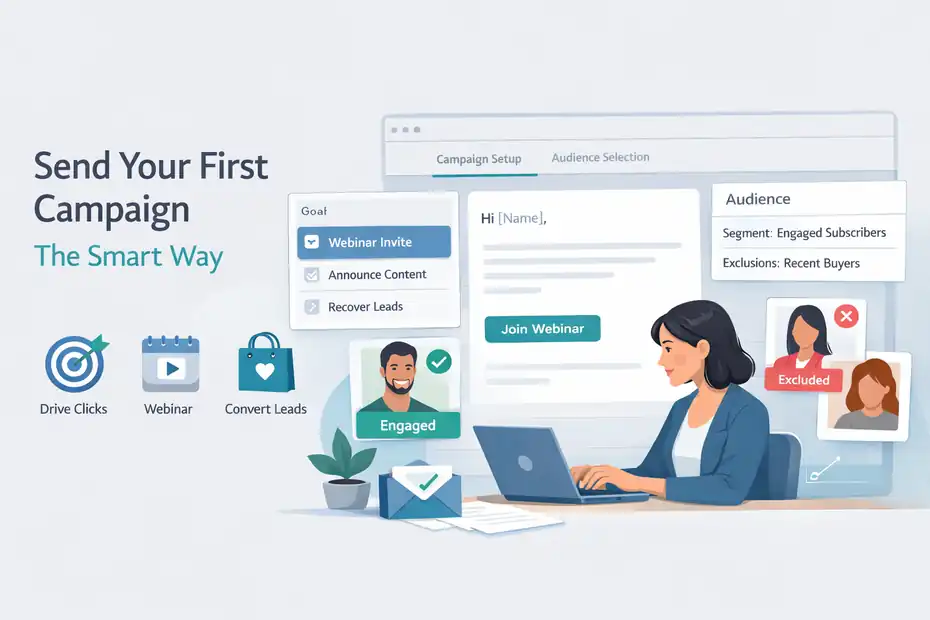
Once your audience structure is in place, you can start sending campaigns. This is where most users get excited, but it is also where weak targeting shows up fast.
Create A Campaign With The Right Audience And Goal
MailerLite’s campaign setup flow includes selecting recipients by groups, segments, or more advanced filters, including exclusions. That is one of the most important pieces of campaign performance because who you exclude matters almost as much as who you include.
Before creating a campaign, choose one goal:
- Drive clicks to a product page
- Announce content
- Generate webinar registrations
- Recover inactive leads
- Convert warm subscribers into customers
Then match the audience to the goal.
A healthy example:
- Send a webinar invite to engaged non-customers
- Exclude recent buyers
- Exclude people who already registered
- Personalize the content using name or interest field where relevant
That is much better than emailing your whole list because it feels easier.
In my experience, campaign clarity matters more than clever wording. One email, one audience, one job. If the email tries to educate, sell, entertain, and survey all at once, performance usually drops.
Write Campaigns That Feel Personal Without Being Overdesigned
A lot of email marketers over-design early campaigns. They add too many blocks, banners, colors, and calls to action. But many high-performing emails are surprisingly simple.
A practical campaign formula:
- Opening line that sounds human
- One clear problem or opportunity
- One useful insight or story
- One main call to action
- Optional secondary link near the end
MailerLite’s drag-and-drop editor makes it easy to build richer layouts, but the goal is not to use every block. The goal is to guide attention.
For many businesses, plain or lightly designed emails outperform busy newsletters because they feel more direct. A founder update, a product tip, or a useful case study often works best when it reads like a real message.
I suggest saving your heavier design treatment for product launches, seasonal promos, or digest-style newsletters.
Schedule Smarter And Test Like A Marketer
MailerLite highlights smart sending in its recent send-time analysis content, describing it as a feature that uses historical subscriber behavior to deliver emails at an optimal time for each person.
That matters because send time is rarely universal. A business audience behaves differently from a consumer audience. A US-heavy list behaves differently from a global one.
Three smart testing habits:
- Test subject lines: Curiosity versus clarity
- Test angle: Educational hook versus offer hook
- Test segment: Warm engaged audience versus broader audience
Do not change five variables at once. Change one thing, learn from it, then improve. Good email marketing is not magic. It is pattern recognition.
A simple metric mindset helps too. Open rate can tell you whether your subject line earned attention, but clicks and conversions tell you whether your message actually worked.
Set Up Automations That Save Time And Increase Revenue
This is where MailerLite becomes more than a newsletter tool. Automations let you build email systems that run without manual effort every week.
Start With Triggers, Not With Fancy Workflows
MailerLite’s automation system starts with a trigger, which is the event that begins a workflow. You can then add emails, delays, rules, and actions. The platform also offers templates, but the logic still matters more than the design.
A strong beginner rule: start with three automations only.
- Welcome Series: Triggered when someone joins a group from a form or landing page
- Nurture Or Education Series: Triggered after interest is captured
- Customer Follow-Up Series: Triggered after purchase, signup, or onboarding event
This keeps your system manageable.
I recommend beginning every automation by asking, “What event should cause this email?” Common triggers include joining a group, completing a form, or another subscriber action supported in the workflow system.
When the trigger is wrong, the whole automation feels off. When the trigger is right, the email feels timely.
Build A Welcome Sequence That Does More Than Say Hello
The welcome sequence is usually the highest-leverage automation in any account because it reaches people at peak attention. They just subscribed. They remember you. This is your best chance to set expectations and earn the next click.
A simple five-email framework:
- Deliver the promised lead magnet or welcome message
- Introduce your brand story and what makes your approach different
- Teach one useful idea or quick win
- Share proof, examples, or a mini case study
- Present the next offer or action
MailerLite lets you build these as workflow emails with delays between each step.
For example, if you run a Shopify store for home office gear, your sequence could deliver a desk setup checklist, then follow with ergonomic tips, then show how customers use your products, then offer a bundle.
That sequence warms a lead far better than sending a discount code and hoping for the best.
Use Conditions And Actions To Personalize Journeys
MailerLite’s automation rules and actions support conditions based on campaign activity, workflow activity, and custom fields. That means you can branch emails based on what a subscriber did or what you know about them.
This is where email marketing starts to feel genuinely smart.
Useful condition examples:
- If subscriber clicked the pricing link, send product education next
- If subscriber did not open the welcome email, resend with a different subject line
- If country equals United States, show region-specific offer
- If interest equals SEO, route to SEO-focused nurture emails
One important MailerLite-specific detail: in workflows triggered by “joins a group,” removing a subscriber from the trigger group can remove them from the queue, and re-adding them places them back in.
That means your group logic should be deliberate. Do not use groups casually inside automations without understanding the downstream effect.
Measure What Matters And Improve Over Time
Once campaigns and automations are running, the goal shifts from setup to performance improvement. Reporting is where you turn activity into decisions.
Focus On The Right Metrics First
MailerLite’s platform includes reporting and campaign performance data, including engagement metrics like opens and clicks. Its AI connection help page also notes that campaign performance data includes open and click rates.
The mistake many people make is staring at open rate alone. Open rate can help, but it is not enough.
The metrics I suggest watching:
- Open rate for subject line and sender-name feedback
- Click rate for message relevance
- Click-to-open logic for email body effectiveness
- Unsubscribe rate for audience mismatch
- Conversion rate for actual business impact
- Revenue per email or per subscriber if you can track it externally
Here is the simple interpretation:
- High opens, low clicks means your email promise was stronger than the email body
- Low opens, high clicks means your subject line is the bottleneck
- High unsubscribes means targeting or frequency may be off
- Good clicks but low sales means the landing page or offer needs work
That is where growth happens. Not in guessing, but in diagnosis.
Build A Practical Optimization Routine
A strong MailerLite workflow is not just “send more emails.” It is “review, adjust, improve.”
I suggest a weekly routine:
- Review last campaign’s open and click performance
- Note top links clicked
- Compare performance by audience segment
- Review automation drop-off points
- Identify one test for next week
A monthly routine:
- Clean up low-engagement segments
- Review top-performing opt-in sources
- Refresh weak forms or landing pages
- Update one automation email that is underperforming
This is where small improvements compound. A slightly better form conversion rate, a slightly better welcome click rate, and a slightly better product email can produce a meaningful lift across the month.
From what I’ve seen, the businesses that grow fastest are not always the ones with the biggest lists. They are the ones with cleaner systems and better follow-up.
Use Reporting To Refine Segmentation And Offers
Reporting should not live in isolation. It should influence who you email and what you pitch next.
For example:
- If subscribers from your webinar group click more than blog subscribers, create a dedicated post-webinar nurture path
- If one interest category consistently outperforms others, produce more content and offers around it
- If customers stop engaging after onboarding, build a reactivation sequence or product usage series
This is where groups, segments, fields, campaigns, and automations all connect.
MailerLite gives you the raw structure. Your advantage comes from learning what your audience responds to and then using that data to sharpen future messages.
Common MailerLite Mistakes To Avoid
Even a good platform can underperform when the strategy behind it is messy. Most poor results come from a few repeat mistakes.
Mistake 1: Treating Everyone On Your List The Same
The fastest way to hurt performance is to send the same email to everyone. MailerLite supports groups, segments, fields, exclusions, and advanced recipient filtering for a reason.
When someone joins from a discount pop-up, they are not the same as someone who bought last week. When someone clicks pricing content, they are not at the same stage as someone who only reads educational articles.
Even basic segmentation improves results because relevance improves attention.
Mistake 2: Building Automations Before Defining The Journey
I see this often. Someone gets excited about workflows and starts building branches before they even know the customer path.
Better order:
- Define the entry point
- Define the desired next action
- Define the decision points
- Then build the automation
MailerLite’s automation builder is useful, but it cannot fix weak journey logic.
Mistake 3: Collecting Data You Never Use
Yes, custom fields are powerful. No, you do not need twenty of them on day one. MailerLite supports text, number, and date fields, but that does not mean you should collect every possible detail.
Collect only data that changes a message, a route, or an offer.
Mistake 4: Overdesigning Emails
A heavy design is not the same as a better email. In many cases, cleaner emails get more clicks because they feel more direct. MailerLite gives you design flexibility, but clarity should win over decoration.
Mistake 5: Ignoring Deliverability And Consent Basics
MailerLite’s service is built for collecting email addresses and sending tracked promotional emails, which means permission and quality matter.
If your list is weak, no automation trick will save it. Good email marketing starts with permission, value, and consistency.
Advanced Ways To Grow Faster With MailerLite
Once the basics are working, you can use MailerLite more strategically to speed up growth.
Create Multiple Entry Funnels Instead Of One Generic Newsletter
Many businesses only use one form and one welcome sequence. That leaves growth on the table.
A better model is to create separate opt-ins for different intents:
- Educational lead magnet
- Product discount
- Webinar registration
- Waitlist
- Quiz or assessment
- Customer resource hub
Each form can feed a different group, and each group can trigger a more relevant automation.
This is one of the most practical ways to improve conversions without getting more traffic. You match message to intent earlier.
Pair Educational Emails With Soft Commercial Paths
MailerLite’s blog examples around upselling and event promotion reinforce the broader principle that email works best when it mixes value and promotion rather than jumping straight to the sale.
A strong pattern is:
- Teach
- Show
- Prove
- Invite
For example, a consultant might send a breakdown of a successful client email sequence, then show the template structure, then present a short case study, then invite readers to book a strategy session.
That feels far more natural than sending “buy now” emails every week.
Add Integrations Only Where They Improve The System
MailerLite provides integration and API options, including generated API tokens from the Integrations area.
Still, I would keep tools minimal unless the integration directly improves:
- Subscriber syncing
- Purchase data
- Lead source tracking
- Conversion tracking
- Automation triggers
Tools are useful when they reduce manual work or improve targeting. They are not useful just because they exist.
In my experience, the fastest-growing setups are usually the cleanest ones. Not the most complicated.
Final Thoughts On How To Use MailerLite For Email Marketing
If you want the simplest answer to how to use MailerLite for email marketing, here it is: organize your subscribers clearly, collect leads through focused forms, send campaigns to the right segments, build a welcome automation first, and improve based on clicks and conversions instead of guesswork.
MailerLite gives you the building blocks: campaigns, forms, automations, groups, segments, landing pages, and reporting. The growth comes from how intentionally you connect them.
I believe the best way to approach the platform is to stay simple at the start. One clear offer. One clean form. One welcome sequence. One reporting habit. Once that works, expand carefully.
That is how you grow faster without creating a system you hate managing.
FAQ
What is MailerLite used for in email marketing?
MailerLite is used to collect subscribers, send email campaigns, and automate follow-ups. It helps businesses manage email lists, create landing pages, and track performance in one platform, making it easier to build relationships and drive conversions through targeted email marketing strategies.
How do beginners use MailerLite for email marketing?
Beginners use MailerLite by creating an account, importing subscribers, building signup forms, and sending their first campaign. The next step is setting up a simple automation like a welcome sequence, which helps engage new subscribers automatically and builds a consistent email marketing system.
Is MailerLite good for small businesses?
MailerLite is a strong choice for small businesses because it offers essential tools like email campaigns, automation, and landing pages at a low cost. Its simple interface makes it easy to manage email marketing without technical skills, which helps small teams grow faster with fewer resources.
How does MailerLite automation work?
MailerLite automation works by triggering emails based on subscriber actions, such as joining a list or clicking a link. You can create workflows that send emails over time, segment users, and personalize content, allowing you to nurture leads and increase conversions without manual effort.
What are the best features of MailerLite?
The best features of MailerLite include email campaigns, automation workflows, signup forms, landing pages, segmentation, and performance tracking. These features work together to help you build targeted campaigns, grow your audience, and improve results through data-driven email marketing decisions.

I’m Juxhin, the voice behind The Justifiable.
I’ve spent 6+ years building blogs, managing affiliate campaigns, and testing the messy world of online business. Here, I cut the fluff and share the strategies that actually move the needle — so you can build income that’s sustainable, not speculative.
Related posts:
 How To Use AWeber For Email Marketing Like A Pro
 Aweber Sign Up Walkthrough: Get Started Fast & Free
 How to Master AWeber Email Marketing in Just a Few Steps
 What Is MailerLite Used For? Powerful Features Explained
 Create a Marketing Email That Readers Can’t Ignore
 Aweber Email Automation Examples: Templates & Pro Insights