
Table of Contents
Some links on The Justifiable are affiliate links, meaning we may earn a small commission at no extra cost to you. Read full disclaimer.
Running a modern retail business without an online POS system is like sailing without a compass—you might move forward, but not necessarily in the right direction.
The right POS platform doesn’t just process sales; it streamlines your inventory, automates your reports, and connects your in-store and online operations seamlessly. But how do you choose one that truly helps you run your store like a pro?
This guide will walk you through everything you need to know—from setup and must-have features to smart optimization strategies—to make your POS your business’s best ally.
Understanding What an Online POS System Really Does
Running a store today means balancing both digital and in-person sales.
That’s exactly where an online POS system shines—it’s your all-in-one control center for selling, tracking, and managing every aspect of your business.
How Online POS Systems Differ from Traditional Cash Registers
Traditional cash registers simply record transactions. They don’t store data, track stock, or connect to your website.
An online POS system, however, lives in the cloud—meaning it’s accessible anywhere, anytime. It automatically updates prices, tracks inventory in real time, and syncs with your e-commerce store.
For example, imagine selling a product in-store that also sells online at the same time. A traditional register might oversell because it doesn’t sync with your website. An online POS updates both instantly, avoiding double-selling nightmares.
In short:
- Traditional POS: Local, manual, and disconnected.
- Online POS: Cloud-based, automated, and omnichannel-friendly.
I believe the biggest mindset shift here is understanding that a POS is no longer “just a register”—it’s your digital business assistant.
Why Cloud-Based POS Technology Is Essential for Modern Retail
Cloud-based technology means all your sales data, inventory, and customer details live securely online instead of on one physical device. This isn’t just convenient—it’s transformational.
You can check real-time performance from home, at another branch, or even while traveling. Cloud POS platforms like Shopify POS and Square POS back up data automatically, so you’re never at risk of losing vital information.
Plus, updates are rolled out instantly. No manual downloads or tech headaches—your POS system stays current and secure. For modern retail, where speed and data accuracy are everything, this flexibility is priceless.
The Core Components That Power an Online POS System
A reliable online POS system combines several components that work together seamlessly:
- POS Software: The brain that manages transactions, customers, and reports.
- Hardware: Devices like tablets, receipt printers, and barcode scanners.
- Cloud Database: Where all your data is securely stored and synced.
- Integrations: Connectors to your accounting software (like QuickBooks) or e-commerce platform (like Shopify or WooCommerce).
When all these parts are in sync, you create a smooth, error-free retail ecosystem.
In my experience, small retailers often underestimate the importance of integrations—yet they’re what transform your POS from a payment tool into a complete business management hub.
How an Online POS Improves Store Efficiency and Customer Experience
Here’s where the real magic happens. An online POS system doesn’t just record sales—it enhances how you sell.
It speeds up checkout by auto-filling customer data and applying discounts automatically. It keeps shelves stocked by sending low-stock alerts before you run out. And it personalizes the customer journey by remembering past purchases and suggesting related items.
For example, a boutique using Shopify POS can instantly pull up a customer’s purchase history and suggest matching accessories. That kind of service not only boosts sales but builds loyalty.
When your POS handles the background work, you and your team can focus on what matters most: connecting with customers.
Key Features Every Online POS System Should Have
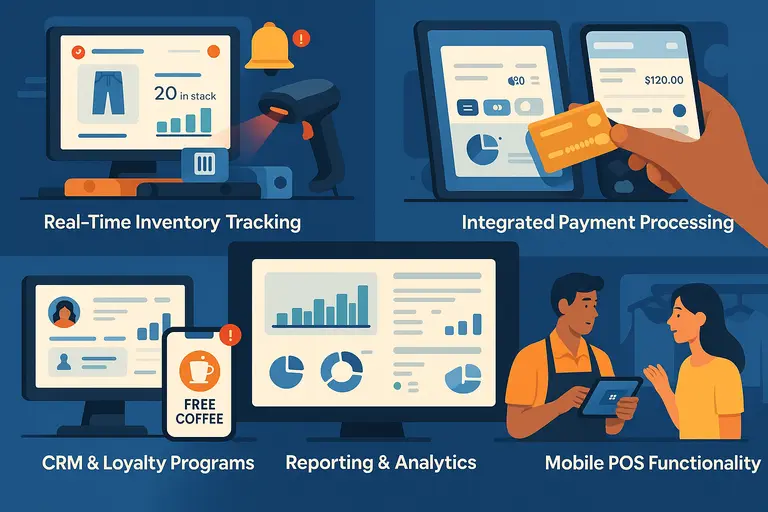
The best online POS systems go beyond transactions—they streamline daily operations, automate tedious tasks, and give you insights that drive growth.
Real-Time Inventory Tracking and Automation
Inventory is the heartbeat of retail. A smart POS system keeps it beating in perfect rhythm.
Real-time tracking ensures that every item sold—whether online or in-store—updates across all channels instantly. You’ll know exactly what’s in stock, what’s low, and what’s moving fast.
Here’s how it usually works:
- You scan an item at checkout.
- The system automatically deducts it from inventory.
- When levels hit a threshold (say, 10 units), you get a restock alert.
I suggest looking for platforms that support barcode automation and purchase order generation. Lightspeed excel here, especially for multi-location stores.
Integrated Payment Processing for Multiple Channels
An effective online POS system processes all kinds of payments—credit, debit, mobile wallets, and even contactless methods like Apple Pay.
But beyond variety, integration is key. A unified payment setup means online and in-store transactions are recorded in one place, reducing errors and simplifying accounting.
For example, Square POS integrates payments with inventory and reports. You can see which payment methods customers prefer, helping you tailor checkout experiences to them.
Customer Relationship Management (CRM) Tools and Loyalty Programs
Your POS should be more than a sales tool—it should help you build relationships.
CRM features store customer names, preferences, and purchase history, enabling personalized recommendations and loyalty rewards.
Imagine this: A customer buys coffee beans weekly. Your POS sends a push notification offering a free bag after 10 purchases. That kind of automation turns one-time buyers into lifelong fans.
If you’re serious about loyalty, I recommend Shopify POS or Clover—they have excellent built-in customer management tools that work right out of the box.
Mobile POS Functionality for On-the-Go Sales
A mobile POS (mPOS) allows you to sell anywhere—pop-up markets, fairs, or curbside pickups.
It’s a compact version of your full POS, often running on a tablet or smartphone. Everything syncs back to your main system in real time.
For instance, if you run a clothing store, you can use an iPad with Square POS to check out customers right in the fitting area—no waiting at the counter. It’s quick, flexible, and leaves a great impression.
Reporting and Analytics for Smarter Business Decisions
Data is the compass that guides business growth. Your POS system should provide reports on sales trends, best-selling products, and employee performance.
Good systems let you filter data by time, product, or location. For example, you might discover that accessories sell 20% more on weekends or that certain staff members excel during evening shifts.
I suggest reviewing these analytics weekly to spot patterns and act on them fast. The insights you gain can guide smarter purchasing, staffing, and marketing decisions.
How to Choose the Right Online POS System for Your Business
Choosing the right system is like picking a business partner—it should complement your workflow, scale with you, and not get in your way.
Identifying Your Store’s Unique Needs Before Buying
Before you buy, take a moment to map out your needs. What kind of products do you sell? Do you operate online, in-store, or both?
For instance:
- Retail stores may prioritize inventory tracking.
- Restaurants focus on tableside orders.
- Service businesses need appointment scheduling.
Write down your must-haves versus nice-to-haves. This clarity prevents you from overpaying for features you’ll never use.
Comparing Pricing Models: Subscription vs. One-Time Payment
Online POS systems typically come in two forms: subscription-based or one-time license models.
- Subscription: You pay monthly or annually, often with cloud hosting included.
- One-Time Payment: You pay upfront but may handle your own server updates.
In my experience, subscriptions are better for most small to medium businesses—they include automatic updates and support. Shopify and Square follow this model, offering scalability as you grow.
Evaluating User Interface and Ease of Training
A complex POS is worse than none at all. Look for a clean interface that staff can learn quickly.
When testing a demo, ask yourself:
- Can I find key functions in under three clicks?
- Does the dashboard show real-time data clearly?
- Would a new employee understand it without much guidance?
From what I’ve seen, Square POS has one of the most intuitive interfaces, while Lightspeed offers deep customization for tech-savvy teams.
Checking Integration Options with E-Commerce and Accounting Tools
Your POS shouldn’t live in isolation. It needs to connect with your existing tools—Shopify, WooCommerce, QuickBooks, or Xero.
Integration ensures that sales automatically sync with accounting, and stock updates reflect across all channels. This saves hours of manual entry and prevents costly discrepancies.
If your POS integrates poorly, you’ll constantly fight data mismatches—and trust me, that’s not a battle you want.
Reading Vendor Reviews and Support Quality Before Committing
Never skip this step. Even the best-looking POS can become a nightmare if support is unresponsive.
Read verified reviews on platforms like G2 or Capterra. Look for patterns—recurring complaints about downtime or billing issues are red flags.
Also, test support responsiveness before buying. Send a pre-sale question and note how quickly and helpfully they reply. A company’s support culture shows early, and it matters most when you’re in crisis mode.
Setting Up Your Online POS System Step-by-Step
Setting up your online POS system the right way from the start saves you endless headaches later. Think of this as laying the foundation for your business operations—it needs to be solid, well-structured, and tailored to your store’s workflow.
Preparing Your Inventory and Product Data for Migration
Before launching your POS, organize your product catalog carefully. I always recommend cleaning up product names, SKUs, and pricing before importing them into the new system.
Most POS platforms let you upload data using a spreadsheet (usually a CSV file). The columns typically include:
- Product name
- SKU (Stock Keeping Unit)
- Price
- Quantity
- Category
If you’re migrating from another POS or an e-commerce platform like Shopify, use their built-in import tool. For example, in Shopify POS, go to Products → Import → Upload CSV, and the system will automatically map fields for you.
A quick tip: Test the import using a small batch first. This lets you spot formatting errors before uploading thousands of items at once.
Configuring Payment Methods and Tax Settings
Your POS must handle transactions smoothly—no one wants a checkout delay. Begin by setting up your accepted payment types.
Most modern systems (like Square POS or Clover) support credit cards, digital wallets, and contactless payments.
Here’s a quick setup example using Square POS:
- Go to Settings → Payments → Payment Types
- Enable credit/debit cards, Apple Pay, Google Pay, and cash
- Set a default tip screen if you want to encourage gratuities
Next, configure taxes according to your local regulations. In Shopify POS, navigate to Settings → Taxes, choose your region, and input applicable rates. If you have multiple store locations, set tax zones individually to avoid compliance issues.
I suggest double-checking with an accountant or using POS tax automation tools like TaxJar to prevent costly errors.
Connecting Hardware Like Barcode Scanners and Receipt Printers
Hardware makes your POS tangible—it’s how the digital connects to the physical. Depending on your setup, you’ll likely use a tablet, card reader, barcode scanner, and receipt printer.
To connect hardware, follow the manufacturer’s guide or the POS system’s setup wizard. For instance, in Lightspeed Retail, go to Settings → Hardware → Add New Device to connect printers or scanners.
Common troubleshooting tips:
- Ensure devices share the same Wi-Fi network.
- Update firmware before pairing.
- Test print a receipt or scan an item to confirm connectivity.
If you’re on the move, mobile POS systems like Square Terminal come all-in-one—printer, card reader, and display built into a single portable device.
Testing the System Before Launching It Live
Think of this as your POS “dress rehearsal.” Before going live, simulate real transactions from start to finish.
Test by:
- Ringing up a few items to confirm pricing accuracy.
- Processing multiple payment types.
- Printing receipts and checking product stock updates.
- Running a refund or exchange test.
Document any issues and resolve them immediately. Many systems allow sandbox or test modes for this purpose—Shopify POS has a built-in “Test Payment Gateway” that simulates real payments safely.
I always advise running this dry test at least twice—once alone, and once with your team present—so everyone feels confident when customers arrive.
Training Staff to Use the POS System Confidently
Even the best POS system fails if your team doesn’t know how to use it properly. Create short, role-based training sessions for your staff.
Focus on:
- How to process sales and refunds
- How to look up products and customers
- How to apply discounts or loyalty rewards
- How to handle payment errors
Most systems include training modes or demo accounts. For instance, Clover POS has a “Training Mode” that lets staff practice transactions without affecting real sales data.
I believe it’s worth assigning one “POS champion” on your team—someone who understands the system deeply and can help others when questions come up. That one step alone saves hours of troubleshooting.
Optimizing Your POS System for Maximum Performance
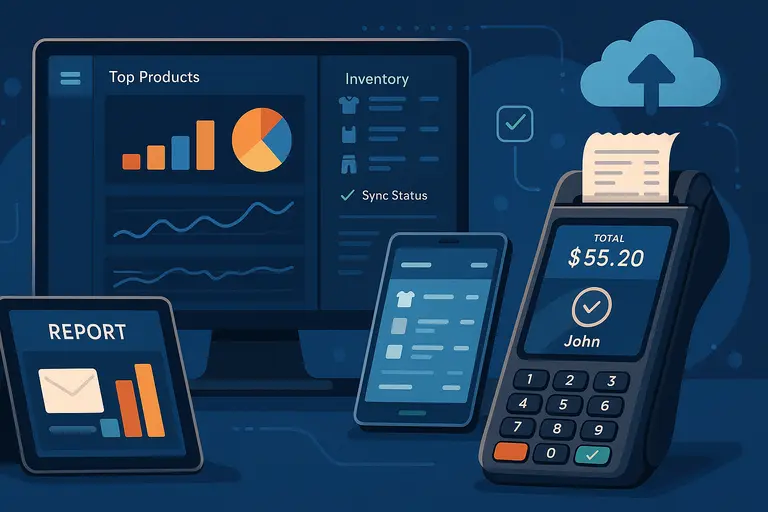
Once your system is up and running, the goal shifts from setup to optimization. This is where your online POS system becomes a genuine business growth engine.
Using Analytics to Identify Best-Selling Products and Trends
Your POS isn’t just tracking sales—it’s revealing patterns. Dive into the analytics dashboard regularly to see which products are performing best and when.
For example, Square POS offers a “Top Items” report that ranks your products by revenue, units sold, and profit margin. I recommend reviewing this weekly to spot seasonal or time-based trends.
You can also track:
- Peak hours for staffing efficiency
- Top employees by sales performance
- Category-level performance to fine-tune your inventory
This data tells you where to invest more—stocking popular items or running promotions at peak times.
Automating Reports to Save Time and Reduce Errors
Manual reporting wastes time. Automate it. Most POS systems let you schedule reports to arrive via email daily or weekly.
In Shopify POS, go to Analytics → Reports → Schedule Report, then select frequency and recipients.
Key reports to automate:
- Daily sales summary
- Inventory levels
- Payment reconciliation
- Customer acquisition and retention metrics
Automation keeps you informed without having to log in constantly. I suggest creating a recurring calendar reminder to review these reports once a week—it’s a small habit that keeps your business running like clockwork.
Syncing Online and Offline Inventory for Seamless Omnichannel Sales
If you sell both online and in-store, your POS must sync inventory automatically across all channels. Otherwise, you risk overselling or running out of stock.
Here’s an example: A customer buys the last pair of shoes online, but your in-store system doesn’t update immediately. Another customer buys them in person—now you’ve oversold.
Platforms like Shopify POS or Lightspeed Retail solve this by instantly updating stock across every sales channel. You can usually verify sync status under Inventory → Channels → Sync Status.
I recommend testing sync speed before a major sale event. Real-time accuracy keeps your customers happy and your business reputation intact.
Enhancing Customer Experience with Personalized Checkout Options
The checkout process is the final moment that defines a customer’s experience. Your POS can make it smooth and memorable.
Add personalization with:
- Saved customer profiles for faster repeat purchases
- Loyalty points that auto-apply during checkout
- Custom receipts with thank-you notes or discounts for next purchases
For example, Clover POS lets you display the customer’s first name on the payment screen and print a thank-you line at the bottom of each receipt.
I suggest experimenting with small personal touches like these—they create emotional connections that no discount can replace.
Backing Up Data and Updating Software Regularly
Data loss is a silent killer for retail businesses. Back up your POS data regularly, even if it’s cloud-based.
Most systems automatically back up data to secure servers, but I recommend exporting critical reports monthly and saving them separately.
Also, never ignore update notifications. These updates often patch security flaws and add new features. Systems like Square and Shopify roll out silent updates, but you can manually check by going to Settings → About → Version Info.
Think of updates as insurance—they keep your store safe, compliant, and competitive.
Common Mistakes to Avoid When Using an Online POS System
Even experienced store owners make small errors that can have big consequences. Avoid these common pitfalls to keep your online POS running smoothly.
Ignoring Regular Software Updates and Security Patches
Skipping updates can make your system vulnerable to bugs or even cyberattacks. Most POS providers release regular patches to improve performance and fix vulnerabilities.
I always suggest setting updates to automatic if the option exists. For systems like Lightspeed, this can be toggled under Settings → System Updates → Auto-Install.
Failing to Train Employees Thoroughly
Inconsistent staff training leads to slow checkouts, input mistakes, and unhappy customers. Even tech-savvy employees need guidance on how your specific setup works.
Schedule refresher sessions every few months. Record short video tutorials using screen captures for new hires—they’re easier to absorb than manuals.
I’ve seen stores cut transaction errors by half just by investing two extra hours in training each quarter.
Neglecting Data Analytics and Customer Insights
If you never look at your reports, you’re flying blind. Many owners only check daily sales totals, missing valuable insights about what drives those numbers.
Review your sales by product, customer frequency, and profit margins at least monthly. Insights from this data can guide smarter stocking and marketing.
Your POS data is like a map—if you don’t read it, you’re just wandering.
Using Too Many Add-Ons That Slow Down the System
While integrations and plugins are helpful, overloading your POS can cause lag or even crashes. Stick to what you truly need.
If your checkout speed drops, disable non-essential extensions and monitor improvement. I’ve seen systems regain up to 30% faster performance after decluttering unused integrations.
Remember, efficiency beats excess.
Forgetting to Back Up Data to the Cloud
Even with a reliable POS provider, accidental data loss can happen. Always ensure your backups are running as expected.
If your system allows manual backups, do it weekly. For cloud-based ones, verify automatic backup logs under your account settings.
I suggest exporting customer and sales data quarterly—it’s a simple habit that safeguards years of work.
Best Online POS Systems to Consider in 2025
The online POS landscape keeps evolving every year. In 2025, the best systems are blending powerful analytics, seamless integrations, and effortless usability.
Based on what I’ve worked with and tested, here are the top contenders worth your attention.
Shopify POS: Best for E-Commerce-Integrated Stores
If your business runs both online and offline, Shopify POS is hands down one of the best choices. It connects directly with your Shopify online store, syncing inventory, customer profiles, and orders in real time.
Here’s what I love about it:
- Unified dashboard: You can manage your store, website, and social sales all in one place.
- Smart inventory sync: When an item sells online, it instantly updates in-store quantities.
- Custom checkout: You can offer local pickup, discounts, or gift cards right from the POS.
A quick setup example: Go to Sales Channels → POS → Setup Guide, and Shopify walks you through connecting devices and syncing products automatically.
Shopify POS is ideal if you already sell online and want everything—from sales to fulfillment—under one digital roof.
Square POS: Ideal for Small and Mobile Businesses
Square POS remains a favorite for small and mobile-based sellers because it’s simple, affordable, and flexible. Whether you’re at a market stall or managing a boutique, Square’s mobile-first approach makes it effortless.
It stands out for:
- Free basic plan: Perfect for startups testing POS functionality.
- Mobile payments: Accept credit cards, Apple Pay, or Google Pay anywhere.
- Instant deposits: Funds can hit your account the same day.
For setup, download the Square POS app, connect your Square Reader, and link your bank account. You’ll be selling in minutes.
In my experience, Square’s reporting tools are underrated. The “Sales Trends” dashboard helps you see what’s driving revenue without complex setup—something most small businesses truly need.
Lightspeed Retail: Designed for Growing Retail Chains
If you’re scaling your business or managing multiple locations, Lightspeed Retail offers unmatched depth. It’s built for retailers who need advanced analytics, employee management, and customizable workflows.
What makes it shine:
- Multi-store inventory management with automatic stock transfers.
- Advanced analytics to forecast demand.
- Built-in e-commerce tools for omnichannel selling.
A good example: In Lightspeed’s interface, you can go to Inventory → Reorder Points, and the system will auto-suggest which items need restocking based on real-time data.
I believe this system is a game-changer for mid-sized and larger operations that outgrow basic POS software but don’t want to build an expensive enterprise system from scratch.
Clover POS: Great for Restaurants and Service-Based Stores
Clover POS is built for flexibility. Whether you’re running a café, salon, or retail store, it adapts beautifully with custom apps and industry-specific features.
Here’s where Clover really excels:
- Table management for restaurants and cafes.
- Appointment scheduling for service-based businesses.
- Built-in customer loyalty programs.
Example workflow: In the Clover dashboard, go to Customers → Loyalty → Create Program to start rewarding repeat buyers automatically.
I recommend Clover if you need an all-in-one device solution. Their hardware—like the Clover Station Solo—comes ready to use out of the box, no tech setup required.
Vend POS (by Lightspeed): Excellent for Inventory-Heavy Retailers
Vend POS, now under Lightspeed, remains a top pick for inventory-driven businesses like electronics shops or fashion retailers. It’s clean, fast, and built with stock management at its core.
Standout features include:
- Smart inventory tracking with low-stock alerts.
- Multi-outlet management for larger operations.
- Customer profiles and loyalty tools.
If you’re migrating from Excel, you’ll love how Vend handles CSV imports. Go to Products → Import → Upload CSV, and it automatically detects fields.
I suggest Vend if your biggest headache is inventory chaos. It handles complexity without overloading you with unnecessary options.
Expert Tips to Get the Most Out of Your POS System
Once your POS system is up and running, optimization becomes the name of the game. Small tweaks in how you use your system can lead to big improvements in efficiency and profit.
Regularly Review Reports to Spot Profit Opportunities
Your POS data tells the truth about your business—if you know how to read it. Review your sales by product, average transaction value, and top customer segments weekly.
For instance, Shopify POS offers a “Sales by Product Type” report that shows which categories drive the most revenue. That’s where you should focus your marketing or bundle offers.
I recommend setting a recurring reminder to review reports every Monday morning. You’ll start the week knowing exactly what’s working and what needs adjusting.
Keep Staff Engaged Through POS Training Refreshers
Even if your staff is trained, habits fade over time. I suggest running a quick refresher every few months. Use real-life scenarios to keep it fun and practical.
Example: Create a mock “difficult customer” situation to test refund workflows. It builds confidence and speeds up real-life problem-solving.
Most systems (like Clover or Square) include training modes where transactions don’t affect live data. Use those regularly—it’s like a gym workout for your POS skills.
Leverage Loyalty Programs to Increase Repeat Sales
Customer loyalty programs turn one-time buyers into long-term supporters. Your POS can automate that for you.
For instance, in Lightspeed Retail, go to Customers → Loyalty → Setup to reward purchases automatically. You can set rules like “Earn 1 point per $1 spent” and redeem points for discounts.
I’ve seen stores increase repeat purchase rates by up to 25% after introducing loyalty rewards. It’s a small setup with a massive return.
Use Cloud Access to Manage Your Store from Anywhere
One of the biggest perks of an online POS system is mobility. You don’t have to be in your store to manage it.
You can check live sales data, update products, or review reports from your laptop or phone. For example, Square Dashboard on mobile shows real-time revenue and inventory alerts wherever you are.
I suggest taking advantage of this freedom—especially during holidays or while traveling. It lets you stay in control without being chained to a counter.
Continuously Evaluate System Performance and Upgrade as Needed
No POS system is perfect forever. Technology moves fast, and so should you.
Every six months, evaluate your setup:
- Are transactions fast enough?
- Are reports accurate and useful?
- Are new features worth upgrading for?
If your current provider isn’t keeping pace, explore alternatives. I’ve seen retailers boost productivity simply by switching to a POS that better fits their current business stage.
Your POS should evolve as your business grows—it’s a partnership, not a one-time purchase.
Future Trends in Online POS Systems
The next few years will completely redefine what an online POS system can do. Artificial intelligence, automation, and sustainability are no longer buzzwords—they’re shaping the future of retail operations.
The Rise of AI-Powered Inventory Forecasting
AI will soon predict your next best-selling product before you even realize it. Tools like Lightspeed Analytics are already analyzing sales patterns and seasonal shifts to suggest restocking strategies.
Imagine your POS alerting you: “Based on last year’s data, order 20 more red jackets this week.” That’s the kind of insight that turns guessing into precision.
POS Systems Integrating with Augmented Reality Shopping
Retailers are starting to experiment with augmented reality (AR) shopping linked to POS data.
Picture this: A customer uses their phone camera to “try on” a product, and your POS automatically updates stock once they purchase.
This blend of in-store and virtual experience will make omnichannel shopping even more immersive.
Contactless Payments Becoming the New Standard
Contactless isn’t just a convenience—it’s becoming expected. By 2025, over 80% of in-person payments are projected to be contactless according to Visa’s consumer reports.
If your POS doesn’t already support Apple Pay, Google Pay, or tap-to-pay cards, now’s the time to enable it. The future of checkout is touch-free.
Deeper Integration with Social Commerce Platforms
POS systems are moving beyond e-commerce—they’re merging with social selling. Shopify already connects directly with Instagram and TikTok Shops, syncing sales and inventory automatically.
Soon, you’ll be able to track a TikTok-driven sale in your POS analytics in real time. That level of visibility turns viral traffic into measurable growth.
Sustainable POS Hardware and Eco-Friendly Payment Solutions
Sustainability is becoming a purchasing factor for businesses and customers alike. Expect to see more recycled materials in POS hardware and paperless receipt options as standard.
Platforms like Square now allow customers to receive receipts via email or text, saving both money and trees. I suggest enabling this by default—it’s efficient, sustainable, and modern.
Pro Tip: Turn Your POS Into a Growth Engine
Your online POS system isn’t just a tool—it’s the command center of your business. If you use it strategically, it can help you forecast demand, build loyalty, and grow smarter every month.
Here’s how to turn it into your growth engine:
- Review analytics weekly to identify trends early.
- Automate reports and alerts so you never miss changes.
- Integrate CRM tools to personalize customer experiences.
- Upgrade strategically—not often, but wisely.
I believe the key is consistency. Your POS gathers invaluable data daily. The more consistently you analyze and act on it, the more profitable your business becomes.
At the end of the day, an online POS system isn’t about technology—it’s about freeing your time so you can focus on what really matters: building meaningful connections with your customers and watching your business grow naturally.

I’m Juxhin, the voice behind The Justifiable.
I’ve spent 6+ years building blogs, managing affiliate campaigns, and testing the messy world of online business. Here, I cut the fluff and share the strategies that actually move the needle — so you can build income that’s sustainable, not speculative.
Related posts:
 Viral Launch Chrome Extension: The Ultimate Tool for Sellers
 Ecommerce Automation That Saves Time Without Breaking Sales
 Salehoo Dropshipping Reviews: Is It Worth Your Money Today?
 How the Salehoo Catalog Helps You Spot Winning Items Quickly
 How the Salehoo App Works and Why It Speeds Up Product Research
 Top Ecommerce Platforms That Make Selling Simple