
Table of Contents
Some links on The Justifiable are affiliate links, meaning we may earn a small commission at no extra cost to you. Read full disclaimer.
The QuillBot AI paraphrasing tool has become a favorite for writers, bloggers, and students who want to write faster without losing originality.
But can this AI-powered rewriter truly help you create smarter, more authentic content instead of just spinning words around?
In this guide, we’ll unpack how QuillBot works, explore its key features, and discuss when it actually improves your writing—and when it doesn’t.
How QuillBot AI Paraphrasing Tool Works
QuillBot AI paraphrasing tool doesn’t just swap words around—it rewrites meaning intelligently.
It’s built to understand the intent behind your sentence before offering a clearer, more concise version of it. Let’s break down how it actually does that.
Understanding QuillBot’s Paraphrasing Engine
At its core, Q.AI uses advanced algorithms to rewrite sentences while preserving context. When you paste a paragraph into QuillBot’s editor and hit “Paraphrase,” it doesn’t simply replace synonyms.
Instead, it reanalyzes the structure and semantics of your text—meaning it looks at the role each word plays in a sentence.
For example, if you write, “The report was finished by the team before the deadline,” QuillBot might output, “The team completed the report ahead of schedule.”
Notice it changes sentence structure, not just vocabulary. That’s context-aware paraphrasing in action.
It works like a real writing assistant—suggesting alternate ways to phrase your ideas without stripping your unique tone. I find it especially handy for rewording repetitive blog sections or simplifying technical content.
The Role of Machine Learning and Natural Language Processing
Machine Learning (ML) and Natural Language Processing (NLP) are the brains behind QuillBot. These technologies train on millions of human-written texts, allowing the tool to understand grammar, tone, and intent.
Think of NLP as teaching the system how humans communicate. It helps QuillBot detect patterns in phrasing, idioms, and even cultural nuances.
Meanwhile, ML constantly refines its output as more users interact with it—so QuillBot’s accuracy improves over time.
What’s fascinating is how it learns contextual sensitivity. For instance, the word “charge” could mean a financial fee, a legal accusation, or an electrical property.
NLP enables QuillBot to decide which meaning fits best based on the rest of the sentence.
How QuillBot Balances Clarity, Tone, and Originality
Balancing clarity and originality is tricky—even for human writers. QuillBot manages this through what I’d call tone control modes.
It detects whether your text sounds formal, academic, casual, or persuasive and adjusts phrasing accordingly.
When you use different modes (like Formal or Creative), QuillBot shifts focus:
- Formal Mode: Ideal for professional or academic writing, emphasizing precision.
- Creative Mode: Prioritizes expressive phrasing and stylistic flair.
- Fluency Mode: Simplifies complex sentences for smoother readability.
I often use Fluency for long-form blogs to keep the tone conversational while maintaining depth. The AI ensures rewritten text remains plagiarism-free and distinct enough to pass originality checks—a huge plus for SEO writers.
Key Features That Make QuillBot Stand Out
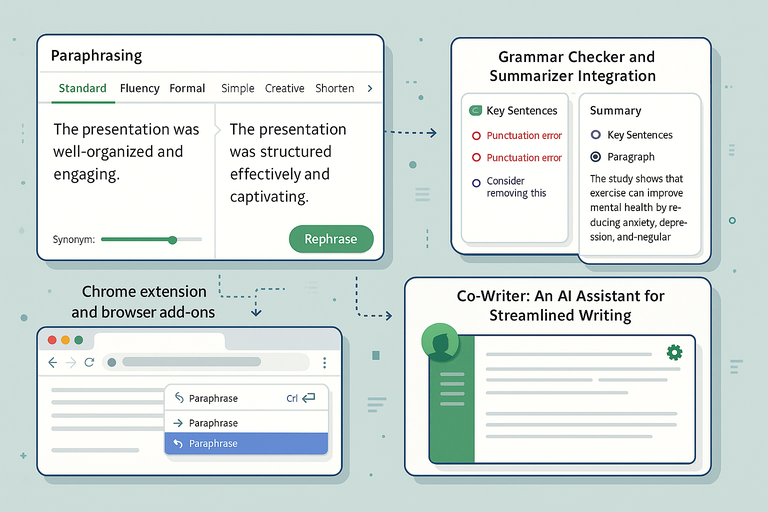
What sets QuillBot apart is its versatility. It’s not just a paraphraser—it’s a full writing ecosystem with tools designed to streamline the entire content creation process.
Paraphrasing Modes: From Standard to Creative
QuillBot offers seven modes: Standard, Fluency, Formal, Simple, Creative, Expand, and Shorten. Each one tailors rewrites based on your goal.
Here’s how I typically use them:
- Standard: For everyday rewriting that balances meaning and readability.
- Creative: For blog intros or storytelling that needs flair.
- Formal: For academic or business writing.
- Expand: To lengthen text when you need more depth.
- Shorten: Perfect for social media or concise copy.
The interface makes it intuitive—you just select the mode from the top bar before paraphrasing. I suggest experimenting with combinations (like Fluency + Creative) for nuanced results.
Grammar Checker and Summarizer Integration
QuillBot comes with a built-in grammar checker that rivals Grammarly. It not only catches punctuation and syntax issues but also offers contextual suggestions.
The Summarizer Tool is another standout. It condenses long paragraphs into concise key points or abstracts—useful when analyzing research or summarizing articles for newsletters.
Example path: Dashboard → Tools → Summarizer.
You can choose between Key Sentences (for outlines) or Paragraph (for fluid summaries). It’s surprisingly accurate at preserving key ideas.
QuillBot’s Chrome Extension and Browser Add-ons
If you write online, this feature is a game changer. The Chrome extension integrates QuillBot directly into platforms like Google Docs, Gmail, and LinkedIn.
Once installed, you can highlight text and right-click to paraphrase in-line—no need to switch tabs. I often use it in Google Docs to rewrite awkward phrases while drafting client content.
Quick tip: You can also activate it inside Gmail for rewriting emails before sending, ensuring clarity and professionalism in a single click.
The Co-Writer: An AI Assistant for Streamlined Writing
The Co-Writer is QuillBot’s all-in-one writing workspace. It combines paraphrasing, grammar correction, and summarization into one editor.
Think of it as a minimalist Google Docs that’s powered by AI. It helps you research, draft, and polish your content in one place—especially useful for long-form projects.
You can paraphrase entire paragraphs as you write, rather than switching between tools. I’ve used it to draft articles from scratch, paraphrasing as I go to keep my tone consistent across sections.
Benefits of Using QuillBot AI Paraphrasing Tool
When used strategically, the QuillBot AI paraphrasing tool can transform your workflow. It saves time, boosts creativity, and helps you maintain consistent quality.
Speeding Up Content Creation Without Losing Meaning
QuillBot drastically reduces writing time by offering instant rewrites. Instead of manually editing paragraphs, you can generate multiple variations and pick the one that best fits your tone.
For instance, if you’re rewriting a 1,000-word blog post, QuillBot can trim your editing time by half. It’s also great for batch paraphrasing—rewriting multiple product descriptions or social captions quickly.
It keeps meaning intact while rephrasing structure, which is vital for SEO and reader comprehension.
Improving Readability and Style Instantly
Clunky sentences can kill engagement. QuillBot helps by simplifying syntax, improving flow, and maintaining coherence.
Use Fluency Mode when your text feels stiff—it’ll smoothen transitions and make it more conversational. You can also hover over any paraphrased phrase to see alternative wordings, which helps refine tone further.
For example, “utilize” may become “use,” and “demonstrate proficiency” might become “show skill.” Simple, natural, and easier to digest.
Reducing Repetition and Writer’s Block
Every writer hits that creative wall. QuillBot helps you break through by generating new sentence structures for familiar ideas.
I often take a stubborn paragraph and let QuillBot reframe it in Creative mode—it sparks new angles I might not have thought of. This makes it especially helpful for long-form or technical content, where phrasing fatigue sets in.
It’s like brainstorming with an AI that never runs out of patience.
Maintaining a Natural, Human-Like Tone
Despite being AI-driven, QuillBot is impressively human-like. It avoids robotic phrasing by analyzing contextual tone and sentence rhythm.
Whether you’re writing academic essays or conversational blogs, the paraphraser adjusts tone without making text sound over-polished. The key is to review and lightly edit the results to keep your voice intact.
Here’s my quick approach:
- Paraphrase using Fluency Mode.
- Read aloud to check tone consistency.
- Make manual tweaks for emotional nuance.
That small step ensures every rewrite feels genuine—something algorithms alone can’t replicate.
Pro Tip: Combine QuillBot with manual editing and plagiarism checks for the best outcome. The AI gives you speed and structure, but your personal touch gives the text soul.
Real Use Cases for Writers and Marketers
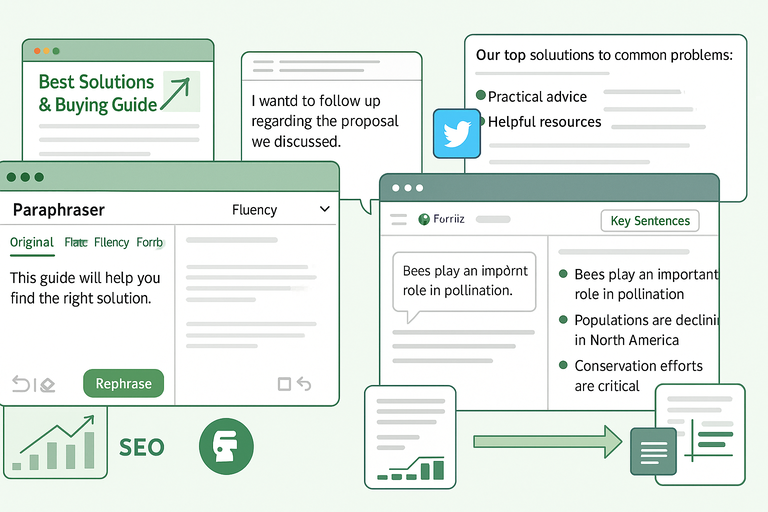
The QuillBot AI paraphrasing tool isn’t just a gadget for rewriting text—it’s a practical assistant that fits into the daily workflows of writers, marketers, and professionals.
Let’s look at how it can transform real writing scenarios.
Rewriting Blog Posts for Better SEO and Engagement
Bloggers often struggle to refresh old articles without sounding repetitive. QuillBot helps breathe new life into existing content while preserving meaning and improving readability.
Here’s how I use it:
- Copy a paragraph from an older blog post.
- Paste it into QuillBot and select Fluency or Creative mode.
- Review the new version—it usually reads smoother and more conversational.
This process helps in optimizing posts for SEO without changing the topic’s intent. For example, QuillBot can rephrase keyword-heavy sentences naturally, making them sound human while maintaining ranking potential.
It also boosts engagement by improving flow and readability. A smoother tone keeps readers hooked longer, which positively impacts dwell time and bounce rate—two quiet but powerful SEO metrics.
Polishing Emails, Social Posts, and Web Copy
Writing professional emails or catchy social captions can be time-consuming. QuillBot speeds up the process while keeping tone consistent.
Let’s say you’re crafting a client outreach email. Using Formal mode, QuillBot can turn a casual message like “Hey, just checking in about the proposal” into “I wanted to follow up regarding the proposal we discussed.” The second version sounds polished and confident—ideal for business communication.
For marketers, I suggest using Shorten mode for ad copy or social posts. It helps condense long sentences into concise, persuasive lines. On LinkedIn or Instagram, that clarity can make the difference between a scroll and a click.
UI path example: Open QuillBot → Paste your copy → Select Shorten mode → Paraphrase. You’ll instantly see shorter, more impactful phrasing.
Academic and Research Writing Applications
Students and researchers use QuillBot to simplify complex sentences, improve structure, and ensure originality. In academic writing, paraphrasing must maintain the original meaning while using different words—and QuillBot excels at that.
Using Formal mode, it rewrites technical language without distorting intent. I’ve seen students use it to refine thesis introductions or rephrase dense academic paragraphs. The built-in Citation Generator also helps quickly format sources in APA, MLA, or Chicago style.
Example: Tools → Citation Generator → Enter Source Type → Generate Citation.
However, I always advise reading the paraphrased text carefully. AI can streamline writing, but human oversight ensures academic integrity.
Repurposing Old Content Into Fresh Pieces
One of my favorite uses for QuillBot is content repurposing. You can turn old blogs, newsletters, or whitepapers into new formats—like LinkedIn posts or email snippets—without starting from scratch.
Here’s how I handle it:
- Take a paragraph from an old article.
- Use Creative or Expand mode to reshape it into a fresh narrative.
- Adjust tone for the target platform (for instance, more conversational for social media).
This keeps your content pipeline active while maximizing existing assets. In content marketing, that’s gold—you save time, maintain consistency, and keep audiences engaged across platforms.
Common Mistakes to Avoid When Using QuillBot
While QuillBot is powerful, it’s not a magic wand. To get the best results, it’s important to understand its limits and avoid the most common pitfalls.
Over-Reliance on Automated Paraphrasing
It’s tempting to let QuillBot do all the work—but that’s where quality drops. The AI is brilliant at suggesting rewrites, not crafting your unique message.
When users depend solely on automation, they risk losing brand tone or emotional connection.
I suggest treating QuillBot like a writing partner, not a ghostwriter. Let it handle structure and phrasing while you refine storytelling and personality.
Use this simple workflow:
- Paraphrase your text using QuillBot.
- Read the output aloud.
- Edit to inject your own tone and authenticity.
This small step keeps your writing human and relatable—something algorithms can’t replicate.
Ignoring Context and Nuance in Rewrites
Every sentence carries intent. QuillBot does an excellent job understanding it most of the time, but occasionally, it might slightly shift nuance.
For example, “She may resign if not promoted” could become “She might leave the company if overlooked.” The meaning is similar, but tone and implication differ. Always read through paraphrased text to ensure accuracy.
If precision is vital—say, in legal, medical, or corporate writing—stick to Fluency or Formal mode. These prioritize clarity over creativity.
Forgetting to Fact-Check and Edit for Accuracy
AI doesn’t fact-check. If you feed QuillBot outdated or incorrect information, it will reword it elegantly but keep the same error.
Before using QuillBot for content publication, verify stats, quotes, and data manually. I often copy the rewritten text into Grammarly or Hemingway afterward to check readability and correctness.
Remember: AI refines language, not truth. Fact-checking is always your job.
QuillBot vs Other Paraphrasing Tools
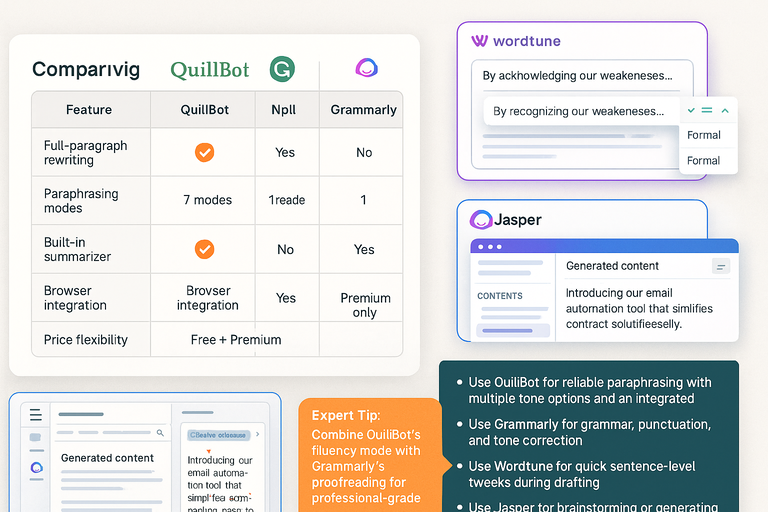
The QuillBot AI paraphrasing tool stands out from competitors, but how does it really compare to others like Grammarly, Wordtune, or Jasper? Let’s break it down objectively.
Comparing QuillBot With Grammarly’s Rewrite Feature
Grammarly offers basic paraphrasing through its Rewrite Suggestion tool, but it’s limited to individual sentences.
QuillBot, on the other hand, can rewrite entire paragraphs with structural variety.
Here’s a quick comparison table:
| Feature | QuillBot | Grammarly |
| Full-paragraph rewriting | Yes | No |
| Paraphrasing modes | 7 modes | 1 rewrite suggestion |
| Built-in summarizer | Yes | No |
| Browser integration | Yes | Yes |
| Price flexibility | Free + Premium | Premium only |
If you need comprehensive rewriting for long-form content, QuillBot wins. Grammarly is better for quick grammar checks and tone adjustments, not deep paraphrasing.
How QuillBot Differs From Wordtune and Jasper
Wordtune focuses on rephrasing at the sentence level, offering variations like “shorten,” “expand,” and “formal.” It’s excellent for fine-tuning but lacks QuillBot’s summarizer and citation features.
Jasper AI, on the other hand, is more of a full-fledged content generator than a rewriter. It’s great for idea generation or writing first drafts, but for users who want to retain control over meaning, QuillBot’s targeted rewriting approach feels safer and more consistent.
In my experience, QuillBot is the sweet spot—it bridges AI rewriting and human editing without overshooting creativity.
Which Tool Works Best for Different Writing Goals
Choosing between these tools depends on what you’re trying to achieve:
- Use QuillBot if you want reliable paraphrasing with multiple tone options and an integrated writing suite.
- Use Grammarly if your priority is grammar, punctuation, and tone correction.
- Use Wordtune for quick sentence-level tweaks during drafting.
- Use Jasper for brainstorming or generating complete articles.
If your goal is to refine and elevate your writing—especially for blogs, academic papers, or marketing copy—QuillBot offers the most balanced solution.
Expert Tip: Combine QuillBot’s Fluency mode with Grammarly’s proofreading for professional-grade content. One polishes structure, the other perfects accuracy—a combo I’ve found nearly unbeatable for client-ready writing.
Tips to Get the Most Out of QuillBot
The QuillBot AI paraphrasing tool is incredibly versatile, but its real power shines when you know how to use it strategically.
The following tips can help you make the most of its features for smoother, smarter writing.
Choosing the Right Paraphrasing Mode for Each Task
Each QuillBot mode is designed for a specific writing need. Understanding when to use which mode can drastically improve your results.
Here’s how I typically approach it:
- Standard Mode: Best for everyday paraphrasing when you want balanced changes without losing tone or intent.
- Fluency Mode: Perfect for improving grammar and sentence flow without altering meaning. I often use this for blog editing and web copy.
- Formal Mode: Ideal for academic papers, reports, or business communication where tone consistency matters most.
- Creative Mode: Great for crafting engaging intros or storytelling sections. This one helps when you want content that feels more dynamic.
- Expand Mode: Useful when you want to add depth or context to shorter text. For example, turning a one-line summary into a fuller paragraph.
- Shorten Mode: Best for social media captions, meta descriptions, or email subject lines where every word counts.
UI tip: You can switch between modes quickly by clicking the dropdown at the top of the editor next to the “Paraphrase” button. I suggest testing two or three modes per piece to find your ideal tone balance.
Combining QuillBot With Human Editing for Best Results
QuillBot provides structure; your human touch gives it life. I always advise blending AI rewrites with manual refinement. This hybrid approach preserves your voice while maximizing productivity.
Here’s what works for me:
- Paste your draft into QuillBot and paraphrase using Fluency or Creative mode.
- Copy the rewritten version back into your document.
- Read it aloud and adjust phrasing that feels too formal, too casual, or out of character.
- Use a grammar tool lik Hemingway for a final polish.
This process not only saves time but also ensures your content maintains personality and emotional depth—something algorithms still struggle to capture perfectly.
A real-world example: I once used QuillBot to rewrite a dense SEO blog section. The AI smoothed transitions beautifully, but I added a few conversational touches afterward to make it sound more “me.” The result was both clean and authentic.
Using the Built-In Citation Generator for Academic Work
QuillBot isn’t just for paraphrasing—it also includes a handy Citation Generator for students and researchers. It automatically formats references in APA, MLA, or Chicago style.
How to access it: Go to Dashboard → Tools → Citation Generator.
You can enter a book title, URL, or DOI (Digital Object Identifier), and QuillBot instantly generates a properly formatted citation. This is particularly useful when paraphrasing research materials—you can immediately back up sources without manual formatting.
It’s a small tool that saves hours, especially when handling multiple references. Still, I recommend double-checking generated citations, as academic databases sometimes update formats or author details.
Pricing and Value for Money

Before committing, it’s worth understanding what QuillBot offers in its free and premium versions—and whether the upgrade truly adds value for your workflow.
Overview of Free vs Premium Plans
The free version of QuillBot allows limited paraphrasing—about 125 words at a time—and access to two modes: Standard and Fluency. It’s great for light users or anyone testing the platform.
The premium plan, however, unlocks:
- All seven paraphrasing modes
- Faster processing speed
- Longer input limits (up to 10,000 characters per run)
- Enhanced Synonym Control for nuanced phrasing
- Unlimited use of Grammar Checker and Summarizer tools
This expanded access makes a noticeable difference if you’re a regular content creator or student managing long-form writing.
What You Actually Get With QuillBot Premium
With premium, you also gain access to the Compare Modes feature—an underused gem. It lets you preview how the same text looks in multiple modes side-by-side. This makes fine-tuning easier since you can pick the phrasing that best fits your intent.
You’ll also experience faster processing speeds, which can feel like a huge relief when you’re handling several articles at once.
As of this writing, QuillBot Premium costs roughly:
- Monthly: around $9.95/month
- Semi-annual: around $6.66/month
- Annual: around $4.17/month
(These rates may vary slightly depending on promotions.)
Evaluating Whether the Cost Matches Your Needs
If you’re a casual writer, the free version might be enough. But for bloggers, marketers, and academic users, the premium plan quickly pays for itself.
Here’s my take: If you spend more than five hours a week writing, premium access saves far more time than its monthly fee. I believe the combination of paraphrasing, summarizing, and citation tools in one ecosystem easily justifies the cost.
For those doing client work or academic projects, the unlimited character limit alone is worth it—you won’t have to split documents constantly. Who Should Use QuillBot AI Paraphrasing Tool
While anyone can use QuillBot, certain professionals get more value out of it depending on how they write and edit daily.
Ideal Users: Students, Bloggers, and Content Marketers
Students use QuillBot to refine essays, improve readability, and avoid accidental plagiarism. I’ve seen it help international students, in particular, express ideas more naturally in English.
Bloggers and marketers, on the other hand, rely on it for rewriting repetitive text and optimizing posts for SEO. QuillBot can turn keyword-heavy sentences into smooth, conversational phrasing, helping pages rank without sounding robotic.
For content marketers managing multiple campaigns, the AI saves hours of editing time by quickly rewriting tone variations for different audiences.
When QuillBot Is a Time-Saver vs a Shortcut
There’s a fine line between efficiency and laziness. QuillBot saves time, but it shouldn’t replace thoughtful writing. I’ve learned that the best results come when you use it to refine, not replace, your words.
If you depend too much on it, your content can lose emotional connection or subtlety. Use it for structure and clarity, but let your personality lead the message.
The right balance turns QuillBot from a crutch into a catalyst.
How Professionals Can Integrate It Into Daily Workflows
Professionals—from copywriters to educators—can seamlessly fit QuillBot into their workflow.
Here’s a system I often recommend:
- Draft Quickly: Write your first version naturally.
- Polish with QuillBot: Use Fluency or Formal mode to smooth structure.
- Summarize or Expand: Use those modes for adapting content length to platform needs.
- Proof and Publish: Always do a human read-through before publishing.
When used this way, QuillBot becomes more of an editorial assistant than an automation tool.
Final Verdict: Is QuillBot Worth It?
After testing dozens of AI tools, I’d say the QuillBot AI paraphrasing tool offers an impressive blend of usability, control, and intelligence.
Strengths and Limitations Summarized
Strengths
- Multiple tone-specific modes for diverse writing styles
- Built-in grammar checker and summarizer
- Reliable Chrome and Docs integrations
- Affordable premium plan
Limitations
- Occasional context loss in highly technical text
- Limited creative flair compared to full AI writing tools like Jasper
- Requires manual review for best results
If you understand these limits and use it thoughtfully, QuillBot can easily replace multiple editing tools in your workflow.
The Future of AI Writing and Human Creativity
AI like QuillBot won’t replace writers—it will amplify them. I believe tools like this represent the evolution of writing, where humans focus on ideas and creativity while AI handles structure and efficiency.
Writers who learn to collaborate with AI, instead of competing with it, will gain an edge in quality, speed, and productivity.
Expert Tip: How to Use QuillBot Responsibly and Ethically
Always remember: AI paraphrasing doesn’t replace critical thinking. Whether you’re a student, creator, or professional, your integrity should guide how you use QuillBot.
I suggest three golden rules:
- Use it to enhance, not imitate.
- Always fact-check your rewritten content.
- Keep your authentic voice at the center.
QuillBot isn’t about writing less—it’s about writing smarter. When used with care, it becomes a reliable creative partner that helps you produce meaningful, human-centered content faster than ever.

I’m Juxhin, the voice behind The Justifiable.
I’ve spent 6+ years building blogs, managing affiliate campaigns, and testing the messy world of online business. Here, I cut the fluff and share the strategies that actually move the needle — so you can build income that’s sustainable, not speculative.
Related posts:
 How to Use QuillBot Paraphrasing Tool Effectively
 AI QuillBot: The Smart Writing Assistant That Rewrites Perfectly
 Why Quillbot Grammar Checker is a Must-Have for Writers
 QuillBot Free Paraphrasing Tool Write Better Instantly
 How Does Udemy Work? Your Ultimate Guide to the Online Learning Platform
 Where to Find a Safe Quillbot Download—No Viruses, No Spam