
Table of Contents
Some links on The Justifiable are affiliate links, meaning we may earn a small commission at no extra cost to you. Read full disclaimer.
Semrush pricing worth it for beginners is not a yes-or-no question in the real world. It depends on what kind of beginner you are, how fast you need answers, and whether SEO is a hobby, a side income, or a serious growth channel for your business.
I’ve seen beginners waste money on SEO tools they barely touch, but I’ve also seen one solid month of Semrush save weeks of guesswork.
The tool can absolutely be worth it, but only when your goals, budget, and workflow match what it actually does.
What Semrush Pricing Really Means For A Beginner
For most beginners, the real question is not the monthly fee by itself. It is whether the tool helps you make better decisions faster than free tools alone.
Why The Price Feels High At First
Most beginners look at Semrush and react the same way: “That is a lot for an SEO tool.” That reaction is fair. Semrush’s SEO Toolkit starts at $139.95 per month on the standard monthly option, with lower effective monthly pricing when billed annually.
Semrush positions its entry plan for freelancers, small business owners, and SEO beginners, while higher plans increase project, tracking, and crawl limits.
The sticker shock usually happens because beginners compare Semrush to free tools one-by-one instead of comparing it to the cost of wasted time. If you are only publishing one article a month and checking a few rankings casually, the price will feel excessive.
If you are trying to grow traffic, validate content ideas, monitor competitors, and fix technical issues in one place, the same price can feel much more reasonable.
I believe this is where many reviews get the topic wrong. They treat pricing like a simple software expense. For a beginner, Semrush is really a speed-and-clarity purchase. You are paying to reduce trial and error.
A simple way to think about it is this:
- Low-stakes beginner: Hobby blogger, learning SEO, no urgent revenue goal.
- Growth beginner: New site owner, affiliate publisher, freelancer, or local business trying to rank faster.
- Work beginner: Junior marketer or solo consultant who needs reporting, research, and repeatable workflows.
For the first group, Semrush often feels expensive. For the second and third groups, it can be easier to justify because the tool supports work that can actually produce measurable return.
What You Are Actually Paying For
A lot of beginners assume they are paying for keyword research alone. That is not really what Semrush sells.
What you are actually paying for is a combined workflow: keyword discovery, competitor analysis, rank tracking, site auditing, backlink review, on-page recommendations, and reporting in one platform.
On the entry SEO plan, Semrush includes limits such as 5 websites to monitor, 500 keywords to track, and 100,000 pages to crawl per month.
The free account is far more limited, including 10 queries per day in several tools, 100 pages for Site Audit, and tracking for 10 keywords.
That difference matters because free tools tend to solve one narrow problem at a time. Semrush is designed to help you move from question to action without jumping across six tabs and three spreadsheets.
Here is the practical value a beginner is buying:
- Research speed: You can validate topics and spot keyword patterns faster.
- Competitive context: You stop guessing what rivals rank for.
- Technical direction: You can find crawl, index, and on-page issues early.
- Tracking discipline: You can measure whether your work is improving rankings.
- Workflow consolidation: You spend less time stitching together disconnected tools.
In my experience, this is the biggest reason Semrush feels “worth it” to some beginners and wildly overpriced to others. If you only use 10% of the platform, the price stings. If you use it to build a repeatable SEO process, the value starts becoming obvious.
The Beginner Types Who Usually Benefit Most
Not every beginner should subscribe. But some beginner profiles tend to get value much faster than others.
The first strong fit is a beginner with commercial intent. Imagine you run a small local service business, a niche ecommerce store, or a content site with affiliate revenue goals.
In that case, one winning page can recover a month of software cost if it brings in leads or sales. You do not need massive traffic for the math to work.
The second fit is the beginner freelancer. If you are pitching SEO, content strategy, or website audits, Semrush can help you research faster and produce more convincing recommendations. A single retained client can make the subscription feel minor.
The third fit is the beginner who already has content momentum. If you are publishing regularly and want to choose better topics, monitor rankings, and identify pages worth improving, Semrush becomes much easier to justify.
The weakest fit is the “curious but inactive” beginner. If you are not publishing, not optimizing, and not checking results consistently, you will not get enough value from a paid SEO suite.
A quick reality check helps:
- Worth considering now: You publish regularly, have a money goal, or serve clients.
- Probably wait: You are still learning basic SEO and have not built a workflow yet.
- Use free first: You have no site, no audience, and no immediate business objective.
That last group should not feel bad about waiting. Sometimes the smartest SEO decision is not buying the tool too early.
How Semrush Works And Why Beginners Either Love It Or Quit
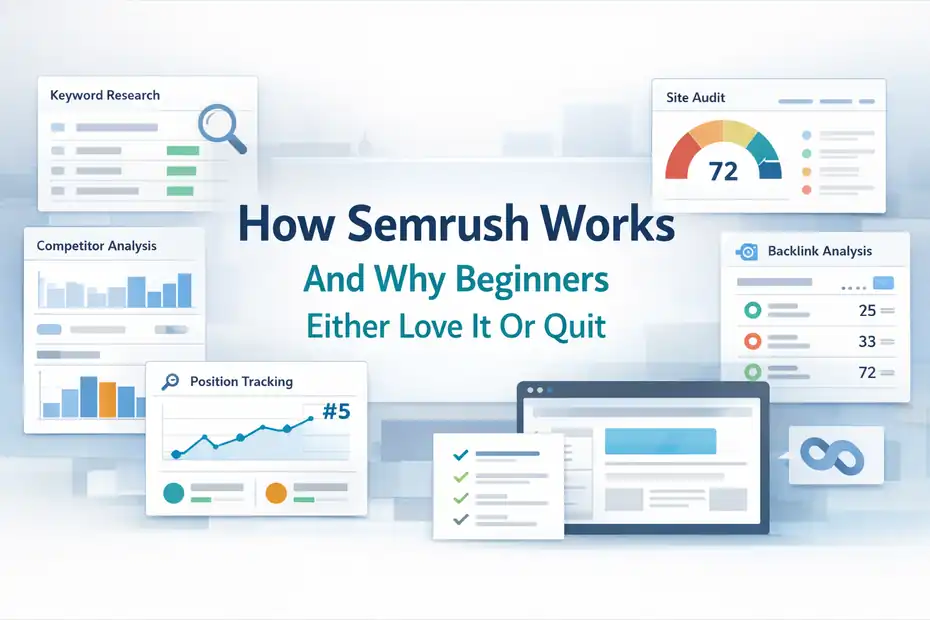
The platform is powerful, but power alone does not create value. Beginners get results when they understand how the tool fits into an actual workflow.
The Core Features A Beginner Will Use Most
Semrush has a lot of products, but most beginners live inside a small group of features. That is good news, because you do not need to master everything to get value.
The most useful beginner stack usually looks like this:
- Keyword research: Find topics, questions, search intent, and difficulty patterns.
- Domain and competitor analysis: See what rival sites rank for and where their traffic likely comes from.
- Position tracking: Monitor target keywords instead of checking rankings manually.
- Site Audit: Scan your site for technical problems that can suppress performance.
- On-page recommendations: Improve pages that already have ranking potential.
- Backlink review: Understand your link profile and compare it with competitors.
Even the free account gives limited access to some of these workflows, including keyword research, competitor research, backlink checks, a 100-page site audit, and tracking for 10 keywords. The paid tiers expand those limits sharply.
What I recommend is focusing on one beginner loop: research a keyword, study top competitors, create or improve a page, track rankings, and revisit the page after data comes in. That loop is where Semrush starts earning its keep.
When beginners dislike the platform, it is often because they wander through too many dashboards without turning insights into actions. The tool is not the strategy. It is the decision engine for the strategy.
The Hidden Learning Curve You Should Expect
This is where I want to be very direct: Semrush is not hard in the sense of being broken or unusable, but it does have a real learning curve.
A beginner can log in and get overwhelmed fast. There are lots of reports, filters, metrics, and tabs. You will see terms like keyword difficulty, search intent, crawlability, toxicity, visibility, and authority score. None of these are impossible to learn, but seeing them all at once can make the platform feel heavier than it needs to.
From what I’ve seen, the learning curve usually comes from three things:
- Too much choice: Beginners do not know which reports matter first.
- Too many metrics: They collect data without knowing what action follows.
- No workflow: They research endlessly instead of publishing or optimizing.
The fix is simple. Give yourself a narrow use case for the first month.
For example, if you run a blog, use Semrush for only these tasks:
- Keyword selection.
- Competitor review.
- Weekly position tracking.
- Monthly site audit.
- Refreshing one underperforming page.
That is enough to justify the subscription for many people. You do not need to become a technical SEO analyst on day one.
I suggest treating Semrush the way you would treat a gym membership. The equipment is useful, but only if you walk in with a plan. Otherwise, you will touch three machines, feel confused, and wonder why you paid.
Why Beginners Often Misjudge The Tool In Week One
A lot of first impressions are misleading. Beginners often expect an SEO tool to hand them guaranteed wins immediately. That is not how it works.
Semrush gives you direction, not magic. It can show you keyword opportunities, competitor pages, technical issues, and ranking movement. But you still have to write the content, improve the pages, build the site properly, and wait for search engines to respond.
This mismatch creates a common pattern:
- Week 1: “This dashboard is impressive.”
- Week 2: “I found a lot of keywords.”
- Week 3: “I’m not sure what actually matters.”
- Week 4: “Maybe I didn’t need this after all.”
Usually the issue is not the tool. It is that the beginner was hoping for instant output rather than process improvement.
I believe the best way to judge Semrush is not by how exciting it feels in the first few days. Judge it by whether it helps you make three better decisions:
- Which keyword to target next.
- Which page to improve first.
- Which competitor pattern is worth copying.
If it helps you do those things consistently, then the tool is creating value. If you mostly click around and admire data, it probably is not.
Step-By-Step: How To Decide If Semrush Pricing Is Worth It For You
This is the part most reviews skip. You need a decision framework, not generic praise or generic criticism.
Start With Your Business Math, Not Tool Features
Before you compare plans, do one simple exercise: figure out what one extra lead, sale, or qualified visitor is worth to you.
Let’s imagine three beginner scenarios.
Example 1: You run a local roofing business. One booked job is worth $2,000 in profit. If Semrush helps you identify and improve pages that generate even one extra qualified lead that converts, the monthly cost becomes easier to justify.
Example 2: You run an affiliate site. One buyer is worth $25 in commission. In that case, you need more volume before the tool pays for itself. Your content output and ranking improvements matter much more.
Example 3: You are a freelance SEO beginner. One small client pays $400 to $800 per month. If Semrush helps you audit sites faster and present better recommendations, one client can cover a large portion of the subscription.
This is the real beginner filter:
- High customer value: Easier to justify.
- Low customer value but high content volume: Can still be worth it.
- Low customer value and low output: Usually not worth it yet.
I recommend writing down these numbers:
- Your average sale or lead value.
- How many pages you publish each month.
- Whether SEO is a primary growth channel.
- Whether one new client or customer could cover the fee.
Once you do that, the question becomes less emotional. You stop asking, “Is the tool expensive?” and start asking, “Can this tool improve outcomes enough to cover itself?”
That is a much better question.
Use The Free Version And Trial The Smart Way
Semrush offers a free account with restricted usage and also promotes a 7-day free trial for fuller access. The free version includes limited daily queries in multiple tools, a 100-page site audit, and 10 tracked keywords, which is enough to test the interface and basic workflows before paying.
Most beginners use the free option badly. They open random reports, run a few searches, and leave without learning anything useful. A better approach is to test specific workflows.
Use the free account or trial to answer these questions:
- Can you find 20 to 50 realistic keyword ideas for your niche?
- Can you identify which competitor pages are winning?
- Can you audit your site and uncover fixable issues?
- Can you track a focused keyword set and understand the reports?
- Can you spot one or two existing pages worth refreshing?
Here is a practical test plan:
- Day 1: Audit your site and list the top issues.
- Day 2: Research 10 competitor-driven keyword ideas.
- Day 3: Choose one content topic and outline it.
- Day 4: Set up tracking for your priority terms.
- Day 5: Review one competitor’s top pages and backlink profile.
- Day 6: Improve one existing page using what you found.
- Day 7: Decide whether the platform gave you actionable next steps.
This matters because beginners often judge tools by feature count. I suggest judging by momentum. Did the platform move you closer to ranking, publishing, or fixing something important? If yes, the subscription has a case.
The Simplest ROI Test For Beginners
You do not need a complicated spreadsheet to estimate SEO tool ROI. You just need a clean, honest test.
Ask yourself this:
- How many hours per month could Semrush save me?
- How much is that time worth?
- Could one better content decision or page update produce measurable upside?
Let’s keep it simple.
Imagine Semrush saves you 6 hours a month by speeding up keyword research, competitor analysis, and page audits. If your time is worth even $25 an hour, that is $150 in value already. That alone can offset the entry plan for some users.
Now add outcome value. Suppose the tool helps you identify a low-competition page that drives one extra lead or three extra affiliate sales each month. The ROI can turn positive pretty quickly.
I like this formula:
- Time value: Hours saved × hourly value.
- Outcome value: Extra leads, sales, or client work influenced by better decisions.
- Net value: Time value + outcome value – tool cost.
This is not perfect, but it is practical.
Where beginners go wrong is expecting perfect attribution. SEO does not work like paid ads. You will not always know that one exact report caused one exact sale. But you can still judge whether the platform improves the quality and speed of your decisions.
If your net value stays negative for two or three months, cancel. If the platform clearly sharpens your workflow and supports revenue-generating work, keep it.
Comparing Semrush To Beginner Alternatives
A beginner should always compare options before subscribing. That is not being cheap. That is being smart.
When Free Tools Are Enough
I want to say this clearly because too many articles avoid it: free tools can be enough for a surprising number of beginners.
If you are in the learning stage, free tools often cover the basics well enough:
- Google Search Console for real search performance data.
- Google Analytics for on-site behavior.
- Keyword ideas from Google search results, autocomplete, and People Also Ask.
- Limited free SEO tools for occasional checks.
- Manual competitor review using live SERPs.
For many of us, this setup is enough in the beginning. Especially if your goals are simple, like publishing your first 10 to 20 articles, fixing obvious site issues, and learning how search intent works.
The main tradeoff is speed and depth. Free tools are usually narrower, slower, or more fragmented. You do more manual work, and you often lose context between tasks.
That is fine if you have more time than money.
Free tools are usually enough when:
- You are validating a niche.
- You have not published much yet.
- You are learning basic SEO concepts.
- You do not need client-ready reporting.
- Your site is small and your budget is tight.
I actually recommend starting here for pure beginners. It teaches you how SEO works underneath the software. Then, when you upgrade to a paid suite later, you use it more intentionally instead of leaning on it like a crutch.
When Semrush Beats Piecing Tools Together
At some point, managing SEO through scattered free tools becomes messy. That is where Semrush starts to make more sense.
The biggest advantage is not that every single metric is unique. It is that the workflow is connected. You can go from keyword idea to competitor check to page audit to tracking without constantly rebuilding context.
That matters more than it sounds.
Let’s say you are managing a small ecommerce site. You notice traffic to a category page is flat. With a fragmented stack, you might check Search Console, then look up keyword ideas elsewhere, then audit the page in another tool, then manually log changes in a spreadsheet.
With Semrush, that process can feel more unified. You can identify related keywords, see competitor patterns, review ranking changes, and pull optimization ideas faster.
The platform’s traffic data is modeled from external datasets, and Semrush says its Traffic & Market data comes from a panel of more than 200 million real anonymized internet users across 190+ countries and regions.
That scale is one reason many marketers use it for directional competitive analysis rather than relying only on internal analytics.
This is where I think Semrush earns its price for serious beginners. It reduces friction. And friction is expensive because it slows execution.
You are not only buying data. You are buying continuity between decisions.
Semrush Vs Going Cheap And Staying Stuck
There is a hidden cost to always choosing the cheapest route: delay.
I have seen beginners spend months trying to avoid paying for tools while also struggling to choose keywords, understand competitors, or diagnose why pages are not moving. That can be sensible if money is extremely tight. But sometimes it becomes false economy.
Here is the uncomfortable truth. Cheap stacks can keep you stuck when they remove too much visibility from the process.
Signs you may be outgrowing free or ultra-cheap tools:
- You publish regularly but still feel unsure what to target next.
- You keep missing competitor opportunities.
- You cannot track rankings consistently.
- You want to refresh pages but lack clear optimization direction.
- You are serving clients and need better research confidence.
That does not mean Semrush is automatically the answer. But it does mean your bottleneck may no longer be effort. It may be information quality and workflow efficiency.
I believe that is the real “worth it” threshold. Once your next level depends on better prioritization, not just more hustle, a premium SEO tool becomes easier to defend.
How Beginners Can Get Real Value From Semrush Without Wasting Money
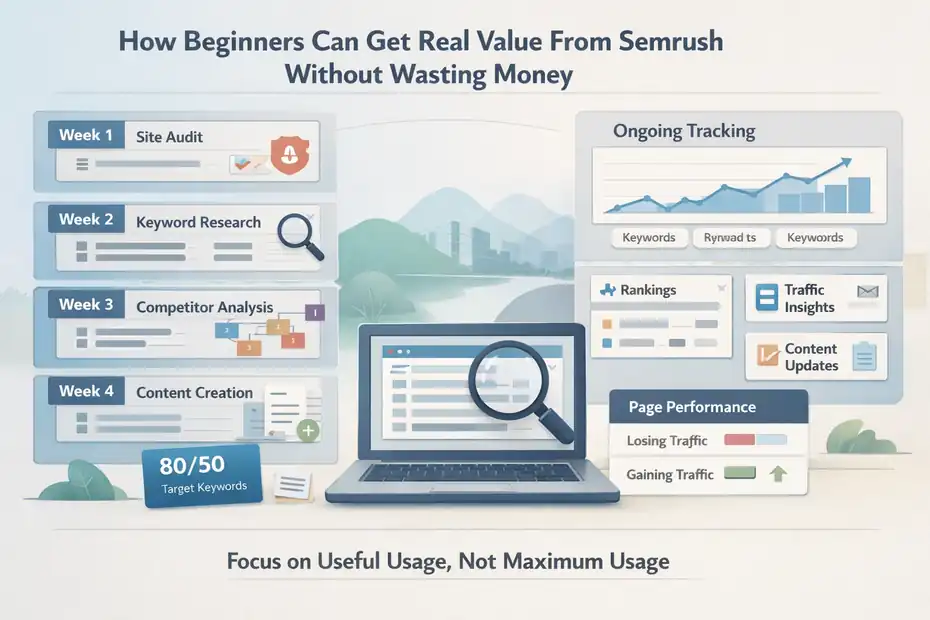
This is where the decision becomes practical. If you do subscribe, you need a usage plan.
The Best First-Month Setup For A Solo Beginner
Your first month should be boring in the best possible way. Do not try to master everything. Build a repeatable routine.
Here is the setup I recommend:
- Week 1: Connect your site, run a site audit, and review your top technical issues.
- Week 2: Build one keyword list around your products, services, or content themes.
- Week 3: Audit your top three competitors and note their highest-value pages.
- Week 4: Create or refresh two to four pages based on what you learned.
- Ongoing: Track a focused keyword set and review movement weekly.
For beginners, the goal is not maximum usage. The goal is useful usage.
A simple dashboard habit works well:
- Track 20 to 50 important keywords, not hundreds.
- Review pages losing or gaining traction.
- Prioritize content updates before creating endless new pages.
- Use site audits monthly, not obsessively every day.
This approach fits the entry plan limits much better than a chaotic “let’s track everything” mindset. The Pro-level limits are generous enough for many solo site owners, especially if they manage one main site and a handful of important competitors.
If you treat the platform like a giant sandbox, you can waste money. If you treat it like a weekly operating system for SEO, you are much more likely to get value.
Common Mistakes That Make The Subscription Feel Useless
Most beginners do not fail because Semrush lacks value. They fail because they use it in ways that disconnect data from execution.
These are the most common mistakes I see:
- Mistake 1: Research without publishing. You collect keyword ideas for hours and never ship pages.
- Mistake 2: Tracking too many terms. You create noise instead of clarity.
- Mistake 3: Obsessing over competitor metrics. You copy numbers instead of understanding strategy.
- Mistake 4: Ignoring existing pages. Sometimes the easiest win is refreshing what already ranks.
- Mistake 5: Confusing estimates with truth. Competitive traffic tools are directional, not perfect.
- Mistake 6: Paying for advanced features you do not use. Bigger plans are not better if your workflow is still basic.
That last point is worth repeating. Beginners often buy too much plan, too soon. The entry SEO plan is already built for freelancers, small business owners, and SEO beginners. Jumping higher only makes sense when your project count, keyword tracking needs, or reporting demands outgrow the lower tier.
I suggest setting one rule: every report you open should lead to an action. Update a page, create a brief, fix a technical issue, or refine your target keyword list. If no action follows, that report is entertainment, not SEO.
The Content Workflows Where Semrush Pays Off Fastest
Not every workflow delivers ROI at the same speed. Some use cases produce value much faster for beginners.
The fastest-paying workflows are usually these:
- Low-competition content discovery: Finding realistic topics you can actually rank for.
- Competitor gap analysis: Spotting pages and keywords your rivals rank for that you have ignored.
- Content refreshes: Improving pages already sitting on page two or the bottom of page one.
- Local SEO prioritization: Identifying service and city combinations worth targeting.
- Client prospecting: Showing opportunities clearly if you sell marketing services.
A realistic example: Imagine you run a small HVAC company. Instead of writing a generic “air conditioning tips” article, Semrush might help you identify stronger local intent topics, service-specific pages, or seasonal comparisons. That shift from broad content to commercial-intent content can be worth far more than the software fee.
Another example: You run a niche blog with 50 articles. A quick review may reveal five posts ranking positions 8 to 20 for valuable queries. Refreshing those pages can produce faster traffic gains than writing 10 new articles from scratch.
This is where Semrush feels worth it. It helps you prioritize work with higher probability of payoff.
And in 2026, that matters even more because AI search features are changing visibility patterns. Semrush’s own 2025 study found AI Overviews appeared for around 16% of analyzed queries after a rapid rise, with commercial and transactional triggers increasing over time.
That makes SERP monitoring and query-level visibility analysis more valuable than they used to be.
Advanced Advice: When To Upgrade, Downgrade, Or Cancel
The smartest beginners are not loyal to software. They stay loyal to outcomes.
Signs The Entry Plan Is Enough
For many beginners, the entry SEO plan is more than enough for quite a while.
You probably do not need to upgrade if:
- You manage one website or a very small portfolio.
- You track a focused keyword set.
- You are publishing consistently but not at agency scale.
- You mainly need keyword research, auditing, competitor analysis, and rank tracking.
- You are still building your SEO process.
The plan’s 5 monitored websites, 500 tracked keywords, and 100,000-page crawl allowance are plenty for a lot of solo operators and small business sites.
I recommend squeezing as much value as possible from the lower tier before thinking about an upgrade. Bigger limits do not fix a weak workflow.
In fact, I have seen the opposite happen. Someone upgrades because they assume more data will solve uncertainty. It usually just gives them more tabs to avoid acting on.
If your current plan still supports your publishing, tracking, and audit needs, stay there. Efficiency beats excess.
When Upgrading Starts Making Sense
Upgrading is usually less about prestige and more about friction. If the lower tier keeps constraining useful work, then the math changes.
A higher plan starts making sense when:
- You manage multiple sites or client accounts.
- You need significantly more tracked keywords.
- You rely on historical data for content and competitor analysis.
- You need broader content tooling or deeper reporting capacity.
- Your audits and optimization projects exceed the lower limits regularly.
Semrush’s higher tiers expand those limits and add features such as historical data, broader content tools, and more reporting flexibility. Guru-level positioning emphasizes scaling businesses and agencies, while Business adds much larger limits and API access.
For a true beginner, though, I would be cautious. Upgrade only when you can point to a repeated operational problem. For example: “I’m maxing out tracked keywords every month and it’s hurting client work,” or “I need historical data to make content decisions across multiple categories.”
That is a healthy reason to upgrade. “I want more features just in case” is not.
When You Should Cancel And Come Back Later
Sometimes the best SEO move is pausing the subscription.
You should seriously consider canceling if:
- You are not publishing or optimizing regularly.
- Your site is too new to support meaningful tracking yet.
- You keep using only one or two reports a month.
- Your budget pressure is causing stress without clear payoff.
- You have not built a basic SEO routine.
This is not failure. It is good budget discipline.
A lot of beginners think canceling means Semrush was “not worth it.” Not necessarily. It may simply mean the timing was wrong. There are seasons where you need the tool more, such as during a site rebuild, a content sprint, a migration, or a client acquisition phase. Then there are slower seasons where free tools can carry more of the load.
I actually like this approach for beginners:
- Subscribe for a focused growth period.
- Use the platform aggressively for research, audits, and prioritization.
- Build a content and optimization backlog.
- Reassess after a month or quarter.
That kind of intentional usage often makes far more sense than keeping a subscription alive out of guilt.
Final Verdict: Is Semrush Pricing Worth It For Beginners Or Not?
Yes, semrush pricing worth it for beginners can absolutely make sense, but only for the right beginner.
If you are a hobby blogger, a total SEO newcomer, or someone who is still figuring out whether you will publish consistently, I would not rush into a paid subscription.
The free account and other free SEO tools will usually take you far enough to learn the basics, validate your niche, and build early momentum. Semrush’s free access is limited, but it is enough to test core workflows before paying.
If you are a beginner with business intent, though, the answer changes. For a freelancer, local business owner, ecommerce operator, or growth-focused publisher, Semrush can be worth the cost because it shortens research time, improves prioritization, and helps you avoid low-value SEO work. That is where the platform earns its keep.
My honest take is this:
- It is not worth it for passive beginners.
- It is often worth it for active beginners with clear goals.
- It is very often worth it for beginners who use SEO to generate revenue, leads, or client work.
So no, the tool is not universally worth it. But it is also not overpriced just because the monthly number looks uncomfortable. The real test is whether you will use it to make better decisions every single week.
That is the difference between paying for software and investing in growth.
FAQ
What is Semrush pricing for beginners?
Semrush pricing for beginners typically starts around $139.95 per month for the entry plan, with discounts on annual billing. This plan includes keyword tracking, site audits, and competitor analysis. Beginners can also use a limited free version to explore features before committing to a paid subscription.
Is Semrush worth it for beginners in SEO?
Semrush is worth it for beginners if they actively publish content, optimize pages, or run a business that relies on search traffic. It helps reduce guesswork and speeds up decision-making. However, for hobby users or inactive beginners, free tools may be sufficient initially.
Can beginners use Semrush effectively?
Yes, beginners can use Semrush effectively by focusing on core features like keyword research, site audits, and rank tracking. Instead of exploring every tool, beginners should follow a simple workflow to avoid overwhelm and turn insights into actionable improvements on their website.
Is there a free version of Semrush for beginners?
Semrush offers a free account with limited access to tools such as keyword research, competitor analysis, and site audits. It includes daily usage caps and restricted data but is useful for beginners who want to test the platform before upgrading to a paid plan.
How do I know if Semrush pricing is worth it for me?
Semrush pricing is worth it if it helps you save time, improve rankings, or generate revenue through better SEO decisions. Beginners should evaluate their goals, content output, and potential return on investment before subscribing to ensure the tool aligns with their needs.

I’m Juxhin, the voice behind The Justifiable.
I’ve spent 6+ years building blogs, managing affiliate campaigns, and testing the messy world of online business. Here, I cut the fluff and share the strategies that actually move the needle — so you can build income that’s sustainable, not speculative.
Related posts:
 Semrush Vs Ahrefs Which Is Better For SEO Today?
 How Good Is My Website SEO? Find Out Instantly!
 What Is Content Marketing in SEO? The Key to More Leads
 Is Whitespark SEO the Missing Piece to Your Local Success?
 Whitespark Alternative: 7 Powerful Local SEO Tools in 2025
 Engine Optimization Explained: Simple Guide for Beginners.