
Table of Contents
Some links on The Justifiable are affiliate links, meaning we may earn a small commission at no extra cost to you. Read full disclaimer.
If you are looking for a practical serpstat features overview, the main thing you probably want to know is simple: which tools inside Serpstat genuinely save time, improve rankings, and help you make better SEO decisions. That is exactly what this guide is built to answer.
I’m going to walk you through what Serpstat does, how its core features work, where it shines, where it can feel limited, and how you can actually use it in a real SEO workflow without getting lost in dashboards, reports, or vanity data.
What Serpstat Is And Why People Use It
Serpstat is an SEO platform built to help you research keywords, analyze competitors, audit websites, track rankings, and explore backlink data in one place.
In plain English, it is the kind of tool people use when they want fewer guesses and better search visibility.
What Problem Serpstat Solves
Many of us start SEO the same way. We publish content, tweak titles, maybe add a few internal links, and hope something moves. Then traffic stays flat, rankings bounce around, and it becomes obvious that guessing is not a strategy.
That is where Serpstat fits. It helps you answer questions like: Which keywords should I target? What are competitors ranking for that I missed? Is my site blocked by technical issues? Are my pages gaining or losing positions? Which backlinks matter? That makes it useful for freelancers, in-house marketers, agencies, bloggers, and e-commerce teams.
I believe the biggest value of Serpstat is not that it gives you data. Most SEO tools do that. Its value is that it groups several essential SEO jobs into one workflow, so you can move from research to action faster. That matters when you are juggling content planning, technical fixes, and reporting all at once.
For a beginner, Serpstat can feel like a shortcut into structured SEO. For an experienced user, it can reduce tool switching and make recurring tasks easier to manage.
Who Gets The Most Value From It
Not every SEO platform fits every team. Some are built for enterprise reporting. Some are better for niche analysis. Some are better for link intelligence. Serpstat tends to work best for people who want broad SEO coverage without building an expensive stack too early.
Imagine you run a small content site with 80 published articles. You need to find low-competition topics, monitor keyword growth, and catch site issues before they become traffic losses. Serpstat gives you those core layers in one interface.
Now imagine an agency managing ten client sites. The value shifts from convenience to repeatability. You can audit, monitor, compare, and report without jumping between five different platforms.
From what I’ve seen, Serpstat is especially useful when you need a balance between content SEO, technical SEO, and competitor analysis. It is less about flashy dashboards and more about practical SEO operations.
That is why a serpstat features overview matters. You do not need every feature. You need to know which ones solve the problem in front of you.
Keyword Research Features That Support Real Content Planning
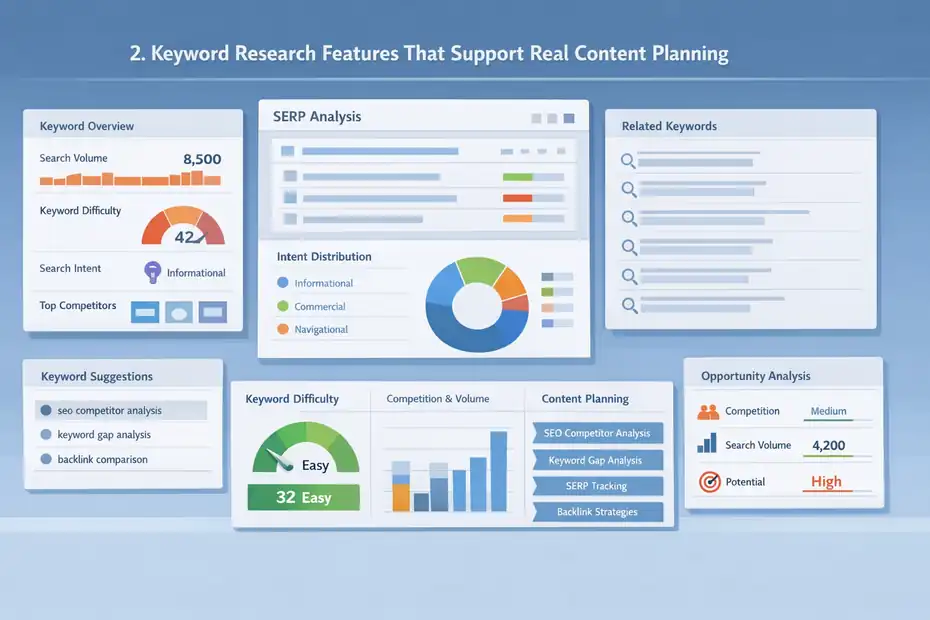
Keyword research is one of Serpstat’s strongest use cases because it helps you move beyond broad phrases and into actual content opportunities.
Instead of chasing random keywords, you can build pages around intent, difficulty, and relevance.
Keyword Overview And Search Intent Clarity
The keyword overview feature is where many users start. You enter a term and get a snapshot of the keyword’s search volume, difficulty, related phrases, and ranking pages. On the surface, that sounds standard. In practice, this is where you decide whether a keyword is worth your time.
Let me break it down for you. If you search a phrase like “serpstat features overview,” you are not just checking if people search it. You are looking for signals. Is the query informational or commercial? Are the top-ranking pages listicles, product pages, or tutorials? How hard will it be to compete? What related phrases should appear on the page?
That matters because keyword targeting is not about finding popular phrases. It is about matching the right page to the right intent. If the search results are full of comparisons and product-led guides, a vague blog post will probably struggle. Serpstat helps you see those clues faster.
In my experience, the smart move is to treat keyword overview as a filtering step, not a final answer. Use it to eliminate bad targets early, then validate strong ones through competitor pages and content structure.
Related Keywords, Search Suggestions, And Topic Expansion
One feature that becomes surprisingly useful over time is the related keywords and search suggestions area. This is where you can turn one seed keyword into a full content cluster.
Say you run a SaaS blog and start with a target like “SEO competitor analysis.” A single article might not be enough. You may also need supporting pages around keyword gap analysis, SERP tracking, backlink comparison, and site audit workflows. Serpstat helps surface these adjacent topics so your content strategy becomes more complete.
This matters for semantic SEO. Google rarely rewards pages that only repeat one exact phrase. Strong pages naturally cover related subtopics, entities, and user questions. When Serpstat shows keyword variations, question terms, and related phrases, it helps you build coverage around the topic instead of stuffing the same keyword over and over.
A practical approach is to separate findings into three groups: primary page target, supporting subtopics, and future standalone articles. That keeps your content plan organized. I suggest doing this before writing anything, because once you see the full topic map, it becomes much easier to create pages that feel comprehensive instead of thin.
Keyword Difficulty And Opportunity Prioritization
Keyword difficulty metrics are never perfect, and I think it is important to say that clearly. No SEO tool can fully predict how hard it will be for your specific site to rank. Still, Serpstat’s difficulty estimates are useful as directional signals.
The mistake many people make is assuming a low-difficulty keyword is automatically easy. It may still be dominated by highly relevant sites with strong internal linking and better content depth. On the other hand, some medium-difficulty keywords are more achievable than they look because the search results are weak, outdated, or poorly targeted.
This is where Serpstat becomes helpful when used with judgment. You can compare difficulty alongside volume, intent, and competing pages. That makes prioritization smarter. Instead of picking topics based only on search volume, you can choose opportunities where realistic ranking potential is higher.
For example, a new site might skip a broad keyword with huge volume and target a detailed variant with lower competition and stronger conversion intent. That usually leads to better early wins. I recommend using difficulty as one input among several, not the deciding factor.
Competitor Analysis Features That Reveal What Is Already Working
Competitor analysis is where SEO starts becoming less theoretical. Instead of asking what might work, you look at what is already ranking and reverse-engineer the logic behind it.
Serpstat gives you several ways to do that.
Domain Analysis And Organic Visibility Insights
Domain analysis lets you review a competitor’s keyword footprint, visibility trends, top pages, and general search performance. This is useful because most SEO growth comes faster when you study pages that already earn clicks in your niche.
Let’s say you manage a store selling ergonomic office equipment. You notice a competitor consistently ranking for commercial blog topics and category keywords. With domain analysis, you can identify which sections of their site drive visibility. Maybe it is not their homepage at all. Maybe their traffic comes from buying guides, comparison posts, or optimized collection pages.
This changes your strategy. Instead of blindly improving product pages, you may realize you need mid-funnel content to support them. That is the practical value of competitor visibility data. It shows where the growth is actually coming from.
I believe this feature is most powerful when you stop using it as a spying tool and start using it as a market research tool. The goal is not to copy another site. The goal is to see what the audience and search engine are already rewarding, then build something clearer, more useful, or more complete.
Competitor Keywords And Content Gaps
One of the most useful parts of any serpstat features overview is understanding how keyword gap discovery works. This is the feature that helps you find phrases your competitors rank for while your site does not.
That matters because missed keywords often reveal missed intent. Maybe your blog covers “on-page SEO” but ignores “SEO audit checklist.” Maybe your service page targets a broad phrase while competitors are attracting buyers through more specific intent-driven queries. Gap analysis surfaces those blind spots.
The best way to use this is not to export a giant list and write 200 thin posts. Instead, look for patterns. Are competitors winning with how-to content, comparison pages, glossary terms, or problem-solving pages? Are there commercial-intent keywords you have not addressed? Are there clusters around one subject where you only have one weak page?
A realistic workflow looks like this:
- Find overlapping competitor keywords.
- Filter for relevance and intent.
- Group them by topic cluster.
- Decide whether to create a new page, improve an existing one, or merge overlapping content.
That process gives you usable insight instead of data overload. In many cases, one strong content upgrade informed by keyword gaps can outperform ten rushed new posts.
Top Pages And Traffic Drivers
Top pages analysis helps you see which competitor URLs likely drive the most SEO value. This is one of my favorite features because it reveals what kind of content format is winning, not just which keywords are present.
For instance, if a competitor’s best-performing URLs are product comparisons, that tells you something very different than a site whose best URLs are educational tutorials. Searchers behave differently at each stage. Pages that rank well usually align closely with the intent behind the query.
I suggest looking at top pages with three questions in mind. First, what page type is ranking? Second, what promise does the headline make? Third, how broad or specific is the topic? This helps you understand content positioning, which is often more important than the raw keyword list.
Imagine two sites targeting similar phrases. One publishes general beginner guides. The other publishes precise, problem-focused content with stronger angles. The second often wins because it better matches search expectations. Serpstat helps you spot that difference faster.
Site Audit Features That Help You Catch Technical SEO Problems
Technical SEO can feel intimidating at first, but the real goal is simple: make your site easier for search engines to crawl, understand, and trust.
Serpstat’s site audit tools are built to surface the issues that might be slowing that down.
Crawl Diagnostics And Issue Detection
The audit feature scans your website and highlights technical issues such as broken links, duplicate metadata, redirect chains, missing headings, indexation concerns, and slow-loading areas. In plain language, it acts like a structured checkup for your site.
This matters because traffic losses are not always caused by weak content. Sometimes pages cannot be crawled properly. Sometimes your internal links are messy. Sometimes duplicate tags create confusion. A site audit helps you catch those problems before they quietly limit performance.
When I first started running technical audits years ago, I made the mistake many people make: I treated every warning like an emergency. That is exhausting and usually unnecessary. A better approach is to separate issues into three levels: blockers, important improvements, and nice-to-have cleanups.
For example, broken canonical logic or accidental noindex settings deserve immediate attention. Minor metadata inconsistencies may not. Serpstat helps surface both, but your job is to prioritize them correctly.
Health Score, Prioritization, And Fix Planning
Health scores are helpful because they compress a complex audit into one directional metric. They are not a perfect measure of SEO performance, but they are useful for monitoring technical improvement over time.
If your site health jumps from a low score to a stronger one after cleanup, that usually reflects real progress in crawlability and site structure. It also makes client communication easier if you work in an agency setting. People understand trend lines more easily than giant audit exports.
What I recommend is using the health score as a reporting signal, then using the actual issue list for implementation. That keeps expectations realistic. A better score does not automatically mean higher rankings tomorrow, but it often means your site is in a better position to perform.
Here is a simple planning framework:
- Fix first: Indexation errors, broken pages, redirect loops, canonical conflicts.
- Fix next: Duplicate tags, weak internal links, orphan pages, oversized media.
- Fix later: Minor formatting inconsistencies and low-impact warnings.
That order matters. Many of us waste time polishing details while bigger technical issues remain untouched.
Audit Reports For Ongoing Maintenance
A single audit is useful. Ongoing audits are where the long-term value appears. Sites change constantly. New pages get published, plugins update, redirects break, and technical debt builds up quietly. Serpstat helps you revisit site health on a routine basis instead of treating SEO as a one-time cleanup.
This is especially important for larger sites, blogs with frequent publishing, and e-commerce stores where product pages come and go. One small technical issue repeated across hundreds of URLs can become a serious crawl problem.
I suggest building a monthly technical review habit. Even a lightweight review can help you catch issues before they compound. Think of it like routine maintenance on a car. You do not wait for the engine to fail before checking the warning lights.
A realistic scenario: You redesign a blog category structure, traffic dips, and rankings slide. The content itself did not suddenly become worse. The problem might be internal linking, redirect confusion, or indexation. A fresh audit often exposes the cause much faster than guessing.
Rank Tracking Features That Show What Is Improving Or Slipping
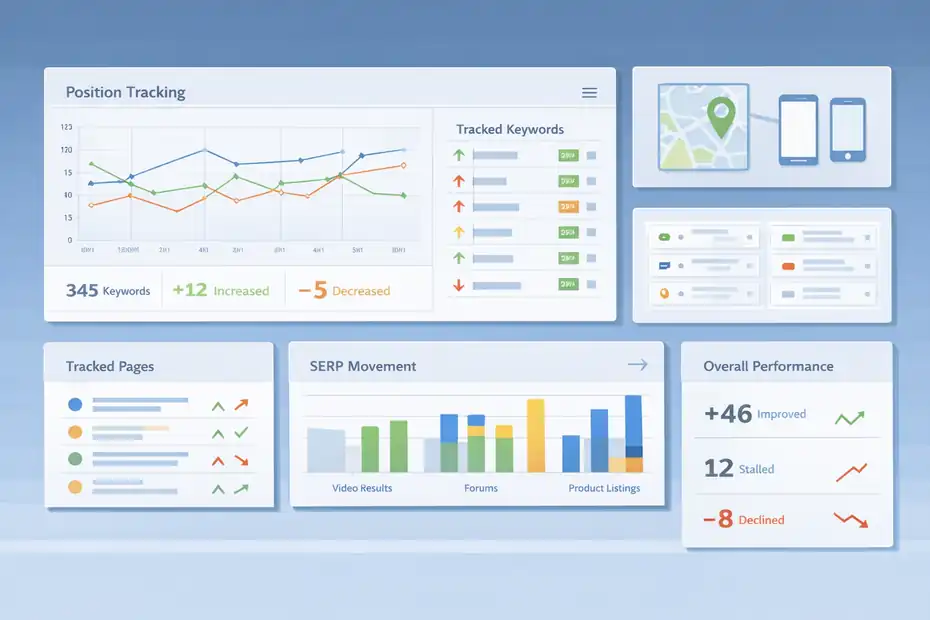
Rank tracking helps you measure movement over time. Not because rankings are the only KPI that matters, but because they show whether your content and technical work are pushing in the right direction.
Position Tracking And Keyword Monitoring
Serpstat’s rank tracking feature lets you monitor keyword positions across time so you can see gains, drops, and overall trends. This is more useful than checking search results manually because manual checks are inconsistent and often misleading.
The real strength of rank tracking is pattern recognition. If five target pages start climbing after internal linking updates, that is useful evidence. If rankings drop after a template change or migration, you have a clue about what caused it. Tracking turns SEO from guesswork into a system you can evaluate.
I always suggest organizing tracked keywords by page or intent. Grouping everything into one list becomes messy fast. For example, track blog keywords separately from category or service page keywords. That way, you can see which parts of the site are improving and which ones need more support.
A ranking report becomes much more valuable when tied to action. A page stuck in positions 8 to 12 may need content expansion, stronger links, or better alignment with intent. A page moving from 25 to 14 may simply need more time and reinforcement.
Location, Device, And SERP Movement Context
Rankings are not always universal. A keyword can perform differently by device or location, and this matters more than many beginners expect. Serpstat’s tracking becomes more useful when you remember that search visibility is not one static number.
For local businesses, location-level tracking can be essential. A plumber in one city does not care about ranking nationally for a broad term. They care about showing up where paying customers actually search. For content publishers, device trends can reveal whether mobile usability issues are hurting pages.
Another useful angle is movement context. Not every drop is a disaster. Sometimes a page falls because search intent shifted, the SERP changed format, or competitors published better content. Rank tracking helps you identify the movement, but interpretation still matters.
I recommend reviewing tracked keywords with intent changes in mind. If a page falls while video results, forums, or product blocks expand in the SERP, the issue might not be your copy alone. The search result environment itself may have changed.
Reporting Wins Without Cherry-Picking
Rank tracking is often where reporting goes wrong. It is easy to cherry-pick the best winners and ignore flat or declining pages. That creates false confidence and leads to bad decisions.
A stronger approach is to report rankings in context:
- How many tracked keywords improved overall.
- Which pages gained visibility.
- Which pages stalled.
- What changes were made.
- What the next action is.
That final point matters most. Rankings should lead to decisions. If a page climbed from position 18 to 9, maybe it is ready for a refresh that pushes it into the top 5. If it fell from 4 to 10, maybe competitors added clearer sections or richer media.
From what I’ve seen, the best SEO reporting is honest and directional. Serpstat gives enough tracking detail to support that kind of reporting when used thoughtfully.
Backlink Features And Why They Matter For Authority
Backlinks are still a meaningful signal in SEO because they often reflect trust, discoverability, and content worth referencing.
Serpstat includes backlink analysis features that help you evaluate link profiles and monitor authority trends.
Backlink Analysis And Referring Domains
The backlink module lets you inspect referring domains, new and lost backlinks, anchor patterns, and overall link profile direction. This matters because links are not just about quantity. Relevance, source quality, and link consistency matter much more.
A common beginner mistake is focusing on total backlink counts. That number can be misleading. One relevant link from a trusted site in your niche may matter more than dozens of weak directory listings. Serpstat helps shift the analysis toward patterns instead of raw totals.
For example, if a competitor is gaining links mostly to original research pages, that tells you something useful about what earns references in your niche. If your own link profile depends almost entirely on homepage links, you may need more link-worthy content deeper in the site.
I suggest reviewing backlinks with two questions in mind: Which pages attract links naturally, and which important pages lack support? That often reveals opportunities for digital PR, resource content, or internal linking support.
Lost Links, New Links, And Risk Awareness
Link profiles are not static. You gain links, lose links, and sometimes attract links you did not ask for. Serpstat helps you monitor those changes so authority shifts do not catch you off guard.
Lost links matter because they can reduce support for key pages, especially if the page depended on a small number of strong referring domains. New links matter because they may signal that content is gaining traction or brand visibility. Watching both helps you connect off-page activity to ranking movement.
There is also a defensive side to this. If a sudden wave of irrelevant or suspicious links appears, it may not be catastrophic, but it deserves a look. Most sites will never need to panic over every strange backlink, but awareness is still helpful.
Imagine you publish a data-driven blog post that starts earning industry mentions. Great. But if those links point to a page with weak internal support or unclear conversion paths, you may waste that momentum. Backlink tracking helps you notice attention, then strengthen the page while it is still gaining visibility.
Using Link Data Without Overcomplicating SEO
Backlink data can become a rabbit hole fast. I have seen people spend weeks analyzing links while ignoring weak page structure, poor intent matching, and thin content. That is backwards.
Serpstat’s backlink features are best used as support for a larger SEO strategy, not as a replacement for one. If your content does not deserve links, chasing links alone usually creates fragile results. If your site has technical problems, more links will not solve the root issue.
A practical order looks like this:
- Make the page genuinely useful.
- Ensure the page is crawlable and well linked internally.
- Compare its link profile with competing pages.
- Strengthen outreach or promotion only where a gap clearly exists.
That sequence keeps your energy focused on durable gains instead of vanity metrics.
Extra Tools, Workflow Benefits, And Where Serpstat Fits Best
Beyond its core SEO modules, Serpstat becomes most useful when you treat it as part of a workflow. The question is not just what features exist. It is how they fit together in daily use.
Workflow Integration Across Research, Audit, And Optimization
A strong SEO process usually follows a pattern: research opportunities, create or improve pages, fix technical obstacles, track outcomes, and repeat. Serpstat supports that loop reasonably well because its major tools connect to the same overall goal.
For example, you might start with competitor research to find keyword gaps, build a content brief around related phrases, publish the page, audit the site section for technical issues, and then monitor rankings. That is not flashy, but it is real SEO work. And it is where integrated platforms save time.
I believe this is one of the practical benefits that often gets missed in a basic serpstat features overview. People focus on individual tools, but the real value comes from reducing friction between steps. The easier it is to move from insight to action, the more likely you are to keep your SEO process consistent.
Comparison Table: Which Serpstat Features Help With Which Jobs
Here is a simple way to think about the platform.
| SEO Need | Serpstat Feature | Best Use Case | Why It Helps |
|---|---|---|---|
| Topic discovery | Keyword research | Planning new content | Finds target terms, variations, and intent clues |
| Competitor research | Domain and page analysis | Benchmarking against rivals | Reveals winning topics and content types |
| Technical cleanup | Site audit | Improving crawlability and health | Flags issues that block performance |
| Performance tracking | Rank tracker | Measuring page and keyword growth | Shows progress and declines over time |
| Authority research | Backlink analysis | Understanding link gaps and trends | Helps evaluate trust and off-page support |
| Ongoing strategy | Combined workflow | Managing SEO continuously | Connects research, fixes, and reporting |
That table is simple on purpose. Most SEO success comes from consistently doing basic things well.
Where Serpstat Feels Strongest And Where You Should Be Careful
No tool is perfect, and I think honest reviews are more useful than hype. Serpstat is strong when you want broad SEO coverage in one platform. It is especially helpful for content planning, competitor research, site auditing, and straightforward position monitoring.
Where should you be careful? First, do not treat any metric as absolute truth. Difficulty scores, visibility numbers, and backlink summaries are directional tools, not final judgments. Second, avoid feature overload. Just because the dashboard offers many reports does not mean you need all of them for every project.
In my experience, Serpstat works best when you already know the business goal. If your goal is clearer topic selection, use keyword and competitor tools heavily. If your goal is recovering lost traffic, audit and ranking features may matter more. If your goal is authority growth, backlink analysis becomes more important.
That is how you keep the platform useful instead of overwhelming.
Common Mistakes, Best Practices, And Advanced Ways To Use It
Once you understand the main tools, the next step is using them well. This is where a lot of people lose momentum. They gather reports, export spreadsheets, and never turn the data into decisions.
Common Mistakes New Users Make
The first mistake is trying to use every feature immediately. That usually leads to confusion, not clarity. A better path is to choose one priority: content planning, technical cleanup, or competitor analysis.
The second mistake is trusting metrics without checking the actual SERP. A keyword might look attractive in the dashboard but still be a poor target if the search results reveal different intent. The third mistake is focusing on volume over value. A lower-volume keyword with stronger buyer intent may be much more useful than a broad informational phrase.
Another common issue is failing to connect findings. Users often research keywords in one session, run audits in another, and track rankings later, but never tie those activities together. SEO improves faster when each step informs the next.
I suggest keeping a simple action log. Every time you use Serpstat, answer one question: what decision did this data help me make? That habit prevents reporting for reporting’s sake.
Best Practices For Getting More From The Platform
A smart workflow makes Serpstat far more effective. Here is a practical approach:
- Start with one page or one topic cluster.
- Use keyword and competitor research to define intent.
- Build or improve the page around that intent.
- Run an audit to catch technical obstacles.
- Track rankings for the target terms.
- Review backlinks only if competing pages clearly have stronger authority support.
This sequence helps you stay focused. It also mirrors how SEO really works. Rankings improve when relevance, usability, and authority reinforce each other.
I also recommend revisiting old content using Serpstat data. Some of the easiest SEO wins come from upgrading pages that already rank between positions 6 and 20. These pages often need clearer structure, broader topic coverage, stronger internal links, or better intent matching. They are usually closer to page one than brand-new articles.
Advanced Use Cases For Teams And Agencies
For larger teams, the platform becomes more valuable when used for repeatable systems. Agencies can compare competing domains, monitor multiple client projects, and turn audit findings into prioritized task lists. In-house teams can use it to coordinate content, SEO, and development work around shared data.
Here is a realistic agency scenario. A client says traffic has plateaued. Instead of guessing, you:
- Review ranking trends for core pages.
- Run a fresh audit to check technical health.
- Compare competitor top pages and gap keywords.
- Identify missed topic clusters and weak pages.
- Prioritize fixes based on impact.
That is not glamorous, but it is exactly how strong SEO work compounds.
For content teams, Serpstat can also help reduce random publishing. Instead of brainstorming topics in isolation, you can validate demand, cluster related terms, and build more strategic editorial calendars. Over time, that usually leads to stronger topical authority and less wasted effort.
Final Verdict: Which Serpstat Features Actually Help Most
The short answer is that the most helpful Serpstat features are the ones that support decisions, not just dashboards. Keyword research helps you choose better topics. Competitor analysis shows what is already working in your market.
Site audits reveal technical blockers. Rank tracking shows whether improvements are moving the needle. Backlink tools add useful authority context when you need it.
The Features Most Users Will Rely On
For most people, the daily value comes from four core areas: keyword research, competitor analysis, audits, and rank tracking. These are the features that directly support planning, publishing, troubleshooting, and measuring.
If you are a blogger or small business owner, keyword research and competitor analysis may give you the fastest return because they improve what you publish next. If you manage a larger site, audit and rank tracking often become more important because technical issues and content maintenance grow with scale.
I believe that is the clearest takeaway from any serious serpstat features overview: you do not need to master every report. You need to master the features that help you make better SEO moves consistently.
When Serpstat Is A Good Fit
Serpstat is a good fit when you want one platform that covers the core SEO workflow without overcomplicating things. It works well for content-led SEO, structured competitor research, recurring site audits, and rank monitoring across ongoing campaigns.
It is especially useful if you are building a process and want your research, tracking, and diagnostics in one place. That convenience matters more than people think. The easier it is to move from insight to implementation, the more likely you are to keep improving the site week after week.
The Practical Bottom Line
If I had to summarize it plainly, I would say this: Serpstat is most helpful when you treat it like an SEO operating system, not a magic ranking button. The platform will not replace strategy, judgment, or strong content. But it can absolutely make those things easier to execute.
And that is why the tools that actually help are not necessarily the flashiest ones. They are the ones that help you publish smarter pages, spot problems earlier, understand competitors better, and measure progress honestly. In real SEO work, that is what moves the needle.
FAQ
What is Serpstat and what does it do?
Serpstat is an all-in-one SEO platform that helps with keyword research, competitor analysis, site audits, rank tracking, and backlink analysis. It gives you data to improve rankings, find new content opportunities, and fix technical issues that may be limiting your website’s performance in search engines.
Which Serpstat features are most useful for beginners?
The most useful Serpstat features for beginners are keyword research, site audit, and rank tracking. These tools help you find what to write about, fix website errors, and monitor your progress over time without needing advanced SEO knowledge or complicated setups.
How accurate is Serpstat keyword data?
Serpstat keyword data is generally reliable for identifying trends, search volume, and competition levels. However, like all SEO tools, it provides estimates rather than exact numbers. It works best when used alongside real search results and competitor analysis for better decision-making.
Can Serpstat help improve website rankings?
Yes, Serpstat can help improve rankings by guiding better keyword targeting, identifying technical SEO issues, and tracking performance changes. It does not directly boost rankings, but it gives you the insights needed to make smarter SEO decisions that lead to growth over time.
Is Serpstat good for competitor analysis?
Serpstat is effective for competitor analysis because it shows which keywords competitors rank for, their top-performing pages, and traffic trends. This helps you discover gaps in your strategy and create content that better matches what already performs well in your niche.

I’m Juxhin, the voice behind The Justifiable.
I’ve spent 6+ years building blogs, managing affiliate campaigns, and testing the messy world of online business. Here, I cut the fluff and share the strategies that actually move the needle — so you can build income that’s sustainable, not speculative.
Related posts:
 How Good Is My Website SEO? Find Out Instantly!
 How to Improve SEO on Website for Top Google Rankings
 How To Track Seo Rankings Using Squirrly Accurately
 Semrush Not Showing Accurate Keyword Data Fix
 Engine Optimization Explained: Simple Guide for Beginners.
 Is the Squirrly SEO WordPress Plugin Enough to Rank?