
Table of Contents
Some links on The Justifiable are affiliate links, meaning we may earn a small commission at no extra cost to you. Read full disclaimer.
Spocket review honest pros and cons is exactly the kind of search you make when you do not want another fluffy “best dropshipping app” article.
You want to know whether Spocket is actually useful, how much it costs, where it helps, where it disappoints, and whether it fits your store in real life.
After digging through Spocket’s current pricing, help docs, Shopify App Store listing, and recent merchant feedback, my view is pretty simple: Spocket can be a strong option for certain stores, but it is not automatically worth it just because it promises faster shipping and better suppliers.
What Spocket Is And Who It Is Really For
Spocket is a dropshipping platform built to help store owners source products, import them into a store, and automate order handling without carrying inventory.
Its positioning is clear: curated suppliers, many in the US and EU, faster shipping than typical long-distance marketplaces, store integrations, branded invoicing, and automation features aimed at beginners and growing sellers.
What Spocket Actually Does In Plain English
If you are brand new to dropshipping, here is the simple version: you list products in your store first, then buy them from a supplier only after a customer places an order.
Spocket sits in the middle and tries to make that workflow easier by giving you a product catalog, product import tools, automated fulfillment, order tracking, and supplier communication in one dashboard.
Its official site says it offers a catalog of 100 million-plus products and highlights automation, no MOQs, and integration support across e-commerce workflows.
What matters more than the marketing, though, is how Spocket frames its edge. The big promise is not “more products.” It is better supplier geography and easier store operations. Spocket says 80% of its US and EU suppliers support faster, more reliable shipping, and that point is important because shipping speed is one of the biggest reasons dropshipping stores lose repeat buyers.
In my experience, this makes Spocket more appealing for store owners who care about delivery expectations, basic branding, and cleaner customer experience. It is less compelling for someone who only wants the absolute cheapest products and is happy to compete on price alone.
The Kind Of Seller Who Usually Gets The Most Value
Spocket tends to fit three store types best. First, it works for beginners who want an easier start than manually juggling suppliers, product pages, and fulfillment steps. Spocket explicitly markets itself as beginner-friendly and offers a free plan plus a 7-day trial on paid tiers, which lowers the barrier to testing it.
Second, it fits niche stores that sell products where perceived quality and shipping speed matter more than rock-bottom pricing. Think home decor, beauty accessories, pet items, or lifestyle products where a few extra dollars in margin is worth a better delivery experience.
Third, it can work for operators who want to test quickly without buying stock. Spocket’s no-MOQ positioning and product import workflow make it easier to test multiple SKUs without inventory risk.
Where I would be cautious is if you are building a heavy discount store. In that case, Spocket’s supplier quality angle may not offset the higher subscription cost and product costs you will likely run into.
What Search Intent This Review Needs To Solve
When people search for “worth it or not,” they are rarely asking only about features. They are asking five deeper questions: Will I make money with it? Will it save me time? Will shipping be good enough? Will support help me when something breaks? And will I regret paying for the plan?
That is why a proper Spocket review honest pros and cons article needs to go beyond the homepage highlights. Spocket has real strengths, especially around supplier location, branded invoices, order tracking, and automation.
But it also has recurring concerns around billing frustration, cancellation anxiety, and whether the catalog quality truly matches your niche and margins.
Those concerns show up in merchant reviews on the Shopify App Store and external review platforms, even while positive reviews praise product quality and shipping speed.
How Spocket Works From Product Sourcing To Fulfillment
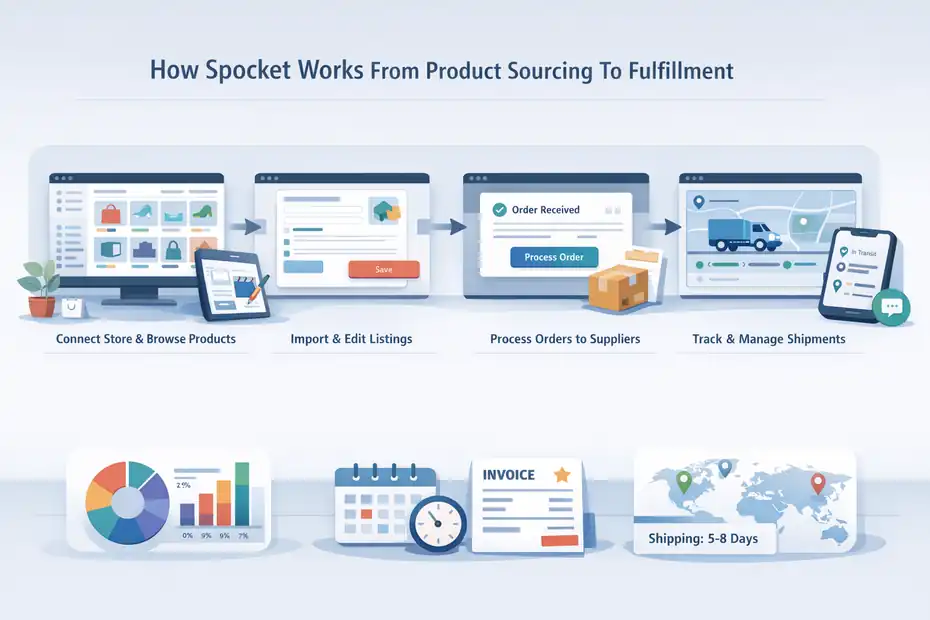
Spocket tries to compress the usual dropshipping workflow into one connected process.
Instead of finding items in one place, editing them in another, and manually passing orders to suppliers, you browse the catalog, import products, publish them into your store, and then route orders through Spocket when customers buy.
Step-By-Step: How A Typical Spocket Workflow Looks
Here is the normal flow most sellers follow:
- Step 1: Connect your store and browse products in the Spocket catalog.
- Step 2: Import selected products with one click and edit titles, descriptions, pricing, and imagery before publishing.
- Step 3: When an order comes in, process it through the dashboard and let the supplier fulfill it.
- Step 4: Track shipment progress inside the app and handle customer communication from that information.
That sounds standard, but the useful part is what Spocket does around the edges. It includes order status visibility, shipping-time detail at product level, and branded invoicing support, which can make a store feel less generic. Spocket also documents how merchants can inspect processing time plus shipping time together, instead of assuming delivery estimates.
I suggest paying close attention to that last point. A lot of beginners assume “US supplier” automatically means Amazon-like delivery. It does not. Spocket’s own help content makes clear that total delivery time includes both processing time and shipping time, and those vary by supplier and destination.
Supplier Location Matters More Than Most Beginners Think
One reason Spocket gets attention is its supplier-location pitch. On its site, it says 80% of its US and EU suppliers support faster and more reliable shipping, and the Shopify listing emphasizes suppliers from the US, Europe, Canada, Australia, Brazil, India, and more.
Why does that matter? Because the delivery promise on your product page is often the difference between a conversion and an abandoned cart. If a customer sees 6 to 10 business days instead of 15 to 30, your conversion rate usually has a better chance.
Spocket’s help center even gives an example where a product for a US customer could arrive in 6 to 10 business days once processing and shipping are added together.
That does not mean every supplier on Spocket is fast. It means you have a better chance of finding locally positioned supply than on marketplaces that lean heavily on long-distance shipping. In practice, I believe this is one of Spocket’s most legitimate advantages.
Where Automation Helps And Where It Does Not
Spocket promotes automated dropshipping, product import, tracking, and order management. For a solo operator, that can remove hours of repetitive work each week. It also supports things like bulk checkout on higher plans and multiple-store support on upper tiers.
Still, automation is not magic. It does not fix bad product selection, weak offers, poor branding, or bad customer expectations. If you pick generic products with thin margins, even a polished dashboard will not save the store.
I think this is where many reviews get lazy. They treat software convenience as business viability. Spocket can improve operations. It cannot create product-market fit for you.
Spocket Pricing: What You Pay And What You Actually Get
Pricing is where many store owners decide whether Spocket feels fair or expensive.
According to Spocket’s official pricing page, its current paid plans include Starter at $39.99 per month, Professional at $59.99 per month, Empire at $99.99 per month, and Unicorn at $299.99 per month on monthly billing.
Its pricing page also shows annual options, including Starter at $24, Professional at $39, Empire at $57, and Unicorn at $79 per month when billed annually.
Spocket also advertises a 7-day trial on paid tiers and shows a free plan on the Shopify App Store listing.
The Main Pricing Tiers Without The Marketing Spin
Here is the practical read on the plans:
- Free: Good for seeing the interface and basic setup, but not enough to run a serious store long term. Shopify’s listing confirms a free plan is available.
- Starter ($39.99/month): Includes 0% transaction fee, a large catalog, 25 unique products on Spocket’s pricing page, and core support. Shopify’s app listing also highlights 7+ million US/EU products, unlimited orders, image search, and AliExpress dropshipping for Starter.
- Professional ($59.99/month): Adds more product capacity and more advanced operating features.
- Empire ($99.99/month): Adds features like chat with suppliers, branded invoice, VIP chat support, eBay dropshipping, Amazon dropshipping, academy access, unlimited orders, and bulk checkout.
- Unicorn ($299.99/month): A high-end tier aimed at larger operators, with higher product limits and multiple-store support.
The thing I would not ignore is that Spocket’s public plan descriptions differ a bit between pages. For example, the official pricing page and Shopify App Store listing describe some limits and included features differently. That is not automatically a red flag, but it is a sign you should verify the live plan details inside checkout before paying.
Is Spocket Expensive For What It Does
For a true beginner, yes, it can feel expensive fast. A $39.99 monthly starting plan is not outrageous for commerce software, but it is high if your store has not proven product demand yet. Add your theme, apps, ad testing, and sample orders, and your monthly cost stack grows quickly.
Where the price starts making more sense is when faster shipping and better customer experience improve your margins or repeat purchase rate. Imagine two stores selling similar products. Store A gets cheaper sourcing but 15- to 20-day delivery.
Store B pays more per month for a platform that helps it source products delivering in 6 to 10 business days. If Store B reduces complaints and refunds enough, that higher software cost may pay for itself.
Spocket’s own help docs show that some listings can hit that 6- to 10-day example window for US customers.
I believe that is the real pricing question: not “Is this cheap?” but “Does this improve unit economics enough to matter?”
The Billing Risk You Should Take Seriously
Spocket’s refund policy states that subscriptions auto-renew unless you cancel at least 24 hours before renewal, and cancellation is done through account settings. Its help center also explains the cancellation flow inside the app.
That sounds normal on paper. The reason it matters in this review is that billing frustration shows up repeatedly in negative merchant feedback, including complaints about unexpected charges, cancellation issues, and refund disputes on review pages.
Shopify App Store reviews include one-star complaints about users being charged after thinking they were on a free version, and Apple App Store feedback also includes refund-related criticism.
My advice here is simple: iIf you test Spocket, document your trial start date, renewal date, and cancellation confirmation. Do not rely on memory. That one habit can prevent the most common regret I saw in user complaints.
The Honest Pros Of Spocket
This is the part where Spocket deserves credit. It is easy to find negative comments online for almost any ecommerce tool, but that should not erase real strengths. Spocket has several.
Pro 1: Better Supplier Geography Than Many Low-End Alternatives
Spocket’s strongest selling point is still supplier location. Its site emphasizes US and EU suppliers, and its Shopify listing also references suppliers across other regions like Canada, Australia, Brazil, and India.
For merchants selling to Western markets, that geography often translates into better delivery expectations and easier positioning than generic long-distance sourcing.
This matters more than people admit. Customers do not always ask where a product ships from, but they absolutely feel the difference when delivery takes a week instead of three. Faster shipping also gives you more freedom in your product page copy, email flows, and customer support promises.
In many stores, the product itself is not unique. The experience is. If Spocket helps you create a smoother experience, that becomes a real competitive edge.
Pro 2: Easier Store Operations For Beginners
Spocket is clearly designed to reduce friction for first-time sellers. It markets one-click product import, automated fulfillment, order tracking, no minimum order quantities, and beginner-friendly setup. Its help center also explains shipping, tracking, branded invoicing, and claims processes in fairly accessible language.
That matters because beginners do not fail only from bad products. They fail from operational overload. When you are trying to learn store design, pricing, offers, copywriting, and ad testing all at once, operational simplicity is valuable.
A realistic example: Imagine you are running a pet niche store after your day job. If you can import a product quickly, see delivery timing, send branded invoices, and track order status without hopping across multiple disconnected systems, you are far less likely to make avoidable mistakes. That alone can justify the platform for some people.
Pro 3: Branded Invoicing Helps You Look Less Generic
Branded invoicing is not glamorous, but it matters for trust. Spocket explains that branded invoices let you customize the invoice customers receive, and its materials position this as a way to showcase your brand. It also notes that certain costs, like shipping or customs and duties, are not currently added to the branded invoice.
Why is this useful? Because unbranded fulfillment is one of the fastest ways to make a store feel like a random middleman. A branded invoice will not fully white-label the experience, but it can make the order feel more cohesive.
I would not oversell this feature, though. It is a nice trust enhancer, not a miracle brand-builder. Customers care more about product quality, delivery, and support than invoice styling. Still, if you want your store to feel more polished, it helps.
Pro 4: Positive Merchant Feedback Often Focuses On Shipping And Ease Of Use
Spocket’s Shopify reviews include recent positive feedback praising the app’s interface, dependable suppliers, smooth fulfillment, and strong shipping times. On January 5, 2026, one review specifically described Spocket as intuitive and praised order fulfillment and shipping speed.
This lines up with Spocket’s own positioning, which is useful because it shows at least some real-world overlap between the promise and merchant experience.
I always look for that. If a tool claims speed but users only talk about support tickets, that is telling. Here, at least some users are saying the shipping angle is genuinely helpful.
The Honest Cons Of Spocket
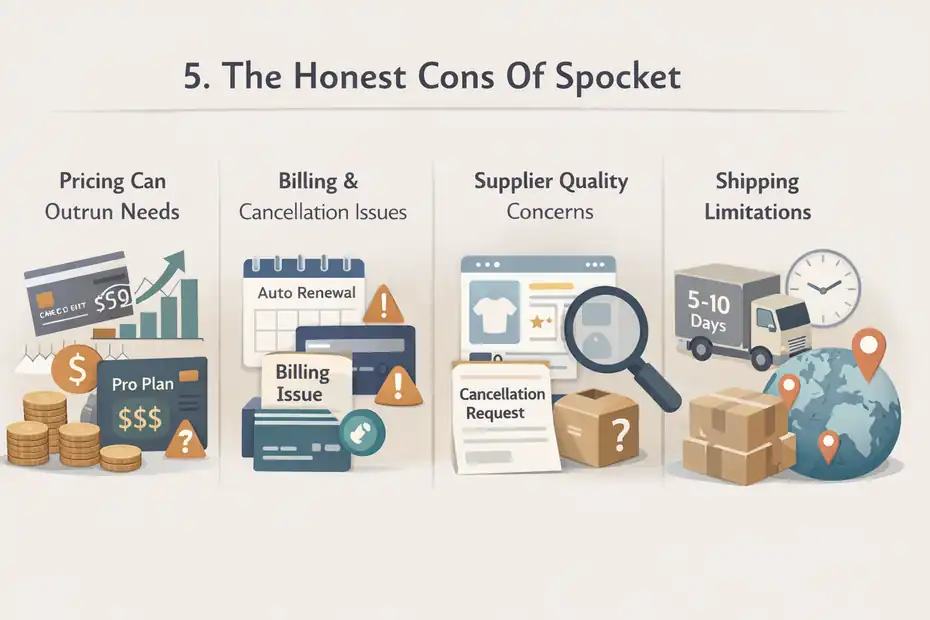
Now for the part many review pages soften too much. Spocket is not a slam-dunk for everyone, and some of the downsides are significant depending on your business model.
Con 1: Pricing Can Outrun A Beginner’s Actual Needs
The first con is straightforward: Spocket can become expensive before you have revenue consistency. The jump from free access to a meaningful paid plan is not tiny, especially if you are still testing your niche. Monthly pricing starts at $39.99 on Starter and goes much higher for Empire and Unicorn.
That is manageable for an established store. For a new seller, it can become just another recurring cost layered on top of ad spend, store software, and sample purchases.
I suggest being brutally honest with yourself here. If you have not validated at least one product angle or content channel, do not pretend premium software will solve a demand problem.
Con 2: Billing And Cancellation Complaints Show Up Too Often
This is the biggest warning sign I found. Spocket’s official refund policy says subscriptions auto-renew unless canceled 24 hours before renewal, and its help center says cancellation happens through settings.
That policy is clear enough. The issue is that public complaints repeatedly mention surprise charges, cancellation confusion, and refund frustration.
To be fair, every SaaS platform gets billing complaints. But when similar complaints appear across multiple review sources, I think it deserves real attention.
That does not automatically mean you will have the same experience. It does mean you should approach the trial carefully, save screenshots, and verify cancellation status instead of assuming it worked.
Con 3: Supplier Quality Still Requires Filtering And Judgment
Spocket’s catalog size is huge, but a massive catalog is not the same thing as a curated set of winners. Even if the platform highlights premium products and better suppliers, you still need to judge margins, product-page quality, shipping windows, and fit for your audience.
Here is the trap: beginners often equate “lots of products” with “easy business.” In reality, more catalog volume can create more bad choices. You can still end up listing overused items, bland products, or products with pricing that leaves too little room for profit after ads, refunds, and support.
Spocket can reduce sourcing friction, but it cannot replace product judgment. That is still on you.
Con 4: Fast Shipping Is A Relative Advantage, Not A Universal Guarantee
Spocket’s core promise is stronger shipping through supplier location, but its own help docs also make clear that shipping times depend on the specific product, destination, processing time, and supplier. It even instructs merchants to add processing and shipping days together for the real delivery window.
That is a subtle but important reality check. Spocket may be faster than some alternatives, but it is not Amazon Prime. If you market products with unrealistic delivery expectations, customer disappointment will still land on you.
I believe this is where a lot of sellers misread the value proposition. Spocket can improve your odds of acceptable delivery. It does not erase logistics complexity.
Setting Up Spocket The Right Way So You Do Not Waste Money
If you decide to test Spocket, setup discipline matters. A sloppy trial usually leads to the wrong conclusion.
Either you overpay because you did not cancel on time, or you blame the platform when the real issue was poor product selection.
A Smart Beginner Setup Process
This is the setup path I would recommend:
- Step 1: Start on the free plan or trial and do not upgrade emotionally.
- Step 2: Narrow your store to one niche and 10 to 20 products max.
- Step 3: Check each product’s processing plus shipping window before importing. Spocket explains how to inspect that detail.
- Step 4: Rework titles, descriptions, and pricing instead of publishing raw imports.
- Step 5: Test branded invoicing only if it supports a real store identity.
I recommend this because too many new store owners treat a catalog like a buffet. They import 80 products, never build a clear offer, then decide “Spocket doesn’t work.” Usually, that is not a platform problem. It is a merchandising problem.
What To Check Before You Publish Any Product
Before any product goes live, I would verify four things: actual landed margin, realistic delivery promise, visual uniqueness, and return risk.
Spocket provides shipping and order-management visibility, and its help center outlines claims, refunds, and return steps, including the need for a tracking number in many refund situations.
That matters because some products look profitable until returns and support costs show up. A product with a nice markup but high defect risk is usually not worth the headache.
One hypothetical example: A low-cost home gadget may have a 3x markup, but if it arrives damaged or causes repeated “where is my order?” emails, your effective profit drops hard. Spocket’s order tracking tools help, but they do not eliminate bad product economics.
The Trial Mistakes That Hurt Beginners Most
The biggest mistakes I see are predictable. One, starting the trial without noting the renewal date. Two, assuming all US or EU suppliers are fast enough. Three, importing too many products.
Four, paying for a high-tier plan before revenue justifies it. Five, expecting the app to substitute for strong product positioning.
Spocket gives you infrastructure. Your store still needs a reason to exist.
Advanced Optimization: How To Decide If Spocket Is Worth It For Your Store
Once your store is running, the question becomes less emotional and more financial.
At that point, “worth it” should mean measurable performance, not just whether the dashboard feels convenient.
The Metrics I Would Watch First
If you want an honest evaluation, track these:
- Conversion rate: Does the promise of faster shipping improve checkout behavior?
- Refund and complaint rate: Are customers less frustrated than with slower alternatives?
- Average order value: Does a more premium supplier base support slightly higher pricing?
- Repeat purchase rate: Do better experiences create more second orders?
- Support load: Are you spending less time explaining delays?
Imagine you move from a slower supplier network to Spocket and your refund rate drops from 6% to 3%, while support tickets about shipping fall by a third. Even if the software fee is higher, those improvements may make the platform worth it.
That is the lens I recommend: operational impact, not feature count.
When Spocket Usually Becomes Worth The Cost
From what I have seen, Spocket starts making more sense when at least one of these is true. You already have traffic and need cleaner operations. Your niche benefits from shorter delivery expectations.
Your audience is willing to pay more for a better buying experience. Or your current supplier setup is creating so much friction that the time savings alone justify the fee.
It usually makes less sense when you are still in pure experimentation mode, selling highly commoditized products, or competing only on price.
That may sound obvious, but it is the difference between software that supports a strategy and software that becomes a distraction.
Scaling With Spocket Without Overcommitting
If your store does start working, scale gradually. Spocket’s upper plans add things like branded invoicing, supplier chat, multiple-store support, bulk checkout, and broader capacity. Those are useful, but only when you have enough order volume to benefit from them.
I would not jump to Empire or Unicorn just because the names sound bigger. Upgrade when a missing workflow feature is slowing you down, not when hope tells you more software will create growth.
Final Verdict: Is Spocket Worth It Or Not?
Spocket can be worth it, but only for the right type of store owner. If you care about supplier geography, faster shipping potential, easier operations, branded touches, and a more polished customer experience, it has real value.
Its official materials and Shopify listing support that positioning, and recent positive merchant feedback does echo those strengths.
At the same time, this is not a no-risk recommendation. Pricing is meaningful for beginners, shipping still varies by supplier and destination, and billing complaints deserve caution.
Spocket’s own policy confirms auto-renewal and cancellation rules, and public user feedback shows that some merchants have been unhappy with how billing and refunds played out in practice.
My honest take is this: Spocket is not “the best dropshipping app” in some universal sense. It is best for sellers who want a cleaner, somewhat more premium operating model than bargain-basement dropshipping tools usually provide. If that is your goal, testing it carefully can make sense. If you are still looking for your first winning product and trying to keep costs as low as possible, I would be more cautious.
So, is Spocket worth it or not? Yes, for a store that values shipping experience, operational simplicity, and brand presentation enough to justify the cost. No, if you are hoping software alone will compensate for weak product selection, thin margins, or poor business basics. That is the most honest answer I can give.
FAQ
What is Spocket and how does it work?
Spocket is a dropshipping platform that connects your store to suppliers, mainly in the US and EU. You import products, list them in your store, and when customers order, suppliers ship directly to them. It helps automate sourcing, fulfillment, and tracking in one dashboard.
Is Spocket worth it for beginners?
Spocket can be worth it for beginners who want an easier setup and faster shipping options. However, the monthly cost can feel high if you are still testing products. It works best if you already have a niche idea and want to improve operations.
What are the main pros of using Spocket?
The main advantages of Spocket include access to US and EU suppliers, faster shipping compared to many alternatives, branded invoicing, and simple automation tools. These features help improve customer experience and reduce operational work for store owners.
What are the biggest cons of Spocket?
The biggest downsides include relatively high monthly pricing, recurring billing concerns, and the need to carefully choose products from a large catalog. Shipping is not always fast for every product, and beginners may struggle if they rely only on the platform.
How does Spocket compare to other dropshipping platforms?
Spocket focuses more on supplier quality and shipping speed, while many alternatives focus on cheaper product sourcing. This makes Spocket better for stores prioritizing customer experience, but less ideal for sellers competing mainly on low prices.

I’m Juxhin, the voice behind The Justifiable.
I’ve spent 6+ years building blogs, managing affiliate campaigns, and testing the messy world of online business. Here, I cut the fluff and share the strategies that actually move the needle — so you can build income that’s sustainable, not speculative.
Related posts:
 Can You Make Money With Spocket Or Is It Overhyped?
 The Best Way to Start Dropshipping With Little to No Money
 Salehoo Directory Free: What You Can Access Without Paying
 How the Salehoo Catalog Helps You Spot Winning Items Quickly
 Salehoo Products List That Helps You Find Winning Items Fast
 How to Use SaleHoo for Dropshipping and Pick Fast-Selling Items