
Table of Contents
Some links on The Justifiable are affiliate links, meaning we may earn a small commission at no extra cost to you. Read full disclaimer.
Switching to Monday from Trello what to expect is something I remember wondering about the first time I outgrew simple boards and needed something more structured.
At first, it felt like just another tool switch—but it quickly became clear that this move changes how you organize, track, and think about work entirely. If you’re considering the same move, you’re probably asking whether it’s worth it, what will break, and what will actually improve.
Let me walk you through exactly what happens before, during, and after you make the switch—so you can move with confidence, not guesswork.
What Actually Changes When You Move From Trello To Monday
Switching to monday from trello what to expect is not just a question about importing cards. It is really a question about changing how your team thinks about work.
Trello is built around boards, lists, and cards. monday.com is built around workspaces, boards, groups, items, columns, views, and dashboards. That sounds like a small vocabulary shift, but in practice it changes how you organize projects, report on progress, and automate repetitive work.
Monday.com also supports a broader hierarchy, including workspaces, folders, boards, items, and even multiple levels of subitems, which is a major difference if your Trello setup has become hard to scale.
Your Team Will Move From Card-Centric Thinking To Data-Centric Thinking
In Trello, most teams think in cards first. A card is the task, the discussion thread, the checklist, and often the mini project. That is simple, which is why Trello is easy to love at the start.
In monday.com, the task still matters, but the real power comes from columns. You do not just track a task name. You track owner, status, due date, priority, timeline, dependencies, effort, budget, and custom fields in a structured way.
That structure is what makes dashboards, reporting, formulas, automations, and cross-team visibility much easier later.
I believe this is the biggest mental adjustment. If your team currently relies on “we just know what this card means,” monday will force you to define your workflow more clearly. That can feel like more work during setup, but it usually pays off fast once the board starts doing part of the management for you.
A simple example: In Trello, a marketing card might sit in “In Progress” with a due date and a checklist. In monday.com, the same work item can show campaign owner, channel, approval status, publishing date, asset link, budget, and timeline on one row. That is far better for reporting and handoffs.
Expect More Visibility, But Also More Setup Decisions
Trello is forgiving. You can make a board quickly and just start moving cards. monday.com gives you more options, which is great once you know what you are doing, but it also means you need a stronger structure before rollout.
Here is the tradeoff I suggest you prepare for:
- Trello advantage: Faster to start, lighter to maintain for very small teams.
- Monday advantage: Better for multi-step workflows, reporting, workload planning, and standardized operations.
- Risk during migration: Teams sometimes overbuild their monday account and create too many columns, views, and automations too early.
- Better approach: Rebuild only the workflows you actually use every week.
From what I have seen, the smoothest migrations happen when teams do not try to recreate Trello exactly. They translate the intent of the workflow, not the old interface. That usually means keeping the board simple at first and adding advanced features only after week two or three.
The Upgrade Is Usually About Scale, Not Just Features
A lot of teams think they are moving because monday has “more features.” That is true, but the deeper reason is often that Trello starts feeling too flat once work becomes cross-functional.
Trello does offer additional views like Timeline, Table, Dashboard, and Workspace views depending on plan level, so it is not fair to call it only a Kanban tool anymore. But monday.com still leans much harder into structured operational management, multi-board dashboards, and customizable workflows.
Trello’s Workspace views cover table and calendar across boards, while monday dashboards can combine data from multiple boards and support more than 30 widgets, giving a broader control center feel.
If you manage client delivery, product launches, campaign pipelines, approvals, or team workload across departments, monday usually feels like a step up. If you only need a visual task board for a tiny team, the move may feel less dramatic.
How Trello Concepts Map To Monday.com
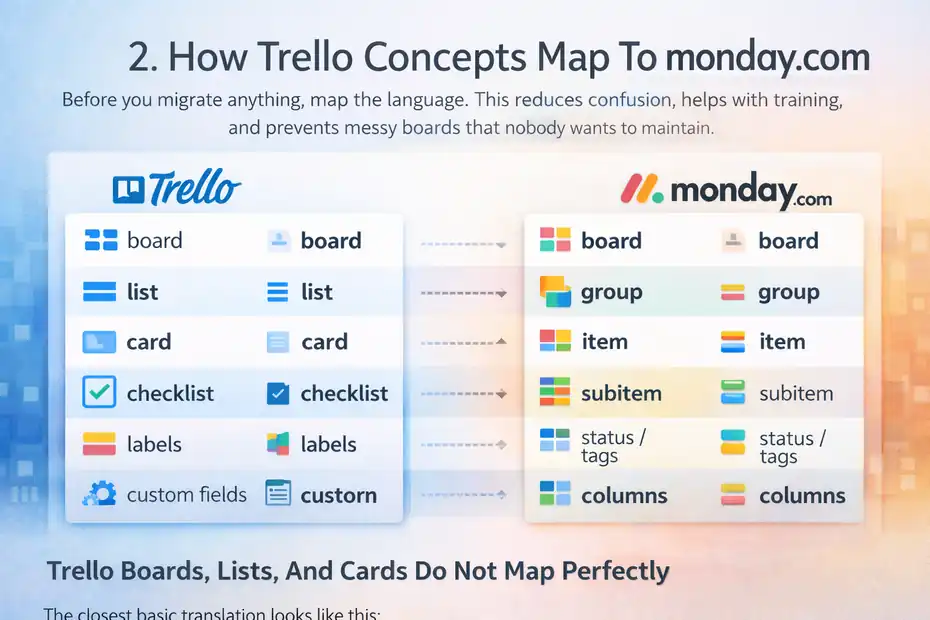
Before you migrate anything, map the language. This reduces confusion, helps with training, and prevents messy boards that nobody wants to maintain.
Trello Boards, Lists, And Cards Do Not Map Perfectly
The closest basic translation looks like this:
- Trello board = monday board, in the loose sense that both hold a set of related work.
- Trello list = monday group, if you use lists mainly as workflow stages or categories.
- Trello card = monday item, meaning one task, project, lead, request, or record.
- Trello checklist item = monday subitem, or sometimes a separate board if the checklist is complex.
- Trello labels = monday status, dropdown, or tags, depending on how you use them.
- Trello custom fields = monday columns.
That mapping is useful, but it is not perfect. In Trello, lists often act as status. In monday, status usually belongs in a Status column, not as separate groups. That change alone makes automations and reporting easier because one item can move through statuses without losing its board position logic.
For example, if your Trello board has lists like Backlog, Doing, Review, Done, you might be tempted to recreate those as groups. I usually recommend keeping groups for larger categories such as sprint, client, team, or month, and using a Status column for workflow stage. That gives you cleaner filters, charts, and automations later.
monday’s Hierarchy Feels More Operational
Monday.com uses a broader structural hierarchy with workspaces at the top, then folders, boards, dashboards, and docs within them. This makes it easier to separate teams, departments, or business functions without turning everything into one giant board.
That matters because many Trello teams end up with one of two problems. Either they have too many boards and no unified reporting, or they cram too much into one board because cross-board visibility is weak. monday gives you a better middle ground.
I suggest thinking in layers:
- Workspace = Department or business area.
- Board = Operational system, project area, or pipeline.
- Group = Phase, team bucket, client segment, or time period.
- Item = Single work unit.
- Column = Data you want to sort, filter, automate, or report on.
Once you see monday this way, the platform stops feeling like “Trello with extra stuff” and starts feeling more like a work operating system.
Checklists And Subtasks Need Special Attention
This is one of the most important migration decisions. In Trello, checklists are lightweight and easy. Many teams use them for everything from quality control to subtasks to recurring processes.
In monday, you have more choices. A former checklist can become a subitem, a status checklist pattern, or even its own linked board if the work needs ownership, dates, and reporting. Monday now supports up to four levels of hierarchy on regular boards through multiple levels of subitems, which is a meaningful advantage for more complex project structures.
My advice is simple: If the checklist item has an owner, deadline, dependency, or business consequence, make it more than a checkbox. That is where monday becomes more valuable than Trello. But if it is just “proofread copy” or “attach invoice,” keep it light. Not every step needs enterprise-grade structure.
What The Import Process Looks Like In Real Life
This is the part most people worry about first. The good news is that monday.com does provide a native Trello import path.
The less-good news is that migration success depends on how clean your Trello data is before you begin.
monday Has A Native Trello Import Option
Monday’s support documentation shows that you can import from Trello by going to your profile picture, choosing Import data, selecting Trello, and connecting your Trello account. Monday also offers a Trello integration in its automation center for ongoing workflows between the platforms.
That means you have two distinct paths:
- One-time migration: Use the Trello importer.
- Temporary coexistence: Use the Trello integration while you phase teams over.
I recommend deciding this before you touch production data. If your team is moving all at once, import is enough. If some departments will stay in Trello for a few weeks, a transition period with limited integration can reduce chaos.
One more practical note: the cleaner your Trello boards are, the better your import will feel. Archived cards, inconsistent labels, old checklist junk, and duplicate members create migration noise fast.
Expect To Clean Data Before And After Import
No migration tool fully solves messy source data. In Trello, this usually shows up as old cards, labels that mean different things on different boards, cards with no owner, and checklists used for wildly different purposes.
Trello Premium users can export board data as CSV, and Premium Workspace admins can export workspace data in CSV and JSON, including raw attachments. That makes pre-migration auditing much easier if you want to review structure before importing into monday.
Here is the cleanup sequence I suggest:
- Step 1: Archive dead cards and stale boards.
- Step 2: Standardize labels and member assignments.
- Step 3: Decide which checklists become subitems versus notes.
- Step 4: Remove “junk lists” that only existed for visual convenience.
- Step 5: Identify fields you want to report on later, then build those as monday columns.
This sounds boring, but it is the difference between “monday is amazing” and “why is this board a mess?”
Some Data Will Need Manual Restructuring
This is where expectations matter. A platform migration is rarely a perfect mirror copy. Even if cards come over, that does not mean your process is already optimized for monday.
In real teams, the post-import work often includes renaming groups, converting labels into proper status columns, restructuring checklists, rebuilding automations, and creating dashboards from scratch. That is normal.
I would go in assuming this: the importer gives you a head start, not a finished system.
That is especially true if your Trello setup depends heavily on Butler logic, card comments as operating notes, or card covers and attachments as workflow cues. You may keep the raw information, but you will still need to redesign how the workflow behaves inside monday.
Features You Will Probably Gain After The Move
This is usually the exciting part. If your team has hit Trello’s ceiling, monday often feels like someone finally turned the lights on.
Reporting Becomes Easier And More Useful
One of the biggest practical upgrades is reporting. Trello does offer Dashboard, Table, Timeline, and Workspace views on supported plans, and those features are useful.
But monday pushes much further into structured analytics because the platform is designed around columns, board relationships, widgets, and dashboards.
Trello’s Dashboard view focuses on due dates, workload, and card distribution, while monday dashboards let you combine multiple boards and use over 30 widgets to track progress, budget, workload, timelines, and more.
That matters because reporting is where simple Kanban systems often start breaking down. You can manage work visually in Trello, but once leadership asks questions like:
- How many requests are stuck in approval?
- Which team member is overloaded this month?
- What is the average cycle time by client?
- Which projects are at risk this week?
monday answers those more naturally if your board is set up well.
In my experience, this is the point where managers become your biggest internal champions. The team may care about usability, but leadership cares about visibility.
Views Feel More Like Decision Tools
Monday supports a wide range of board views, and recent support documentation highlights Table, Gantt, Calendar, Chart, Numbers, and other widgets, plus dashboard-level timeline visibility across boards. The Gantt and Timeline features are especially useful if your team plans against real dates and dependencies.
Trello also has Timeline, Table, Dashboard, and Workspace views, so the difference is not that Trello has none. The difference is how central those views feel to day-to-day planning. monday tends to make those views part of the workflow, not just alternate ways to look at the same cards.
Imagine you run client onboarding. In Trello, you may have cards moving through lists with due dates attached. In monday, you can see the same onboarding work as a table, a date-based timeline, a workload dashboard, and a higher-level executive summary without rebuilding the whole system.
That is a real upgrade when your work depends on coordination, not just task capture.
Complex Workflows Become More Maintainable
Trello is excellent for simple movement logic: when a card moves, when a due date arrives, when a checklist changes. Trello automation remains powerful, and Atlassian’s docs say most things you can do in Trello can be automated.
But monday’s structure often makes advanced workflows easier to maintain because triggers and actions are tied to richer field data across boards and items.
This matters more than people expect. In Trello, a clever board can become too clever. It works beautifully until the one person who built it goes on vacation.
With monday, you can create more transparent operational logic because the system is more explicit. Status changes, owner assignments, dates, mirrored data, dependencies, and connected boards all work together in ways that are easier to explain to the next admin.
That does not mean monday is always simpler. It means it is often easier to scale without relying on tribal knowledge.
What You Might Miss From Trello
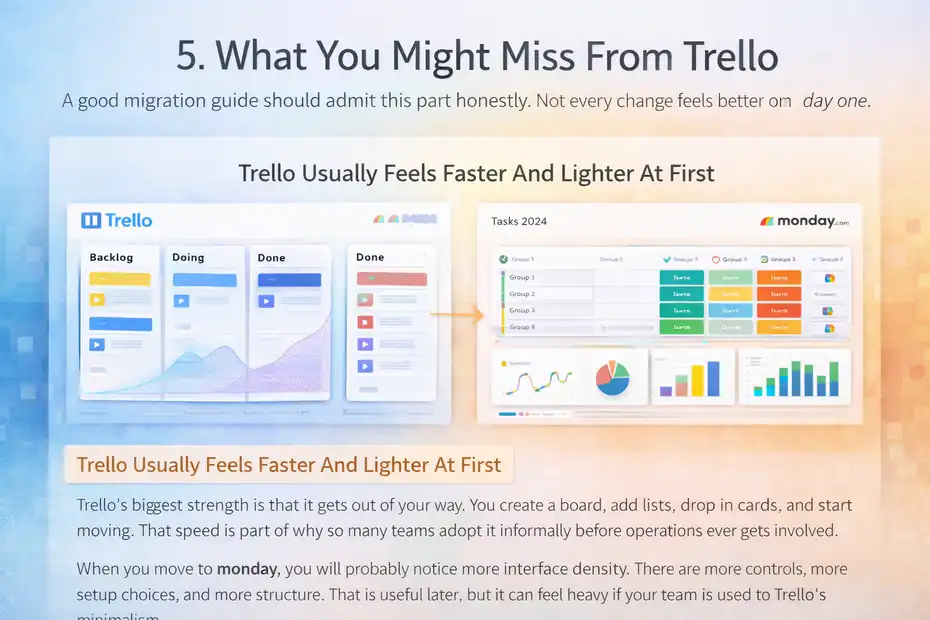
A good migration guide should admit this part honestly. Not every change feels better on day one.
Trello Usually Feels Faster And Lighter At First
Trello’s biggest strength is that it gets out of your way. You create a board, add lists, drop in cards, and start moving. That speed is part of why so many teams adopt it informally before operations ever gets involved.
When you move to monday, you will probably notice more interface density. There are more controls, more setup choices, and more structure. That is useful later, but it can feel heavy if your team is used to Trello’s minimalism.
I suggest preparing your team for this emotionally, not just technically. The first reaction may be, “Why is this more complicated?” A fair answer is, “Because it can do more, and we are going to use that extra power carefully.”
If you frame it that way, resistance usually drops.
The Kanban Simplicity Is Hard To Replicate Perfectly
Yes, monday supports board-style workflows. But Trello’s card-and-list interaction still feels uniquely clean for pure visual task movement. That matters for creative teams, editorial pipelines, and small operations that live almost entirely in status-based flow.
If your team mainly wants to drag cards across a simple board and have lightweight conversations, monday may feel like a stronger engine than you strictly need.
This does not mean the move is wrong. It means you should preserve simplicity wherever possible. Do not turn every board into a spreadsheet with colors.
A good rule is this: if a column is not helping someone decide, automate, filter, or report, do not add it.
Certain Trello Habits Need To Be Unlearned
The habits that often cause trouble after migration include:
- Using visual position as the main source of truth.
- Storing key process steps only inside checklists.
- Letting labels mean different things on different boards.
- Running approvals through comments only.
- Treating one card as a whole project even when multiple owners are involved.
These habits work in Trello longer than they should because Trello is forgiving. monday exposes those habits quickly because the platform is built to structure work more explicitly.
That can feel annoying at first. But honestly, it usually reveals process debt that needed fixing anyway.
Pricing, Plans, And Cost Expectations Before You Switch
Budget matters, and this is one area where teams sometimes get surprised. The move is not just about software price. It is about what features your process actually needs.
monday And Trello Price Work Differently In Practice
As of the current pricing pages, Monday.com Work Management lists a Free plan with up to 2 seats and 3 boards, then paid tiers including Basic at $9 per seat per month billed annually, Standard at $12, and Pro at $19, with Enterprise priced separately.
Monday’s support center also notes four paid plans for Work Management: Basic, Standard, Pro, and Enterprise.
Trello’s pricing page lists Free, Standard, Premium, and Enterprise plans, while Atlassian support notes that Standard workspaces can use up to 1,000 automation runs per month.
What matters more than sticker price is this: many teams pay for monday because it can replace a patchwork of reporting, intake, coordination, and visibility gaps. If you are only comparing “board for board,” monday can look more expensive. If you are comparing “total operating friction,” the math often changes.
Your Real Cost Is Tied To Workflow Complexity
I recommend asking three questions:
- Do you need dashboards across multiple boards?
- Do you need structured automations and reporting?
- Do you need more than a simple Kanban system?
If the answer is yes to all three, the move often makes financial sense even before you measure time savings. If the answer is no, Trello may remain the leaner choice.
A realistic example: A 10-person agency using Trello plus spreadsheets plus Slack reminders plus weekly manual reporting may save enough manager time in monday to justify the price difference. But a 3-person creative team running lightweight editorial planning may not.
This is why I never recommend migrating just because a tool looks more advanced. The better question is whether your team has outgrown the operating model.
Automation Limits Can Change The Economics
Trello’s automation works well, but plan-based limits matter. Atlassian support says Standard workspaces can use up to 1,000 automation runs per month, and there is also a database limit of 64,000 characters shared across automations you create.
Trello’s older pricing announcement also noted unlimited Butler command runs on Premium, while current support emphasizes quotas and limits in plan documentation.
This matters because teams often discover too late that their “cheap” setup depends on lots of manual work or on automation ceilings that become annoying as volume grows.
Before you switch, estimate your operational load:
- How many tasks move stages every week?
- How many reminders, owner changes, status updates, and notifications happen?
- How many recurring workflows repeat each month?
If the answer is “a lot,” automation headroom is not a minor detail. It is part of the real business case.
How To Rebuild Your Workflow In Monday The Right Way
This is where migrations succeed or fail. Do not just import. Redesign intentionally.
Start With One Core Board, Not Your Entire Workspace
I strongly suggest you begin with one high-value workflow. Not ten boards. Not your whole department. One workflow that matters enough to get attention but is contained enough to fix quickly.
Good pilot candidates include:
- Client onboarding
- Marketing production
- Internal request intake
- Sprint execution
- Content calendar management
Build that board around decisions, not around nostalgia for Trello. Ask: what do we need to see, update, automate, and report on every week?
Then build columns only for that answer.
A strong starter board usually includes item name, owner, status, due date, priority, and maybe one or two custom fields tied to your workflow. You can always expand later. In my experience, teams that start with 15 columns usually regret it.
Use Status Columns Instead Of Recreating Lists Everywhere
This is one of the most helpful rebuild decisions. In Trello, the list is often the workflow. In monday, the Status column should usually carry that job.
Why? Because statuses are easier to automate, count, filter, chart, and standardize. Groups can then represent something more useful, like project phase, client account, month, squad, or source of work.
A simple migration example:
- Trello lists: Ideas, Drafting, Review, Approved, Published
- Monday group: Q2 Content Pipeline
- Monday status column: Idea, Drafting, Review, Approved, Published
That one change makes dashboards and charts much cleaner. It also reduces board sprawl.
I have seen teams resist this because it looks less “visual” at first. But once they filter by owner, view by timeline, and chart by status, they usually stop asking for the old list setup.
Turn Repeatable Processes Into Subitems Or Linked Boards
Checklists are comforting because they are easy. But easy is not always scalable.
If your old Trello card contains a 12-step onboarding checklist with three departments involved, that is not really a checklist. It is a workflow hiding inside a card.
In monday, you can handle that more intelligently:
- Use subitems when the steps belong to the parent item and need some tracking.
- Use a connected board when the steps are really their own workflow with separate ownership or reporting needs.
- Keep simple checklist-style steps as notes when they do not affect reporting or accountability.
monday’s support documentation on subitems and hierarchy makes this especially relevant now that multiple levels of subitems exist on regular boards.
The practical test is this: If you would ever want to ask, “Which of these subtasks are late?” then they probably deserve real structure.
Common Migration Mistakes And How To Avoid Them
Most monday migrations do not fail because the platform is weak. They fail because teams import chaos or overengineer too early.
Mistake 1: Recreating Trello Exactly
This is the most common error. People assume success means the new tool looks like the old one. That usually produces awkward boards that miss the whole point of the move.
What works better is translating function, not copying appearance.
Ask these questions board by board:
- What is this workflow trying to accomplish?
- What decisions do people need to make inside it?
- What information should be visible without opening an item?
- What should happen automatically?
That mindset gives you a monday-native workflow instead of a Trello costume.
Mistake 2: Building Too Many Columns And Automations
The moment people discover monday’s flexibility, they often overdo it. Suddenly every item has 18 fields, five views, and seven automations.
That is not maturity. That is operational clutter.
I suggest this rule: Every column must earn its place by serving one of four jobs: visibility, accountability, automation, or reporting. If it does none of those, delete it.
Same with automations. Start with the boring high-value ones:
- Notify owner when status changes.
- Move item when approval is complete.
- Set due date reminders.
- Create standard subitems for recurring work.
You do not need a clever system. You need a reliable one.
Mistake 3: Ignoring Change Management
Even the best board fails if the team does not trust it. A migration is partly technical and partly behavioral.
What I recommend:
- Give the team a naming guide for statuses and columns.
- Explain what changed and why.
- Train people on the two or three actions they will use daily.
- Avoid showing every advanced feature on day one.
- Choose one admin who owns feedback and board cleanup for the first month.
This matters because software frustration is often really change frustration. The cleaner your rollout story, the smoother adoption becomes.
Advanced Optimization Once You Are Settled In Monday
Once the basic migration works, that is when monday starts showing its real value. This is the phase many teams never reach because they stop at “the board exists.”
Build Dashboards For Decisions, Not Decoration
Dashboards are one of monday’s strongest advantages, especially when you need visibility across multiple boards. monday says dashboards can display information from multiple boards and support over 30 widgets.
The mistake is treating a dashboard like a wall of charts. A useful dashboard helps someone decide what to do next.
Good dashboard questions include:
- Where is work getting stuck?
- Who is overloaded this week?
- Which deadlines are at risk?
- Which projects are off track?
- What volume is each team handling?
If a widget does not help answer one of those, it is probably just visual noise.
Standardize Your Board Architecture Across Teams
This is not glamorous, but it matters. Once you have one successful board, create rules for how future boards should be built.
I recommend standardizing:
- Status names for common workflow stages.
- Priority definitions.
- Owner conventions.
- Date field usage.
- Naming structure for boards and groups.
- Which processes deserve subitems versus separate boards.
This reduces admin chaos fast. It also makes cross-team reporting much cleaner because you are not comparing five different meanings of “In Progress.”
In my experience, this is where monday begins to feel enterprise-ready, even for smaller companies.
Use monday For Process Improvement, Not Just Task Tracking
The smartest teams do not stop at migration. They use the new structure to improve the process itself.
Once your data is clean, you can look for patterns:
- Which stage creates the most delay?
- Where do approvals bottleneck?
- Which work types overrun estimates?
- Which client requests create repeated rework?
That is the deeper payoff. You are no longer just moving tasks around. You are learning how work actually behaves.
And that, honestly, is the strongest reason to move.
Final Decision: Should You Switch From Trello To Monday?
If you want the honest answer, switching to monday from trello what to expect depends less on features and more on operational maturity.
monday Is Usually Worth It When Work Has Outgrown Simplicity
You should strongly consider the move if your team needs better reporting, clearer accountability, multi-step workflows, workload visibility, or cross-board coordination. monday’s structure, dashboards, views, and deeper hierarchy make it a stronger fit for growing operational complexity.
This is especially true for agencies, operations teams, product teams, service teams, and any business juggling multiple stakeholders across recurring processes.
If your current Trello boards feel like a clever workaround rather than a clean system, that is a sign.
Trello Still Wins For Lightweight Visual Task Management
You may not need to switch if your work is simple, your team is small, and visual card movement is the main thing you value. Trello remains a very good product. It is fast, approachable, and still offers useful views and automation for many teams.
There is no prize for adopting a heavier system before you need it.
I believe the best reason to move is not “monday has more features.” It is “we need a clearer operating system for how work flows, gets measured, and improves.”
What To Expect Before You Move, In One Sentence
Expect less simplicity at the beginning, more clarity after setup, and much better scalability if you rebuild your workflows intentionally instead of copying Trello board for board.
That is really the trade. A little more structure up front in exchange for much more control later.
And for many teams, that is exactly the upgrade they were hoping for.
FAQ
What should I expect when switching to monday from trello?
Switching to monday from trello what to expect includes a shift from simple card-based tracking to structured workflows with columns, automation, and dashboards. You will gain better reporting and visibility, but setup takes more effort initially. Expect to rebuild workflows rather than copy them exactly.
Is it easy to migrate data from Trello to monday?
Migrating from Trello to monday is relatively straightforward using the built-in importer, but results depend on how clean your Trello boards are. You may need to reorganize columns, statuses, and checklists after import to fully optimize your workflow.
Will monday feel more complicated than Trello?
monday may feel more complex at first because it offers more features and customization. However, once your workflows are properly structured, it becomes easier to manage projects, automate tasks, and track performance compared to Trello’s simpler interface.
What features does monday offer that Trello does not?
monday offers advanced features like customizable columns, multi-board dashboards, workload tracking, and deeper automation capabilities. These allow better reporting and process management, especially for teams handling complex workflows or cross-functional projects.
Should I switch from Trello to monday for my team?
You should switch if your team needs better structure, reporting, and scalability. If your workflow is simple and relies mostly on visual task tracking, Trello may still be sufficient. The decision depends on your team’s complexity and growth needs.

I’m Juxhin, the voice behind The Justifiable.
I’ve spent 6+ years building blogs, managing affiliate campaigns, and testing the messy world of online business. Here, I cut the fluff and share the strategies that actually move the needle — so you can build income that’s sustainable, not speculative.
Related posts:
 Project Management Tools Monday: Complete Beginner’s Guide
 Is Monday Project Management Software Worth It?
 Monday App Download: Quick Setup Guide for New Users
 Why Teams Prefer Monday PM Software Over Traditional Tools
 7 Monday Alternatives For Small Teams On A Budget That Save Money
 Social Media Marketing for Small Business – Best Tips