Table of Contents
Some links on The Justifiable are affiliate links, meaning we may earn a small commission at no extra cost to you. Read full disclaimer.
Thinkific pricing explained clearly can save you from choosing a plan that looks affordable at first but becomes limiting once your course business starts moving.
I’ve seen many creators focus only on the monthly subscription, then get surprised by payment processing fees, missing features, upgrade pressure, or third-party tool costs.
So in this guide, we’ll walk through what Thinkific actually costs, what each plan gives you, where hidden expenses can appear, and how to choose the plan that fits your stage without overpaying.
Think of this as a practical pricing breakdown, not a sales page.
Understand What Thinkific Pricing Really Includes
Before comparing plan names, it helps to understand what you are actually paying for.
Thinkific is not just charging you for a course builder; it is charging for hosting, checkout, learning tools, community features, marketing features, support, and scalability.
What Thinkific Is Charging You For
At its core, Thinkific is an online course platform. That means you can create course lessons, upload videos, build a course website, enroll students, accept payments, and manage learner access from one dashboard.
For many creators, this replaces several separate tools: a website builder, video hosting service, checkout system, course player, and student management tool.
That matters because Thinkific pricing is not only about the visible monthly fee. You should also think about the cost of replacing or adding missing features.
For example, if your plan does not include the sales tools you need, you may end up paying for extra checkout software, email automation, or integrations.
The main value is convenience. You can build a course business without stitching together too many platforms. In my experience, this is where Thinkific makes the most sense: creators who want a structured learning experience and do not want to spend weeks building a technical setup from scratch.
Thinkific currently lists paid self-serve plans such as Basic, Start, and Grow, with Plus available for larger businesses that need custom support and enterprise-level features.
Basic starts at $49 per month when billed monthly or $36 per month when billed annually; Start is $99 monthly or $74 annually; Grow is $199 monthly or $149 annually.
The Difference Between Platform Fees And Payment Fees
This is one of the biggest areas of confusion, so let me break it down simply. Your Thinkific subscription is the amount you pay to use the platform. Payment processing fees are the charges taken when a student pays you.
Most course platforms have some kind of payment processing cost because credit card networks, payment gateways, and local payment methods are not free. Thinkific says most payment processors charge around 2.9% plus $0.30 per successful transaction, although exact fees vary by country, payment method, and student location.
Here is the practical difference:
| Cost Type | What It Means | Example |
|---|---|---|
| Subscription cost | Your monthly or annual Thinkific plan | $49/month for Basic billed monthly |
| Payment processing fee | Fee taken when a student pays | Around 2.9% + $0.30 in many cases |
| Third-party gateway fee | Extra fee when using external processors in certain regions | Varies by plan |
| Tax/VAT solution fee | Fee when Thinkific handles tax assessment in supported regions | 0.5% where applicable |
| Add-on tools | Optional external tools you connect | Email, analytics, design, automation |
So when creators ask, “How much does Thinkific cost?” the honest answer is: your plan fee plus payment-related fees plus any tools you add around it.
Why The Cheapest Plan Is Not Always The Cheapest Option
The cheapest plan can be smart when you are validating an idea. But it can become expensive if it blocks features that directly increase revenue. For example, if a higher plan gives you payment plans, subscriptions, bundles, or abandoned cart recovery, the upgrade may pay for itself with only a few extra sales.
Imagine you sell a $299 course. If a feature like payment plans helps five extra students buy each month, that is $1,495 in extra revenue before fees. In that case, paying more for the plan may make sense.
On the other hand, upgrading just because a plan has more features is not wise either. Features only matter when you use them. I suggest choosing based on your current sales motion, not on what sounds impressive.
Ask yourself three simple questions:
- Do I need recurring revenue tools right now?
- Do I need stronger student engagement features?
- Will the upgrade help me sell more or manage less manually?
If the answer is no, stay lean.
Compare Thinkific Plans Side By Side
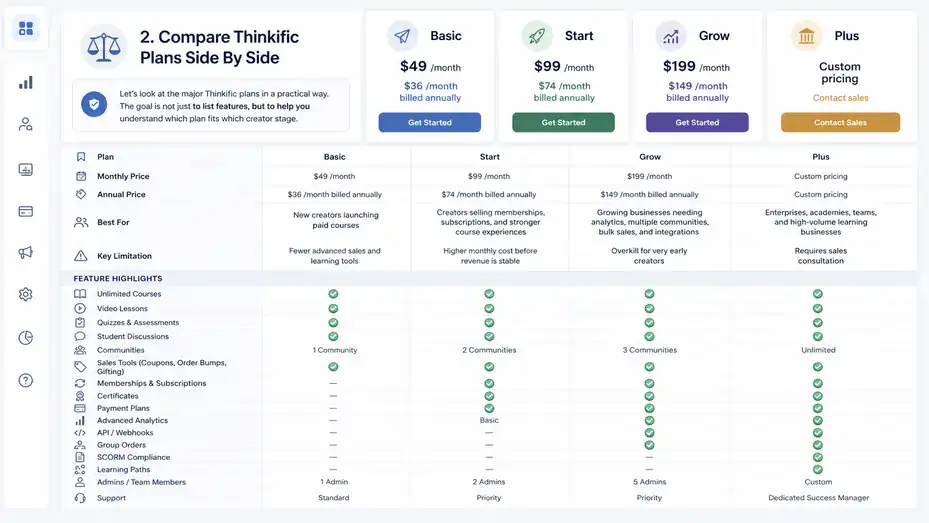
Now let’s look at the major Thinkific plans in a practical way. The goal is not just to list features, but to help you understand which plan fits which creator stage.
Thinkific Pricing Table
Thinkific’s public pricing can change, so always confirm final numbers on the official pricing page before buying. As of the current official pricing information I found, the core paid plans are Basic, Start, Grow, and Plus.
| Plan | Monthly Price | Annual Price | Best For | Key Limitation |
|---|---|---|---|---|
| Basic | $49/month | $36/month billed annually | New creators launching paid courses | Fewer advanced sales and learning tools |
| Start | $99/month | $74/month billed annually | Creators selling memberships, subscriptions, and stronger course experiences | Higher monthly cost before revenue is stable |
| Grow | $199/month | $149/month billed annually | Growing businesses needing analytics, multiple communities, bulk sales, and integrations | Overkill for very early creators |
| Plus | Custom pricing | Custom pricing | Enterprises, academies, teams, and high-volume learning businesses | Requires sales consultation |
Basic includes unlimited courses, video lessons, quizzes, student discussions, one community, digital downloads, and basic sales tools like order bumps, gifting, and coupons.
Start adds features such as live events, coaching sessions with Zoom integration, certificates, assignments, compliance tools, bundles, upsells, payment plans, memberships, subscriptions, custom HTML/CSS, and two course administrator accounts.
Grow adds three communities, brand removal, enhanced analytics, invoicing, group orders, API/webhooks, and higher support access.
Basic Plan: Best For Your First Real Course Business
The Basic plan is usually the most sensible starting point for creators who are serious about selling but not yet running a complex business. You get unlimited courses, which is important because it lets you create a starter course, flagship course, bonus course, or mini workshop without immediately bumping into product limits.
I like Basic for creators who already know what they want to teach and need a clean way to sell it. For example, a fitness coach could create a beginner strength course, add video lessons, include quizzes, and use coupons for launch week. That is enough to start earning.
The mistake is expecting Basic to support every advanced business model. If you want memberships, subscriptions, advanced upsells, payment plans, or deeper learner controls, you may feel boxed in. But that does not make Basic weak. It just means Basic is for simple selling.
Best use case: You have one to three course ideas, you want a branded course site, and your main goal is to launch without building a complicated tech stack.
What I would not do: I would not choose Basic if your entire strategy depends on recurring memberships, payment plans, or structured certification workflows from day one.
Start Plan: Best For Recurring Revenue And Stronger Learning Experiences
The Start plan is where Thinkific starts feeling more like a serious course business platform rather than just a course publishing tool. The biggest upgrades are around monetization and learning quality. You get memberships, subscriptions, payment plans, bundles, post-purchase upsells, certificates, assignments, and compliance tools.
Let’s translate that into plain English. Certificates let students receive proof of completion. Assignments let them submit work. Compliance tools help you control lesson completion requirements. Payment plans let students split a higher-priced course into smaller payments. Subscriptions and memberships help you build recurring revenue.
This plan is often a good fit when your course offer is above beginner level. For example, if you sell a $799 professional training program, payment plans can reduce buyer hesitation. If you teach a certification-style program, completion tools and certificates make the learning experience feel more legitimate.
I believe Start is the plan many creators should consider once they have product-market fit. You do not need massive sales yet, but you should have a clear offer and a reason to use the extra features.
Best use case: You are selling premium courses, memberships, subscriptions, or cohort-style programs and need better learning and revenue tools.
Grow Plan: Best For Scaling, Teams, And Better Reporting
The Grow plan is designed for creators and businesses that have moved beyond “Can I sell this?” and are now asking, “How do I improve, segment, automate, and scale this?” That is a very different stage.
Grow adds features that matter once you have more students, more offers, or more operational complexity. For example, three communities can help you segment learners by program, skill level, or customer type.
Enhanced analytics help you understand enrollment and engagement trends. Group orders make it easier to sell bulk access to companies or teams. API and webhooks help you connect Thinkific with more advanced systems.
Here’s a realistic scenario. Imagine you run a leadership training business. You sell individual courses to managers, but companies also ask to buy 30 seats for their team. On a lower plan, managing that manually can become messy. Grow’s group order and reporting features can reduce admin work and make B2B sales smoother.
The Grow plan is probably too much if you have not launched yet. But once you are getting consistent sales and need cleaner operations, it can be the plan that saves time and improves decision-making.
Best use case: You have steady sales, multiple products, team/bulk buyers, or enough data that analytics can influence your next move.
Plus Plan: Best For Enterprise Training And Large Academies
Thinkific Plus is not for the average solo creator launching a first course. It is built for larger businesses, academies, professional training companies, and organizations that need deeper support, more control, and enterprise-level learning features.
Plus includes custom pricing, so you will need to speak with Thinkific’s sales team. According to Thinkific, Plus can include unlimited users and products, SCORM-compliant courses, learning paths, AI teaching assistant features, and dedicated customer success support. SCORM is a technical standard used for interactive e-learning content, often in corporate training environments.
This matters if you sell training to companies, need structured learning paths, or have compliance requirements. For example, a software company training thousands of customers may need multiple learning tracks, deeper integrations, and stronger account support.
For most independent creators, Plus is unnecessary. But for a serious training business, it can be a practical investment because the cost is tied to operational scale, not just course publishing.
Best use case: You manage high-volume training, corporate education, customer onboarding, or a multi-product academy with complex requirements.
Calculate What Creators Actually Pay
The listed plan price is only part of the story. To understand Thinkific pricing explained from a real creator’s point of view, you need to calculate your actual monthly and per-sale costs.
Start With The Subscription Cost
Your subscription is the easiest number to calculate. If you pay monthly, you pay the higher monthly rate. If you pay annually, your monthly equivalent is lower, but you commit to a year.
For example:
| Plan | Monthly Billing | Annual Billing Monthly Equivalent | Annual Savings |
|---|---|---|---|
| Basic | $49/month | $36/month | $156/year |
| Start | $99/month | $74/month | $300/year |
| Grow | $199/month | $149/month | $600/year |
Annual billing can make sense once you are confident you will use the platform for at least 12 months. But I would be careful about paying annually before you validate your course idea. Saving money is great, but not if you lock yourself into software before proving demand.
A practical approach is to start monthly during validation, then switch to annual once your course has paying students and your plan choice feels stable.
Add Payment Processing Fees
Payment processing fees are taken from successful transactions. Thinkific’s support documentation says most processors charge around 2.9% plus $0.30 per successful transaction, though the exact rate depends on location, payment method, and other factors.
Let’s use a simple example. Suppose you sell a course for $200 and the payment processing fee is 2.9% + $0.30.
| Course Price | Percentage Fee | Fixed Fee | Estimated Fee | Estimated Net Before Subscription |
|---|---|---|---|---|
| $200 | $5.80 | $0.30 | $6.10 | $193.90 |
Now imagine 20 sales in a month:
| Metric | Amount |
|---|---|
| Gross sales | $4,000 |
| Estimated processing fees | $122 |
| Basic monthly plan | $49 |
| Estimated net before other costs | $3,829 |
This is why payment fees matter, but they usually are not the main issue unless you have high volume or low-priced products. If you sell a $19 mini-course, fixed fees can hurt more. If you sell a $999 program, the fixed $0.30 barely matters.
Watch For Third-Party Gateway Fees
This is where some creators get surprised. Thinkific says third-party payment gateway fees can apply when creators use third-party processors like Stripe or PayPal in certain regions, and the fee varies by plan.
Thinkific’s support page lists third-party gateway fees for sales processed through external gateways: Basic 5.0%, Start 2.0%, Grow 1.0%, Expand 0.5%, and Plus no fee at this time, while customers using Thinkific Payments do not incur this specific fee.
That is not the same as standard credit card processing. It is an additional gateway-related fee under the conditions Thinkific describes.
Here is why this matters. If you are on Basic and use an external payment gateway where the fee applies, a 5% fee on a $10,000 sales month would be $500. That is far more than the difference between Basic and Start.
So before choosing a plan, check your payment setup. For many creators, Thinkific Payments may simplify things and help avoid the third-party gateway fee. But your location, payout needs, accounting preferences, and payment method requirements should guide the decision.
Include Tax, VAT, And Invoice-Related Fees
Taxes are not exciting, but they are part of real pricing. Thinkific’s support documentation says its Sales Tax and VAT solution has a 0.5% fee for every transaction where tax is assessed for students in the United States, Canada, the UK, and the EU, with some exceptions such as free orders and 100% off coupon transactions.
Thinkific also lists invoicing fees: a 0.4% fee applies to each invoice paid through Thinkific’s invoicing solution, with maximum fee caps depending on currency, plus relevant payment processing fees.
This may not matter when you are just selling a few courses. But if you sell B2B training and clients expect invoices, invoicing costs and payment method fees should be part of your pricing model.
A simple rule: If Thinkific automates something that saves admin time, a small fee may be worth it. But you still need to price your course so fees do not quietly shrink your margin.
Choose The Right Plan For Your Creator Stage
The best Thinkific plan depends less on your ambition and more on your current business model.
I know it is tempting to buy the plan that feels like your future self, but pricing works better when you choose for your current stage.
If You Are Validating A Course Idea
If you are still testing whether people will buy your course, keep your setup simple. You do not need a giant tech stack, advanced analytics, or complex automations. You need a clear offer, a checkout page, and a way to deliver the course professionally.
For many beginners, Basic is the most practical choice once they are ready to accept payments. It gives you enough structure to create a real course and sell it without making the business feel heavier than it is.
At this stage, your biggest risk is not missing advanced features. Your biggest risk is spending months building instead of selling. I suggest creating a minimum viable course: a focused version of your course that solves one urgent problem for one specific audience.
Example: Instead of launching “Complete Photography Mastery,” start with “How To Shoot Better Product Photos With Natural Light.” It is easier to sell, easier to finish, and easier to improve based on student feedback.
The plan should support validation, not distract from it.
If You Are Launching A Premium Course
Premium courses usually need more than simple video delivery. Buyers may expect payment plans, completion certificates, assignments, live sessions, or a stronger sense of accountability. This is where Start often becomes worth considering.
Think about buyer psychology. A $49 course can be an impulse purchase. A $799 course usually requires more trust. Payment plans reduce friction. Certificates increase perceived value. Assignments make the course feel more guided. Live events or coaching sessions can make students feel supported.
In my experience, creators selling premium courses should not only ask, “Can I afford Start?” They should ask, “Will Start help me sell more confidently and deliver a better outcome?”
A premium course also benefits from stronger packaging. You might offer:
- Core course lessons
- Downloadable workbook
- Live monthly Q&A
- Completion certificate
- Payment plan option
- Private community access
That kind of offer often feels more valuable than “Here are 40 videos.”
If You Are Building A Membership
Memberships are different from one-time courses. You are not just selling content; you are selling ongoing value. That means your pricing, content calendar, community experience, and retention strategy all matter.
Start is usually the minimum plan to seriously consider if recurring revenue is part of your model, because it includes memberships and subscriptions. Without those features, you may be forced into workarounds that make the experience clunky.
The key question is whether you can keep members engaged. A membership should not become a content treadmill where you constantly create more just to justify the monthly fee. Instead, build around outcomes and rhythm.
Example: A career coach could run a membership with monthly resume reviews, weekly job search prompts, a private community, and quarterly workshops. The value is not just “more content.” It is momentum.
I recommend pricing memberships carefully. If your monthly price is too low, you may need a huge audience to make it worthwhile. If it is too high, members expect deeper access. Thinkific’s pricing is only one part of the equation; your retention economics matter more.
If You Are Selling To Companies Or Teams
B2B course sales can change everything. One company buying 50 seats may be more valuable than 50 separate individual buyers. But B2B sales also create operational needs: invoices, bulk enrollments, seat assignments, reporting, and group access.
This is where Grow becomes much more attractive. Thinkific lists group orders, invoicing, enhanced analytics, API/webhooks, and priority support as Grow-level advantages.
Imagine you sell compliance training to small businesses. A manager wants to buy access for 25 employees and track who completed the training. If you try to manage that manually on a lower setup, you may spend hours creating accounts, answering access questions, and sending reports.
For team sales, a higher plan may reduce friction enough to help you close bigger deals. B2B buyers care about professionalism and reliability. If your checkout, invoicing, and reporting feel smooth, you look easier to work with.
My advice: Upgrade when your sales process demands it, not just because the feature list looks impressive.
Compare Thinkific Costs With Common Alternatives
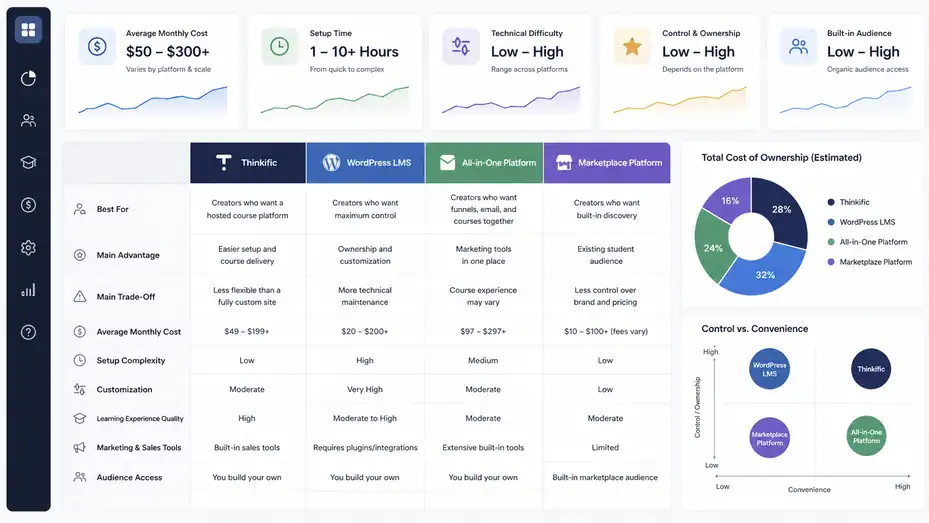
Thinkific rarely exists in a vacuum. Most creators compare it with other course platforms, WordPress plugins, or all-in-one marketing tools.
The right comparison depends on what you value: simplicity, control, cost, customization, or built-in marketing.
Thinkific Vs A DIY WordPress Setup
A WordPress setup can look cheaper at first. You might pay for hosting, a learning management plugin, a theme, checkout software, video hosting, email tools, and security plugins. The problem is that the real cost is not only money. It is maintenance.
With WordPress, you are responsible for plugin conflicts, updates, site speed, security, checkout reliability, and technical troubleshooting. Some creators love that control. Others find it exhausting.
Thinkific is more managed. You give up some flexibility, but you gain simplicity. You do not need to worry as much about hosting your learning environment or building the student experience from scratch.
Here is the practical comparison:
| Option | Best For | Main Advantage | Main Trade-Off |
|---|---|---|---|
| Thinkific | Creators who want a hosted course platform | Easier setup and course delivery | Less flexible than a fully custom site |
| WordPress LMS | Creators who want maximum control | Ownership and customization | More technical maintenance |
| All-in-one platform | Creators who want funnels, email, and courses together | Marketing tools in one place | Course experience may vary |
| Marketplace platform | Creators who want built-in discovery | Existing student audience | Less control over brand and pricing |
I suggest Thinkific if you want to spend more time building your course business and less time managing your tech stack.
Thinkific Vs All-In-One Marketing Platforms
Some platforms combine funnels, email marketing, website building, checkout, memberships, and courses. That can be appealing because everything is under one roof. But all-in-one does not always mean best-in-class.
Thinkific’s strength is structured learning. If your course experience matters deeply, Thinkific may feel more polished for students. If your main need is aggressive funnel building and email automation, an all-in-one marketing tool may be more attractive.
The question is: Where does your business create value?
If you sell a serious educational program, the learning experience matters. If you sell mostly digital downloads, templates, or simple trainings, you may care more about checkout and email flows.
I would not choose a platform just because it has more features. Choose the platform that supports the part of your business customers actually pay for.
Thinkific Vs Course Marketplaces
Course marketplaces can be useful if you want access to an existing audience. But you usually trade away control. Your pricing, branding, customer relationship, and promotional options may be limited.
Thinkific is different because it lets you build your own course business. You own the customer relationship more directly, shape your offer, build your site, and create your own pricing strategy.
That is both good and challenging. Thinkific will not magically bring students to you. You need your own audience, content strategy, partnerships, ads, email list, or sales process.
So the pricing comparison is not just platform cost. It is business model cost.
- Marketplace model: Lower setup burden, less control.
- Thinkific model: More control, more responsibility for marketing.
If you already have an audience, Thinkific can be powerful. If you have no audience yet, your real challenge is demand generation, not course hosting.
Identify Hidden Costs Before You Upgrade
No platform is completely free of extra costs. The key is knowing which costs are necessary, which are optional, and which are avoidable.
Email Marketing Costs
Thinkific can help with course delivery and selling, but many creators still use a dedicated email marketing platform to build newsletters, nurture leads, and run launch campaigns. This is not necessarily a weakness. Email marketing is a specialized function.
Your email costs usually grow based on subscriber count. At first, the cost may be small. Later, if you build a list of 10,000 subscribers, it can become a meaningful monthly expense.
Before adding tools, map your actual workflow:
- Lead magnet: How will people join your list?
- Nurture sequence: What emails help them trust you?
- Launch sequence: How will you announce the course?
- Student sequence: What happens after purchase?
Do not buy email software just because everyone says you need it. Buy it when you have a real audience-building strategy. A tool without traffic is just another subscription.
Design, Branding, And Website Costs
Thinkific includes site-building features, landing pages, and custom domain support. But depending on your brand standards, you may still invest in design help, copywriting, logo work, or custom page styling.
This is where creators sometimes overspend too early. A polished brand helps, but it does not replace a strong offer. I would rather see a creator launch with a simple, clear course page than wait three months for a perfect website.
Your first course page needs four things:
- A clear promise
- A specific audience
- A believable outcome
- A frictionless checkout
You can improve design later. In most cases, clarity beats fancy visuals.
Video Production Costs
Course creators often underestimate video costs. You may need a microphone, lighting, screen recording software, editing support, slides, or captioning. But you do not need a studio-quality setup to start.
A clean microphone and clear teaching structure matter more than cinematic production. Students want useful lessons, not a movie.
A lean setup might include:
- A decent USB microphone
- Natural light or one soft light
- Simple slide templates
- Screen recording software
- Basic editing for mistakes and pauses
The real cost is time. Recording a 5-hour course can take much longer than 5 hours once you include outlining, scripting, filming, editing, uploading, and organizing lessons.
My advice: Create shorter, outcome-driven lessons. A tight 8-minute lesson often works better than a wandering 35-minute video.
Integrations And Automation Costs
As your business grows, you may want to connect Thinkific with analytics tools, email tools, customer relationship management systems, or automation platforms. These integrations can save time, but they can also create complexity.
Automation should solve a real bottleneck. For example, sending every new student a welcome sequence is useful. Tagging buyers based on product purchase is useful. Creating a 17-step automation before your first sale is probably procrastination wearing a fancy hat.
Grow includes more advanced integration options such as API and webhooks, which can matter for businesses with custom workflows.
Use this rule: Automate repeated tasks after they happen manually at least a few times. That way, you automate reality, not imagination.
Build A Smart Pricing Strategy For Your Course
Thinkific pricing is only one side of profitability. Your own course pricing matters even more.
A $49/month software cost feels very different when you sell a $29 course versus a $999 program.
Price Based On Outcome, Not Lesson Count
A common beginner mistake is pricing by the number of videos. More lessons do not automatically mean more value. Students pay for transformation, clarity, speed, confidence, access, and results.
For example, a 2-hour course that helps freelancers land their first client may be more valuable than a 20-hour course full of theory. The buyer cares about the outcome.
A simple pricing framework:
| Course Type | Typical Price Range | Best Fit |
|---|---|---|
| Mini-course | $19–$99 | Lead conversion, beginner problem, quick win |
| Core course | $100–$500 | Main skill-building product |
| Premium program | $500–$2,000+ | Deeper transformation, support, certification, coaching |
| Membership | $15–$200/month | Ongoing support, community, recurring learning |
| B2B training | Custom or per-seat pricing | Teams, compliance, onboarding, professional development |
These are not rules, but they are useful anchors. Your audience, niche, proof, and support level can change everything.
Use Payment Plans To Reduce Buyer Friction
Payment plans can increase conversions for higher-priced programs because they lower the upfront cost. A $900 course may feel intimidating. Three payments of $330 may feel more manageable, even though the total is slightly higher.
Thinkific’s Start plan includes payment plans as part of its advanced sales tools.
Here is a practical example:
| Offer | One-Time Price | Payment Plan | Why It Works |
|---|---|---|---|
| Career transition program | $897 | 3 payments of $329 | Lower upfront friction |
| Certification course | $1,200 | 4 payments of $325 | Matches professional budget cycles |
| Coaching-supported course | $1,500 | 6 payments of $275 | Makes premium support more accessible |
The key is not to make payment plans too complicated. Two or three options are usually enough. Too many choices can slow buyers down.
Use Bundles And Upsells Carefully
Bundles and upsells can increase average order value, but only when they are genuinely helpful. An order bump should feel like a natural add-on, not a sneaky extra charge.
Example: If your course teaches podcast launching, an order bump for “Podcast Guest Outreach Templates” makes sense. It helps the buyer move faster. But an unrelated productivity ebook may feel random.
Thinkific’s Basic plan includes basic sales tools such as order bumps, gifting, and coupons, while Start adds more advanced sales tools like bundles, post-purchase upsells, and payment plans.
I suggest using this simple rule: The upsell should help the student get the promised result faster, easier, or with less stress.
Protect Your Margins
When pricing your course, subtract all expected costs before deciding if the price works. Include platform costs, payment fees, affiliate commissions, ad spend, refunds, support time, and content production.
Example monthly model:
| Metric | Amount |
|---|---|
| Course price | $299 |
| Monthly sales | 30 |
| Gross revenue | $8,970 |
| Estimated processing fees at 2.9% + $0.30 | About $269 |
| Thinkific Start monthly plan | $99 |
| Other tools | $100 |
| Estimated net before tax/labor | $8,502 |
That looks healthy. But if you spend $4,000 on ads to get those sales, your margin changes. If you offer heavy one-on-one support, your time cost changes too.
I recommend reviewing margins monthly once sales begin. You do not need a complex finance dashboard. A simple spreadsheet can show whether your course is actually profitable.
Optimize Your Thinkific Setup To Get More Value
Once you choose a plan, the next goal is getting the most from it. A creator who uses Basic well can outperform someone on Grow who barely understands their offer.
Build A Simple Course Architecture
Your course structure affects completion rates, student satisfaction, and refund requests. A confusing course can make even great content feel disappointing.
Think in milestones. Each module should move the student one step closer to the promised outcome. Avoid dumping every idea you know into the course. Teaching is not showing how smart you are; it is helping the student make progress.
A simple structure:
- Module 1: Set the foundation
- Module 2: Build the first practical skill
- Module 3: Apply the skill in a real scenario
- Module 4: Troubleshoot common issues
- Module 5: Improve, repeat, or scale
For each lesson, include one clear action. Students should know what to do after watching. This is especially important for self-paced courses where no one is personally guiding them.
In my experience, shorter lessons and clearer assignments often beat longer content.
Improve Checkout Conversion
Your checkout flow matters because small improvements can produce more sales without growing your audience. If 1,000 people visit your course page and 2% buy, that is 20 sales. If you improve conversion to 3%, that is 30 sales from the same traffic.
Focus on the basics:
- Clear headline: Say who the course is for and what result it helps them achieve.
- Strong proof: Add testimonials, examples, credentials, or student outcomes.
- Simple pricing: Make the offer easy to understand.
- Risk reversal: Use a fair refund policy or guarantee if it fits your business.
- Helpful FAQ: Answer objections before checkout.
Thinkific includes landing pages and sales tools, but the tool cannot fix unclear positioning. The words on the page matter.
A mini scenario: If you sell a course called “Excel For Beginners,” your page is broad. If you sell “Excel For Admin Assistants Who Need Cleaner Reports In 30 Days,” the buyer instantly understands the relevance.
Use Communities With A Clear Purpose
Thinkific includes community features, and higher plans expand what you can do with communities. But a community is only valuable when people know why they should participate.
Do not create a community just because the feature exists. Give it a job.
Examples:
- Accountability community: Students post weekly progress.
- Feedback community: Students share assignments and get input.
- Support community: Students ask questions and troubleshoot.
- Networking community: Members connect around shared goals.
The community should support the course outcome. Otherwise, it becomes another quiet forum.
I suggest starting with a few structured prompts. For example, every Monday students post their goal, every Wednesday they share a small win, and every Friday they ask one question. Structure creates participation.
Track The Metrics That Actually Matter
Analytics can become overwhelming if you track everything. Start with a few useful numbers:
| Metric | Why It Matters |
|---|---|
| Sales page conversion rate | Shows whether your offer page persuades visitors |
| Checkout abandonment | Shows whether buyers hesitate near payment |
| Course completion rate | Shows whether students are progressing |
| Refund rate | Shows whether expectations match delivery |
| Revenue per student | Shows how much each buyer is worth |
| Support requests | Shows where students get confused |
Thinkific’s Grow plan includes enhanced analytics with enrollment and engagement insights, which can become valuable once you have enough students for patterns to matter.
Early on, do not obsess over tiny data samples. If five people visit your page, conversion rate means almost nothing. Once hundreds of people visit, patterns become more useful.
Avoid Common Thinkific Pricing Mistakes
Most pricing mistakes come from choosing based on fear, hype, or incomplete math. You can avoid that by matching your plan to your actual business model.
Mistake 1: Upgrading Before You Have A Revenue Reason
It is easy to convince yourself that a higher plan will make you more serious. I get it. Buying tools feels productive. But a higher plan does not create demand.
Upgrade when you can name the specific feature that will improve revenue, delivery, or operations.
- Good reason: “I need payment plans because I’m selling a $900 course and buyers are asking for installments.”
- Weak reason: “Grow sounds more professional.”
The right plan should remove a real constraint. If there is no constraint yet, save the money and focus on selling.
Mistake 2: Ignoring Payment Gateway Fees
Some creators compare only subscription prices and forget payment-related costs. That can lead to a bad surprise, especially if third-party gateway fees apply to their setup.
Thinkific says customers using Thinkific Payments do not incur the third-party payment gateway fee, while external gateways can trigger plan-based fees in certain countries and conditions.
Before launching, test your checkout setup and review the fee rules for your country. Look at how students will pay, whether you need PayPal, whether you need invoices, and whether Thinkific Payments is supported where you operate.
This is not the fun part of course creation, but it is the part that protects your profit.
Mistake 3: Choosing A Plan Based On Feature Lists Alone
Long feature lists can be misleading. A feature has value only when it supports your strategy.
For example, API access is powerful. But if you have no custom integration needs, it does nothing for you. Multiple communities are useful. But if you cannot engage one community yet, three communities may just create more empty rooms.
I recommend ranking features by business impact:
- Revenue-critical features
- Student outcome features
- Time-saving features
- Nice-to-have features
Choose based on the first two categories first. Nice-to-have features can wait.
Mistake 4: Underpricing Your Course To Cover Platform Anxiety
Some creators keep their course price too low because they feel nervous charging more. Then the platform fee feels heavy because each sale produces too little revenue.
If your course solves a meaningful problem, price it accordingly. A $49/month platform cost is not scary if your course sells for $299 and you make several sales. It becomes scary if you sell a $9 course and need dozens of sales just to cover software.
This does not mean you should overcharge. It means your pricing should match the outcome, support level, and audience value.
A useful question: How much money, time, stress, or opportunity does this course help the student save or gain?
That answer often points to a more confident price.
Decide Whether Thinkific Is Worth It
Thinkific is worth it for some creators and not worth it for others. The honest answer depends on your offer, audience, sales strategy, and need for structured learning tools.
When Thinkific Is Worth The Cost
Thinkific is worth considering when you want a polished course experience without building everything yourself. It is especially useful if your product is education-first: courses, certifications, workshops, memberships, training programs, or learning communities.
It is also a good fit if you value simplicity. You can host content, accept payments, manage students, create communities, and build course pages in one environment. For many creators, that reduces the technical drag that stops them from launching.
Thinkific can be worth it when:
- You already have or are building an audience.
- You want to sell courses under your own brand.
- You need structured lessons, quizzes, discussions, or certificates.
- You want a hosted platform instead of managing WordPress plugins.
- You plan to build a serious education business.
From what I’ve seen, Thinkific works best for creators who treat their course like a business asset, not just a folder of videos.
When Thinkific May Not Be The Best Fit
Thinkific may not be the best fit if you only want to sell a simple digital download, a low-ticket PDF, or a very basic video product. In that case, a simpler checkout or digital product tool may be enough.
It may also feel limiting if you want total design control or a fully custom learning environment. A developer-led WordPress or custom build may offer more flexibility, though it also brings more maintenance.
Thinkific may not be ideal when:
- You need the lowest possible monthly cost.
- You want a marketplace to bring students for you.
- You mainly sell templates or downloads, not courses.
- You need complete control over every technical detail.
- You are not ready to market your own offer.
The platform is not a magic audience machine. You still need positioning, traffic, trust, and a reason for people to buy.
My Practical Recommendation
If you are launching your first real paid course, I would usually start with Basic unless you clearly need memberships, subscriptions, payment plans, assignments, certificates, or compliance tools.
If your offer is premium or recurring, Start may be the smarter starting point. If you are already selling consistently and need reporting, group sales, multiple communities, integrations, and better support, Grow becomes more logical.
Here is the simple version:
| Your Situation | Best Starting Plan |
|---|---|
| Testing a simple course offer | Basic |
| Selling a premium course | Start |
| Building a membership | Start |
| Selling to teams or companies | Grow |
| Running a large academy or enterprise training business | Plus |
I would not overthink it beyond that. Choose the plan that supports your next 90 days, not your imaginary business three years from now.
Create A Simple Cost Forecast Before You Buy
Before choosing a plan, build a small forecast. This makes Thinkific pricing feel less abstract and helps you see whether the platform cost fits your revenue goals.
Forecast Your First 90 Days
A 90-day forecast is useful because most creators do not need a five-year financial model. You need to know whether your near-term plan makes sense.
Use this simple table:
| Forecast Item | Conservative Estimate | Realistic Estimate | Optimistic Estimate |
|---|---|---|---|
| Course price | $199 | $299 | $499 |
| Monthly sales | 5 | 15 | 30 |
| Monthly revenue | $995 | $4,485 | $14,970 |
| Platform plan | $49–$99 | $49–$199 | $99–$199 |
| Estimated processing fees | Variable | Variable | Variable |
| Other tools | $0–$100 | $50–$200 | $100–$500 |
The point is not to predict perfectly. The point is to avoid guessing blindly.
If your conservative estimate still covers the platform cost comfortably, you are in a safer position. If you need an optimistic launch just to break even, simplify your plan.
Calculate Break-Even Sales
Break-even sales tell you how many students you need to cover your software cost.
Example using only the subscription cost:
| Plan | Monthly Cost | Course Price | Sales Needed To Cover Plan |
|---|---|---|---|
| Basic | $49 | $99 | 1 sale |
| Start | $99 | $299 | 1 sale |
| Grow | $199 | $499 | 1 sale |
| Grow | $199 | $99 | 3 sales |
This is why course price matters. If you sell a strong offer at a healthy price, the platform cost can be covered quickly. If you sell very low-ticket courses, you need more volume.
I recommend calculating break-even using net revenue after payment fees, not just gross price. That gives you a more realistic view.
Decide Your Upgrade Trigger In Advance
One of the best ways to avoid emotional software decisions is to set upgrade triggers before you need them.
Examples:
- Upgrade to Start when: You launch a premium course that needs payment plans or certificates.
- Upgrade to Grow when: You start selling group access or need better analytics.
- Consider Plus when: You need SCORM, custom enterprise features, or dedicated success support.
This keeps your decision grounded. Instead of wondering every month whether you should upgrade, you wait for the business case.
In my experience, this one habit saves creators a lot of money.
Final Verdict: What Creators Actually Pay For Thinkific
Thinkific pricing explained properly comes down to four layers: the plan subscription, payment processing, possible gateway or tax-related fees, and the extra tools you choose to add around your course business.
The Real Cost Summary
The visible price is simple: Basic starts at $49 monthly or $36 annually, Start at $99 monthly or $74 annually, Grow at $199 monthly or $149 annually, and Plus is custom. But your real cost depends on your payment setup, sales volume, student location, tax handling, invoicing needs, and external tools.
For a new creator, Thinkific might cost roughly the plan fee plus standard payment processing. For a scaling business, the cost may also include email software, automation tools, design help, ad spend, affiliate commissions, invoices, and analytics workflows.
That does not mean Thinkific is expensive by default. It means you need to evaluate it like a business system, not just a monthly subscription.
The Best Plan For Most Creators
For most new paid course creators, Basic is the cleanest starting point. It gives you enough to launch, sell, and learn from real students.
For creators selling premium offers, Start is often the better value because payment plans, memberships, subscriptions, certificates, assignments, and advanced sales tools can directly support revenue and student outcomes.
For creators with steady sales, teams, or B2B buyers, Grow is where the operational features start to make more sense.
Plus is best reserved for larger organizations that need enterprise features, deeper support, and more advanced learning infrastructure.
The Bottom Line
Thinkific is worth paying for when it helps you sell and deliver a better learning experience with less technical friction. It is not worth overbuying before you have a clear offer, audience, or reason to use the extra features.
My honest advice: Start with the smallest plan that supports your real business model, launch your course, watch your numbers, then upgrade when the upgrade has a clear job. That is how you keep Thinkific from becoming just another monthly expense and turn it into a platform that actually supports your growth.
FAQ
What does Thinkific pricing include?
Thinkific pricing includes access to its course creation platform, website builder, checkout tools, student management features, video hosting, communities, and sales features depending on your plan. Creators may still pay extra for payment processing, taxes, third-party tools, email marketing, design, or advanced integrations.
How much does Thinkific cost per month?
Thinkific plans usually start with a lower entry-level paid plan and increase based on features like memberships, payment plans, certificates, analytics, and team tools. The exact monthly cost depends on whether you choose monthly or annual billing and which plan fits your course business.
Is Thinkific free to use?
Thinkific has offered free or trial-based options at different times, but serious creators usually need a paid plan to unlock stronger selling, branding, and student experience features. Always check Thinkific’s current pricing page before choosing, because plan names, limits, and included features can change.
Which Thinkific plan is best for beginners?
For most beginners, the best Thinkific plan is the lowest paid plan that supports selling courses professionally. It usually gives you enough features to launch, accept payments, and test demand without paying for advanced tools you may not use yet.
Are there hidden costs with Thinkific?
Thinkific can have extra costs beyond the monthly plan, including payment processing fees, tax handling, third-party apps, email marketing software, design help, and advertising. These are not always “hidden,” but many creators forget to include them when calculating what they actually pay.

I’m Juxhin, the voice behind The Justifiable.
I’ve spent 6+ years building blogs, managing affiliate campaigns, and testing the messy world of online business. Here, I cut the fluff and share the strategies that actually move the needle — so you can build income that’s sustainable, not speculative.