
Table of Contents
Some links on The Justifiable are affiliate links, meaning we may earn a small commission at no extra cost to you. Read full disclaimer.
Sellfy platform walkthrough guide is exactly what I wish more creators had before launching their first digital product, merch store, or subscription offer.
Sellfy looks simple on the surface, and that is part of its appeal, but a profitable store still needs the right structure behind it. You need clean product pages, payment settings, delivery rules, trust signals, checkout flow, and a plan for getting visitors to buy.
In this guide, I’ll walk you through the full setup process step by step, using plain language and practical examples so you can build a store that feels ready to sell.
Understand What Sellfy Is Before You Build Your Store
Sellfy is a no-code ecommerce platform built mainly for creators who want to sell digital products, subscriptions, physical goods, and print-on-demand merchandise from one simple storefront.
Its main advantage is speed: you can launch without building a custom website or installing lots of plugins.
What Sellfy Is Best Used For
Sellfy works especially well when your business model is simple, direct, and creator-led. Think of a designer selling presets, a musician selling sample packs, a fitness coach selling downloadable plans, or a YouTuber selling branded merch.
You do not need a huge ecommerce setup to make that work. You need a store, product delivery, checkout, and a way to promote offers.
The platform supports digital downloads, subscriptions, physical products, and merch through print-on-demand. Sellfy also promotes itself as a no-code store builder with templates and drag-and-drop customization, which matters if you want to avoid technical setup.
According to Sellfy’s own site, creators can sell digital products, subscriptions, and merch, and the platform says it has supported over 75,000 creators who have earned more than $165 million.
In my experience, Sellfy makes the most sense when you want fewer moving parts. You are not trying to build a giant marketplace. You are trying to turn attention into revenue. That could be attention from YouTube, TikTok, Instagram, an email list, a podcast, or a personal website.
Here’s the honest way I’d frame it: Sellfy is not trying to be the most complex ecommerce platform. It is trying to be approachable. That is useful when your real job is creating, teaching, designing, filming, or building an audience.
How Sellfy Works Behind The Scenes
At a basic level, Sellfy gives you a hosted storefront where people can browse your products, add items to cart, and pay online. You add your products inside the dashboard, connect payment processors, customize the store design, publish pages, and share the store link with your audience.
For digital products, Sellfy handles file delivery after purchase. That means a customer can buy something like an ebook, template, video file, audio pack, or design asset, then receive access without you manually emailing files.
For physical products, you set product details such as price, shipping, and inventory rules. For print-on-demand, the idea is that products are produced after purchase rather than pre-purchased in bulk.
The simple workflow looks like this:
- Create your store: Choose your store name, branding, and basic account settings.
- Add products: Upload files, write descriptions, set prices, and organize product types.
- Connect payments: Use payment options such as Stripe or PayPal through Sellfy’s payment settings.
- Customize checkout: Adjust checkout preferences, terms, newsletter opt-ins, and buyer experience.
- Promote your store: Send traffic from content, social media, email, search, or paid campaigns.
What I like about this structure is that it keeps your first launch focused. You are not spending three weeks comparing plugins before selling one product. You are getting the offer in front of real people.
Who Should And Should Not Use Sellfy
Sellfy is a strong fit for solo creators, small digital product sellers, educators, artists, designers, musicians, and personal brands. It is also practical for people who want to test an idea before investing in a larger ecommerce system.
Imagine you have 4,000 YouTube subscribers and people keep asking for your Lightroom presets. You could spend weeks building a complex website, or you could create a Sellfy store, upload your preset pack, connect payments, and link it under your videos. That is the kind of scenario where Sellfy shines.
Sellfy may be less ideal if you need a very complex catalog, advanced inventory workflows, large-scale app integrations, multi-location fulfillment, or heavy custom development. In those cases, a broader ecommerce platform might make more sense. I would not choose Sellfy just because it is easy; I would choose it because the simplicity matches the business.
A helpful rule: If your store depends more on your audience and offer than on complex ecommerce operations, Sellfy is worth considering.
Plan Your Store Before Opening The Dashboard
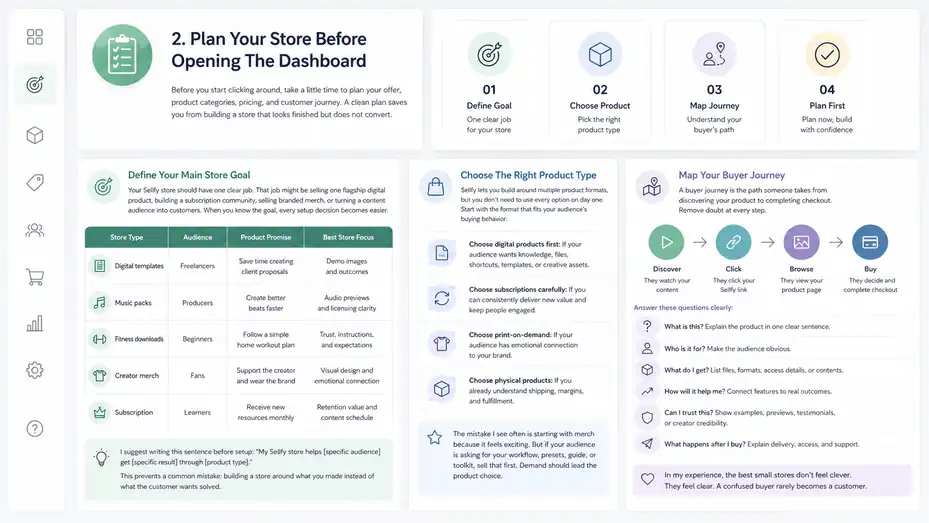
Before you start clicking around, take a little time to plan your offer, product categories, pricing, and customer journey.
A clean plan saves you from building a store that looks finished but does not convert.
Define Your Main Store Goal
Your Sellfy store should have one clear job. That job might be selling one flagship digital product, building a subscription community, selling branded merch, or turning a content audience into customers. When you know the goal, every setup decision becomes easier.
For example, if your goal is to sell a $19 digital template pack, your store should be fast, simple, and proof-driven. You need screenshots, benefits, examples, and a low-friction checkout. If your goal is to sell a $25 monthly subscription, your store needs a stronger explanation of recurring value. People need to understand what they receive every month and why they should keep paying.
I suggest writing this sentence before setup: “My Sellfy store helps [specific audience] get [specific result] through [product type].”
Here are a few examples:
| Store Type | Audience | Product Promise | Best Store Focus |
|---|---|---|---|
| Digital templates | Freelancers | Save time creating client proposals | Demo images and outcomes |
| Music packs | Producers | Create better beats faster | Audio previews and licensing clarity |
| Fitness downloads | Beginners | Follow a simple home workout plan | Trust, instructions, and expectations |
| Creator merch | Fans | Support the creator and wear the brand | Visual design and emotional connection |
| Subscription | Learners | Receive new resources monthly | Retention value and content schedule |
This sounds basic, but it prevents a common mistake: building a store around what you made instead of what the customer wants solved.
Choose The Right Product Type
Sellfy lets you build around multiple product formats, but you do not need to use every option on day one. Start with the format that fits your audience’s buying behavior.
Digital products are often the easiest first offer because they have no inventory, no shipping, and high margins. Examples include ebooks, presets, templates, patterns, video files, audio packs, courses, guides, or software files. Subscriptions work when you can deliver repeated value, such as monthly design assets, exclusive content, coaching resources, or ongoing education.
Physical products are useful when you already have inventory or want to sell something tangible. Print-on-demand is attractive because it lets you sell merch without ordering stock upfront. But I’d be careful here: merch usually works best when you already have an audience that cares about your brand.
Here’s how I’d decide:
- Choose digital products first: If your audience wants knowledge, files, shortcuts, templates, or creative assets.
- Choose subscriptions carefully: If you can consistently deliver new value and keep people engaged.
- Choose print-on-demand: If your audience has emotional connection to your brand.
- Choose physical products: If you already understand shipping, margins, and fulfillment.
The mistake I see often is starting with merch because it feels exciting. But if your audience is asking for your workflow, presets, guide, or toolkit, sell that first. Demand should lead the product choice.
Map Your Buyer Journey
A buyer journey is simply the path someone takes from discovering your product to completing checkout. On Sellfy, this journey is usually short, but it still needs intention.
Picture someone watching your tutorial video. They like your style. You mention a downloadable template. They click the link, land on your Sellfy product page, scan the preview images, read the benefits, check the price, and decide whether to buy. Every point in that path either builds confidence or creates doubt.
Your job is to remove doubt before it appears. That means your store should answer simple questions quickly:
- What is this? Explain the product in one clear sentence.
- Who is it for? Make the audience obvious.
- What do I get? List files, formats, access details, or product contents.
- How will it help me? Connect features to real outcomes.
- Can I trust this? Show examples, previews, testimonials, or creator credibility.
- What happens after I buy? Explain delivery, access, and support.
In my experience, the best small stores do not feel clever. They feel clear. A confused buyer rarely becomes a customer.
Create Your Sellfy Account And Set Basic Store Details
Once your store plan is clear, you can start the setup process inside Sellfy.
This stage is about creating a trustworthy foundation: store name, URL, contact details, legal basics, and brand identity.
Sign Up And Choose Your Store Identity
Start by creating your Sellfy account and choosing a store name that matches your brand, product, or creator identity. Sellfy offers a 14-day free trial with no card required according to its homepage, which gives you room to build before committing to a paid plan.
Your store name should be easy to recognize and easy to type. If you already have a brand name on YouTube, Instagram, TikTok, or your personal website, use the same name where possible. Consistency matters because people trust what they recognize.
A good store name usually falls into one of three types:
- Creator-based: Your personal name or creator brand.
- Outcome-based: A name that describes the result customers want.
- Niche-based: A name that clearly signals the topic or product category.
For example, “Maya Edits Presets” is stronger than “Maya’s Shop” if the audience is looking for editing presets. “Client Proposal Kit” is stronger than “Digital Downloads Store” because it tells people exactly what they are getting.
Do not overthink this for weeks. A clear name beats a clever name almost every time.
Set Your Store URL And Custom Domain Plan
By default, Sellfy stores can use a Sellfy-branded store URL. Sellfy’s documentation notes that the included customizable domain ends in sellfy.store, while a fully custom domain requires connecting a domain purchased from a domain provider.
For a new store, using the default URL is fine while you build. But before serious promotion, I recommend connecting a custom domain if you can. A custom domain looks more professional, builds trust, and makes your store easier to remember.
For example:
| URL Type | Example Style | Best For |
|---|---|---|
| Sellfy subdomain | yourbrand.sellfy.store | Testing and early setup |
| Custom domain | shop.yourbrand.com | Creator brands with existing websites |
| Product domain | yourproductname.com | Single flagship offer |
| Store domain | yourbrandshop.com | Standalone ecommerce presence |
My preference is usually shop.yourbrand.com if you already have a main website. It keeps your content and store connected while making the buying experience feel branded.
Add Store Contact And Business Information
Store information may not feel exciting, but it affects customer trust. Add a support email, store description, business details where required, and any relevant contact expectations. People are more likely to buy when they know there is a real person or brand behind the store.
I suggest creating a dedicated support email such as support@yourbrand.com or hello@yourbrand.com. Even if you are a solo creator, this feels more organized than using a random personal inbox.
Also think through your support promise. You do not need to offer instant replies. You just need to set realistic expectations. For example: “For product questions or download issues, contact us and we usually reply within 1–2 business days.”
This kind of language quietly reduces buyer anxiety. It says, “You are not on your own after purchase.”
Choose The Right Sellfy Pricing Plan
Sellfy pricing matters because each plan affects your yearly sales volume, available marketing features, and growth options.
Do not choose based only on the monthly price; choose based on what your store needs in the next stage.
Compare Sellfy Plans Based On Real Store Needs
Sellfy lists three main paid plans: Starter, Business, and Premium. On annual billing, the official pricing page shows Starter from $22 per month, Business from $59 per month, and Premium from $119 per month.
On monthly billing, it lists Starter from $29 per month, Business from $79 per month, and Premium from $159 per month. Sellfy also states that its plans have 0% transaction fees, though payment processors such as Stripe or PayPal may still charge their own processing fees.
Here is a simplified comparison based on Sellfy’s pricing page:
| Plan | Annual Price From | Monthly Price From | Annual Sales Volume | Useful For |
|---|---|---|---|---|
| Starter | $22/month | $29/month | Up to $10k/year | New creators testing products |
| Business | $59/month | $79/month | Up to $50k/year | Growing stores needing more marketing features |
| Premium | $119/month | $159/month | Up to $200k/year | Higher-volume sellers needing advanced support and growth tools |
The Starter plan is often enough for a first digital product store. The Business plan starts making more sense when you are actively optimizing conversions and need growth features. Premium is better when revenue and support needs justify the higher cost.
My practical advice: Do not buy the biggest plan because you feel ambitious. Buy the plan that matches your current stage, then upgrade when your store proves demand.
Understand Transaction Fees Versus Processing Fees
This is a small detail that confuses many new sellers. Sellfy says it does not charge transaction fees on its paid plans, but that does not mean every sale is completely fee-free. Payment processors still charge processing fees.
Sellfy’s pricing FAQ mentions that sellers need to cover payment processing fees from PayPal or Stripe, typically around 2.9% + 30¢ depending on the payment gateway.
Let me break it down simply. A platform transaction fee is what the ecommerce platform charges for each sale. A payment processing fee is what the payment company charges to move money from the customer to you. Even when a platform has 0% transaction fees, payment processing fees usually still apply.
For example, if you sell a $20 digital product, you should not plan your margin as if you keep exactly $20. You may also have payment processing costs, taxes depending on your setup, refunds, advertising costs, affiliate payouts, or production costs if selling physical products.
A healthy pricing model accounts for this before launch. I recommend estimating your net revenue per product, not just your list price.
Pick A Plan Based On Revenue Math
The easiest way to choose a plan is to estimate sales realistically. Let’s say you plan to sell a $29 template pack. If you sell 20 copies per month, that is $580 monthly revenue, or $6,960 per year before fees and costs. That fits within a lower annual sales volume plan.
But if you already have an audience and expect 150 sales per month at $29, that is $4,350 per month, or $52,200 per year. In that case, your plan needs may change quickly.
Use this simple planning table:
| Product Price | Monthly Sales | Estimated Annual Sales | Setup Implication |
|---|---|---|---|
| $19 | 25 | $5,700 | Starter-level store may be enough |
| $29 | 75 | $26,100 | Growth features may become useful |
| $49 | 100 | $58,800 | Higher plan may be needed |
| $99 | 50 | $59,400 | Strong checkout and support matter more |
The goal is not perfect forecasting. The goal is avoiding surprises. A store that grows faster than expected is a good problem, but you still want your tools to match the business.
Add Your First Product The Right Way
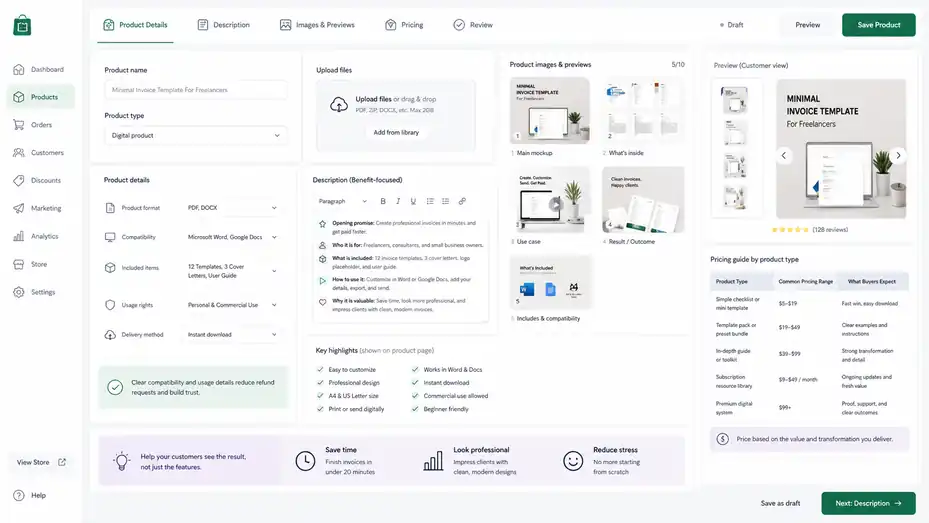
Your product page is where interest becomes action. A strong Sellfy product setup needs more than a file upload and a price; it needs positioning, previews, benefits, and clear expectations.
Upload Product Files And Organize Product Details
When adding a digital product, upload the correct file or files, name the product clearly, set the price, and confirm what the customer receives after purchase. Use simple product names that include the product type and outcome.
For example, “Minimal Invoice Template For Freelancers” is clearer than “Invoice Pack.” “Cinematic LUTs For Travel Videos” is clearer than “Color Pack Vol. 1.” Search engines and customers both benefit from specificity.
Your product details should include:
- Product format: PDF, ZIP, MP4, JPG, PSD, preset file, audio file, or another format.
- Compatibility: Software versions, device requirements, or skill level.
- Included items: Number of templates, files, pages, presets, modules, or assets.
- Usage rights: Personal use, commercial use, client use, or license limitations.
- Delivery method: Instant download, account access, email delivery, or recurring access.
In my experience, compatibility details reduce refund requests. If your template only works in Canva, say that. If your presets require a certain app version, say that. People do not mind requirements; they mind surprises.
Write A Product Description That Sells Clearly
A product description should not just describe what the product is. It should explain why it matters. Start with the customer’s problem, then show how your product solves it.
A simple structure works well:
- Opening promise: Say what the product helps the customer achieve.
- Who it is for: Name the audience clearly.
- What is included: List the actual deliverables.
- How to use it: Explain the basic workflow.
- Why it is valuable: Connect the product to saved time, better results, or reduced stress.
Example: “This proposal template helps freelance designers send polished client proposals in less than 20 minutes, even if they hate writing from scratch.”
That sentence is stronger than: “Includes a 12-page proposal template.”
Why? Because it connects the feature to a real-life outcome. The customer does not simply want a file. They want a faster, easier, more professional result.
Add Product Images, Previews, And Proof
Product visuals matter, even for digital products. If someone cannot touch the product, they need to see what they are buying. Add mockups, screenshots, before-and-after examples, sample pages, preview images, or short demo clips where relevant.
For a template product, show 3–5 real pages. For presets, show before-and-after images. For music samples, include audio previews if your setup allows it. For merch, use clean lifestyle or product mockups that show scale, fit, and style.
A good visual stack might include:
- Image 1: Main product mockup with product name.
- Image 2: Preview of what is inside.
- Image 3: Use-case example.
- Image 4: Result or transformation.
- Image 5: Compatibility or included items graphic.
I believe previews are one of the easiest ways to increase conversion because they reduce uncertainty. People buy faster when they can imagine using the product.
Set Pricing That Matches Perceived Value
Pricing is not only math; it is positioning. A $7 product feels casual. A $49 product needs stronger proof. A $199 product needs a more serious sales page, clearer outcomes, and possibly support or bonuses.
If this is your first Sellfy product, I suggest choosing a price that feels easy to test but still respects your work. Many digital creators underprice because they are afraid nobody will buy. But very low prices can create another problem: you need a lot more customers to make meaningful revenue.
Here’s a basic pricing lens:
| Product Type | Common Pricing Range | What Buyers Expect |
|---|---|---|
| Simple checklist or mini template | $5–$19 | Fast win, easy download |
| Template pack or preset bundle | $19–$49 | Clear examples and instructions |
| In-depth guide or toolkit | $39–$99 | Strong transformation and detail |
| Subscription resource library | $9–$49/month | Ongoing updates and fresh value |
| Premium digital system | $99+ | Proof, support, and clear outcomes |
The right price depends on your niche, audience, and product value. Test carefully, but do not apologize for charging if your product solves a real problem.
Configure Payments, Checkout, And Customer Trust Settings
Payments and checkout are the operational core of your store. If anything feels confusing here, customers may abandon the purchase even if they like the product.
Connect Stripe Or PayPal
Sellfy’s help documentation explains that sellers can connect payment options from Store settings > Payment Settings, including connecting an existing Stripe account or connecting with PayPal.
Stripe is commonly used for card payments, while PayPal is familiar to many online buyers. Offering both can increase trust because different customers prefer different payment methods. Some people like paying by card. Others feel safer using PayPal.
Before connecting payments, make sure your business information is consistent across your payment account and store. Payment platforms may ask for legal name, address, business type, tax information, and bank details. That is normal. It helps verify that payments are going to a legitimate seller.
I recommend testing checkout after connecting payments. Buy your own low-priced test product or use whatever testing method is available in your account setup. Make sure the payment succeeds, the confirmation email arrives, and the file or product access works as expected.
Customize Checkout Settings
Sellfy’s documentation says checkout can be customized, including payment processor choices and options such as newsletter opt-in, business checkout, and mandatory terms and conditions agreement.
This is one of those quiet setup areas that can make your store feel more professional. You want checkout to be simple, but you also want it to protect your business and set expectations.
Consider enabling or reviewing:
- Terms agreement: Useful for digital products, licensing, refunds, and product use rules.
- Newsletter opt-in: Helpful if you plan to follow up with customers and build repeat sales.
- Business checkout: Useful if your customers may need business purchase details.
- Checkout branding: Keeps the payment experience consistent with your store.
Avoid adding unnecessary friction. If a setting does not support trust, compliance, or future marketing, leave it simple. A checkout should feel like a clean path, not an obstacle course.
Create Clear Refund And Delivery Policies
Digital product refunds can be tricky because files are delivered instantly. That does not mean you should ignore refund policies. It means you should be clear before purchase.
A good refund policy explains when refunds are available, when they are not, and what customers should do if they have a problem. For example, you might not offer refunds after a digital download has been accessed, but you might help with duplicate purchases, broken files, or accidental orders.
Use human language. Something like: “Because this is an instant digital download, we generally do not offer refunds after access is delivered. If you have trouble opening the file or believe there was a purchase issue, contact us and we’ll help.”
For physical or print-on-demand products, include shipping timeframes, size considerations, damaged item support, and address-change rules. The clearer you are upfront, the fewer stressful support conversations you will have later.
Customize Your Sellfy Store Design For Conversions
Your store design does not need to be fancy, but it does need to be clear, trustworthy, and easy to use. Good design helps buyers understand your offer quickly.
Choose A Clean Store Layout
Sellfy’s store builder is designed to be code-free, with templates and drag-and-drop customization according to its website. That means your main job is not coding; it is arranging information in a way that helps customers decide.
Start with a simple homepage structure:
- Hero section: Clear headline, short benefit, and call-to-action.
- Featured products: Show your best or newest products.
- Audience promise: Explain who the store is for.
- Proof section: Add testimonials, results, examples, or creator credibility.
- FAQ section: Answer common objections.
- Final CTA: Invite visitors to browse or buy.
For a small store, I would not overload the homepage. The best version often feels almost obvious: “Here’s what I sell, here’s who it helps, here’s why it’s useful, and here’s where to buy.”
Use white space generously. A cramped store feels less trustworthy. A clean store gives your products room to breathe.
Match Branding To Your Audience
Branding is not just colors and fonts. It is the feeling your store creates. A store selling minimalist business templates should feel polished and calm. A creator merch store might feel energetic and personal. A music sample store might feel bold and creative.
Choose a color palette that supports the product, not one that fights for attention. Use consistent imagery, clean product thumbnails, and a voice that matches your audience.
Here’s a simple branding table:
| Audience | Store Feeling | Design Direction |
|---|---|---|
| Freelancers | Professional and organized | Neutral colors, clean mockups |
| Fans of a creator | Personal and energetic | Brand colors, creator photos, merch visuals |
| Music producers | Creative and modern | Dark backgrounds, audio-inspired visuals |
| Students or beginners | Friendly and simple | Clear icons, approachable copy |
| Business buyers | Trustworthy and efficient | Direct copy, proof, policies |
I suggest reviewing your store on mobile before publishing. Many buyers will come from social apps, and social traffic is heavily mobile. If your product images are too small, headings too vague, or buttons hard to find, mobile visitors may leave.
Write Homepage Copy That Moves People Toward Action
Your homepage copy should answer three questions quickly: “Am I in the right place?”, “What can I buy here?”, and “Why should I trust this?”
A strong homepage headline might look like:
- “Digital Templates For Freelancers Who Want Cleaner Client Workflows”
- “Presets, LUTs, And Editing Tools For Travel Creators”
- “Simple Study Planners For Students Who Want Less Chaos”
Notice that each headline names the product category and the audience or outcome. That is much better than “Welcome To My Store.”
Your call-to-action should also be specific. “Browse Products” is fine, but “Shop Editing Presets” or “Download The Template Pack” is stronger when you have a focused offer.
Good copy does not pressure people. It guides them. Think of your homepage as a calm salesperson who helps the buyer understand what matters.
Set Up Marketing Features And Sales Tools
Once the store is functional, you can start adding marketing features that improve conversions and repeat purchases.
The key is using these tools with intention, not cluttering the customer experience.
Use Discounts Without Training People To Wait
Discounts can help you launch, reward loyal buyers, or create urgency, but they can also weaken your pricing if used constantly. Use them for specific campaigns rather than as a permanent crutch.
For example, a launch discount can work well during the first week: “Get 20% off the new template pack until Friday.” That gives your audience a reason to act now without making the product feel cheap forever.
Good discount use cases include:
- Launch offer: Reward early buyers.
- Email subscriber offer: Encourage list growth.
- Bundle discount: Increase average order value.
- Seasonal campaign: Tie your offer to a timely need.
- Customer thank-you: Encourage repeat purchases.
Avoid fake urgency. If you say the offer ends Friday, end it Friday. Trust is more valuable than one extra sale.
Use Upsells To Increase Average Order Value
An upsell offers a related product during or after the buying process. The goal is to help the customer get a better result, not just squeeze out more money.
Sellfy’s pricing page lists product upselling as a growth feature on higher-tier plans. If you have access to upsells, use them in a way that feels natural.
For example:
| Main Product | Smart Upsell | Why It Works |
|---|---|---|
| Resume template | Cover letter template | Same job-search goal |
| Lightroom preset pack | Editing workflow guide | Helps users get better results |
| Fitness meal planner | Grocery list template | Makes implementation easier |
| Music loop pack | Drum kit bundle | Complements production workflow |
| Client proposal template | Invoice and contract pack | Supports full client process |
The best upsell answers, “What would this buyer probably need next?” If the answer is obvious, the upsell feels helpful. If it is random, it feels annoying.
Build An Email List From Day One
Even if your first store is tiny, email matters. Social platforms are great for attention, but email gives you a more direct relationship with customers and subscribers.
Sellfy’s pricing page includes email marketing among plan features, with core marketing features available across plans and additional growth features on higher tiers. Use email to announce new products, share helpful tips, send product updates, and re-engage past buyers.
A simple email flow might be:
- Welcome email: Thank the person and explain what they can expect.
- Value email: Share a helpful tip related to your product niche.
- Product email: Introduce your best product naturally.
- Proof email: Share a customer example, use case, or behind-the-scenes story.
- Reminder email: Invite them to buy before a launch offer ends.
I would rather have a small list of engaged people than a huge list that never opens anything. Treat email as a relationship channel, not just a sales button.
Optimize Product Pages For SEO And Search Intent
A Sellfy store can get traffic from your audience, but you should still optimize product pages for search.
SEO helps your products become discoverable beyond social posts and one-time promotions.
Use Search-Friendly Product Titles
Your product title should include what the product is and who it helps or what it does. Avoid vague names unless your brand is already famous.
For example:
| Weak Title | Stronger Title |
|---|---|
| Ultimate Pack | Instagram Canva Template Pack For Coaches |
| Preset Bundle | Moody Lightroom Presets For Portrait Photography |
| My Ebook | Beginner Budget Planner PDF For Students |
| Merch Drop | Minimal Creator Hoodie With Logo Design |
| Templates Vol. 2 | Client Onboarding Email Templates For Freelancers |
A search-friendly title helps both humans and search engines. It gives context. It also improves the chance that someone browsing your store understands the product without clicking every page.
Use the focus phrase naturally when relevant, but do not force it. In this article, “sellfy platform walkthrough guide” belongs in the introduction and a few contextual spots, not every heading.
Write Descriptions Around Buyer Intent
Search intent means the reason someone is searching. A person looking for “wedding photography contract template” probably wants a ready-to-use document, compatibility details, and reassurance that it covers common client situations. Your product page should match that intent.
A good SEO product description includes:
- The product type
- The audience
- The use case
- The result
- File format or compatibility
- What is included
- Common questions
Let’s say you sell a Notion content calendar. Do not only say, “A Notion content calendar for creators.” Expand it: “This Notion content calendar helps solo creators plan weekly posts, track ideas, organize deadlines, and manage publishing without juggling five separate spreadsheets.”
That is still natural, but it includes semantic keywords like content calendar, creators, weekly posts, ideas, deadlines, publishing, and spreadsheets. This helps search engines understand the page while helping buyers understand the value.
Add FAQs To Reduce Objections
FAQs are useful because they answer questions that might stop someone from buying. They also help you cover long-tail search terms naturally.
Good product FAQs might include:
- “What file format is included?”
- “Can I use this for client work?”
- “Is this beginner-friendly?”
- “Do I need paid software?”
- “How do I access the product after purchase?”
- “Can I get updates after buying?”
- “What should I do if the file does not open?”
Keep answers short and practical. Do not turn FAQs into a second sales page. Their job is to remove friction.
In my experience, FAQs also reduce support emails. If ten people ask the same question before buying, add it to the page. Your customers are telling you what your copy is missing.
Test Your Store Before Launching Publicly
Testing is the difference between “my store looks ready” and “my store actually works.” Before you announce your Sellfy store, walk through the buyer experience like a customer.
Run A Complete Checkout Test
After connecting payments, test the buying process from start to finish. Use a real device, preferably both desktop and mobile. Click your product, read the page, add it to cart, complete checkout if possible, and confirm the post-purchase experience.
Check these items:
- Product page: Images load, price is correct, description is clear.
- Cart: Product name, quantity, and price display correctly.
- Checkout: Payment methods work and terms are visible.
- Confirmation: Buyer receives a clear success message.
- Delivery: Download link or access instructions work.
- Email: Receipt and product delivery emails are understandable.
- Support: Contact information is easy to find.
This may feel boring, but it can save your launch. I have seen creators promote a product only to discover the wrong file was uploaded or the checkout button was buried on mobile. Those mistakes are fixable, but they cost momentum.
Review Mobile Experience Carefully
Many Sellfy buyers will arrive from social media, which usually means mobile. Open your store from your own phone, not just your laptop.
Look for simple issues: Is the headline visible without awkward scrolling? Are product images clear? Is the buy button easy to tap? Does the product description feel too long before the offer is clear? Are FAQ sections readable?
Mobile visitors are impatient, not because they are rude, but because they are often multitasking. They may be watching a video, checking messages, or standing in line. Your store needs to communicate quickly.
A good mobile product page should show the product name, main image, price, and buying action without making people hunt. Details can come after that.
Ask One Real Person To Test It
Before launching, ask one person who fits your target audience to test the store. Do not ask, “Does it look good?” That usually leads to polite answers. Ask better questions:
- “What do you think this product helps you do?”
- “Is anything unclear before buying?”
- “Would you know what happens after purchase?”
- “Is the price what you expected?”
- “Where would you click first?”
Watch for hesitation. If they pause, scroll back, or ask what something means, that is useful feedback. It does not mean your store is bad. It means your store is becoming clearer.
Launch Your Sellfy Store With A Simple Promotion Plan
A good launch does not need to be complicated. You need a clear message, a reason to care, and repeated visibility across the places where your audience already pays attention.
Create A Launch Message
Your launch message should explain what you made, who it is for, why you made it, and how to get it. Keep it personal. People are more likely to support a product when they understand the story behind it.
A simple launch post structure:
- Start with the problem: “I kept hearing from freelancers who struggled to write proposals quickly.”
- Introduce the product: “So I created a proposal template pack you can customize in under 20 minutes.”
- Explain the result: “It helps you send cleaner proposals without starting from a blank page.”
- Add launch offer: “It’s 20% off this week.”
- Share the link: “You can grab it here.”
Notice how this feels more human than “New product available now.” You are bringing people into the reason the product exists.
Promote Across Your Existing Channels
Start with the channels where you already have attention. That might be YouTube, TikTok, Instagram, Pinterest, email, a blog, Discord, or a personal website. You do not need to be everywhere. You need to be consistent where your audience already listens.
For a creator, one product can become several pieces of launch content:
| Channel | Launch Content Idea |
|---|---|
| YouTube | Tutorial showing the product in use |
| Carousel explaining the before-and-after | |
| TikTok | Short demo or behind-the-scenes clip |
| Personal launch story and product link | |
| Blog | SEO article targeting a related problem |
| Visual pins for templates, planners, or downloads |
The strongest launch content teaches something useful, then naturally introduces the product as the shortcut. That approach feels helpful instead of pushy.
Track Early Results And Adjust
After launch, pay attention to early signals. You do not need advanced analytics to learn. Look at views, clicks, sales, questions, refund requests, and comments.
Important early metrics include:
- Traffic: How many people visited the store or product page?
- Conversion rate: How many visitors bought?
- Average order value: How much did each buyer spend?
- Support questions: What confused people?
- Refund requests: Did the product match expectations?
- Traffic sources: Which channel produced buyers, not just clicks?
If many people click but few buy, the issue may be product page clarity, price, proof, or offer fit. If few people click, the issue may be promotion, audience targeting, or message strength.
I recommend changing one major thing at a time. If you rewrite the page, change the price, swap the images, and alter the offer all at once, you will not know what worked.
Fix Common Sellfy Setup Mistakes
Most Sellfy store problems are not technical. They are clarity problems.
The store works, but the offer is vague, the product page is thin, or the buyer does not feel enough trust.
Mistake 1: Selling A Product Without A Clear Outcome
A common beginner mistake is describing the product by its contents instead of its outcome. “50-page ebook” is a feature. “Learn how to plan your first digital product launch in one weekend” is an outcome.
Customers buy improvement. They want more time, better quality, less stress, a cleaner workflow, a nicer design, or a faster result. Your product page should connect every major feature to a benefit.
For example:
| Feature | Better Benefit |
|---|---|
| 20 Canva templates | Create branded posts faster without designing from scratch |
| 10 meal plans | Know what to cook each week without daily decision fatigue |
| 100 drum samples | Build stronger beats with ready-to-use sounds |
| Proposal template | Send polished client proposals faster |
| Budget spreadsheet | See where your money goes and plan with less stress |
Before publishing, read your product page and ask: “So what?” after each feature. If the answer is not obvious, add the benefit.
Mistake 2: Making The Store Too Busy
New sellers often add too many products, colors, banners, buttons, popups, and explanations. I get it. You want the store to feel complete. But too much visual noise makes buying harder.
A simple store with one strong product can outperform a crowded store with ten unclear offers. Your first goal is not to look big. Your first goal is to help a real buyer choose confidently.
Keep your homepage focused. Feature your best products. Use consistent thumbnails. Avoid long blocks of text above the first call-to-action. Make product categories easy to understand.
If you are unsure what to remove, ask this: “Does this help the visitor decide to buy, trust me, or understand the product?” If not, it can probably go.
Mistake 3: Ignoring Post-Purchase Experience
Many creators focus so much on the sale that they forget what happens after the sale. But the post-purchase experience affects reviews, repeat purchases, and refund rates.
For digital products, make sure customers know how to download and use the file. Add a short instruction PDF if needed. For templates, include a quick-start guide. For subscriptions, explain how often new content arrives. For print-on-demand or physical products, set expectations around shipping.
A small “Start Here” file can make a huge difference. It does not need to be fancy. It might say:
- Open this first: Read the instructions before editing the files.
- Check compatibility: Make sure you are using the right software version.
- Use the examples: Copy the sample workflow to get started faster.
- Need help: Contact support with your order email.
That little bit of guidance can turn a confused buyer into a happy customer.
Optimize And Scale Your Sellfy Store Over Time
After launch, your job shifts from setup to improvement. Scaling does not mean doing everything at once. It means using data, customer feedback, and better offers to grow intentionally.
Improve Conversion Rate Before Chasing More Traffic
Many sellers assume they need more traffic, but sometimes they need a better product page. If 1,000 people visit and only two buy, sending another 1,000 visitors may not fix the real problem.
Conversion optimization means improving the percentage of visitors who purchase. Start with the product page. Strengthen the headline, improve images, add examples, clarify what is included, answer objections, and make the call-to-action obvious.
Small changes can matter. A better first image, clearer product title, or stronger opening paragraph can help visitors understand the value faster.
Here’s a practical conversion review:
- Headline: Does it clearly explain the result?
- Images: Can buyers see what they get?
- Description: Does it connect features to benefits?
- Proof: Are there testimonials, examples, or creator credibility?
- FAQ: Are objections answered before checkout?
- Price: Does the value feel aligned with the cost?
- CTA: Is the next step obvious?
I suggest reviewing your top product page every month, especially after getting customer questions. Your customers will show you what needs clarification.
Create Bundles To Increase Revenue
Bundles are one of the easiest ways to grow a digital product store. A bundle combines related products into one higher-value offer, usually at a better price than buying items separately.
For example, instead of selling a proposal template for $19, an invoice template for $12, and an onboarding checklist for $9, you could sell a “Freelancer Client Starter Kit” for $39. The buyer gets a more complete solution, and you increase average order value.
Good bundles are based on a shared goal. Do not bundle random products just because you have them. Bundle products that help the same customer complete the next step.
Strong bundle examples:
| Bundle Name | Included Products | Customer Goal |
|---|---|---|
| Freelancer Client Kit | Proposal, contract, invoice, onboarding checklist | Land and manage clients |
| Creator Editing Pack | Presets, LUTs, export guide, thumbnail templates | Improve content visuals |
| Student Planner System | Study planner, budget sheet, habit tracker | Stay organized |
| Music Producer Starter Pack | Loops, drums, MIDI files, license guide | Make tracks faster |
Bundles also give you better promotional angles. Instead of saying “buy my templates,” you can say “get the complete client workflow kit.”
Use Customer Feedback To Build The Next Product
Your best product ideas often come from buyers. Pay attention to support emails, comments, reviews, and questions. If people keep asking, “Do you have this for beginners?” or “Can I use this with clients?” they may be showing you the next offer.
A simple feedback loop works like this:
- Collect questions: Save repeated customer questions.
- Identify patterns: Look for problems that appear more than once.
- Create improvements: Update the product, add instructions, or build a new product.
- Tell buyers: Let customers know when improvements are available.
- Use feedback in marketing: Address real objections in your product page.
This is how a small store becomes stronger over time. You do not need to guess forever. Real buyers give you clues.
Build A Long-Term Sellfy Growth System
A Sellfy store becomes more powerful when it connects to a broader content, email, and product strategy. The store is the checkout point, but your growth system creates demand.
Connect Content To Products Naturally
Content is one of the best ways to sell without constantly pitching. Teach something useful, then offer your product as the faster or easier path.
If you sell design templates, publish content about design mistakes, client workflows, branding, or time-saving systems. If you sell music samples, create beat-making tutorials or breakdowns. If you sell planners, create productivity guides.
The formula is simple: helpful content earns trust, and relevant products monetize that trust.
Example scenario: Imagine you sell a content calendar template. You could publish a blog post or video called “How To Plan 30 Days Of Content In One Afternoon.” Inside that content, you teach the process. Then you mention that your Sellfy template gives readers the ready-made structure.
That feels natural because the product supports the lesson. It is not random promotion.
Create A Product Ladder
A product ladder gives customers multiple ways to buy from you at different commitment levels. This helps you serve beginners and serious buyers without forcing everyone into one offer.
A simple ladder might look like:
| Level | Product Example | Purpose |
|---|---|---|
| Free | Checklist or sample file | Build trust and email list |
| Low-cost | Mini template or starter pack | Turn followers into buyers |
| Core offer | Full toolkit or bundle | Main revenue product |
| Premium | Advanced system or subscription | Higher-value relationship |
| Repeat offer | Updates, new packs, add-ons | Long-term customer value |
You do not need all of this on day one. Start with one strong paid product, then build around it. But thinking in terms of a ladder helps you avoid disconnected products.
For many creators, the first big milestone is not a huge catalog. It is one product that sells consistently.
Review Your Store Like A Business, Not A One-Time Project
A Sellfy store is not something you set up once and forget. It should improve as your audience, products, and data improve.
Set a simple monthly review rhythm:
- Review traffic: Which channels sent buyers?
- Review sales: Which products converted best?
- Review support: What confused customers?
- Review refunds: Did expectations match reality?
- Review content: Which posts or videos drove clicks?
- Review product ideas: What are people asking for next?
This rhythm keeps your store alive. You will notice patterns earlier, fix problems faster, and make better decisions.
In my opinion, this is where many creators separate themselves. They do not just launch. They listen, adjust, and keep improving.
Final Thoughts: Build Simple, Then Improve With Evidence
A good Sellfy platform walkthrough guide should leave you with more than a finished store. It should help you understand how each piece supports the sale: the product, page, payment setup, design, checkout, launch plan, and follow-up system.
Start simple. Choose one clear audience, one useful product, one direct promise, and one clean path to checkout. Then test everything, launch to the audience you already have, and improve based on real buyer behavior.
Sellfy can make the technical side easier, but the strategy still comes from you. The stronger your offer and the clearer your customer journey, the more your store can grow from “just a product page” into a real income channel.
FAQ
What Is A Sellfy Platform Walkthrough Guide?
A Sellfy platform walkthrough guide helps beginners set up a Sellfy store step by step, from account creation to product uploads, payments, design, checkout, and launch. It is useful for creators who want to sell digital products, subscriptions, physical goods, or merch without needing advanced technical skills.
How Do I Start Setting Up A Sellfy Store?
Start by creating a Sellfy account, choosing your store name, adding basic business details, and setting your store URL. After that, upload your first product, write a clear description, add product images, connect payment options, and test the checkout before sharing your store publicly.
Is Sellfy Good For Selling Digital Products?
Yes, Sellfy is a strong option for selling digital products because it handles file delivery, checkout, payments, and storefront setup in one place. It works well for ebooks, templates, presets, music files, guides, software files, and other downloadable products that creators want to sell directly.
What Should I Add To A Sellfy Product Page?
A Sellfy product page should include a clear product title, benefit-focused description, high-quality images or previews, price, file details, compatibility notes, usage rights, refund policy, and delivery information. These details help buyers understand the value and feel confident before completing checkout.
How Can I Improve Sales On My Sellfy Store?
You can improve Sellfy sales by making your offer clear, using strong product visuals, writing benefit-focused copy, adding FAQs, testing checkout, building an email list, promoting through content, and creating bundles or upsells. Small improvements to trust and clarity often increase conversions over time.

I’m Juxhin, the voice behind The Justifiable.
I’ve spent 6+ years building blogs, managing affiliate campaigns, and testing the messy world of online business. Here, I cut the fluff and share the strategies that actually move the needle — so you can build income that’s sustainable, not speculative.
Related posts:
 Sellfy Pros And Cons For Digital Sellers: Honest Breakdown
 Sellfy Features Overview: Tools Creators Actually Need
 How the Salehoo Catalog Helps You Spot Winning Items Quickly
 How to Sell on SaleHoo: A Simple Guide for New Sellers
 Doba Alternatives: Better Dropshipping Platforms Compared
 Sellfy Pricing Explained: Real Costs Creators Must Know