Table of Contents
Some links on The Justifiable are affiliate links, meaning we may earn a small commission at no extra cost to you. Read full disclaimer.
Thinkific pros and cons for creators matter a lot when you’re trying to turn your knowledge into a real online course business, not just upload a few videos and hope people buy.
I’ve seen many creators choose a platform too quickly, then feel trapped by missing features, confusing pricing, or weak marketing tools. Thinkific can be a strong choice, especially if you want a clean course platform, built-in payments, communities, memberships, and room to grow.
But it is not perfect for every creator, and the smartest decision depends on your goals, budget, tech comfort, and sales strategy.
Understand What Thinkific Actually Is
Thinkific is an online course platform built to help creators package knowledge into courses, communities, memberships, digital downloads, and learning programs.
Before judging whether it is good or bad, you need to understand the role it plays in your creator business.
What Thinkific Does For Creators
Thinkific gives you the core tools to build, host, sell, and manage online learning products from one dashboard. In plain English, that means you can upload course videos, organize lessons, create checkout pages, accept payments, enroll students, and track learner progress without building everything from scratch.
For many creators, that matters because the biggest problem is not knowing how to teach. The biggest problem is turning knowledge into a product people can easily buy and complete.
Thinkific tries to remove the technical mess around hosting videos, protecting course content, collecting payments, and delivering lessons in a structured way.
Thinkific’s own positioning focuses on courses, communities, commerce, memberships, and digital downloads. It also says more than 35,000 businesses use the platform and highlights features such as unlimited courses, landing pages, custom domains, AI-powered content creation, SCORM-compliant LMS features, commerce tools, coupons, order bumps, and abandoned cart emails.
In my experience, the platform fits creators who want a professional learning experience more than a quick “link-in-bio product.” Imagine you’re a fitness coach selling a 6-week beginner strength program.
You need video lessons, weekly modules, progress tracking, payment options, and maybe a private student community. Thinkific can handle that kind of setup far better than a basic file delivery tool.
Who Thinkific Is Best Suited For
Thinkific is best for creators who want to sell structured education, not just casual downloadable content. That includes coaches, consultants, teachers, subject-matter experts, niche educators, business trainers, and creators who want to build a branded online academy.
I’d especially consider Thinkific if you care about the student experience. A good course is not just content; it is a guided path. Thinkific helps you create that path with lessons, modules, quizzes, certificates, communities, and learner management features.
That makes it useful when your promise depends on transformation, not just information.
For example, a creator teaching “how to start freelance writing” could structure a beginner course into research, portfolio building, pitching, pricing, client communication, and retention. Students can move through it step by step instead of feeling lost inside a folder of random videos.
Thinkific is also a good fit for creators who want to grow into higher-ticket programs later. You might start with a $49 mini-course, then add a $299 flagship course, a monthly membership, live coaching, or a private community. That flexibility is one of Thinkific’s biggest strengths.
It may not be ideal if you only need a simple ebook checkout, a tiny digital download store, or a heavy marketing automation system. In those cases, a leaner tool or a more marketing-first platform may feel easier.
How Thinkific Fits Into A Creator Business Model
Thinkific is not just a “course builder.” It can become the delivery layer of your creator business. Your audience might discover you through YouTube, TikTok, SEO, email, podcasts, or social media, but Thinkific is where the paid learning experience happens.
Here’s how the typical flow works:
- Audience: You attract people with free content.
- Lead capture: You offer a free lesson, checklist, webinar, or sample course.
- Paid product: You sell a course, community, bundle, membership, or download.
- Student experience: Thinkific delivers the content and tracks progress.
- Expansion: You offer upsells, advanced courses, coaching, or subscriptions.
That flow matters because many creators confuse platform choice with business strategy. Thinkific can help you deliver and sell education, but it will not magically create demand. You still need a clear audience, a painful problem, a strong offer, and consistent traffic.
I believe the best way to think about Thinkific is this: It is the infrastructure for your learning business. It gives you the rooms, checkout counter, classroom, and student records. You still need to bring people through the door and teach something worth paying for.
Review The Main Thinkific Pros For Creators
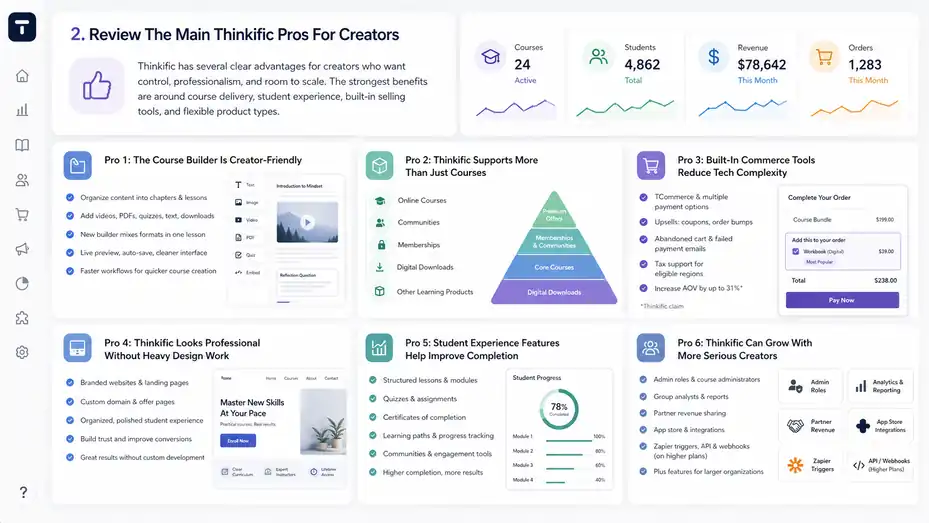
Thinkific has several clear advantages for creators who want control, professionalism, and room to scale.
The strongest benefits are around course delivery, student experience, built-in selling tools, and flexible product types.
Pro 1: The Course Builder Is Creator-Friendly
The biggest advantage of Thinkific is that it makes course creation feel approachable. You do not need to be a developer, designer, or learning management expert to create a professional course structure.
You can organize content into chapters and lessons, add videos, PDFs, quizzes, text, downloads, and other learning materials.
Thinkific has also introduced a newer course builder experience for newer sites, with a more flexible lesson format.
According to Thinkific’s support documentation, the new builder lets creators mix text, images, video, PDFs, quizzes, and external content within the same lesson, instead of managing separate lesson types for everything.
It also includes live preview, auto-save, a cleaner interface, and faster workflows, though some classic features may still be unavailable while the builder is in beta.
That flexibility is useful because real learning is rarely one format. A strong lesson might include a short video, a written summary, a downloadable worksheet, and a quiz. Instead of forcing your student to jump between disconnected assets, you can build a smoother learning flow.
In practical terms, this helps creators move faster. Let’s say you already have five recorded coaching calls. You can turn each one into a lesson, add notes below the video, attach a workbook, and create a reflection prompt. You do not need to rebuild your entire teaching method around complex software.
One caveat: If you rely on advanced learning formats, mobile app support, drip schedules, or certain classic features, you should check whether the new or classic builder is better for your specific course. Thinkific says courses cannot be moved between the two builder experiences, so that choice deserves attention.
Pro 2: Thinkific Supports More Than Just Courses
A strong creator business usually grows beyond one course. Thinkific supports online courses, communities, memberships, digital downloads, and other learning products, which gives you more ways to package your expertise. That matters because different buyers want different levels of depth and support.
A beginner might buy a $29 digital download. A more committed student might buy a $299 course. A serious customer might join a $49-per-month membership or a premium community. Thinkific gives you room to create that product ladder inside one ecosystem.
This is where I think Thinkific becomes more interesting for long-term creators. If you only sell one course, almost any decent course platform can work. But if you want to build a learning brand, you need more than a video library. You need offers for different awareness levels, budgets, and commitment levels.
Imagine you teach photography. Your product ladder could look like this:
- Starter product: A downloadable camera settings cheat sheet.
- Core course: A beginner photography course with video lessons.
- Community: A private critique space for monthly feedback.
- Membership: Ongoing challenges, live reviews, and advanced tutorials.
- Premium offer: A cohort-based workshop for serious learners.
That kind of setup helps you avoid relying on one launch. Instead, you create multiple buying paths. In my view, this is one of the strongest arguments for Thinkific if you are serious about creator monetization.
Pro 3: Built-In Commerce Tools Reduce Tech Complexity
Thinkific includes built-in commerce and payment features, which is helpful if you do not want to stitch together a checkout tool, video host, email automation system, tax plugin, and student dashboard from five different platforms.
Its website highlights TCommerce, multiple payment options, upsells such as coupons and order bumps, abandoned cart and failed payment emails, and tax support for certain regions.
For creators, this reduces friction in a very practical way. The fewer tools you need to connect, the fewer things can break during a launch. A failed checkout, missing login email, or confusing payment flow can cost real sales.
Thinkific also claims users of its built-in payment solution can increase average order value by up to 31%. I would treat that as a platform-specific claim rather than a guaranteed result, but the underlying idea is sound: better checkout experiences, payment options, and upsells can improve revenue per customer.
Here’s a simple example. You sell a $199 course. At checkout, you add a $39 workbook as an order bump. If 20 out of 100 buyers add it, that is $780 in extra revenue from the same traffic. You did not need more followers. You just improved the buying path.
I suggest creators think about commerce tools early, not after launch. Your course content matters, but the checkout experience determines whether interested people become paying students.
Pro 4: Thinkific Looks Professional Without Heavy Design Work
Thinkific helps creators build branded websites, landing pages, and course experiences without needing custom development. That is valuable because trust affects conversions. If your course site looks confusing, outdated, or unfinished, people hesitate before entering their card details.
You can use landing pages for individual offers, create a broader course website, connect a custom domain, and organize your student-facing experience in a polished way. For many solo creators, this is enough to look credible without hiring a designer.
This matters more than people admit. Let’s say two creators sell a similar productivity course. One has a messy checkout page with unclear benefits and no course structure preview.
The other has a clean page, clear modules, testimonials, FAQ, and a simple checkout. The second creator will usually have an easier time converting visitors because the buying decision feels safer.
Thinkific is not a full custom website builder in the same way a dedicated CMS is. You may run into design limitations if you want total creative control.
But for many creators, the tradeoff is worth it. You get enough customization to look legitimate while avoiding the headache of managing a custom learning portal.
My advice is to avoid over-designing your course site at the start. Use a clean layout, strong copy, clear outcomes, and a simple buying path. Most students care more about whether your course can help them than whether your page has fancy animations.
Pro 5: Student Experience Features Help Improve Completion
A course business only grows if students get value. Thinkific gives creators tools that support a better learning experience, such as structured lessons, quizzes, certificates, learning paths, progress tracking, communities, and completion-focused features depending on the plan.
These features matter because course completion is often a hidden business metric. If students do not finish, they are less likely to leave testimonials, buy the next offer, refer friends, or trust your brand again. A clean learning experience can improve perceived value even before the student finishes the course.
For example, a creator teaching public speaking could add short quizzes after each module, reflection exercises after practice videos, and a certificate at the end. None of those features magically creates transformation, but they give students checkpoints. Checkpoints help people feel progress, and progress keeps them moving.
Thinkific’s main site also mentions AI-powered teaching support, customized learning paths, and SCORM-compliant LMS functionality. SCORM is a technical standard used for tracking learning content in more formal training environments, and it is especially relevant for businesses or professional training programs.
For solo creators, the lesson is simple: do not just upload content. Build momentum. Use short lessons, clear module outcomes, simple assignments, and progress markers. Thinkific gives you the structure, but you still need to design the journey.
Pro 6: Thinkific Can Grow With More Serious Creators
Thinkific offers features that support growth beyond the beginner stage, including admin roles, course administrators, group analysts, partner revenue sharing, analytics integrations, the app store, Zapier triggers, API/webhooks on higher plans, and Plus features for larger organizations.
This is important because your needs change as your creator business grows. At first, you may do everything yourself: upload lessons, answer support emails, update pages, and manage students. Later, you might hire a virtual assistant, bring in guest instructors, sell to teams, or create corporate training packages.
Thinkific’s admin and role features help with that transition. You can give limited access to people who help manage specific courses without giving them full control over your entire business. That is not exciting when you are just starting, but it becomes very useful when your course library expands.
A realistic scenario: You sell a design course and later add a copywriting course taught by a partner. Revenue sharing and course admin permissions become important. You do not want to manually calculate partner payments every month or give someone unnecessary access to your full site.
From what I’ve seen, creators who plan for growth early avoid painful migrations later. You do not need enterprise-level features on day one, but you should know whether your platform can support your next two or three stages.
Review The Main Thinkific Cons For Creators
Thinkific is strong, but it has drawbacks that can affect your budget, workflow, and marketing strategy.
The biggest issues usually show up around pricing, feature limits, design flexibility, and the need for external audience-building tools.
Con 1: Pricing Can Feel Expensive As You Grow
Thinkific’s pricing can become a serious consideration, especially for newer creators who are not earning consistent course revenue yet. Its pricing page lists plan tiers such as Basic, Start, Grow, and Plus, with features increasing as you move up.
The support page also notes that plans can be billed monthly or yearly and that taxes such as sales tax or VAT may apply depending on your location.
The challenge is not just the monthly subscription. The real issue is feature access. Many creators start on a lower plan, then realize they need memberships, advanced sales tools, certificates, assignments, more admin accounts, integrations, or stronger automation.
That can push you into a higher plan before your revenue feels stable.
Here’s a simple way to think about it. If your platform costs $99 per month and your course sells for $99, you need at least one sale per month just to cover the software, not counting payment processing fees, email software, ads, editing tools, design help, or your time.
That is manageable if you have an audience. It feels stressful if you are starting from zero.
I do not think this means Thinkific is overpriced for everyone. A creator earning $5,000 per month from courses may see the cost as normal infrastructure. But a beginner with no validated offer should be careful.
My practical suggestion: Before upgrading, write down the exact feature you need and how it will increase revenue, save time, or improve retention. Do not upgrade because a feature sounds nice. Upgrade when it solves a real bottleneck.
Con 2: Thinkific Is Not A Complete Marketing Engine
Thinkific helps you sell courses, but it does not replace a full marketing strategy. You still need traffic, email nurturing, content, positioning, launch planning, and conversion-focused messaging. This is where many creators get disappointed.
A platform can host your course beautifully, but it cannot guarantee buyers. If you have 200 followers, no email list, and an unclear offer, Thinkific will not fix that. You need to understand your audience’s pain, create a compelling promise, and build trust before asking for the sale.
This is not unique to Thinkific. It is true for every course platform. Still, it matters because Thinkific’s clean setup can make course creation feel deceptively easy. You might spend weeks polishing modules and pages while ignoring the harder question: Who is ready to buy this, and why now?
A strong Thinkific funnel usually needs outside traffic sources. That might be SEO blog content, YouTube videos, newsletter growth, webinars, partnerships, podcast appearances, social media, or paid ads. Thinkific can support the checkout and learning experience, but it is not your audience-building machine.
In my experience, the creators who succeed with Thinkific treat it as one part of the system. They build demand outside the platform, then use Thinkific to convert and deliver. That mindset prevents a lot of frustration.
Con 3: Advanced Customization Has Limits
Thinkific offers enough customization for many creators, but it can feel limiting if you want a highly custom website, unusual checkout flow, complex learning experience, or deeply branded interface. You are working inside a platform structure, not building a fully custom app.
This tradeoff is normal. The more a platform simplifies setup, the more it standardizes certain parts of the experience. That standardization helps beginners, but advanced creators may eventually want more design freedom.
For example, you might want a fully custom homepage with complex interactive sections, advanced personalization based on student behavior, unusual course navigation, or custom reporting dashboards.
Depending on the feature, you may need higher-tier functionality, apps, integrations, custom code, or a different setup.
The new course builder also has specific limitations while in beta. Thinkific says some features are not supported yet, including mobile app availability, Shopify integration availability, certain settings such as free preview lessons, course reviews, drip schedules, custom code snippets, and third-party app extensions to the Course Player.
That does not make the new builder bad. It simply means creators need to choose carefully. If your course relies on drip release, mobile app access, or course reviews, you should verify the best builder before building.
I recommend mapping your must-have experience before committing. Write down what students need to do, what you need to track, and what sales flow you want. Then compare that against Thinkific’s actual feature set, not just the marketing page.
Con 4: Some Important Features Depend On Plan Tier
One common frustration with course platforms is discovering that a feature exists, but not on your current plan. Thinkific is no exception. Features like course admin accounts, group analyst accounts, advanced integrations, partner revenue sharing, API access, SSO, and deeper support vary by plan.
This matters because creators often compare platforms based on feature lists without checking plan availability. A platform may technically offer something, but if you need a higher plan to use it, the cost-benefit calculation changes.
For example, certificates can be valuable if your course serves professionals who want proof of completion. Advanced integrations can matter if you depend on automation. Extra admin seats matter if you have a team. API access matters if you plan to connect Thinkific to a custom system.
The problem is not that paid tiers exist. Software companies need pricing tiers. The issue is that creators should evaluate the plan they will actually need, not the lowest advertised price.
Here’s the practical way to avoid surprises:
- List your must-haves: Only include features needed for launch.
- List your nice-to-haves: Include features that can wait.
- Check plan availability: Match each feature to the correct Thinkific plan.
- Calculate break-even: Estimate how many monthly sales cover the platform cost.
- Review again after launch: Upgrade based on real usage, not guesswork.
This one exercise can save you from choosing a plan that is either too limited or too expensive.
Con 5: You Still Need To Design A Strong Course Yourself
Thinkific gives you tools, but it does not make your course effective automatically. That may sound obvious, but it is one of the most important Thinkific pros and cons for creators because beginners often confuse “course platform” with “course quality.”
A great course needs a clear promise, beginner-friendly structure, useful examples, strong lessons, practice opportunities, feedback loops, and measurable outcomes. Thinkific helps you organize and deliver those pieces, but you still need to create them.
For example, a course called “Instagram Growth” is vague. A course called “Build Your First 30-Day Content System For A Local Service Business” is clearer. The second course has a specific person, result, timeframe, and use case. Thinkific can host both, but the second one is much easier to sell and teach.
In most cases, your course should start with the student’s current state and move toward a specific outcome. Each module should remove one obstacle. Each lesson should answer one question. Each assignment should create progress.
I advise creators to storyboard the student journey before opening the course builder. Use a simple outline: problem, outcome, milestones, lessons, exercises, proof, and next step. Once that structure is clear, Thinkific becomes much easier to use well.
Compare Thinkific Pros And Cons At A Glance
Sometimes it helps to see the tradeoffs in one place. This comparison table gives you a practical view of where Thinkific shines and where creators may need to be careful.
| Area | Thinkific Pros | Thinkific Cons | Best For |
|---|---|---|---|
| Course creation | Easy course structure, video hosting, quizzes, downloads, flexible lessons | Advanced learning formats may require careful setup or higher plans | Creators building structured education |
| Sales tools | Built-in payments, coupons, order bumps, abandoned cart tools, payment options | Not a complete marketing system by itself | Creators with an existing audience or traffic plan |
| Website and branding | Landing pages, custom domains, branded course site | Less flexible than a fully custom website | Creators who want professional pages without coding |
| Student experience | Progress tracking, certificates, communities, memberships, learning paths | Course quality still depends on your instructional design | Coaches, educators, trainers, experts |
| Scaling | Admin roles, integrations, app store, partner revenue sharing, Plus options | Some features are plan-gated | Growing creators and small education businesses |
| Cost | Useful all-in-one value when revenue is steady | Can feel expensive before product-market fit | Creators with validated offers |
How To Read This Comparison Like A Business Owner
The key is not asking, “Is Thinkific good?” A better question is, “Is Thinkific good for my current stage?” That slight shift makes the decision much easier.
If you are still validating your first offer, your top priority is speed and low risk. You need to prove people will pay before investing too much in platform complexity. Thinkific can still work, but you should keep your setup simple and avoid unnecessary upgrades.
If you already have an audience and a clear course idea, Thinkific becomes more attractive. You can move quickly, create a polished student experience, and use built-in selling features to improve conversions.
If you run a growing education business, Thinkific’s scaling features become more relevant. Admin roles, integrations, partner permissions, and analytics support can save real time. At that stage, the platform cost is easier to justify because it supports operations, not just content hosting.
I recommend rating each category from 1 to 5 based on importance to your business. If course delivery, professionalism, and student experience score high, Thinkific likely deserves serious consideration. If deep automation, custom design, or low-cost experimentation matters more, compare alternatives carefully.
A Simple Decision Matrix For Creators
Let me break it down in a practical way. Thinkific is usually a strong fit when your offer is educational, your students need structure, and you care about long-term brand trust.
It may be less ideal when your product is very simple, your budget is extremely tight, or your business depends on complex marketing automation from day one.
A beginner creator with no audience might use Thinkific for a simple beta course, but I would suggest keeping costs low and validating demand first. A mid-level creator with an email list and proven niche can use Thinkific more confidently.
An advanced creator selling to businesses may value Thinkific’s learning management features more than a casual creator selling templates.
Here’s a quick gut-check:
- Choose Thinkific: You want a professional course platform with strong learning delivery.
- Be cautious: You need advanced marketing automation built directly into the platform.
- Compare alternatives: You mainly sell simple downloads or want full website control.
- Upgrade slowly: You should only pay for features tied to revenue, retention, or time savings.
This decision is not emotional. It is operational. The right platform should reduce friction between your expertise and your student’s result.
Set Up Thinkific The Smart Way
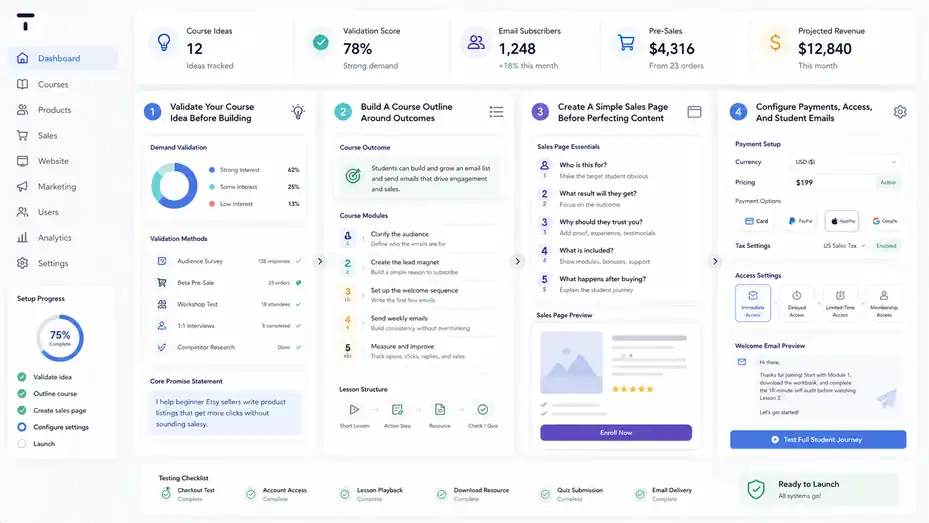
A good Thinkific setup starts before you upload your first video.
You need a clear offer, organized course structure, simple pricing, and a conversion-focused student path.
Step 1: Validate Your Course Idea Before Building
The worst mistake is spending months building a course nobody asked for. Before you go deep into Thinkific, validate the offer. Validation means proving that real people understand the problem, want the result, and are willing to pay for help.
Start by writing one clear sentence: “I help [specific audience] achieve [specific result] without [specific pain].” For example, “I help beginner Etsy sellers write product listings that get more clicks without sounding salesy.” That is stronger than “I teach Etsy marketing.”
Then test demand. You can ask your audience, run a small workshop, sell a beta version, review common questions in your niche, or interview potential students.
Look for repeated pain points. If people keep saying, “I don’t know what to do first,” your course might need a clear step-by-step roadmap. If they say, “I know what to do but can’t stay consistent,” your course may need accountability and community.
I suggest pre-selling or beta-testing whenever possible. You do not need 1,000 students. Even 5 to 20 early buyers can reveal whether your promise is clear and whether the content actually helps.
Once you validate demand, Thinkific becomes a build tool instead of a guessing tool. That difference matters. You are not asking the platform to rescue an unproven idea. You are using it to deliver a solution people already want.
Step 2: Build A Course Outline Around Outcomes
A strong course outline is not a list of everything you know. It is a sequence of steps that help students reach a result. This is where many creators accidentally overwhelm people.
Start with the end outcome. What should the student be able to do after finishing? Then work backward. What milestones must they hit? What concepts do they need first? What mistakes will block progress?
For example, if your course teaches beginner email marketing, your modules might be:
- Clarify the audience: Define who the emails are for.
- Create the lead magnet: Build a simple reason to subscribe.
- Set up the welcome sequence: Write the first few emails.
- Send weekly emails: Build consistency without overthinking.
- Measure and improve: Track opens, clicks, replies, and sales.
That structure is easier to complete than a giant library called “Everything About Email Marketing.” Students want progress, not a content museum.
Inside Thinkific, translate each milestone into a module or chapter. Keep lessons focused. One lesson should solve one small problem. If a video goes beyond 15 or 20 minutes, ask whether it should become two lessons.
In my experience, completion improves when students feel small wins early. Put a quick action in the first module so they do something meaningful right away. That builds confidence and reduces refund risk.
Step 3: Create A Simple Sales Page Before Perfecting Content
Many creators polish lessons before writing the sales page. I suggest doing the opposite. Write the sales page early because it forces you to clarify the buyer, promise, pain points, outcomes, modules, proof, pricing, and objections.
Your Thinkific sales page should answer five questions quickly:
- Who is this for? Make the target student obvious.
- What result will they get? Focus on the outcome, not just lessons.
- Why should they trust you? Add experience, examples, testimonials, or proof.
- What is included? Show modules, bonuses, support, and access details.
- What happens after buying? Explain the student journey clearly.
A good sales page is not about hype. It is about reducing uncertainty. People buy when they understand the value, trust the creator, and believe they can follow the process.
Imagine a parent wants to learn meal planning for busy school weeks. A vague course page says, “Learn meal planning with 20 videos.” A stronger page says, “Plan five simple weeknight dinners in under 30 minutes, even if your schedule changes daily.” That speaks to a real problem.
Thinkific gives you the page structure, but your copy does the persuasion. Use plain language. Avoid inflated claims. Show the practical transformation.
Step 4: Configure Payments, Access, And Student Emails
Once your course structure and sales page are ready, set up the operational basics. These are not glamorous, but they prevent launch-day problems.
Start with payments. Choose your payment setup, test checkout, confirm tax settings where relevant, and make sure the currency and pricing match your market.
Thinkific’s support documentation notes that subscription costs can be monthly or yearly and may include taxes depending on location, which is a reminder to check the total cost and compliance details before launch.
Next, configure access. Decide whether students get immediate access, delayed access, limited-time access, or access through a membership. For evergreen courses, immediate access often works well. For cohort-style programs, scheduled access may create more accountability.
Then review student emails. Your welcome email should tell students exactly what to do first. Do not just say, “Thanks for joining.” Give them a first step. For example: “Start with Module 1, download the workbook, and complete the 10-minute self-audit before watching Lesson 2.”
Finally, test the full journey as a student. Buy your own course with a test checkout if possible, log in, watch a lesson, download a resource, complete a quiz, and check email delivery. This small test can catch embarrassing issues before real buyers find them.
Use Thinkific To Improve Sales And Conversions
Thinkific can help you sell more effectively, but only when your offer and buyer journey are clear.
The goal is to make buying feel simple, safe, and worthwhile.
Optimize Your Course Offer Before Optimizing The Platform
Before you tweak buttons, coupons, and checkout settings, make sure the offer is strong. A weak offer with perfect software still struggles. A strong offer with a simple setup can sell surprisingly well.
Your offer includes the audience, problem, outcome, format, support, timeline, and price. Thinkific helps package those pieces, but you need to make the value obvious.
For example, “Social Media Course” is broad. “30-Day Content System For Busy Real Estate Agents” is specific. The second offer tells the buyer, “This was made for me.” That level of relevance usually improves conversions more than small design changes.
I suggest using the “pain-to-outcome” method. Write down what your student is struggling with now, then define what life looks like after the course. Your modules should become the bridge between those two points.
Use testimonials or beta feedback wherever possible. If you do not have testimonials yet, use transparent proof: your experience, screenshots of your process, before-and-after examples, sample lessons, or a clear curriculum preview.
Thinkific’s sales tools can support the offer, but they cannot replace clarity. If people do not understand why they need the course, no checkout feature will save the sale.
Use Coupons And Order Bumps Carefully
Coupons and order bumps can improve revenue, but they can also train your audience to wait for discounts if overused. Use them strategically.
A coupon works best when there is a real reason: launch week, student beta group, seasonal campaign, partner promotion, or loyalty reward. Avoid constant fake urgency. People can sense it, and it weakens trust over time.
Order bumps are more interesting because they increase average order value without requiring a separate sales process. Thinkific highlights upsell tools such as coupons and order bumps as part of its selling features.
A good order bump should be tightly related to the course. If you sell a course on resume writing, an order bump could be a resume template pack. If you sell a course on beginner photography, an order bump could be a printable shot checklist. The bump should feel like a helpful shortcut, not a random extra.
Here’s a simple rule I use: The order bump should make the main course easier to complete or faster to apply. If it does not support the main outcome, skip it.
Track performance. If 5% to 20% of buyers accept the bump, it may be useful. If almost nobody accepts it, the offer may be unclear, overpriced, or poorly matched.
Build A Better Checkout Experience
Checkout is where interest becomes revenue. Small points of friction can reduce sales, especially if buyers feel confused or uncertain.
A good checkout experience should be simple, trustworthy, and consistent with the sales page. The course name should match. The price should be clear.
Payment options should be easy to understand. Any guarantee, access terms, or subscription details should be visible before purchase.
Thinkific’s commerce features include multiple payment options and tools designed to improve sales and order value. Its site also mentions abandoned cart and failed payment emails, which can help recover sales that might otherwise disappear.
In practical terms, do not overload checkout with too many distractions. The buyer has already decided. Your job is to help them finish.
A few checkout improvements worth testing:
- Clear product title: Use a specific name that matches the sales page.
- Simple order summary: Make the price, payment plan, or subscription terms obvious.
- Relevant order bump: Add one helpful upgrade, not five unrelated extras.
- Trust elements: Include secure checkout cues and refund policy clarity.
- Recovery emails: Follow up when someone starts but does not complete payment.
From what I’ve seen, checkout improvements matter most once traffic is already targeted. If the wrong people are visiting your page, checkout tweaks will not fix the core issue.
Improve Student Results And Retention
Student success is the quiet engine of a profitable course business.
Better outcomes lead to testimonials, referrals, repeat purchases, and stronger brand trust.
Design Lessons For Completion, Not Just Information
Creators often overteach. I understand the instinct because you want students to get everything. But too much content can make students feel behind before they even start.
A better approach is to design lessons around action. Each lesson should help the student understand one idea, make one decision, or complete one task. That keeps momentum high.
For example, instead of a 45-minute lesson called “Everything About Branding,” create shorter lessons like “Choose Your Brand Promise,” “Pick Three Visual Rules,” and “Write Your One-Sentence Positioning Statement.” Each lesson has a clear job.
Thinkific’s structure supports this because you can break content into lessons, add downloads, include quizzes, and create a visible path through the course. Use that structure to reduce overwhelm.
I recommend ending each lesson with a next action. It could be a worksheet prompt, a checklist item, a reflection question, or a simple task. Students should never wonder, “Okay, now what?”
Also consider early wins. If your first module takes three hours before the student does anything useful, you may lose people. Give them a quick success in the first 20 minutes. That success builds belief, and belief increases completion.
Use Communities To Add Support And Accountability
Thinkific supports communities, which can be valuable when your course benefits from discussion, accountability, feedback, or peer learning. A community is not just a chat space. Done well, it becomes the support layer that helps students keep going.
This is especially useful for courses where students need practice. Writing, fitness, business, design, language learning, and coaching topics often improve when students can ask questions and share progress.
But here’s the catch: A community only works if it has a purpose. A silent community can make your course feel abandoned. Before adding one, decide how you will use it.
You might create weekly discussion prompts, monthly feedback threads, accountability check-ins, office-hour questions, or student wins posts. Keep it simple. You do not need to be online all day.
For example, a creator teaching freelancing could use three recurring threads:
- Monday planning: Students share outreach goals.
- Wednesday feedback: Students post pitches for review.
- Friday wins: Students share replies, calls booked, or lessons learned.
That structure turns the community into part of the learning experience instead of a random forum.
I believe communities work best when they support a clear transformation. If your course is purely self-paced and simple, you may not need one. If your students need encouragement and feedback, a community can increase perceived value.
Track Student Behavior And Improve Weak Points
Once students enroll, pay attention to where they slow down. Course improvement should be based on behavior, not just your assumptions.
If many students stop after Module 2, ask why. Is the lesson too long? Is the assignment unclear? Did you introduce a difficult concept too soon? Is there no quick win? Completion data and student questions can show you where the course needs work.
Thinkific’s learning and analytics features can help creators understand student progress, while integrations may help with broader tracking depending on the plan and setup. Its pricing page also mentions marketing analytics integrations and app store access for extending the platform.
A simple course improvement rhythm works well:
- Review completion: Find lessons with drop-off.
- Read questions: Identify confusing sections.
- Ask students: Use short surveys after key modules.
- Improve one thing: Shorten, clarify, reorder, or add examples.
- Measure again: See whether completion improves.
Do not rebuild the whole course every month. Make small, targeted improvements. A confusing lesson might only need a better intro, a checklist, or a worked example.
In my experience, the best courses become clearer over time. Your first version does not need to be perfect. It needs to be useful, measurable, and easy to improve.
Avoid Common Thinkific Mistakes
Most Thinkific problems are not really software problems.
They come from unclear offers, overcomplicated setup, weak student journeys, or unrealistic expectations about traffic and sales.
Mistake 1: Building Too Much Before Selling
One of the most common mistakes is building a huge course before validating demand. This feels productive, but it is risky. You can spend months recording lessons, designing worksheets, and customizing pages only to discover that your audience wanted a different result.
I suggest starting smaller. Build a minimum viable course. That means the simplest version that can still deliver the promised outcome. You might create four modules instead of twelve, use simple worksheets instead of polished workbooks, and offer live support during the first beta round.
This approach gives you feedback while your idea is still flexible. Students will tell you what confused them, what they loved, what they skipped, and what they wished you included. That feedback is more valuable than guessing alone.
Thinkific makes it easy to add and update content, so use that flexibility. Launch a strong first version, then improve based on real student behavior.
A practical mini-case: Imagine you want to teach “Notion for students.” Instead of building a giant Notion academy, sell a focused course called “Set Up A Study Dashboard In One Weekend.” Once students buy and complete it, you can expand into habit tracking, exam planning, or productivity systems.
Small, specific, and validated usually beats huge, vague, and untested.
Mistake 2: Treating Thinkific Like A Traffic Source
Thinkific is not where most people discover you. It is where they buy and learn. That distinction matters.
Many creators launch a course and expect sales just because the course exists. But unless you already have an audience, search visibility, partnerships, ads, or a warm email list, buyers will not magically arrive.
Your traffic strategy should be separate from your platform setup. For SEO, that might mean publishing articles targeting course-related questions. For YouTube, it might mean tutorials that lead to a deeper paid program. For email, it might mean a lead magnet and welcome sequence. For social media, it might mean consistent problem-solving content that builds trust.
Thinkific can support the sales page and checkout, but the demand usually starts elsewhere.
I advise choosing one primary traffic channel at first. Do not try to master SEO, YouTube, Instagram, TikTok, webinars, ads, and affiliates all at once. Pick the channel your audience already uses and create helpful content consistently.
If you teach career skills, LinkedIn and SEO may work well. If you teach visual skills, YouTube or Instagram may fit better. If you teach business systems, webinars and email can be powerful.
The platform delivers the product. Your marketing brings the people.
Mistake 3: Ignoring The Student Onboarding Experience
Student onboarding is the first impression after purchase. It can either create excitement or confusion.
A weak onboarding experience says, “Here’s your login.” A strong onboarding experience says, “Here’s what to do first, here’s how the course works, here’s how to get support, and here’s what success looks like.”
Inside Thinkific, you can shape this through your welcome email, course introduction lesson, first module, community instructions, and student dashboard structure. Keep everything simple.
Your first lesson should not be a long lecture. It should orient the student. Tell them who the course is for, how to use it, what to complete first, how much time to set aside, and where to ask questions if support is included.
For example: “Start with the 10-minute audit. Then watch Lesson 1. Do not skip the worksheet because we’ll use it in Module 2.” That kind of instruction reduces uncertainty.
Onboarding is especially important for memberships and communities. If people do not participate in the first week, they may never form the habit. Give them a simple first action, like posting an introduction, choosing a goal, or completing a quick-start lesson.
Good onboarding increases completion, reduces refund requests, and makes students feel cared for. It is a small effort with a big emotional payoff.
Decide Whether Thinkific Is Worth It For You
Thinkific is worth it for many creators, but not all. The right decision depends on your business model, audience stage, course complexity, and growth plans.
When Thinkific Is A Strong Choice
Thinkific is a strong choice when you want to build a real learning business, not just sell files. It works well if your content needs structure, your students benefit from progress tracking, and your brand needs a polished course experience.
It is also strong if you plan to create multiple learning products over time. Courses, communities, memberships, and digital downloads can support a broader creator business. That gives you more flexibility than a one-product setup.
I would lean toward Thinkific if you have at least one of these advantages:
- Existing audience: You already have followers, subscribers, clients, or community members.
- Validated offer: People have asked for your help or paid for a related service.
- Structured transformation: Your course teaches a step-by-step result.
- Long-term vision: You want to build an academy, membership, or learning brand.
- Need for professionalism: You want a cleaner student experience than basic file delivery.
Thinkific’s public site emphasizes business growth, learning products, built-in selling tools, and support for creators, academies, and companies. That aligns best with creators who see education as a serious revenue stream, not a side experiment.
In short, Thinkific is worth considering when your course is more than content. It is a product, experience, and business asset.
When Thinkific Might Not Be The Best Fit
Thinkific may not be the best fit if you are still unsure what to sell, have no audience, need the cheapest possible setup, or mainly sell simple digital files. In those cases, you may want to validate demand with a lighter system first.
It may also feel limiting if you need a fully custom website, advanced automation built directly into the core platform, or highly specialized learning experiences. Thinkific can integrate with other tools, but every integration adds complexity.
Creators with very specific design requirements should test the site builder before committing. Creators with advanced course delivery needs should check whether the required features are available on the plan and builder they intend to use.
The new course builder is promising, but Thinkific’s own documentation says it is currently in beta and that certain features are not yet supported. That means creators with specific requirements should avoid assuming every classic feature works the same way in the new experience.
I believe Thinkific is strongest when your priority is professional course delivery with solid commerce support. It is weaker if your priority is ultra-low-cost experimentation or total creative control.
The honest answer is this: Thinkific can be an excellent platform, but only if it matches the business you are actually building.
My Final Recommendation For Creators
If you are a creator with a clear topic, a defined audience, and a real plan to sell educational products, Thinkific is a serious option. Its strengths in course delivery, student experience, commerce, communities, and scaling features make it a platform you can grow with.
But I would not start by obsessing over every feature. Start with your offer. Who do you help? What result do they want? Why are you credible? What is the simplest course that can deliver that result? Once those answers are clear, Thinkific becomes much easier to evaluate.
My practical recommendation is to use Thinkific if you want a polished learning platform and you are ready to treat your course like a business. Keep your first version simple. Validate demand. Build a strong student journey. Use sales tools thoughtfully. Improve based on student behavior.
The biggest Thinkific pro is that it gives creators a professional foundation for selling knowledge. The biggest con is that it cannot replace strategy, audience trust, or good teaching.
If you remember that, you’ll make a much better decision. Thinkific is not magic. But in the hands of a creator with a clear offer and a real commitment to student success, it can be a very capable platform.
FAQ
What are the main Thinkific pros and cons for creators?
Thinkific gives creators an easy course builder, professional student experience, built-in payments, communities, memberships, and strong scaling options. The main downsides are pricing, limited advanced customization, plan-based feature restrictions, and the need to bring your own traffic through content, email, ads, or an existing audience.
Is Thinkific good for beginner creators?
Thinkific can work well for beginners who already have a clear course idea and want a simple way to build and sell online courses. However, beginners should validate demand first because Thinkific helps deliver and sell courses, but it does not automatically create an audience or guarantee sales.
What is the biggest advantage of Thinkific?
The biggest advantage of Thinkific is its professional course delivery system. Creators can organize lessons, host videos, add quizzes, accept payments, manage students, and create a branded learning experience without building a custom website or using many disconnected tools.
What is the biggest disadvantage of Thinkific?
The biggest disadvantage of Thinkific is that important features can depend on your plan, which may increase costs as your business grows. It also is not a complete marketing engine, so creators still need a clear offer, traffic strategy, and conversion-focused sales process.
Is Thinkific worth it for creators?
Thinkific is worth it for creators who want to build structured courses, memberships, communities, or a long-term education business. It may not be the best fit if you only sell simple downloads, need very low startup costs, or require full control over advanced design and automation.

I’m Juxhin, the voice behind The Justifiable.
I’ve spent 6+ years building blogs, managing affiliate campaigns, and testing the messy world of online business. Here, I cut the fluff and share the strategies that actually move the needle — so you can build income that’s sustainable, not speculative.