Table of Contents
Some links on The Justifiable are affiliate links, meaning we may earn a small commission at no extra cost to you. Read full disclaimer.
If you’ve ever dreamed of turning your words into income, learning how to WordPress start a blog could be your most profitable move yet. I still remember when I built my first blog—no coding, no fancy setup—just pure curiosity and a laptop.
Within months, it started earning from affiliate links and ads. That’s the beauty of WordPress: it gives you freedom, scalability, and control.
In this guide, I’ll walk you through the complete roadmap—from setup to monetization—so you can confidently start your own WordPress blog and make money online doing what you love.
Choosing The Right Niche For Your WordPress Blog
Finding the perfect niche is the foundation of every successful WordPress start a blog journey. It determines not only what you’ll write about but also who you’ll attract—and ultimately, how much you can earn.
Understanding The Importance Of A Profitable Niche
A profitable niche gives your blog focus, identity, and earning power. Without it, even great content struggles to find the right audience.
Think of your niche as your blog’s compass—it guides your topics, voice, and monetization strategy. When you choose a niche with both passion and demand, you set yourself up for long-term growth.
Here’s the reality: readers pay attention to specialists, not generalists. A blog about “everything” rarely builds loyal traffic. But a blog about eco-friendly home organization or budget travel for digital nomads attracts a clear, loyal audience willing to take recommendations and buy from you.
Quick tip: If you can think of at least 20 blog post ideas within a niche and name 3–5 ways to monetize it (like affiliate products, courses, or services), you’re on the right track.
How To Validate A Niche With Audience Demand And Monetization Potential
Before committing, you need proof your niche has both traffic and income potential.
Here’s how I personally test niches:
- Search volume check: Use tools like Google Keyword Planner or Ubersuggest to find if people are actually searching for your niche topics.
- Monetization signs: Look for active affiliate programs, products, or digital offers in the space. If companies spend money advertising there, that’s a good signal.
- Community engagement: Browse Reddit or Facebook groups to see if people discuss and seek advice in that niche.
Example: When I validated my first blog in personal finance, I noticed thousands of monthly searches for “save money fast” and hundreds of products like budgeting apps and side hustle courses. That combination confirmed the potential.
Avoiding Overcrowded Niches And Finding Unique Angles
Not all popular niches are worth entering. Some—like “fitness” or “travel”—are oversaturated. But that doesn’t mean you can’t join them. It just means you need a sharper focus.
Here’s how you can stand out:
- Find a micro-niche: Instead of “fitness,” go with “fitness for busy moms” or “minimalist home workouts.”
- Share personal experience: People love authentic voices. Use your journey to differentiate your content.
- Offer a unique value angle: Maybe you provide data-backed fitness plans or story-driven travel guides.
The goal isn’t to compete on volume but on value and perspective. A smaller, loyal audience can outperform a massive, unengaged one.
Tools To Research Trends And Competition Effectively
You don’t need to guess what’s trending—tools can give you clear signals.
- Google Trends: Helps you spot seasonal spikes or growing interest in topics.
- SEMrush: Reveals keyword difficulty and what competitors are ranking for.
- AnswerThePublic: Shows common questions real people ask in your niche.
- Pinterest Trends: Ideal if your niche relies on visual content or lifestyle topics.
Pro insight: When you see a consistent upward trend and moderate competition for a topic, that’s often the sweet spot for new bloggers.
Selecting The Best Hosting And Domain For Your Blog
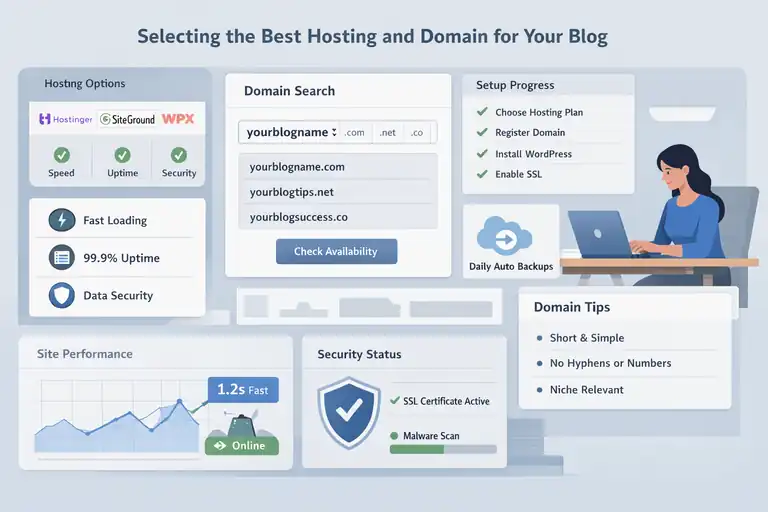
Now that your niche is clear, it’s time to set the technical stage. Your hosting and domain are like the land and address of your online home—they need to be reliable, accessible, and memorable.
Why Reliable Hosting Matters For Long-Term Growth
A slow or unstable website can ruin your blog before it even takes off. Reliable hosting affects everything—from user experience to Google rankings.
Good hosting ensures your blog:
- Loads quickly (under 3 seconds ideally)
- Stays online even during traffic spikes
- Protects your data from malware and hackers
If you choose cheap, poor-quality hosting, you’ll end up dealing with downtime and slow speeds that frustrate readers and advertisers alike. It’s worth investing in a reputable host early—it saves you money and headaches later.
Choosing A Domain Name That Builds Trust And Authority
Your domain name is your online identity. It’s how people remember you, share your content, and perceive your credibility.
Here’s what I recommend:
- Keep it short and simple: Aim for under 15 characters.
- Avoid hyphens or numbers: They confuse users and look less professional.
- Make it niche-relevant: For instance, “savvybudgetlife.com” instantly signals a personal finance focus.
A memorable domain name doesn’t just describe your topic—it builds a brand.
Step-By-Step Process To Register Your Domain And Hosting
Here’s how you can get everything up and running quickly:
- Choose a hosting provider: Visit a WordPress-recommended host (like Bluehost, Pressable , or Hostinger).
- Pick your plan: Select a basic shared hosting plan for starters.
- Register your domain: Most hosts offer free domain registration for the first year.
- Set up your WordPress install: Many hosts have one-click WordPress setup tools that make it seamless.
- Secure your site: Enable SSL (usually free) to ensure your blog runs on HTTPS.
Pro tip: Use your hosting dashboard’s auto-backup feature to avoid losing progress if something breaks later.
Recommended Hosting Providers For WordPress Beginners
Based on speed, reliability, and ease of use, here are some solid hosting choices:
- Hostinger: Great for affordability and simplicity.
- SiteGround: Offers top-notch performance and customer support.
- WPX Hosting: Ideal if you plan to scale quickly with high traffic.
Each of these integrates easily with WordPress and offers one-click installations, making setup stress-free for beginners.
Installing WordPress And Setting Up The Foundation
Once your hosting and domain are ready, the fun begins—setting up WordPress itself. Don’t worry, it’s much simpler than it sounds, even if you’ve never built a website before.
How To Install WordPress In Under 10 Minutes
Most modern hosts make installation effortless.
Here’s how to do it:
- Log in to your hosting dashboard.
- Find the “Install WordPress” option. Usually under “Website” or “Apps.”
- Enter your site name and admin details. Keep these secure.
- Click Install. That’s it—your WordPress site will be live in minutes.
You can then access your blog by visiting yourdomain.com/wp-admin and logging in with your credentials.
Essential Settings To Configure Before Publishing
Before writing your first post, tweak a few key settings to ensure everything runs smoothly:
- Change your permalink structure: Go to Settings > Permalinks and select “Post name.” This keeps URLs clean and SEO-friendly.
- Set your site title and tagline: Under Settings > General.
- Install an SSL certificate: This secures your site and improves trust.
- Create a basic menu and privacy page: These add professionalism from day one.
Getting these basics right prevents messy structures and future rework.
Choosing Between Free And Premium WordPress Themes
WordPress offers thousands of free themes, but not all are equal. Free themes are great for testing ideas, while premium themes provide customization and support.
Here’s what I recommend:
- Start free: Try Astra for lightweight, responsive designs.
- Upgrade later: When you’re ready to scale, consider premium themes like Divi.
Premium themes often include advanced customization tools and speed optimization built in, saving you time tweaking code later.
Best Practices For Creating A Clean, Professional Layout
Your layout shapes first impressions. Keep it clean, focused, and consistent.
Here’s how:
- Limit clutter: Too many widgets or ads distract readers.
- Stick to 2–3 colors: Preferably your brand palette.
- Use readable fonts: Sans-serif fonts like Lato or Open Sans look modern and easy to scan.
- Highlight CTAs: Make buttons (like “Subscribe” or “Shop Now”) stand out clearly.
A professional layout builds trust. Even if your content is great, messy design can drive readers away.
Designing A User-Friendly And Engaging Blog
Your blog design isn’t just about how it looks—it’s about how it feels for the reader. When someone lands on your site, they decide in seconds whether to stay or bounce.
A user-friendly WordPress design helps you hold attention, build trust, and make your content easy to explore.
How To Choose A Theme That Matches Your Niche
The right WordPress theme does more than decorate—it sets the tone for your brand. It influences readability, navigation, and even conversion rates.
Start simple. Avoid flashy designs or heavy animations that slow things down. Clean, minimalist themes like Astra, GeneratePress, or Kadence are fast, flexible, and mobile-friendly.
When choosing your theme, keep three key filters in mind:
- Relevance: The theme should visually reflect your niche. A lifestyle blog might favor soft colors, while a tech blog benefits from modern, structured layouts.
- Speed: Lightweight themes perform better in search engines and improve user experience.
- Customization: Pick a theme that lets you adjust fonts, colors, and layouts without coding.
Pro tip: Before committing, preview your theme on mobile—over 60% of blog visitors browse from their phones.
Customizing WordPress Menus, Widgets, And Pages
Menus and widgets guide readers through your site. Think of them as signposts that help people find your best content.
Menus: Use clear, simple navigation labels. Stick to 5–7 main items max, such as Home, Blog, About, Contact, and Resources. If you have categories, organize them under a drop-down.
Widgets: These are small content blocks that appear in your sidebar or footer. Use them strategically for:
- An email signup form
- Recent posts or popular posts
- Social media links
Pages: Beyond your blog posts, create essential pages like:
- About Page – tell your story and what readers can expect
- Contact Page – include a form or email address
- Privacy Policy – builds credibility, especially for monetization
Less clutter, better flow. Keep your design intuitive so visitors never feel lost.
Optimizing Blog Design For Mobile And Readability
Mobile optimization isn’t optional—it’s the standard. Over half of all web traffic comes from mobile users, so your site must look and function beautifully on small screens.
Here’s what helps:
- Responsive theme: Make sure your theme automatically adjusts to screen size.
- Readable fonts: Choose 16px or larger text for mobile comfort.
- White space: Give your content breathing room—it increases reading time.
- Fast loading: Use caching plugins and compressed images to improve speed.
I always test new designs using Bings’s Mobile-Friendly Test—it highlights issues you might not notice on desktop.
The Role Of Branding In Building Reader Loyalty
Branding is more than a logo—it’s how readers recognize and remember you. Consistency builds trust, and trust builds loyalty.
To strengthen your brand identity:
- Use consistent visuals: Stick to a color palette, font pairing, and imagery style.
- Develop a brand voice: Whether it’s friendly, professional, or witty, keep it uniform across posts and emails.
- Add a personal touch: A photo of yourself, your signature in emails, or a friendly author bio goes a long way.
Think of your blog as your digital handshake—it should immediately feel you.
Creating Compelling Blog Content That Converts
Your design gets readers in the door, but your content keeps them around—and convinces them to take action.
Great blogging isn’t just about writing; it’s about connection, clarity, and conversion.
How To Write Blog Posts Readers Actually Want To Read
Start by understanding what your audience cares about. The best posts solve a real problem or answer a burning question.
Here’s how to find those topics:
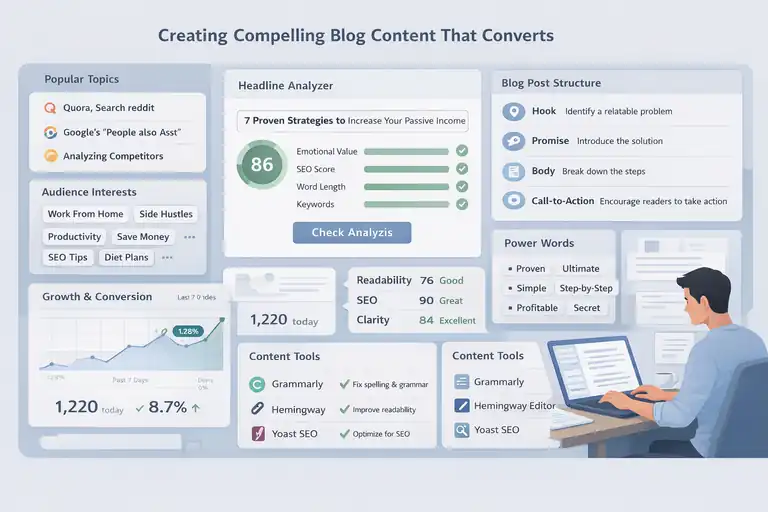
- Browse Quora or Reddit discussions in your niche.
- Use Google’s “People Also Ask” section for inspiration.
- Analyze your competitors’ most shared content.
When writing, keep paragraphs short (2–4 lines), and use simple language. Write like you’re explaining a concept to a friend over coffee—clear, relatable, and honest.
Remember: the more conversational your tone, the longer people stay.
Crafting Catchy Headlines And SEO-Friendly Titles
Your headline decides whether someone clicks or scrolls past.
To create magnetic titles:
- Include emotion or curiosity: “10 Simple Habits That Save You Hours Every Week.”
- Add clarity: Readers should instantly know what the article offers.
- Use your main keyword naturally in the title and early in the post.
A good formula:
- Number + Adjective + Promise + Keyword
Example: “7 Proven Ways To Start A WordPress Blog That Makes Money.”
Pro insight: Tools like CoSchedule Headline Analyzer can score and improve your titles for engagement.
Structuring Blog Posts For Engagement And Monetization
A structured post keeps readers hooked from start to finish.
Here’s a simple layout I use:
- Hook: Start with a relatable problem or story.
- Promise: Tell the reader what they’ll learn.
- Body: Break down the solution step by step with subheadings.
- Action: End with a clear call-to-action (CTA)—subscribe, comment, or buy.
For monetized blogs, strategically place affiliate links or product mentions where they naturally fit, not as sales pitches.
And never underestimate the power of visuals—add screenshots, infographics, or short videos to make complex ideas simple.
Tools For Editing, Proofreading, And Content Optimization
Even the best writers need editing support.
Here are my go-to tools:
- Grammarly: Fixes grammar and clarity issues in real-time.
- Hemingway Editor: Helps simplify long sentences and improve readability.
- Rank Math: Ensures on-page SEO is solid before publishing.
- Canva: Perfect for designing blog graphics and feature images.
Before publishing, I always read my post out loud. If it sounds stiff or robotic, I rewrite it. Great content sounds natural before it reads well.
Implementing SEO Strategies To Grow Organic Traffic
You don’t need to be an SEO expert to grow traffic—you just need the right habits. SEO (Search Engine Optimization) ensures your WordPress blog shows up when people search for topics you cover.
On-Page SEO Techniques For WordPress Bloggers
On-page SEO is about optimizing what’s directly on your site.
Here’s what matters most:
- Use one main keyword per post: Place it in the title, first paragraph, and one subheading.
- Write descriptive meta titles and descriptions: These appear in Google search results.
- Use short, keyword-rich URLs: For example, yourblog.com/start-a-wordpress-blog.
- Include internal links: Connect to related posts to keep readers exploring.
Don’t chase algorithms—chase clarity. Google rewards content that genuinely helps readers.
Optimizing Blog Images, URLs, And Meta Descriptions
Images and metadata quietly shape your SEO strength.
Here’s how to make them work for you:
- Compress images: Use tools like EWWW.io to speed up your site.
- Add alt text: Describe your images in simple terms for accessibility and SEO.
- Write short URLs: Avoid random strings—use readable, keyword-based slugs.
- Craft engaging meta descriptions: Summarize your post in one compelling sentence (under 160 characters).
When done right, these small tweaks can improve your click-through rate and help you appear higher in search results.
How To Use Internal Linking To Boost Rankings
Internal linking connects your posts like a web—it helps both readers and search engines navigate your site.
Here’s how I do it:
- Link to older, relevant posts from new ones.
- Use descriptive anchor text like “learn how to write better blog titles” instead of “click here.”
- Add related post sections at the end of each article.
Over time, these links distribute SEO value across your site and help older posts stay visible in search results.
Recommended SEO Plugins To Simplify Optimization
WordPress plugins make SEO simpler, even for beginners.
- Rank Math: Offers real-time SEO analysis, schema markup, and easy setup.
- Yoast SEO: Great for guiding you through on-page SEO improvements.
- WP Rocket: Speeds up loading times, which directly impacts rankings.
My personal setup? I use Rank Math for SEO, WP Rocket for speed, and ShortPixel for image compression—it’s a balanced combo that keeps my site light, fast, and visible.
Monetizing Your WordPress Blog Effectively
Once your WordPress start a blog journey is up and running, the next big question is how to turn traffic into income. There’s no single right way to monetize—what works depends on your niche, audience, and comfort level.
Let’s go through the main income models and how to choose the ones that suit you best.
Understanding Different Blog Monetization Models
There are several proven ways to make money with your blog. Some require steady traffic, while others depend on trust and expertise.
Here are the four main models most bloggers start with:
- Affiliate Marketing: Promoting other people’s products and earning a commission per sale.
- Display Ads: Earning money from ad impressions or clicks.
- Sponsored Content: Getting paid by brands to feature their products.
- Digital Products or Services: Selling your own courses, templates, or coaching.
The smartest strategy? Mix a few of these once your traffic grows. Early on, focus on one method—like affiliate marketing—so you can master it before diversifying.
How To Make Money With Affiliate Marketing
Affiliate marketing is one of the most beginner-friendly ways to monetize a WordPress blog. It doesn’t require your own product—just trust and good recommendations.
Here’s how it works: you join an affiliate program, promote a product through your blog, and earn a commission every time someone buys through your link.
How to get started:
- Identify products or tools your audience already needs.
- Join affiliate networks like Awin, Impact, or Flexoffers.
- Create content around solutions—reviews, tutorials, or comparison guides.
- Insert your affiliate links naturally, never forcefully.
For example, if you blog about productivity, you might recommend a paid Notion template or a digital planner. Mention it naturally while explaining how it helps you.
Important tip: Always disclose affiliate relationships to stay transparent and build trust. Readers respect honesty more than hype.
Display Ads, Sponsored Posts, And Product Reviews Explained
Once your blog has consistent traffic, display ads and sponsored collaborations become strong income sources.
- Display Ads: You can use ad networks like Google AdSense, Adsterra, or Monetag to display ads. The more traffic and engagement you get, the higher your earnings. However, don’t overload your site with ads—it hurts user experience.
- Sponsored Posts: Brands might pay you to review or feature their products. To attract sponsors, keep your “Work With Me” page updated and showcase your audience stats (monthly views, engagement rate, etc.).
- Product Reviews: These work well if you genuinely use the product. Readers can tell the difference between a real experience and a sales pitch. Always highlight pros and cons, and share how the product improved your workflow or solved a problem.
In short, treat every monetization effort as a service to your readers—not a cash grab. The goal is to recommend what truly adds value.
Creating And Selling Your Own Digital Products Or Services
Selling your own digital products is where blogging income can grow exponentially. Once you’ve built credibility, your audience will trust your expertise enough to buy from you.
Here are some ideas:
- Ebooks or Guides: Turn your best-performing content into a structured resource.
- Courses: Use platforms like Teachable or Podia to create online classes.
- Digital Templates: Offer Canva, Notion, or WordPress resources.
- Coaching or Consulting: Offer 1-on-1 guidance in your niche.
The advantage is clear: you own the entire profit margin and control every aspect of your offer.
My advice? Start small. Create a simple digital guide that solves a clear problem—then expand once you know what resonates.
Building An Email List To Grow Loyal Readers
Your blog may attract casual visitors, but your email list builds true loyalty. An email list lets you connect with readers directly—no algorithms, no distractions, just trust.
Why Email Marketing Is Key To Long-Term Blog Success
Relying solely on social media traffic is risky because algorithms change constantly. Email marketing gives you control over your audience connection.
Here’s why it matters:
- You can nurture relationships over time.
- Emails convert better than social media posts.
- You can drive repeat visits and promote products directly.
According to HubSpot, email marketing delivers an average ROI of $36 for every $1 spent. That’s huge for bloggers.
How To Set Up Email Capture Forms In WordPress
You can easily integrate email signup forms using plugins or marketing platforms.
Here’s a simple setup process:
- Choose a platform like Kit (formerly ConvertKit), Brevo, or MailerLite.
- Create a basic form with a headline, description, and clear call-to-action.
- Use a plugin like WPForms or Elementor to embed the form in your site’s sidebar, footer, or under each post.
- Test your form—make sure it’s mobile-friendly and loads fast.
Tip: Don’t just say “Subscribe to my newsletter.” Instead, say “Get weekly blogging tips straight to your inbox.” Give readers a reason.
Offering Lead Magnets That Encourage Signups
People don’t give away their email for nothing—they need value first. That’s where lead magnets come in.
Lead magnet ideas:
- Free checklists or templates
- Short eBooks or mini-guides
- Exclusive video tutorials
- Printable planners or toolkits
Let’s say you run a travel blog. You could offer a free “3-Day Budget Travel Checklist” as an instant download after signup.
Lead magnets work best when they’re:
- Instantly helpful
- Easy to consume (1–3 pages max)
- Directly related to your niche
It’s not about quantity—it’s about solving one specific problem fast.
Using Email Campaigns To Drive Traffic And Sales
Once your email list starts growing, keep it alive with consistent communication.
Here’s what works for me:
- Send one valuable email per week.
- Mix education, storytelling, and recommendations.
- Include links to your latest posts or products.
You can even create automated sequences—for example, a 3-day welcome series introducing your story, your best content, and a small offer at the end.
The more authentic and conversational your tone, the higher your engagement will be. Write like you’re emailing a friend, not a mailing list.
Promoting Your Blog On Social Media Platforms
Promotion is where your blog starts getting noticed. Social media helps you share your content, connect with readers, and attract new visitors who might never find you otherwise.
Identifying The Right Social Platforms For Your Niche
Not every platform suits every blogger. Choose based on where your audience already hangs out.
Here’s a quick guide:
- Pinterest: Best for lifestyle, food, DIY, and travel niches.
- Instagram: Great for personal brands, visuals, and behind-the-scenes content.
- LinkedIn: Ideal for business, marketing, and professional niches.
- TikTok: Works well for quick how-tos, storytelling, and tutorials.
Start with one or two platforms—you’ll grow faster by focusing rather than spreading too thin.
How To Create Shareable Content That Spreads Organically
Shareable content resonates emotionally or solves a problem quickly.
Here’s what usually performs well:
- List-based or step-by-step posts
- Inspiring quotes or short tips
- Infographics summarizing your blog posts
- Quick “how-to” videos or reels
Make sure every post includes a clear call-to-action—for example, “Read the full guide on my blog” or “Save this for later.”
A helpful trick: repurpose your blog content. Turn a long post into a carousel or a 60-second video to reach new audiences.
Scheduling And Automation Tools To Save Time
Staying consistent on social media doesn’t mean being online 24/7. Scheduling tools let you plan content ahead of time.
Some solid options include:
- Buffer: Simple and clean interface for beginners.
- Later: Excellent for visual planning, especially Instagram.
- Metricool: Combines scheduling and analytics in one dashboard.
Batch your posts weekly, then spend your real-time engagement replying to comments or messages.
Consistency builds visibility—and visibility builds traffic.
Using Pinterest, Instagram, And LinkedIn To Drive Traffic
Each platform drives traffic differently, so tailor your strategy.
- Pinterest: Use vertical pins (1000x1500px) with clear text overlays. Pin 5–10 times daily using tools like Tailwind to stay active.
- Instagram: Use your bio link strategically—update it with your latest post or freebie. Stories and Reels work best for engagement.
- LinkedIn: Write mini-articles or “value posts” summarizing your blog content. Add a soft CTA to visit your site for the full version.
When done right, social media doesn’t just build followers—it sends targeted traffic that’s more likely to convert into loyal readers or customers.
Tracking Blog Performance And Scaling Your Income
Once your WordPress start a blog journey is in motion, tracking performance becomes your compass.
Without data, it’s like driving at night without headlights—you might move, but you won’t know where you’re going.
Key Metrics Every Blogger Should Monitor
Numbers tell the real story of your blog’s growth. But not all metrics are equal—focus on those that truly drive results.
Here are the metrics that matter most:
- Traffic: How many visitors you attract (measured in sessions or pageviews).
- Bounce rate: The percentage of visitors leaving after viewing one page—aim for under 60%.
- Average session duration: The longer, the better—it shows engagement.
- Conversion rate: The percentage of readers who take action (subscribe, buy, etc.).
- Revenue by source: Know where your income comes from—ads, affiliates, or products.
A common mistake is obsessing over vanity metrics like social followers. Focus instead on engagement and conversions—those actually build income.
How To Use Google Analytics To Measure Growth
Google Analytics is your free powerhouse tool for understanding how people use your site.
Here’s how I use it step-by-step:
- Set it up: Connect Google Analytics 4 (GA4) to your WordPress site using a plugin like Site Kit by Google or MonsterInsights.
- Monitor traffic sources: Check Acquisition > Traffic Sources to see if visitors come from search, social, or referrals.
- Track user behavior: Under Engagement > Pages and Screens, see which posts keep readers interested.
- Set conversion goals: Measure newsletter signups, affiliate clicks, or product sales to understand ROI.
If you see posts getting lots of traffic but low conversions, it’s a signal to adjust your calls-to-action or offer.
Refining Content Strategy Based On Data Insights
Data isn’t just numbers—it’s a feedback loop. It tells you what’s working and what’s not.
Here’s how I refine my content plan using analytics:
- Double down on high-traffic topics and create related posts.
- Update old posts that used to perform well but dropped in ranking.
- Improve pages with high impressions but low clicks (usually a title/meta issue).
- Identify content gaps—questions people are searching for that you haven’t covered yet.
When you consistently analyze and adapt, your blog evolves from guesswork to strategy.
When And How To Outsource Tasks To Scale Faster
At some point, you’ll hit a wall where doing everything yourself slows you down. Outsourcing isn’t a luxury—it’s how you grow efficiently.
Start by delegating repetitive or time-consuming work like:
- Graphic design or pin creation
- Proofreading or formatting posts
- Email management or outreach
You can find reliable freelancers on Upwork, Fiverr, or OnlineJobs.ph. Start small—outsource one task and track the time and results.
Freeing up even five hours a week lets you focus on strategy, monetization, or creating better content—the things that truly scale income.
Common Mistakes New Bloggers Make And How To Avoid Them
Blogging is full of learning curves, but some mistakes can hold you back for months. Let’s talk about the ones I see most often—and how you can dodge them.
Ignoring SEO And Keyword Research From The Start
Skipping SEO early on is like planting a tree but never watering it. Without SEO, your content won’t reach the people searching for it.
To fix this:
- Use a tool like Ubersuggest or Ahrefs to find low-competition keywords.
- Naturally include these keywords in titles, headings, and introductions.
- Write for readers first but optimize for search engines second.
It’s easier to build SEO habits from day one than to fix hundreds of posts later.
Publishing Without A Clear Monetization Plan
Many bloggers focus only on writing—and forget about revenue until months later. The problem? Content without purpose rarely converts.
Before publishing, decide:
- What action do you want readers to take? (Subscribe? Click an affiliate link?)
- How will this post align with your monetization strategy?
- Is there a related product or offer to mention naturally?
Plan your blog like a business, not just a journal. That’s how small blogs grow into income-generating assets.
Failing To Build An Email List Early
I learned this one the hard way. Waiting to start your email list means missing out on loyal readers who might never return.
Start collecting emails from day one, even if your traffic is small. Offer a freebie, newsletter, or quick tip series.
The earlier you build your list, the stronger your foundation for future launches and promotions.
Overcomplicating Design And Neglecting User Experience
Many new bloggers fall into the “more is better” trap—too many colors, pop-ups, or plugins. It only confuses visitors.
Keep your site clean and fast. Focus on readability, navigation, and speed.
A minimal, distraction-free layout almost always performs better.
When your blog feels easy to explore, readers stick around—and that’s what really matters.
Expert Tips For Long-Term Blogging Success
Blogging is a marathon, not a sprint. What separates long-term success from burnout is mindset and consistency.
How To Stay Consistent And Avoid Burnout
Consistency doesn’t mean posting daily—it means showing up regularly with quality.
Here’s how to keep it sustainable:
- Create a realistic posting schedule (one solid post per week beats three rushed ones).
- Batch tasks like writing, editing, or social posting.
- Take regular breaks—your creativity needs rest, too.
If you ever feel stuck, remind yourself why you started. Blogging should feel like a creative outlet, not an endless grind.
Building Connections Within The Blogging Community
Networking isn’t just for corporate jobs—it’s how bloggers grow faster.
Join Facebook groups, blogging forums, or niche communities. Comment on others’ blogs, exchange guest posts, and share knowledge openly.
Collaborations often lead to backlinks, shared audiences, and friendships that make the journey a lot less lonely.
Regularly Updating Old Content For Better Rankings
Search engines love fresh, relevant content. I make it a habit to refresh at least two posts every month.
When updating:
- Add new stats or examples.
- Improve readability and structure.
- Replace broken links and outdated screenshots.
These small updates can lead to massive traffic boosts without writing new content from scratch.
Turning Your Blog Into A Sustainable Online Business
At some point, your blog becomes more than a passion—it’s a brand. Treat it like one.
Here’s what helps you transition smoothly:
- Diversify your income streams (affiliate, ads, products).
- Keep track of earnings and expenses using tools like QuickBooks templates.
- Set quarterly goals for growth, not just daily tasks.
A blog that earns consistently and runs smoothly behind the scenes is the ultimate freedom engine.
Final Steps To Launch And Grow Your WordPress Blog
You’ve done the hard work—now it’s time to launch confidently and plan for sustainable growth.
Checklist Before Publishing Your First Blog Post
Before hitting publish, make sure you’ve checked off the essentials:
- Proofread for grammar and flow.
- Optimize with a primary keyword and meta description.
- Add at least one internal and external link.
- Include a featured image (optimized for size).
- Test how the post looks on mobile.
Think of your first post as your digital handshake—it should represent your best effort.
How To Announce Your Blog Launch Strategically
Don’t just quietly publish—make it an event.
Here’s a launch plan that works:
- Tease it on your social channels a week before launch.
- Send a short “I’m live!” email to your subscribers (even if you have 5).
- Share your first few posts across relevant Facebook groups or Reddit threads.
Your goal isn’t to go viral—it’s to create awareness and attract your first real readers.
Setting Realistic Goals For Your First 6 Months
It’s easy to overestimate early results, but growth takes time. Instead of chasing quick wins, focus on learning and consistency.
Your six-month goals could include:
- Publishing 20–25 high-quality posts.
- Reaching your first 1,000 visitors per month.
- Building an email list of 100+ subscribers.
- Earning your first affiliate commission.
Every small milestone builds momentum.
Proven Growth Habits Of Successful WordPress Bloggers
After years of studying top bloggers, a few habits stand out:
- They treat blogging like a business, not a hobby.
- They keep learning—SEO, design, copywriting.
- They prioritize relationships and genuine value.
- They track results, adapt fast, and stay humble.
If you stay consistent, focus on helping your audience, and keep improving bit by bit, your WordPress blog can absolutely become your best online income stream.
Pro tip: Blogging success doesn’t happen overnight, but with steady effort, your words can turn into a long-term, scalable source of income. Keep showing up—the growth will follow.
FAQ
How do I start a WordPress blog to earn money online?
To start a WordPress blog, choose a niche, register a domain, get reliable hosting, install WordPress, and publish useful content. Once you gain traffic, monetize through affiliate marketing, ads, or digital products.
How much does it cost to start a WordPress blog?
Starting a WordPress blog typically costs between $50–$150 per year, covering hosting, a domain name, and optional premium themes or plugins.
Can beginners make money from a WordPress blog?
Yes. Beginners can earn from a WordPress blog through affiliate links, sponsored posts, display ads, and selling digital products once consistent traffic builds up.

I’m Juxhin, the voice behind The Justifiable.
I’ve spent 6+ years building blogs, managing affiliate campaigns, and testing the messy world of online business. Here, I cut the fluff and share the strategies that actually move the needle — so you can build income that’s sustainable, not speculative.