
Table of Contents
Some links on The Justifiable are affiliate links, meaning we may earn a small commission at no extra cost to you. Read full disclaimer.
When I first started exploring wpengine dedicated hosting, I wondered whether the jump from shared or managed plans to a dedicated environment was truly worth the cost.
If you’re asking the same question, you’re not alone. Is the upgrade really justified, or is it overkill for most site owners?
Below is a detailed outline that answers that question from every angle.
Key Reasons Businesses Consider WPengine Dedicated Hosting
Here’s what I’ve seen: Most people only think about upgrading when their current plan starts holding them back.
WPengine dedicated hosting becomes a serious option once performance, reliability, or growth needs push past the limits of shared cloud resources.
Evaluating Performance Limits on Existing WPengine Plans
Identifying the ceiling on your current plan can be tricky, but there are clear signals.
If you’re on WPengine’s managed plans, you’re already getting solid performance. But those plans still operate within shared cloud environments.
That means CPU cycles, database throughput, and network capacity are pooled with other customers.
I’ve noticed the following issues appear first:
- Spikes in Time to First Byte (TTFB) during traffic surges.
- Intermittent slowdowns tied to background processes like cron jobs or search indexing.
- Caching dependency, where pages load fast only when fully cached.
A quick way to check for these limits is by opening: WP Engine > Overview > Site Metrics and reviewing average response time under load. If your baseline metrics look fine but collapse when traffic climbs, that’s often the moment when I advise clients to consider dedicated infrastructure.
From what I’ve seen, businesses running WooCommerce, membership sites, or large content hubs hit these performance ceilings sooner because they generate more dynamic requests that bypass caching layers.
Understanding When High Traffic Justifies a Dedicated Server
Traffic alone isn’t the reason to upgrade — the type of traffic is what matters.
A site serving 50,000 daily visitors in static content often runs smoothly on a mid-tier plan. But a site with 5,000 users performing logged-in actions may struggle. If you run marketing campaigns, product launches, or holiday promotions, you’ve probably noticed unpredictable surges.
A dedicated server stabilizes these events by guaranteeing exclusive CPU, RAM, and storage I/O. In simple terms: no one else’s traffic affects your site.
I generally recommend considering the dedicated upgrade when:
- You’re consistently hitting 75–85% resource usage during peak times.
- Campaigns or social virality cause load times to double or triple.
- Revenue depends on uptime during critical traffic windows.
Think of a Black Friday ecommerce rush. One slow checkout or stalled product page can cost real money. I’ve watched businesses avoid five-figure losses simply by moving to an isolated server before their busy season.
Identifying Workloads That Outgrow Shared Cloud Resources
Even if your traffic is modest, your workload might be the real issue.
Certain WordPress builds strain shared resources regardless of visitor count.
Here are the workloads I see outgrowing managed hosting the fastest:
- WooCommerce with hundreds of products or heavy plugins.
- Learning management systems (LMS) with frequent user interactions.
- Custom plugins that run intense database queries.
- Sites using personalization, real-time search, or API-heavy integrations.
These workloads generate dynamic requests that caching can’t fully optimize. When I evaluate a site, I usually check database query times in WP Engine > Performance Insights.
If slow queries persist despite optimization, dedicated hosting can offer the isolated CPU power needed to process them consistently.
In short, if your site does things rather than just shows pages, dedicated hosting starts to make a lot of sense.
Performance Gains From the WPengine Dedicated Upgrade
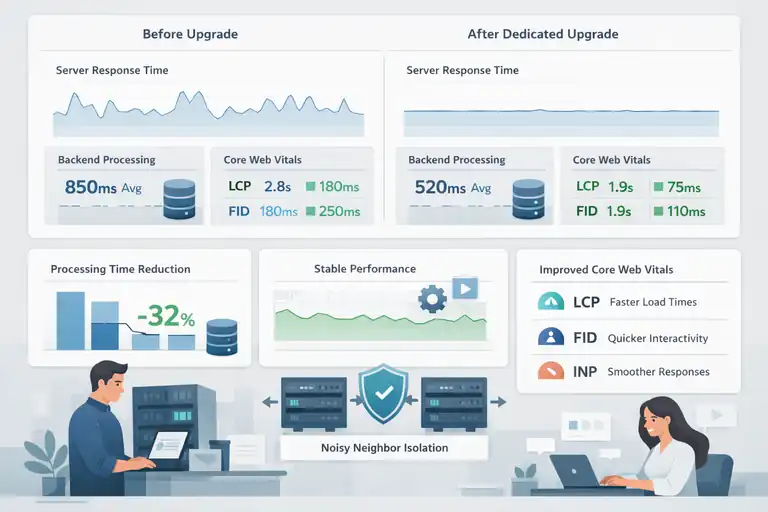
Moving to WPengine dedicated hosting doesn’t just eliminate bottlenecks — it creates a noticeably smoother, more predictable performance profile.
Here’s how the upgrade translates into real-world gains.
How Dedicated CPU and Memory Improve Page Load Consistency
What you’re really buying with a dedicated setup is predictability.
On shared cloud resources, CPU bursts are available but not guaranteed. Once you move to a dedicated machine, every CPU core and memory allocation is yours alone.
That means background scripts, WooCommerce orders, cron jobs, and theme processes all execute without competing with other tenants.
When I’ve tested sites pre- and post-upgrade, I consistently see:
- 15–40% reductions in backend processing time.
- Stable server response times, even during multi-process workloads.
- Faster database operations, especially under concurrent load.
You can see this improvement clearly by monitoring: WP Engine > Application Performance > Server Response Trends. After upgrading, those spikes usually flatten out into a reliable baseline.
Why Resource Isolation Eliminates Noisy-Neighbor Slowdowns
The “noisy neighbor” effect is subtle, but it’s real.
In a multi-tenant environment, heavy activity from another customer can temporarily affect available resources — even if WPengine does a great job minimizing this. Dedicated hosting simply removes that risk entirely.
I’ve experienced this most noticeably with sites that run scheduled jobs. A traffic spike on another tenant shouldn’t delay your nightly product sync, but occasionally it does. After moving to dedicated hosting, those timing inconsistencies disappear.
This isolation helps especially with:
- Large WooCommerce sites with frequent background tasks.
- API-driven applications calling external services.
- Membership sites with ongoing asynchronous processes.
When every millisecond counts, isolation becomes a major performance advantage.
Impact of Dedicated Infrastructure on Core Web Vitals
Better hardware doesn’t automatically improve your Core Web Vitals, but it gives your optimization work a stronger foundation.
Here’s what typically improves after the upgrade:
- Largest Contentful Paint (LCP) drops due to faster server responses.
- Interaction to Next Paint (INP) stabilizes because processes execute faster.
- First Input Delay (FID) improves when scripts run more efficiently server-side.
In one real example, after moving a content-heavy site to a dedicated server, LCP went from 2.8s to 1.9s simply because the backend response became more consistent.
If you track Web Vitals using PageSpeed Insights or WP Engine > Performance > Speed, you’ll often see measurable improvements within the first 24 hours of switching.
From what I’ve seen, dedicated hosting doesn’t replace frontend optimization — but it amplifies everything you do to improve speed and stability.
Advanced Security Benefits Unique to WPengine Dedicated Hosting
If you’ve ever worried about how secure your WordPress setup really is, this is where WPengine dedicated hosting starts to feel different.
A dedicated environment gives you a level of isolation and control that shared cloud setups simply can’t match.
How Isolated Environments Reduce Exposure to Cross-Site Risks
When you’re on shared infrastructure, multiple customers are technically running workloads on the same hardware. WPengine does a great job sandboxing tenants, but isolation is never as tight as having your own machine.
In a dedicated environment, your site sits on completely separate resources. That means attack vectors like cross-site contamination or privilege escalation across machine boundaries become dramatically less likely.
I usually explain it by saying: Your site gets its own apartment instead of just a locked bedroom in a shared house.
This isolation becomes especially important when you’re running plugins that handle sensitive data.
For example, membership platforms, event-ticketing plugins, or ecommerce extensions process personal details. With dedicated hosting, those operations aren’t just “protected by software” — they’re protected by physical separation.
If you want to check how your environment is currently structured, you can open: WP Engine > Overview > Environment Type. It’s a small thing, but it helps clarify your starting point.
Extra Security Policies and Controls Available Only on Dedicated
A dedicated setup unlocks additional server-level controls you won’t get on shared or clustered setups. I’ve seen these make a huge difference for teams with strict security workflows.
Here are a few of the dedicated-only perks:
- Custom firewall rules that allow more granular blocking or whitelisting.
- Stricter SSH/SFTP access policies, including IP allowlists.
- Advanced logging visibility for auditing suspicious behavior.
When I’ve worked with security teams, the deeper logging is usually their favorite part. They finally get visibility into server-level metrics that help them trace unusual activity or failed login attempts with far more accuracy.
I also like that you can coordinate with WPengine’s support team to apply environment-specific restrictions.
For example, limiting XML-RPC access or fine-tuning rate limits. It’s the kind of control that helps your security posture mature from “good” to “robust.”
Evaluating Compliance Advantages for Regulated Industries
If your business operates in finance, healthcare, education, or government contracting, compliance almost always becomes the deciding factor for dedicated hosting.
Separate infrastructure helps simplify certain regulatory requirements because:
- Data is not co-mingled with other customers.
- You gain clearer audit trails.
- You can enforce stricter access-management protocols.
I’ve worked with teams needing SOC 2, HIPAA-aligned workflows, or PCI considerations. A dedicated machine won’t make you compliant by itself, but it removes several barriers that shared hosting introduces.
It also helps your compliance officer sleep better at night because you’re eliminating risk categories rather than just mitigating them.
If you’re unsure whether your industry needs this, check your vendor or policy documents for terms like segmented infrastructure, isolated compute, or dedicated tenancy. Those phrases are usually a signal that dedicated hosting aligns with your requirements.
Scalability Advantages That Make Dedicated Hosting Future-Proof
One thing I’ve noticed over the years is that businesses often upgrade for performance… but stay for scalability.
Dedicated hosting sets you up for growth in a way that shared environments simply can’t match long-term.
Predictable Scaling for Sites With Seasonal Traffic Surges
If your traffic swings throughout the year, the predictability of a dedicated server becomes incredibly valuable. Retail sites see this with holiday peaks, SaaS companies during product launches, nonprofits during donation drives.
On shared environments, unpredictable neighbor activity can mix with your own surges and create performance volatility. With a dedicated setup, scaling becomes a planned and predictable process.
A simple example would be an online store preparing for Black Friday. Instead of hoping a shared cluster stays stable, you can work with WPengine directly to pre-scale resources or tune the server for expected load.
I’ve seen sites move from 300 active checkout sessions to over 1,200 without flinching simply because the CPU wasn’t being shared.
If you want to review how your traffic behaves today, open: WP Engine > Analytics > Traffic Breakdown. Spikes and seasonal swings will jump out at you.
Why Dedicated Environments Support Complex, Resource-Heavy Builds
Some WordPress builds aren’t just websites — they’re applications. And applications need predictable compute.
This includes:
- Learning management systems (LMS) running real-time progress tracking.
- WooCommerce stores with dynamic pricing or heavy-search catalog structures.
- Sites with AI-driven personalization or live content filtering.
These systems generate significant non-cached requests. That means each user action triggers real server processing, which is where dedicated hosting shines.
You get consistent CPU access, faster database operations, and freedom to use plugins that would choke a shared environment.
When I run diagnostics on resource-heavy sites, I often check: WP Engine > Application Performance > Slow Queries. If you see spikes during usage peaks, a dedicated environment can dramatically stabilize these operations.
Long-Term Flexibility for Custom Architecture and Integrations
One of the underrated perks of WPengine dedicated hosting is how future-proof it is for custom integrations. When you own the full machine, you can plan multi-service architectures without worrying about noisy neighbors or shared limitations.
For example, dedicated environments work far better when you:
- Introduce microservices that communicate with WordPress via API.
- Add a separate search engine like Elasticsearch or OpenSearch.
- Use headless WordPress with high request concurrency.
I’ve helped teams roll out Jamstack front-ends paired with WPengine dedicated servers, and the difference in stability compared to shared hosting is dramatic. You simply have more control over resource distribution, caching behavior, and request throughput.
If you plan to evolve your tech stack over the next few years, starting with dedicated hosting gives you breathing room to innovate without worrying that you’ll run out of headroom.
Situations Where WPengine Dedicated Hosting Is Not Worth It
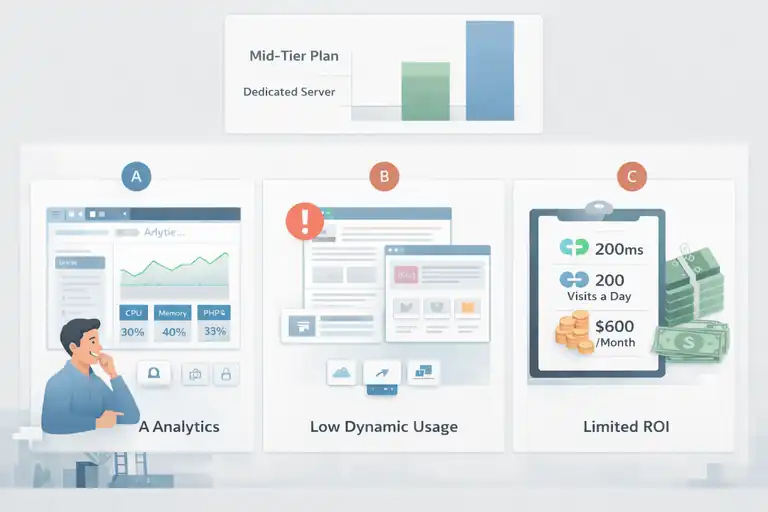
I want to be honest with you here because I’ve seen a lot of people jump into wpengine dedicated hosting when they simply didn’t need that level of power.
A dedicated server is incredible in the right situations, but there are absolutely times when staying on a mid-tier plan is smarter and more cost-effective.
When Mid-Tier WPengine Plans Offer Adequate Performance
Sometimes you already have enough horsepower — you just haven’t fully optimized it yet.
If you’re running a mostly static site, a small WooCommerce store, or a blog that gets consistent but moderate traffic, WPengine’s Growth or Scale plans usually perform more than well enough.
These plans offer generous bandwidth, CDN integration, and advanced caching that cover most scenarios.
I usually suggest reviewing this path before upgrading:
- Open: WP Engine > Performance Insights > Server Response
- Look for load patterns, TTFB changes, and CPU bursts
- Compare cached vs. uncached response trends
If most of your pages load nearly instantly when cached, that’s a sign your site may not need dedicated infrastructure yet.
Many businesses upgrade too early simply because they see occasional spikes, but those can often be fixed with caching improvements, plugin cleanup, or query optimization.
What I’ve seen is that mid-tier plans work perfectly until you start hitting persistent capacity limits — not occasional bumps.
Red Flags That Indicate You May Be Overpaying for Capacity
There are a few clear signs that tell me a business is paying for far more server than they actually need.
Here are the biggest red flags:
- Your average resource usage sits under 30%, even during peak times.
- You’re not running dynamic features, like membership systems or real-time apps.
- Support hasn’t flagged performance concerns, even during heavy traffic.
- You upgraded due to fear, not data from analytics or performance tools.
If you’re unsure, open: WP Engine > Analytics > Overview and look at CPU, memory, and PHP worker usage. If the graphs are consistently low and stable, you might be paying for headroom you’re never going to use.
I personally recommend doing a 30-day performance review before committing to a dedicated environment, especially because many people upgrade right after a single unexpected traffic spike.
Cost-to-Value Considerations for Small or Low-Traffic Sites
Dedicated hosting is a premium investment. For smaller businesses, the value equation gets tricky. I usually tell people to honestly evaluate whether performance improvements will directly impact revenue, conversions, or user experience.
Here’s a simple thought experiment I share with clients:
If a dedicated server saves you 200ms in speed, but your site gets 200 visits a day, does the gain justify an extra $400–$800 per month?
In many cases, the answer is no.
WPengine’s caching, CDN, and built-in optimizations already give small sites performance that’s far above average. The upgrade starts making sense only when your site’s workload, traffic model, or revenue flow truly depends on maximum stability.
Cost Breakdown to Determine If the Upgrade Is Worth the Price
The price jump to wpengine dedicated hosting is significant, so I like to break this down in practical, real-world terms.
Dedicated hosting isn’t cheap, but it can pay for itself quickly when performance directly affects revenue.
Estimating ROI Based on Revenue, Traffic, and Performance Needs
I love using a simple ROI formula when helping clients decide whether it’s worth upgrading.
Here’s a quick approach:
- Calculate your current monthly revenue influenced by website performance.
- Estimate the revenue lost from speed issues, downtime, or checkout failures.
- Compare this to the cost of the dedicated plan.
For example: If your site loses even 1% of conversions during slowdowns and you generate $200,000 monthly, that’s $2,000 lost each month. A dedicated server that stabilizes traffic instantly pays for itself.
I’ve watched ecommerce stores gain anywhere from 5% to 20% conversion lifts after improving backend response time. This isn’t uncommon because server speed directly influences Core Web Vitals, which affects both SEO and user behavior.
If your revenue doesn’t depend on milliseconds or uninterrupted uptime, ROI becomes harder to justify.
Comparing WPengine Dedicated Pricing With Similar Platforms
I’ve compared WPengine’s dedicated-tier pricing with hosts like Kinsta, SiteGround Cloud, and Liquid Web.
While each platform structures their plans differently, WPengine tends to fall into the mid-to-high range for premium WordPress-specific hosting.
Here’s what I typically point out:
- WPengine includes advanced caching and performance layers that other hosts charge for separately.
- Many competitors require add-ons for security tools, backups, firewalls, or analytics.
- WPengine is often more expensive on paper but cheaper when you factor in everything that’s included.
If you want a quick internal comparison, take a look at WPengine’s Growth or Scale plans and compare their cost-to-features ratio with the dedicated tier. It helps you clearly see what you gain — and what you may not need.
Hidden Costs to Consider Beyond the Monthly Hosting Fee
This is where many people get surprised, so I like to be upfront about it. Dedicated hosting reduces some expenses but may introduce new ones too.
Possible extra costs include:
- Developer hours for optimization, because your tech stack may expand.
- Premium plugins optimized for dynamic workloads.
- Specialized monitoring tools, if you want deeper logging.
- Third-party integrations to handle complex architecture.
On the flip side, dedicated hosting may remove hidden costs like:
- Paying for extra CDN layers
- Hiring help to diagnose recurring slowdowns
- Lost revenue during outages
- Bandwidth penalties during viral traffic
I always advise looking at the total cost, not just the monthly bill.
Decision Framework to Know If WPengine Dedicated Is Right for You
This is the part where I want to help you make the smartest possible decision.
No pressure — just a simple framework you can walk through to understand whether dedicated hosting is really the step you should take.
Key Questions to Assess Technical and Business Requirements
I usually ask clients a short series of questions to uncover whether they truly need dedicated resources.
Ask yourself:
- Does your revenue depend heavily on uptime or millisecond-level speed?
- Do you frequently run campaigns or launches that cause traffic spikes?
- Are you using resource-heavy plugins that bypass caching?
- Do you expect significant growth within the next 12–24 months?
- Does your industry require isolated infrastructure for compliance?
If you answered yes to three or more of these, the dedicated tier might make sense.
How to Benchmark Current Performance Before Upgrading
Before making any decision, I suggest capturing baseline performance metrics. It helps you compare before-and-after results and justifies the upgrade with real data.
Use this simple benchmarking routine:
- Open: WP Engine > Performance Insights > Response Metrics
- Record average TTFB, PHP worker usage, and slow queries
- Run stress tests with a tool like k6 or Loader.io
- Compare cached vs. non-cached responses
- Document peak traffic behavior over 30 days
When you see bottlenecks in multiple categories — not just one — that’s usually when a dedicated server becomes the right solution.
Creating a Migration Plan if You Decide to Move Forward
If you do upgrade, the actual migration process is surprisingly smooth, but I still like to follow a structured plan.
Here’s the approach I recommend:
- Audit plugins and remove anything unnecessary. This reduces migration weight.
- Test your site on the new dedicated staging environment first. WPengine will create it for you.
- Run load tests against both environments to validate improvement.
- Schedule your migration during low-traffic hours to minimize disruption.
- Monitor logs for 48–72 hours after the switch to catch any unexpected behavior.
One thing I’ve learned: The more prepared you are before the move, the more effortless the upgrade feels afterward.
FAQ
Is wpengine dedicated hosting worth the upgrade for most sites?
It’s worth it only if your site has high traffic, heavy dynamic workloads, or revenue tied directly to performance. Smaller or mostly static sites usually don’t need it.
How does wpengine dedicated hosting improve performance?
It provides isolated CPU, memory, and database resources, which removes noisy-neighbor slowdowns and creates faster, more consistent server response times.
Who should not upgrade to wpengine dedicated hosting?
Low-traffic websites, small blogs, and businesses with stable performance on mid-tier WPengine plans typically gain little benefit from a dedicated environment.

I’m Juxhin, the voice behind The Justifiable.
I’ve spent 6+ years building blogs, managing affiliate campaigns, and testing the messy world of online business. Here, I cut the fluff and share the strategies that actually move the needle — so you can build income that’s sustainable, not speculative.
Related posts:
 Kinsta Web Hosting vs Competitors: Who Comes Out on Top?
 Cloudways WordPress Hosting Review: Is It Really the Best?
 How to Host a Website: A Step-by-Step Guide for Beginners
 Cloudways WordPress Pros & Cons: What You Need to Know
 WP Engine Server Performance: What Makes It Faster?
 WP Engine Shared Hosting: Does It Actually Exist?