
Table of Contents
Some links on The Justifiable are affiliate links, meaning we may earn a small commission at no extra cost to you. Read full disclaimer.
Becoming a freelance administrative assistant isn’t just about knowing how to organize emails or schedule meetings—it’s about mastering the right blend of technical, communication, and business skills that make you indispensable to clients.
The real question is: which skills truly set the best freelancers apart from the rest?
In this guide, we’ll uncover the 10 essential skills you need to master to thrive as a freelance administrative assistant and build a sustainable, high-paying career.
1. Mastering Time Management and Organization
Success as a freelance administrative assistant depends on your ability to juggle multiple clients, deadlines, and priorities without burning out.
Time management isn’t just about staying busy—it’s about staying intentional.
Building a Reliable Task Management System
Without structure, freelance work quickly becomes chaos. I suggest setting up a simple yet reliable task management system that gives you clarity at a glance. Tools like Trello and Notion work beautifully here.
- Trello: Think of Trello as a digital whiteboard where you can create “boards” for each client. Each board can hold “cards” for tasks (like update spreadsheet or schedule social posts), which you can move from To Do to Doing to Done.
- Notion: Notion offers a more flexible system for freelancers who like an all-in-one workspace. You can combine notes, tasks, and client databases in one dashboard. For example, you might create a “Client Portal” page with project timelines, deliverables, and meeting notes in one place.
The key is to pick a system that you’ll actually use every day. A fancy setup that’s ignored is worse than a simple checklist that works.
Prioritizing Workloads Using the Eisenhower Matrix
Not every task deserves your immediate attention. The Eisenhower Matrix is a powerful framework that helps you decide what to do, delegate, delay, or drop.
It divides work into four categories:
- Urgent and Important – Do it now (e.g., meeting deadlines).
- Important but Not Urgent – Schedule it (e.g., long-term planning).
- Urgent but Not Important – Delegate it (e.g., minor admin tasks).
- Neither Urgent nor Important – Eliminate it (e.g., redundant reports).
When I started using this, I realized half my “busy work” wasn’t actually helping clients move forward. This method forces you to focus on what truly drives results—and sanity.
Using Productivity Tools Like Trello and Notion
Productivity tools can transform your workflow when used right. Besides Trello and Notion, I often recommend Todoist for simple to-do tracking or ClickUp for freelancers managing multiple projects.
Here’s how to use them effectively:
- Assign due dates to every task, even small ones.
- Use color-coded tags for priorities (e.g., urgent, low priority).
- Review your dashboard every morning before diving into client work.
It’s less about using every tool and more about using the right one consistently.
Setting and Maintaining Realistic Deadlines for Clients
Deadlines define trust. When you set realistic ones, clients know they can rely on you. I’ve seen too many freelancers overpromise and underdeliver—it always ends the same way.
Here’s a quick framework that works:
- Estimate accurately: If something usually takes two hours, quote three.
- Communicate early: If delays happen, inform clients before it becomes a problem.
- Use buffer time: Always build in a day or two of flexibility.
Being transparent about your timeline makes you look professional and dependable. Clients value honesty over speed.
2. Developing Strong Communication Skills
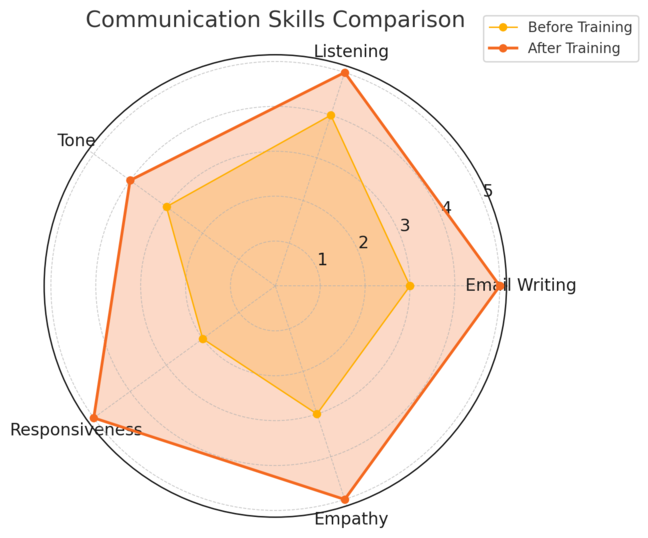
Clear, consistent communication is the backbone of a successful freelance administrative assistant career.
Clients don’t just hire you for your skills—they hire you for your reliability and responsiveness.
Writing Clear and Professional Emails
Emails are often your client’s first impression of you. Keep them clear, structured, and action-oriented.
Here’s a quick formula I use:
- Greeting: Keep it simple and polite (e.g., Hi Sarah,).
- Purpose: Get to the point quickly (“I wanted to confirm tomorrow’s meeting details.”).
- Action Steps: Specify what you need (“Could you please send me the updated spreadsheet by Thursday?”).
- Sign-off: Use friendly but professional closings (Best regards, Thanks, Warmly).
Tools like Quillbot can help polish tone and catch small mistakes before they become embarrassing.
Mastering Active Listening and Client Communication
Active listening builds trust faster than any clever words can. Instead of just hearing, you’re showing understanding.
Try these techniques:
- Summarize what the client said before responding (“So, you’d like the report to focus on Q3 data, right?”).
- Ask clarifying questions.
- Avoid interrupting—wait for natural pauses.
Strong communicators make clients feel heard, which often turns short-term gigs into long-term contracts.
Managing Difficult Conversations Gracefully
Tough conversations are part of freelance life—whether it’s negotiating pay or handling missed deadlines. The trick is to stay factual and calm, not defensive.
I suggest using the “Feedback Sandwich” technique:
- Start with something positive.
- Address the issue directly and professionally.
- End with reassurance or a solution.
Example: “I appreciate how clear your project briefs are. However, the turnaround time is very tight. Could we discuss adjusting future deadlines to maintain quality?”
Using Tools Like Slack or Zoom for Efficient Collaboration
Collaboration tools bridge distance gaps. For real-time messaging, Slack is ideal—it lets you create channels for each project and keeps communication searchable.
For video meetings, Zoom remains the go-to. Tip: create recurring meeting links for regular check-ins to save setup time.
Use notifications wisely—mute non-urgent channels so you can focus when needed.
3. Learning Essential Software and Tools
Being tech-savvy is a non-negotiable skill for any freelance administrative assistant. It’s not about knowing every tool—it’s about mastering the ones your clients use most.
Navigating Google Workspace and Microsoft 365
Most clients rely on either Google Workspace or Microsoft 365. You should be comfortable switching between both.
- Google Workspace: Includes Gmail, Docs, Sheets, Calendar, and Drive. Example: You can create a shared Google Drive folder to organize project files accessible to the client anytime.
- Microsoft 365: Offers Outlook, Word, Excel, and Teams. Example: You can schedule meetings in Outlook directly linked with Teams video calls.
If you’re new, start with the basics—document collaboration, calendar syncing, and shared permissions.
Mastering Project Management Platforms Like Asana or ClickUp
Clients expect you to be organized across multiple projects. Tools like Asana and ClickUp simplify this process.
- Asana: Great for task tracking and timeline visualization. You can assign tasks, set due dates, and add comments per task.
- ClickUp: Combines task management, notes, and time tracking. It’s a favorite for freelancers managing diverse projects.
Tip: Always create one “master dashboard” that shows your tasks across all clients so nothing slips through the cracks.
Using Automation Tools Like Zapier to Save Time
Automation can save you hours each week. Zapier connects different apps to perform actions automatically.
Example: You can set up a “Zap” so that every time a client fills out a Google Form, it automatically adds a task in Asana and sends you a Slack notification.
This removes repetitive manual work and keeps your workflow smooth.
Understanding File Sharing and Cloud Storage Systems
Cloud storage keeps you and your clients organized and secure. Learn to manage permissions properly in Google Drive, Dropbox, or OneDrive.
A few quick rules:
- Use clear naming conventions (e.g., “ClientName_Project_Date”).
- Set proper access levels (viewer, editor, etc.).
- Keep backups of important documents offline just in case.
I’ve found that maintaining clean, labeled folders impresses clients—it signals professionalism and attention to detail.
4. Improving Data Entry and Database Management
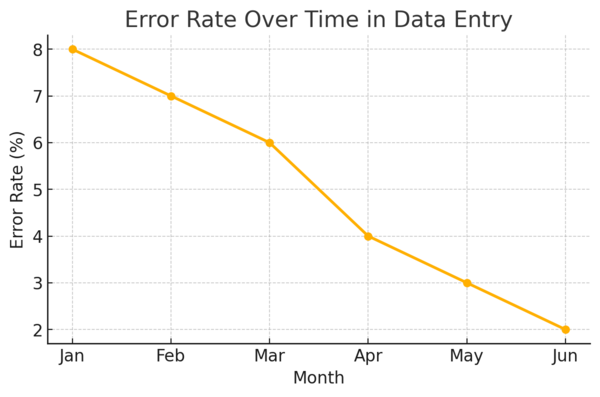
Accuracy, structure, and speed define your reliability as a freelance administrative assistant.
Clients rely on you to handle sensitive data, organize it meaningfully, and make it accessible when needed.
Good database management isn’t glamorous—but it’s one of the clearest signs of a true professional.
Maintaining Accuracy and Speed in Data Entry
Mistakes in data entry can snowball fast—one misplaced decimal or typo can cost a client time, money, or credibility. I suggest prioritizing accuracy over speed until you develop rhythm and precision.
A few strategies that help:
- Double-check before submitting: Always review your work once before finalizing.
- Use data validation tools: In Excel or Google Sheets, use Data > Data validation to limit entries (for example, only allowing dates or specific formats).
- Keyboard shortcuts: Learning basic shortcuts (like Ctrl + D to duplicate data or Alt + = for auto-sum) can speed up repetitive work.
I’ve seen freelancers jump from five hours to two just by mastering simple Excel functions. Efficiency isn’t about rushing—it’s about removing friction.
Organizing Information with Excel and Google Sheets
Both Excel and Google Sheets are foundational tools for any administrative freelancer. They’re not just for storing data—they’re for structuring it intelligently.
- Excel: Ideal for large, formula-heavy datasets. Use features like PivotTables to summarize data or Conditional Formatting to highlight trends (e.g., overdue tasks).
- Google Sheets: Perfect for collaboration. You can share links, tag clients in comments, and track edits in real time.
Example: When managing a client’s product inventory, you might create a Google Sheet with tabs for “In Stock,” “Pending Orders,” and “Restock Dates.” This gives everyone live visibility without constant email back-and-forth.
Learning Basic Database Tools Like Airtable
If Excel feels too rigid, Airtable is your next step—it’s like a hybrid of a spreadsheet and a database. You can create “bases” (projects) and “tables” (datasets), each linked together visually.
Here’s a quick example:
- A “Client Projects” base might include tables for Tasks, Invoices, and Contacts.
- You can link each task to its respective client, making tracking seamless.
I recommend exploring templates within Airtable to learn quickly. It’s especially powerful if your client manages multiple projects with lots of moving parts.
Implementing Data Security and Privacy Best Practices
Handling client data responsibly builds trust. As a freelancer, you’re often managing confidential information—passwords, invoices, or client lists—so protection isn’t optional.
Follow these habits:
- Use password managers: Tools like 1Password or LastPass securely store client credentials.
- Enable two-factor authentication (2FA): Especially for Google Workspace or Dropbox accounts.
- Avoid public Wi-Fi: When accessing sensitive client files, always use a secure network or VPN.
I once had a client lose access to key files because their data wasn’t backed up. Since then, I’ve used both cloud storage and local backups to prevent data loss. A little paranoia here is healthy.
5. Strengthening Customer Service Skills
Exceptional freelance administrative assistants don’t just deliver tasks—they deliver reassurance.
Strong customer service transforms one-off projects into loyal, recurring relationships.
Handling Client Requests and Complaints Professionally
When clients come with last-minute requests or frustrations, it’s a test of your composure. Always respond from a calm, solutions-first mindset.
A simple framework:
- Acknowledge: “I understand how important this is.”
- Assess: Check whether the request is feasible within your workload.
- Act: Offer a clear solution or alternative timeline.
Even if you can’t fix a problem immediately, communicating progress shows accountability. Clients appreciate honesty far more than silence.
Building Empathy and Positive Client Relationships
Empathy is your invisible skill—it shapes every client interaction. Take time to understand what stresses your client out. For example, if they run a small business, late reports may directly affect cash flow.
Show empathy through actions:
- Send updates before being asked.
- Use positive, reassuring language (“I’ve handled this, no need to worry.”).
- Remember small details about their preferences or tone.
In my experience, clients who feel understood tend to stick with you long-term—and even refer others.
Managing Client Expectations Through Clear Communication
Most client frustrations come from mismatched expectations. Prevent that by setting boundaries early.
When taking on new tasks, clarify:
- Scope: What’s included and what’s not.
- Timeline: When deliverables will be ready.
- Feedback process: How revisions or updates will work.
For example, you can write: “I’ll deliver the report draft by Tuesday, and you can send any changes by Thursday.” This keeps both sides aligned without awkward misunderstandings.
Leveraging CRM Tools Like HubSpot for Better Client Tracking
If you manage multiple clients, a CRM (Customer Relationship Management) tool like HubSpot can simplify everything. It helps track interactions, emails, and project history in one place.
Practical example: In HubSpot, create a “Contact Record” for each client with fields for Last Meeting Date, Open Tasks, and Follow-Up Notes. That way, you never forget to check in or miss a milestone.
HubSpot also integrates with Gmail and Outlook, automatically logging client communication—saving you from manual updates. I recommend starting with the free version to explore its automation features.
6. Developing Bookkeeping and Invoicing Skills
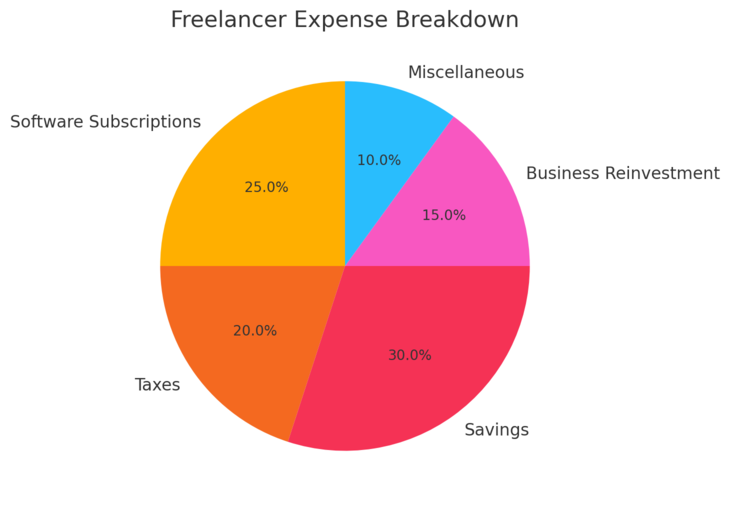
As a freelance administrative assistant, financial organization is just as important as client organization.
Managing invoices, expenses, and payments keeps your business stable and professional.
Creating and Managing Invoices Professionally
Invoices are more than just payment requests—they’re a reflection of your professionalism. Always make them clear, detailed, and consistent.
Include these essentials:
- Your name or business name
- Client details
- Service description and dates
- Payment amount and due date
- Payment method (e.g., PayPal, bank transfer, Stripe)
Tools like FreshBooks let you create branded invoices quickly. I suggest keeping templates ready for recurring clients—it saves time and ensures consistency.
Using Accounting Software Like QuickBooks or Wave
Accounting software automates financial tracking, saving you hours of manual work.
- QuickBooks: Best for freelancers managing multiple clients and tax reporting. You can connect your bank, categorize transactions, and generate profit reports.
- Wave: Free and user-friendly, perfect for beginners. It lets you create invoices, track expenses, and monitor payments.
For instance, I once connected my PayPal account to Wave, allowing it to automatically log payments—no more guessing which invoice was paid.
Tracking Payments and Managing Expenses
Cash flow can make or break a freelance career. Create a simple system to track what’s owed and what’s spent.
Try this:
- Maintain a Google Sheet with columns for Client Name, Invoice Number, Amount, Due Date, and Status.
- Color-code overdue invoices for quick visibility.
- Use apps like Expensify to capture receipts on the go.
This system helps you forecast income and avoid chasing unpaid bills.
Understanding Basic Financial Terminology
Even if you’re not an accountant, learning the basics helps you communicate better with clients and stay compliant.
A few key terms to know:
- Accounts Receivable: Money clients owe you.
- Accounts Payable: Money you owe others.
- Gross Income: Total earnings before expenses.
- Net Income: What’s left after deducting expenses.
Understanding these gives you financial confidence—and helps you spot issues before they snowball.
7. Enhancing Social Media and Online Presence Management
Managing your clients’ online presence is one of the most marketable skills a freelance administrative assistant can offer.
Many businesses simply don’t have the time to keep up with social media—so if you can manage their content calendars, engagement, and brand voice, you instantly become more valuable.
Scheduling and Managing Posts Using Tools Like Buffer
Consistency is key to growth on any platform, but manual posting is time-consuming. That’s where scheduling tools like Buffer come in handy.
Buffer allows you to:
- Connect multiple accounts (Instagram, LinkedIn, X, Facebook) in one dashboard.
- Plan weekly content calendars visually.
- Schedule posts automatically at optimal times.
For example, you can upload a week’s worth of client posts on Sunday, set them to auto-publish, and spend the rest of your week focusing on other client needs.
I also recommend Later or Hootsuite if you need stronger analytics or team collaboration features.
To make your workflow smoother, set up a shared content approval system with clients—simply create a Google Sheet or Notion board with post drafts, visuals, and status updates.
Writing Engaging Captions and Content for Clients
Good captions create connection. Whether it’s a business update or a lifestyle post, your tone should match the client’s audience and brand personality.
Here’s a formula I like to use for social copywriting:
- Hook: Start with a question or bold statement.
- Value: Give something useful—an insight, stat, or relatable story.
- Action: End with a call to engage (like, comment, share).
Example: “Ever wondered why your Mondays feel chaotic? It’s not you—it’s your workflow. Try this 10-minute reset and reclaim your week.”
Keep it conversational, short, and clear. Avoid jargon. If your client’s brand is playful, use emojis and light humor. If it’s corporate, keep it clean and minimal.
Monitoring Engagement and Analytics to Improve Performance
You can’t improve what you don’t measure. Track your results weekly or monthly to understand what’s resonating.
Look at metrics such as:
- Engagement rate (likes, comments, shares)
- Follower growth
- Click-through rates on links
Tools like Buffer Analytics, Meta Business Suite, or Sprout Social offer visual dashboards showing what’s working. I suggest noting top-performing post types—then doubling down on those themes next month.
A mini example: One of my clients saw a 37% boost in engagement just by switching from text-heavy posts to carousels explaining step-by-step processes.
Understanding Brand Voice and Consistency
Every brand has a “feel” to its language. A tech startup may sound smart and witty, while a wellness brand might sound calm and encouraging.
To define your client’s voice:
- Review their existing posts and note tone patterns.
- Create a mini brand voice guide with Do’s and Don’ts.
- Keep visuals, hashtags, and posting cadence consistent.
Clients love when you maintain their identity across platforms. It makes their brand look cohesive and professional—and that’s exactly the impression you want to help them build.
8. Building Project Management and Coordination Skills
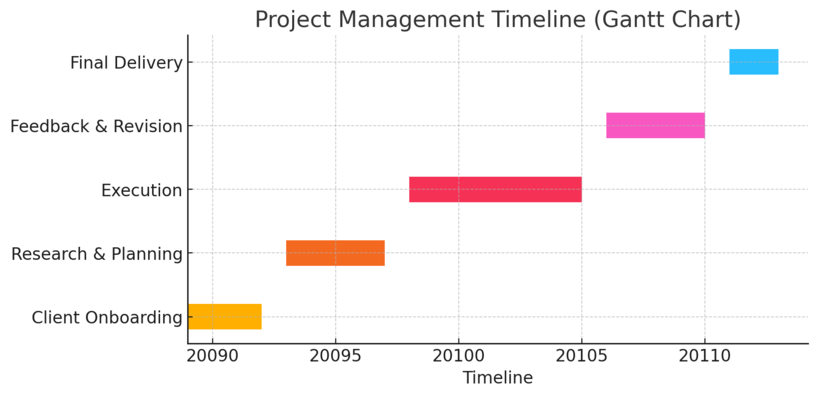
Project management is what turns you from a task-doer into a trusted partner. A great freelance administrative assistant keeps everyone on the same page and projects moving smoothly without micromanagement.
Creating and Tracking Project Timelines
Projects can easily drift off schedule if there’s no clear plan. I recommend starting every project with a timeline in Monday.com.
Here’s a quick setup:
- List all project phases (Planning, Execution, Review).
- Add due dates and responsible team members.
- Color-code statuses (e.g., green for on track, red for delayed).
In Monday.com, you can use the “Timeline” view to visualize deadlines like a Gantt chart—helpful for keeping everyone aligned at a glance.
Managing Multiple Stakeholders and Teams
Working with multiple people can feel like herding cats unless you communicate intentionally. Keep your updates short, frequent, and clear.
A practical tip: Create a weekly “status summary” email with three parts—what’s done, what’s next, and blockers. This format keeps updates efficient and transparent.
I also suggest using Slack to create dedicated project channels. That way, all relevant communication stays in one thread instead of scattered across emails.
Handling Resource Allocation and Delegation
Not every task is yours to complete—and that’s okay. Great coordinators know when to delegate.
Start by identifying:
- Who has the right skill set for each task.
- Who’s under or over capacity.
- What tasks can be automated.
Tools like ClickUp or Basecamp let you assign tasks and set reminders directly, reducing confusion. Delegation isn’t about giving up control—it’s about ensuring efficiency across the team.
Using Tools Like Basecamp or Monday.com for Coordination
Basecamp and Monday.com are both excellent coordination platforms.
- Basecamp keeps communication simple with message boards and to-do lists. It’s best for smaller teams that need clarity without too much structure.
- Monday.com, on the other hand, is more visual. You can build dashboards showing timelines, owners, and dependencies all in one place.
I advise picking one tool that matches your client’s workflow rather than juggling several. Integration and simplicity always win.
9. Strengthening Problem-Solving and Critical Thinking
Clients hire you not just to follow instructions—but to think ahead. Problem-solving and critical thinking make you invaluable because they prove you can handle pressure and adapt quickly.
Analyzing Challenges and Proposing Effective Solutions
Start with questions, not assumptions. Before fixing a problem, make sure you understand it completely.
Ask yourself:
- What’s the real issue here?
- What information am I missing?
- What’s the impact if nothing changes?
Then, propose practical solutions. For example, if a client’s workflow is slowing down because of unclear task ownership, suggest creating a shared “Responsibility Chart” in Google Sheets that clarifies who does what.
Clients value initiative—it shows you care about their success, not just your to-do list.
Using Root Cause Analysis for Recurring Issues
If the same problem keeps resurfacing, you’re dealing with a root cause, not a symptom. Try the “Five Whys” technique: ask “why?” five times until you reach the underlying reason.
Example:
- The client’s reports are always late.
- Why? Data isn’t ready on time.
- Why? Team members submit updates inconsistently.
- Why? There’s no clear deadline for submissions.
- Solution: Create automated reminders two days before reports are due.
This simple habit saves hours of frustration and keeps operations smooth.
Staying Calm and Professional Under Pressure
Stressful moments reveal your professionalism. Whether it’s a missed deadline or tech issue, clients remember how you respond, not just what went wrong.
My approach is to take a breath, assess the situation, and communicate calmly: “Here’s what happened, here’s what I’m doing to fix it, and here’s when it’ll be resolved.”
Remaining level-headed builds trust—clients will come to see you as their steady problem-solver, not just a task manager.
Making Informed Decisions Quickly and Confidently
Analysis paralysis kills productivity. The goal is to make smart enough decisions quickly.
Gather key facts, consult relevant stakeholders, and then act. If you’re 80% sure based on available data, move forward. Perfection often costs more than a small, correctable mistake.
I’ve learned that clients prefer decisive assistants who adapt later rather than cautious ones who stall progress. Confidence comes from preparation and pattern recognition—the more you face, the faster you decide.
10. Mastering Self-Marketing and Client Retention
To build a sustainable freelance career, you need more than skills—you need visibility and repeat business. Marketing yourself effectively ensures a steady stream of projects and referrals.
Building a Strong Freelancer Profile on Upwork or Fiverr
Your profile is your storefront. It should immediately show credibility, warmth, and competence.
Include:
- A professional photo and approachable bio.
- A strong opening line that mentions your niche (e.g., “Experienced Freelance Administrative Assistant helping businesses stay organized and efficient”).
- Clear service descriptions and packages.
Pro tip: Add client testimonials or portfolio samples—even screenshots of spreadsheets or dashboards you’ve built. Visuals help potential clients imagine working with you.
Writing Proposals That Win Projects
Most proposals fail because they sound robotic. The secret is personalization.
Structure each proposal around the client’s specific problem:
- Start with a short greeting and something personal about their project.
- Show you understand their pain point.
- Offer a brief solution outline.
- End with a confident, friendly close.
Example: “I noticed you’re looking for help managing your client inbox. I currently handle similar workflows for two other businesses using Gmail filters and labels—I can help streamline yours too.”
Maintaining Long-Term Client Relationships
Acquiring clients is hard; keeping them is easier and far more profitable. Stay proactive and reliable.
Try this rhythm:
- Send a monthly summary of completed work and upcoming priorities.
- Check in occasionally to ask if they need help beyond current tasks.
- Celebrate milestones together—like one year of working together or a big project launch.
When clients feel appreciated, they stay longer—and pay more.
Asking for Feedback and Referrals to Grow Your Business
Feedback is gold. After a successful project, simply ask: “Would you be open to sharing a quick testimonial or referring me to someone who might need support?”
You can even automate a polite reminder using HubSpot or Google Forms. Most happy clients will say yes—they just need a small nudge.
Referrals often lead to higher-paying clients because they come pre-qualified through trust. It’s one of the simplest, most effective growth strategies for any freelance administrative assistant.

I’m Juxhin, the voice behind The Justifiable.
I’ve spent 6+ years building blogs, managing affiliate campaigns, and testing the messy world of online business. Here, I cut the fluff and share the strategies that actually move the needle — so you can build income that’s sustainable, not speculative.
Related posts:
 How to Become a Freelance Personal Assistant Online
 Python Freelance Jobs Where to Land High-Paying Projects
 Freelance Developer: How to Find the Perfect Fit for Your Project
 WordPress Freelancer: How to Hire Experts Without Overpaying
 Upwork Freelancer Tips to Avoid Scams and Wasted Money
 Freelance Data Entry Jobs You Can Start From Home Today