
Table of Contents
Some links on The Justifiable are affiliate links, meaning we may earn a small commission at no extra cost to you. Read full disclaimer.
Power bi freelance work opens a real pathway to earning more with the data skills you already have.
I’ve been seeing a big shift: companies want clean dashboards, smarter insights, and faster reporting, but they don’t always want full-time hires.
This raises an exciting question: How do you turn your Power BI skills into a high-earning freelance career that keeps growing?
This guide breaks it down with clear, practical steps you can start using right away.
Proven Power BI Freelance Paths To Build Real Income
Power BI freelancing becomes far more profitable when you follow paths where businesses already spend money.
Let me walk you through the options that consistently lead to higher-paying work.
Choosing Profitable Niches That Match Your BI Strengths
When I look at freelancers who grow fast, they usually focus on one niche instead of serving every possible client. Choosing a niche helps people understand exactly what you solve, and it also shortens your sales cycle.
I suggest picking a niche where you already understand the workflows.
Examples of profitable Power BI niches:
- Sales analytics: Building dashboards showing pipeline health, win rates, and rep performance.
- Ecommerce analytics: Tracking ROAS, SKU-level margins, and customer cohorts.
- Finance reporting: Automating P&L, cash flow, and scenario forecasting.
- Operations analytics: Measuring inventory turnover, capacity, or production output.
If you’re unsure, try this mindset: Which datasets do I naturally understand? Which conversations energize me?
A niche aligned with your background lets you deliver results faster, and that’s exactly what clients pay more for.
Offering Dashboard Builds That Solve Real Business Bottlenecks
Businesses rarely want “a dashboard.” They want a dashboard that fixes a pain point. I’ve learned that the fastest way to land larger projects is to position Power BI dashboards as solutions to bottlenecks.
Here’s what usually triggers a dashboard project:
- Decision delays: Leaders can’t get numbers quickly.
- Messy spreadsheets: Teams waste hours merging CSVs manually.
- No single source of truth: Sales, marketing, and finance don’t align.
- Compliance reporting headaches: Monthly or quarterly reporting overwhelms staff.
If you want to stand out, include a short workflow visual in proposals showing how Power BI replaces manual steps.
For example: “Excel → Email → Manual Pivot → PDF” becomes “Power BI → Auto-refresh → Role-based views.” This kind of side-by-side comparison instantly shows value.
Creating Automated Reporting Systems Clients Pay Premiums For
Automated systems are where freelancers consistently earn more. When you build an end-to-end solution, you’re not just selling a dashboard—you’re selling time savings. That’s a powerful pitch.
Examples of automation that clients pay well for:
- Scheduled refreshes: Connecting datasets so reports update daily without human effort.
- Dataflows: Centralizing transformations so multiple reports pull from one clean model.
- Gateway setup: Allowing on-premise data (like SQL Server) to refresh automatically.
- Email alerts: Triggering notifications when KPIs cross thresholds.
A simple automation—like connecting Google Analytics to Power BI through a tool such as Funnel.io—can replace hours of manual data aggregation. I’ve seen companies pay 4x higher for automation because it solves ongoing pain, not just visualization.
Positioning Yourself As A Data Visualization Problem Solver
Clients don’t remember technical skills as much as they remember outcomes. This is why I often advise freelancers to brand themselves as problem solvers rather than “Power BI experts.”
You can position yourself this way through:
- Before/after dashboards: Show how messy data becomes a clear narrative.
- Story-first design: Explain the business story before talking about visuals.
- Simple UI paths in proposals: Example: “View → Filters → Export Data.”
- Quick wins: Build a one-page dashboard sample during sales calls.
A problem solver earns more because clients feel supported, not overwhelmed. You’re not selling charts; you’re delivering clarity. And clarity has a premium price tag.
Effective Ways To Attract High-Value Power BI Clients
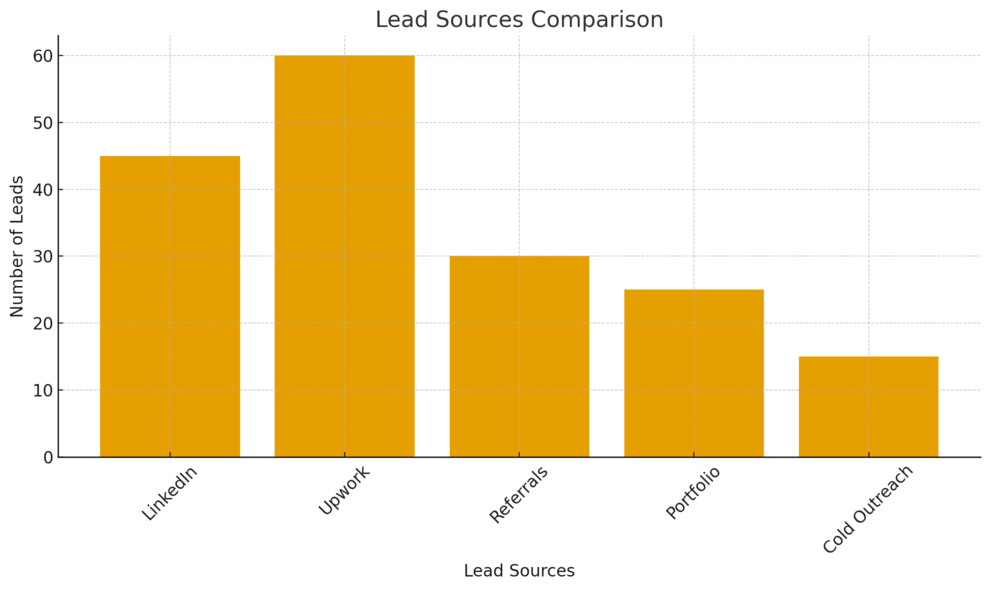
Power BI clients rarely fall from the sky. They find you when your online presence shows clear outcomes, credibility, and relevance.
Let’s break down the channels that send the best-quality leads.
Building A Portfolio That Shows Real Business Outcomes
A great Power BI portfolio isn’t a gallery of pretty charts. It’s a collection of short, outcome-focused examples that show how your work solved real problems.
Here’s what a strong sample looks like:
- Challenge: “Sales manager struggled with pipeline visibility.”
- Solution: “Built a real-time dashboard connected to CRM through Power BI Desktop.”
- Result: “Reduced weekly reporting time from 8 hours to 20 minutes.”
A portfolio like this builds trust fast because it mirrors the issues prospects already face. If you don’t have many samples yet, I suggest creating two fictional scenarios—one in sales, one in finance.
Make them realistic, use dummy data, and explain the story behind each one.
Using Freelance Platforms Where BI Work Is In High Demand
Some platforms consistently attract clients who urgently need analytics work. The trick is choosing platforms where Power BI budgets match your expectations.
High-demand platforms include:
- Upwork: Great for long-term clients; use filters like “Power BI + ongoing.”
- Toptal: Curated network; requires testing but attracts top-tier budgets.
- Contra: Strong for modern tech companies and startup analytics projects.
- Fiverr Pro: Works well if you create packaged offers like “Sales Dashboard Setup.”
A platform isn’t just a lead source; it’s a credibility builder. I believe a well-optimized profile with niche-focused offerings often outperforms cold outreach.
Creating Outreach Messages That Convert Prospects Into Clients
Most freelancers send vague outreach messages that sound like templates. To stand out, you want to speak directly to the prospect’s problem and offer a quick-win suggestion.
A simple structure I often recommend:
- Start with a recent problem the company likely has.
- Add one line showing you understand their data stack.
- Suggest a small, specific fix you could build quickly.
- End with an invitation, not a pitch.
Example: “I saw your team is handling sales reporting manually. If you’re using HubSpot, Power BI can pull daily deals automatically through the API. I can show you a quick sample if you’re exploring a more automated setup.”
This type of message works because it’s personal, helpful, and relevant. And relevance converts.
Optimizing Your LinkedIn Profile For Power BI Lead Generation
LinkedIn is the most efficient organic channel for BI freelancers, especially once your profile reflects your value clearly.
Here’s what usually boosts conversions:
- Headline focused on outcomes: “I help businesses turn messy data into clear Power BI insights.”
- Featured section with dashboard samples: Upload screenshots or use a short Loom video.
- Keyword-rich About section: Mention Power BI, DAX, Power Query, data modeling, and automation.
- Weekly posts sharing lessons: Examples, screenshots, or short problem-solving breakdowns.
I often advise freelancers to post at least one mini-teardown weekly.
Something like: “Here’s how I cleaned a 50k-row Excel file using Power Query…” These posts attract decision-makers quietly watching your feed.
Step-By-Step Methods To Price And Package BI Services
Pricing Power BI freelance work becomes easier once you create structure around your offers.
A clear pricing strategy helps you avoid undervaluing your skills and gives clients predictable options.
Structuring Tiered Packages That Increase Client Lifetime Value
Tiered packages make your pricing easier for clients to understand.
I suggest using three levels because people naturally compare options and choose the middle one. Each tier should solve a different level of complexity, not just include more “features.”
A simple three-tier layout:
- Starter: One dashboard page, one data source, basic visuals, no automation.
- Growth: Multi-page dashboards, data modeling, scheduled refresh, KPIs.
- Pro: Full reporting system, dataflows, advanced DAX, automation, alerts.
What I’ve noticed is that the Growth tier often becomes the most profitable. It’s meaningful enough to show real impact without requiring heavy engineering work.
You can also improve lifetime value by offering optional upgrades like template libraries or training sessions for the client’s team.
A small trick that works well: Show UI paths in your proposal so the client understands exactly what they get.
For example, “Dataset refresh will run automatically through Settings → Scheduled Refresh inside the Power BI service.” This kind of clarity builds confidence.
Setting Project Rates That Reflect Technical Depth And Impact
Setting rates in Power BI freelancing is never about hours. It’s about impact, data complexity, and automation.
I recommend thinking about your rates in three buckets: complexity, risk, and value.
Here’s how I break it down when quoting projects:
- Complexity: Number of sources, data quality, need for DAX, use of Power Query transformations.
- Risk: Dependencies on internal IT, slow data pipelines, on-premise gateways.
- Value: How much time the automation will save the team long term.
For example, a dashboard for an ecommerce store using Google Analytics, Shopify, and Meta Ads may require blending data with inconsistent naming conventions. That complexity pushes the price upward because the modeling takes deeper work.
I also suggest avoiding hourly rates. They cap your income and reward slowness. Project-based pricing rewards efficiency and lets you reinvest time into improving your templates.
Creating Monthly Retainers For Long-Term Reporting Support
Retainers are one of the easiest ways to stabilize income. Most businesses need ongoing reporting updates or new dashboards as their data grows, so a retainer becomes a win for both sides.
Common retainer services include:
- Monthly data model maintenance when new products, SKUs, or business units are added.
- Dashboard updates as teams evolve their KPIs.
- Scheduled performance tuning for large datasets that slow down.
- Quarterly audit logs to check refresh failures, data quality, and gateways.
A typical structure starts with a flat monthly rate covering a set number of requests.
For instance, “Up to 6 dashboard changes per month” plus priority response times. I suggest keeping scope very clear so you don’t become an unpaid internal employee.
Using Scope Documents To Prevent Revision Overload
Scope creep can quietly burn hours you never get paid for. I’ve learned that a simple, crystal-clear scope document is one of the easiest ways to save yourself from revision overload.
Inside your scope document, include:
- The exact number of dashboard pages.
- The exact number of data sources.
- Whether you’re building transformations through Power Query or expecting clean data.
- How many revision cycles are included.
Add simple UI paths to reinforce clarity. Something like: “Client can request visual changes from the Visualizations pane inside Power BI Desktop. Structural changes to the data model are considered out-of-scope unless specified.”
This language sets clean boundaries without sounding rigid. Clients appreciate the professionalism, and you maintain healthy project timelines.
Expert Strategies To Scale Your Power BI Freelance Work
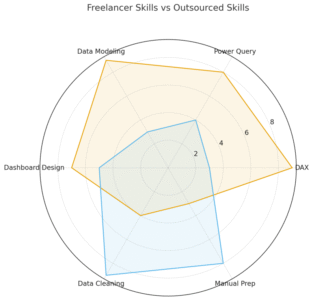
Scaling a Power BI freelance business is about freeing time and increasing the quality of your output. Once you move beyond solo-project mode, the growth potential becomes much larger.
Streamlining Your Workflow With Reusable Templates And Models
Reusable assets may be the biggest time-saver in Power BI freelancing. I advise creating templates for common tasks so you don’t rebuild the same pieces for every project.
Templates you can create:
- Standardized DAX measures like YoY, rolling averages, or retention.
- Pre-built data models for sales, ecommerce, marketing, or finance.
- Color palettes using company branding or consistent themes.
- Dashboard wireframes with placeholder visuals.
A scenario to consider: If a client uses a CRM like HubSpot, having a ready-made model that maps companies, contacts, deals, and activities can cut hours off the onboarding time.
The faster you build, the more projects you can take without sacrificing quality.
Delegating Low-Value Tasks So You Focus On High-Level BI Work
As your workload grows, small tasks start to slow you down. Delegating basic cleanup or repetitive steps can open up space for higher-value work, like modeling or DAX architecture.
Tasks you can delegate easily:
- CSV cleaning and formatting.
- Manual category mapping.
- Initial imports of tables into Power BI Desktop.
- Simple M-query transformations.
Delegation doesn’t mean building a team immediately. You can start small by hiring a part-time data assistant or working with another freelancer.
This allows you to stay focused on the analysis, automation, and consulting clients actually pay for.
Developing Repeatable Systems That Grow Your Capacity
Systems make your business scalable. When every project has a repeatable flow, you reduce decision fatigue and increase consistency.
I suggest documenting a basic workflow such as:
- Intake and requirements gathering.
- Data audit and source mapping.
- Modeling and transformation.
- Visual design and interactivity.
- QA and refresh testing.
- Client training and handoff.
Each stage should have checklists. For example, your QA step might include: “Run a full refresh through Power BI service → Check for dimension mismatches → Validate key DAX outputs.” This structure makes your work faster, cleaner, and more predictable.
Turning One-Off Projects Into Long-Term Consulting Relationships
The most profitable Power BI freelancers I know rarely chase new leads. Their best clients stay with them for years because the value keeps growing.
To turn one-off projects into long-term consulting, you can:
- Offer quarterly reporting reviews.
- Suggest new dashboards as business needs evolve.
- Propose automations that eliminate manual data work.
- Provide training sessions for new hires.
Clients appreciate freelancers who think proactively. When you point out inefficiencies or opportunities inside their workflow, it becomes natural for them to keep you involved.
Proven Marketing Tactics To Grow A Data Analytics Brand
Your marketing determines how many high-quality Power BI freelance clients find you each month. A small effort done consistently can completely transform your pipeline.
Publishing Tutorials That Demonstrate Problem-Solving Ability
Tutorials help prospects see how you think. You’re not showing off—you’re educating people who may hire you.
Types of tutorials that work well:
- Short breakdowns of DAX formulas with real use cases.
- Power Query steps showing cleanup techniques.
- Modeling strategies like using star schema instead of snowflake designs.
For example, a post explaining “How to use Transform → Unpivot Columns in Power Query to clean messy sales data” can generate engagement fast because it solves a universal problem.
Sharing Dashboard Breakdowns That Attract Decision-Makers
Decision-makers love seeing dashboards in action. If you walk through the story behind a dashboard, people quickly understand your value.
Try sharing breakdowns such as:
- A sales dashboard showing KPIs, segment filters, and drill-through logic.
- An operations dashboard comparing daily vs weekly performance.
- A marketing dashboard using conversion paths and attribution.
Breakdowns can be short. A simple two-slide carousel with “Problem → Dashboard → Impact” works incredibly well.
Leveraging YouTube And Short-Form Content To Build Authority
Video builds trust faster than text because people can hear your thinking. You don’t need a studio setup; you only need clarity and consistency.
Content ideas that perform well:
- 5-minute DAX explainers.
- Dashboard rebuilds using mock data.
- Power Query transformations recorded with screen share.
- Quick comparison videos like “Excel vs Power BI for reporting.”
A YouTube channel becomes a lead magnet because it positions you as the person who “makes Power BI easy.”
Creating Lead Magnets That Capture Serious BI Prospects
Lead magnets attract clients who are actively looking for solutions. They’re small, valuable downloads that solve a specific problem.
Ideas that convert well:
- A Power BI checklist for new dashboard projects.
- A template data model for sales or finance.
- A mini-guide on DAX patterns like time intelligence.
Once someone downloads your resource, you can follow up with value-driven emails, not sales messages. I believe this builds trust far more effectively than cold pitching.

I’m Juxhin, the voice behind The Justifiable.
I’ve spent 6+ years building blogs, managing affiliate campaigns, and testing the messy world of online business. Here, I cut the fluff and share the strategies that actually move the needle — so you can build income that’s sustainable, not speculative.
Related posts:
 Is Freelancer Worth It: Make Good Money
 Legitimate Transcription Work From Home
 How Fiverr Affiliate Program Will Make You Tons Of Cash
 How Does Udemy Work? Your Ultimate Guide to the Online Learning Platform
 Side Job Ideas: 10+ Easy and Profitable Ways to Earn Extra Income
 Free Invoice Software: Top 10 Solutions for Small Businesses and Freelancers