
Table of Contents
Some links on The Justifiable are affiliate links, meaning we may earn a small commission at no extra cost to you. Read full disclaimer.
Doba automation is one of those things people assume is fully hands-off until they actually start using the platform. I’ve seen a lot of confusion around what Doba really automates versus what still requires manual work, especially for new or scaling dropshippers.
This breakdown is for ecommerce sellers, dropshippers, and online store owners who are considering Doba or already using it and want a clear, honest answer to one core question: what does Doba automate for you, and what parts of the workflow still depend on human input?
How Doba Automation Handles Product Importing
Doba automation around product importing is one of its strongest selling points, but it’s also one of the most misunderstood. A lot of sellers expect a “set it and forget it” catalog system.
In reality, Doba does a solid job on the heavy lifting while still expecting you to make judgment calls that protect your store long-term.
How Doba Automatically Syncs Supplier Product Data
When you connect Doba to your store, the platform automatically pulls supplier product data into its marketplace. This includes titles, base descriptions, wholesale prices, stock status, and shipping origin details.
Here’s what’s genuinely automated behind the scenes:
- Supplier catalogs are centrally maintained by Doba
- Product availability updates flow into Doba without you chasing suppliers
- Core product attributes sync when suppliers make changes
From my experience, this saves hours compared to manual CSV uploads or email-based supplier updates. Doba claims access to over 2 million products, and automation is the only reason that scale is manageable at all.
That said, automation here is more about data access than data quality. Doba gives you the raw materials fast, but it doesn’t curate them for conversion.
What Product Details Still Require Manual Review
This is where many new users get burned. Even with doba automation handling the sync, product content still needs human judgment.
You’ll want to manually review:
- Product titles that are too generic or keyword-stuffed
- Descriptions written for suppliers, not shoppers
- Missing specs, dimensions, or compatibility details
- Images that don’t match your brand quality
I’ve personally seen supplier descriptions that were fewer than 40 words. That’s not an SEO strategy — it’s a bounce-rate generator.
A quick rule I use: if I wouldn’t buy it based on the listing, I don’t publish it as-is. Automation gets products into your store, but trust is still built manually.
Limits Of Automation In Product Variations And SKUs
Doba automation struggles most when products have complex variations. Simple items are fine. Once you introduce multiple attributes, cracks start to show.
Common limitations include:
- Color or size variants not grouped cleanly
- Separate SKUs treated as separate products
- Inconsistent naming across variations
For example, a hoodie available in five sizes and four colors might appear as multiple standalone listings instead of one clean product page. That’s not just messy — it hurts conversions.
In practice, this means you’ll often need to:
- Manually merge variants in your store
- Rename SKUs for consistency
- Remove duplicate listings created by automation
Automation accelerates setup, but catalog structure still needs a human brain.
How Often Doba Updates Pricing And Availability
Pricing and inventory updates are automated, but they’re not real-time in the way many people assume.
Based on platform behavior and user reports:
- Inventory updates typically occur multiple times per day
- Pricing changes depend on supplier update frequency
- There can be short delays during high-volume periods
This matters because even a few hours of lag can lead to overselling. I’ve seen sellers lose money when a supplier quietly raised prices overnight and automation pushed the update after orders were already placed.
Best practice I recommend:
- Build buffer margins into pricing
- Avoid razor-thin profit models
- Monitor fast-moving products manually
Automation reduces effort, but it doesn’t eliminate risk.
What Order Processing Is Actually Automated In Doba
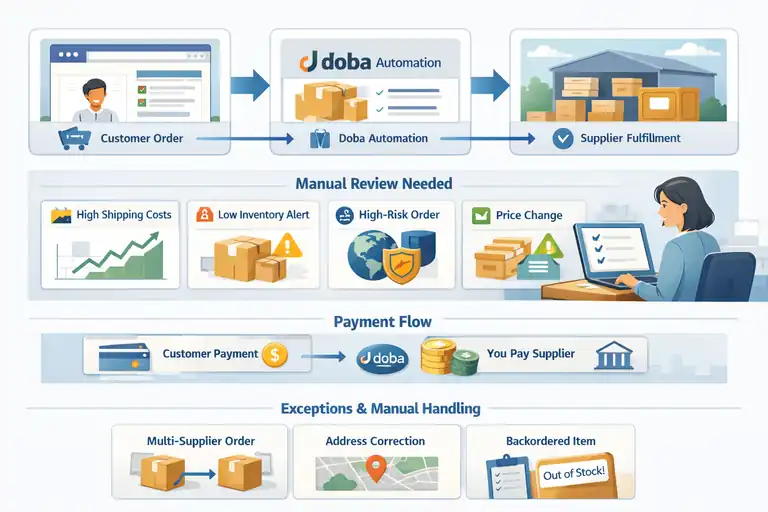
Order processing is where doba automation feels the most “hands-off” at first glance. Orders flow, suppliers fulfill, tracking numbers appear.
But once you look closer, there are still decision points that require your involvement.
How Doba Automatically Sends Orders To Suppliers
Once a customer places an order in your connected store, Doba can automatically forward that order to the supplier. This includes:
- Customer shipping details
- Selected product and quantity
- Supplier-specific order requirements
This is a major time saver. Without automation, you’d be copying and pasting order details into supplier portals all day.
In clean scenarios, the workflow looks like this:
- Customer orders → order syncs to Doba
- Doba routes order to supplier
- Supplier processes fulfillment
For low-risk, standard products, this part works smoothly.
Where Manual Order Approval Still Comes Into Play
Despite automation, not every order should be auto-approved. Doba gives you the option to review orders before they’re sent out, and I strongly suggest using it.
Manual approval is especially important when:
- Shipping costs spike unexpectedly
- Inventory is low or fluctuating
- Orders come from high-risk regions
- Supplier pricing has recently changed
Think of this as a safety net, not a bottleneck. Automation moves fast. Manual review keeps you profitable.
How Payment Flow Works Between Stores And Suppliers
This is one area people often misunderstand. Doba does not pay suppliers for you.
Here’s how it actually works:
- Your customer pays you via your store
- You pay Doba or the supplier separately
- Doba facilitates the transaction but doesn’t front costs
This means cash flow management is still on you. Automation doesn’t eliminate the need to track margins, fees, and timing.
If you’re running ads or scaling volume, this can matter a lot. I’ve seen stores grow sales quickly but stall because supplier payments outpaced cash reserves.
Common Order Scenarios That Break Full Automation
Some situations simply don’t play well with automation, no matter the platform.
Common examples include:
- Multi-supplier orders in one cart
- Address corrections after checkout
- Backordered items discovered post-purchase
- Split shipments with different delivery timelines
When these happen, automation pauses and humans step in. Emails get sent. Decisions get made. Refunds or partial shipments happen.
That’s not a flaw — it’s reality. Dropshipping isn’t fully automatic, and anyone promising that is selling fantasy, not software.
Pro tip: Treat Doba automation like a fast assistant, not a replacement for thinking. Let it handle speed and scale, but keep control over pricing, product quality, and edge-case decisions. That balance is where profitable stores are actually built.
Inventory Sync Automation And Its Real-Time Limits
Inventory sync is one of those areas where doba automation feels reassuring on the surface but needs a reality check once you’re actually selling at volume.
Doba does automate inventory updates, but those updates are only as good as the data timing and supplier behavior behind them.
How Doba Tracks Supplier Stock Levels Automatically
Doba tracks inventory by pulling stock data directly from its connected suppliers and updating product availability inside the Doba marketplace. That information then flows to your store through integrations like Shopify.
Here’s what’s automated:
- Supplier stock feeds: Suppliers push inventory counts into Doba’s system.
- Availability status: Products marked out of stock are flagged automatically.
- Catalog-level updates: Changes apply across all stores using that product.
In simple terms, Doba acts as a middle layer that listens to suppliers so you don’t have to email or log into multiple dashboards. For slower-moving products, this works well enough.
From what I’ve seen, this setup is designed for scale, not precision. It’s meant to reduce manual checking, not eliminate it completely.
Delays And Gaps In Inventory Data Updates
This is where expectations often break. Inventory updates are not real-time in the strict sense.
Common causes of delay include:
- Supplier update frequency: Some suppliers update inventory once or twice daily.
- Batch processing: Doba processes inventory changes in intervals, not continuously.
- High-volume spikes: Flash sales or seasonal demand can outpace sync cycles.
Imagine a supplier has 10 units left. Five sellers are connected. All five stores still show “in stock” for several hours. That’s how gaps happen.
In my experience, fast-selling products are the most vulnerable here. The automation works, but it’s always a step behind reality.
Risk Areas For Overselling Despite Automation
Overselling is the biggest inventory risk with doba automation, and it usually shows up in predictable scenarios.
High-risk situations include:
- Low-stock products with high demand
- Products promoted via ads or influencers
- Multi-store sellers pulling from the same supplier
- Suppliers with inconsistent inventory reporting
When overselling happens, you’re the one dealing with refunds, apology emails, and potential chargebacks. Automation doesn’t take that hit — you do.
That’s why I don’t trust automation blindly for inventory. It’s a helper, not a guarantee.
Best Practices For Managing Inventory With Doba
This is where strategy matters more than software.
What’s worked best for me and other sellers:
- Avoid low-stock products: Especially for ads or featured collections.
- Use buffer rules: Mark products out of stock in your store earlier than Doba does.
- Manually monitor top sellers: A quick daily check prevents big problems.
- Build supplier relationships: Reliable suppliers reduce sync issues dramatically.
Think of doba automation as a traffic report. Helpful, but you still need to watch the road.
Shipping Automation Features Inside The Doba Platform
Shipping automation in Doba focuses on simplifying fulfillment, not customizing every detail.
It works best when you accept standard shipping logic and step in only when exceptions appear.
How Doba Automates Shipping Method Selection
Doba automatically assigns shipping methods based on supplier defaults. That means the supplier decides:
- Carrier (UPS, FedEx, USPS, etc.)
- Shipping speed tiers
- Origin location
For sellers, this removes a lot of guesswork. You don’t need to negotiate shipping rules product by product.
The tradeoff is control. You’re trusting the supplier’s logistics choices, which is fine for most standard items but less ideal for branded or premium experiences.
What Shipping Costs Are Calculated Automatically
Shipping costs are calculated automatically at checkout based on:
- Product weight and dimensions
- Shipping destination
- Supplier-defined rates
This helps prevent undercharging customers, which is a common beginner mistake. According to ecommerce benchmarks, unexpected shipping costs cause nearly 48% of cart abandonments, so accuracy matters.
However, these costs can change without much warning. I’ve seen shipping jump 20–30% during peak seasons, which can quietly eat margins if you’re not watching.
Tracking Number Generation And Sync Capabilities
Once an order ships, Doba pulls the tracking number from the supplier and syncs it back to your store.
What’s automated here:
- Tracking number creation
- Carrier identification
- Customer notification triggers
For customers, this feels seamless. For you, it reduces “where’s my order?” emails, which is a huge win once order volume grows.
That said, tracking updates depend entirely on supplier responsiveness. If they delay, automation can’t fix that.
Manual Steps Required For Shipping Exceptions
No shipping system is exception-free, and this is where automation steps aside.
You’ll still need to handle:
- Address corrections after checkout
- Split shipments across suppliers
- Delayed or lost packages
- Customer-requested shipping changes
When these happen, Doba won’t magically resolve them. You’ll be emailing suppliers, updating customers, and sometimes issuing partial refunds.
My honest take: This is normal. Shipping is messy in real life. Automation handles the boring parts, but empathy and judgment handle the rest.
Pricing Automation And Margin Control In Doba
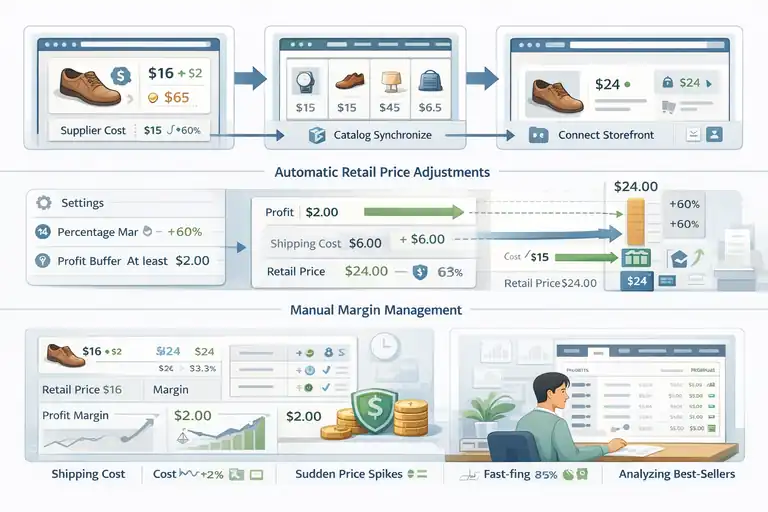
Pricing is where doba automation can either quietly protect your margins or slowly bleed them if you’re not paying attention.
Doba does automate parts of pricing, but it does not manage profitability for you. That responsibility still sits squarely on your shoulders.
How Doba Automates Supplier Price Changes
Doba automatically syncs supplier cost changes at the catalog level. When a supplier increases or decreases their wholesale price, that update flows into Doba and reflects on the product data connected to your store.
What this automation handles well:
- Supplier cost updates: You don’t need to manually check price lists.
- Catalog-wide syncing: Price changes apply across all connected sellers.
- Reduced surprise invoices: You’re less likely to pay more than expected per order.
The catch is timing. These updates are not instant. If a supplier raises prices at 9 a.m. and your store processes orders before the update hits, you absorb that difference.
From what I’ve seen, sellers running thin margins are the most exposed here. Automation keeps data aligned, but it doesn’t protect profit.
Tools For Automatic Retail Price Adjustments
Doba allows retail pricing rules, especially when integrated with platforms like Shopify. These rules let you automatically apply markups instead of pricing each product manually.
Common approaches include:
- Percentage-based markups: Simple and scalable.
- Fixed dollar markups: Useful for predictable margins.
- Hybrid rules: Percentage plus a minimum profit buffer.
This works well for large catalogs. I’ve used percentage rules to manage hundreds of SKUs without losing my sanity.
However, automated pricing assumes supplier costs behave rationally. When shipping surcharges or sudden cost spikes happen, rules don’t adapt emotionally — they just execute.
Where Manual Margin Management Is Still Needed
This is the unglamorous part of ecommerce, but it matters.
You still need to manually:
- Review margins on best-selling products
- Adjust prices during peak shipping seasons
- Account for refunds, chargebacks, and ad costs
- Protect margins on fast-moving inventory
A quick example: if your ad cost per sale is $12 and your automated pricing leaves you $10 in gross profit, you’re scaling losses, not revenue.
I suggest manually reviewing your top 20 products weekly. Automation handles volume, but humans protect profit.
Risks Of Fully Hands-Off Pricing Automation
Going fully hands-off sounds tempting. It’s also risky.
The biggest dangers include:
- Silent margin erosion
- Shipping cost volatility
- Supplier price spikes
- Competitive undercutting wars
I’ve seen stores run smoothly for months, then suddenly dip into unprofitability because no one noticed small pricing shifts stacking up.
My honest opinion: pricing automation should support decisions, not replace them. If you’re not checking numbers, automation won’t save you.
Store Integration Automation With Ecommerce Platforms
Store integration is one area where doba automation genuinely shines, especially for sellers who value speed and simplicity.
Still, integrations aren’t flawless, and knowing where they break helps you avoid headaches later.
How Doba Automates Shopify Store Synchronization
Doba’s Shopify integration is its most mature connection. Once linked, products, inventory status, and orders sync automatically between platforms.
What’s automated:
- Product imports: Push listings from Doba into Shopify.
- Inventory updates: Stock changes flow automatically.
- Order syncing: Customer orders move into Doba for fulfillment.
For solo sellers or small teams, this setup saves a huge amount of time. You can focus on marketing instead of admin work.
That said, Shopify becomes the “source of truth.” If something breaks, you’ll usually need to fix it there first.
Product And Order Sync Capabilities With Other Platforms
Doba also supports other ecommerce platforms, though the level of automation can vary.
Typical differences include:
- Fewer customization options
- Slower sync intervals
- Limited order-routing controls
This doesn’t mean they’re unusable. It just means Shopify users get the smoothest experience.
If you’re not on Shopify, I recommend testing with a small product set before committing fully.
Automation Gaps In Multi-Store Setups
Running multiple stores exposes automation limits quickly.
Common gaps include:
- Inventory shared across stores without visibility
- Pricing rules applied inconsistently
- Orders competing for the same supplier stock
Doba doesn’t manage inventory allocation between your stores. That’s on you.
In multi-store setups, automation accelerates growth, but coordination prevents chaos.
Data Conflicts That Require Manual Resolution
When data doesn’t match, automation stops being polite.
Typical conflicts involve:
- Product edits made in the store but not in Doba
- SKU mismatches between systems
- Inventory discrepancies after manual overrides
When this happens, you’ll need to:
- Identify the source of truth
- Manually resync products or orders
- Sometimes delete and re-import listings
It’s annoying, but it’s part of using any integration-heavy stack.
Best practice: Use doba automation aggressively for scale, but audit pricing and integrations on a schedule. Ten minutes of weekly review can save you weeks of cleanup later.
What Customer Management Is Not Automated By Doba
This is the section where expectations really need to be reset. Doba automation focuses on suppliers, products, and orders — not customers.
If you’re hoping Doba will handle customer relationships for you, this is where the line is clearly drawn.
Why Doba Does Not Automate Customer Support
Doba intentionally stays out of customer support. The platform sees you as the merchant of record, meaning the customer relationship belongs to you, not Doba or the supplier.
What Doba does not automate:
- Responding to customer emails or chat messages
- Handling delivery complaints or delays
- Explaining shipping timelines or product details
- Managing negative reviews or disputes
This design is deliberate. Customers buy from your store, not from Doba. From a branding perspective, that’s a good thing. From a workload perspective, it means you need systems in place.
In my experience, this is where beginners underestimate the work. Automation handles transactions, not trust. And trust is built conversation by conversation.
Handling Returns And Refunds Outside The Platform
Returns are another area where automation stops cold.
Doba does not provide a centralized return workflow. Instead, returns depend on:
- Individual supplier return policies
- Product category rules (electronics vs apparel, for example)
- Time limits and restocking fees
What this means in practice:
- You coordinate returns manually with suppliers
- Refunds are processed in your store, not Doba
- Partial refunds often require manual math
A realistic scenario: a customer wants to return a $60 item. The supplier charges a $15 restocking fee and doesn’t refund shipping. You decide how much the customer gets back — not automation.
This is why clear return policies on your site matter more than any tool.
Manual Communication With End Customers
Every meaningful customer interaction is manual by default.
This includes:
- Order confirmations beyond basic automation
- Shipping delay explanations
- Address correction follow-ups
- Post-purchase reassurance emails
You can automate templates, but the responsibility stays with you. When something goes wrong, customers don’t want software logic. They want a human response.
I’ll be honest: this part doesn’t scale as cleanly as product imports. But it’s also where loyal customers are created.
Automation Workarounds Using External Tools
While Doba doesn’t automate customer management, you can absolutely build a smarter system around it.
Common workarounds include:
- Helpdesk tools like Gorgias or Zendesk
- Automated email flows inside Shopify
- Order status tracking pages to reduce tickets
These tools don’t replace you, but they reduce repetitive work. I’ve found that even basic autoresponders can cut support volume by 30–40% when set up well.
Think of Doba as the supply engine. Customer experience still needs its own fuel.
Reporting And Analytics Automation Inside Doba
Reporting is one area where Doba automation helps with visibility, but not with decision-making. The platform gives you data, not insights. Knowing the difference saves a lot of frustration.
Automated Sales And Order Performance Reports
Doba automatically generates basic reports related to orders and sales activity.
These typically include:
- Order volume over time
- Fulfillment status summaries
- Product-level order counts
This is useful for quick health checks. You can see what’s moving and what’s not without digging through raw orders.
However, these reports are descriptive, not strategic. They tell you what happened, not why it happened or what to do next.
Supplier Performance Tracking Capabilities
Doba does offer limited visibility into supplier performance.
You can generally monitor:
- Order fulfillment speed
- Shipping consistency
- Product availability stability
This helps identify unreliable suppliers over time. If one supplier consistently causes delays or cancellations, the data will show it.
That said, the tracking is passive. You still need to notice patterns and take action yourself.
Data That Requires Manual Export And Analysis
Once you want deeper insights, automation runs out.
You’ll need manual exports for:
- Profit margin analysis
- Refund and return impact
- Advertising cost comparisons
- Customer lifetime value
Most sellers export this data into spreadsheets or analytics tools. It’s not glamorous, but it’s where real decisions are made.
I’ve yet to see a dropshipper grow sustainably without doing some manual number crunching.
Limits Of Doba’s Built-In Analytics Automation
The biggest limitation is context.
Doba does not know:
- Your ad spend
- Your brand strategy
- Your customer acquisition costs
- Your long-term goals
So while doba automation provides operational data, it can’t judge performance for you. It doesn’t know if a product is “good” or just “busy.”
My take: use Doba reports to spot signals, then use your own tools to decide direction.
Where Doba Automation Stops And Human Work Begins
This is the point where doba automation needs to be understood for what it is: a powerful operational assistant, not a business owner.
Knowing where automation ends is what separates calm operators from sellers constantly putting out fires.
Tasks Doba Intentionally Leaves Manual
Some tasks are left manual by design, not by accident. Doba focuses on supplier coordination, not decision-making.
Tasks you should expect to handle yourself include:
- Choosing which products align with your brand
- Setting pricing strategies beyond basic markups
- Managing customer expectations and communication
- Deciding when to pause or remove risky products
These are judgment-based tasks. Automation can’t weigh brand trust, long-term value, or customer emotion. In my experience, when sellers try to automate these anyway, quality drops fast.
Doba assumes you want control here — and honestly, you should.
Common Misconceptions About Full Dropshipping Automation
One of the biggest myths in dropshipping is “fully automated income.” Doba automation often gets pulled into that fantasy.
Common misconceptions I hear:
- Automation means zero daily involvement
- Software prevents all mistakes
- Scaling removes human workload
In reality, scaling shifts the work. You spend less time uploading products and more time reviewing data, handling edge cases, and making decisions.
Automation removes repetition, not responsibility.
Workflow Areas That Benefit Most From Human Oversight
Some areas improve dramatically when humans stay involved.
These include:
- Product selection and pruning
- Supplier reliability evaluation
- Pricing adjustments during volatility
- Customer-facing messaging
For example, when shipping delays spike during holidays, automation keeps moving orders. Humans explain delays in a way that keeps refunds down. That difference matters.
If I had to pick one area to never fully automate, it would be anything customer-facing.
How To Balance Automation With Control Using Doba
The balance comes from setting boundaries.
A practical approach:
- Automate product imports and order routing
- Manually review top-selling SKUs weekly
- Set alerts or reminders for pricing checks
- Step in only when metrics cross thresholds
Think of doba automation like cruise control. It’s great on highways, but you still steer through traffic.
Is Doba Automation Enough For Scalable Dropshipping
This is the real question most sellers are asking, even if they don’t phrase it this way. The answer depends less on Doba and more on how you operate.
Who Doba Automation Works Best For
Doba automation works best for sellers who value operational simplicity over extreme customization.
It’s a strong fit if you:
- Want fast access to U.S.-based suppliers
- Prefer fewer tools over complex stacks
- Sell standardized, non-custom products
- Are comfortable reviewing data regularly
For solo founders or small teams, Doba can remove a lot of friction early on.
Scenarios Where Doba Automation Falls Short
There are clear limits.
Doba struggles when:
- You need branded packaging or inserts
- You run multiple stores at scale
- You depend on real-time inventory precision
- You want deep customer behavior analytics
In these cases, automation covers the basics but not the nuance.
When Additional Automation Tools Are Necessary
As volume grows, most sellers layer tools on top of Doba.
Common additions include:
- Helpdesk software for customer support
- Advanced analytics platforms
- Pricing and margin tracking tools
- Inventory monitoring alerts
This isn’t a failure of Doba. It’s a sign your business is maturing.
How To Decide If Doba Fits Your Automation Goals
Here’s the simplest way I look at it.
Ask yourself:
- Do I want speed or control right now?
- Am I optimizing for simplicity or customization?
- Can I commit to regular review, not full autopilot?
If your answer leans toward speed and simplicity, doba automation can absolutely support scalable dropshipping. Just don’t expect it to think for you.
Final takeaway: Automation is leverage, not leadership. Use doba automation to move faster, but keep your hands on the wheel where it counts.
FAQ
What does Doba automation actually handle for dropshipping sellers?
Doba automation handles product importing, supplier inventory syncing, order routing to suppliers, shipping rate calculation, and tracking number updates. It automates operational tasks that reduce manual work but does not manage pricing strategy, customer support, or business decisions.
What parts of dropshipping are not automated by Doba?
Doba does not automate customer support, returns and refunds, profit margin management, supplier disputes, or brand-level decisions. Sellers are responsible for customer communication, pricing oversight, and handling exceptions like shipping delays or inventory errors.
Is Doba automation enough to run a fully hands-off dropshipping business?
No. Doba automation supports scale and efficiency, but it does not replace human oversight. Successful sellers still review pricing, monitor inventory risk, communicate with customers, and intervene when automation breaks or edge cases appear.

I’m Juxhin, the voice behind The Justifiable.
I’ve spent 6+ years building blogs, managing affiliate campaigns, and testing the messy world of online business. Here, I cut the fluff and share the strategies that actually move the needle — so you can build income that’s sustainable, not speculative.
Related posts:
 How to Use Dsers Shopify for Seamless Dropshipping
 Shopify DSers Review: Is It Really Worth Your Time?
 Connective Ecommerce Explained: Build Without Inventory
 Ecommerce Automation That Saves Time Without Breaking Sales
 Is Doba Shopify Worth Using for Dropshipping Stores?
 How To Automate Order Fulfillment Using Appscenic