
Table of Contents
Some links on The Justifiable are affiliate links, meaning we may earn a small commission at no extra cost to you. Read full disclaimer.
A real HubSpot review for small business has to go beyond the glossy landing pages and look at what you actually get when you’re the one paying the bill.
If you run a small business, startup, agency, or lean service team, HubSpot can feel like the dream setup: CRM, marketing, sales, service, and automation in one place.
In my experience, that promise is mostly real, but only if you understand where HubSpot is excellent, where it gets expensive, and which plan makes sense before you build your whole process around it.
What HubSpot is and why small businesses consider it
HubSpot is best understood as a connected customer platform, not just a CRM.
That matters because small businesses usually do not need “more software.” They need fewer disconnected tools and less manual work.
A simple explanation of what HubSpot actually does
HubSpot combines contact management, sales pipeline tracking, forms, email marketing, live chat, ticketing, reporting, content tools, and automation inside one system. HubSpot now positions this around its Smart CRM plus product hubs for marketing, sales, service, content, commerce, and data.
For a small business owner, that means your lead form, deal stage, follow-up emails, and support history can live in one place instead of being scattered across spreadsheets and five different apps.
What I like here is the logic. When your tools share the same data, you do less copying, fewer exports, and less “Wait, which number is correct?” chaos. That alone can save a small team a surprising amount of time.
The catch is that HubSpot works best when you commit to using the platform properly. If you only want a cheap contact database, it may feel like overkill. If you want one system that grows with your marketing, sales, and support, it starts making much more sense.
Why HubSpot appeals to small businesses so quickly
The biggest reason small businesses look at HubSpot is simplicity at the front end and scalability at the back end. You can start with free tools, then move into Starter plans, and only upgrade further if your process becomes more complex.
HubSpot also has a Starter Customer Platform bundle built specifically for startups and small businesses, which packages multiple Starter products together.
There is also a practical emotional reason: HubSpot feels less intimidating than many enterprise-style CRMs. The interface is cleaner, setup is easier, and the language is more approachable.
Imagine you run a five-person home services company. You want forms on your website, quote follow-ups, pipeline visibility, and a basic support inbox. HubSpot can handle that without forcing you into a fully custom implementation on day one. That is a big part of its appeal.
How HubSpot works for a small business in the real world
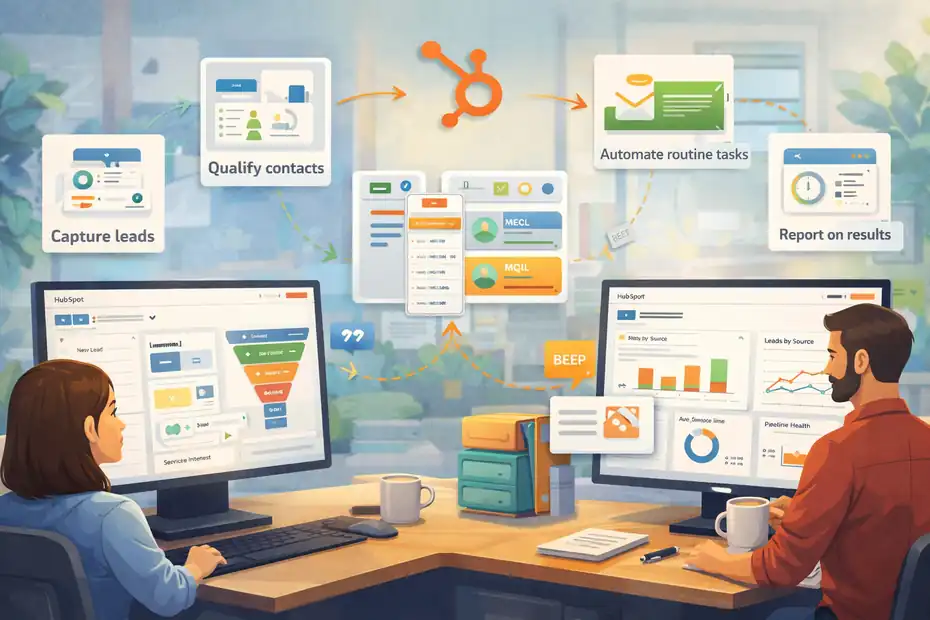
Before deciding whether HubSpot is worth it, it helps to picture how it fits into everyday operations. Most small businesses do not fail with software because the tool is bad.
They fail because the workflow never becomes practical.
The core workflow most small teams will use
For most small businesses, the basic HubSpot flow looks like this:
- Capture leads: Website forms, chat, landing pages, or imported contacts enter the CRM.
- Qualify contacts: You label leads by source, service interest, geography, budget, or lifecycle stage.
- Move deals forward: Sales pipeline stages show who needs a call, quote, demo, or follow-up.
- Automate routine tasks: Emails, task reminders, simple nurturing, and ticket routing reduce manual admin.
- Report on results: Dashboards show lead sources, close rates, response times, and pipeline health.
That flow sounds basic, but for many small businesses it is exactly what is missing. Instead of relying on memory and inbox searching, you create a system.
HubSpot’s own ROI page says customers report productivity gains, revenue growth, and positive ROI, with average gains such as 3x more leads and 94% more deals closed after six months.
I would treat vendor-reported numbers as directional rather than guaranteed, but they do support the broader case that a connected system can improve performance.
Where HubSpot feels strongest during day-to-day use
In my view, HubSpot is strongest when one person wears multiple hats. That is normal in a small business. The owner might do sales in the morning, marketing after lunch, and customer support before closing the laptop at night.
HubSpot handles that kind of overlap well because the same contact record can hold marketing activity, deal status, and service history. That makes conversations more informed and follow-ups more relevant.
I also think HubSpot is at its best when speed matters. If a lead submits a form, gets an automated response, lands in the right pipeline, and creates a task for a salesperson without anyone touching it, you feel the benefit immediately. It is not flashy. It is just less mess.
HubSpot pricing for small business: where value turns into friction
This is the part most reviews either oversimplify or hide.
HubSpot can be affordable at the entry level and very expensive once you need advanced automation, larger contact tiers, or premium seats.
What the free and Starter options look like
HubSpot offers free tools and low-cost Starter entry points across its platform. Its Starter Customer Platform bundle is normally priced at $20 per seat per month, with promotional discounts shown on the official page for new customers, and it includes Starter editions of multiple HubSpot products.
Individual Starter products like Smart CRM, Marketing Hub Starter, Sales Hub Starter, Service Hub Starter, Content Hub Starter, and Data Hub Starter also start at $20 per seat per month.
For a true small business, this is where HubSpot is most attractive.
Here is the honest take:
- Best value zone: Free tools and Starter plans.
- Why it works: Low commitment, easy setup, enough functionality for early growth.
- Who benefits most: Service businesses, consultants, small agencies, local businesses, and founder-led startups.
If your needs are straightforward, Starter can be enough for quite a while. That is especially true if you mainly need CRM, simple email marketing, forms, a website, ticketing, or lightweight sales follow-up.
When the price jump becomes very real
The pricing story changes fast once you move into Professional tiers. Marketing Hub Professional starts at $890 per month with 3 Core Seats included and requires a one-time onboarding fee of $3,000.
Sales Hub Professional starts at $100 per seat per month, while Service Hub Professional also starts at $100 per seat per month. Content Hub Professional starts at $500 per month, and Data Hub Professional starts at $800 per month.
This is the moment where many small businesses pause.
A realistic scenario: You started on Starter at a manageable monthly cost. Then you decide you want more robust marketing automation, advanced reporting, or more sophisticated campaign workflows. Suddenly, you are not comparing HubSpot to “doing nothing.” You are comparing it to several specialized tools combined, and the cost jumps hard.
I do not say that to scare you. I say it because this is where HubSpot goes from easy yes to strategic decision.
A quick pricing snapshot
| Plan area | Entry pricing | Small-business takeaway |
|---|---|---|
| Free tools | $0 | Great for testing CRM basics and simple workflows |
| Starter Customer Platform | $20/seat/month standard, promos may reduce first-year cost | Best overall value for many small teams |
| Smart CRM Starter | $20/seat/month | Good if you mainly need CRM structure |
| Marketing Hub Starter | $20/seat/month | Fine for simple email and lead capture |
| Marketing Hub Professional | $890/month + onboarding | Powerful, but expensive for most small teams |
| Sales Hub Professional | $100/seat/month | Reasonable if sales process is core to growth |
| Service Hub Professional | $100/seat/month | Can work for support-heavy businesses |
Pricing and onboarding details come from HubSpot’s official catalog and pricing pages.
Features that matter most to small businesses
A feature list is not useful unless it connects to a real business problem. So let’s focus on what actually changes your day, your follow-up speed, and your visibility.
CRM, pipeline, and contact management
HubSpot’s CRM is still one of its best selling points. You can organize contacts, companies, deals, tasks, and activity history in one place. For a small business, this is valuable because it replaces memory-based selling with trackable process.
Let me be direct: most small businesses do not lose deals because they have no leads. They lose deals because nobody followed up on time, the quote got buried, or the contact history was split across inboxes and notebooks.
HubSpot fixes that surprisingly well. You can see what stage a deal is in, who owns it, when the next task is due, and what interactions happened already. That makes handoffs cleaner and helps owners manage small teams without micromanaging every conversation.
If your business depends on repeat customers, referrals, or longer sales cycles, this alone can justify using HubSpot.
Marketing, content, and lead capture tools
HubSpot’s marketing side is where things get interesting for growth-focused small businesses. Starter and higher tiers can support forms, landing pages, email campaigns, CTAs, simple automation, and content management.
Content Hub and Marketing Hub also connect well with the CRM, which is the whole point: you can track what content or lead source actually creates revenue, not just traffic.
This matters if you run SEO, email newsletters, downloadable guides, webinar signups, or local service campaigns.
A practical example: imagine you run a boutique accounting firm. Someone downloads your tax checklist from a landing page.
HubSpot can store that contact, tag the source, send a follow-up email, and notify your team if the person later books a consultation. That kind of continuity is where the platform feels smart rather than bloated.
Support, AI, and integrations
HubSpot also gives small businesses room to grow into support and AI workflows. Service Hub includes ticketing and team inbox tools, while Breeze adds AI assistance for tasks like content generation, summaries, meeting prep, and workflow support.
HubSpot’s ecosystem has also passed 2,000 apps and 2.5 million active installs, which matters if you need to connect your accounting software, ecommerce stack, or communication tools later.
I would not buy HubSpot only for the AI. Plenty of software now has AI. But as a layer inside a connected CRM, it is more useful than gimmicky. It can save time precisely because it already knows your customer records and activity history.
Who should use HubSpot and who should skip it
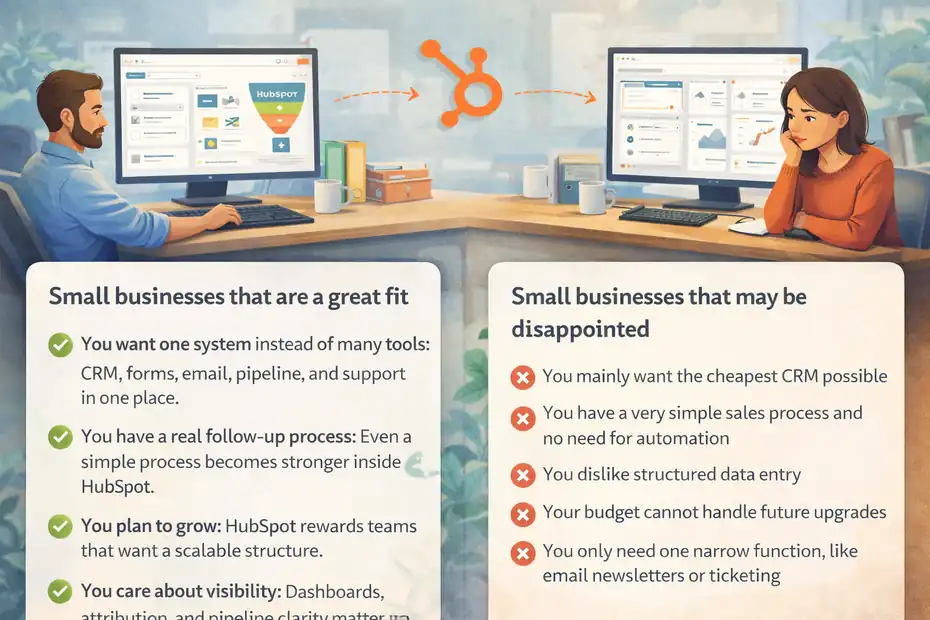
This is where a real review becomes useful. HubSpot is not “for everyone,” and pretending it is will only waste your time.
Small businesses that are a great fit
HubSpot is a strong fit if you match most of these points:
- You want one system instead of many tools: CRM, forms, email, pipeline, and support in one place.
- You have a real follow-up process: Even a simple process becomes stronger inside HubSpot.
- You plan to grow: HubSpot rewards teams that want a scalable structure.
- You care about visibility: Dashboards, attribution, and pipeline clarity matter to you.
- You sell through relationships: B2B services, agencies, consulting, SaaS, home services, and education businesses often fit well.
In my experience, HubSpot works especially well when the business has moved beyond the “just keep it in my head” stage but is not ready for a heavy enterprise stack.
Small businesses that may be disappointed
HubSpot may not be the right choice if:
- You mainly want the cheapest CRM possible
- You have a very simple sales process and no need for automation
- You dislike structured data entry
- Your budget cannot handle future upgrades
- You only need one narrow function, like email newsletters or ticketing
This is the honest part many reviews skip: HubSpot can feel amazing at first and then frustrating if you buy into the ecosystem before confirming your long-term budget. That does not make it bad. It just means you should adopt it with a plan, not excitement alone.
Common mistakes small businesses make with HubSpot
Most disappointment with HubSpot comes from setup decisions, not the platform itself. A few early mistakes can make the software feel harder and more expensive than it needs to be.
Mistake 1: Buying too much too early
I see this a lot. A small business gets excited, upgrades quickly, and pays for advanced features before basic process is even stable. Then six weeks later, no one uses the automation correctly because the lifecycle stages, contact properties, and deal pipeline were never defined.
Start smaller. Build your process first. Then upgrade because the process demands it.
A better path looks like this:
- Step 1: Set up contact properties and pipeline stages.
- Step 2: Standardize tasks, reminders, and follow-up expectations.
- Step 3: Add forms, email capture, and dashboards.
- Step 4: Upgrade only when limitations are blocking growth.
That order sounds boring, but boring systems usually make money.
Mistake 2: Treating HubSpot like a database instead of a workflow engine
If you only store contacts in HubSpot and never build process around it, you will probably wonder what the hype was about. The value appears when records trigger action.
That means assigning ownership, creating tasks automatically, defining deal stages clearly, and using simple workflows to reduce repetitive work.
Here is the mindset shift I recommend: do not ask, “Where do I store customer info?” Ask, “What should happen automatically when this lead, customer, or ticket reaches the next step?” Once you think that way, HubSpot becomes far more useful.
How to get the best results from HubSpot on a small-business budget
You do not need a giant tech stack or a certified admin to make HubSpot useful. You do need discipline.
A practical setup plan that keeps costs under control
If I were setting up HubSpot for a small business today, I would keep it lean:
- Start with the CRM and one clear pipeline: Do not create five pipelines because you might need them one day.
- Define key fields early: Source, service type, lead status, next step, owner, and close reason.
- Use one form and one follow-up workflow first: Prove the process before building more.
- Build two or three dashboards that matter: Leads by source, deals by stage, response time, and close rate are enough to start.
- Audit monthly: Remove unused properties, fix messy stages, and tighten automation.
That kind of setup gives you control without overengineering.
When upgrading actually makes sense
Upgrading is usually worth it when one of these becomes true:
- You are losing time to manual work every week
- Your lead volume is high enough that follow-up consistency matters more
- You need better reporting to make budget decisions
- Marketing, sales, and service need the same customer record
- You can clearly tie the upgrade to revenue or labor savings
I believe this is the simplest rule: if HubSpot saves or creates more money than it costs, it is worth it. If not, stay on the lighter plan longer.
Final verdict: is HubSpot worth it for small business?
Yes, HubSpot is worth it for many small businesses, but mainly in the free and Starter range. That is where the platform delivers its best balance of simplicity, functionality, and price. The CRM, pipeline visibility, lead capture, and connected workflows can genuinely help a small team become more organized and responsive.
Where the hype becomes risky is at the upgrade point. Marketing Hub Professional and other advanced tiers are powerful, but they are not casual purchases.
Once onboarding fees, seat pricing, and added complexity enter the picture, HubSpot stops being an easy “small business tool” and becomes a real operating decision.
So here is my honest conclusion:
- Worth it: For small businesses that want an all-in-one growth system and are happy to build process around it.
- Not worth it: For businesses that only want the cheapest basic CRM or cannot justify future upgrades.
- Best approach: Start lean, prove ROI, then expand carefully.
If I were advising a small business owner one-on-one, I would say this: HubSpot is not hype, but it is also not magic. It is a very good platform that becomes great when your business is ready for structure.
FAQ
Is HubSpot good for small businesses?
HubSpot is a strong option for small businesses that want an all-in-one system for CRM, marketing, sales, and support. It works best for teams that need structure and automation. The free and Starter plans are especially valuable for small teams starting to organize their processes.
How much does HubSpot cost for small businesses?
HubSpot offers free tools and Starter plans starting at around $20 per seat per month. However, costs can increase significantly with Professional plans, which include advanced features. Small businesses should start with lower tiers and upgrade only when their growth justifies the expense.
What are the main benefits of HubSpot for small business owners?
The main benefits include centralized customer data, automated workflows, better lead tracking, and improved team productivity. HubSpot helps small businesses reduce manual work and stay organized, which often leads to faster response times and higher conversion rates across sales and marketing efforts.
Is HubSpot worth the price for small businesses?
HubSpot is worth it if the platform helps generate more revenue or saves time through automation. For many small businesses, the Starter plans provide excellent value. However, advanced plans can become expensive, so it is important to evaluate ROI before upgrading.
What are the disadvantages of HubSpot for small businesses?
The biggest downside is the pricing jump when moving to higher-tier plans. Some small businesses may also find it overwhelming if they only need basic features. Without a clear process in place, HubSpot can feel underutilized or more complex than necessary.

I’m Juxhin, the voice behind The Justifiable.
I’ve spent 6+ years building blogs, managing affiliate campaigns, and testing the messy world of online business. Here, I cut the fluff and share the strategies that actually move the needle — so you can build income that’s sustainable, not speculative.
Related posts:
 Email Marketing Campaigns: 5 Secrets to Skyrocket Engagement
 Top 5 Automated Sales Funnel Hacks for Explosive Growth!
 Best Sales Funnels Builder for Explosive Growth
 Freshsales CRM Pricing Comparison: Save More on Upgrades
 7 Reasons to Try Omnisend Email Marketing Today
 Omnisend Marketing Automation That Actually Increases Revenue