
Table of Contents
Some links on The Justifiable are affiliate links, meaning we may earn a small commission at no extra cost to you. Read full disclaimer.
Omnisend low email open rate fix usually starts with a simple truth: your problem is rarely just the subject line. In most cases, low opens come from weaker inbox placement, tired segments, or emails that no longer match what your subscribers expect.
I’ve seen brands chase clever copy while ignoring the real issue sitting underneath.
In this guide, I’ll walk you through how to diagnose the cause inside Omnisend, fix it step by step, and improve the numbers that actually matter for revenue, not just vanity metrics.
Why Low Open Rates Happen In Omnisend
A low open rate in Omnisend is usually a signal, not the root problem.
Before you change templates or rewrite campaigns, you need to understand what the number is really telling you.
Open Rate Is A Clue, Not The Whole Story
Open rate still matters, but it is no longer a perfect measure of interest. Omnisend’s own deliverability guidance says an average open rate is around 20%, while its 2025 ecommerce report showed email open rates at 26.6% across its dataset.
That gap matters because it tells you benchmarks change by audience, campaign type, and measurement conditions.
Apple Mail Privacy Protection also changed how marketers should read opens. Litmus says more than 50% of email opens happen on a device with Apple Mail Privacy Protection activated, which can inflate opens by preloading tracking pixels.
So if your Omnisend open rate is low, that can still be a real problem, but if it looks high, that does not automatically mean your emails are genuinely winning attention.
What I recommend is using opens as an early warning metric, then validating the diagnosis with click rate, revenue per campaign, unsubscribe rate, spam complaints, and first-24-hour engagement trends inside Omnisend reports.
Omnisend specifically surfaces open rate, click rate, revenue, and hour-by-hour performance so you can spot whether the issue is inbox placement, weak messaging, or poor timing.
The Five Most Common Causes Of Low Opens
Most Omnisend open rate problems come from one of five places.
First, poor domain authentication can hurt trust with inbox providers. Omnisend recommends signing your domain with SPF, DKIM, and DMARC, and Google and Yahoo now expect proper authentication from senders, especially bulk senders.
Second, low engagement segments drag down future campaigns. Omnisend warns that unengaged contacts are a major cause of complaints, spam traps, and hard bounces, all of which damage sender reputation.
Third, weak list hygiene creates bounce and trust issues. Omnisend says list cleaning improves open and click rates because you keep only valid addresses and reduce the bounce problems that hurt reputation.
Fourth, poor content-to-audience match lowers intent. Even if your email gets delivered, people will ignore it if the angle is wrong. Fifth, send-time and frequency mistakes create fatigue.
Omnisend’s reporting emphasizes first-24-hour engagement trends for refining send times, which tells you timing still has a measurable role in performance.
What A Healthy Omnisend Performance Baseline Looks Like
You do not need a perfect benchmark to improve. You need a realistic baseline. Omnisend’s support guidance points to roughly 20% as an average open rate, around 0.2% unsubscribe rate, and, in BFCM best-practice guidance, suggests reviewing whether your open rate is at least 20%, spam complaint rate is under 0.1%, and bounce rate is under 0.3%.
Google says spam rates in Postmaster Tools should stay below 0.3%, and its FAQ says senders should aim below 0.1% to stay safe.
In practice, I would read your Omnisend account like this: Under 15% opens on a permission-based ecommerce list is a warning, under 10% is a serious problem, and anything below that usually means deliverability, segmentation, or acquisition quality needs immediate attention.
That final judgment is my interpretation, but it is grounded in Omnisend’s published benchmarks and inbox-provider spam thresholds.
Diagnose The Problem Before You Try To Fix It
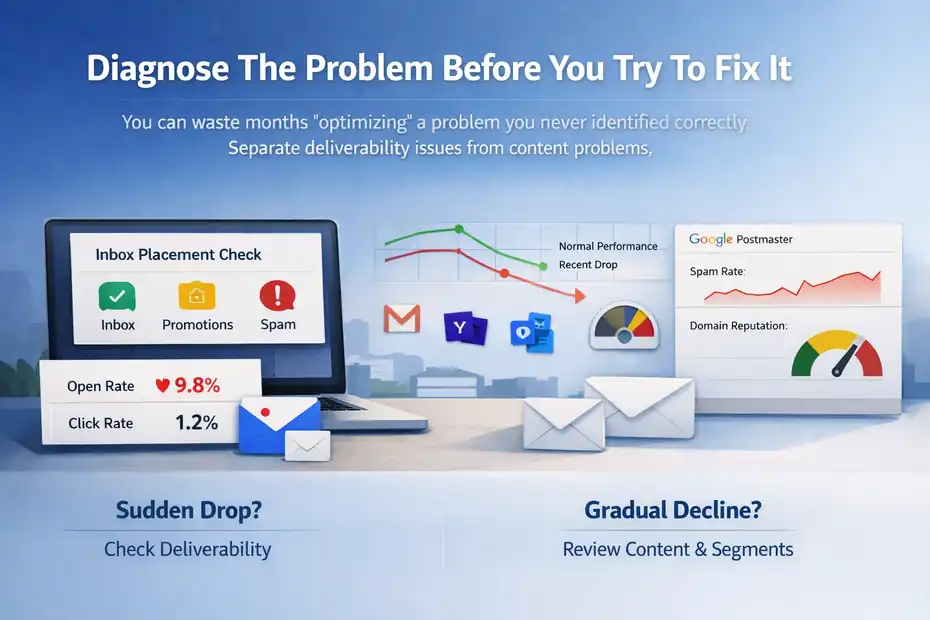
You can waste months “optimizing” a problem you never identified correctly. The fastest path is to separate a content problem from a deliverability problem.
Check Whether Your Emails Are Reaching The Inbox
Start with inbox placement, not creativity. Omnisend’s spam-prevention guidance says to verify authentication, send test campaigns to Gmail, Yahoo, and Outlook, and check inbox, promotions, and spam folders. It also recommends connecting Google Postmaster Tools to monitor spam rate and domain reputation.
Here is the simplest way to think about it. If your open rate suddenly dropped across almost every campaign, your deliverability likely changed. If only one campaign underperformed while others stayed normal, your message or offer is more likely the issue. That sounds basic, but it saves a lot of guesswork.
A realistic scenario: Imagine your store usually gets 24% opens on campaign sends, then your last four broadcasts land between 9% and 12% even though click rate on automation emails still looks healthy. I would not spend my first hour rewriting subject lines.
I would check authentication, domain alignment, spam placement, and complaint signals first. Omnisend’s own documentation treats those issues as foundational because mailbox providers judge sender trust before subscribers even see your copy.
Use Omnisend Reports The Right Way
Omnisend gives you more than enough data to diagnose low opens if you know where to look. Campaign reports show messages sent, open rate, click rate, and revenue, while individual campaign and automation reports show first-24-hour performance and segment-level views.
The trick is not to stare at one number. Compare these combinations instead. Open rate down + click rate down usually points to inbox or subject-line issues. Open rate steady + click rate down usually points to weak content or weak offer alignment.
Open rate down + revenue steady can happen when you are sending to smaller, more qualified segments. That is why I always tell people not to panic just because the top-line open number moved.
Inside Omnisend, look at the first 24 hours for your best and worst recent campaigns. If most opens happen earlier for strong campaigns and lag or disappear on weak ones, timing or inbox placement may be involved. Then compare segment performance.
If VIP buyers open at 32% but newsletter-only leads open at 11%, you are not dealing with one audience. You are dealing with at least two very different intent levels.
Identify Whether The Drop Is Sudden Or Gradual
A sudden drop usually means a technical or reputation event. A gradual decline usually points to fatigue, weaker acquisition quality, or stale messaging. That difference matters because the fix is completely different.
For example, if open rate fell after you imported a large list, changed domains, or increased frequency, that is a sender-quality problem until proven otherwise. Omnisend explicitly warns that improperly collected lists and unengaged contacts hurt deliverability, and it may require cleanup when permission quality is questionable.
If the decline happened over three to six months, I would look harder at segmentation and promise mismatch. Maybe subscribers joined for a discount but now receive too many generic promotions. Maybe your welcome flow sets one expectation and your campaigns deliver another.
In my experience, this slow-burn problem is incredibly common in ecommerce because stores grow faster than their messaging strategy does.
Fix Deliverability First Because It Multiplies Everything Else
If your emails are not trusted, nothing else scales. Deliverability is the boring part that quietly determines whether all your creative work gets seen.
Authenticate Your Sending Domain Properly
Omnisend wants your sender domain signed with SPF, DKIM, and DMARC, and it provides domain setup instructions plus error guidance for SPF problems. Google and Yahoo also require strong authentication for bulk senders. This is not optional anymore. It is the baseline cost of entry.
If you have not done this, go to your Omnisend domain setup area and add the DNS records exactly as shown. Then verify them. One subtle problem Omnisend highlights is multiple SPF records. A domain can only have one SPF record, so if you stacked several over time, validation can fail.
I suggest treating this like a revenue task, not a tech chore. Even a great subject line cannot overcome a sender setup that looks suspicious. And once you authenticate properly, you usually get a cleaner foundation for every future campaign, automation, and seasonal push.
Monitor Spam Complaints And Reputation Closely
Spam complaints are one of the fastest ways to lose inbox placement. Google says spam rates reported in Postmaster Tools should stay below 0.3%, and its FAQ says senders should aim below 0.1%. Yahoo also references a 0.3% enforcement threshold for complaint rate. Omnisend’s own BFCM guidance suggests keeping spam complaint rate below 0.1%.
That sounds like a tiny percentage, because it is. Three complaints per 1,000 delivered emails is enough to create real trouble. This is why low open rates often begin long before you notice a dramatic failure. Mailbox providers quietly reduce trust first.
Here is my rule: If a campaign gets decent clicks but unusually high unsubscribes or complaints, do not repeat that angle to the full list. Pull back. Review the segment, the promise in the signup form, and whether the send felt too aggressive for the audience.
A lot of ecommerce brands accidentally train mailbox providers to distrust them by chasing short-term promo spikes.
Clean Your List More Aggressively Than You Think
Omnisend is clear that cleaning your list improves open and click rates, reduces bounces, and protects sender reputation from spam traps, invalid addresses, and typos. It also stresses that unengaged subscribers can generate complaints and damage deliverability over time.
This is one of the least exciting fixes and one of the most profitable. If 30% of your list never opens and barely clicks, you are not preserving opportunity by holding onto them forever. You may be actively lowering performance for the people who still want your emails.
A simple working approach looks like this: create engaged segments based on recent clicks, opens, or purchases; send regular campaigns primarily to them; move colder subscribers into a lighter cadence; then run a re-engagement sequence before suppressing the truly inactive.
Omnisend even recommends improving deliverability with engaged contacts and offers segmentation ideas specifically to improve engagement metrics.
Improve Campaign Opens With Smarter Segmentation
Once deliverability is under control, segmentation usually becomes the highest-leverage open-rate fix. Better targeting creates better attention.
Stop Sending The Same Email To Everyone
The fastest way to depress open rates is to act like your list is one audience. It is not. New subscribers, repeat buyers, discount hunters, VIPs, and seasonal shoppers all respond to different messages.
Omnisend highlights segmentation as a way to improve engagement metrics because campaigns become more relevant to the people receiving them. That sounds obvious, but many stores still run broad sends because it is easier operationally. Easier does not mean better.
I recommend beginning with four practical segments: recent purchasers, engaged non-buyers, repeat customers, and inactive subscribers. This alone can change the tone of your campaigns.
Recent buyers may respond better to replenishment or usage education. Engaged non-buyers often need proof and clarity. Repeat customers are more open to launches and bundles. Inactive subscribers should not receive your full promo cadence.
Imagine you run a skincare store. Sending one “Spring Sale” campaign to the whole list might land at 14% opens. But a “Restock Your Routine” send to past customers and a separate “Still Thinking It Over?” send to recent browsers can create stronger intent because the message fits the customer’s stage.
Match Subject Lines To Segment Intent
A subject line does not work in isolation. It works when it matches what the subscriber already cares about.
That is why generic urgency often underperforms on healthy lists. “Final Hours” can work for warm buyers, but it often feels empty to people who are still deciding whether your product matters at all. For colder segments, specificity tends to beat hype. Think benefit, category, usage case, or outcome.
Here is the strategic shortcut I use: write the segment reason first, then write the subject line. For example, if the segment is “customers who bought running socks in the last 60 days,” the reason might be “they are likely open to complementary gear.” That leads to a subject line like “Your Next Easy Upgrade For Long Runs,” which is much stronger than “Don’t Miss Out.”
Omnisend’s reporting tools can help validate this fast. Watch open rate by segment, then compare click and revenue. If a segment opens well but does not buy, your subject line may be attracting curiosity instead of qualified intent.
Use Resends And Boosters Without Annoying People
Omnisend includes Campaign Booster functionality and specifically advises using a completely different subject line when resending to non-openers or non-clickers. It also defines Campaign Booster as a feature that resends an updated campaign to non-openers to improve engagement.
This is one of the most practical Omnisend low email open rate fixes because it lets you recover missed attention without rebuilding the whole campaign. But the key is restraint. Do not resend the same message with a tiny tweak. Change the angle meaningfully.
A good pattern is this: First send emphasizes the offer, second send emphasizes the use case, and final send emphasizes deadline or scarcity. The person who ignored “20% Off Ends Tonight” may open “Your Weekend Restock Is Still Waiting” because it feels more relevant and less noisy.
Fix The Message So People Actually Want To Open
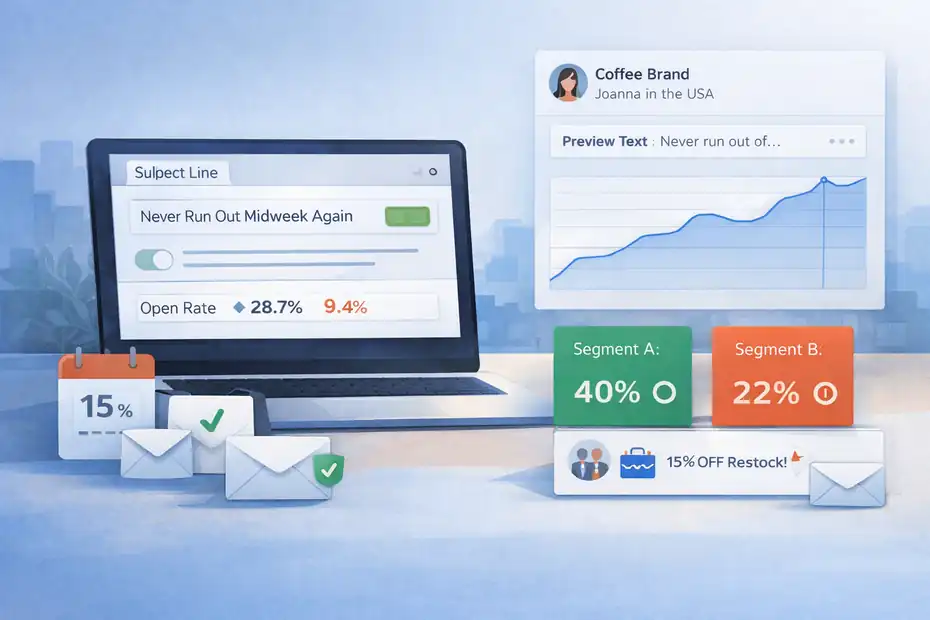
Once your emails are reaching the inbox and landing with the right segment, message quality becomes the growth lever.
Write Subject Lines That Earn Curiosity Honestly
I believe the best subject lines do one of three things: promise a clear benefit, create relevant curiosity, or reflect existing customer intent. The bad ones try to manufacture excitement the email cannot support.
You do not need tricks. You need alignment. If the email is about a restock, say that in a more interesting way. If it is about a limited-time bundle, let the reader sense the advantage without turning the subject line into a discount siren.
A few practical rules help:
- Keep the promise believable.
- Avoid all-caps and spammy punctuation.
- Use urgency only when it is real.
- Write for one segment, not the entire list.
- Pair the subject line with a preview text that adds new information.
Omnisend’s campaign metrics can tell you whether the subject line did its job, but the click rate reveals whether the body delivered on that promise. That relationship matters. High opens with weak clicks usually means your subject line overperformed the email itself.
Improve Preview Text And From Name Trust
A lot of marketers obsess over subject lines and ignore the other two things people see first: the from name and preview text. That is a mistake.
Your from name should be recognizable and consistent. People open emails from brands they remember, not mysterious sender labels. Your preview text should also support the subject line rather than repeat it. Think of it like a second chance to clarify why opening is worth it.
This is especially important in crowded promo periods. Omnisend’s seasonal deliverability guidance for BFCM emphasizes baseline metrics, list cleaning, and domain authentication before high-volume periods because mailbox providers are already on guard. During those windows, trust cues matter even more.
In practice, I suggest testing one change at a time here. Keep the offer fixed, then test from-name format or preview-text style over several campaigns. Tiny trust improvements compound.
Align The Email Angle With The Offer
Sometimes the open-rate issue is not about the inbox or the subject line at all. It is about the offer being too weak, too common, or poorly framed.
If every campaign sounds like a sale, your audience stops listening. If every message is broad, your best subscribers stop feeling seen. What usually works better is angle variety: education, use-case framing, curation, product pairing, customer proof, seasonal relevance, and only then hard urgency.
Here is a simple example. A coffee brand promoting subscription discounts could send “Save 15% On Every Order,” but a stronger angle for some segments may be “Never Run Out Midweek Again.” Same offer. Better emotional fit.
In my experience, open rates often recover when the brand stops talking like a megaphone and starts sounding like a helpful guide.
Optimize Timing, Frequency, And Automation Mix
Even great campaigns lose power when they show up at the wrong moment or too often. This is where many stores quietly underperform.
Find The Right Send Time Using Omnisend Data
Omnisend’s individual campaign reports show first-24-hour performance and specifically say these graphs can help refine send times and align with audience behavior. That means the platform already gives you the clues you need.
Instead of relying on generic “best time to send” advice, review your top-performing campaigns by segment. Maybe your VIP buyers engage early morning while newsletter leads respond better in the evening. Maybe weekday sends outperform Sunday sends for high-consideration products. Your store’s pattern matters more than any universal blog post.
I recommend choosing one major segment, sending at two different times across similar campaigns, and measuring opens, clicks, and revenue together. The goal is not more opens in isolation. The goal is more qualified attention that turns into sales.
Reduce Frequency For Cold Segments
One of the fastest ways to hurt open rate is to keep sending your full calendar to people who have already gone cold. Omnisend’s guidance around engaged contacts is useful here because it frames low engagement as a deliverability risk, not just a reporting annoyance.
For many brands, the smarter move is not “send more until they notice.” It is “send less until relevance improves.” You can keep hot segments on your regular promotional cadence while moving colder segments to a weekly digest, category update, or re-engagement path.
This protects revenue too. Why? Because list fatigue can spread. If too many subscribers ignore, delete, or complain, mailbox providers notice at the domain level. Your best segment can end up paying for your worst segment’s apathy.
Let Automations Carry More Of The Revenue Load
Broadcast campaigns are useful, but automations often create stronger engagement because they are tied to behavior. Omnisend’s automation reporting guidance suggests reviewing message format, CTAs, and checkout alignment when workflows show mismatched engagement and sales.
This is why I usually advise stores with weak campaign opens to shift some revenue pressure into flows like welcome, browse abandonment, cart recovery, replenishment, and post-purchase sequences. Those emails are naturally more relevant because they respond to something the customer already did.
That does not directly “fix” campaign open rate, but it improves overall account engagement quality, which can support sender reputation over time. More importantly, it reduces the temptation to blast the whole list every time revenue dips.
Troubleshoot The Most Common Omnisend Open Rate Problems
At this stage, you have the main framework. Now let’s handle the stubborn situations that keep showing up in real accounts.
Good Deliverability But Weak Opens
If inbox placement looks fine and authentication is correct, weak opens usually come down to audience-message mismatch. Your subject lines may be too generic, your send cadence may be too repetitive, or your segments may be too broad.
The fix here is usually not dramatic. Tighten segments, refresh angles, and stop sending “store-wide” thinking to everyone. Also compare your best-selling products with your most-promoted products. They are not always the same. Sometimes brands push what they want to sell, not what subscribers are most ready to buy.
High Opens But Low Revenue
This problem is more common than people admit, especially with Apple Mail Privacy Protection inflating open behavior on some devices. Litmus says MPP affects over half of opens on Apple-protected devices, which is why high open rates can mislead you if clicks and sales do not follow.
If this is your pattern, improve the email body, CTA clarity, landing-page match, and offer quality. Omnisend’s automation reporting guidance specifically points users toward message format, CTAs, and checkout alignment when engagement and sales do not match.
A Sudden Crash After Changing ESP, Domain, Or Volume
This is usually a warm-up or authentication problem. Omnisend’s deliverability collection includes domain setup, SPF/DKIM/DMARC authentication, blocked-domain troubleshooting, and domain-warming guidance, which tells you the platform expects these transitions to affect inbox performance.
If you recently changed sending behavior, slow down, prioritize engaged segments, and rebuild trust before scaling volume again. I know that is annoying advice when sales targets are looming, but forcing more sends through a weak reputation almost always makes recovery slower.
Build A Revenue-Focused Open Rate Improvement Plan
A real Omnisend low email open rate fix should boost revenue, not just the dashboard. The winning mindset is simple: improve opens by becoming more relevant and more trusted.
A Simple 30-Day Recovery Plan
- Week 1: Verify SPF, DKIM, and DMARC, test inbox placement, connect Google Postmaster Tools, and review spam and bounce signals. Omnisend and Google both frame these as core deliverability steps.
- Week 2: Build engaged and inactive segments, suppress obvious dead weight, and reduce frequency to colder audiences. Omnisend’s list-cleaning and engaged-contact guidance supports this directly.
- Week 3: Rewrite campaign angles by segment, improve preview text, and test two distinctly different subject-line styles. Then use Campaign Booster with a genuinely different second subject line for non-openers.
- Week 4: Review first-24-hour performance, compare segment-level outcomes, and judge success by click rate, revenue, unsubscribe rate, and complaint trends, not by opens alone. Omnisend’s reporting structure is built for exactly this kind of analysis.
The Real Goal: More Qualified Attention
I’ll be honest: Not every low open rate should be “fixed” by pushing it higher at all costs. Sometimes the right move is to send less, narrow the audience, and accept a smaller send volume in exchange for better revenue density.
That sounds less exciting than a magic subject-line formula, but it is how healthier accounts are built. More trust. More relevance. Fewer wasted sends. Better revenue per email.
That is the version of an Omnisend open-rate fix I believe is worth pursuing, because it holds up beyond one campaign and keeps working when inbox rules get stricter.
FAQ
What is the main cause of low email open rates in Omnisend?
Low email open rates in Omnisend are usually caused by poor deliverability, weak segmentation, or irrelevant messaging. If emails land in spam or reach unengaged subscribers, opens drop quickly. In most cases, improving sender reputation and targeting the right audience has a bigger impact than changing subject lines alone.
How can I fix a low open rate in Omnisend quickly?
To fix a low open rate in Omnisend quickly, start by verifying domain authentication, then clean your email list and focus on engaged segments. After that, improve subject lines and resend campaigns to non-openers with a different angle. These steps typically produce noticeable improvements within a few campaigns.
Does list cleaning improve Omnisend email open rates?
Yes, list cleaning significantly improves Omnisend email open rates by removing inactive or invalid contacts. This reduces bounce rates and spam complaints, which helps rebuild sender reputation. As a result, more emails land in the inbox and reach subscribers who are actually interested in your content.
What is a good open rate benchmark for Omnisend emails?
A good open rate for Omnisend emails typically falls between 20% and 30%, depending on your industry and audience quality. If your open rate drops below 15%, it often indicates issues with deliverability, targeting, or content relevance that need to be addressed quickly.
How does segmentation increase email open rates in Omnisend?
Segmentation increases email open rates in Omnisend by sending more relevant messages to specific groups of subscribers. When emails match customer behavior or purchase history, they feel more personalized and timely. This leads to higher engagement, better inbox placement, and improved long-term performance.

I’m Juxhin, the voice behind The Justifiable.
I’ve spent 6+ years building blogs, managing affiliate campaigns, and testing the messy world of online business. Here, I cut the fluff and share the strategies that actually move the needle — so you can build income that’s sustainable, not speculative.
Related posts:
 Email Best Practices You Need to Start Using Today
 Ecommerce Email Marketing Best Practices for Higher Sales
 Create a Marketing Email That Readers Can’t Ignore
 MailerLite Low Email Open Rate Fix: 9 Proven Ways To Boost Opens
 What is Getresponse: A Brief Introduction
 Klaviyo Emails Going To Spam: Fix This Before You Lose Sales