
Table of Contents
Some links on The Justifiable are affiliate links, meaning we may earn a small commission at no extra cost to you. Read full disclaimer.
BrightLocal review for Google Business Profile tracking gets interesting once you stop asking, “Does it track my profile?” and start asking, “Does it help me improve visibility, prove progress, and spot local SEO problems faster than Google alone?” That is the real decision in 2026.
In my view, BrightLocal is not just a dashboard for watching numbers move. It is much more useful as a local SEO operating system for rankings, audits, competitor context, and reporting. But it is not perfect, and it is not necessary for every business.
This review breaks down where it gives better insights, where it does not, and who should actually pay for it.
What BrightLocal Actually Does For Google Business Profile Tracking
BrightLocal is strongest when you need more than raw Google Business Profile performance data.
It adds ranking visibility, audit context, competitor benchmarking, and client-friendly reporting around your profile.
What “Google Business Profile Tracking” Really Means In BrightLocal
When most people hear “Google Business Profile tracking,” they think of views, calls, clicks, and direction requests.
Google does give you those inside Business Profile Performance, including views, interactions, and search terms used to find your business. Google also lets you set date ranges to review performance over time.
BrightLocal goes a level deeper. It separates tracking into a few practical jobs:
- Performance monitoring: How your profile is being found and used.
- Ranking monitoring: Where you appear in Google Search and Google Maps for local keywords.
- Audit monitoring: What is broken or weak in your profile and local footprint.
- Competitor benchmarking: Who is outranking you and why.
That distinction matters. Native Google data tells you what happened inside the profile. BrightLocal helps explain why performance may be flat, why one nearby competitor wins the map pack, or why your profile is underperforming in one neighborhood and not another.
According to BrightLocal, its GBP Audit surfaces duplicate listings, NAP errors, and local ranking identifiers outside the profile itself, while its Local Rank Tracker and Local Search Grid monitor rankings from Google Search and Google Maps.
In my experience, that is the real value proposition. BrightLocal is less about replacing Google’s own data and more about giving that data context you can act on.
Where BrightLocal Gives Better Insights Than Native GBP
Google’s built-in Performance area is useful, but it has limits. It shows what customers did after finding your profile, yet it does not give you a strong diagnostic layer for local SEO.
You can see search terms, interactions, and views, but you do not get a rich competitor benchmark, neighborhood-level ranking map, or a broad audit of off-profile issues from Google’s native view alone.
BrightLocal’s best “better insight” features are these:
- GBP Audit: Good for catching duplicate listings, NAP inconsistencies, and competitive gaps.
- Local Search Grid: Useful when one city-wide ranking average hides huge street-to-street ranking swings.
- Local Rank Tracker: Helpful for ongoing keyword movement in Google Search and Maps.
- Longer GBP performance history: BrightLocal says it gives 18 months of GBP Insights data, compared with 6 months in its own framing of native limits.
That last point is especially important for agencies and seasonal businesses. If you run a dental clinic, HVAC service, med spa, or restaurant, six months of native data can be too short to compare busy seasons properly. An 18-month window gives you more room to spot whether growth is real or just a seasonal bounce.
So yes, BrightLocal can provide better insights, but mostly because it adds diagnostic visibility rather than because it magically unlocks secret Google data.
Who This Tool Is Best For And Who Should Skip It
I would put BrightLocal into the “worth paying for” bucket for three groups.
- Local SEO freelancers and agencies: The white-label reporting, competitor views, and multi-location workflow make more sense here. BrightLocal also includes customizable white-label reporting on its plans.
- Multi-location businesses: Ranking shifts, listing consistency, and profile performance become hard to manage manually as locations grow.
- Single-location businesses in competitive markets: Think lawyers, dentists, roofers, realtors, med spas, plumbers, and similar categories where map visibility drives leads.
I would skip it, or at least delay it, if you are:
- A very small local business with one location, light competition, and no reporting needs.
- Still struggling with basic GBP setup, category choice, photos, service pages, or review generation.
- Operating outside BrightLocal’s core supported countries, because BrightLocal says its tools are configured for the USA, UK, Canada, and Australia.
That country limitation is not discussed enough. If your local SEO footprint lives elsewhere, the “review” becomes a lot simpler: you need to verify coverage before buying.
How BrightLocal Tracks A Google Business Profile In Practice
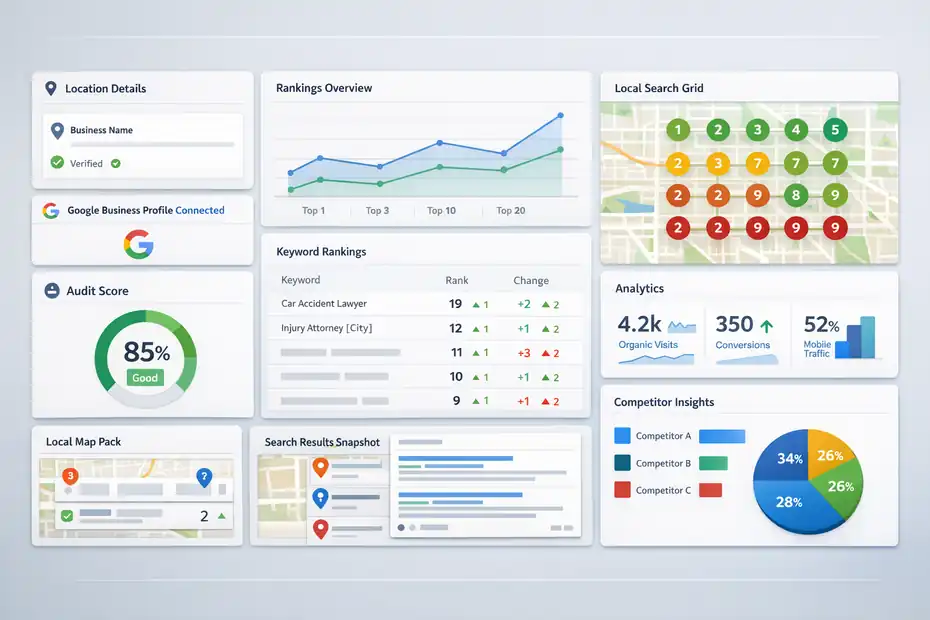
This is where BrightLocal feels more like a local SEO workflow than a simple analytics add-on. You create a location, connect the right data sources, then layer ranking, audit, and reporting views around that location.
Setting Up A Location And Connecting The Right Data
BrightLocal’s setup flow revolves around creating a location first, then adding reports or monitors for that location. In the help documentation for GBP Audit, BrightLocal lets you choose to monitor Google Business Profile data only or set up broader monitoring across multiple data sources.
A sensible setup looks like this:
- Step 1: Create the business location carefully, using the correct business name and details.
- Step 2: Connect the Google Business Profile where relevant.
- Step 3: Turn on GBP Audit and GBP monitoring.
- Step 4: Add rank tracking and, if local competition is tight, Local Search Grid.
- Step 5: Connect analytics if you want a more complete dashboard.
BrightLocal also mentions Google Analytics integration, which can show channel traffic, mobile traffic, and conversions in the same environment. That matters because Google Business Profile tracking is only one piece of the customer journey. If your profile gets more clicks but your landing pages still leak conversions, profile metrics alone can fool you.
One thing to keep straight: BrightLocal is not a direct replacement for managing every GBP setting. Its help documentation states that if a service-area business does not want its address shown, that change needs to be made in Google Business Profile itself because BrightLocal does not currently feed data into GBP for that.
That limitation is important. BrightLocal helps you monitor and optimize, but it does not fully become your source of truth for every profile edit.
Why Rank Tracking Is The Feature Most Businesses Underestimate
A lot of users come in thinking the audit or reporting will be the main event. In practice, local rank tracking is often the feature that changes decisions fastest.
BrightLocal’s Local Rank Tracker monitors up to 100 keywords from Google Search and Google Maps, based on the official tool page. That is already useful. But the bigger reason rank tracking matters is this: GBP performance can rise or fall because your visibility changed before interactions changed.
Imagine you own a personal injury law firm. Calls dip 18% in a month. If you only look at GBP interactions, you might blame seasonality. But if BrightLocal shows your rankings dropped from positions 2–3 to 6–8 for “car accident lawyer near me” and “injury attorney [city],” the diagnosis becomes much clearer.
BrightLocal also explains that Local Rank Tracker uses a single search location point based on the city, town, or ZIP entered, effectively a centroid. This is both useful and limiting. It gives you consistent trend tracking, but it can oversimplify reality in large metro areas where rankings vary block by block.
That is why I believe rank tracking only becomes truly powerful when paired with Local Search Grid. The tracker tells you trend direction. The grid tells you where the problem lives geographically.
How Local Search Grid Changes The Quality Of Insight
BrightLocal’s Local Search Grid is one of the clearest reasons to use the platform for Google Business Profile tracking. BrightLocal describes it as a tool that shows where your business ranks on a granular level instead of giving you one number for a whole city.
That is not a small improvement. It changes how you think.
Here is the practical difference:
| View | What You Learn | Where It Falls Short |
|---|---|---|
| Native GBP performance | Interactions, views, search terms, calls, clicks | Weak on ranking diagnosis and competitor context |
| City-level rank tracker | Overall trend for keywords in a market | Can hide neighborhood-level volatility |
| Local Search Grid | Street-to-street visibility in Google Maps | More data to interpret, so it needs discipline |
For a plumber, this could reveal that you rank strongly north of downtown but disappear in the western suburbs. For a dentist, it might show strong branded visibility near the practice but weak non-branded visibility just three miles away. For a service-area business, that is gold, because it turns vague underperformance into map-based action.
BrightLocal also lets users click grid points and view a SERP screenshot for that point in Maps. That is a very practical touch. It makes the data easier to trust because you can inspect the ranking context instead of staring at abstract heatmap colors.
The BrightLocal Features That Matter Most In A Real Review
Not every BrightLocal feature matters equally for Google Business Profile tracking. Some are central. Others are useful extras. Here is how I would weight them.
GBP Audit: The Most Useful “Why Am I Not Improving?” Feature
The GBP Audit is the part of BrightLocal I would recommend first to anyone frustrated by flat local performance. BrightLocal says the tool surfaces duplicate listings, NAP errors, and local ranking identifiers outside your profile, and benchmarks you against top competitors for important ranking factors.
That matters because local SEO problems are often indirect. Your Google Business Profile can look fine at a glance and still underperform because:
- Duplicate listings confuse Google.
- Your business information is inconsistent across the web.
- Competitors have stronger review momentum.
- Their primary category or profile completeness is stronger.
- Their local landing pages support the profile better.
What I like here is that BrightLocal does not trap you in a vanity-metric mindset. Instead of just showing interactions, it nudges you toward diagnosis. For most businesses, that is more valuable than another pretty chart.
A realistic scenario: A med spa sees impressions up, but calls stay flat. The GBP Audit reveals messy citations, weak category alignment, and local competitors with stronger review recency. That gives you an action plan: clean listings, improve category targeting, and push for fresh reviews. The metric problem becomes an optimization roadmap.
This is where BrightLocal feels less like software and more like a second set of local SEO eyes.
Local Rank Tracker And Maps Tracking: Strong, But Not Magic
BrightLocal’s Local Rank Tracker monitors rankings from both Google Search and Google Maps. For businesses that depend on map visibility, that alone justifies attention. Too many tools still overemphasize traditional organic positions when the local pack and Maps are where lead intent often shows up first.
Still, I would be careful not to oversell it. Rank tracking is helpful, but it is not a direct revenue dashboard. Rankings can improve while lead quality stays flat. Rankings can also bounce because of algorithm shifts, proximity changes, or market noise.
The tool works best when you use it with a disciplined keyword set:
- Core commercial terms: “emergency plumber,” “divorce lawyer,” “dentist near me.”
- Service modifiers: “same day,” “free estimate,” “family,” “implant.”
- Location modifiers where relevant: neighborhood, suburb, ZIP, or city.
- Branded terms: mainly for defense and reputation monitoring.
I suggest keeping keyword sets tight. Many users make the mistake of tracking too many terms and learning nothing useful. Twenty carefully chosen keywords usually beat a bloated list of eighty weak ones.
BrightLocal’s own help documentation also explains that the rank tracker search location is based on a central point for the area entered. So if your market is geographically messy, do not rely on rank tracking alone. The strongest setup is rank tracker for trend lines, plus Local Search Grid for spatial truth.
Review Monitoring, Posting, And Listings: Helpful Extras, Not The Main Reason To Buy
BrightLocal also bundles reviews, listings, and posting tools into its broader platform. The company says it can monitor 80+ review sites, and it offers review generation, review widgets, Active Sync, and a GBP Post Scheduler.
These are helpful, but I would not make them the main reason to buy BrightLocal for Google Business Profile tracking.
Here is why:
- Review monitoring: Useful because reviews clearly influence consumer behavior. BrightLocal’s 2026 Local Consumer Review Survey found that 97% of consumers read reviews online, 85% say positive reviews make them more likely to use a business, and 77% say negative reviews make them less likely to choose one.
- GBP posting: Nice for consistency, especially across multiple locations. BrightLocal’s GBP Post Scheduler emphasizes scheduling, multi-location distribution, and AI-assisted content creation.
- Listings management: Important if citation consistency is one of your weak spots.
But these feel like support features. The heart of BrightLocal’s value for this topic is still ranking, auditing, and competitor-aware visibility analysis. The extras strengthen the stack. They do not define it.
What The Data Tells You And How To Turn It Into Action
Good software does not just collect data. It helps you decide what to do next. This is the part where many BrightLocal reviews stay too shallow.
Which Metrics Matter Most For A Local Business Owner
Not every chart deserves your attention. I would prioritize these metrics in roughly this order:
- Keyword visibility in Maps and local pack
- Grid coverage across priority service areas
- Calls, website clicks, and direction requests
- Search terms driving discovery
- Review velocity, recency, and average rating
- Citation and profile issues surfaced in audits
Google’s own Performance documentation confirms that owners and managers can review views, clicks, customer interactions, and search terms over a selected date range. It also notes that search metrics update at the start of each month and may take up to five days to appear.
That timing note matters. A lot of businesses panic too early. If you changed categories, added services, or refreshed photos last week, some query data will lag.
My rule is simple: treat metrics in layers.
- Layer 1: Visibility metrics tell you if people can find you.
- Layer 2: Interaction metrics tell you if they are interested enough to act.
- Layer 3: Conversion metrics tell you whether your site and offer are closing the deal.
BrightLocal helps most at Layer 1 and early Layer 2. It is strongest when you use it to answer questions like: Are we visible in the right areas? For the right keywords? Against the right competitors? Are our reviews and profile quality supporting that visibility?
Those are better questions than “Did impressions go up?”
How To Read Competitor Benchmarks Without Fooling Yourself
BrightLocal’s GBP Audit benchmarks you against top competitors for factors affecting local rankings. That is powerful, but it can be misread.
The common mistake is treating competitor comparison like a scoreboard instead of a clue system. If a competitor has more reviews, better recency, stronger local landing pages, or better geographic coverage, the insight is not “we lost.”
The insight is “Google is seeing stronger local relevance and prominence signals from them.”
A practical way to interpret competitor views:
- Ask what changed, not just who is ahead.
- Look for repeat patterns across multiple competitors.
- Separate brand strength from optimization strength.
- Focus on fixable gaps first.
For example, if three competitors outrank you and all three have fresh reviews every week while your latest review is 53 days old, that is an actionable pattern. If their profiles also dominate specific grid zones, that points to a local prominence issue, not just a tracking curiosity.
I believe this is where BrightLocal earns its keep for agencies. It helps turn “Your rankings dropped” into “Your review recency is stale, citation consistency is messy, and your west-side map visibility is slipping.” That is a much better conversation with a client or boss.
The Best Weekly Workflow For Using BrightLocal Without Drowning In Reports
One risk with any local SEO platform is over-monitoring. You do not need to stare at dashboards every day.
A simple weekly workflow works better:
- Monday: Check rank tracker and grid movement for core keywords.
- Tuesday: Review GBP interactions and search terms for unusual changes.
- Wednesday: Scan audits for issues, duplicates, or citation inconsistencies.
- Thursday: Review new reviews and response backlog.
- Friday: Log actions taken and compare with competitor movement.
For agencies, I suggest a monthly reporting rhythm and a weekly internal review rhythm. That keeps reporting polished without turning the tool into a time sink.
BrightLocal’s white-label reporting and location-based dashboard structure support this use case well.
If I had to boil it down: The tool becomes much more valuable when you use it as a decision system, not a dashboard wallpaper.
Pricing, Value, And Whether BrightLocal Is Worth It In 2026
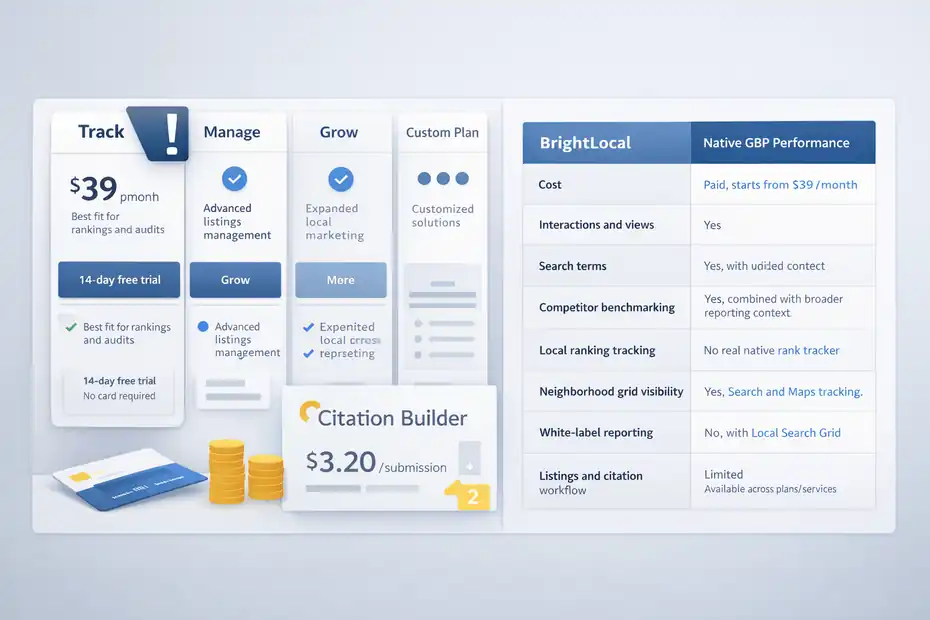
BrightLocal does not have to be the cheapest tool in your stack. It has to save enough time or create enough clarity to justify the spend.
BrightLocal Pricing And What You Actually Get
BrightLocal’s pricing page says plans start at $39 per month, includes a 14-day free trial with no card required, and offers Track, Manage, and Grow tiers plus custom plans.
It also notes that Citation Builder is pay-as-you-go and available separately, with citation submissions or updates priced at $3.20 each or $2 with bulk credits.
Even without every tier price visible in the rendered page, the structure is clear:
- Track: Best fit for rankings, audits, and core local SEO monitoring.
- Manage: Adds stronger listings management capabilities.
- Grow: Expands further for larger or more advanced local marketing needs.
- Custom plans: For higher-volume users.
That means the pricing conversation should not be “Can I afford BrightLocal?” It should be “Which problem am I paying it to solve?”
If all you need is occasional Google Business Profile checks, the native GBP interface is free and probably enough.
But if you spend hours each month checking rankings manually, building client reports, diagnosing visibility drops, or trying to explain why one neighborhood performs better than another, even a relatively modest subscription can pay for itself quickly.
I usually view BrightLocal as a time-and-clarity purchase more than a software purchase.
BrightLocal Vs Native Google Business Profile Performance
Here is the honest comparison.
| Category | Native GBP Performance | BrightLocal |
|---|---|---|
| Cost | Free | Paid, starts from $39/month |
| Interactions and views | Yes | Yes, with added context |
| Search terms | Yes | Yes, combined with broader reporting context |
| Competitor benchmarking | Very limited | Stronger, especially in GBP Audit |
| Local ranking tracking | No real native rank tracker | Yes, Search and Maps tracking |
| Neighborhood grid visibility | No | Yes, with Local Search Grid |
| White-label reporting | No | Yes |
| Listings and citation workflow | Limited | Available across plans/services |
My verdict here is simple: BrightLocal wins on insight quality, diagnosis, and reporting depth. Native GBP wins on cost and simplicity.
So is BrightLocal “better”? Yes, for insight depth. No, if all you want is a free snapshot of profile interactions.
Who Should Buy BrightLocal And Who Should Keep It Simple
I would recommend BrightLocal if your business fits one of these profiles:
- You rely on Google Maps and local pack visibility for lead flow.
- You serve multiple neighborhoods or multiple locations.
- You need to prove local SEO progress to clients or leadership.
- You have enough competition that rankings can shift materially month to month.
- You want one platform for rankings, audit context, reviews, and listings support.
I would keep it simple and stay with native tools if:
- You are a new business still setting up your first Google Business Profile.
- You have one low-competition location and only need basic call and click trends.
- You are not ready to act on the data anyway.
That last point matters. Buying a local SEO platform before you have the time or process to use it is how software turns into shelfware.
Final Verdict: Is BrightLocal Better For Google Business Profile Insights?
For the right user, yes. BrightLocal gives better insights for Google Business Profile tracking because it expands beyond profile performance into rankings, audits, competitor context, and geographic visibility.
That is what makes the platform useful in real local SEO work.
The Biggest Strengths I See
BrightLocal’s strongest advantages are not flashy. They are practical.
- You can diagnose, not just observe. That is the biggest win.
- The Local Search Grid is genuinely helpful for location-sensitive businesses.
- GBP Audit adds competitor and consistency context that Google’s native view does not emphasize.
- Reporting is better suited for agencies and teams than trying to piece together screenshots and spreadsheets.
- The platform stays focused on local SEO rather than trying to be an all-purpose SEO suite.
In my view, this focus is why BrightLocal still stands out. It is not trying to be everything. It is trying to help you win locally.
The Main Weaknesses You Should Know Before Buying
BrightLocal is not a perfect fit for everyone.
- It is more useful after basic GBP optimization is already in place.
- Coverage is limited to core markets like the USA, UK, Canada, and Australia.
- It does not fully replace editing and management inside Google Business Profile itself.
- Some users may underuse it if they only check reports passively and do not turn insights into actions.
That means the platform can feel underwhelming to a beginner and extremely valuable to an agency, consultant, or growth-minded local business owner. Same tool, different stage of business.
My Bottom-Line Recommendation
If you are asking whether BrightLocal offers better insights than Google Business Profile alone, my answer is yes, but with an important qualifier: it gives better decision-making insight, not just more charts.
I would recommend BrightLocal for Google Business Profile tracking when you need to:
- Understand why local visibility changed
- Compare your profile against nearby competitors
- Track rankings in Maps and Search
- See location-based visibility with more precision
- Report progress cleanly to clients or internal stakeholders
If you only want free interaction stats, stick with Google’s native Performance dashboard. If you want a real local SEO control panel, BrightLocal is one of the better fits in 2026. And if your revenue depends heavily on local discovery, I believe that extra layer of insight is usually worth more than the subscription cost.
FAQ
What is BrightLocal used for in Google Business Profile tracking?
BrightLocal is used to track local search rankings, audit your Google Business Profile, and monitor competitor performance. It goes beyond basic insights by showing where your business ranks in Google Maps and search results, helping you understand visibility trends and identify areas to improve local SEO performance.
Is BrightLocal better than Google Business Profile insights?
BrightLocal offers deeper insights than native Google Business Profile data by adding rank tracking, competitor analysis, and local grid visibility. While Google shows interactions and views, BrightLocal helps explain why performance changes, making it more useful for diagnosing local SEO issues and improving visibility strategically.
How accurate is BrightLocal rank tracking?
BrightLocal rank tracking is generally accurate for showing trends in local search visibility, especially when tracking Google Maps and local pack results. However, rankings can vary based on user location and personalization, so it works best when used alongside tools like Local Search Grid for more precise geographic insights.
Does BrightLocal help improve Google Business Profile rankings?
BrightLocal does not directly change rankings, but it helps improve them by identifying issues like inconsistent business listings, weak keyword targeting, and poor local visibility. By acting on its insights, businesses can optimize their profiles and increase their chances of ranking higher in local search results.
Is BrightLocal worth it for small businesses?
BrightLocal can be worth it for small businesses in competitive local markets that rely on Google visibility for leads. If you need ranking insights, competitor tracking, and clear reporting, it provides strong value. For low-competition areas, free Google Business Profile insights may be enough.

I’m Juxhin, the voice behind The Justifiable.
I’ve spent 6+ years building blogs, managing affiliate campaigns, and testing the messy world of online business. Here, I cut the fluff and share the strategies that actually move the needle — so you can build income that’s sustainable, not speculative.
Related posts:
 BrightLocal Honest Review For Freelancers: Smart Investment Or Waste?
 BrightLocal Review For Small Business Local SEO: Is It Worth Paying For?
 BrightLocal Review For Local SEO Agencies: Is It Worth The Cost?
 BrightLocal Reviews: Why Marketers Trust This SEO Tool
 Is the Squirrly SEO WordPress Plugin Enough to Rank?
 Squirrly SEO Pricing: What You Pay vs What You Get