
Table of Contents
Some links on The Justifiable are affiliate links, meaning we may earn a small commission at no extra cost to you. Read full disclaimer.
Leadpages review for affiliate marketers usually comes down to one practical question: will it help you turn more clicks into leads and sales, or is it just another polished landing page builder with a loud marketing message?
I’ve gone through the current platform, pricing, and affiliate program details to answer that from an affiliate-first angle.
In this guide, I’ll show you where Leadpages genuinely helps, where it falls short, and who should actually pay for it in 2026—especially if you care about conversion rate, list growth, testing, and keeping your funnel simple.
What Leadpages Is And Why Affiliate Marketers Even Consider It
Leadpages is a landing page and lead generation platform built around fast page creation, testing, and conversion-focused assets.
For affiliate marketers, that matters because most campaigns do not fail on traffic alone; they fail in the handoff between the click and the offer.
What Leadpages Actually Does
What it is: Leadpages gives you a no-code builder for landing pages, pop-ups, alert bars, and simple websites, with built-in A/B testing, analytics, mobile-responsive templates, lead routing, and payment features. It also supports custom domains, standard integrations, advanced integrations on higher tiers, and direct publishing options.
For an affiliate marketer, that usually translates into four practical use cases. First, you can build a bridge page that warms up traffic before sending people to an affiliate offer. Second, you can collect email leads before making the recommendation.
Third, you can test multiple angles for the same product without touching your main site.
Fourth, you can create offer-specific pages quickly, which is useful when you are running paid traffic, promoting a launch, or segmenting audiences by intent.
In my experience, this is why Leadpages stays relevant. It is not trying to be a full CMS, deep CRM, or enterprise experimentation suite. It is trying to reduce friction between “I have traffic” and “I need a page live today.”
That is a very real pain point for affiliate marketers who would rather test messaging than wrestle with design systems.
Why Affiliates Buy Landing Page Builders In The First Place
The real problem: Affiliate marketers usually buy tools like Leadpages because their website is doing too many jobs at once. A blog post may educate, rank, and monetize, but it often does not convert cold traffic as efficiently as a focused page with one CTA, one promise, and one next step.
That matters even more when you look at landing page benchmarks. Unbounce reported a median landing page conversion rate of 6.6% across industries based on tens of millions of conversions and hundreds of millions of visits. That is not a promise that your page will hit 6.6%, but it is a strong reminder that page structure and conversion design can materially affect results.
Imagine you are promoting an SEO tool. Sending traffic straight to the merchant can work, but a pre-sell page that frames the pain clearly, filters out bad-fit visitors, and captures the email often gives you more leverage. Even when the affiliate sale does not happen on visit one, you still own the relationship through your list.
That is where Leadpages is often strongest: not as a “website replacement,” but as a fast conversion layer on top of your content and traffic strategy.
How Leadpages Works For An Affiliate Funnel
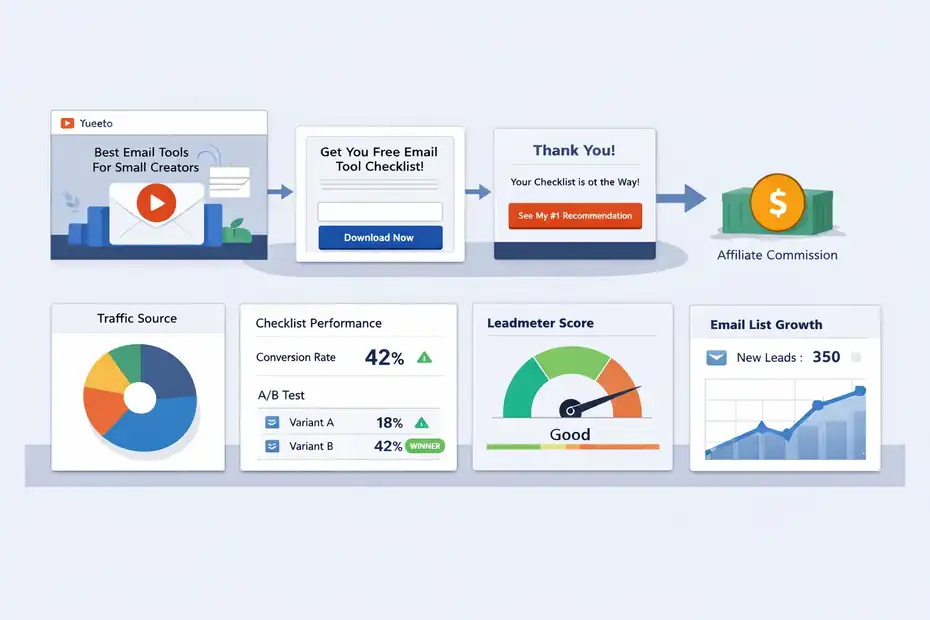
The reason this topic matters is simple: a landing page builder is only useful if it fits the way affiliate funnels actually work.
You do not need more features. You need fewer leaks.
The Best Funnel Types To Build In Leadpages
Best-fit funnels: Leadpages works best for affiliate funnels that need speed, clarity, and a single action. Think lead magnet pages, webinar registration pages, bridge pages, bonus pages, and review-style opt-in pages where the visitor joins your list before seeing a recommendation.
A strong example is a software affiliate funnel. You run a YouTube video called “Best Email Tools For Small Creators,” then send viewers to a simple page offering a comparison checklist.
That page collects the email, delivers the checklist, and then redirects to your recommended provider with a short explanation of why it fits beginners. Leadpages is good for that kind of flow because it offers hosted landing pages, form capture, integrations, pop-ups, and testing without needing a developer.
Another good use case is paid traffic. If you are buying clicks, every point of relevance matters. Leadpages positions its builder around ad-to-page alignment, A/B testing, and real-time conversion guidance through Leadmeter.
That matters more to affiliates than flashy design does. Better relevance usually means lower bounce, cleaner intent, and cheaper learning when you test hooks.
What I would not use it for is a giant content site with deep category architecture. Leadpages can support simple websites and SEO settings, but that is not the core reason most affiliates pay for it.
A Simple Affiliate Workflow Inside Leadpages
How it plays out: Start with one traffic source, one audience pain point, and one offer. Build a page around a single action, not three competing ones. That action could be “Download the checklist,” “See the bonus stack,” or “Watch the demo.”
Then structure the page like this:
- Section 1: Call out the exact problem.
- Section 2: Explain the promised result.
- Section 3: Add trust elements like screenshots, proof points, or a short personal note.
- Section 4: Ask for the click or opt-in.
- Section 5: Handle one or two major objections.
This sounds basic, but it is where most affiliate pages get messy. People stuff in too many product features, too much brand copy from the merchant, and too many outbound links. A Leadpages page performs best when it acts like a focused conversion asset, not a mini-homepage.
If you already have a blog, you can use pop-ups or alert bars to funnel readers into offer-specific pages. Leadpages supports both, and they can be added to third-party sites that allow HTML and JavaScript, including platforms like WordPress and Squarespace.
Where Leadpages Helps More Than A Normal Blog Post
Why dedicated pages win: A blog review can rank and nurture trust, but it often forces the reader to scroll through context, alternatives, FAQs, and disclosures before they reach the action. A landing page is allowed to be narrower.
That narrower structure is useful when the visitor already has intent. Maybe they came from your email list, a YouTube description, a Facebook ad, or a comparison article. At that point, sending them to a cleaner bridge page can outperform dropping them into a long post.
You can also spin up multiple variants quickly for different traffic segments, which is harder to do cleanly inside a standard blog layout.
Leadpages also includes built-in A/B testing on its plans, which lowers the barrier to iterative testing. Many affiliate marketers talk about testing, but few actually do it because the setup feels annoying.
When testing is easier, it happens more often. And when it happens more often, your copy gets sharper faster.
Leadpages Features That Matter Most For Affiliate Marketers
Not every feature matters equally. For affiliate marketers, I think the useful question is: which features directly improve traffic quality, email capture, or buyer intent?
Landing Pages, Templates, And Speed To Launch
Why this matters: The biggest practical advantage of Leadpages is speed. The platform offers 200+ landing page templates, mobile-responsive design, drag-and-drop editing, and hosted publishing. That reduces the time between idea and test.
For affiliate marketers, speed is not a luxury. It is leverage. If a new product launch drops, a bonus offer opens, or your traffic angle changes, you want a page live quickly. A slow setup process quietly kills testing volume.
That is one reason a lot of affiliates stick with simpler builders even after they could technically afford more advanced tools.
Leadpages also claims 99.9% uptime and emphasizes page-load speed as part of its conversion pitch. You should never assume a platform alone will solve performance problems, but reliable hosting and fast-enough delivery matter when paid clicks are involved.
My opinion here is straightforward: Leadpages is not the most design-flexible tool in the category, but for many affiliates that is actually a benefit. More freedom often creates slower pages, more decisions, and uglier experiments.
A/B Testing, Analytics, And Conversion Guidance
This is the real selling point: Leadpages includes unlimited A/B testing on the current plans shown on its pricing page, and its landing page builder highlights real-time conversion guidance through Leadmeter.
That combination matters because many affiliates do not need “advanced experimentation.” They need simple test loops:
- Headline test: Pain-first vs outcome-first.
- CTA test: “Get The Checklist” vs “See My Recommended Setup.”
- Offer framing test: Free guide vs free template.
- Trust test: Personal note above the fold vs social proof block lower down.
When those tests are built into the page workflow, you are more likely to run them. And that matters because landing pages are rarely made great on version one. In most cases, the first draft just tells you what to fix.
Leadpages’ analytics are useful for directional decisions, though serious affiliates will still want external tracking and ad-platform data for cleaner attribution. The platform also supports adding tracking codes and pixels, which is important if you are running paid campaigns and need to measure the handoff between ad click, opt-in, and downstream action.
Pop-Ups, Alert Bars, Integrations, And Checkouts
Support features that actually help: Leadpages supports pop-ups, alert bars, lead notifications, lead routing, standard integrations, advanced integrations on higher tiers, and native connections plus Zapier expansion. Leadpages also states it integrates natively with 90 online marketing tools and 2,000+ more through Zapier.
For affiliates, integrations matter less as a feature checklist and more as a risk reducer. If your page cannot pass leads cleanly into your email platform or CRM, your funnel gets brittle fast. I would rather have boring, dependable integrations than fancy visual tricks.
Checkouts and payments are included on the current pricing page as well. That is more relevant if you sell a bonus product, consultation, workshop, or low-ticket companion offer alongside your affiliate funnel.
It is not essential for every affiliate, but it does give you more monetization options without spinning up a separate stack.
Leadpages Pricing And Whether The Cost Makes Sense
This is where the hype question gets real. A landing page builder can be “good” and still be a bad buy for your current stage.
Current Leadpages Pricing In 2026
What it costs: Leadpages currently lists Standard at $37 per month when paid monthly, or $49 billed annually, and Pro at $74 per month when paid monthly, or $99 billed annually. The page also advertises a 14-day free trial.
Standard includes 5 landing pages, unlimited traffic and leads, 1 custom domain, standard integrations, unlimited A/B testing, sales and payments, blog monetization, client sub-accounts, and advanced integrations on the current pricing page. Pro includes everything in Standard plus unlimited landing pages and 3 custom domains.
Here is the most useful way to read that as an affiliate marketer: Standard is for testing one or a few offers carefully. Pro is for anyone building multiple offer pages, multiple lead magnets, or segmented funnels by traffic source.
If you are only sending traffic to one main opt-in page, Standard can be enough. If you are doing niche sites, YouTube promos, launch bonuses, or multiple bridge pages, the five-page cap becomes the first friction point. At that stage, Pro usually makes more sense.
Pricing Comparison Against Common Alternatives
How it stacks up: Leadpages sits below the current published self-serve starting prices shown for Unbounce and Instapage.
Unbounce’s pricing page shows plans starting at $149 per month billed annually, while Instapage’s plan page shows Create at $79 per month and Optimize at $159 per month.
Kit positions itself more as an email and creator platform with landing pages included, rather than a pure landing page CRO tool.
| Platform | Entry Pricing Shown | Best For | My Take For Affiliates |
|---|---|---|---|
| Leadpages | $37/mo monthly; $49 billed annually | Fast landing pages and simple funnels | Best balance of ease and cost for many solo affiliates |
| Unbounce | $149/mo billed annually | Heavier CRO and larger paid traffic programs | Strong, but pricey for early-stage affiliate sites |
| Instapage | $79/mo for Create; $159/mo for Optimize | Design control and team workflows | Better fit for teams and ad-focused businesses |
| Kit | Pricing scales around creator/email needs | Email-first creators who need pages too | Better if email is your core system and pages are secondary |
Pricing and feature notes above are based on current vendor pricing pages.
My honest take: Leadpages wins the value argument when you want a dedicated landing page system but cannot justify enterprise-style pricing.
When The Cost Is Worth It And When It Is Not
Worth it if: You have repeatable traffic, a clear niche, and at least one offer that already gets clicks. In that case, even a modest lift in opt-in rate or click-through rate can justify the subscription.
A simple example: Say you send 1,000 visitors a month to an affiliate bridge page. If better page structure helps you go from a 25% opt-in rate to 35%, that is 100 extra subscribers monthly. If your list monetizes at even a conservative level over time, the math can work fast. The exact number will vary, but the principle is solid.
Not worth it if: You have no traffic, no email follow-up, no clear offer, and no intention of testing. In that case, Leadpages becomes shelfware. The tool is not the bottleneck; your funnel strategy is.
I believe this is the key filter most reviews miss. Leadpages is not hype, but it also is not a shortcut around weak positioning.
The Pros, Cons, And Common Mistakes Affiliates Make With Leadpages
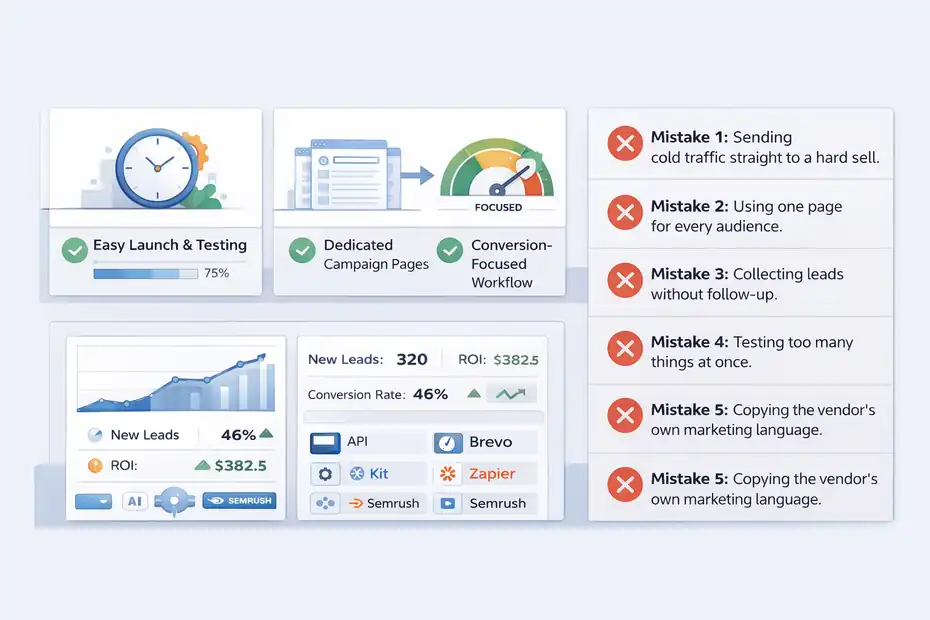
A good review should tell you not just what a tool can do, but how people waste money with it. This is where most buying decisions get clearer.
What Leadpages Does Really Well
Big strengths: It is easy to launch, easier to test than many DIY setups, and affordable relative to premium landing page platforms. Its current positioning centers on conversion-focused templates, A/B testing, hosted publishing, real-time optimization guidance, and broad integration coverage.
From a working affiliate perspective, three strengths stand out.
First, it reduces implementation drag. That sounds small until you realize how many funnels never get built because the page setup felt annoying.
Second, it supports dedicated campaign pages without forcing you to rebuild your site stack. That is great for bonuses, pre-sell pages, webinar funnels, and list-building assets.
Third, it keeps you focused. Some tools invite endless tinkering. Leadpages tends to push you toward “publish, test, iterate,” which is healthier for conversion work.
I also like that it covers adjacent needs such as pop-ups, alert bars, and simple site-level SEO settings. Those are not reasons alone to buy it, but they make the stack cleaner.
Where Leadpages Falls Short
Main limitations: Design freedom is not the deepest in the category, and advanced teams may outgrow it if they need high-end collaboration, more granular experimentation, or complex multi-page campaign infrastructure. Instapage, for example, emphasizes collaboration features, reusable blocks, mobile builder controls, and workspace-level tooling in a way that signals a more team-centric product.
For solo affiliates, this is not always a problem. But it can become one if you want highly custom layouts or you are obsessed with pixel-perfect control.
Another limitation is strategic, not technical: Leadpages makes it easy to launch pages, which can tempt you to launch too many average pages instead of a few sharp ones. I have seen this happen a lot. When the builder is easy, discipline matters more.
And while Leadpages offers SEO settings and simple site capabilities, I would still treat it primarily as a conversion page tool first. If your entire strategy depends on publishing dozens or hundreds of content-driven SEO pages, a dedicated content platform often makes more sense.
The Most Common Affiliate Mistakes With Leadpages
- Mistake 1: Sending cold traffic straight to a hard sell. Many affiliate offers need context. A bridge page often performs better than a raw affiliate link because it frames the problem and sets expectations.
- Mistake 2: Using one page for every audience. A YouTube viewer, a blog reader, and a paid ad click are not equally warm. Build separate angles when intent differs.
- Mistake 3: Collecting leads without follow-up. A landing page is not a business model. It is a conversion point. Without email sequences, your list value stays underused.
- Mistake 4: Testing too many things at once. Change one core variable first: headline, CTA, hero angle, or trust block. Otherwise, you learn nothing useful.
- Mistake 5: Copying the vendor’s own marketing language. Your page should sound like you, not like recycled SaaS homepage copy.
That last one is huge. In my experience, pages convert better when they sound like a trusted recommendation, not a press release.
Leadpages Affiliate Program, Best Use Cases, And Final Verdict
There are really two separate questions here: is Leadpages a good tool for affiliates, and is Leadpages itself a good affiliate offer to promote?
The answer to both is usually yes, but for different reasons.
Is Leadpages A Good Affiliate Offer To Promote?
Program basics: Leadpages runs its affiliate program through PartnerStack, according to its support documentation. Its public affiliate pages also advertise commissions, and PartnerStack’s program directory currently shows multiple fixed-payout structures listed, including figures such as $30 and $100 for Standard subscriptions and $130, $180, and $200 for Pro subscriptions.
The public program pages do not make the final active commission tier fully clear from the snippets alone, so you should confirm the exact current payout inside PartnerStack before making projections.
That said, the offer has qualities affiliates usually like:
- It solves a real business pain.
- It has broad appeal across creators, coaches, consultants, and marketers.
- It benefits from trial-driven signup behavior.
- It is easier to explain than many technical SaaS products.
I would especially like this offer for audiences already thinking about list building, lead generation, webinars, or launch funnels. It is a weaker fit for audiences who only want a free blog tool or are not yet at the stage of needing dedicated campaign pages.
Who Should Use Leadpages And Who Should Skip It
Use Leadpages if: You are an affiliate marketer with real traffic, you want dedicated pages separate from your main site, and you care about improving opt-ins, bridge-page click-throughs, or offer segmentation. It is especially attractive if you want current CRO basics like A/B testing, mobile-responsive templates, hosted pages, integrations, and fast deployment without paying Unbounce-level pricing.
Skip Leadpages if: You are still at the stage where you need traffic, niche clarity, and an email strategy more than you need a builder. Also skip it if your main priority is a full content website rather than dedicated conversion assets, or if your team needs deeper collaboration and enterprise workflows.
Here is the blunt version I would give a friend: Leadpages is a good purchase when funnel friction is already costing you money. It is a mediocre purchase when you are hoping software will invent your strategy for you.
Final Verdict: More Conversions Or Just Hype?
My verdict is that Leadpages is more conversions than hype for the right affiliate marketer. The value is not in flashy innovation. The value is in reducing the friction between traffic and action.
It gives you the essentials that matter most for affiliate campaigns: quick page deployment, testing, integration flexibility, conversion-focused structure, and pricing that is much easier to justify than higher-end alternatives. It also offers enough surrounding tools—like pop-ups, alert bars, and simple site SEO controls—to keep your setup lean.
But I would not oversell it. Leadpages will not rescue a weak offer, fix poor traffic quality, or write persuasive affiliate copy for you. What it will do is make it easier to build focused pages, test angles, capture leads, and improve the parts of the funnel you actually control.
So if you are asking whether Leadpages is worth it for affiliate marketers in 2026, my answer is this: yes, for affiliates who are already in motion and want a cleaner path to conversions; probably not for beginners who still need fundamentals more than software.
FAQ
What is Leadpages and how does it help affiliate marketers?
Leadpages is a landing page builder designed to create high-converting pages quickly. For affiliate marketers, it helps capture leads, pre-sell offers, and improve click-through rates. Instead of sending traffic directly to affiliate links, you can build focused pages that increase conversions and long-term revenue.
Is Leadpages worth it for affiliate marketers in 2026?
Leadpages is worth it if you already have traffic and want to improve conversions or build an email list. It becomes especially valuable when running paid ads or promoting multiple offers. However, beginners without traffic or a clear strategy may not benefit immediately from the cost.
How does Leadpages compare to other landing page builders?
Leadpages is more affordable and easier to use than tools like Unbounce or Instapage. While it offers fewer advanced design features, it focuses on speed, simplicity, and conversion basics. This makes it a strong choice for solo affiliate marketers who need results without complexity.
Can you use Leadpages for affiliate marketing legally?
Yes, you can use Leadpages for affiliate marketing as long as you follow affiliate program rules and include proper disclosures. It is commonly used to create bridge pages, collect emails, and provide value before directing users to affiliate offers.
What are the biggest drawbacks of Leadpages for affiliates?
The main drawbacks include limited design flexibility and fewer advanced features compared to premium platforms. It may also feel unnecessary if you already use a full website builder. Additionally, without traffic or testing, Leadpages alone will not improve your results.

I’m Juxhin, the voice behind The Justifiable.
I’ve spent 6+ years building blogs, managing affiliate campaigns, and testing the messy world of online business. Here, I cut the fluff and share the strategies that actually move the needle — so you can build income that’s sustainable, not speculative.
Related posts:
 Building Your Team to Generate New Business Leads
 How To Create Passive Income Online: 10 Best Ways
 Earn Money Online: 10 Proven Strategies for Financial Freedom
 How to Integrate Aweber with ClickFunnels
 How to Build Lead Pages That Convert Like Crazy
 Leadpages Review For Bloggers Building Email Lists: Grow Faster Or Not?