Table of Contents
Some links on The Justifiable are affiliate links, meaning we may earn a small commission at no extra cost to you. Read full disclaimer.
Thinkific features overview searches usually come from creators who are asking one simple question: “Can this platform actually help me build, sell, and grow my online learning business?”
I get it, because choosing course software can feel bigger than just picking a tool. You’re choosing where your content, customers, payments, community, and brand will live.
In this guide, I’ll walk you through Thinkific’s core features in plain language, from course creation and websites to payments, memberships, analytics, mobile learning, and scaling.
By the end, you’ll know what matters, what to use first, and what to ignore until you need it.
Understand What Thinkific Is Built To Do
Thinkific is an online learning commerce platform, which means it is designed to help creators package knowledge into products and sell them online.
Its strongest use case is not just hosting videos; it is building a structured learning business around courses, communities, memberships, digital downloads, coaching, and related learning products.
What Thinkific Actually Helps You Create
Thinkific lets you create several types of learning products, including online courses, communities, memberships, digital downloads, coaching offers, webinars, and bundles. That matters because many creators start with one course, then later realize they need recurring revenue, community engagement, or corporate sales. A good platform should give you room to grow without forcing you to rebuild everything from scratch.
In simple terms, Thinkific gives you a place to upload your content, organize it into lessons, publish a branded website, accept payments, enroll students, track progress, and manage your learners. For a solo creator, that can replace a messy mix of video hosting, checkout software, spreadsheets, email reminders, and manual access control.
I suggest thinking about Thinkific as your learning business headquarters. Your course is only one room in that headquarters. The rest includes checkout pages, landing pages, student profiles, completion tracking, certificates, upsells, reporting, and community areas.
Imagine you’re a fitness coach selling a “Beginner Strength Program.” At first, you might only need video lessons and a checkout page. Later, you might add a paid community, a monthly membership, a PDF workout library, and group coaching sessions. Thinkific is built for that kind of progression.
Who Thinkific Is Best For
Thinkific is usually a strong fit for creators who want to sell structured learning experiences without hiring a developer. That includes coaches, consultants, educators, creators, small training businesses, and brands that want a clean course delivery system.
Where it shines most is when your product needs a clear curriculum. If your content benefits from modules, lessons, quizzes, certificates, drip schedules, and progress tracking, Thinkific gives you more structure than a simple content website. That structure helps students know what to do next, which can improve completion and reduce confusion.
For many of us, the real value is not just “hosting a course.” It is creating a smoother buying and learning journey. A student discovers your offer, reads the landing page, pays through checkout, enters the course, follows lessons in order, asks questions, completes activities, and maybe joins your community or membership afterward.
I would not treat Thinkific as a magic marketing machine. You still need audience building, positioning, content strategy, and a strong offer. But as the operational backbone for a course-based business, it can remove a lot of technical friction.
How Thinkific Fits Into The Creator Business Model
Most creators do not fail because they lack knowledge. They struggle because their knowledge is scattered. Thinkific helps turn that knowledge into sellable assets: a beginner course, an advanced course, a certification path, a membership, a private community, or a corporate training package.
The platform supports common monetization models like one-time course payments, subscriptions, payment plans, bundles, and memberships. Subscriptions can be used for courses, bundles, memberships, or communities when payment processing is connected through Thinkific Payments or Stripe.
Here’s how you can think about the ladder:
| Business Stage | Thinkific Product Type | Best Use Case |
|---|---|---|
| Beginner | Course | Sell one structured learning outcome |
| Growing | Bundle | Package related products together |
| Recurring Revenue | Membership | Offer ongoing value for a monthly or yearly fee |
| Engagement | Community | Keep students connected after lessons |
| Scaling | Group Orders | Sell seats to teams or businesses |
| Premium Offer | Coaching Or Webinars | Add live support and accountability |
I believe the best Thinkific strategy is to start simple, then expand based on student behavior. Do not launch with ten products if one focused course can prove demand first.
Build Courses With The Online Course Builder
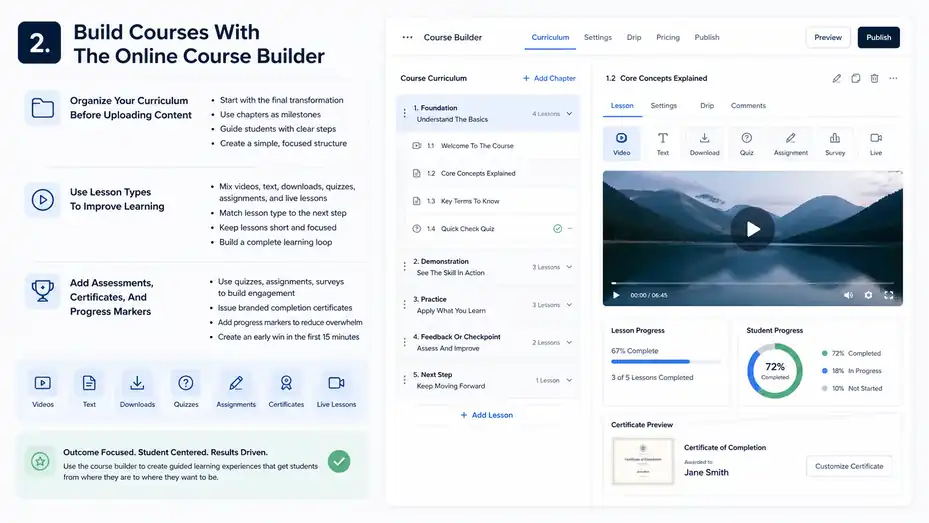
The course builder is the core of Thinkific. It helps you organize your expertise into lessons, chapters, assessments, resources, and learning paths so students can move through your material with less confusion.
Thinkific describes its course builder as supporting self-paced, scheduled, and cohort-style courses, along with live lessons, assignments, surveys, quizzes, certificates, and analytics.
Organize Your Curriculum Before Uploading Content
Before you touch the upload button, map the outcome. This is one of the biggest creator mistakes I see: they build a course around what they know instead of what the student needs to achieve. A better approach is to start with the final transformation, then work backward.
For example, instead of naming a course “Photography Basics,” define the result as “Take confident manual-mode portraits in natural light.” Now every module has a job. One module might explain camera settings.
Another might cover light direction. Another might walk through a real shoot. That structure makes the course easier to sell and easier to complete.
In Thinkific, you can break content into chapters and lessons. I recommend using chapters as milestones, not just folders. Each chapter should answer a question the student is already asking: “What do I need first?” “How do I practice this?” “How do I know I did it right?”
A simple structure works well:
- Foundation: Explain the core concept and why it matters.
- Demonstration: Show the skill in action.
- Practice: Give the student a small task.
- Feedback Or Checkpoint: Use a quiz, assignment, or reflection.
- Next Step: Tell the student exactly where to go next.
This keeps your course from becoming a content dump. Students do not just want information. They want guided progress.
Use Lesson Types To Improve Learning
Thinkific supports different learning experiences, including video lessons, quizzes, assignments, surveys, live lessons through Zoom, certificates, downloadable resources, and other course features depending on plan and setup.
The practical question is not “How many lesson types can I use?” It is “Which lesson type helps the student take the next step?” Video is great for demonstration. Text works well for summaries, checklists, and explanations.
Downloads are helpful for templates, worksheets, scripts, and reference guides. Quizzes are useful when students need to confirm understanding before moving on.
In my experience, a high-performing course usually mixes formats. A course that is only long videos can feel heavy. A course that is only text can feel dry. A better rhythm might be a short video, a written summary, a downloadable worksheet, then a quiz or assignment.
For a business course, you might use a video to explain pricing strategy, a worksheet to calculate profitable pricing, and a quiz to check whether the student understands fixed costs, variable costs, and margin. That small combination creates a more complete learning loop.
I recommend keeping most videos focused. A 6-minute lesson that solves one problem is usually easier to finish than a 38-minute lecture that tries to cover everything. Completion matters because student success drives testimonials, referrals, and repeat purchases.
Add Assessments, Certificates, And Progress Markers
Assessments are not just for schools. They help students feel momentum. Thinkific’s quizzes, assignments, surveys, and certificates can make your course feel more professional and more interactive. Certificates can automatically include student names, completion dates, expiry dates, custom fields, and your branding.
A quiz is useful when there is a right or wrong answer. An assignment is better when the student needs to apply a skill. A survey works when you want feedback or reflection. A certificate is valuable when completion proof matters, such as professional development, internal training, or skill-based programs.
Let me break it down with a scenario. Imagine you sell a copywriting course. At the end of your “Landing Page Headline” module, you ask students to submit three headline drafts as an assignment. That gives them practice, not just passive learning. Then, after they complete the full course, they receive a certificate they can share.
Progress markers also reduce overwhelm. If students can see what they have finished and what comes next, they are more likely to continue. This is especially important in longer courses where motivation can drop after the first few modules.
I suggest adding a small win in the first 15 minutes of your course. Get the student to complete something simple, visible, and encouraging. Early momentum is underrated.
Create A Branded Website And Landing Pages
Thinkific includes website and landing page tools so you can present your offer without building a separate site from scratch.
The platform highlights unlimited websites, landing pages, and custom domains among its feature set, along with AI-powered page creation for landing pages.
Build A Course Website That Feels Trustworthy
Your course website has one main job: help the right person feel confident enough to take the next step. That might mean buying, joining a waitlist, registering for a webinar, or exploring your course catalog.
A strong Thinkific site usually includes a homepage, product landing pages, checkout pages, an about page, and support or FAQ content. You do not need a huge website to start. In fact, a simple site often converts better because it gives visitors fewer distractions.
The homepage should answer three questions quickly: Who is this for? What result do you help them achieve? Why should they trust you? From there, your course landing page can go deeper into the offer, curriculum, benefits, testimonials, pricing, and guarantee or refund policy if you use one.
I recommend using your own language, not vague promises. Instead of “Transform your life with our premium program,” say something clearer like “Learn how to plan, record, and publish your first paid workshop in 14 days.” Specificity builds trust.
Your branding does not need to be fancy. Consistent colors, clear section headings, simple navigation, and a friendly photo can be enough. The goal is not to impress designers. The goal is to make buyers feel safe and understood.
Write Landing Pages That Sell The Outcome
A landing page is not just a pretty page. It is a guided argument for why your course is worth buying. Thinkific’s landing page tools help creators build pages, but the conversion power still comes from your message.
Start with the pain point your buyer already feels. Maybe they are tired of guessing what to post, struggling to finish a certification, or wasting time on manual work. Then connect that pain to your course outcome. This makes the page feel relevant instead of generic.
A strong landing page usually includes:
- Headline: Name the result clearly.
- Problem Section: Show that you understand the reader’s current struggle.
- Course Promise: Explain what changes after they complete the course.
- Curriculum: Show the path without overwhelming them.
- Proof: Add testimonials, examples, credentials, or student results.
- Offer Details: Explain what they get, how access works, and who it is for.
- Call To Action: Make the next step obvious.
Here’s a quick example. If your course teaches Excel dashboards, your page should not only say “Includes 25 lessons.” It should say, “By the end, you’ll build a dashboard your manager can actually use to make weekly decisions.” That is the outcome people buy.
Use Custom Domains And Product Pages Strategically
A custom domain helps your school feel like a real brand rather than a temporary project. When students see a clean branded URL, it can improve trust, especially if you sell higher-priced training or B2B learning.
Product pages should be treated like sales assets, not default placeholders. Thinkific creates pages for learning products, including memberships, and these pages can show what is included, link to product cards, and guide visitors toward purchase.
In most cases, I suggest creating one dedicated page per major offer. Do not force every product onto one crowded catalog page unless your audience already knows what they want. A beginner course, advanced workshop, and membership probably need different positioning.
For example, your beginner course page might focus on confidence and step-by-step guidance. Your advanced membership page might focus on ongoing support, fresh resources, and implementation accountability. Same audience, different buying reasons.
A useful shortcut is to write your page around objections. If people wonder, “Do I have time?” add a section about lesson length. If they wonder, “Is this too advanced?” add a section about prerequisites. If they wonder, “Will this work for my situation?” add examples for different use cases.
Sell Products With Payments, Pricing, And Checkout Tools
Thinkific’s selling features help you turn learning products into revenue.
With TCommerce and Thinkific Payments, creators can manage payments, subscriptions, refunds, taxes, checkout tools, order bumps, group orders, and related commerce tasks.
Choose The Right Pricing Model
Pricing is one of the most important decisions in your course business. Thinkific supports common pricing approaches such as one-time payments, subscriptions, payment plans, bundles, and memberships.
Payment plans split a product price into automatically collected monthly payments, while subscriptions support recurring access for courses, bundles, memberships, or communities.
A one-time payment works well for focused courses with a clear outcome. A payment plan works well for higher-ticket programs where the full price might create hesitation. A subscription fits ongoing value, such as monthly training, community access, or regularly updated resources.
Here is a practical way to decide:
| Pricing Model | Best For | Watch Out For |
|---|---|---|
| One-Time Payment | Clear, finite courses | Revenue can be less predictable |
| Payment Plan | Premium programs | Students may expect more support |
| Subscription | Memberships and ongoing content | Requires consistent value |
| Bundle | Related products | Too many items can confuse buyers |
| Group Orders | Teams and companies | Needs a clear seat-management process |
I believe many creators underprice their first course because they compare it to content, not outcomes. If your course helps someone save time, earn money, pass an exam, or solve a painful problem, price around value, not just video length.
Improve Checkout With Order Bumps And Upsells
Order bumps let you offer an additional product during checkout without interrupting the buyer’s purchase flow. Thinkific explains order bumps as a way to offer related products while the buyer already has purchasing momentum.
This is one of the simplest revenue features to use well. The key is relevance. A good order bump should feel like a helpful add-on, not a random extra. If someone buys a course on launching a podcast, a checklist pack, episode planning template, or editing workflow mini-course could make sense. A completely unrelated product will probably feel pushy.
Thinkific reports that customers using Thinkific Payments have a 31% higher average order value, and its TCommerce tools include features such as order bumps, group orders, custom invoicing, and tax automation.
I recommend starting with one low-friction bump. Keep it affordable compared to the main product, and make the value obvious in one sentence. For example: “Add the client proposal template pack and save two hours setting up your first offer.”
Do not overcomplicate checkout too early. Your first goal is to validate that people buy the main course. Once sales are consistent, order bumps can help improve average order value without needing more traffic.
Use Coupons, Gifting, And Group Orders Carefully
Discounts can help, but they can also train your audience to wait. Use coupons strategically: launch campaigns, partner promotions, student loyalty, or limited-time reactivation. Avoid discounting every week unless that is truly part of your brand model.
Thinkific’s TCommerce includes additional selling features such as gifting, group orders, payment management, refunds, subscriptions, and automated tax support depending on eligibility and setup. Group Orders let buyers purchase multiple seats for one product and assign them to others through a built-in seat management flow.
Group Orders are especially useful if you sell to businesses, schools, teams, agencies, or nonprofit organizations. Instead of one manager buying a course and emailing you to manually enroll ten people, they can buy seats and assign access more smoothly.
Gifting can work well for personal development, hobby courses, professional skills, and family-friendly learning products. Thinkific notes some limitations, such as gift purchases not applying to free, subscription, or payment-plan products.
My advice is to match the selling feature to the buyer behavior. Do not add every feature just because it exists. Add the one that removes the biggest buying friction.
Grow With Memberships, Communities, And Bundles
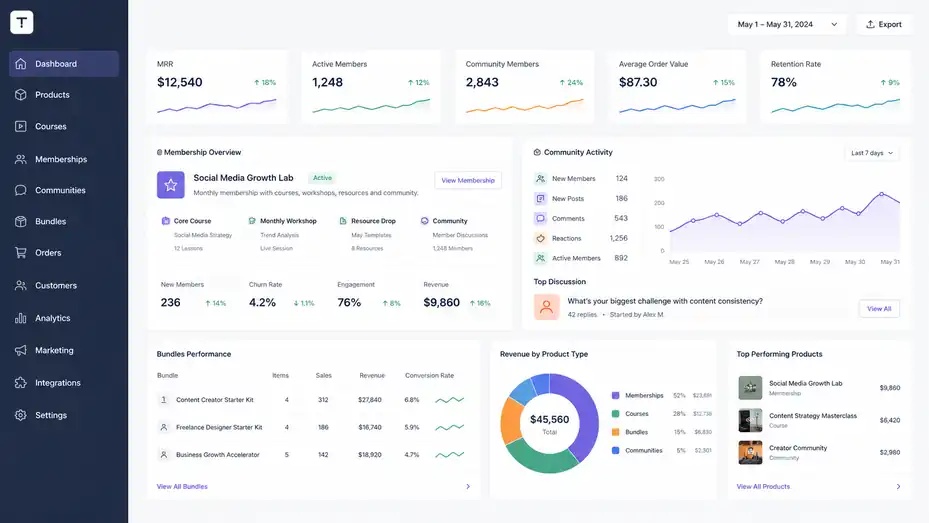
Courses are powerful, but they are not the only way to monetize knowledge.
Thinkific lets you package ongoing access through memberships, community products, and bundles, which can help increase retention and lifetime customer value.
Turn Courses Into Membership Offers
A Thinkific membership can package multiple courses and/or communities into one offer. This is useful when your value continues over time instead of ending after a single course.
The mistake many creators make is calling something a membership just because it charges monthly. A real membership needs ongoing value. That value might come from new lessons, monthly Q&A sessions, templates, community feedback, challenges, office hours, or expert interviews.
Imagine you teach social media strategy. A one-time course might teach the foundations: positioning, content pillars, hooks, and analytics. A membership could provide monthly content prompts, live audits, trend breakdowns, and accountability threads. The course gives the method. The membership helps people keep applying it.
I suggest building a membership only after you know what your audience wants repeatedly. Look at student questions, support tickets, comments, and unfinished lessons. Those signals tell you where ongoing support is useful.
A simple membership structure could include one core course, one monthly workshop, one resource drop, and one community discussion theme. That is enough to feel valuable without overwhelming you as the creator.
Build A Community That Supports Learning
Thinkific Communities can be sold as standalone products, included in bundles or memberships, connected to courses, or offered through order bumps and coupons. Thinkific also positions communities as a way to help audiences connect, build trust, and collaborate around learning.
A community should not be a random chat room. It needs a purpose. The best learning communities usually help students do one or more of these things: ask questions, share wins, get feedback, stay accountable, network with peers, or apply lessons in public.
If your course is self-paced, a community can reduce isolation. Students often get stuck not because the content is bad, but because they hit a small uncertainty and have nowhere to ask. A community gives them a place to continue.
Here’s how I would structure a beginner-friendly community:
- Welcome Space: Help members introduce themselves.
- Ask For Help: Give students a clear place for questions.
- Wins And Progress: Encourage momentum.
- Feedback Threads: Let students share work for review.
- Announcements: Keep updates separate from discussion.
The creator’s role matters. You do not need to reply instantly to everything, but you should model the kind of participation you want. Ask good questions. Celebrate progress. Keep the space focused. A quiet but clear community is better than a busy but chaotic one.
Use Bundles To Increase Value Without Confusing Buyers
Bundles let you package related products together. Thinkific describes bundles as curated collections of courses and/or communities sold as a single offering.
A strong bundle is not “everything I have.” It is a logical path. For example, “Freelance Designer Starter Kit” could include a pricing course, proposal template pack, client onboarding mini-course, and private community access. The buyer understands why the pieces belong together.
Bundles can increase average order value because buyers get more complete support. But too many products can make the offer feel bloated. I recommend limiting bundles to products that serve one clear outcome.
Use bundles when:
- The products naturally connect: Each item helps with the same bigger goal.
- The buyer wants a complete path: They prefer one package over separate decisions.
- The combined value is easy to explain: The offer feels simpler, not heavier.
Avoid bundles when your products serve totally different audiences. A beginner photography course and advanced business finance course might both be good, but together they create confusion.
In my experience, the best bundle names focus on the result, not the contents. “Client Acquisition System” sounds clearer than “Course Bundle 4.” People buy progress, not folders.
Manage Students, Access, And Learning Experience
A good course platform should make student management easier, not harder.
Thinkific gives creators tools for user profiles, enrollments, groups, certificates, private products, hidden products, and student progress tracking.
Control Access With Private And Hidden Products
Private and hidden product settings help you control who can access your courses, bundles, memberships, and communities, and how visible those products are on your site.
This matters when you do not want every product publicly available. Maybe you have a bonus course only for coaching clients. Maybe you run a corporate training program for one company. Maybe your advanced course should only be available after students complete the beginner course.
Private products can support invite-only offers, beta programs, internal training, alumni bonuses, and special promotions. Hidden products can help you keep your public catalog clean while still giving access through direct links or enrollment rules.
A realistic example: You sell a public “Copywriting Foundations” course. After students finish, you invite qualified students to a hidden “Sales Page Review Lab.” That advanced product does not need to appear in your main catalog because it is not for everyone.
I recommend keeping access rules simple at first. Complex access setups can create support headaches. Name your products clearly, document who gets access, and test the student journey before launching. Log in as a test student and make sure the right products appear in the right order.
Use Groups For Cohorts And Client Segments
Groups help organize students based on shared characteristics. You might use groups for cohorts, corporate clients, membership tiers, partner programs, or internal training departments.
The power of grouping is that it lets you manage learners at scale. Instead of treating every student as an isolated person, you can organize them by purchase type, start date, company, or learning path.
For example, imagine you run a leadership training program. Company A buys 25 seats, Company B buys 40 seats, and your public audience buys individual access. Groups make it easier to separate those learners, track them, and manage their experience.
For cohort-based courses, groups can also help you keep a class together. Everyone starts on the same date, follows the same weekly content schedule, and participates in the same discussion prompts. This creates urgency and accountability.
I suggest naming groups in a way your future self will understand. “Spring 2026 Cohort” is better than “Group 7.” “Acme Corp Managers” is better than “Client Training.” Good naming prevents messy admin work later.
Improve The Student Experience With Clear Navigation
Student experience is not only about features. It is about how easy it feels to learn. The course player, lesson order, completion markers, downloadable resources, and next-step instructions all affect whether students keep moving.
Thinkific’s mobile support article notes that students can access learning content through mobile apps, search or filter products, open course curriculum, and resume where they left off. It also notes that not every web feature is supported in the mobile app, which is important when planning your course experience.
Make your lessons predictable. Use the same basic flow across modules: introduction, teaching, example, action step, and recap. When students know what to expect, they use less mental energy figuring out the platform and more energy learning.
At the end of every lesson, tell students what to do next. Do not assume they will know. A simple line like “Now download the worksheet and complete sections one and two before moving on” can prevent drop-off.
I also suggest creating a “Start Here” lesson. Explain how the course works, what tools they need, how long lessons take, where to ask questions, and how to get the best result. This one lesson can reduce confusion and support requests.
Use Analytics To Improve Courses And Revenue
Thinkific Analytics helps creators understand business performance, learning content, student behavior, engagement, revenue, enrollments, and sales data.
It also allows filtering, drilling down into data, and exporting information for reports.
Track The Metrics That Actually Matter
Analytics can feel overwhelming if you track everything. I recommend starting with a small set of metrics tied to decisions. For a course business, the most useful metrics are usually traffic, conversion rate, revenue, enrollments, lesson completion, student engagement, refunds, and repeat purchases.
Thinkific’s analytics materials mention enrollment trends, visitor trends, checkout performance, lead-generating content, engagement, revenue, and performance metrics.
Here is a practical measurement table:
| Metric | What It Tells You | What To Do With It |
|---|---|---|
| Landing Page Visitors | Demand and traffic quality | Improve promotion or SEO |
| Checkout Conversion | Offer and pricing strength | Adjust copy, pricing, or proof |
| Course Completion | Learning experience quality | Improve lessons and milestones |
| Quiz Or Assignment Results | Skill gaps | Add examples or clarification |
| Revenue Per Customer | Monetization strength | Test bundles or order bumps |
| Refunds | Expectation mismatch | Improve sales page honesty |
From what I’ve seen, completion rate is one of the most underrated metrics. If people buy but do not finish, you may still earn revenue short term, but long-term trust suffers. Better completion can lead to better testimonials and stronger word of mouth.
Use Course Data To Find Drop-Off Points
A drop-off point is where students stop progressing. It might be a lesson that is too long, an assignment that feels intimidating, a missing explanation, or a module that arrives too late.
When you review course analytics, look for patterns. If many students stop at lesson three, lesson three is not just a lesson. It is a bottleneck. Your job is to figure out whether the problem is difficulty, boredom, confusion, or lack of motivation.
A simple troubleshooting process works well:
- Find The Drop-Off: Identify the lesson or module where progress slows.
- Review The Content: Check whether the lesson is too long, vague, or advanced.
- Add Support: Include an example, worksheet, checklist, or shorter explainer.
- Clarify The Action: Tell students exactly what to do before moving on.
- Ask For Feedback: Use a survey or community post to understand friction.
Let’s say you teach a course on building a portfolio website. If students stop at the “write your about page” lesson, they may not need more theory. They may need sentence starters, examples, or a fill-in-the-blank template.
Data points you toward the problem. Student feedback tells you why it exists.
Connect Revenue Analytics To Business Decisions
Revenue analytics help you decide where to focus. Your best-selling course may not be your most profitable product if it creates heavy support work. Your smaller membership may become more valuable over time because it creates recurring revenue.
Thinkific’s Orders report lets creators track sales and subscriptions, view purchaser details, see referral source data, and export order information as CSV. The report updates once every 24 hours between 3:00 AM and 4:00 AM PST.
I recommend reviewing revenue in layers. First, look at total revenue. Then look at revenue by product. Then look at refund rate, payment plans, subscriptions, and traffic source. This helps you avoid false conclusions.
For example, a course might generate $8,000 from a launch but require constant manual help. A membership might generate only $2,000 monthly at first, but if churn is low, it could become the steadier asset.
Your goal is not just more sales. It is healthier sales. Healthy revenue comes from the right buyers, clear expectations, strong onboarding, and products that deliver what they promise.
Extend Thinkific With Mobile, AI, And Integrations
Thinkific includes newer and extended features that can improve learning access, save creator time, and connect your school to other systems. These include mobile learning, branded mobile apps, AI-assisted tools, and integrations through the Thinkific App Store and apps like Zapier.
Use Mobile Learning For Accessibility And Engagement
Students increasingly expect learning to fit into real life. Mobile access helps them continue lessons during commutes, breaks, travel, or short study windows.
Thinkific’s mobile app supports access to courses, digital downloads, certificates, and Thinker, its AI teaching assistant, though some features are not supported in the app and still require the web version.
Thinkific also offers a branded mobile app as an add-on, designed to give creators a custom app experience with their own branding. Thinkific states that the Branded Mobile App is available as a $199 USD/month add-on or included with select Thinkific Plus plans.
A branded app is not necessary for every creator. I would consider it when mobile engagement is central to your product. Fitness programs, language learning, professional communities, daily practice programs, and coaching memberships may benefit more than a simple one-time video course.
Mobile also changes how you design content. Short lessons, downloadable resources, audio-friendly explanations, and clear lesson titles become more important. A student on a phone will not patiently dig through messy modules.
Before investing in a branded app, check whether your students already use mobile heavily. If most engagement happens on desktop, spend your energy improving the core course first.
Use AI Features Without Losing Your Voice
Thinkific highlights AI-powered content and design tools, AI landing page generation, and an AI teaching assistant called Thinker.
AI can help speed up creation, but it should not replace your judgment. Your course still needs your examples, your framework, your stories, and your way of explaining things. That is what makes people trust you.
Use AI for rough drafts, outlines, quiz ideas, lesson summaries, and page structure. Then revise everything with your audience in mind. Ask yourself: “Would my student actually understand this?” “Does this sound like me?” “Is the example specific enough?”
A practical workflow could look like this:
- Outline Help: Use AI to generate a first curriculum draft.
- Expert Review: Remove weak lessons and reorder based on real student needs.
- Quiz Support: Generate question ideas, then verify accuracy.
- Landing Page Draft: Create a first version, then rewrite with your own proof and positioning.
- Student Support: Use AI assistance where it helps learners find answers faster.
I believe AI works best when it removes blank-page friction. It should not flatten your personality. Your voice is part of the product.
Connect Thinkific To The Rest Of Your Business
No platform lives alone forever. As your business grows, you may need email marketing, CRM workflows, analytics tracking, spreadsheets, accounting, or automation. Thinkific’s App Store and Zapier integration can help connect Thinkific events to other tools and workflows
Zapier uses OAuth for connecting accounts through the Thinkific App Store, which removes the older need to manually copy an API key.
The important thing is to automate only what is worth automating. New creators sometimes build complicated workflows before they have steady sales. That usually creates more maintenance than value.
Good early automations might include adding new students to an email list, notifying your team when someone buys a high-ticket product, tagging members by purchase type, or sending course completion data to a spreadsheet.
As you scale, integrations become more useful for reporting, segmentation, onboarding, and customer success. For example, a business training company might send group enrollment data into a CRM so the sales team can follow up with corporate clients.
I suggest documenting every automation you build. Write down the trigger, action, owner, and purpose. Six months later, you will be grateful.
Avoid Common Thinkific Mistakes
Thinkific gives you a lot of features, but more features do not automatically create a better course business. The creators who win usually keep the learner journey simple, the offer clear, and the operations manageable.
Mistake 1: Building Too Much Before Validating Demand
It is tempting to build a massive course before selling anything. I understand the urge. You want it to feel complete. But a 10-module course with no buyers is not a business asset yet. It is an assumption.
A better approach is to validate demand with a focused offer. You might pre-sell a cohort, launch a minimum viable course, host a paid workshop, or create a shorter starter product. Once people buy and complete it, you can expand with confidence.
Thinkific makes it easier to create products, landing pages, payments, and learning flows, but it cannot prove demand for you. That comes from audience research, conversations, waitlists, content performance, and actual purchases.
A simple validation question is: “Have people already tried to solve this problem?” If yes, your course has a clearer path. If no, you may need more education before selling.
I recommend starting with one painful problem, one defined audience, and one measurable outcome. For example, “Help new Etsy sellers photograph their first 20 products with a phone” is stronger than “Photography for everyone.”
Build the smallest course that delivers the promised result. Then improve it based on real student behavior.
Mistake 2: Treating The Course As Content Instead Of A Path
A course is not a library. A library stores information. A course guides change. This difference matters because students do not want to hunt for value. They want you to lead them.
If your course feels like a folder full of videos, students may start strong and fade quickly. The fix is to create a path with milestones, action steps, and feedback moments.
Each module should have a clear purpose. Each lesson should answer one question. Each activity should help the student apply what they learned. Each checkpoint should confirm progress.
For example, in a course about starting a newsletter, module one might define the audience. Module two might create the content promise. Module three might write the first three emails. Module four might set up publishing. Module five might focus on growth. That path makes sense.
Use Thinkific’s quizzes, assignments, certificates, drip schedules, and progress tools to support the path, not decorate it. Every feature should help the student move forward.
A helpful question to ask after every lesson is: “What can the student now do that they could not do before?” If the answer is unclear, the lesson may need tightening.
Mistake 3: Ignoring Checkout And Onboarding
Many creators spend months making the course and only one afternoon on the sales and onboarding experience. That is backwards. If checkout is confusing or onboarding is weak, students may feel regret before they even begin.
Your checkout should make the purchase feel safe. Your product page should clearly explain what they get, how access works, who the product is for, and what happens after payment. If you use order bumps, payment plans, subscriptions, or memberships, explain them plainly.
After purchase, onboarding should reduce uncertainty. Send students to a clear welcome page or first lesson. Tell them where to start, how to ask for help, and what result to aim for in week one.
A good onboarding flow might say: “Start with the 8-minute orientation, download the workbook, complete the first checklist, then introduce yourself in the community.” Simple, direct, and calming.
I advise testing your own purchase flow before launch. Buy your product with a test account if possible. Read every email. Open the course on desktop and mobile. Look for anything confusing. Your students will notice what you skipped.
Optimize And Scale Your Thinkific Business
Once your course is live and working, the next stage is optimization.
This means improving conversions, student outcomes, retention, average order value, and operational efficiency without making the business harder to run.
Optimize For Student Success First
Student success is the foundation of long-term growth. Ads, funnels, and discounts can bring people in, but student results create testimonials, referrals, repeat purchases, and brand trust.
Start by improving the learning journey. Look at completion data, questions, refund reasons, assignment quality, and community posts. These signals show where students need more support.
Add examples where people get stuck. Shorten lessons that feel too heavy. Turn confusing explanations into diagrams or worksheets. Add “common mistake” notes before difficult tasks. Create a quick-start path for students who feel overwhelmed.
A mini case scenario: Imagine 60% of students complete modules one and two, but only 25% complete module three. Module three includes a large assignment. Instead of assuming students are lazy, break the assignment into three smaller steps, add a sample answer, and include a “done is better than perfect” reminder. Completion may improve because the friction is lower.
I suggest reviewing your course every quarter. Do not rebuild everything. Pick one bottleneck and fix it. Small improvements compound.
Optimize For Revenue Without Becoming Pushy
Revenue optimization should feel helpful, not aggressive. The best sales features match the buyer’s next logical need.
If your main course teaches the foundation, your order bump might provide templates. If your course teaches implementation, your membership might provide ongoing support. If your students want team access, group orders can reduce manual friction. If buyers hesitate on price, a payment plan might help.
Thinkific’s commerce tools support several of these approaches, including order bumps, group orders, subscriptions, payment plans, coupons, and sales reporting.
A simple optimization sequence could be:
- Improve Landing Page Conversion: Clarify the promise, add proof, and answer objections.
- Add One Order Bump: Offer a highly relevant resource.
- Create A Bundle: Package related products around one outcome.
- Launch A Membership: Add recurring value only when students want ongoing support.
- Offer Group Orders: Serve teams if businesses are already asking.
Do not optimize everything at once. If you change price, copy, bonuses, and checkout all in one week, you will not know what worked. Test one meaningful improvement at a time.
Scale With Systems, Not Just More Content
Scaling does not mean constantly creating new courses. Sometimes it means making your current offer easier to buy, easier to complete, and easier to manage.
Systems help you scale without burning out. That includes reusable lesson templates, onboarding emails, support macros, student feedback forms, quarterly content updates, analytics reviews, and clear community rules.
If you sell to businesses, build a repeatable B2B process. Create a group order page, corporate pricing sheet, onboarding email, reporting workflow, and renewal reminder. If you sell memberships, build a monthly content calendar so you are not inventing value at the last minute.
I believe creators should protect their energy as carefully as they protect revenue. A business that grows but drains you is not really working. Use Thinkific features to simplify, not complicate.
The best scaling question is: “What can I improve once that helps every future student?” A better welcome lesson, clearer worksheet, stronger landing page, or automated enrollment flow can serve hundreds of people without extra work each time.
Final Thoughts On This Thinkific Features Overview
This Thinkific features overview comes down to one idea: Thinkific is strongest when you use it as a complete learning business platform, not just a place to upload videos. Its course builder, landing pages, payments, memberships, communities, analytics, mobile access, AI tools, and integrations can support a creator from first product to scalable education business.
Start with the essentials: one clear course, one strong landing page, one simple checkout, and one thoughtful student journey. Once that works, add features that solve real problems.
Add order bumps when buyers need a useful extra. Add communities when students need connection. Add memberships when ongoing value is natural. Add analytics reviews when you have enough data to improve decisions.
In my experience, the creators who get the most from Thinkific are not the ones who use every feature immediately. They are the ones who build with intention. They know the student’s goal, remove friction, measure what matters, and improve steadily.
Thinkific gives you the tools. Your strategy turns those tools into a business.
FAQ
What is included in a Thinkific features overview?
A Thinkific features overview usually includes course creation tools, website building, landing pages, payments, memberships, communities, analytics, mobile learning, and integrations. It helps creators understand how Thinkific supports building, selling, delivering, and improving online courses from one central platform.
Is Thinkific good for beginner course creators?
Yes, Thinkific is useful for beginners because it provides simple tools for creating courses, building landing pages, accepting payments, and managing students without needing advanced technical skills. Beginners can start with one course and later expand into memberships, bundles, communities, or coaching offers.
What are the most important Thinkific features for creators?
The most important Thinkific features for creators include the course builder, payment options, landing pages, student progress tracking, certificates, communities, memberships, analytics, and integrations. These tools help creators launch faster, improve the student experience, and grow their online education business more efficiently.
Can Thinkific help sell more than online courses?
Yes, Thinkific can help creators sell more than online courses. You can create memberships, communities, digital downloads, bundles, webinars, and coaching-style offers. This makes it easier to build different revenue streams instead of depending on one standalone course.
How does Thinkific help creators grow their business?
Thinkific helps creators grow by combining course delivery, checkout tools, subscriptions, analytics, order bumps, communities, and integrations. These features allow creators to improve conversions, increase student engagement, track performance, and create repeatable systems for scaling their online learning business.

I’m Juxhin, the voice behind The Justifiable.
I’ve spent 6+ years building blogs, managing affiliate campaigns, and testing the messy world of online business. Here, I cut the fluff and share the strategies that actually move the needle — so you can build income that’s sustainable, not speculative.