Table of Contents
Some links on The Justifiable are affiliate links, meaning we may earn a small commission at no extra cost to you. Read full disclaimer.
Thinkific platform walkthrough guide content can feel overwhelming when you’re staring at a blank dashboard and wondering what to click first.
I get it. You do not just want to “create a course.” You want to build something people can understand, trust, buy, and actually finish.
In this guide, I’ll walk you through Thinkific from the first setup decisions to your first sale, with practical steps, realistic examples, and the little details that make a course feel polished instead of rushed.
Understand What Thinkific Is Before You Build
Thinkific is a course commerce platform, which means it helps you create, sell, deliver, and manage online learning products in one place.
Before you touch settings, it helps to understand what the platform is actually designed to do.
What Thinkific Helps You Create
Thinkific is built for creators, educators, coaches, and businesses that want to sell learning-based products online. That can include self-paced courses, live or recorded training, memberships, communities, coaching programs, webinars, digital downloads, and other education-focused offers.
Thinkific describes itself as an online learning commerce platform for selling courses and other digital learning products to both consumer and business audiences.
The key word here is “learning.” Thinkific is not just a website builder, and it is not only a checkout tool. It gives you a structured way to organize lessons, control access, manage students, track progress, and connect your sales pages to your learning experience.
Imagine you’re a fitness coach selling a “Beginner Strength Program.” Your public landing page explains the result. Your checkout collects payment. Your course area delivers videos, worksheets, and progress milestones. Your student dashboard helps buyers continue from the last lesson they watched.
That full journey is where Thinkific becomes useful. Instead of stitching together five separate systems, you can keep the buying and learning experience under one roof.
How The Thinkific Dashboard Is Organized
When you first enter Thinkific, the dashboard can look busier than expected. The good news is that most of your work falls into a few simple areas: your products, your website pages, your students, your payments, and your marketing or selling tools.
The Course Builder is where you create your curriculum, add lessons, manage settings, set pricing, control drip schedules, and publish your course.
Thinkific’s own support documentation describes the Course Builder as the place where curriculum, course settings, pricing, drip schedule, and publishing live.
Site Builder is different. It controls the external-facing pages your visitors see before they buy. Thinkific says Site Builder lets you build your homepage, product pages, and custom pages without coding.
I suggest thinking of it this way:
- Course Builder: This is where students learn.
- Site Builder: This is where visitors decide whether to buy.
- Payments And Checkout: This is where interest turns into revenue.
- Users And Analytics: This is where you see what is working.
Once you separate those areas mentally, Thinkific feels much less confusing.
Why The Setup Order Matters
A common mistake is designing a beautiful landing page before the course promise is clear. That feels productive, but it usually creates extra work. Your page copy, pricing, modules, checkout offer, and student experience should all support the same outcome.
Let me break it down for you. If your course promise is “Learn Excel basics in 7 days,” your modules should follow a 7-day path. Your landing page should emphasize beginner confidence. Your pricing should match the value of a quick skill-building outcome. Your completion emails should encourage daily progress.
If you build randomly, you may end up with a course that has 40 lessons, a landing page promising “fast results,” and a checkout that does not explain what the buyer gets. That mismatch hurts conversion.
In my experience, the best Thinkific setup order is: Offer strategy first, curriculum second, course build third, site pages fourth, payment fifth, launch testing sixth, optimization last. That order keeps you from polishing pieces that may need to change later.
Plan Your Course Offer Before Opening The Builder
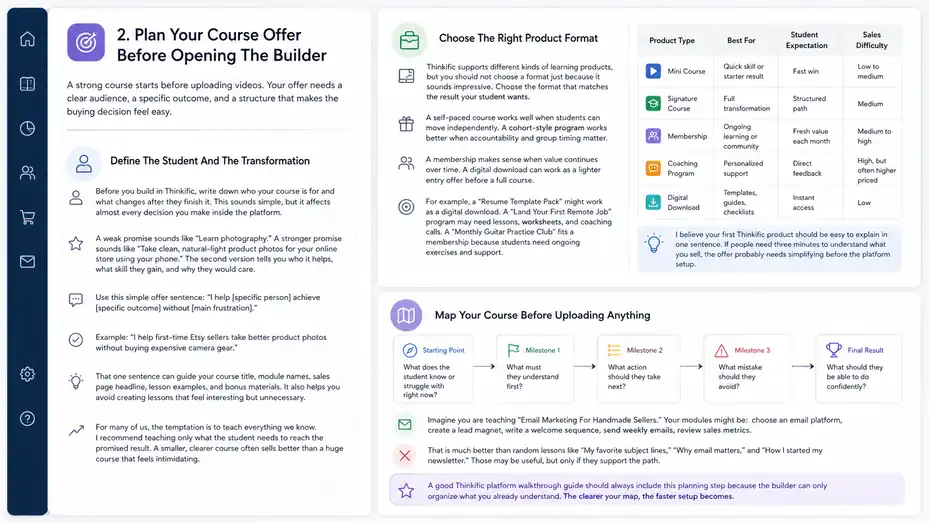
A strong course starts before uploading videos.
Your offer needs a clear audience, a specific outcome, and a structure that makes the buying decision feel easy.
Define The Student And The Transformation
Before you build in Thinkific, write down who your course is for and what changes after they finish it. This sounds simple, but it affects almost every decision you make inside the platform.
A weak promise sounds like “Learn photography.” A stronger promise sounds like “Take clean, natural-light product photos for your online store using your phone.” The second version tells you who it helps, what skill they gain, and why they would care.
Use this simple offer sentence: “I help [specific person] achieve [specific outcome] without [main frustration].”
Example: “I help first-time Etsy sellers take better product photos without buying expensive camera gear.”
That one sentence can guide your course title, module names, sales page headline, lesson examples, and bonus materials. It also helps you avoid creating lessons that feel interesting but unnecessary.
For many of us, the temptation is to teach everything we know. I recommend teaching only what the student needs to reach the promised result. A smaller, clearer course often sells better than a huge course that feels intimidating.
Choose The Right Product Format
Thinkific supports different kinds of learning products, but you should not choose a format just because it sounds impressive. Choose the format that matches the result your student wants.
A self-paced course works well when students can move independently. A cohort-style program works better when accountability and group timing matter.
A membership makes sense when value continues over time. A digital download can work as a lighter entry offer before a full course.
For example, a “Resume Template Pack” might work as a digital download. A “Land Your First Remote Job” program may need lessons, worksheets, and coaching calls. A “Monthly Guitar Practice Club” fits a membership because students need ongoing exercises and support.
Here’s a practical comparison:
| Product Type | Best For | Student Expectation | Sales Difficulty |
|---|---|---|---|
| Mini Course | Quick skill or starter result | Fast win | Low to medium |
| Signature Course | Full transformation | Structured path | Medium |
| Membership | Ongoing learning or community | Fresh value each month | Medium to high |
| Coaching Program | Personalized support | Direct feedback | High, but often higher priced |
| Digital Download | Templates, guides, checklists | Instant access | Low |
I believe your first Thinkific product should be easy to explain in one sentence. If people need three minutes to understand what you sell, the offer probably needs simplifying before the platform setup.
Map Your Course Before Uploading Anything
Do not start by uploading every video you have. Start with a course map. A course map is a simple outline that shows the student journey from “I’m stuck” to “I got the result.”
Use this structure:
- Starting Point: What does the student know or struggle with right now?
- Milestone 1: What must they understand first?
- Milestone 2: What action should they take next?
- Milestone 3: What mistake should they avoid?
- Final Result: What should they be able to do confidently?
Imagine you are teaching “Email Marketing For Handmade Sellers.” Your modules might be: choose an email platform, create a lead magnet, write a welcome sequence, send weekly emails, review sales metrics.
That is much better than random lessons like “My favorite subject lines,” “Why email matters,” and “How I started my newsletter.” Those may be useful, but only if they support the path.
A good Thinkific platform walkthrough guide should always include this planning step because the builder can only organize what you already understand. The clearer your map, the faster setup becomes.
Set Up Your Thinkific Account And Site Foundation
Once your offer is clear, you can set up the foundation of your Thinkific site.
This includes basic site settings, branding, plan selection, and account details.
Pick A Plan Based On Your Launch Stage
Thinkific’s pricing page currently positions the platform for selling courses, communities, memberships, digital downloads, coaching, webinars, and other learning products. Its public pricing structure can change, so I always suggest checking the current pricing page before choosing a plan.
The decision should not be based only on the cheapest monthly cost. It should be based on what you need to launch without overcomplicating your setup.
If you are validating your first course, start with the lowest plan that lets you sell the offer properly. If you need memberships, advanced selling features, or multiple products, you may need a higher plan.
If you are building for a company, team, or high-volume academy, you may need more advanced options.
Here’s a simple decision table:
| Launch Situation | What You Likely Need | What To Avoid |
|---|---|---|
| First paid course | Course builder, landing page, checkout | Paying for advanced features too early |
| Growing creator | Coupons, bundles, better sales tools | Ignoring analytics |
| Membership business | Recurring payments and community structure | Treating membership like a one-time course |
| B2B training | User management, reporting, scalability | Manual student tracking |
| Established academy | Advanced integrations and operations | Building around short-term hacks |
In my experience, creators often overbuy tools before validating demand. Your first goal is not to own every feature. Your first goal is to publish a clean offer and make the buying path work.
Configure Your Basic Site Settings
Your basic settings make your Thinkific site feel legitimate. Start with your site name, business information, support email, timezone, currency, and default language. These are not glamorous settings, but they affect trust and operations.
Think carefully about your site name. If you are a personal brand, your name may work. If you plan to sell multiple courses under a bigger education brand, use the brand name instead. For example, “Maya Chen Studio” feels personal, while “Product Photo Academy” feels more niche and expandable.
Your support email matters too. A generic personal email can work at the beginning, but a branded email looks more professional. Even something simple like support@yourdomain.com can reduce buyer hesitation.
Also review your student notifications. These are the automated emails students receive when they enroll, reset passwords, or complete actions. You do not need to rewrite everything at first, but you should check that the tone matches your brand.
A student who pays $299 and receives a cold, generic message may still access the course, but the experience feels less thoughtful. Small touches make your course feel cared for.
Add Branding That Supports Trust
Branding inside Thinkific includes your logo, colors, fonts, page style, and overall visual consistency. You do not need a luxury brand identity to launch, but your site should look intentional.
Start with one primary color, one accent color, and clean typography. Avoid using five colors because you like all of them. Too much visual noise can make your sales page feel amateur, even if the course is valuable.
Thinkific’s Site Builder allows creators to customize external-facing pages and branding settings without coding. That means you can create a solid first version without hiring a developer.
Here’s a practical shortcut I suggest: Match your call-to-action buttons across the whole site. If your “Enroll Now” button is green on one page, blue on another, and orange on checkout, the experience feels inconsistent. Pick one button color and stick with it.
Also upload a clear profile photo or instructor image if your brand is personal. People buy education from people they trust. A friendly, professional photo can do more for conversion than a fancy background pattern.
Build Your Course In Thinkific Step By Step
Now you are ready to create the actual learning product. The goal is not just to upload content, but to build a course that students can follow without confusion.
Create The Course Shell
In Thinkific, your course shell is the container for your curriculum, lessons, settings, pricing, and publishing controls. Thinkific’s support documentation explains that the Course Builder helps new creators add a course, add lessons, understand settings, and publish.
Start by creating a new course and adding a working title. Do not worry if the title is not perfect yet. You can refine it after your landing page copy is clearer.
Then add your course description. This internal description helps you stay focused, but it may also appear in some student-facing areas depending on your page setup. Keep it outcome-driven.
Instead of “This course includes 20 videos about podcasting,” write “Build, record, and publish your first simple podcast episode without getting stuck in gear confusion.”
Next, add your instructor information. If students see your name, bio, or profile, keep it relevant to their trust. You do not need your full life story. Share why you can help them and what kind of outcome you have guided before.
A simple instructor bio formula works well: “I help [audience] solve [problem]. Over the past [experience], I’ve learned [key belief]. In this course, I’ll show you [result].”
That is clear, human, and useful.
Organize Modules And Lessons
Thinkific courses usually work best when the curriculum is broken into clear chapters or modules, with lessons inside each one. Think of modules as milestones and lessons as the specific actions or ideas students need to complete each milestone.
A beginner-friendly structure might look like this:
- Module 1: Understand The Goal
- Module 2: Set Up The Tools
- Module 3: Complete The First Project
- Module 4: Improve The Result
- Module 5: Maintain Or Scale
Each lesson should have one job. If a lesson teaches three unrelated ideas, split it. Students rarely complain that a course is too clear. They do complain when lessons feel long, messy, or hard to revisit.
The completion rate problem is real across online learning. A widely cited analysis of 221 MOOCs found completion rates ranging from 0.7% to 52.1%, with a median of 12.6%. Thinkific cannot magically fix completion, but your structure can reduce friction.
I recommend naming lessons with action-based titles. “Write Your First Welcome Email” is stronger than “Welcome Email Overview.” The action title tells the student what they will do, not just what they will hear about.
Add Videos, Downloads, Quizzes, And Assignments
Your course content should match the lesson goal. Video is useful for explanation and demonstration, but not every lesson needs a video. Sometimes a checklist, worksheet, quiz, or short text lesson is more helpful.
Use video when students need to see a process. Use text when students need a quick reference. Use downloads when students need a template.
Use quizzes when students need to check understanding. Use assignments when students need to submit work or reflect before moving forward.
For example, in a “Freelance Writing Starter Course,” you might use:
- Video Lesson: Walk through how to analyze a job post.
- Download: Provide a pitch template.
- Text Lesson: Explain common red flags in client requests.
- Assignment: Ask students to draft and submit one pitch.
- Quiz: Test whether they can identify good-fit clients.
This is where many course creators accidentally create passive learning. They upload videos and assume students will act. In reality, students often need prompts, examples, and small wins.
I suggest adding one “do this now” moment every few lessons. It can be as simple as “Pause here and write your course promise in one sentence.” That tiny action turns watching into progress.
Set Your Course Progression And Access Rules
Thinkific lets you control how students move through content, depending on the features available in your plan and course settings. You may choose open access, scheduled release, prerequisite-style learning, or drip content.
Drip content means lessons become available over time. This can help prevent overwhelm, especially for coaching programs or courses where students need to practice between modules. Open access works better when students want immediate self-paced learning.
Use drip carefully. If someone buys a “Build Your Website This Weekend” course, they probably expect immediate access. If someone joins a 6-week live group program, drip makes sense.
Ask yourself: Does delayed access help the student get a better result, or does it only make the course feel more controlled?
For many beginner courses, I prefer open access with strong guidance. Give students everything, but include a recommended path. For deeper transformation programs, I like staged access because it slows people down enough to implement.
Your access rules should match your promise. Fast promise, fast access. Guided promise, guided release.
Build Your Course Website And Sales Pages
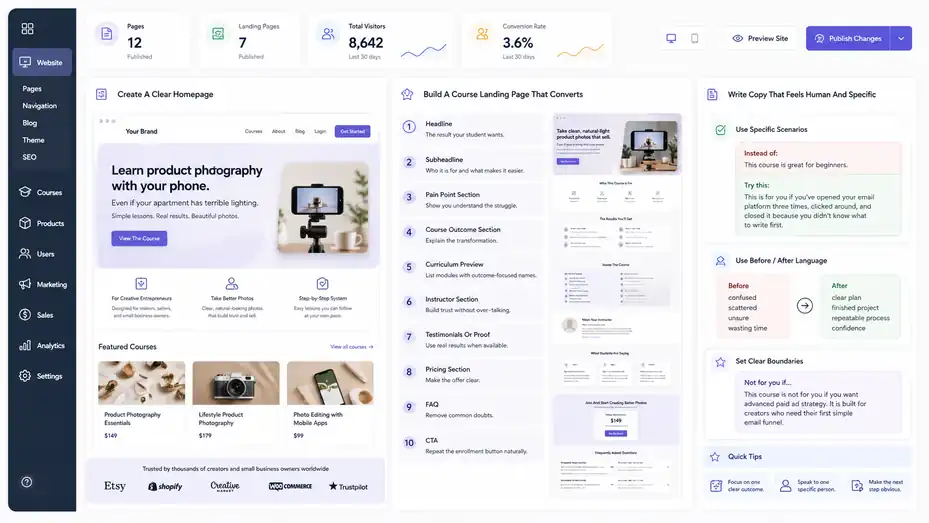
Your course may be excellent, but people still need a reason to buy it. Your Thinkific website and landing pages turn your offer into a decision-making experience.
Create A Clear Homepage
Thinkific’s Site Builder lets you create a homepage, course landing pages, and additional custom pages. Your homepage does not need to tell every detail about every product. Its job is to quickly explain who you help, what you offer, and where visitors should go next.
A strong homepage usually includes a simple hero section, a short explanation of your audience, featured products, credibility signals, and a clear call to action.
Your hero section should answer three questions within seconds:
- Who is this for? Make the audience obvious.
- What result do you help them get? Make the outcome specific.
- What should they do next? Make the next click clear.
For example: “Learn product photography with your phone, even if your apartment has terrible lighting.” That speaks to a real pain point. The button might say “View The Course” or “Start Learning.”
Avoid vague homepage language like “Unlock your potential” or “Transform your future.” Those phrases sound nice, but they do not help the visitor decide.
In most cases, clarity beats cleverness. A plain sentence that makes the right person feel understood will outperform a pretty headline that says nothing specific.
Build A Course Landing Page That Converts
Thinkific supports course landing pages, and its documentation notes options for AI-generated landing pages or classic website pages depending on your settings. Regardless of builder style, the conversion principles stay the same.
Your landing page should guide the reader through a buying decision. Start with the problem and desired result. Then explain what the course includes, who it is for, how it works, why you are credible, what students will learn, and what happens after enrollment.
A simple landing page structure:
- Headline: The result your student wants.
- Subheadline: Who it is for and what makes it easier.
- Pain Point Section: Show you understand the struggle.
- Course Outcome Section: Explain the transformation.
- Curriculum Preview: List modules with outcome-focused names.
- Instructor Section: Build trust without over-talking about yourself.
- Testimonials Or Proof: Use real results when available.
- Pricing Section: Make the offer clear.
- FAQ: Remove common doubts.
- CTA: Repeat the enrollment button naturally.
I recommend writing the page before obsessing over design. If the message is weak, design will not save it. Once the copy is strong, layout makes it easier to read and act.
Write Copy That Feels Human And Specific
Good course copy does not pressure people. It helps them recognize whether the course is right for them. You want the reader to think, “That sounds like me,” and “This feels doable.”
Replace broad claims with specific scenarios. Instead of “This course is great for beginners,” say “This is for you if you’ve opened your email platform three times, clicked around, and closed it because you didn’t know what to write first.”
That sentence feels more real because it reflects a lived moment.
Use “before and after” language throughout the page. Before: confused, scattered, unsure, wasting time. After: clear plan, finished project, repeatable process, confidence. This helps the reader understand the value.
I also suggest adding a “not for you” section when appropriate. It may feel risky, but it builds trust. For example: “This course is not for you if you want advanced paid ad strategy. It is built for creators who need their first simple email funnel.”
Clear boundaries reduce refund risk and attract better-fit students.
Set Pricing, Payments, And Checkout
A course becomes a business asset only when people can buy it smoothly. Pricing, payment setup, and checkout clarity all affect trust.
Choose A Pricing Model That Matches Value
Your course price should reflect the result, audience, support level, and market context. A $29 mini course can work if it solves a small problem quickly. A $499 program needs a stronger transformation, more proof, or deeper support.
Think about pricing through value, not lesson count. A 90-minute course that helps someone fix a costly business problem may be worth more than a 12-hour course full of general advice.
Common pricing models include:
- One-Time Payment: Best for standalone courses.
- Payment Plan: Useful for higher-priced programs.
- Subscription: Best for memberships or ongoing training.
- Free Preview: Useful for lead generation and trust building.
- Bundle Pricing: Good when multiple products create a bigger outcome.
Imagine you sell a $199 “Launch Your First Digital Product” course. A payment plan of two payments may increase accessibility, but it also adds operational risk if payments fail. A lower-priced mini course may convert faster, but you need more sales volume.
I believe pricing should feel slightly uncomfortable but still defensible. If you cannot confidently explain why the course is worth the price, improve the offer before raising the number.
Set Up Thinkific Payments
Thinkific Payments is Thinkific’s native payment system. Thinkific’s documentation explains setup steps such as providing business information and ensuring business names match official documents when required.
Payment setup is one of those areas where accuracy matters. Use the correct legal name, tax details, business address, and payout information. Mistakes can delay payouts or create verification issues.
Before launching, test the checkout path from a buyer’s perspective. Look at the checkout page and ask:
- Is the product name clear?
- Does the price match the sales page?
- Are payment options easy to understand?
- Does the confirmation message feel reassuring?
- Does the student know what to do after purchase?
You should also understand refunds, failed payments, chargebacks, and payout timing. Thinkific has support resources for managing student payments, failed payments, refunds, payouts, and chargebacks under its Thinkific Payments documentation.
Do not wait until your first failed payment to learn how that process works. A little preparation saves stress later.
Create Coupons And Launch Offers Strategically
Coupons can help with launches, affiliates, student appreciation, and limited-time promotions. But coupons can also train your audience to wait for discounts if you use them too often.
Use coupons with a reason. For example, a founding student discount makes sense because early buyers accept that the course may improve over time. A holiday sale can work if it fits your audience’s buying behavior. A private coupon for webinar attendees can reward people who took action.
Avoid fake urgency. If your page says “48 hours only” every week, trust drops. Instead, use honest promotional windows.
A good first launch offer might be: “Enroll by Friday and get the course for $149 before it moves to the regular $199 price.” That is clear and believable.
You can also use bonuses instead of discounts. A bonus worksheet, live Q&A, or feedback session can increase value without lowering your core price.
In my experience, discounts work best when they are simple, specific, and tied to a real event. Complicated coupon structures create confusion, and confused buyers often leave.
Configure Student Experience And Delivery
The sale is not the finish line. The student experience determines reviews, referrals, completion, and repeat purchases.
Improve The First 10 Minutes After Enrollment
The first 10 minutes after purchase are powerful. Students are excited, but they are also looking for confirmation that they made a good decision.
Create a welcome lesson that tells them exactly what to do first. Do not make the first lesson a long biography. Keep it practical and reassuring.
A strong welcome lesson should include:
- What To Expect: Explain the course structure.
- How To Use The Course: Tell students whether to watch in order.
- What To Download First: Point to key resources.
- How To Get Help: Explain support options.
- Quick Win: Give them one tiny action right away.
For example: “Before you watch Module 1, download the Course Roadmap and write your goal at the top. This will help you choose the right examples as we go.”
That small action makes the student feel active immediately.
I suggest adding a “Start Here” module even if the course is short. It reduces uncertainty and helps students feel guided. Remember, people do not just buy information. They buy a path through information.
Add Completion Support Inside The Course
Students often start courses with motivation and then lose momentum. Your job is to reduce friction and remind them why progress matters.
Use lesson summaries, action prompts, and progress checkpoints. At the end of each module, include a short recap and a “before moving on” checklist. This gives students a sense of completion.
Example: “Before you continue, make sure you have chosen your niche, written your course promise, and drafted your first three module names.”
You can also add estimated lesson times. A student is more likely to begin a 7-minute lesson than a mystery lesson that could take 45 minutes.
Completion improves when students see progress. Since online course completion can be low in many open online learning environments, designing for momentum is not a nice extra; it is part of the product.
Thinkific gives you the container, but you create the learning rhythm. Short lessons, clear next steps, and visible milestones make the course feel achievable.
Create Support Boundaries
Support can make your course more valuable, but unclear support can drain your time. Set expectations early.
Tell students where to ask questions, when they can expect a response, and what kind of help is included. If the course includes community support, explain how to use it. If it does not include personal feedback, say that clearly.
For example: “This course includes access to the lessons and templates. It does not include individual review, but you’ll find examples inside each module to compare against your work.”
That kind of boundary protects both you and the student.
If you offer support, create repeatable systems. Save common answers. Add new FAQ lessons when the same question appears multiple times. Improve unclear lessons instead of answering the same confusion forever.
In my experience, support questions are valuable feedback. If ten students ask where to find a worksheet, the problem is probably not the students. The course navigation needs improvement.
Connect Marketing And Sales Systems
Thinkific can host and sell your course, but marketing usually happens across several touchpoints.
Your goal is to connect those touchpoints without making the system too complicated.
Build A Simple Lead Path
A lead path is the journey someone takes before buying. It might start with a blog post, social media post, podcast episode, webinar, free lesson, or downloadable checklist.
For your first launch, keep the lead path simple. You do not need a giant funnel with 17 emails and 9 automations. You need one clear way for interested people to learn more.
Example path: Social post → free checklist → welcome email → course landing page → checkout.
That is enough to start.
Your free resource should relate directly to the paid course. If your course teaches “Create Your First Online Course,” your free resource could be “Course Outline Template.” Do not offer a random productivity checklist just because it is easy to make.
The better the free resource matches the paid outcome, the warmer the lead. A good lead magnet should create a small version of the paid result.
I recommend asking this question: “What would my ideal student need right before they are ready for the course?” Build that.
Use Email To Warm Up Buyers
Email is still one of the strongest channels for selling courses because it lets you educate, build trust, and answer objections over time. Your email sequence does not need to be pushy.
A simple pre-launch sequence can include:
- Email 1: Share the problem and why it matters.
- Email 2: Teach one useful concept.
- Email 3: Share a story or example.
- Email 4: Introduce the course.
- Email 5: Answer common questions.
- Email 6: Remind readers before the offer closes.
Each email should move the reader closer to clarity. Do not just repeat “buy now.” Show them why the course exists, who it is for, and what changes after they take action.
Imagine you are selling a course on creating a home bakery business. One email could explain why underpricing happens. Another could walk through a sample menu. Another could share a student-style scenario: “Sara sold 12 cupcake boxes but realized she had no profit after packaging.”
Stories make the need feel real.
Track Where Sales Come From
You cannot improve what you never measure. At minimum, track page visits, conversion rates, email clicks, checkout starts, purchases, refunds, and student completion.
You do not need a complicated analytics setup at first. Start with basic questions:
- Traffic: How many people visited the sales page?
- Conversion: What percentage bought?
- Email: Which emails drove clicks?
- Checkout: Did people abandon checkout?
- Learning: Are students progressing?
- Revenue: Which offer produced the most sales?
A simple launch review might reveal that 800 people visited your landing page, 80 clicked checkout, and 16 bought. That means your page-to-checkout rate is 10%, and your visitor-to-purchase rate is 2%.
Those numbers are not automatically good or bad. They become useful when compared over time. If your next launch converts at 3%, your changes likely helped.
I advise reviewing metrics after every launch, not during every anxious hour of launch week. Real decisions need patterns, not panic.
Launch Your Thinkific Course
Launching is where planning meets reality.
Your first launch does not need to be perfect; it needs to be clear, trackable, and useful.
Run A Pre-Launch Check
Before you invite people to buy, test the full customer journey. This is one of the most important steps in this Thinkific platform walkthrough guide because small broken details can cost real sales.
Create a test checklist:
- Sales Page: Check headline, buttons, pricing, FAQ, and mobile layout.
- Checkout: Confirm product, price, payment options, and confirmation page.
- Enrollment: Make sure buyers land in the right course.
- Welcome Email: Confirm the message is correct and helpful.
- Course Access: Open lessons as a student and check files.
- Links: Click every important button.
- Refund Policy: Make sure expectations are visible.
I suggest testing on both desktop and mobile. Many buyers will browse on their phone, and a page that looks beautiful on a laptop may feel cramped on a smaller screen.
Also ask one trusted person to test the path. They do not need to be a technical expert. In fact, a non-technical person may catch confusing language faster because they are closer to a real student.
Choose A Launch Style
There are several ways to launch a Thinkific course. The right choice depends on your audience size, offer price, and comfort level.
A soft launch means you quietly invite a small group. This works well for validating a first course. A live launch means you promote during a set window. This can create momentum. An evergreen launch means the course is always available. This is easier operationally but may require stronger ongoing marketing.
For a first course, I like a founding student launch. You invite a limited number of early buyers at a special price in exchange for feedback, testimonials, and real-world insight.
Example: “I’m opening 20 founding student spots for the first version of this course. You’ll get lifetime access, the best launch price, and the chance to help shape future lessons.”
This feels honest because it is. You are not pretending the course is perfect. You are inviting the right people into an early version with a clear benefit.
Founding launches can reduce pressure and help you improve the course before scaling.
Handle Launch Week Without Chaos
Launch week can make even calm creators refresh their dashboard every five minutes. I’ve been there. The best way to avoid chaos is to prepare your messages before the launch opens.
Create your launch assets ahead of time: email sequence, social posts, FAQ answers, checkout link, testimonial graphics, and reminder messages.
During launch week, focus on answering real objections. If people ask, “Is this for beginners?” your sales page may need a stronger beginner section. If they ask, “How long do I have access?” your pricing section may be unclear.
Do not change everything mid-launch unless something is truly broken. A launch gives you data, but early signals can be noisy. One person’s hesitation does not mean your whole offer is wrong.
After launch, review the numbers and feedback. What did people click? What questions came up? Where did they hesitate? What lesson did early students love? That review becomes your optimization plan.
Optimize Your Course After The First Sales
The best courses improve after real students use them.
Optimization helps you increase conversions, reduce refunds, improve completion, and create better student outcomes.
Improve Your Sales Page With Real Questions
Your first buyers and non-buyers will tell you what your sales page is missing. Pay attention to their questions. Every repeated question is a clue.
If people ask, “Do I need experience?” add a section explaining prerequisites. If they ask, “How long does it take?” add a time commitment section. If they ask, “Will this work for my industry?” add examples by use case.
Do not guess your way into better copy. Use real language from your audience. If a student says, “I just want to stop feeling scattered,” that phrase may belong on your page.
A sales page should become more specific over time. Version one explains the offer. Version two handles objections. Version three uses proof. Version four improves positioning.
I suggest keeping a simple “sales page feedback” document. Add every question, hesitation, compliment, and refund reason. Review it monthly. You will quickly see patterns.
The goal is not to manipulate people into buying. The goal is to answer the questions they already have before they need to ask.
Improve Lessons Based On Student Behavior
Look at where students slow down, stop, or ask for help. Those moments often reveal confusing lessons, missing examples, or too much work at once.
If students stop at Module 2, ask why. Maybe the lesson is too long. Maybe the assignment feels intimidating. Maybe the outcome is unclear. Maybe they need a template before they can act.
One practical improvement is adding “bridge lessons.” These are short lessons that help students transition from one stage to the next. For example, after teaching theory, add a lesson called “Apply This To Your Own Business In 15 Minutes.”
Another improvement is adding more examples. Many students understand an idea faster when they see it applied to a realistic scenario.
For example, if your course teaches pricing, do not only explain pricing theory. Show three sample products, costs, margins, and final prices. That kind of detail turns abstract advice into usable instruction.
In my experience, courses improve fastest when you ask, “Where did students hesitate?” Then you make that exact point easier.
Use Testimonials And Proof Ethically
Testimonials can increase trust, but they should be specific and honest. Avoid vague praise like “This course is amazing” if you can collect more useful proof.
A strong testimonial explains the before state, the course experience, and the after result. Example: “Before the course, I had a folder of video ideas but no structure. After Module 2, I created my full outline and recorded my first three lessons.”
That is more believable because it shows a concrete change.
Ask students for feedback at natural milestones. After they complete a module, finish a project, or get a result, invite them to share their experience.
You can ask:
- Before: What were you struggling with before joining?
- During: What part helped you most?
- After: What changed because of the course?
- Advice: What would you tell someone considering it?
Never invent testimonials. Never exaggerate results. Trust is hard to win and easy to lose.
Use proof to clarify fit, not to pressure everyone. The best testimonials help the right person feel safe taking the next step.
Troubleshoot Common Thinkific Setup Problems
Even a well-planned course can hit technical or strategic issues.
Troubleshooting is easier when you know where to look and what each problem usually means.
Students Cannot Access The Course
If a student says they cannot access the course, check the basics first. Confirm they purchased the correct product, used the correct email, and are enrolled in the right course.
Sometimes students create an account with one email and purchase with another. Sometimes a checkout issue prevents enrollment. Sometimes the course is still in draft mode or access settings are wrong.
A simple troubleshooting flow works well:
- Confirm Purchase: Check whether the order exists.
- Confirm User Email: Make sure the student is using the right login.
- Confirm Enrollment: Verify they are enrolled in the course.
- Check Course Status: Make sure the course is published.
- Check Access Timing: Review drip or release settings.
- Send Login Help: Provide a reset link or clear instructions.
Keep your reply calm and helpful. The student may already feel frustrated after paying. A clear support response can turn a bad moment into trust.
I recommend creating a saved support response for login issues. You can personalize it, but having the structure ready saves time.
Checkout Is Not Converting
If people visit your page but do not buy, do not assume the price is the only issue. Checkout conversion can be affected by unclear offer positioning, weak proof, confusing pricing, missing FAQs, or poor mobile experience.
Start by identifying where people drop off. If few visitors click the buy button, the sales page may not be persuasive. If many click checkout but few complete payment, the checkout experience, price clarity, or trust level may need work.
Review the page through the eyes of a skeptical buyer. Can they quickly understand what they get? Do they know who teaches it? Do they believe it can work for them? Is the refund policy clear? Are there examples of the course content?
Sometimes the fix is simple. A stronger headline, clearer curriculum preview, or FAQ section can improve confidence. Sometimes the offer itself needs work.
I suggest changing one major thing at a time. If you rewrite the whole page, change the price, and redesign the checkout at once, you will not know what helped.
Students Are Not Finishing
Low completion is not always failure. Some students buy a course for one specific section and still feel satisfied. But if many students stop early, your course may need better momentum.
Look for friction. Are lessons too long? Are assignments unclear? Does Module 1 start with too much theory? Are students unsure what result they are working toward?
Try adding shorter lessons, clearer action steps, progress checklists, and more encouragement. A “quick win” in the first module can make a big difference.
For example, in a course about building a personal budget, do not begin with 45 minutes of financial philosophy. Help students calculate one number they can use immediately. Then explain the bigger system.
You can also send progress reminders. A friendly email after a few days can bring students back: “You’re closer than you think. Module 2 should take about 20 minutes, and by the end, you’ll have your first draft finished.”
Completion is partly content quality and partly emotional support. Students need to believe the next step is doable.
Scale Your Thinkific Course Business
Once your course works, scaling means improving systems, adding offers, and increasing revenue without making everything heavier.
Create A Product Ladder
A product ladder gives students a next step. Instead of selling one course forever, you create a path from beginner to advanced value.
A simple product ladder might include a free checklist, a $29 mini course, a $199 core course, a $799 group coaching program, and a monthly membership. Not every business needs all of these, but the idea is useful.
The key is progression. Each offer should solve a different level of problem.
Example for a writing coach:
- Free Resource: Blog post checklist.
- Mini Course: Write your first portfolio piece.
- Core Course: Build a freelance writing business.
- Coaching: Get feedback on pitches and client strategy.
- Membership: Monthly accountability and writing reviews.
This works because each product leads naturally to the next. The student does not feel randomly upsold. They feel guided.
I recommend building the next offer only after your first offer has proof. Scaling a weak offer usually creates more problems. Improve the core product first, then expand.
Use Bundles, Upsells, And Repeat Buyers
Bundles can increase average order value when products naturally belong together. For example, a “Course Creation Bundle” might include course planning, video recording, and launch strategy.
Upsells can work too, but they should be relevant. If someone buys a beginner course, offering a template pack at checkout may help. Offering an unrelated advanced mastermind may feel jarring.
Think about what the buyer needs next. Right after purchase, they may want templates, examples, feedback, or implementation support.
A good upsell feels like: “This will help me use what I just bought.” A bad upsell feels like: “They are trying to sell me something before I even start.”
Repeat buyers are often your best customers because they already trust you. Serve them well, then give them a logical next step.
In my experience, the easiest revenue growth often comes from improving the path for existing students, not constantly chasing brand-new audiences.
Build Operational Systems Before Growth Gets Messy
Scaling creates operational pressure. More students means more support questions, more payment issues, more content updates, and more data to review.
Before you grow aggressively, document your repeatable processes. Create checklists for launching, uploading lessons, testing checkout, responding to common support issues, and reviewing analytics.
This may feel boring, but it protects your time.
You can create simple systems like:
- Launch Checklist: Everything to review before opening enrollment.
- Support Library: Saved answers for common questions.
- Content Update Log: Notes on what changed and when.
- Monthly Metrics Review: Sales, conversion, refunds, completion.
- Student Feedback Tracker: Questions, wins, complaints, ideas.
A course business becomes easier when you stop relying on memory. If you plan to hire help later, these systems become even more valuable.
Scaling is not just selling more. It is making sure more sales do not break the student experience.
Conclusion: Build The Course, Then Keep Improving The System
A strong Thinkific platform walkthrough guide is not just a list of buttons to click. The real goal is to help you build a course business that feels clear for you and trustworthy for your students.
Start with the offer. Map the transformation. Build the course structure. Create a landing page that explains the value clearly. Set up payments carefully. Test the full student journey. Launch with a simple plan. Then improve based on real behavior.
Thinkific gives you the platform, but your strategy creates the result. I suggest treating your first version as a serious draft, not a final monument.
Publish thoughtfully, listen closely, and keep refining. That is how a simple online course becomes a reliable learning product people are happy to buy, finish, and recommend.
FAQ
What is a Thinkific platform walkthrough guide?
A Thinkific platform walkthrough guide explains how to set up, build, publish, and sell an online course using Thinkific. It usually covers course creation, landing pages, pricing, checkout, student access, launch steps, and optimization so beginners can move from setup to their first sale with confidence.
Is Thinkific good for beginners creating online courses?
Yes, Thinkific is beginner-friendly because it gives you tools to build courses, create sales pages, manage students, and accept payments without needing code. Beginners still need a clear course idea, organized lessons, and a simple launch plan to get the best results from the platform.
How do I start selling a course on Thinkific?
To start selling on Thinkific, create your course outline, upload lessons, design your course landing page, set pricing, connect payments, and test the full checkout process. After that, promote your course through email, social media, content marketing, or a small launch campaign.
What should I include in my Thinkific course landing page?
Your Thinkific course landing page should include a clear headline, course benefits, target audience, curriculum overview, instructor details, pricing, testimonials if available, FAQs, and a strong call to action. The goal is to answer buyer questions and make enrollment feel simple and trustworthy.
How can I improve sales after launching a Thinkific course?
Improve Thinkific course sales by reviewing traffic, checkout clicks, conversion rates, student questions, and refund reasons. Update your sales page, clarify your offer, add stronger examples, improve testimonials, test pricing, and make the student experience smoother so buyers feel more confident enrolling.

I’m Juxhin, the voice behind The Justifiable.
I’ve spent 6+ years building blogs, managing affiliate campaigns, and testing the messy world of online business. Here, I cut the fluff and share the strategies that actually move the needle — so you can build income that’s sustainable, not speculative.