
Table of Contents
Some links on The Justifiable are affiliate links, meaning we may earn a small commission at no extra cost to you. Read full disclaimer.
Sellfy worth it for digital products is a question I’d take seriously before paying for another ecommerce tool, because the wrong platform can quietly eat your time, margins, and motivation.
Sellfy looks appealing because it gives creators a simple way to sell downloads, subscriptions, and merch without building a complex online store from scratch. But “simple” is not always the same as “best.”
In this guide, I’ll walk you through what Sellfy does well, where it feels limited, who should use it, who should skip it, and how to decide based on your actual product, audience, and growth plan.
Understand What Sellfy Is Really Built For
Sellfy is best understood as a creator-first ecommerce platform, not a full enterprise store builder.
That difference matters because your experience will depend heavily on whether you want speed and simplicity or deep customization.
What Sellfy Does For Digital Product Sellers
Sellfy lets you create a hosted online store where you can sell digital downloads, subscriptions, physical products, and print-on-demand merchandise. For digital products specifically, it handles the most annoying part of the process: File hosting, checkout, and automatic delivery after purchase.
Sellfy says it hosts digital files securely and delivers orders instantly to customers, which means you do not have to manually email PDFs, templates, presets, videos, audio files, or design assets after each sale.
That is the main appeal. If you are a creator, designer, coach, musician, photographer, educator, or small digital brand, you probably do not want to spend your first month configuring plugins, payment gateways, hosting, security, and delivery rules. You want to upload a product, write a clear description, connect payment, and start selling.
Here’s how I’d think about it: Sellfy is trying to remove the technical wall between your audience and your offer. It gives you a storefront, product pages, checkout, discount tools, email marketing, and digital delivery in one place. That makes it especially useful for creators who already have traffic from YouTube, TikTok, Instagram, Pinterest, a blog, or an email list.
But it is not trying to be everything. If you need advanced CMS control, complex funnels, multi-step automations, marketplace discovery, deep B2B features, or a heavily custom storefront, Sellfy can start to feel tight.
That does not make it bad. It just means it is built around one clear promise: Help creators sell faster without making ecommerce feel like a second full-time job.
Why Digital Products Change The Platform Decision
Selling digital products is different from selling physical products because the biggest challenges happen before and after checkout. You are not usually worried about inventory boxes or shipping labels.
You are worried about file delivery, access control, refunds, piracy, product positioning, conversion rate, and whether people understand the value of something they cannot physically touch.
That is why a platform that looks “basic” can still be useful. For example, a Notion template seller may care more about clean product pages, instant delivery, discount codes, and a mobile-friendly checkout than advanced warehouse integrations.
A photographer selling Lightroom presets may want quick upload, secure links, and simple upsells more than custom code.
Digital products also have attractive margins because you can create once and sell many times. But that does not mean every sale is pure profit. You still pay platform costs, payment processing fees, taxes in some cases, design costs, content creation time, support time, and refund risk.
Sellfy does not charge its own transaction fee, according to its pricing documentation, but payment processors like Stripe or PayPal still charge their own fees.
This is where many beginners get surprised. They compare a $29 monthly plan to a free marketplace and assume one is obviously cheaper. In reality, the better choice depends on your sales volume, conversion rate, audience ownership, and how much control you want.
A hosted tool like Sellfy can be worth it when you already have people to send to your product page. It is less magical if you expect the platform itself to bring buyers.
The Simple Verdict Before We Go Deeper
So, is Sellfy worth it for digital products? In many cases, yes, but mainly for creators who value fast setup, simple digital delivery, no Sellfy transaction fees, and built-in selling tools over advanced customization.
I would not call Sellfy the best choice for every digital business. I would call it a strong choice for solo creators and small brands selling straightforward digital products like ebooks, files, templates, subscriptions, audio, videos, presets, patterns, or digital art. It is especially attractive when you want a standalone store without learning a bigger ecommerce system.
The limit is control. You can customize your store, but you are still operating inside Sellfy’s ecosystem. That is comfortable when you want speed. It can feel restrictive when your brand grows into more complex content, segmented funnels, advanced analytics, or sophisticated customer journeys.
A useful rule is this: Choose Sellfy when your biggest problem is launching and selling cleanly. Consider another setup when your biggest problem is advanced scaling, complex marketing automation, marketplace exposure, or deep brand customization.
Review Sellfy Pricing And Real Costs
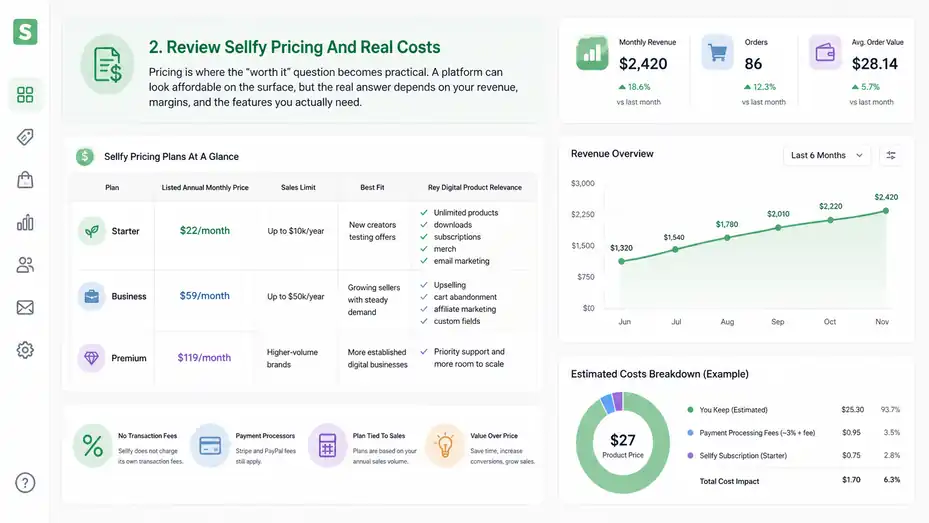
Pricing is where the “worth it” question becomes practical.
A platform can look affordable on the surface, but the real answer depends on your revenue, margins, and the features you actually need.
Sellfy Pricing Plans At A Glance
Sellfy’s current public pricing page lists three main plans: Starter, Business, and Premium. The Starter plan is listed at $22 per month when billed annually and supports up to $10,000 in sales per year.
The Business plan is listed at $59 per month when billed annually and supports up to $50,000 in yearly sales. The Premium plan is listed at $119 per month when billed annually and supports higher-growth sellers.
Here’s a simple comparison based on Sellfy’s pricing page and help documentation:
| Plan | Listed Annual Monthly Price | Sales Limit | Best Fit | Key Digital Product Relevance |
|---|---|---|---|---|
| Starter | $22/month | Up to $10k/year | New creators testing offers | Unlimited products, downloads, subscriptions, merch, email marketing |
| Business | $59/month | Up to $50k/year | Growing sellers with steady demand | Upselling, cart abandonment, affiliate marketing, custom fields |
| Premium | $119/month | Higher-volume brands | More established digital businesses | Priority support and more room to scale |
Those numbers matter because Sellfy’s pricing is not just about features. It is also tied to your annual sales volume. If you sell a $29 ebook and make 30 sales per month, you are around $870 monthly revenue, or $10,440 annually.
That puts you just beyond the Starter threshold, at least in simple revenue terms. Suddenly, the Business plan becomes part of your cost structure.
I suggest doing this before you sign up: Estimate your expected monthly sales in three scenarios. Use a conservative number, a realistic number, and an optimistic number. Then compare the monthly plan cost against your gross revenue and expected profit. A $22 monthly cost is tiny if you make $2,000 per month. It feels heavier if you make $80 per month.
Transaction Fees, Payment Fees, And Profit Margins
One of Sellfy’s strongest pricing advantages is that it does not charge its own transaction fee. Sellfy’s help center states that sellers pay the recurring subscription cost and that there are no transaction fees from Sellfy, although PayPal and Stripe still charge processing fees.
That distinction is important. “No transaction fees” does not mean every payment is free to process. Stripe’s published pricing varies by region; in Europe, for example, Stripe lists rates such as 1.5% + €0.25 for standard EEA cards, with higher rates for premium, UK, and international cards. PayPal’s U.S. merchant fee page lists PayPal Checkout at 3.49% plus a fixed fee for domestic transactions.
Let me break it down with a simple example. Imagine you sell a $27 digital planner and use a payment processor that charges roughly 3% plus a fixed fee. Your processing cost could land around $1 per sale, depending on the buyer’s location and payment method. If you sell 100 copies, processing fees may be around $100, plus your Sellfy subscription.
That still can be excellent compared with platforms that add a marketplace fee, platform commission, or extra app fees. But you should calculate your actual numbers. Digital products often have high margins, yet low-priced products are sensitive to fixed payment fees. A $5 template absorbs a fixed fee much more painfully than a $99 course workbook.
I recommend pricing your digital products with fees in mind from day one. Do not price only based on what “feels affordable.” Price based on value, support time, payment costs, refund risk, and your target monthly income.
When Sellfy Becomes Financially Worth It
Sellfy becomes financially worth it when its monthly cost saves you enough time, increases enough conversions, or replaces enough separate tools to justify the subscription.
For example, suppose you are selling Canva templates through manual PayPal links. Every order requires checking payment, sending files, answering “where is my download?” emails, and manually tracking buyers. Even if Sellfy costs you $22 to $59 per month, automatic delivery alone might be worth it after a handful of sales because it reduces friction and support work.
Now imagine you sell a $49 digital product and make only five sales per month. That is $245 in gross revenue. A Starter annual plan cost would take a noticeable but manageable share. If Sellfy helps you look more professional, recover trust, and deliver instantly, it may still be worth testing.
But if you have no audience, no product validation, and no traffic plan, the subscription can become another monthly bill. Sellfy does not solve product-market fit. It gives you the shelf, checkout, and delivery system. You still need the offer, positioning, content, and traffic.
My practical threshold is simple: Sellfy starts making sense when you can reasonably expect the platform to help you sell at least one to three extra products per month or save several hours of manual work. If it cannot do either, wait until your offer is better validated.
Evaluate The Core Digital Product Features
The best way to judge Sellfy is not by counting features. It is by asking whether those features solve the actual jobs digital sellers need done every week.
Digital File Hosting And Automatic Delivery
Sellfy’s digital delivery feature is one of its biggest reasons to exist. You upload your digital product files, create a product page, set a price, and Sellfy delivers the product after purchase.
Sellfy’s documentation says customers receive their digital products automatically, and its digital downloads page says buyers receive a unique download link by email after completing the purchase.
That sounds simple, but it removes a major operational headache. Manual delivery works when you have two customers. It becomes messy when you have fifty customers, different time zones, failed emails, refund requests, and people asking for updated files months later.
For digital sellers, the delivery experience is part of the product. If someone buys a printable budget planner and the download link arrives instantly, they feel reassured. If they wait twelve hours for a manual email, they may wonder whether they were scammed. That trust gap affects reviews, refunds, and repeat purchases.
A good setup is to name your files clearly, compress large assets when possible, and include a “start here” PDF for bundles. For example, if you sell a brand kit, include one simple guide that explains what each folder contains, how to use the files, and what to do if something does not open.
I also suggest testing your own checkout before launching. Buy your product with a test email or low-price coupon, then inspect the buyer experience. Look at the confirmation email, download page, file names, mobile experience, and support instructions. Small details here can reduce customer confusion dramatically.
Storefront, Product Pages, And Checkout Flow
Sellfy gives you a hosted storefront, templates, and product pages so you can sell without building a website from scratch. Its homepage positions the platform as a code-free online store builder with templates and a 14-day free trial. Sellfy also states that more than 75,000 creators have used the platform and earned over $165 million through it.
For creators, this is useful because the product page often needs to do more than display a price. It needs to explain the outcome, show previews, answer objections, and make the buyer feel safe. A digital product page should usually include what is inside, who it is for, who it is not for, what happens after purchase, refund expectations, and a few realistic use cases.
Imagine you sell a $19 Instagram content calendar. A weak product page says, “Download my content calendar.” A stronger page says, “Plan 30 days of posts in one sitting, with prompts, caption angles, and weekly themes for small business owners who hate starting from a blank page.” Same product, better buyer clarity.
Sellfy’s simplicity helps you publish quickly, but you still need persuasive copy. I would not rely only on screenshots and a short description. Digital buyers need confidence because they cannot touch the product first. Use product mockups, preview images, clear benefit statements, and a short FAQ.
Checkout matters too. Every extra step can reduce conversions. Sellfy’s built-in checkout is helpful because you are not stitching together separate checkout, delivery, and email tools. That said, you should still test it on mobile. Many creator-driven buyers come from social apps, so your mobile product page may matter more than your desktop page.
Marketing Features That Actually Matter
Sellfy includes built-in marketing tools such as email marketing, discounts, upselling, cart abandonment, and affiliate marketing depending on the plan. The Business plan listed on Sellfy’s pricing page includes growth features like product upselling, cart abandonment, and affiliate marketing.
These features matter because digital products often rely on repeated exposure. Someone may see your template today, think it looks useful, and buy three days later after seeing another post.
Cart abandonment emails can help recover people who started checkout but did not finish. Upsells can raise average order value by offering a related product at the right moment.
Here’s a practical example. Let’s say you sell a $15 meal planning spreadsheet. Your upsell could be a $9 grocery budget tracker. The buyer already wants organization, so the second product fits naturally. That is better than randomly offering a product that solves a different problem.
Discount codes can also work, but I advise using them carefully. Constant discounts train your audience to wait. A better approach is to use discounts for specific moments: Product launch, seasonal sale, bundle promotion, student-friendly offer, or email subscriber bonus.
Affiliate marketing can be useful once your product has proof. I would not start affiliates on day one unless you already have trusted partners. First, improve the product page, collect feedback, and make sure buyers are happy. Then affiliates become growth partners instead of unpaid testers.
Compare Sellfy With Other Ways To Sell Digital Products
Sellfy does not exist in a vacuum. Whether it is worth it depends on what you would use instead and what trade-offs you are willing to accept.
Sellfy Vs Marketplaces
Marketplaces can be attractive because they may already have buyer traffic. The trade-off is that you usually have less control over branding, customer relationships, fees, rules, and competition. Your product may appear next to dozens of similar products, which can push you into price comparison instead of value-based selling.
Sellfy is different because it gives you your own storefront. That means you are responsible for traffic, but you also control the buying environment more directly. For many creators, that is a fair trade. You can send people from your content directly to your product page instead of hoping a marketplace algorithm favors you.
The big question is audience. If you already have an audience, Sellfy can be more powerful than a marketplace because you are not handing the buyer journey to another platform. If you do not have an audience, a marketplace might help with discovery, although competition can be intense.
I believe the strongest strategy for many creators is not either-or. You can use a marketplace for discovery and Sellfy as your main branded store. But be careful with your time. Managing multiple platforms means updating files, prices, descriptions, and customer support in more places.
If you want brand ownership, customer experience control, and simple direct selling, Sellfy has the edge. If you need built-in search traffic more than control, a marketplace may be more useful at the beginning.
Sellfy Vs Full Ecommerce Platforms
Full ecommerce platforms can offer more customization, app ecosystems, analytics options, and scaling flexibility. They are often better for larger catalogs, complex product types, physical inventory, custom themes, advanced integrations, and teams that need more operational control.
Sellfy’s advantage is speed. You do not need to think as much about hosting, plugins, complex store architecture, or technical maintenance. That is a real benefit when your business is still small or when digital products are one part of your creator income.
The downside is that advanced sellers may eventually want more. For example, you may want complex email segmentation, deep analytics dashboards, custom checkout logic, advanced SEO controls, or highly customized landing pages. Sellfy can cover the basics, but it may not match the flexibility of a more modular ecommerce setup.
Here’s my honest take: The more your business depends on a sophisticated website experience, the more you should compare Sellfy carefully against larger platforms. The more your business depends on a simple offer and strong audience trust, the more Sellfy makes sense.
A creator selling five polished digital products from a YouTube audience may not need a heavyweight ecommerce stack. A brand running hundreds of SKUs, multiple campaigns, and custom funnels probably does.
Sellfy Vs Payment Links And Manual Delivery
Payment links are tempting because they feel free and fast. You can create a link, accept payment, and send files manually. For early validation, that can be completely fine. In fact, I often like simple validation before building anything complicated.
But manual delivery has a ceiling. The moment sales become consistent, your process starts to leak time. You may forget to send a file. A customer may miss the email. Someone may ask for access while you are asleep. You may struggle to track who bought which version.
Sellfy solves that operational gap. It turns your digital product into a repeatable buying experience. That repeatability matters if you want your product to sell while you are creating content, studying, working, or sleeping.
A useful mini test is this: If you would be stressed getting ten orders in one day, your system is too manual. A good digital product setup should make ten orders feel exciting, not chaotic.
Payment links are fine for testing. Sellfy is better when you want a more professional storefront, automated delivery, product pages, and marketing features in one place.
Decide If Sellfy Fits Your Product Type
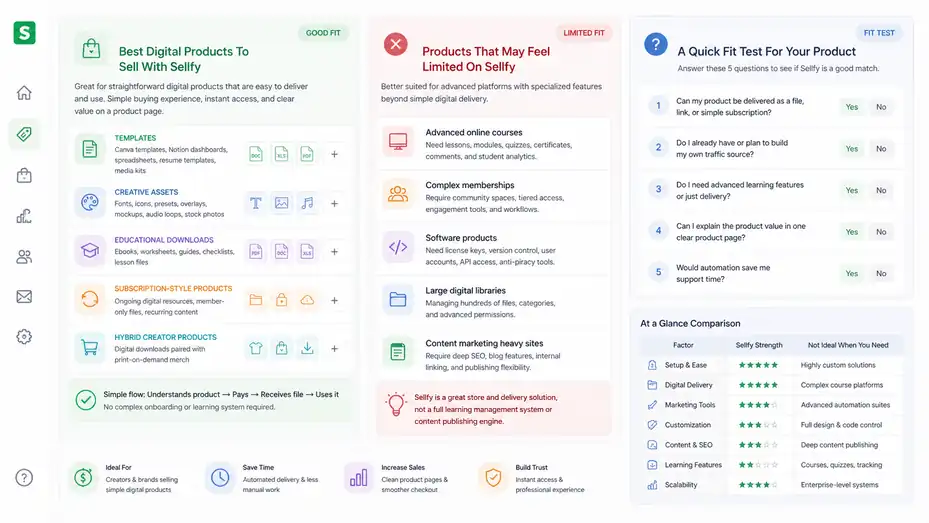
Not every digital product needs the same selling environment. A simple printable and a premium subscription have very different needs.
Best Digital Products To Sell With Sellfy
Sellfy is a good fit for straightforward digital products where the customer buys, receives access, and can use the product without complicated onboarding. This includes ebooks, templates, design files, presets, digital art, music files, audio packs, video files, printables, spreadsheets, guides, and simple memberships.
The platform works especially well when the value can be explained clearly on a product page. For example, “30 editable Canva templates for bakery owners” is easier to sell directly than a vague “marketing resource pack.” Specificity improves conversion because buyers instantly know whether the product is for them.
Here are product types that tend to fit Sellfy well:
- Templates: Canva templates, Notion dashboards, spreadsheets, resume templates, media kits.
- Creative assets: Fonts, icons, presets, overlays, mockups, audio loops, stock photos.
- Educational downloads: Ebooks, worksheets, guides, checklists, lesson files.
- Subscription-style products: Ongoing digital resources, member-only files, recurring content.
- Hybrid creator products: Digital downloads paired with print-on-demand merch.
The common thread is simplicity. The customer understands the product, pays, receives the file, and uses it. You do not need a complex learning management system or high-touch onboarding.
If your product requires lessons, student progress tracking, quizzes, certificates, community spaces, or coaching workflows, Sellfy may still help with payment and delivery, but it might not be enough as your main learning platform.
Products That May Feel Limited On Sellfy
Sellfy may feel limited for advanced online courses, complex memberships, software products with license management, large digital libraries, or businesses that need heavy content marketing features built into the site.
For example, if you want to sell a full course with modules, lesson completion, comments, quizzes, certificates, and student analytics, you may want a dedicated course platform instead of a simple digital delivery store. Sellfy can sell videos or files, but that is not the same as a structured learning experience.
Software sellers may also need more specialized features such as license keys, version control, user accounts, API access, or advanced anti-piracy tools. If you sell a simple downloadable tool, Sellfy might work. If you run a software business, you may outgrow it quickly.
Another possible limitation is SEO content depth. If you want a full blog-driven content strategy with dozens of optimized articles, category pages, comparison pages, and custom internal linking, Sellfy may not give you the same flexibility as a dedicated content management system.
That does not mean you cannot rank product pages. It means Sellfy should not be confused with a full SEO publishing engine. In most cases, I would use Sellfy for the store and build serious long-form content on a platform designed for publishing.
A Quick Fit Test For Your Product
Before choosing Sellfy, ask yourself five practical questions. Your answers will tell you more than any generic review.
- Can my product be delivered as a file, link, or simple subscription? If yes, Sellfy may fit.
- Do I already have or plan to build my own traffic source? If yes, a standalone store makes more sense.
- Do I need advanced learning features or just delivery? If you need lessons and progress tracking, compare alternatives.
- Can I explain the product value in one clear product page? If yes, Sellfy’s simplicity can work well.
- Would automation save me support time? If yes, Sellfy may pay for itself quickly.
In my experience, creators often overbuy complexity. They think they need a giant tech stack before making their first sale. Usually, they need a clear offer, a trustworthy page, and a frictionless checkout. Sellfy is strongest in that simpler world.
But underbuying can also hurt. If your product depends on advanced customer experience, do not force it into a basic delivery model just to save time. Match the platform to the promise you are making to buyers.
Set Up Sellfy For Digital Product Sales The Smart Way
A tool only becomes worth it when you use it properly. The setup process should create trust, reduce friction, and make the buyer feel confident before and after checkout.
Build Your Store Around One Clear Buyer
The biggest mistake I see with digital product stores is trying to look like a catalog before proving one clear offer. A new creator might upload a budget planner, Instagram template pack, ebook, art print, and random checklist all in the same week. The store looks busy, but the positioning feels unclear.
Start with one buyer. For example, “freelance designers who need client onboarding templates” is better than “people who like templates.” Once you know the buyer, your product titles, descriptions, images, and bundles become much easier to write.
Your Sellfy homepage should answer three questions quickly: Who is this for, what problem does it solve, and what should I buy first? You do not need fancy wording. You need clarity.
A simple structure could be:
- Hero message: Sell the outcome, not just the file.
- Featured product: Highlight your best starter offer.
- Proof section: Add testimonials, examples, or usage results when available.
- FAQ section: Answer delivery, compatibility, refund, and support questions.
Imagine you sell digital planners for students. A clear homepage might say, “Simple study planners for students who want to feel less scattered before exams.” That is more human than “Premium productivity digital downloads.”
Create Product Pages That Sell The Outcome
A digital product page should not just describe what the buyer gets. It should help them picture how their life or work improves after using it.
Start with the pain point. If you sell a content calendar, talk about the stress of waking up with no idea what to post. If you sell a budgeting spreadsheet, talk about the frustration of not knowing where money went. Then connect the product to a practical outcome.
A strong product page usually includes:
- Product promise: Explain the result in one sentence.
- What’s included: List files, formats, pages, templates, or bonuses.
- Who it’s for: Help the right buyer self-identify.
- How it works: Explain what happens after purchase.
- Preview images: Show enough to build trust without giving away the whole product.
- FAQ: Cover compatibility, refunds, updates, and support.
For example, instead of saying “Includes 20 templates,” say “Includes 20 editable templates so you can create a full week of posts without designing from scratch.” The second version explains why the number matters.
I also recommend adding a small “before you buy” note when relevant. If your files require Canva, Procreate, Lightroom, Excel, or another app, say that clearly. Fewer surprises means fewer refund requests.
Price Your Digital Product With A Simple Margin Model
Pricing is emotional, especially when you are selling something you made yourself. Many creators underprice because the product is “just a file.” But buyers do not pay for file weight. They pay for usefulness, saved time, better results, or emotional relief.
A practical pricing model starts with three factors: Value, audience, and support. If your template saves a business owner five hours, pricing it at $7 may be too low. If your audience is students with limited budgets, a lower price with volume may make more sense.
You can use three pricing tiers even with simple products:
- Starter product: A low-friction product from $9 to $29.
- Core product: A stronger offer from $29 to $99.
- Bundle or premium product: A larger package from $99+ when the value supports it.
This is not a rule; it is a starting framework. The right price depends on niche, proof, depth, and buyer urgency.
I suggest avoiding random discounts during launch. Instead, use an early-buyer offer with a reason, such as “launch week price” or “first 50 buyers.” That gives urgency without making the product feel cheap.
Track conversion rate, refund rate, and support questions after launch. If many people buy and few ask questions, you may be priced too low. If many people visit but nobody buys, the issue may be price, positioning, traffic quality, or trust.
Optimize Sellfy For Higher Conversions
Once your store is live, the real work begins. Optimization is where you turn a decent product page into a reliable sales asset.
Improve Trust Before The Checkout
Trust is the invisible conversion lever. People rarely buy digital products because the checkout button exists. They buy because they believe the product will help them and they trust that delivery will work.
Add trust signals where they naturally fit. Testimonials are great, but early sellers may not have them. In that case, use product previews, screenshots, sample pages, creator notes, clear refund terms, and transparent compatibility details.
For example, if you sell Lightroom presets, show before-and-after images across different lighting conditions. If you sell a spreadsheet, show a blurred or sample dashboard. If you sell an ebook, show the table of contents and a sample page.
Your product copy should also reduce doubt. Avoid vague claims like “transform your business overnight.” Say exactly what the product helps with. Buyers can smell exaggeration, and honestly, they are right to be skeptical.
I like adding a short “This is for you if…” section and a “This may not be for you if…” section. It feels honest, and it helps buyers make a better decision. Sometimes telling the wrong person not to buy increases trust with the right person.
Also make your support path clear. Even one sentence helps: “After purchase, you’ll receive an email with your download link. If anything goes wrong, contact us through the support email on your receipt.”
Use Upsells And Bundles Without Being Pushy
Upsells work best when they feel like helpful next steps, not surprise pressure. Sellfy’s Business plan includes product upselling, which can increase average order value when paired with related products.
A good upsell should answer this question: What would the buyer naturally need next? If someone buys a resume template, a cover letter template is a logical upsell. If someone buys a digital fitness tracker, a meal planning spreadsheet might fit. If someone buys a brand style guide template, a social media launch kit could work.
Bundles are another strong strategy for digital products because they increase perceived value without increasing delivery costs much. You create the files once, then package them in a way that solves a bigger problem.
Here’s a simple bundle ladder:
- Single product: $19 social media caption prompts.
- Small bundle: $39 caption prompts plus content calendar.
- Premium bundle: $79 content system with templates, prompts, calendar, and launch checklist.
The key is not to bundle random products. Bundle around a complete outcome. Buyers should instantly understand why the items belong together.
I recommend reviewing your sales data monthly. If many buyers purchase two products separately, turn them into a bundle. If an upsell gets ignored, it may be poorly matched or shown at the wrong moment.
Reduce Cart Abandonment With Better Buyer Clarity
Cart abandonment happens for many reasons: Price hesitation, distraction, payment issues, unclear delivery, lack of trust, or surprise information. Sellfy’s Business plan includes cart abandonment features, which can help recover some buyers who leave before completing checkout.
But abandoned cart emails are not magic. They work better when your product page already answered the big objections. If someone leaves because they do not understand the product, a reminder email may not fix the confusion.
A simple abandoned cart message can say something like, “Still interested in the template pack? Your download will be delivered instantly after checkout, and you can start editing today.” That reinforces immediacy and reduces uncertainty.
You can also test a small incentive, but I would not always lead with discounts. Sometimes a clearer benefit reminder works better than lowering the price. Use discounts when your margins allow it and when urgency fits the campaign.
Look at patterns. If many people add to cart but do not buy, examine checkout trust, payment options, pricing, and product clarity. If few people add to cart at all, your page or traffic may be the issue. Optimization starts by diagnosing the right part of the funnel.
Know The Real Limits Before You Commit
Sellfy’s simplicity is both its strength and its ceiling. You should understand that ceiling before building your whole digital product business around it.
Limited Customization Compared With Larger Systems
Sellfy gives you a store builder, templates, and product pages, but it is not the same as owning a fully custom website. That is fine for many creators. It becomes limiting when you want precise control over layout, advanced SEO structure, custom scripts, complex landing pages, or deeply branded experiences.
This matters because digital product brands often mature over time. At first, you may only need a product page. Later, you may want long-form SEO pages, lead magnet funnels, segmented landing pages, case studies, comparison pages, and advanced analytics.
If you expect your website to become a major content hub, I would plan for that early. You could still use Sellfy as the checkout and delivery layer while using a separate site for content. That combination can work well if you are comfortable managing two connected parts.
The danger is assuming Sellfy will grow into every future need. It may not. Instead, think of it as a fast, creator-friendly commerce layer. If that matches your next twelve to twenty-four months, great. If your vision already requires heavy customization, compare carefully before committing.
I do not see this as a deal-breaker. I see it as a trade-off. Sellfy gives you less complexity because it also gives you fewer knobs to turn.
Not A Built-In Traffic Engine
This is probably the most important limitation: Sellfy does not automatically bring you customers. It helps you sell to people you can already reach or attract.
That means your traffic strategy matters. You may use SEO, YouTube, short-form video, Pinterest, email, collaborations, paid ads, affiliates, or community building. But the platform itself is not a substitute for demand.
The creator economy continues to grow, and creator-led commerce is getting more attention. For example, Business Insider reported that U.S. creator ad spending was projected to hit $37 billion in 2025, based on IAB figures, showing how much brands value creator-driven audiences.
That trend is encouraging, but it also means competition is real. Many people are launching templates, ebooks, digital guides, and downloadable resources. The winners are not always the best designers. They are often the people who understand a specific audience and communicate value clearly.
So before blaming Sellfy for low sales, check your traffic and offer. Are the right people seeing the product? Is the promise clear? Does the product solve a painful enough problem? Is your content building trust before the pitch?
Sellfy can make checkout easier. It cannot make an unclear offer desirable.
Advanced Analytics And Automation May Require More
As your business grows, you may want deeper reporting and automation than Sellfy’s built-in tools provide. You might want to segment buyers by product interest, trigger detailed email sequences, track customer lifetime value, compare traffic sources, or run advanced retargeting campaigns.
Sellfy covers practical ecommerce basics, but advanced operators often need a broader stack. That does not mean beginners should start there. In fact, too much data too early can become a distraction. But once you are making consistent sales, better analytics can reveal where revenue is leaking.
For example, you may discover that Pinterest traffic converts better for templates, while YouTube traffic buys higher-priced bundles. Or you may learn that first-time buyers of a $12 checklist often upgrade to a $79 bundle within two weeks. Those insights can shape your content and product roadmap.
If you reach that stage, you may connect Sellfy with other tools where appropriate or move parts of your system elsewhere. The key is not to overcomplicate before revenue justifies it.
My advice is to start with the simplest tracking that answers real questions: Where did buyers come from, what did they buy, what page converted, and what support issues appeared after purchase? Once those answers become too basic, upgrade your analytics process.
Avoid Common Sellfy Mistakes
Most Sellfy problems are not caused by the platform itself. They come from unclear offers, weak positioning, poor product presentation, or no traffic plan.
Mistake 1: Uploading Products Before Validating Demand
It is easy to spend weeks making a beautiful digital product nobody asked for. I say that gently because many of us have done some version of it. Creating feels productive, but validation is what tells you whether the market cares.
Before building a large product, test the idea. Post content around the problem. Ask your audience what they struggle with. Share a sample. Offer a smaller paid version. Watch which topics get saves, replies, comments, clicks, or email signups.
For example, if you want to sell a “small business finance dashboard,” first publish content about common finance tracking problems. If people ask for the spreadsheet, request examples, or join a waitlist, you have a signal. If nobody responds, adjust the angle before spending another month polishing formulas.
Validation does not have to be complicated. A simple landing page, presale, waitlist, or low-priced beta version can teach you a lot. Sellfy can support the selling part once you know the offer has interest.
The mistake is treating the store launch as the validation. A store going live only proves the store exists. It does not prove demand. Demand comes from people showing they want the outcome enough to click, join, ask, or pay.
Mistake 2: Treating Digital Products Like Passive Income Magic
Digital products can become semi-passive, but they are rarely passive at the beginning. You still need research, creation, product positioning, traffic, updates, customer service, and optimization.
I like digital products because they scale better than one-to-one services. But “create once, sell forever” is only partly true. Products get outdated. Design trends change. Software interfaces change. Buyer expectations rise. Competitors improve.
If you sell a social media template pack, you may need to update dimensions, platform references, or content prompts. If you sell an SEO checklist, you need to keep it aligned with current search behavior. If you sell a budgeting spreadsheet, you may improve instructions after customer feedback.
Sellfy can automate delivery, but it cannot automate relevance. That part is on us.
A healthier mindset is this: Your digital product is an asset, not a lottery ticket. Assets need maintenance. The good news is that maintenance becomes easier when you listen to buyers. Every support email can become a better FAQ, clearer instruction, or improved product feature.
Mistake 3: Making The Store Too Generic
A generic digital product store is forgettable. It uses broad phrases like “resources for entrepreneurs” or “templates to help you grow.” The problem is not that those phrases are wrong. The problem is that they are too vague to create urgency.
Specificity sells. “Client onboarding templates for freelance web designers” is more compelling than “business templates.” “Budget spreadsheets for college students with irregular income” is stronger than “money planner.” “Lightroom presets for indoor food photography” is clearer than “photo presets.”
Your Sellfy store should make the right buyer feel seen. That comes from language, examples, previews, and product organization.
One simple exercise: Write down the exact moment your buyer realizes they need your product. Are they planning a launch? Editing photos late at night? Trying to organize study notes before exams? Sending a proposal to a client? Use that moment in your copy.
For example, “Stop rewriting your client welcome email from scratch every time someone books” feels more real than “Improve your client workflow.” It names the annoying moment. That is where conversion starts.
Use A Practical Decision Framework
You do not need a perfect answer. You need a decision that fits your stage, product, and risk level.
Choose Sellfy If These Conditions Match You
Sellfy is likely worth it if you want a simple, hosted store for digital products and you prefer speed over deep customization. It is especially useful when you already have an audience or a realistic traffic plan.
Choose Sellfy if:
- You sell simple digital downloads: Your product can be delivered as files or access links.
- You want fast setup: You do not want to build a complex ecommerce site.
- You value no Sellfy transaction fees: You prefer paying a subscription while keeping platform commissions predictable.
- You need built-in selling tools: Email marketing, discounts, upsells, and cart recovery matter to your workflow.
- You are a creator-first business: Your traffic comes from content, community, social media, email, or personal brand.
In this situation, Sellfy can help you move from idea to selling quickly. That speed has value. Many creators lose momentum because they spend too long building systems before testing offers.
I would especially recommend it for a creator launching their first serious digital product store. You can learn what sells, collect buyer feedback, and improve your offers without drowning in technical setup.
Skip Sellfy If These Conditions Match You
Sellfy may not be the best fit if you need advanced customization, marketplace discovery, complex course features, or deep marketing automation from day one.
Skip or compare carefully if:
- You need a full learning platform: Courses with progress tracking, quizzes, certificates, or communities may need specialized software.
- You need marketplace traffic: Sellfy is not primarily a discovery marketplace.
- You want deep website control: Heavy SEO publishing, custom layouts, and advanced site architecture may require another setup.
- You sell complex software: License management, API access, and versioning may need specialized tools.
- You are not ready to drive traffic: A store without traffic will not create sales by itself.
This is where I’d be honest with myself. If you are hoping Sellfy will solve marketing, it will disappoint you. If you are hoping it will simplify selling after you bring the audience, it can help a lot.
The best platform is the one that removes your current bottleneck. If your bottleneck is checkout and delivery, Sellfy is relevant. If your bottleneck is demand, fix demand first.
My Final Recommendation
My final answer: Sellfy is worth it for digital products if you are a creator or small digital brand that wants a clean, fast, low-maintenance way to sell directly to an audience. Its biggest strengths are simple setup, automated digital delivery, no Sellfy transaction fees, unlimited products on plans, and built-in tools for discounts, email, upsells, cart abandonment, and affiliates depending on the plan.
Its biggest limits are customization, advanced automation, complex course delivery, and traffic generation. You still need a strong offer, clear product page, and reliable traffic source. Sellfy gives you the store and delivery system; it does not create demand on its own.
If you are just starting, I would validate one product idea first, then use Sellfy when you are ready to sell professionally and automate delivery. If you already have an audience and a digital product people want, Sellfy can be a smart, practical choice.
The best way to think about it is this: Sellfy is not the most powerful ecommerce platform. It is one of the more convenient options for creators who want to stop fighting tech and start selling digital products with less friction.
FAQ
Is Sellfy worth it for digital products?
Sellfy is worth it for digital products if you want a simple store, instant file delivery, built-in checkout, and basic marketing tools. It works best for creators selling ebooks, templates, presets, printables, videos, or memberships without needing a complex ecommerce setup.
What digital products can I sell on Sellfy?
You can sell ebooks, PDFs, templates, presets, audio files, videos, digital art, software files, printables, spreadsheets, memberships, and subscriptions on Sellfy. It is strongest for products that can be delivered instantly after purchase with minimal customer setup.
What are the main limits of Sellfy?
Sellfy’s main limits are reduced customization, fewer advanced SEO controls, limited course-style learning features, and no built-in marketplace traffic. You still need your own audience, content strategy, or advertising plan to bring buyers to your store.
Is Sellfy good for beginners?
Sellfy is good for beginners because it removes many technical steps from selling digital products. You can upload a product, create a page, connect payments, and start selling quickly. It is best when you already have a clear offer and target buyer.
Does Sellfy charge transaction fees?
Sellfy does not charge its own transaction fees on sales, which can help protect profit margins. However, payment processors such as Stripe or PayPal still charge their standard processing fees, so you should include those costs when pricing your digital products.

I’m Juxhin, the voice behind The Justifiable.
I’ve spent 6+ years building blogs, managing affiliate campaigns, and testing the messy world of online business. Here, I cut the fluff and share the strategies that actually move the needle — so you can build income that’s sustainable, not speculative.
Related posts:
 Sellfy Ecommerce Platform Review: Honest Creator Verdict
 Sellfy Pricing Explained: Real Costs Creators Must Know
 Sellfy Pros And Cons For Digital Sellers: Honest Breakdown
 Advantages of a Dropshipping Company: Genuine Business Knowledge
 7 Best Website Builder for Online Store Launches in One Day
 Sellfy Platform Walkthrough Guide: Store Setup Step-By-Step