
Table of Contents
Some links on The Justifiable are affiliate links, meaning we may earn a small commission at no extra cost to you. Read full disclaimer.
Freshsales pricing explained is really about one thing: figuring out what you will actually pay once your team starts using the CRM for real, not just what the pricing page shows on first glance.
Freshsales looks affordable at entry level, especially with its free plan and low Growth tier, but the smartest choice depends on your seat count, reporting needs, AI usage, and whether you need sales-only CRM or the broader Freshsales Suite.
In this guide, I’ll break down the plans, the hidden costs, the trade-offs, and the plan choices that usually make the most sense.
What Freshsales Pricing Actually Means
Freshsales pricing is easier to understand once you stop looking at it as a single monthly number and start looking at it as a stack of cost decisions.
The base subscription is only the first layer.
Freshsales Has Four Main Pricing Tiers
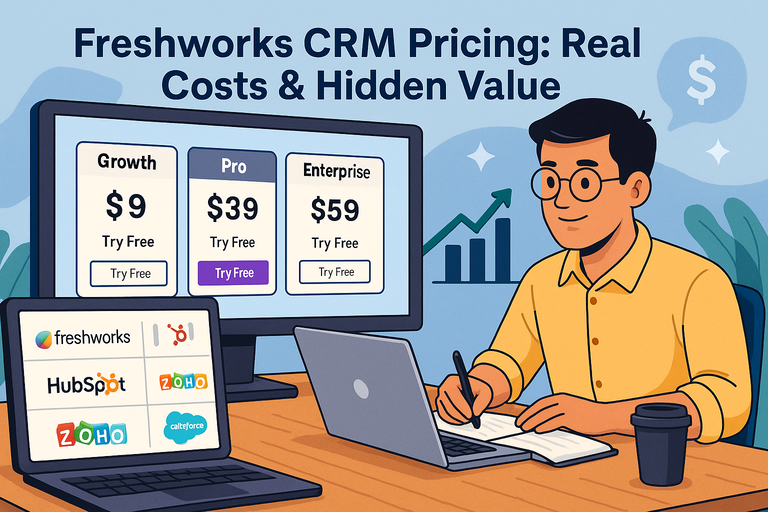
Freshsales currently offers four plan levels: Free, Growth, Pro, and Enterprise. The Free plan covers up to 3 users. Paid Freshsales plans start at $9 per user per month for Growth, then move to $39 for Pro and $59 for Enterprise when billed annually.
The official comparison page positions Growth for startups and SMBs, Pro for growing and mid-sized businesses, and Enterprise for larger teams that need stronger customization and governance.
What matters here is not just the jump in price, but the jump in operational capability. Growth gives you the basics most small teams need: contact management, pipeline tracking, built-in email, chat, phone, basic workflows, reports, and marketplace access.
Pro is where the platform starts to feel meaningfully more powerful, with lead scoring, sales sequences, custom reports, auto-assignment, territory management, and more AI support.
Enterprise adds governance and deeper customization, including field-level permissions, custom modules, sandbox, audit logs, and more advanced AI forecasting insights.
In my experience, this is the first place buyers get tripped up. They compare Freshsales to another CRM using only entry-level price. That usually leads to a false comparison. If your team needs routing, custom reporting, multiple pipelines, or structured permissions, you are not really shopping the $9 tier.
You are shopping the $39 or $59 tier whether you realize it yet or not. That is the real starting point for many growing sales teams.
The Real Cost Depends On Seats, Billing Term, And Usage
Freshsales is sold per user on its paid plans, so the moment your team grows, cost scales linearly with seat count. A five-user team on Growth is very different from a 25-user team on Pro.
Even though that sounds obvious, many teams underestimate how quickly CRM cost rises once sales reps, managers, operations staff, and admins all need access.
Freshworks’ own pricing guide notes that sales CRMs can range from about $9 to $300 per user per month depending on features and business needs, which is a useful reminder that feature scope is usually the biggest cost lever.
There is also a billing nuance. The public pricing shown on the official Freshsales pages is explicitly billed annually, which means the headline numbers are tied to annual commitment rather than flexible month-to-month budgeting.
If you are trying to compare total ownership cost with another CRM, use annualized math first so you do not compare one vendor’s annual rate with another vendor’s monthly contract.
Usage also matters more than many buyers expect. Freshworks includes 500 AI agent sessions with all paid plans as a trial allocation, limited once per account, and then sells additional session capacity through an add-on.
So even if your seat price looks stable, customer-facing AI usage can create a second spending layer later. That is why “Freshsales pricing explained” should always include both subscription cost and expansion cost.
A Plan-By-Plan Breakdown Of Freshsales
The most useful way to compare Freshsales plans is to match each one to a business stage, not just a budget.
A cheap plan that blocks your workflow is more expensive than a higher-tier plan that removes bottlenecks.
Free Plan: Good For Testing, Not For Serious Scale
The Freshsales Free plan costs $0 and supports up to 3 users. Freshworks positions it for small teams that are just starting to manage customer data, and the included capabilities are better than many “free CRM” offers: Kanban views, email templates, built-in phone, and live chat are all listed on the official pricing page. There is also no credit card required and support is listed as 24×5.
That sounds generous, and for the right team it is. I would recommend this plan for founders validating a sales process, very small agencies, or service businesses that mainly need a lightweight place to track contacts and deals.
It is also useful if you want to test Freshsales’ interface before migrating your actual revenue process into it. Because the free plan keeps the barrier low, it can reduce the risk of adopting a new CRM and discovering your team hates the workflow.
Where it stops working is when structure starts to matter. Once you need stronger automation, deeper reporting, routing logic, territory management, or more than 3 users, the Free plan quickly becomes a temporary holding zone rather than a long-term solution.
I would not build a scaling sales operation around it. It is a test bench, not a full growth engine. That distinction helps you avoid wasting weeks setting up a free plan you will outgrow almost immediately.
Growth Plan: Best Entry Point For Small Sales Teams
Growth is the first real paid Freshsales plan, priced at $9 per user per month when billed annually. Freshworks describes it as tailored for startups and SMBs that need pipeline management and engagement across channels.
Feature-wise, it includes Kanban views for contacts, accounts, and deals, contact lifecycle stages, built-in chat, email, and phone, email templates, custom fields, basic workflows, curated reports, marketplace access, mobile app support, and even 1 CPQ license.
That feature mix tells you exactly who this tier is for. If you are a small team that mainly needs organized follow-up, basic automation, and unified communication, Growth is probably enough. Imagine a six-person B2B sales team that handles inbound demo requests, follow-up calls, and quote generation.
Growth gives them one place to manage leads, track deals, collaborate, and keep outreach moving without paying mid-market CRM pricing on day one.
Still, there is one important caution. Growth is affordable partly because it avoids many of the “control” features that operations-heavy teams eventually need.
Basic workflows are helpful, but if your process depends on territory rules, multiple pipelines, advanced reporting, or AI-assisted prioritization, you may hit the ceiling faster than expected.
I usually see Growth as the best cost-to-value choice for small teams with a simple sales motion, not for teams with several reps, handoff complexity, or mature revenue operations.
Pro And Enterprise: Where The Platform Gets Serious
Pro costs $39 per user per month billed annually, and it is the tier where Freshsales starts to behave like a more advanced revenue platform.
It adds contact scoring by Freddy AI, custom sales activities, advanced custom fields, auto-assignment rules, territory management, sales sequences, AI-assisted sales emails, text rephrasing and enhancement, multiple sales pipelines, account hierarchy, deal insights, advanced workflows, and custom reports.
This is the plan I would look at first if your team already has a structured sales process. For example, if leads are routed by region, industry, or account size, auto-assignment and territory management are not “nice to have” features. They are daily workflow requirements.
The same is true for custom reports. Once a manager needs funnel visibility by rep, source, or segment, curated reports are rarely enough. Pro often becomes the practical minimum for teams that want clean accountability and process consistency.
Enterprise moves to $59 per user per month billed annually and adds features aimed at control, governance, and complexity: field-level permissions, custom modules, workflows for custom modules, sandbox, audit logs, and forecasting insights by Freddy AI.
That makes Enterprise less about selling more emails or calls and more about building a CRM environment that larger teams can govern safely. If multiple departments touch data, if compliance matters, or if your process needs objects beyond standard contacts and deals, Enterprise is where the pricing starts to make sense.
Hidden Costs Most Buyers Miss
This is the section many people really mean when they search for freshsales pricing explained.
The plan price is visible. The extra spend triggers are the part that hurts later.
Add-Ons Can Quietly Change Your Budget
Freshworks explicitly promotes add-ons on the Freshsales pricing page, including Configure, Price, Quote and Freddy AI Agent. That matters because the sticker price of your base plan may not reflect the actual workflows your team wants to use.
A company can buy Pro thinking the CRM budget is settled, then realize its quote process, document generation, or AI chatbot usage requires add-on spend.
The Growth plan listing also includes “1 CPQ license,” which is interesting because it suggests product quoting capability may begin in limited form but not necessarily at the scale a growing team needs.
Once more users need that function, or once document workflows become standardized across reps, budgeting only for base seats can create a gap between what was approved and what operations actually needs.
I believe this is where many software buyers make the wrong mental model. They treat the CRM plan as the whole purchase instead of the platform foundation. A better approach is to ask one practical question before you buy: “What process will our team try to run in month three that is not fully covered by base seats?”
If the answer includes advanced quoting, AI engagement, or custom workflow expansion, that needs to be part of your cost estimate from the start.
AI Usage Is Not The Same As AI Availability
Freshsales leans heavily into Freddy AI across its product pages. On the core sales page, Freshworks highlights AI for lead and deal insights, email drafting, and productivity support.
On the pricing page, the paid plans include 500 AI agent sessions to try chatbots, limited once per account, after which additional sessions can be purchased with the AI agent add-on. Only customer-facing AI bot features consume those sessions, while agent-facing AI features and bots do not consume them in the same way.
That distinction is easy to miss. A buyer may read “AI included” and assume unlimited usage across the board. That is not the right assumption.
Some AI functionality is built into plan value, but customer-facing AI engagement can become metered through session packs. If your website gets steady traffic or if you actively use AI bots to qualify leads, this can become one of the more important hidden costs.
A simple rule I recommend is this: Separate AI features into two buckets before signing. Bucket one is productivity AI for your team, like scoring or writing support. Bucket two is customer-facing AI interactions that can scale with traffic. The second bucket is the one that deserves its own budget line. That one habit prevents a lot of surprise renewal conversations.
The Wrong Plan Can Cost More Than The Higher Plan
Sometimes the biggest hidden cost is underbuying. Freshworks’ own CRM pricing guide argues that the best value in CRM often sits in the middle tiers, because a modest price increase can unlock capabilities that materially improve workflow and reporting.
That insight fits Freshsales well. Growth looks inexpensive, but if your team spends extra hours manually routing leads, building workarounds, or exporting data to compensate for missing features, the lower seat price can become a false economy.
Take a realistic scenario. A 10-user team chooses Growth to save money, but their sales manager needs territory rules, custom reports, and sequences. Two reps miss follow-ups, leads sit unassigned, and pipeline reviews depend on spreadsheets. The team then upgrades to Pro after months of friction.
On paper, they “saved” on software. In practice, they paid with slower response times, more admin work, and poorer visibility. For a revenue team, that hidden cost is often bigger than the subscription gap.
That is why I suggest pricing the workflow, not just the license. If the next plan removes manual steps from a revenue-critical process, it may be the cheaper option overall. Software cost is easy to see. Process drag is harder to see, but it is very real.
Freshsales Vs Freshsales Suite: Which One Saves More Money?
Not every company needs only a sales CRM. Some teams also need marketing automation, visitor tracking, or closer alignment between lead generation and sales follow-up.
That is where Freshsales Suite enters the conversation.
When Freshsales Alone Is The Smarter Buy
Freshsales on its own is usually the better fit when your core problem is sales execution, not marketing orchestration.
If your team already has a separate marketing stack, or if most leads come from outbound prospecting, referrals, or partner channels, paying for a broader suite may add complexity you do not need.
The core Freshsales product is built to help teams capture, qualify, track, and close leads faster through pipeline management, built-in communication, and AI-assisted selling.
This is especially true for service-led businesses, agencies, consultants, and smaller B2B teams where the CRM’s main job is to centralize contacts, manage deals, and keep follow-ups organized.
In that environment, the cleanest budget often comes from using the sales CRM alone and keeping the rest of the stack lean. You spend on the process that directly supports revenue, not on adjacent features your team may never fully adopt.
I suggest resisting the temptation to buy “more platform” just because it sounds strategic. The smartest plan is usually the one your team will actually use deeply. A narrow, well-adopted CRM beats a broader suite that sits half-configured while reps continue using spreadsheets and inboxes.
When The Suite Can Be Cheaper In Practice
Freshsales Suite is positioned as a single CRM-plus-marketing environment that unifies customer data and helps sales and marketing work from one source of truth.
Freshworks says the Suite combines CRM, marketing automation, and AI, and highlights benefits like understanding visitor intent, building landing pages, tracking on-site behavior, using chatbots, and tailoring email campaigns.
It also markets the Suite as a way to reduce IT complexity and cost by replacing disconnected tools with one system.
That matters because “cheaper” does not always mean a lower subscription line item. If you currently pay for a separate CRM, a lightweight email platform, live chat, and visitor tracking, then a unified suite can reduce tool sprawl.
It may also cut soft costs like integration setup, sync errors, and reporting gaps between marketing and sales. In those cases, the Suite may have a higher sticker price than Freshsales alone but a lower total software footprint.
A useful test is this: Count the number of tools touching your lead journey from first website visit to closed deal. If that number is three or four and your team constantly complains about data fragmentation, the Suite may save more than it costs. If your funnel is simple and your marketing needs are modest, Freshsales alone will often stay the cleaner and cheaper path.
How To Choose The Right Freshsales Plan
The best Freshsales plan is usually the one that matches your next 12 months, not just your current month. Buying only for today often leads to rework.
Match The Plan To Your Sales Process Complexity
Here is the simplest way I know to choose. Start with your workflow, not your budget. If you only need contacts, deals, communication, and basic automation, Growth is usually enough.
If you need structured routing, multiple sales motions, manager reporting, or AI-based prioritization, Pro is usually the right answer.
If you need governance, permission control, custom objects, auditability, or a safe testing environment through sandbox, Enterprise becomes the more realistic option.
Ask yourself a few practical questions. Do leads need to be distributed automatically? Do managers need custom reports instead of canned ones? Will you run more than one pipeline? Do different teams need different data access?
The more “yes” answers you get, the less likely Growth will hold up. This is not about chasing premium features. It is about avoiding operational friction that makes the CRM harder to trust.
I recommend choosing the lowest plan that supports your real workflow without workarounds. That wording matters. Every workaround becomes future admin burden. The right plan should feel boring in a good way: leads route where they should, managers can report without hacks, and reps can follow the system instead of inventing their own.
Use A Simple Costing Framework Before You Commit
Before you buy, build a one-page internal estimate with four lines: seats, annual commitment, add-ons, and expected expansion. Most teams only budget the first line. That is a mistake.
| Cost Area | What To Check | Why It Matters |
|---|---|---|
| Base seats | Number of active users by role | Paid plans are per user, so team size drives the core budget |
| Billing basis | Annual rate shown on pricing page | Headline prices are listed as billed annually |
| Add-ons | CPQ expansion, AI agent sessions, extra workflow needs | Base plan may not cover the full operating model |
| Growth buffer | Expected hires or added usage in 6 to 12 months | Prevents underbudgeting right after rollout |
This framework is simple, but it works. Imagine you have 12 users today and expect four more by year-end. You also plan to use AI chat on your website. Suddenly the cheapest-looking plan may no longer be the most realistic budget choice.
When you price with expansion in mind, you make a cleaner decision and avoid the “surprise second purchase” problem that happens after implementation.
Common Buying Mistakes To Avoid
A lot of CRM regret comes from predictable mistakes. Most are not technical. They come from buying software in the wrong order.
Mistake 1: Comparing Freshsales To Competitors By Entry Price Alone
Freshsales starts at a low published rate, and that makes it tempting to compare it against other CRMs using only the first paid plan.
But Freshworks itself notes that CRM pricing varies widely based on functionality, and mid-tier plans often deliver the strongest value because they unlock advanced capability for a relatively modest jump in cost.
That is a strong hint that serious comparison should happen feature-for-feature, not price-tag-to-price-tag.
If one platform includes routing, AI scoring, custom reports, or deeper permissions only at higher tiers, then those higher tiers are the real comparison point. I have seen teams celebrate choosing the cheaper CRM, only to spend the next quarter patching missing capabilities with manual processes or separate tools. That is not savings. It is deferred cost.
A better comparison method is to list your five non-negotiable workflows first. Then ask which plan on each platform supports all five natively. That instantly makes the pricing comparison more honest. And yes, sometimes the platform with the higher sticker price turns out to be the cheaper operational choice.
Mistake 2: Buying For Features You Will Not Use
The opposite problem also happens. Some teams jump straight to Pro or Enterprise because they fear outgrowing the system, but they have not yet built the process maturity to use those features.
If your sales process is still loose, your reporting expectations are basic, and your team has not standardized follow-up, premium features can become expensive shelfware. Freshsales’ pricing ladder makes those upgrades available, but availability does not mean immediate necessity.
For many teams, Growth is enough for the first serious phase of CRM adoption. It provides contact management, communication channels, custom fields, basic workflows, reports, and mobile access.
That is already a meaningful step up from spreadsheets or an inbox-driven process. You do not need every advanced feature on day one to get strong value.
My advice is simple: Buy for the next stage of discipline, not the fantasy end state. If your team is not yet using sequences, territories, or advanced reporting in any structured way, do not pay extra just because those terms sound sophisticated. Get the team using the CRM properly first, then upgrade when the operational need becomes real.
Smart Ways To Keep Freshsales Cost Efficient
Once you choose a plan, the next challenge is making sure you get full value from it.
Cost efficiency is not about paying less every month. It is about making every paid seat and feature earn its place.
Keep Seat Count Clean And Intentional
Because paid Freshsales plans are priced per user, unused or loosely assigned seats create instant waste. This sounds basic, but it is one of the most common CRM budget leaks.
Teams often buy seats for “just in case” access, temporary contributors, or people who rarely touch the system. Over time, that turns a clean CRM budget into a bloated one.
I recommend grouping users into three categories before purchase: daily operators, managers, and occasional viewers. Daily operators usually deserve full seats. Managers usually do too, especially if they need dashboards or coaching visibility.
Occasional viewers are where you should be more disciplined. If a role only needs periodic exports or summary access, do not assume that person belongs in the paid-seat count by default.
This matters even more as teams grow. A difference of a few unnecessary seats may look minor on paper, but over an annual billing cycle it adds up quickly. Clean seat governance is not glamorous, yet it is one of the most reliable ways to keep CRM spend aligned with actual usage.
Upgrade Only When A Missing Feature Slows Revenue
The smartest upgrade trigger is not curiosity. It is friction tied to revenue. If your current plan makes it harder to route leads, prioritize deals, report performance, or control data properly, then an upgrade is probably justified. If not, hold off.
Freshsales makes this relatively easy to think through because the feature jumps are clear. Growth covers basic operating needs. Pro adds scale features like scoring, sequences, routing, multiple pipelines, and custom reports.
Enterprise adds governance and customization depth. That means you can anchor upgrade timing to specific pain points instead of vague “we might need this later” reasoning.
A good internal rule is this: Upgrade when the missing feature either costs the team time every week or creates risk in forecasting, handoffs, or data quality. That way, the upgrade decision stays tied to measurable business pain rather than product marketing. In my experience, that one habit leads to much better CRM spending decisions over time.
Final Verdict On Freshsales Pricing
Freshsales pricing is competitive on the surface, but the smartest way to evaluate it is by workflow fit, not just headline rate. The Free plan is genuinely useful for testing and tiny teams. Growth is a strong value tier for small businesses with a straightforward sales motion.
Pro is where many scaling teams will find the real operational sweet spot, and Enterprise is best when governance, customization, and control start to matter.
The hidden costs are not especially sneaky once you know where to look. They mainly come from add-ons, AI agent session expansion, annual billing expectations, and choosing the wrong plan for your workflow.
Freshworks openly lists add-ons like CPQ and Freddy AI Agent, includes 500 AI agent sessions once per paid account, and publishes annual per-user pricing clearly. The challenge is not missing information. It is translating that information into a realistic buying decision.
If I had to give one plain-English recommendation, it would be this: choose the cheapest Freshsales plan that supports your real operating model without workarounds, and price your decision using seats, add-ons, and expected growth together.
That approach keeps you from overbuying, underbuying, and getting surprised later. And in a CRM purchase, that is usually the difference between “affordable” and “actually worth it.”
FAQ
What is Freshsales pricing and how does it work?
Freshsales pricing is based on a per-user monthly subscription model, with four main plans: Free, Growth, Pro, and Enterprise. Each tier unlocks more advanced sales features, and pricing increases depending on user count, billing cycle, and optional add-ons like AI or CPQ tools.
Is Freshsales really free to use?
Yes, Freshsales offers a free plan for up to three users with basic CRM features like contact management, email tracking, and deal pipelines. However, most growing teams quickly need paid plans to access automation, reporting, and advanced sales tools that are not included in the free version.
What are the hidden costs in Freshsales pricing?
Hidden costs in Freshsales pricing usually come from add-ons, additional AI usage, and scaling user seats. While base plans look affordable, features like advanced workflows, AI agent sessions, or expanded quoting tools can increase the total cost over time.
Which Freshsales plan is best for small businesses?
The Growth plan is typically the best starting point for small businesses because it includes essential CRM features like pipelines, email, phone, and basic automation at a low cost. However, businesses with more complex sales processes may need the Pro plan sooner than expected.
Is Freshsales worth the price compared to other CRMs?
Freshsales offers strong value for its price, especially in mid-tier plans like Pro where automation and reporting features improve efficiency. Compared to other CRMs, it is often more affordable, but the best value depends on how well the plan fits your sales workflow.

I’m Juxhin, the voice behind The Justifiable.
I’ve spent 6+ years building blogs, managing affiliate campaigns, and testing the messy world of online business. Here, I cut the fluff and share the strategies that actually move the needle — so you can build income that’s sustainable, not speculative.
Related posts:
 Why CRM Freshworks Stands Out From Other Platforms
 Freshworks CRM Pricing: Real Costs & Hidden Value
 Freshworks CRM And Support Software Review: Best Value?
 Social Media Marketing for Small Business – Best Tips
 Freshworks Vs HubSpot Comparison: Which Drives More Revenue
 Monday Limitations For Small Teams That Can Slow You Down