
Table of Contents
Some links on The Justifiable are affiliate links, meaning we may earn a small commission at no extra cost to you. Read full disclaimer.
MailerLite email list growth strategy works best when you stop chasing “more traffic” and start building a system that turns the traffic you already have into subscribers. That is the real game.
In my experience, MailerLite gives smaller brands a nice advantage here because it combines forms, pop-ups, landing pages, automations, segmentation, and reporting in one place instead of forcing you to duct-tape everything together.
In this guide, I’ll walk you through 9 proven ways to grow subscribers faster, keep lead quality high, and turn your list into something that actually drives revenue.
Why A MailerLite Email List Growth Strategy Matters
A lot of email list advice sounds good but falls apart in real life because it ignores intent. Not every new subscriber is valuable. The goal is not just a bigger list.
The goal is a list full of people who want your content, recognize your brand, and are likely to buy, book, reply, or come back. That is where a proper MailerLite setup helps.
MailerLite combines signup forms, pop-ups, landing pages, automations, segmentation, personalization, and campaign analytics inside one platform, which makes it easier to build an end-to-end growth system instead of a collection of random tactics.
MailerLite also reports industry benchmark data showing average 2025 open rates of 43.46%, click rate of 2.09%, and unsubscribe rate of 0.22%, which gives you a realistic baseline for judging whether your list growth efforts are producing quality subscribers or just inflated numbers.
Start With The Right Growth Goal
Before you design a form or launch a landing page, define what “growth” means for you. For some businesses, it is raw subscriber count. For most, it should be one of these:
- Net subscriber growth: New subscribers minus unsubscribes.
- Lead-to-customer quality: How many subscribers eventually buy.
- Source efficiency: Which form, page, or lead magnet brings the best people.
- Engagement quality: Open, click, and reply behavior after signup.
I suggest setting one primary goal and two supporting metrics. For example, an ecommerce brand might target 500 net new subscribers per month, while also tracking first-email open rate and first-purchase rate.
A consultant might care less about list size and more about how many subscribers book discovery calls. Campaign Monitor also highlights monthly net growth and form conversion rate as core metrics worth watching when evaluating email list health.
Build For Subscriber Quality, Not Vanity Metrics
This is where many of us get tempted to do the wrong thing. A generic “Join our newsletter” form might bring in a few signups, but it usually attracts low-intent subscribers. Better growth comes from matching the offer to the page topic, the traffic source, and the subscriber’s stage of awareness.
For example, imagine you run a Shopify skincare store. A homepage popup offering “10% off” may grow the list. But a product-category popup offering “Get the routine for sensitive skin” could bring in fewer signups and still outperform because the subscribers are more qualified.
MailerLite’s segmentation tools, custom fields, groups, and personalization features are built for exactly this kind of targeting, which is why your growth strategy should start with relevance, not volume.
Set Up The Foundation Before You Chase More Subscribers
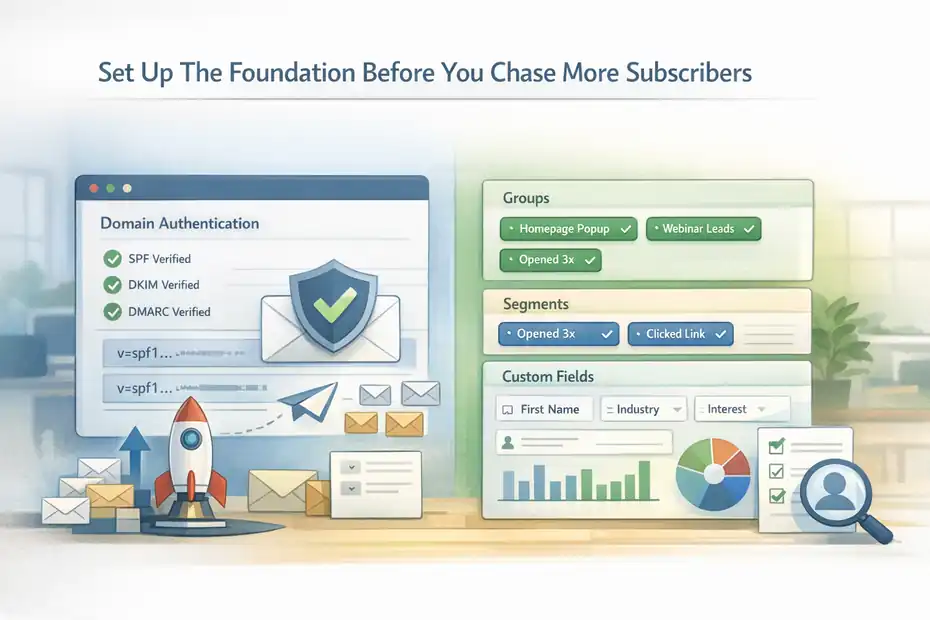
You can absolutely grow fast with MailerLite, but the best results come when the backend is clean. This part is not glamorous, though it saves you from a ton of pain later.
Authenticate Your Domain First
If I had to pick one “boring” step people skip too often, it would be domain authentication.
MailerLite’s deliverability guidance and help docs make it clear that authenticating your domain with SPF and DKIM improves deliverability and helps align with newer sender policy requirements. MailerLite also recommends DMARC as part of strong authentication hygiene.
When these records are missing or messy, your beautifully designed emails have a better chance of landing in spam or promotions more aggressively than they should.
Here is the practical takeaway. Do this before you launch lead generation at scale:
- Step 1: Add your sending domain inside MailerLite.
- Step 2: Publish the DNS records MailerLite provides for SPF and DKIM.
- Step 3: Confirm approval inside the Domains area.
- Step 4: Test with a real campaign before increasing signup volume.
This matters because list growth magnifies whatever system you already have. If your inbox placement is weak, getting 1,000 new subscribers just means 1,000 more people might never see your emails.
Organize Groups, Segments, And Custom Fields Early
MailerLite gives you several ways to organize subscribers, and using them correctly makes list growth much smarter. Groups work like tags you control manually or via automation.
Segments update dynamically based on conditions like behavior, location, or field values. Custom fields store subscriber data you collect, such as first name, product interest, plan type, or lead source.
I recommend a simple structure at first:
- Groups: Use for source and intent, such as “Homepage Popup,” “Webinar Lead,” or “SEO Guide Download.”
- Segments: Use for behavior, such as “Opened 3 of last 5 campaigns” or “Clicked pricing link.”
- Custom Fields: Use for details you may personalize with later, such as industry, product category, or content preference.
This setup pays off fast. A subscriber who joins from a blog post about email automation should not receive the same first week of emails as someone who signs up from a pricing page.
MailerLite supports custom fields in forms and personalization tags in campaigns, which makes targeted onboarding much easier when your structure is ready from day one.
9 Proven Ways To Explode Subscribers With MailerLite
These are the core tactics. None of them are magic alone. Together, they create a compounding system.
1. Create A Sharp Lead Magnet Around One Specific Problem
The fastest way to improve signup rates is to stop offering a vague newsletter and start offering a useful result. People do not usually wake up thinking, “I hope I can join one more email list today.” They want a shortcut, an answer, a template, a calculator, a checklist, or a clear next step.
A good lead magnet inside a MailerLite email list growth strategy should solve one immediate problem, not an entire category. “Weekly marketing tips” is weak. “7-email welcome sequence template for SaaS trials” is much stronger. “Healthy recipes” is broad. “5-day gluten-free meal plan under 20 minutes” is much better.
Here is a simple filter I use:
- Problem: What small pain does the reader want solved right now?
- Speed: Can they get value in 5 to 15 minutes?
- Fit: Does the lead magnet attract people who could eventually buy?
Imagine you run a freelance bookkeeping business. A generic lead magnet might grow your list slowly. A specific one like “Monthly Cash Flow Review Template for Service Businesses” attracts subscribers who already think like buyers.
Then you can send them into a tailored MailerLite automation based on the form or landing page they used to sign up. That one move usually improves both conversion rate and subscriber quality.
MailerLite supports landing pages, signup forms, and automation workflows out of the box, which makes this easy to implement without a big tool stack.
2. Match Embedded Forms To Page Intent
Embedded forms are underrated because they feel less aggressive than pop-ups, but on the right page they can quietly convert very well.
MailerLite’s embedded forms let you add custom fields, control design, and place forms exactly where intent is highest, such as below a tutorial, inside a comparison page, or after a case study section.
The trick is page-message match. Your form should continue the conversation the visitor is already having with the page. If someone is reading a long article about abandoned cart emails, your form should not suddenly pitch a random general newsletter. Offer a related asset, summary, checklist, or sequence.
A simple example:
- Blog post topic: How to reduce cart abandonment.
- Weak form: Join our newsletter for updates.
- Better form: Get the 3-email abandoned cart sequence template.
I also suggest placing embedded forms in two spots: one above the fold for high-intent visitors, and one after a useful content section for readers who need proof first.
HubSpot notes that well-optimized landing pages for search traffic commonly convert in the 2% to 5% range, and embedded form placement can help you squeeze more value from traffic you already earned. That is not a guarantee, but it is a helpful benchmark when testing pages.
3. Use Pop-Ups Without Annoying People
Pop-ups work because they are visible. They also fail because many of them are lazy.
MailerLite’s popup builder lets you create timed pop-ups and connect them to groups, which means you can trigger different offers for different stages of the journey instead of blasting everyone with the same interruption.
The best pop-up strategy is not “show it faster.” It is “show it smarter.” In most cases, I recommend testing one of these approaches:
- Timed popup: Show after 20 to 45 seconds for readers who are engaged.
- Scroll popup: Trigger after the visitor reaches meaningful depth on the page.
- Exit-intent popup: Use for abandoning visitors with a relevant final offer.
- Category-specific popup: Change the offer based on the page topic.
For example, if you run a creator newsletter, a homepage popup may offer “Join 12,000 readers.” But on a blog article about monetization, a better popup might offer “Get the 5-part creator revenue email course.” Same platform, same traffic, much better match.
MailerLite has also published guidance on form A/B testing, which matters here because small changes in headline, CTA copy, or offer framing can materially affect form performance. I usually test message angle before design. Better promise first, prettier form second.
4. Build Dedicated Landing Pages For Each Audience Segment
One of the biggest list growth mistakes is sending all traffic to one generic signup page. MailerLite’s landing page tools exist for a reason. A dedicated page gives you one goal, one audience, one offer, and far fewer distractions.
MailerLite also highlights built-in SEO tools and analytics for landing pages, which helps when you want each page to perform as a measurable acquisition asset rather than just a placeholder.
I recommend creating separate landing pages for different traffic sources or subscriber intents. For example:
- Podcast listeners: A page with your story, social proof, and a simple “get the private notes” offer.
- Paid traffic: A page with one lead magnet, one CTA, and almost no navigation.
- Blog readers: A page tied to a specific content upgrade.
- Partners or affiliates: A page that references the partner by name and context.
This is where subscriber growth starts feeling strategic instead of random. You are not just collecting emails. You are collecting context. That context helps you personalize the welcome flow, segment future campaigns, and improve conversion rates later.
MailerLite defines landing pages as pages built for a specific audience and one clear purpose, which is exactly why they tend to outperform more cluttered website pages for opt-in goals. In my experience, this is one of the fastest wins for brands stuck with “okay” conversion rates.
5. Collect More Than An Email, But Only When It Helps
This one needs balance. Asking for more fields can reduce form conversion, but collecting the right extra detail can dramatically improve subscriber value.
MailerLite allows you to create custom fields and add them to forms, pop-ups, and landing pages, which means you can gather useful information at signup without creating a messy workaround.
The question is not “Should I ask for more fields?” It is “Will this extra field make my follow-up meaningfully better?”
Good examples include:
- Business type: Helpful for agencies, SaaS, and B2B service providers.
- Primary goal: Helpful for coaches, educators, and course creators.
- Product interest: Helpful for ecommerce and multi-category stores.
- Role or team size: Helpful for software and consulting.
A great compromise is progressive profiling. Ask only for the email on the first form, then gather more detail later through a welcome email, survey, quiz, or preference update.
MailerLite supports surveys and quizzes in emails, and custom fields can store the information for later segmentation and personalization. That keeps the first conversion friction low while still helping you build a richer profile over time.
My personal rule is simple: If the field does not change what the subscriber receives next, do not ask for it yet.
6. Send A Welcome Sequence Immediately After Signup
A subscriber is never more interested than right after they opt in. That is why welcome automation is not optional.
MailerLite’s automation tools let you trigger workflows when someone joins a group or completes a form, then add delays, conditions, A/B tests, and actions based on what they do next.
This matters because automated emails consistently outperform regular campaigns. MailerLite’s own analysis found the first email in an automation averaged a 64% open rate and a 21.32% click rate in ecommerce, far above regular campaign averages.
GetResponse also reports welcome emails averaging an 83.63% open rate, which shows how strong immediate post-signup intent can be across email marketing more broadly.
A simple welcome flow looks like this:
- Email 1: Deliver the promised lead magnet or benefit right away.
- Email 2: Introduce your best content, product category, or quick-start path.
- Email 3: Ask a small question or invite a click that reveals intent.
- Email 4: Share a case study, testimonial, or practical win.
- Email 5: Present the next logical action.
For a fitness coach, that might mean: meal plan delivery, beginner routine, goal selection, client transformation, then consultation invite. For a SaaS brand, it could be trial setup, first-use tutorial, feature path selection, success story, then upgrade nudge.
This is where list growth becomes revenue growth.
7. Use Click-Based Segmentation To Learn What Subscribers Want
One of my favorite MailerLite moves is using subscriber behavior to quietly sort people into more relevant paths. MailerLite supports link-click triggers, group assignment, segments, and field updates inside automation, which means you can let subscribers “vote” with clicks instead of forcing them through a long onboarding form.
Here is what that looks like in practice. In your welcome email, include three links:
- Learn about pricing
- See beginner tutorials
- Explore case studies
Each click can trigger a group assignment or field update. Suddenly you know whether that subscriber is buyer-curious, information-seeking, or proof-hunting. That makes the next emails much more relevant.
This strategy is especially useful when you serve multiple audience types. Let’s say you sell email templates to freelancers, agencies, and ecommerce stores. Rather than guessing, you can let each subscriber self-segment with one click.
MailerLite specifically documents automations triggered by link clicks and updated fields, and also explains how groups can act like tags for hyper-relevant targeting.
I like this method because it feels natural. People do not mind clicking what already interests them. They do mind filling out a five-question form before they have even decided whether they trust you.
8. Turn Existing Content Into Content Upgrades
This tactic is quieter than a flashy popup, but it compounds beautifully. A content upgrade is a lead magnet tied to one specific article, video, or resource. Instead of building one giant lead magnet, you build several smaller, highly relevant ones around your best-performing content.
MailerLite is well-suited for this because you can create separate forms, groups, landing pages, and automations for each upgrade.
That means your article about product photography can lead to one download and one onboarding sequence, while your article about conversion copy leads to something entirely different.
A few content upgrade ideas that usually work well:
- Checklist: Good for process-heavy tutorials.
- Template: Great for marketers, agencies, consultants, and SaaS.
- Swipe file: Strong for copywriting, ads, and ecommerce.
- Worksheet or calculator: Useful for finance, health, and operations content.
- Mini course: Great for higher-intent lead nurturing.
Here is the part many people skip: prioritize upgrades only on pages that already get qualified traffic. Start with your top 10 pages by search traffic or time-on-page. Add one tightly matched upgrade to each.
You do not need 50 offers. You need a few strong offers attached to pages people already care about.
That is one reason SEO and email growth work so well together. Search brings intent. Content upgrades capture it.
9. Add A Preference Center To Reduce Unsubscribes And Keep More Leads
List growth is not just about acquisition. Retention matters too. MailerLite offers a Preference Center that lets subscribers update the kinds of messages they want to receive and the information they have already provided.
That helps keep people on your list who might otherwise unsubscribe completely just because the content mix or frequency is off.
This is especially useful once your email program expands. Maybe you send newsletters, product updates, promotions, event invites, and educational content. Some subscribers want all of it.
Others only want one category. A preference center gives them a middle ground between “everything” and “goodbye forever.”
A simple setup might let subscribers choose:
- Weekly newsletter
- Product updates
- Sales and discounts
- Webinars or events
- Beginner tips only
MailerLite notes that the Preference Center is available on Advanced plans, so it is not necessary for day-one setup, but it becomes valuable once your list and content catalog grow.
I believe this is one of those features that quietly improves long-term list quality rather than producing a dramatic short-term spike. And honestly, that is often the smarter win.
How To Optimize Your MailerLite Email List Growth Strategy
Once the system is running, the next job is refining it. This is where growth gets cheaper and more predictable.
A/B Test The Offer Before You A/B Test The Design
Most people test button colors first because it feels easy. I would test the value proposition first almost every time.
MailerLite supports A/B testing for forms, landing pages, campaigns, and automation paths, which gives you plenty to work with once traffic volume is high enough.
Start with these variables in order:
- Offer angle: Discount, checklist, template, quiz, free lesson.
- Headline promise: Outcome-focused versus curiosity-focused.
- CTA wording: “Get the guide” versus “Start improving now.”
- Form friction: Email only versus email plus one qualifier.
- Timing: Popup at 20 seconds versus 45 seconds.
I have seen “boring” copy changes outperform visual redesigns by a mile. A popup that says “Join our newsletter” is often dead on arrival. The same popup reframed as “Get the 3-email launch sequence we use for new offers” can be a completely different asset.
The point is to test the reason to subscribe, not just the surface appearance.
Watch The Metrics That Reveal Lead Quality
A growing list can still be a weak list. That is why I like to judge acquisition sources using downstream behavior, not just top-of-funnel conversion rate.
MailerLite gives campaign reports, click maps, open and click metrics, bounce data, spam complaints, and unsubscribe figures, so you can compare subscriber sources based on what happens after signup.
The most useful quality metrics are usually:
- First-email open rate: Shows immediate intent.
- Welcome-sequence click rate: Shows whether the promise matched the signup.
- Unsubscribe rate by source: Shows if you attracted the wrong people.
- Spam complaints: Signals expectation mismatch.
- Lead-to-sale or lead-to-booking rate: Best metric when available.
MailerLite’s benchmark data puts average unsubscribe rate at 0.22% in 2025, which is useful context. If one lead source unsubscribes at triple that rate during the first few emails, you probably have a targeting problem, not a copy problem.
Keep Your List Clean As You Scale
This is the part nobody wants to hear because cleanup sounds less exciting than growth hacks. But list hygiene protects deliverability, lowers wasted sends, and keeps your reporting honest.
MailerLite’s deliverability help center advises validating lists, removing inactive or invalid contacts, and avoiding purchased lists entirely.
It specifically warns that older databases are especially vulnerable to hard bounces, which hurt sender reputation.
My advice is to build cleanup into your system:
- After 30 to 60 days: Identify subscribers who never opened or clicked.
- Before removing them: Send a re-engagement email with one clear choice.
- If they stay inactive: Move them out of your main sending path.
- Never import bought or scraped lists: That shortcut usually creates bigger problems than it solves.
A smaller engaged list regularly outperforms a bloated one. That is not just theory. It affects inbox placement, reporting accuracy, and the confidence you have when making future decisions.
Common Mistakes That Slow Subscriber Growth
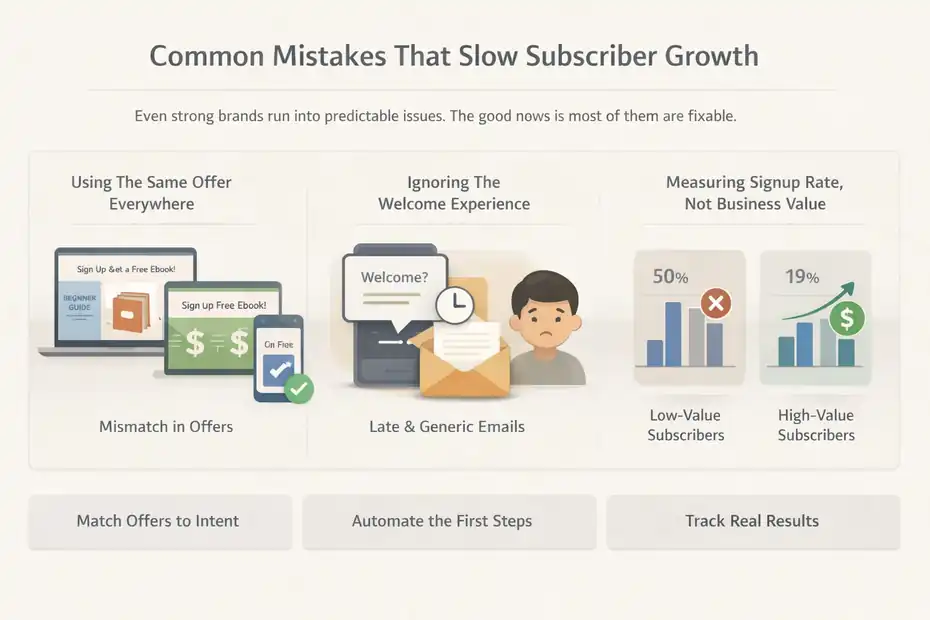
Even strong brands run into predictable issues. The good news is most of them are fixable.
Mistake 1: Using The Same Offer Everywhere
One signup offer across your whole site feels efficient, but it usually ignores intent. A reader on a beginner guide, a pricing page visitor, and a returning customer are not in the same headspace.
When the offer does not match the moment, conversion rates suffer and lead quality drops.
A better approach is to map offers to intent clusters. Use one lead magnet for educational blog traffic, another for commercial pages, and a different hook for returning visitors.
MailerLite’s forms, groups, and landing pages make this kind of segmentation manageable without a heavy tech stack.
Mistake 2: Growing Fast But Ignoring The Welcome Experience
Too many brands treat signup as the finish line. It is really the starting point. If your first email is late, generic, or disconnected from what the subscriber expected, you waste the highest-intent moment in the entire relationship.
That is why automation matters so much. MailerLite supports immediate workflows triggered by form completion or group join, and the performance gap between automated first-touch emails and regular broadcasts can be huge.
This is one of the simplest improvements you can make if subscriber numbers are rising but sales or engagement are not.
Mistake 3: Measuring Signup Rate Without Measuring Business Value
A popup that converts at 8% can still be worse than one that converts at 3% if the subscribers from the second source buy more, engage more, and unsubscribe less. This is why I encourage you to think in stages: opt-in rate, first-week engagement, then business outcome.
In practical terms, that means tagging every major source and checking what those subscribers do over time. A slightly lower form conversion rate is often perfectly fine if the lead quality is substantially better.
It is one of those uncomfortable truths that usually separates serious email programs from casual ones.
A Simple 30-Day Plan To Put This Into Action
You do not need to launch all 9 growth tactics at once. I actually think that is a good way to create a mess. A focused rollout works better.
Week 1: Fix The Infrastructure
Authenticate your domain, define your groups and custom fields, and set up one primary welcome automation.
Make sure your lead source can be tracked from the first opt-in. That part is not exciting, but it gives everything else a stable base.
Week 2: Launch One Embedded Form And One Popup
Choose your two highest-intent pages and add one embedded form plus one smart popup with a very specific offer.
Keep the copy focused on the result, not the newsletter itself. Then connect each to its own group so performance stays trackable.
Week 3: Build One Dedicated Landing Page
Create a landing page for your best lead magnet or most important traffic source.
Strip distractions, sharpen the headline, and make sure the thank-you step flows directly into the welcome sequence. This is usually where you start seeing cleaner conversion data.
Week 4: Add Segmentation And Testing
Introduce click-based self-segmentation in the welcome flow, then start testing one variable in your forms or page headline. Do not test five things at once. Pick the biggest lever and learn from it.
MailerLite’s automation conditions, A/B testing options, and segmentation tools are strong enough to support this without overcomplicating your setup.
Final Thoughts
A strong MailerLite email list growth strategy is not about one viral trick. It is about building a system where the offer matches the page, the form matches intent, the automation matches the promise, and your segmentation keeps getting smarter over time.
That is what turns subscriber growth into real business growth.
If I were starting from scratch today, I would not obsess over getting every detail perfect. I would build one great lead magnet, one relevant form, one simple welcome sequence, and one way to segment subscribers by what they actually care about.
Then I would improve from there. That is usually enough to move from “we have a list” to “our email channel is working.”
FAQ
What is a MailerLite email list growth strategy?
A MailerLite email list growth strategy is a structured approach to increasing subscribers using targeted forms, landing pages, automations, and segmentation. It focuses on attracting the right audience, improving conversion rates, and nurturing leads effectively to turn subscribers into engaged customers over time.
How can I grow my email list faster with MailerLite?
You can grow your email list faster by using high-converting lead magnets, optimized pop-ups, targeted landing pages, and automated welcome sequences. Combining these with segmentation and A/B testing helps attract qualified subscribers while improving engagement and long-term list performance.
Why is segmentation important in email list growth?
Segmentation allows you to group subscribers based on behavior, interests, or source, making your emails more relevant. This improves open rates, click rates, and conversions, while reducing unsubscribes, ultimately helping you grow a higher-quality email list rather than just a larger one.
What are the most common mistakes in email list growth?
Common mistakes include using the same signup offer everywhere, ignoring the welcome experience, and focusing only on subscriber numbers instead of lead quality. These issues reduce engagement and conversions, making it harder to turn subscribers into loyal customers.
How do I measure the success of my email list growth strategy?
You should track metrics like conversion rate, open rate, click rate, unsubscribe rate, and lead-to-customer conversion. These indicators help you understand not just how fast your list is growing, but how valuable and engaged your subscribers are.

I’m Juxhin, the voice behind The Justifiable.
I’ve spent 6+ years building blogs, managing affiliate campaigns, and testing the messy world of online business. Here, I cut the fluff and share the strategies that actually move the needle — so you can build income that’s sustainable, not speculative.
Related posts:
 Aweber Email Marketing: Boosting Your Business Through Effective Email
 How Marketing Automation Tools Can Help You Boost Your Sales
 5 Dynamic Lead Magnets That Convert Visitors into Leads
 Top 10 Email Service Providers: Powerful Tools for Businesses
 How to Integrate Aweber with ClickFunnels
 How To Plan An Email Marketing Campaign