
Table of Contents
Some links on The Justifiable are affiliate links, meaning we may earn a small commission at no extra cost to you. Read full disclaimer.
Automated marketing solutions are transforming how businesses attract, convert, and retain customers—without drowning in repetitive work.
Have you ever wondered how top-performing brands manage to run personalized campaigns across multiple channels while still saving time and scaling revenue?
The secret isn’t a bigger team—it’s automation done right. In this guide, we’ll break down how these tools free up your schedule, streamline your strategy, and turn efficiency into measurable profit.
Understanding How Automated Marketing Solutions Work
Automated marketing solutions take repetitive marketing tasks—like sending emails, nurturing leads, and segmenting audiences—and run them automatically using pre-defined rules or “workflows.”
They allow teams to work smarter instead of harder by connecting different parts of their marketing system into one seamless process.
How Marketing Automation Streamlines Daily Operations
When set up correctly, marketing automation keeps your entire marketing engine running smoothly without constant human input.
Think of it like a personal assistant that handles the small, time-consuming stuff—while you focus on strategy and creativity.
For example:
- A lead downloads an ebook → The system instantly sends a thank-you email.
- If that lead opens the email → It triggers a follow-up with related offers.
- If they don’t → The system waits two days and tries again with a different message.
This kind of automation saves hours every week. Tools like HubSpot or Aweber make it easy to design these workflows using drag-and-drop editors. You can visually connect each step—email → action → next step—without writing a single line of code.
I recommend starting with a simple workflow, like a welcome email sequence. You’ll see just how much manual effort it replaces once it’s running automatically.
The Key Components of an Automated Marketing System
Every effective automated marketing system usually includes four main building blocks:
- Triggers – Events that start an automation (like a new subscriber or form submission).
- Actions – The steps the system takes (sending an email, tagging a contact, updating a lead score).
- Conditions – Rules that control what happens next (for example, if the user opens an email → send offer A; if not → send offer B).
- Goals – The results you want to achieve (like converting a free trial user into a paying customer).
These components work together to move people through your funnel automatically. A platform like Mailerlite visualizes this beautifully: You can literally watch leads progress along paths you’ve mapped out.
Common Business Processes You Can Automate Effortlessly
Here’s where the magic happens—automation handles the daily grind so you can focus on growth.
Common processes you can automate include:
- Email nurturing: Automatically follow up after sign-ups or purchases.
- Lead scoring: Assign points based on engagement level or website activity.
- Customer segmentation: Group people dynamically based on behavior.
- Social media posting: Schedule or auto-share new blog posts.
- Abandoned cart reminders: Recover lost revenue automatically.
I’ve seen small ecommerce stores save over 10 hours a week by automating just their cart recovery and post-purchase flows. It’s one of the fastest ROI wins you can get from automation.
How Automation Enhances Personalization and Targeting
Personalization isn’t just about using a customer’s first name anymore—it’s about timing, context, and intent. Automated marketing systems let you tailor every message to a customer’s unique journey.
Example: A user visits a product page but doesn’t buy. You can automatically send them a follow-up email featuring that exact product, plus a small discount.
Modern tools like Klaviyo use behavioral data (pages visited, emails opened, actions taken) to send hyper-targeted content.
I suggest starting with one simple personalization layer—like sending different welcome emails based on how someone found your website. Even that small tweak can increase engagement rates by 20–30%.
Saving Time With Automated Campaign Management
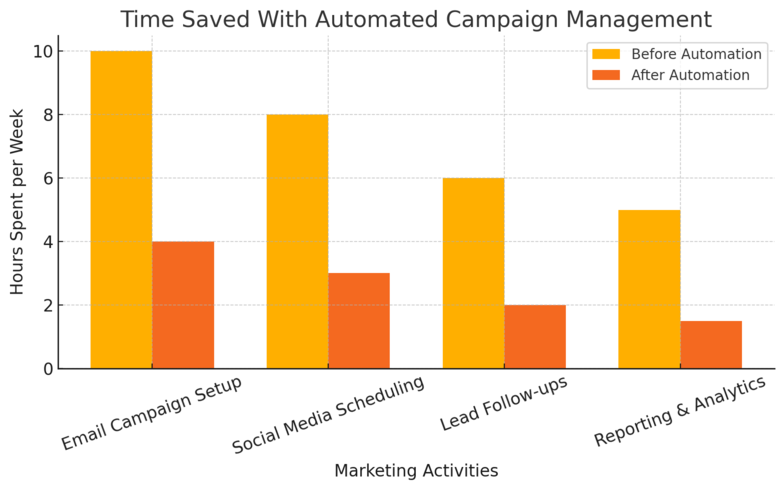
Automated marketing isn’t just about convenience—it’s about reclaiming time you can reinvest in strategy, creative work, or scaling campaigns.
Scheduling Campaigns Across Multiple Channels Simultaneously
Managing multiple marketing channels manually is exhausting. With automation, you can schedule email, SMS, and social media campaigns to launch at the same time—or trigger them based on customer behavior.
Tools like HubSpot Campaigns let you align everything from one dashboard. You can set a launch date, define audience segments, and preview messages across platforms.
I like to batch-schedule content for a month at a time—then let automation take care of delivery.
Quick tip: Schedule campaigns during your audience’s peak engagement times using built-in analytics. It’s a simple move that can lift click-through rates by up to 25%.
Reducing Manual Workload Through Workflow Automation
Workflow automation is like having a virtual marketing assistant. It manages everything from assigning leads to sending reminders to your sales team.
Example workflow in ActiveCampaign:
- Lead fills out a contact form.
- System assigns them to a sales rep.
- Rep gets a task notification.
- After two days, the system checks if the lead was contacted.
- If not, it triggers an automated follow-up email.
This eliminates the need for repetitive check-ins or manual tracking. I’ve personally seen teams cut task duplication by 40% with a single well-structured workflow.
Using Trigger-Based Emails to Maintain Consistent Engagement
Trigger-based emails are automated messages sent when a specific action occurs—like signing up, abandoning a cart, or completing a purchase.
They keep communication consistent without feeling robotic.
Example triggers:
- Welcome email after signup.
- Product recommendation after browsing.
- Reactivation email after 30 days of inactivity.
Mailchimp’s Customer Journey Builder is great for setting these up visually. Start simple—automate one type of message first, then build from there.
I suggest focusing on welcome or cart abandonment flows since they generate some of the highest ROI per email sent.
Real-Time Tracking and Optimization Without Manual Input
Once your automations are live, the system continuously tracks performance in real time—open rates, conversions, and customer behavior—without you manually checking reports every hour.
Most automation tools include dashboards with built-in analytics. For instance, HubSpot shows how each email or workflow performs, and you can tweak underperforming steps instantly.
I often recommend setting up weekly automated reports so you can review metrics in one glance. That way, you stay informed but not buried in data entry.
Increasing Revenue Through Smarter Lead Management
Automation isn’t just about saving time—it’s a powerful driver of revenue growth.
By automating how leads are scored, nurtured, and converted, you can scale your sales without hiring more staff.
How Automated Lead Scoring Prioritizes High-Value Prospects
Lead scoring ranks prospects based on engagement—so sales teams can focus on the most promising ones first. Automated systems assign points for actions like:
- Opening emails
- Visiting key pages
- Attending webinars
When a lead reaches a specific score, the system can notify sales instantly or move them to a new campaign.
I’ve used HubSpot’s lead scoring feature to automatically qualify leads—turning random form fills into actionable insights.
It’s an underrated feature that boosts conversion efficiency by focusing your efforts where they’ll pay off most.
Nurturing Leads With Behavior-Based Sequences
Behavior-based nurturing sequences guide leads along their journey using relevant content. For example, if a user downloads a beginner’s guide, the automation sends them more beginner content instead of advanced offers.
Platforms like ActiveCampaign excel at this because they let you branch automations based on engagement. If someone clicks a link, they move into a different path.
This keeps your communication highly relevant, building trust and credibility. I recommend creating at least three segmented nurture paths—top-of-funnel education, middle-of-funnel engagement, and bottom-of-funnel conversion.
Converting Cold Leads Into Loyal Customers Automatically
Cold leads don’t always mean dead leads—they often just need reactivation. Automated re-engagement campaigns can rekindle interest through personalized messages or special offers.
For example:
- Send a “We miss you” email after 60 days of inactivity.
- Offer a loyalty discount or updated product recommendation.
- Retarget them with dynamic ads showing recently viewed items.
Using platforms like Omnisend, I’ve seen reactivation rates as high as 15–20%. The key is empathy—don’t push too hard; remind them of value instead.
Integrating CRM Systems for Streamlined Sales Processes
When your marketing automation connects directly with your CRM (Customer Relationship Management) system, your sales and marketing teams work in harmony.
This integration ensures data flows both ways: marketing learns from sales outcomes, and sales benefits from detailed behavioral tracking.
Example setup:
- Marketing automation captures a lead.
- CRM records all interactions automatically.
- When the lead becomes “sales-ready,” the system notifies the rep.
- After conversion, CRM data triggers post-sale nurturing campaigns.
Tools like Monday CRM or Freshsales are designed for this seamless alignment. I recommend syncing fields carefully during setup—it prevents data mismatches and ensures leads don’t fall through the cracks.
Expert Tip: The best automation strategy isn’t the most complex—it’s the one that mirrors your customer journey closely. Start with mapping your buyer stages, then build automations that guide users naturally from awareness to loyalty.
Maximizing ROI With Data-Driven Decision Making
The biggest strength of automated marketing solutions is their ability to turn raw data into clear, actionable insights.
Instead of guessing what’s working, you get real-time feedback that helps you make smarter decisions and stretch every marketing dollar further.
How Automation Tools Analyze Customer Behavior in Real Time
Modern automation tools constantly track user behavior across channels—email clicks, page visits, purchase history, even time spent on a webpage.
Platforms like HubSpot, ActiveCampaign, and Klaviyo integrate these data points into unified dashboards so you can see the full customer journey in one place.
Example workflow:
- A visitor downloads a free resource.
- The system logs their visit, tags them by interest, and tracks future behavior.
- Each interaction updates their lead score automatically.
This real-time insight helps you react faster. I suggest setting up automated alerts for key actions—like when a lead reaches a specific engagement threshold—so your sales team can act immediately.
It’s one of the most effective ways to catch buying signals before they fade.
Using Predictive Analytics To Forecast Sales Growth
Predictive analytics uses past customer data to anticipate future behavior. Instead of reacting to what already happened, you can plan your next move with confidence.
Tools like Salesforce Pardot and HubSpot Enterprise use machine learning to identify patterns—for instance, which email sequences tend to lead to conversions or which products drive repeat purchases.
Example scenario: If your data shows customers who read two blog posts and open three emails have a 60% higher chance of converting, your automation can automatically nurture similar users with the same flow.
I believe this kind of proactive forecasting is where marketing is headed—it’s not just about tracking, but about anticipating. It’s like having a GPS that tells you where your next sale is likely to come from.
Identifying Underperforming Campaigns Before They Waste Budget
One underrated feature of marketing automation tools is their ability to flag underperforming campaigns early.
You don’t have to wait for quarterly reports—automation does the math for you daily.
Here’s how it works:
- The system monitors metrics like click-through rate, cost per lead, and conversions.
- If performance dips below a set threshold, it triggers an alert.
- You can pause, adjust, or A/B test alternative versions automatically.
ActiveCampaign’s performance automation rules make this incredibly simple: set a rule such as “If open rate < 10% for 3 days, send to re-optimization list.” That one line of automation can save hundreds in wasted ad spend.
I recommend pairing this with Google Analytics for attribution tracking—when combined, you’ll know exactly which channels deserve your money and which need tweaking.
Turning Marketing Insights Into Profitable Adjustments
Raw data only becomes valuable when it drives smarter action. The best marketing automation systems help you close that loop—collect, analyze, adjust, repeat.
Practical example: If your automation tool shows that product A converts better on weekends, you can set your campaigns to automatically boost ads on Saturdays and Sundays. Similarly, if engagement drops at certain times, you can shift send schedules dynamically.
Platforms like HubSpot’s Adaptive Testing and Klaviyo’s Smart Send Time use AI to make these micro-adjustments automatically.
I advise reviewing these reports weekly—not to babysit them, but to spot patterns automation may not yet recognize. Data-driven marketing works best when human intuition and machine precision collaborate.
Enhancing Customer Retention With Automated Engagement
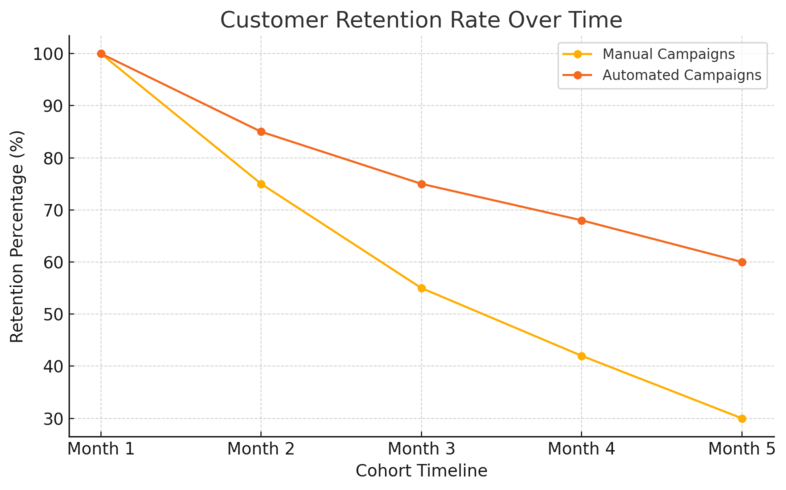
Once a customer converts, the real growth starts. Automated marketing solutions help you maintain long-term relationships without adding more manual work to your schedule.
Personalizing Customer Journeys Without Manual Effort
Automation allows you to build personalized journeys that adapt to each user’s behavior.
Instead of manually segmenting audiences, tools like Klaviyo or ActiveCampaign automatically adjust the path for each customer based on their interests and engagement.
Example in practice:
- A new subscriber gets a welcome series.
- A repeat buyer moves into a loyalty flow.
- A dormant user enters a reactivation sequence.
I suggest mapping out your customer journey visually using a workflow builder (HubSpot’s drag-and-drop tool makes this easy). Once you see each touchpoint, you can identify where automation can step in to make the experience smoother and more personal.
Automating Feedback Requests and Review Campaigns
Customer feedback drives both trust and improvement, but asking manually after every sale isn’t sustainable. Automation handles it effortlessly.
Example workflow:
- After a purchase → Wait 7 days → Send a short review request email.
- If the customer leaves a review → Tag them as a “promoter” and follow up with a referral incentive.
Tools like Trustpilot or Yotpo integrate directly with email marketing platforms, automatically requesting reviews and publishing them on your website. From my experience, automating review requests can triple your response rate compared to manual outreach.
Re-Engaging Inactive Customers Through Smart Segmentation
Not every customer stays active—but automation can bring many of them back.
Using engagement data, you can automatically segment users who haven’t opened an email or purchased recently, then target them with reactivation offers.
Example segmentation rule: “If no interaction for 45 days → Move to re-engagement list → Send 15% off incentive.”
Klaviyo and Omnisend make this simple through “smart segments,” which update automatically as customer behavior changes.
I recommend testing at least two reactivation campaigns—one discount-driven, one value-based—to see which resonates best.
Building Loyalty Programs That Run on Autopilot
Automation makes customer loyalty scalable. Instead of manually managing points or rewards, you can connect loyalty tools directly to your store or CRM.
Platforms like Smile.io or LoyaltyLion sync with Shopify, WooCommerce, and HubSpot. They automatically track purchases, assign points, and trigger rewards emails.
Example flow:
- Customer makes a purchase → Earns points → Gets a reward email.
- If points remain unused → System sends a reminder after 14 days.
I’ve seen businesses increase repeat purchases by 25% using automated loyalty sequences alone. The key is to keep it simple: reward engagement, not just transactions.
Reducing Human Error and Maintaining Consistency
Human error costs both time and reputation. Automated marketing solutions eliminate inconsistencies and ensure your campaigns run predictably, no matter who’s managing them.
How Automation Eliminates Missed Follow-Ups and Mistakes
Missed follow-ups are one of the most common causes of lost sales. With automation, every lead receives attention—without relying on memory or sticky notes.
Example setup in HubSpot:
- A contact fills out a demo form.
- If no response from sales within 24 hours, automation sends a reminder.
- If another 24 hours pass, it sends a personalized follow-up email automatically.
This guarantees no lead falls through the cracks. I’ve implemented similar systems for clients and reduced response delays by over 70%. The reliability alone is worth the setup effort.
Maintaining Brand Voice Across All Communication Channels
Automation ensures consistency in tone, design, and messaging. Whether it’s an email, SMS, or chatbot response, templates keep everything on-brand.
You can use shared content libraries in Mailchimp to create approved templates. Whenever your team creates a new campaign, it automatically pulls from these pre-approved assets.
That way, every message reflects your brand’s voice—even if multiple people or teams are involved. I suggest reviewing your content templates quarterly to keep messaging fresh and aligned with your evolving tone.
Ensuring Compliance With Automated Rules and Workflows
Compliance is non-negotiable, especially with regulations like GDPR and CAN-SPAM. Automation tools help ensure you follow these laws without constant oversight.
Example compliance automation:
- Automatically exclude unsubscribed contacts.
- Auto-delete inactive users after a set time.
- Double-opt-in for all new subscribers.
Platforms like Brevo have compliance settings built in, so you can “set and forget” the rules. It not only saves time but also protects your brand from costly mistakes.
Improving Collaboration Between Marketing and Sales Teams
When marketing and sales operate in silos, opportunities get lost. Automation bridges that gap by syncing data and assigning clear ownership.
Example integration:
- Marketing automation qualifies a lead → Updates CRM record automatically.
- Sales gets notified with lead history, email interactions, and scoring data.
- After conversion, the system triggers a post-sale nurturing sequence.
Tools like Zoho Marketing Automation do this seamlessly. I recommend setting clear triggers for lead handoffs—like a specific engagement score or completed form—to ensure no confusion about who follows up next.
Expert Tip: The smartest automation systems work quietly in the background. You’ll know you’ve done it right when your marketing runs smoothly even when you’re not watching it. Use automation not to replace human connection, but to make more space for it.
Tools That Power Automated Marketing Solutions
Choosing the right automated marketing solution can completely transform how you manage campaigns, nurture leads, and drive conversions.
Each tool has unique strengths depending on your business size, goals, and technical comfort level.
HubSpot: A Comprehensive Automation and CRM Platform
HubSpot is the all-in-one powerhouse for businesses that want everything—CRM, marketing automation, content management, and analytics—under one roof.
What it does: HubSpot lets you automate emails, lead scoring, customer journeys, and follow-ups while keeping all your customer data in one unified dashboard. It’s perfect for managing the full marketing and sales pipeline without switching platforms.
Real example: You can build a workflow that automatically enrolls new leads into an email sequence, waits for engagement, updates their score, and notifies your sales team when they’re ready to buy.
I recommend HubSpot for teams that need structure and visibility. Its visual workflow editor is simple: just go to Automation → Workflows → Create Workflow. From there, you can drag and drop triggers, actions, and conditions seamlessly.
It’s more than convenience—it’s clarity. HubSpot’s real-time reporting shows how each automation contributes to revenue, helping you scale what works and fix what doesn’t.
ActiveCampaign: Advanced Email and Journey Automation
If you’re looking for precision and flexibility, ActiveCampaign shines. It’s designed for businesses that want deep behavioral targeting and sophisticated automation paths.
Why it stands out: ActiveCampaign lets you automate based on behavior—like website visits, email clicks, or even time since last engagement. You can also create conditional content in emails, so each subscriber sees personalized text or offers.
Example setup: You can create a journey that says, If a subscriber opens email A but not B, send C after 3 days. These small tweaks make communication feel human even though it’s automated.
I personally like using ActiveCampaign for lead nurturing because it gives full visibility into where each person is in the funnel. It’s like having a 24/7 assistant who knows when someone’s ready to buy.
For advanced users, integrations with Shopify or WordPress are seamless—triggering automations when a purchase happens or a form is submitted.
Zapier: Connecting Apps and Creating Smart Workflows
Zapier is the glue that connects all your marketing tools. If you’ve ever wished your email software could talk to your CRM, social media, or analytics platform—Zapier makes that happen.
How it works: You create “Zaps” that link one app’s trigger to another’s action. For example:
- When a new lead fills out a Google Form → Add them to your HubSpot list.
- When a sale happens on Shopify → Send a personalized thank-you email via Gmail.
It’s like digital duct tape for marketers. You don’t need to know any code—just select triggers and actions from drop-down menus.
From experience, I suggest keeping your first few Zaps simple (like syncing contacts or notifications) before chaining multiple apps together. It’s the easiest way to extend your automation power without paying for enterprise software.
Mailchimp: Simplifying Automation for Small Businesses
Mailchimp is the go-to option for small businesses or solo entrepreneurs who want affordable, easy automation.
Key benefits: It offers drag-and-drop email automation, customer segmentation, and pre-built journey templates that are quick to set up.
Example use case: A small ecommerce store can automate cart abandonment reminders, product follow-ups, and customer birthday emails—all in a few clicks.
To set one up, go to Automations → Customer Journeys → Create Journey. From there, choose a trigger like cart abandoned or welcome new subscriber, and Mailchimp guides you through the setup.
While it’s not as advanced as HubSpot or ActiveCampaign, Mailchimp is excellent for small teams who want results fast without complexity.
I recommend it for those starting their automation journey or running lean marketing operations.
Best Practices To Implement Automated Marketing Successfully
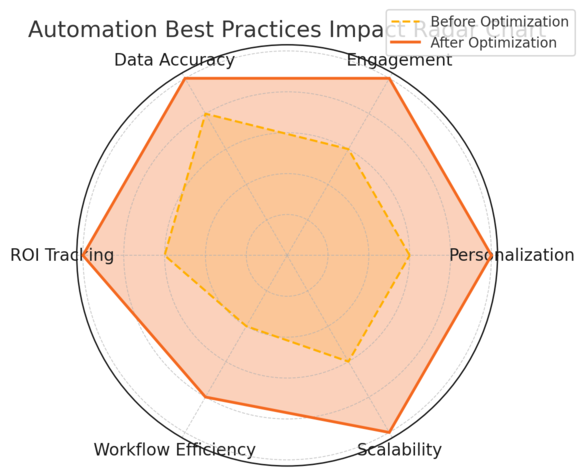
Automation only delivers results when it’s built on strategy and maintained with care. The right foundation ensures your automations enhance relationships instead of overwhelming customers.
Mapping Customer Journeys Before Automating
Before setting up any automation, you need a clear picture of your customer journey. That means identifying every touchpoint—from first visit to post-purchase follow-up.
Use a whiteboard or digital tool like Miro to visualize this flow. Ask: What happens after someone signs up? When should they hear from me again?
Once you’ve mapped it, you can use automation to deliver the right message at the right stage.
I always suggest starting with three core journeys: lead capture, nurture, and retention. That way, you cover every phase of the funnel without overcomplicating it.
Testing and Optimizing Automated Sequences Regularly
Automation isn’t “set and forget.” To keep results strong, you need ongoing testing.
Here’s a simple process:
- Review open and click rates weekly.
- Identify which emails or steps underperform.
- A/B test new subject lines, send times, or sequences.
Tools like ActiveCampaign and HubSpot include built-in A/B testing and visual analytics so you can easily compare results. I’ve seen small tweaks—like changing an email subject line—improve conversions by 15–20%.
Treat your automation like a living system that evolves with your audience’s behavior.
Balancing Automation With Human Interaction
Automation should enhance relationships, not replace them. A completely robotic experience can alienate customers, especially in high-touch industries.
Practical balance:
- Use automation for repetitive tasks (reminders, follow-ups).
- Keep personal outreach for moments that matter (custom replies, milestone check-ins).
For instance, when a lead becomes “sales-ready,” let automation notify your team—but have a human send the first outreach message. This blend builds trust while saving time. I believe this hybrid approach is where real customer loyalty comes from.
Measuring Success Using Key Marketing Metrics
If you can’t measure it, you can’t improve it. Marketing automation platforms make this easy by tracking key metrics automatically.
Focus on these indicators:
- Conversion rate per workflow
- Customer lifetime value (CLV)
- Email engagement (opens, clicks, replies)
- ROI per campaign
HubSpot and Google Analytics both integrate well for performance tracking. I suggest setting up monthly reports that highlight what’s driving revenue and what’s not. When your data tells a story, decision-making becomes effortless.
Common Mistakes To Avoid With Marketing Automation
Even the best tools can fail without the right strategy. Many marketers jump into automation too quickly, which can create more chaos than clarity.
Automating Too Early Without a Clear Strategy
One of the biggest pitfalls is automating before understanding your audience or having a plan. If your message isn’t right, automation just amplifies the wrong thing faster.
Before setting up any workflow, define:
- Your audience segment.
- The problem you’re solving.
- The action you want them to take.
I advise testing manually first. Once a process consistently delivers results, then automate it. That way, you’re scaling success—not mistakes.
Overloading Customers With Irrelevant Messages
Sending too many automated messages can backfire fast. People unsubscribe or ignore you altogether.
To avoid this, limit automated emails per contact per week and use behavioral triggers to ensure relevance. For example, only send product recommendations if a customer has shown interest in that category.
Tools like ActiveCampaign’s conditional content help keep messaging personalized instead of overwhelming. I recommend using suppression lists or smart frequency caps to maintain balance.
Ignoring Data Insights From Automated Reports
Most platforms generate powerful insights automatically—but many marketers skip reviewing them. That’s like driving blindfolded.
Schedule time weekly or monthly to study automation reports. Look at engagement trends, conversion funnels, and drop-off points. I’ve often found hidden issues—like broken links or outdated messages—just by glancing at workflow analytics.
Use these insights to guide your adjustments instead of relying on instinct alone.
Failing To Align Automation With Business Goals
Automation should always serve a clear business outcome—whether it’s lead generation, sales growth, or customer retention.
If your automation doesn’t connect to a measurable goal, it’s just busywork. Align every sequence with a specific KPI like increase repeat purchases by 10% or reduce churn by 5%.
When automation directly supports your bottom line, it becomes a growth engine—not just a time-saver.
The Future of Automated Marketing Solutions
Automation is evolving fast. With AI and machine learning entering the picture, marketers can now predict customer needs instead of just responding to them.
The Role of AI and Machine Learning in Next-Gen Automation
AI-driven automation tools are already rewriting how we segment, target, and personalize. They analyze millions of data points instantly to predict what customers want next.
Example: Platforms like HubSpot AI Assist or Salesforce Einstein automatically adjust workflows based on user intent and performance data.
I see this shift as a leap forward—it’s not replacing marketers, it’s freeing them to focus on strategy, storytelling, and creativity.
How Predictive Personalization Will Redefine Marketing
Predictive personalization means your marketing evolves dynamically for each customer. Imagine a system that knows when someone’s ready to upgrade before they do.
Tools like Klaviyo Predictive Analytics use purchase probability modeling to do just that. You can set automations to trigger at the perfect moment—without guessing.
As these systems mature, personalization will go from “nice-to-have” to non-negotiable.
Integrating Automation Across Entire Business Ecosystems
In the near future, marketing automation won’t live in isolation. It will sync across sales, support, and operations for a seamless customer experience.
For instance, when a customer opens a support ticket, automation could instantly pause marketing emails and trigger a satisfaction survey post-resolution. Platforms like Zapier and Make (Integromat) already make this integration possible today.
I recommend exploring cross-department automations early—it’s how brands deliver frictionless, connected experiences.
Preparing Your Team for the Automation-First Future
The future of marketing belongs to teams that can balance technology with empathy. That means training—not just on tools, but on strategy, data, and creativity.
Start small: teach your team how to build one automation, analyze its performance, and iterate. Gradually expand from there.
In my experience, the most successful companies treat automation as an enhancement of human capability, not a replacement. The goal isn’t to remove people—it’s to empower them to do their best work faster.
Expert Tip: The best automated marketing solution isn’t the most complex—it’s the one that helps you connect with customers more meaningfully. Technology should serve your message, not the other way around.

I’m Juxhin, the voice behind The Justifiable.
I’ve spent 6+ years building blogs, managing affiliate campaigns, and testing the messy world of online business. Here, I cut the fluff and share the strategies that actually move the needle — so you can build income that’s sustainable, not speculative.
Related posts:
 9 Best Email Marketing Solutions To Automate Your Growth
 How to Integrate Aweber with ClickFunnels
 Aweber Autoresponder: Expert Setup & Automation Guide
 10 AI Marketing Solutions Every Marketer Should Try Now
 Top 7 Business Marketing Solutions Every Entrepreneur Needs
 Best Email Marketing Solutions to Nurture Leads and Boost Sales