
Table of Contents
Some links on The Justifiable are affiliate links, meaning we may earn a small commission at no extra cost to you. Read full disclaimer.
BrightLocal review for local SEO reporting is usually less about whether the software “works” and more about whether it fits the way you report results, prove ROI, and keep clients calm without eating half your week.
If you manage local campaigns for one business, a few clients, or dozens of locations, reporting speed matters a lot more than most people admit.
In this review, I’ll break down where BrightLocal genuinely saves time, where it feels limited, and who should use it without expecting it to do everything.
What BrightLocal Is Actually Good At For Reporting
BrightLocal is built around local search, not general SEO. That sounds obvious, but it matters because the reporting experience feels focused on rankings, citations, Google Business Profile performance, reviews, and location-based visibility rather than trying to be an all-purpose SEO suite.
BrightLocal says its platform brings listings, reviews, and rank tracking together in one dashboard, and its pricing page confirms customizable white-label reporting is included across plans, with plans starting at $39 per month.
Why Its Reporting Angle Appeals To Local SEO Users
If you have ever built a monthly local SEO report by hand, you already know the real pain is not gathering one metric. It is combining ten small things into one story that a client can understand.
BrightLocal helps because it organizes reporting around local campaign objects such as locations, audits, rank tracking, citation tracking, grid visibility, and reviews instead of treating local SEO like a side feature.
Its supported tool set includes Local Rank Tracker, Local Search Grid, Citation Tracker, GBP Audit, and Local Search Audit, which lines up well with what local clients usually expect to see in a report.
In my experience, that alone saves mental energy. You spend less time deciding what to show because the platform already assumes the campaign is location-based.
There is also a practical advantage here for agencies. BrightLocal’s white-label reporting page says you can create online and PDF white-label reports for every location, customize them with your logo and brand colors, control what data clients can see, and even create multiple white-label skins.
It also says the white-label setup can be done in under three minutes and rolled out across reports.
That is a bigger deal than it sounds. When reporting is easy to brand and easy to repeat, teams actually keep it consistent.
Where BrightLocal Is Stronger Than Generic SEO Tools
A lot of SEO platforms can technically report on local performance. Fewer of them make local reporting feel native.
BrightLocal has a better fit when your client conversation sounds like this: “Are we ranking in the target city?” “How visible are we around the service area?” “Did our review profile improve?” “Are our citations clean?” “What changed in the Google Business Profile?”
Those are local questions, and BrightLocal organizes its reporting around them.
That does not mean it replaces every analytics or business intelligence tool. It does not. If you need deeply customized dashboards blending revenue, CRM data, call tracking, ad spend, and SEO into one executive view, BrightLocal is not trying to be that product.
I believe that is the right way to judge it. BrightLocal is strongest when you want faster local SEO reporting, not infinite reporting flexibility.
The Core Trade-Off You Need To Understand Early
This is the honest review part: BrightLocal saves hours mostly by limiting how much custom analysis you do inside the reporting layer.
That trade-off is worth it for many users. You get speed, repeatability, white-label delivery, and local-specific reporting assets. But you also accept that some clients will eventually want a more narrative, business-outcome-driven report than a tool-generated PDF can provide.
So the right question is not “Is BrightLocal perfect?” It is “Does BrightLocal automate the 70 to 85 percent of reporting work that slows me down most?”
For many local SEO teams, the answer is yes.
How BrightLocal Reporting Works In Practice
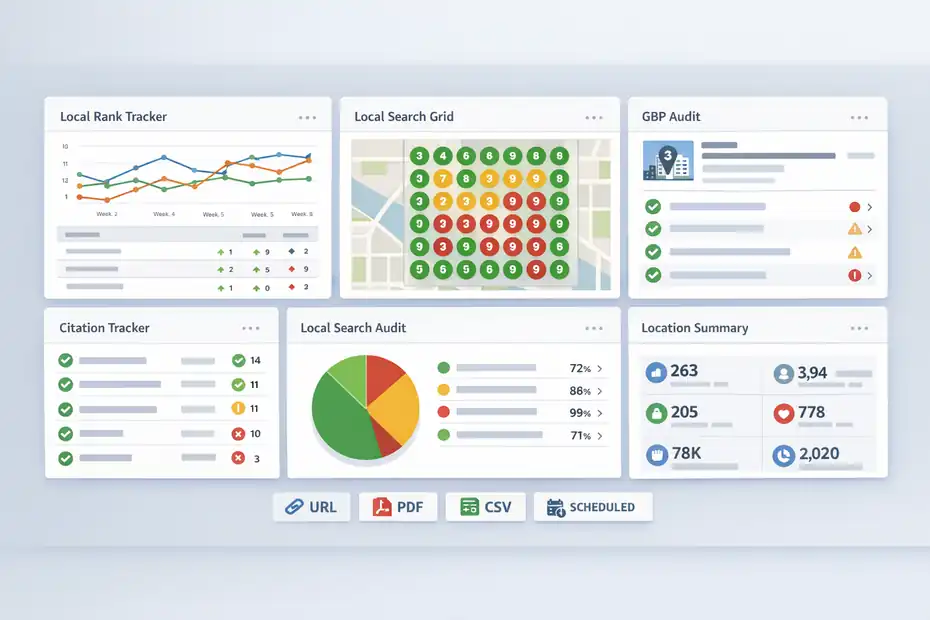
The reporting model becomes easier to understand once you stop thinking in terms of one master dashboard. BrightLocal reporting is really a collection of report types tied to a location and then delivered through external URLs, PDFs, CSV files, or scheduled updates depending on the report.
The help documentation shows that Location Summary, Local Search Audit, Citation Tracker, Citation Builder, Google Business Profile Audit, Local Rank Tracker, and Local Search Grid can all be shared by external URL, while many also support PDF export.
The Main Report Types You’ll Actually Use
Most users will end up leaning on a small group of reports again and again. These are the ones that matter most for local SEO reporting workflows:
- Local Rank Tracker: Tracks rankings and can be scheduled weekly or monthly.
- Local Search Grid: Shows geo-grid visibility and can be exported as PDF or shared via external URL.
- Citation Tracker: Useful for cleanup, consistency checks, and showing citation progress.
- Google Business Profile Audit: Gives a client-friendly way to discuss GBP completeness and issues.
- Local Search Audit: Helps explain local SEO health in a broader way than rankings alone.
- Location Summary: A higher-level view for people who want one easier snapshot.
This is where BrightLocal starts saving time. Instead of building one giant spreadsheet every month, you can choose the few report types that match the campaign stage and send those in a repeatable package.
Scheduled Vs Ad-Hoc Reporting
BrightLocal’s setup distinguishes between Active Locations and Ad-hoc Locations. Active Locations are required for ongoing management and recurring reporting, while Ad-hoc Locations are better for one-off audits and prospecting.
BrightLocal explicitly says Ad-hoc Locations can only run manual reports and cannot schedule recurring reports.
That matters more than many people realize.
Imagine you are pitching a local dentist with a one-time audit. An Ad-hoc setup is fine. But the second they become a monthly client, you will want them as an Active Location so recurring updates happen without manual intervention.
That one structural choice changes whether BrightLocal feels like a labor saver or just another tool you still have to babysit.
Why Reporting Feels Faster Than Manual Assembly
Here is the practical reason agencies like BrightLocal reporting: it reduces report assembly, not just data collection.
You can share reports by external URL, download PDFs, export CSVs where supported, apply white-labeling, and automate emails. BrightLocal’s white-label page also emphasizes automated report emails so clients stay updated without manual work.
That is the boring operational stuff that quietly eats hours every month. Not glamorous, but very real.
When I look at reporting tools, I care less about a fancy chart and more about whether a junior account manager can prepare a clean monthly update in ten minutes instead of forty-five. BrightLocal performs well on that test.
Setting Up BrightLocal For Fast, Client-Friendly Reporting
The setup process is where many people accidentally make the software feel underwhelming.
BrightLocal works best when you build the reporting system around locations, cadence, and client expectations from day one.
Start With The Right Reporting Goal
Before you even touch settings, decide what the client actually needs to see each month.
A local SEO report can serve at least three different jobs:
- Proof of work: “We did the tasks.”
- Proof of progress: “Visibility and trust signals improved.”
- Proof of business value: “These improvements support leads, calls, visits, or revenue.”
BrightLocal handles the first two better than the third. So I suggest mapping each client to one primary report goal first, then building the report stack around that.
For example, a new client in month one may need audit-heavy reporting. A mature client in month six may care more about ranking movement, review growth, and local pack visibility trends
A franchise brand may care more about roll-up reporting and location consistency. BrightLocal’s product lineup supports these different angles, but you have to choose the angle on purpose.
Set Up Active Locations Early
BrightLocal’s help center is very clear here: Active Locations are necessary for ongoing management and reporting, and they enable recurring reports. Ad-hoc Locations do not.
This sounds like a small admin detail, but it changes the whole workflow.
Step 1: Add real client locations as Active Locations once they move beyond prospecting.
Step 2: Reserve Ad-hoc Locations for audits, lead generation, and one-off checks.
Step 3: Match each Active Location to the reports you want on a recurring schedule.
If you skip this and keep everyone in a manual, one-off state, BrightLocal will not save you nearly as much time as it should.
Build A Standard Report Stack Per Client Type
One of the fastest ways to save hours is to stop inventing a new report package for every account.
I recommend creating two or three internal templates, even if BrightLocal does not call them templates in the way a dashboard tool might. Think in bundles:
- Starter Local SEO Reporting: Location Summary, GBP Audit, Local Rank Tracker
- Growth Reporting: Rank Tracker, Local Search Grid, Reviews, Citation Tracker
- Multi-Location Reporting: Roll-up views, location-level ranking summaries, citations, review monitoring
BrightLocal also supports a Local Rank Tracker Roll-Up Report, and the help docs note that it can be shared via external URL and downloaded as XLSX summary data.
Once you standardize the stack, reporting becomes an operations process instead of a creative task. That is where the real time savings happen.
What The Reports Show And Where They Fall Short
This is where a BrightLocal review for local SEO reporting needs to be honest.
The platform covers the metrics most local SEO clients expect, but the usefulness depends on how well you interpret the outputs.
What Clients Usually Like Seeing
Clients tend to respond well to reporting when the visuals connect to questions they already ask. BrightLocal is good at this because the reports line up with familiar local SEO topics such as rankings, map visibility, listings, reviews, and profile completeness.
For example, Local Search Grid reporting can show how visibility changes across an area instead of giving one average rank number. The help documentation explains that each keyword includes a timeline so each report run adds a new data point over time.
That is extremely helpful for service-area businesses or competitive metros where one ranking number hides the real story. A plumber may rank well near the city center but poorly farther out. A grid view makes that visible quickly.
The review side is also important. BrightLocal’s 2026 Local Consumer Review Survey found that 97% of consumers read reviews online, 85% say positive reviews make them more likely to use a business, and 77% say negative reviews make them less likely to choose one.
The same survey says 93% of consumers have made a purchase after reading reviews.
Those numbers matter because they turn “review management” from a nice extra into a reportable business asset.
Where The Reports Can Feel Too Tool-Centric
The weakness is not inaccurate reporting. The weakness is that tool-generated reports can still feel like tool-generated reports.
A client may see a PDF full of rankings, citations, and audit checks and still ask, “So what should I care about?” That is not BrightLocal’s fault exactly, but it is the limitation of software-first reporting. The platform organizes data well; it does not replace your strategic commentary.
This is especially true for local businesses that judge success by calls, bookings, or store visits rather than SEO metrics. BrightLocal can support the story, but you still need to connect the dots.
I suggest adding a short human summary above any exported report. Even three lines can change how useful the report feels:
- This month, map visibility improved in your core service area.
- Reviews increased and average sentiment stayed strong.
- Next priority is citation cleanup and more review requests.
That small narrative layer stops the client from drowning in data.
The Best Way To Interpret BrightLocal Data
BrightLocal works best when you read it like a trend system, not a scoreboard.
One ranking drop does not mean the campaign is failing. One grid improvement does not mean the job is finished. What matters is the pattern across location visibility, review growth, citation consistency, and GBP health.
BrightLocal’s own release notes from October 2025 also show that Google changes can affect ranking tools differently. BrightLocal noted that Local Search Grid was not affected by one specific change impacting broader-result reporting, while Local Rank Tracker was affected and now provides the top 50 results.
That is useful context. It reminds you that reporting tools operate inside search engine constraints, and some metrics may change in scope or behavior over time.
White-Labeling, Exports, And Client Delivery
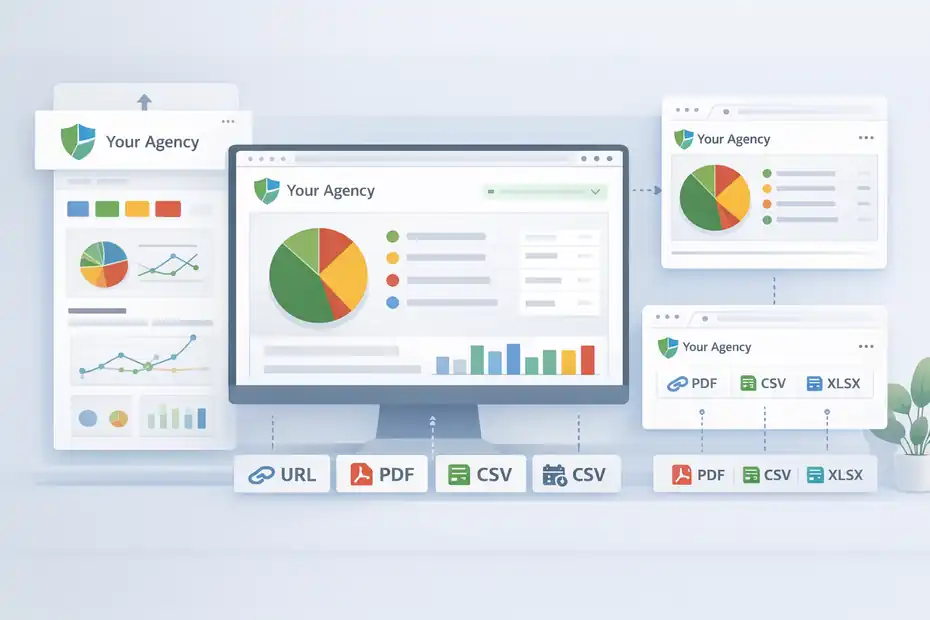
For many agencies, this is the section that determines whether BrightLocal feels polished or cheap. Reporting is not only about what the data says. It is also about how the client receives it.
White-Labeling Is One Of BrightLocal’s Biggest Strengths
BrightLocal’s white-label pages and help docs make this pretty clear.
Customers on the Track, Manage, and Grow plans can use white-labeling to remove BrightLocal branding from reports, and the white-label settings apply to PDF reports, external URL reports, and report alert emails.
The platform also allows logo uploads, brand color customization, multiple white-label profiles, and even white-label domains for report sharing.
That gives smaller agencies something they often need badly: a cleaner client-facing experience without building a custom dashboard stack.
I like this because it helps you look more organized without forcing enterprise-level complexity. A client sees your brand, your colors, your report delivery, and a cleaner URL experience. That matters for trust, especially early in the relationship.
Export And Sharing Options Are Better Than Many Expect
BrightLocal’s download and sharing support is broader than some people realize. According to the help center, several key reports support external URLs and PDF downloads, while some also support CSV and one roll-up report supports XLSX export.
Local Search Audit, Citation Tracker, Google Business Profile Audit, Local Rank Tracker, and Local Search Grid all support external URL sharing and PDF export.
Here is a quick comparison:
| Report Type | External URL | CSV/XLSX | |
|---|---|---|---|
| Location Summary | Yes | Yes | No |
| Local Search Audit | Yes | Yes | No |
| Citation Tracker | Yes | Yes | CSV |
| GBP Audit | Yes | Yes | CSV |
| Local Rank Tracker | Yes | Yes | CSV |
| Local Rank Tracker Roll-Up | Yes | No | XLSX |
| Local Search Grid | Yes | Yes | No |
This is enough flexibility for most local SEO reporting setups. PDF works for monthly client updates. External URLs work for easy access. CSV/XLSX helps when you want to combine outputs elsewhere.
The Delivery Limitation You Should Know About
There is one small but useful caveat in BrightLocal’s help docs: you currently cannot download a report via the external URL itself. Downloading happens from inside the account, not from the public share view.
That will not matter to everyone, but it is the kind of operational detail worth knowing before you promise a client a self-serve reporting portal.
Also, not every report has every export type. Reputation Manager areas, for example, lean more toward CSV than polished PDF presentation. And some scheduling capabilities vary by report type.
Local Rank Tracker can be scheduled weekly or monthly, while Reputation Manager reports can also be weekly or monthly, with daily review tracking requiring an add-on.
So yes, BrightLocal is strong on delivery. Just do not assume total uniformity across every module.
Pricing, Value, And Who Gets The Best ROI
BrightLocal’s pricing value depends heavily on how repetitive your reporting workload is.
If you only run an occasional audit, the software may feel nice but not transformative. If you manage recurring local campaigns, the time savings become much easier to justify.
What Pricing Tells You About The Product Positioning
BrightLocal says plans start at $39 per month, offers a 14-day free trial with no card, and positions Track, Manage, and Grow as the main plan tiers, with custom plans available for higher-volume needs.
The pricing page also says standard subscription levels do not let you buy only certain features, though custom plans may be possible for high-volume use cases needing only one or two report types.
This tells me BrightLocal is aiming for a practical middle ground. It is not trying to be bargain-basement software, and it is not pretending to be a huge enterprise BI platform either.
For a solo consultant or small agency, that can be a sweet spot. You get enough local SEO reporting infrastructure to look sharp and save time, without paying for a bloated enterprise stack you will barely use.
Who Usually Gets The Best Return
BrightLocal tends to offer the best ROI for three groups:
- Freelancers and consultants with recurring local clients: White-label reporting makes you look more established fast.
- Small agencies handling multiple local accounts: Repetition is where the time savings compound.
- Multi-location marketers who need standardized local reporting: Roll-up and location-based structure help keep things organized.
The worst-fit user is someone wanting one master marketing report that combines local SEO with every other channel and deep business attribution. That person will likely still need another reporting layer.
A Practical ROI Example
Imagine you manage 15 local SEO clients and spend 45 minutes per account per month collecting screenshots, compiling rankings, exporting data, and sending reports. That is 11.25 hours monthly.
Now imagine BrightLocal cuts that to 15 minutes per account because reports are scheduled, branded, and easy to export. That brings the reporting workload down to 3.75 hours. You save 7.5 hours every month.
Even if your effective internal time cost is modest, that gap adds up quickly. And honestly, the softer benefit matters too: fewer last-minute reporting scrambles, fewer inconsistent decks, and fewer “sorry, I’ll send this tomorrow” emails.
That is where BrightLocal earns its keep.
Common Mistakes That Make BrightLocal Feel Worse Than It Is
A lot of negative experiences with reporting tools are really workflow problems wearing a software costume. BrightLocal is no exception.
Mistake 1: Treating Every Client Like They Need Every Report
One common mistake is over-reporting. People turn on everything because the data is available, then wonder why reports feel cluttered and clients look confused.
You do not need to show every audit, every export, every ranking segment, and every citation detail every month. Pick the few reports that match the stage of the campaign and the client’s actual priorities.
Example: A law firm owner may care about map visibility, review growth, and core city rankings. They probably do not want a dense citation file in every monthly update unless citation work is the active project.
BrightLocal gives you multiple report types. The skill is choosing the right mix, not dumping all of them on the client.
Mistake 2: Skipping White-Label Setup
This is such an easy miss. BrightLocal’s own materials say white-label setup is quick, can apply across reports, and supports logos, colors, multiple skins, and custom domains.
Yet many users postpone it.
I recommend doing it immediately. The difference between “here is your BrightLocal report” and “here is your monthly visibility update from our team” is not just cosmetic. It changes perceived professionalism.
Mistake 3: Confusing Manual Audits With Ongoing Reporting
BrightLocal clearly separates Ad-hoc Locations from Active Locations. Ad-hoc is for one-off work; Active is for recurring reporting.
If you keep clients in a one-off setup, you create manual labor for yourself. Then the tool gets blamed for not saving time.
This is one of those cases where the software is telling you how to use it efficiently. It is worth listening.
Mistake 4: Sending Data Without Interpretation
This is the biggest one.
A BrightLocal PDF is not the finished deliverable. It is the evidence layer. You still need an executive summary, priorities, and context. Without that, even accurate reporting can feel thin.
I suggest attaching a short note each month:
- What improved
- What needs attention
- What we are doing next
That tiny habit can improve retention more than another graph ever will.
Advanced Reporting Workflows To Save More Time
Once you have the basics working, BrightLocal becomes more useful when you treat it as part of a reporting system, not the whole system.
Use BrightLocal As The Evidence Layer
I believe this is the smartest advanced workflow: let BrightLocal handle repeatable local SEO evidence, then add your human interpretation on top.
Your process can look like this:
- BrightLocal handles: Rank tracking, grid visibility, GBP checks, citation reporting, review monitoring, branded PDFs, and external URLs.
- You handle: Narrative summary, business impact translation, priorities, and stakeholder-specific notes.
This keeps the process fast while avoiding the “robot report” feeling.
For example, a monthly email might say: “Your grid visibility improved in the north and west service area, review volume increased, and GBP completeness is stable. Next, we’re focusing on weaker zones where rankings still lag.” Then you attach or link the BrightLocal reports.
That is a much better client experience than sending raw exports alone.
Create Reporting By Campaign Phase
A clever way to reduce noise is to change the report stack by phase.
- Phase 1, Baseline: GBP Audit, Local Search Audit, citation review
- Phase 2, Visibility Build: Local Rank Tracker and Local Search Grid
- Phase 3, Trust Build: Review monitoring and review growth reporting
- Phase 4, Scale: Roll-up reporting across locations and executive summaries
This matches how local SEO really works. You do not optimize everything at once. You diagnose, fix, grow visibility, strengthen trust, and scale.
BrightLocal’s tool mix maps well to that journey.
Use Review Data More Aggressively In Reports
BrightLocal’s 2026 survey gives strong justification for emphasizing review metrics in client reporting. It found 97% of consumers read reviews, 41% always read reviews when browsing for businesses, and 78% of consumers were asked to write a review in the last 12 months, with 65% writing one after being asked.
That means review generation and review response activity are not side metrics. They are active growth levers.
If I were building an advanced BrightLocal reporting process, I would highlight three review metrics every month:
- Review volume trend
- Review recency
- Response consistency
Clients understand those quickly, and the numbers support real-world behavior better than vanity metrics often do.
Final Verdict: Save Hours Or Settle Less?
BrightLocal review for local SEO reporting comes down to this: yes, it can absolutely save hours, but only if you want a local-first reporting engine rather than a fully custom analytics universe.
Who Should Choose It
BrightLocal is a smart choice if you want:
- Faster recurring local SEO reports
- White-label PDFs and shared URLs
- Reporting tied to locations, rankings, citations, GBP, reviews, and local visibility
- A cleaner agency workflow without building everything from scratch
It is especially attractive for freelancers, boutique agencies, and local marketing teams that need structure more than they need infinite customization.
Who Should Be Careful
You may feel limited if you want:
- One dashboard for SEO, ads, CRM, and revenue
- Heavily customized executive reporting
- Advanced cross-channel attribution inside the same reporting tool
BrightLocal is not weak because it does not do all that. It is simply specialized.
And honestly, I think that specialization is part of the appeal. Many local SEO teams do not need another complicated all-in-one system. They need a reporting setup that is fast, client-friendly, and focused on the things local businesses actually care about.
My Final Take
I would not call BrightLocal the most flexible reporting platform. I would call it one of the most practical local SEO reporting platforms.
That is an important distinction.
If your current process involves too many screenshots, too many spreadsheets, too much manual formatting, and too many late-night “just finishing this report” sessions, BrightLocal can save you real time.
Its support for external URLs, PDFs, CSV exports, recurring schedules on Active Locations, and strong white-labeling features makes it a very sensible operational tool for local SEO reporting.
But if you expect it to replace strategic thinking, stakeholder communication, and business outcome interpretation, you will settle for less.
My honest verdict: BrightLocal is worth it for local SEO reporting when you use it as your reporting engine, not your entire reporting brain.
FAQ
What is BrightLocal used for in local SEO reporting?
BrightLocal is used to track local rankings, monitor reviews, audit Google Business Profiles, and manage citations. It helps businesses and agencies generate automated reports that show visibility improvements across specific locations, making it easier to demonstrate local SEO performance without manually compiling data every month.
Is BrightLocal good for client reporting?
BrightLocal is well-suited for client reporting because it offers white-label reports, automated scheduling, and easy-to-share dashboards. It simplifies the reporting process by organizing key local SEO metrics into clear formats, helping clients understand progress without needing deep technical knowledge.
Does BrightLocal save time for SEO reporting?
Yes, BrightLocal saves time by automating data collection, report generation, and delivery. Instead of building reports manually, users can schedule recurring updates and export ready-made reports, reducing repetitive work and allowing more focus on strategy and client communication.
What are the limitations of BrightLocal reporting?
BrightLocal reporting can feel limited if you need highly customized dashboards or advanced business analytics. It focuses on local SEO metrics rather than combining data from multiple marketing channels, so users may still need additional tools for deeper performance analysis.
Who should use BrightLocal for local SEO reporting?
BrightLocal is ideal for freelancers, small agencies, and businesses managing multiple locations. It works best for those who want efficient, repeatable reporting focused on local search performance, rather than complex, fully customized analytics systems.

I’m Juxhin, the voice behind The Justifiable.
I’ve spent 6+ years building blogs, managing affiliate campaigns, and testing the messy world of online business. Here, I cut the fluff and share the strategies that actually move the needle — so you can build income that’s sustainable, not speculative.
Related posts:
 BrightLocal Review For Citation Building: Is It Worth Your Money?
 BrightLocal Review For Google Business Profile Tracking: Better Insights?
 BrightLocal Honest Review For Freelancers: Smart Investment Or Waste?
 BrightLocal Review For Small Business Local SEO: Is It Worth Paying For?
 BrightLocal Review For Local SEO Agencies: Is It Worth The Cost?
 Is the Squirrly SEO WordPress Plugin Enough to Rank?