
Table of Contents
Some links on The Justifiable are affiliate links, meaning we may earn a small commission at no extra cost to you. Read full disclaimer.
Leadpages review for small business searches usually come from one practical question: will this tool help you grow faster, or will it quietly become another monthly bill that looks cheap until everything adds up?
I’ve looked at Leadpages through that exact lens. For a small business, the real issue is not whether Leadpages can build a nice landing page. It can.
The real issue is whether its pricing, limits, ease of use, and conversion tools make financial sense when you are trying to get leads without hiring a developer or stitching together five separate apps.
What Leadpages Is And Who It Is Really Built For
Leadpages is a landing page and lead generation platform built to help businesses publish pages, pop-ups, alert bars, and simple websites without relying on a developer.
Its current positioning is very clear: fast page creation, built-in testing, hosted infrastructure, and conversion-focused tools for teams that want results without technical overhead.
Why Small Businesses Even Consider Leadpages
For most small businesses, Leadpages becomes attractive when the existing website is doing a poor job of turning traffic into leads. Maybe your homepage gets visits but not inquiries. Maybe your ad traffic lands on a generic services page and disappears. Maybe your email signup form is buried in the footer and nobody notices it.
That is where Leadpages makes sense. It is not trying to be a giant all-in-one business operating system. It is trying to solve a narrower and more valuable problem: getting a campaign page live quickly and giving you a better shot at turning a click into a lead or sale.
Leadpages says it serves more than 466,000 businesses, captures 9.1 million-plus leads monthly, and delivers a 1.8-second median page load, which tells you the platform is leaning heavily on speed and conversion performance as part of its value proposition.
In my experience, that positioning matters. Small businesses usually do not lose because they lack a prettier website. They lose because launching a campaign takes too long, pages are too broad, and every test requires help from someone technical. Leadpages tries to remove that bottleneck.
That is why coaches, consultants, service businesses, local businesses, and lean ecommerce teams are a better fit than companies that need deep enterprise workflows or full storefront functionality.
What Leadpages Actually Does Day To Day
At a practical level, Leadpages lets you build campaign pages, lead capture pages, sales pages, pop-ups, and alert bars. It also includes A/B testing, analytics, and a checkout option powered by Stripe for businesses that want to sell simple offers, services, subscriptions, or digital products directly from a page.
Leadpages also supports integrations with tools like Mailchimp, HubSpot, Klaviyo, Slack, and Zapier. Leadpages says it has 90+ integrations, with more available via Zapier.
That feature set sounds ordinary until you look at how a small business uses it in the real world. Imagine you run a local med spa, bookkeeping service, or home cleaning business. You do not need a giant site rebuild to test a “Spring Special” offer.
You need a fast page, one clear call to action, a form that syncs to your email tool, and maybe a thank-you page that offers a low-ticket add-on. Leadpages covers that use case well because the workflow is direct.
Where it gets weaker is when your business needs heavy design freedom across a full site, advanced funnel logic, or deeper native automation. Leadpages can plug into other systems, but it is strongest when used as a focused lead generation layer rather than the center of your entire tech stack.
How Leadpages Works In Practice For A Small Business
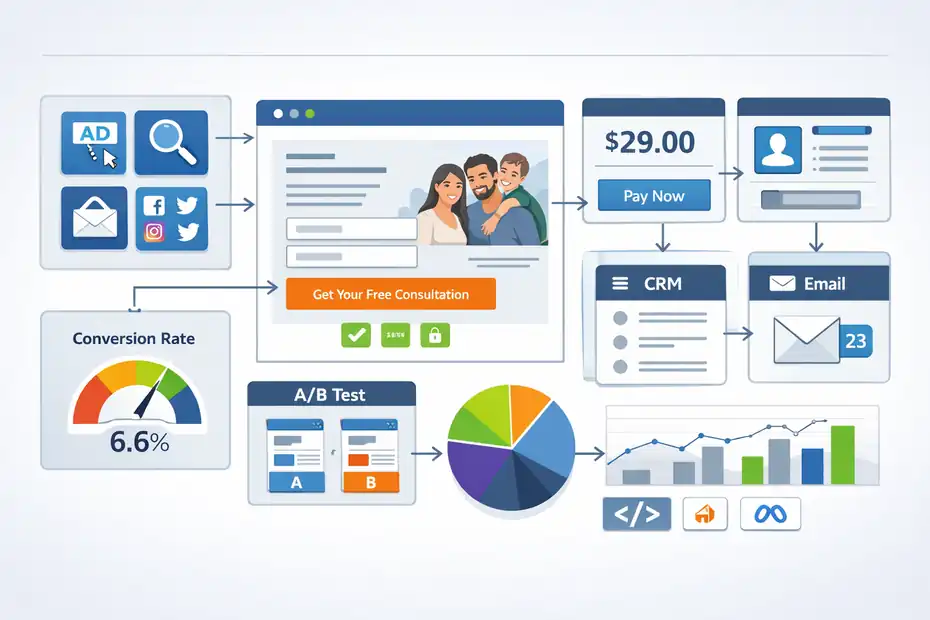
The appeal of Leadpages is not just the feature list. It is the speed between idea and launch. If you are a small business owner, that speed can be the difference between running campaigns consistently and never getting around to them.
The Core Workflow From Traffic To Lead
The basic flow is simple. You create a page around one offer, drive traffic from ads, search, social, or email, collect the lead through a form or pop-up, then send that lead into your email platform or CRM. You can also add a payment step if you are selling something directly.
That sounds obvious, but a lot of small businesses still send ad traffic to a homepage or service overview page with multiple distractions. A dedicated landing page usually works better because it narrows the visitor’s choices.
Unbounce’s benchmark data put the median landing page conversion rate at 6.6% across industries based on Q4 2024 data from 464 million visits and 57 million conversions, which is a useful baseline for judging whether your page is weak, average, or strong.
Leadpages builds around that exact logic. It includes forms, alert bars, pop-ups, A/B testing, analytics, and optimization prompts through Leadmeter. It also allows third-party tracking code, including Google Analytics and Meta Pixel, so you can measure what happens after the click. For a small business owner who wants a cleaner path from ad or social post to inquiry, that is one of the strongest arguments in its favor.
What The Editing Experience Looks Like
Leadpages now highlights its Page Studio experience with per-device responsive editing, pixel-perfect placement, global styles, advanced forms, and built-in testing. That matters because older landing page builders often forced users into rigid templates that looked fine until you tried to make them fit your brand.
From what I’ve seen, Leadpages is trying to sit in a useful middle ground. It wants to stay easy enough for non-designers, but flexible enough that marketers do not feel trapped.
That is a smart move for small businesses, because most owners do not want total design freedom if it comes with total design responsibility. They want enough control to make the page look credible, not enough control to accidentally destroy the layout.
A realistic example: Imagine you are a family law firm running ads for a free consultation. You need a page with trust badges, one headline, a short form, mobile-friendly spacing, maybe a sticky call button, and a thank-you page. Leadpages is built for that kind of job. What it is not built for is creating a deeply customized multi-page web experience with complicated conditional user journeys. If that is your priority, you may outgrow it.
Leadpages Pricing: The Real Cost Behind The Headline
This is where the “hidden costs or smart growth tool” question gets real.
Leadpages’ pricing is not outrageous, but the cheapest-looking number does not tell the full story.
Leadpages Plans In 2026
According to Leadpages’ official pricing page, the Standard plan is $37 per month billed annually, while Pro is $74 per month billed annually.
Standard includes 5 landing pages, unlimited traffic and leads, 1 custom domain, standard integrations, and—based on the current pricing page—unlimited A/B testing.
Pro includes everything in Standard plus unlimited landing pages and 3 custom domains. Custom pricing is available for larger organizations that need extras like client sub-accounts and more domains. Leadpages also offers a 14-day free trial.
That pricing structure creates a very specific small business decision. If you run one or two campaigns at a time, Standard may be enough. If you publish pages frequently, manage multiple offers, or want room to test more aggressively, Pro becomes the realistic plan. And that is where cost psychology matters.
The jump from $37 to $74 a month is not crazy, but it is enough that many very small businesses will hesitate, especially if they also pay for email software, a CRM, ad spend, a booking tool, and analytics.
The Hidden Costs Most Reviews Miss
I do not think “hidden costs” here means Leadpages is sneaking random mystery fees into the checkout. In fact, Leadpages promotes no transaction fees on its built-in checkouts. The more honest issue is stack cost.
For example, Leadpages can help you collect and route leads, but you may still need:
| Cost Layer | What You May Still Need | Why It Matters |
|---|---|---|
| Email marketing | Kit, Mailchimp, HubSpot, or similar | Leadpages captures leads, but nurturing still happens elsewhere |
| Payment processing | Stripe fees | Leadpages says no transaction fees, but Stripe processing still applies |
| Ads and analytics | Google Ads, Meta Ads, GA4, pixel setup | Traffic and measurement are separate costs |
| CRM or automation | HubSpot, Klaviyo, Zapier, others | Deeper follow-up and segmentation may require more tools |
Leadpages itself is not charging for all of these, but your lead generation system still costs more than the monthly subscription. Stripe’s pricing page also makes clear that payment processing includes per-transaction charges, and it separately notes possible fees for international cards, currency conversion, and disputes depending on setup and region.
So the honest answer is this: Leadpages is affordable compared with some premium landing page tools, but it is not a complete growth stack. If you go in expecting one subscription to solve page building, email nurturing, CRM management, payments, and reporting, you will feel the cost creep fast.
The Best Features For Small Business Growth
This is the section where Leadpages earns its keep. If your business wins by launching offers quickly, testing them often, and capturing leads cleanly, several features stand out.
Built-In A/B Testing, Speed, And Conversion Tools
Leadpages now promotes built-in A/B testing on every plan, real-time analytics, Leadmeter optimization suggestions, pop-ups, and alert bars. It also says pages have a 1.8-second median load time and highlights traffic and conversion measurement as core value.
For a small business, these are not “nice to have” features. They are the difference between guessing and improving. Let me break it down:
- A/B Testing: You can test headlines, offers, layouts, or CTAs without buying another testing tool.
- Leadmeter: Leadpages gives optimization feedback while you build, which helps non-experts avoid weak pages.
- Fast Hosting: You do not need to worry about plugin conflicts, bad hosting, or bloated themes slowing down the page.
- Pop-Ups And Alert Bars: These help you capture leads beyond the main landing page itself.
I believe this is the strongest argument for Leadpages over a patchwork WordPress setup for many small businesses. With WordPress, you can absolutely build great landing pages, but you may need a page builder, testing solution, speed optimization, hosting, maintenance, and more time.
Leadpages bundles enough of the high-impact pieces that you can move faster, which often matters more than saving a few dollars on paper.
Checkout, Integrations, And Campaign Execution
Leadpages Checkouts, powered by Stripe, lets users sell services, subscriptions, and products from landing pages with no Leadpages transaction fees. On the integration side, Leadpages supports native connections with tools like Mailchimp, HubSpot, Klaviyo, Slack, and Zapier-based workflows to send lead data where it needs to go.
That is useful for small businesses selling simple offers. Think paid consultations, workshop access, low-ticket digital products, webinar registrations, or local service deposits. You do not always need a full ecommerce platform. Sometimes you need one page, one promise, one checkout, and a follow-up email.
A good example is a nutrition coach selling a $49 meal planning workshop. Instead of building a full store, they can run one landing page, collect payment via Stripe-powered checkout, send buyers into their email tool, and upsell a coaching package afterward. That is the kind of lean campaign flow Leadpages handles well.
But again, if you need catalog management, complex fulfillment, or advanced recurring billing logic, that is where a dedicated commerce stack becomes more appropriate.
The Downsides, Limitations, And Complaints You Should Know
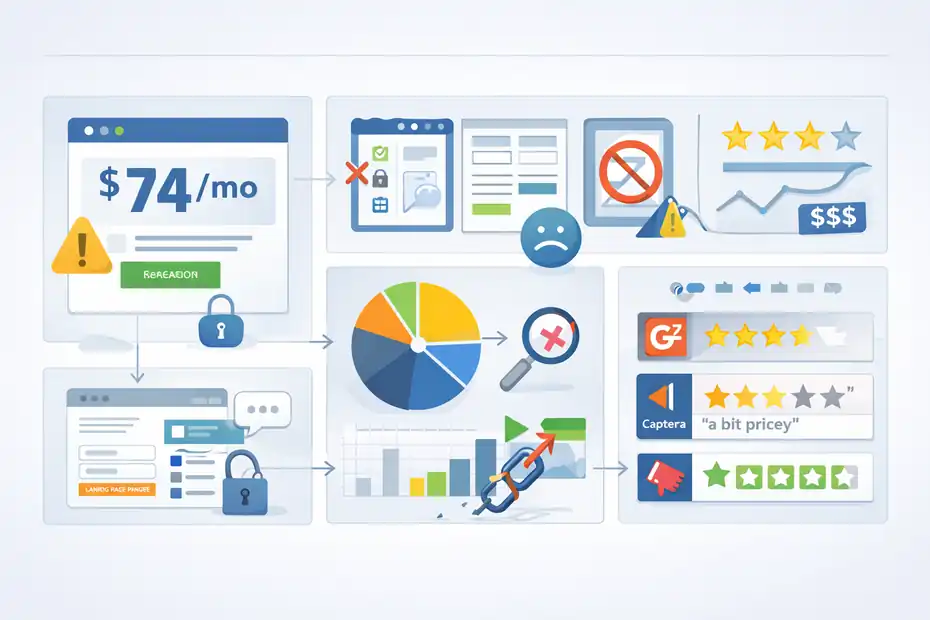
No honest Leadpages review for small business should pretend the platform is perfect.
The tradeoff for simplicity is usually some combination of design limits, workflow limits, or pricing pressure. Leadpages has all three to some extent.
Where Small Businesses Might Feel Friction
The biggest friction point is value relative to stage of business. If you are very early and have little traffic, Leadpages can feel expensive because you are paying for conversion infrastructure before you have enough data to benefit from it. That is not a Leadpages problem exactly. It is a timing problem.
The second issue is flexibility. G2’s review summary says users consistently praise ease of use and template quality, but some want more template variety and flexibility in customization. That is a common pattern with software like this: the easier it is to use, the more likely advanced users will eventually push against the guardrails.
The third issue is that platform convenience can hide process gaps. A lot of owners buy landing page software thinking the real problem is page design, when the actual problem is weak messaging, poor traffic targeting, or no follow-up sequence.
Leadpages can improve execution, but it cannot rescue a bad offer. If your lead magnet is forgettable, your headline is vague, or your sales call process is weak, you can still get disappointing results with a very polished page.
What Real Users Seem To Like And Dislike
Review platforms paint a mixed but useful picture. G2 highlights ease of use, intuitive design, and fast page creation as common positives, while also noting requests for greater flexibility.
Capterra includes recent reviews from 2025 praising simplicity and fit for small businesses, but it also shows at least one reviewer calling the product “a bit pricey” and giving value-for-money a 3 out of 5. Trustpilot, meanwhile, shows harsher complaints around billing experiences from some users, though review platforms vary widely in tone and reliability.
My read is this: People who want fast, good-looking campaign pages tend to like Leadpages. People who want maximum control, lower cost at the earliest stage, or broader all-in-one functionality are more likely to feel tension with it. That is not unusual. It just means you should buy it for the right job, not as a magic growth shortcut.
Leadpages Vs Other Options For Small Business
You should never evaluate Leadpages in a vacuum. The smarter question is whether it offers the right balance of cost, simplicity, and performance compared with other ways to build landing pages.
Quick Comparison Table
Here is a practical comparison using official pricing pages and positioning:
| Platform | Starting Price | Best For | Main Tradeoff |
|---|---|---|---|
| Leadpages | $37/mo billed annually | Small businesses that want focused lead capture and fast deployment | Standard plan has page limits; not a full all-in-one |
| Unbounce | $149/mo | Performance marketers who want more advanced CRO depth | Much more expensive for small businesses |
| Instapage | Demo / plan-based pricing | Teams focused on ad landing page optimization at a higher level | Usually aimed above typical small business budgets |
| Carrd | From $9/year Pro Lite | Extremely simple, low-cost one-page sites and basic landing pages | Far lighter on testing, optimization, and business integrations |
Sources vary on details beyond the entry pricing headline, but the positioning is clear enough. Leadpages sits in a middle zone. It is more serious than ultra-cheap page builders like Carrd, but much less intimidating on price than Unbounce. Instapage is usually positioned more toward ad-centric teams and larger marketing operations.
When Leadpages Is The Smartest Choice
I would put Leadpages in the “smart growth tool” category when three things are true.
- You need speed more than perfect customization: You want to launch campaigns this week, not redesign your whole web presence.
- You already have or can get traffic: Even modest traffic from ads, email, or social makes testing worthwhile.
- You care about lead generation more than website artistry: Your goal is appointments, signups, deposits, or sales.
I would not rush into Leadpages if you are at the “I barely know my offer” stage. In that case, the biggest win may come from tightening your offer, validating your messaging, and getting your first consistent traffic source before paying for a more conversion-focused platform.
That is where cheaper tools or even manual MVP-style pages can be enough.
How To Get Better Results If You Decide To Use Leadpages
A lot of businesses judge landing page software too quickly. They publish one page, send weak traffic, and conclude the tool did not work.
The platform matters, but the setup matters more.
A Simple Setup Strategy That Usually Works
If you start with Leadpages, I suggest building around one offer, one audience, and one conversion goal. Do not begin with six versions, three audiences, and an overloaded page.
A simple structure looks like this:
- Step 1: Pick one offer with a clear outcome, like a quote request, free consultation, downloadable checklist, or workshop registration.
- Step 2: Write a headline around the result, not the company name.
- Step 3: Keep the form short. Ask only for what you actually need.
- Step 4: Add proof like testimonials, star ratings, outcomes, or recognizable client types.
- Step 5: Send the lead somewhere useful immediately, such as an email sequence or booking flow.
Leadpages’ built-in forms, pop-ups, alert bars, and integrations support this well. The mistake is trying to cram your entire business into one page. A good landing page says one thing clearly and removes every unnecessary choice. That is still true no matter how advanced the builder becomes.
Optimization Tips That Matter More Than Fancy Design
From what I’ve seen, small businesses get the biggest lift from message clarity, offer strength, and follow-up speed. The platform can help, but these fundamentals still decide most of the outcome.
A few practical improvements tend to matter most:
- Use specific CTAs: “Book Your 15-Minute Tax Review” beats “Learn More.”
- Match page copy to the traffic source: If the ad says “Free Roof Inspection,” the page should say the same thing immediately.
- Test one major variable at a time: Headline first, then form length, then CTA.
- Watch mobile spacing carefully: A page that looks fine on desktop can feel chaotic on a phone.
- Set up lead routing before launch: Every form should trigger a next step, not sit in limbo.
Leadpages supports testing and tracking, but the real discipline comes from you. I believe this is where many small businesses leave money on the table. They buy a better tool, but keep sloppy campaign habits. If you pair Leadpages with clean offer positioning and consistent testing, the value becomes much easier to justify.
Final Verdict: Hidden Costs Or Smart Growth Tool?
Leadpages is not a scammy expense hiding behind clever pricing. But it is also not the cheapest path to getting online.
The fairest conclusion is that Leadpages is a smart growth tool when your business is ready to use what it gives you.
My Honest Recommendation For Small Businesses
If you are a small business owner who wants to launch high-converting landing pages quickly, test offers without extra tools, and avoid developer dependence, Leadpages is a strong option.
Its official feature set now includes built-in A/B testing, analytics, fast page performance, pop-ups, alert bars, Stripe-powered checkouts, and broad integrations. Those are real advantages, not marketing fluff.
Where the “hidden cost” concern becomes valid is when you treat Leadpages as your whole growth stack. It is not. You may still need email software, CRM workflows, ad spend, Stripe fees, and a clear follow-up process.
For tiny businesses with low traffic, that total system cost may feel high. For businesses already running offers and generating traffic, Leadpages can be cheaper than the time, maintenance, and missed conversions that come from a slower setup.
My verdict is simple: Leadpages is worth it for small businesses that are serious about lead generation, not just website appearance. If you need a focused conversion tool and can act on the data it gives you, it is a smart buy. If you are still validating your offer, barely have traffic, or want one tool to replace your entire marketing stack, it may feel expensive faster than you expect. That is the real answer behind the headline.
FAQ
What is Leadpages and how does it help small businesses?
Leadpages is a landing page builder designed to help small businesses capture leads and increase conversions without needing technical skills. It allows you to create campaign-focused pages, forms, and pop-ups quickly, making it easier to turn traffic into customers and test different marketing offers efficiently.
Is Leadpages worth it for small businesses in 2026?
Leadpages can be worth it if your business already has traffic and needs better conversion tools. It helps you launch pages quickly and test offers without developers. However, very small businesses with limited traffic may find the monthly cost harder to justify early on.
What are the hidden costs of using Leadpages?
The main hidden costs are not within Leadpages itself but in your overall marketing stack. You may still need email marketing tools, CRM software, ad spend, and payment processing fees. These additional tools can increase your total cost beyond the base subscription.
How does Leadpages compare to other landing page builders?
Leadpages offers a balance between affordability and functionality compared to tools like Unbounce or Instapage. It is easier to use and cheaper, but less advanced. It works best for small businesses that prioritize speed and simplicity over deep customization or enterprise-level features.
Can you build a full website with Leadpages?
Yes, Leadpages allows you to build simple websites, but it is best used for landing pages and campaign funnels. For complex websites with multiple pages and advanced functionality, a dedicated website builder or CMS may be a better long-term solution.

I’m Juxhin, the voice behind The Justifiable.
I’ve spent 6+ years building blogs, managing affiliate campaigns, and testing the messy world of online business. Here, I cut the fluff and share the strategies that actually move the needle — so you can build income that’s sustainable, not speculative.
Related posts:
 Honest Leadpages Review For Beginners: Easy Start Or Costly Mistake?
 Leadpages Review For Coaches And Consultants: Book More Clients Faster?
 How to Grow an Online Business That Scales While You Sleep
 How Do You Grow Online Business Without Big Marketing Budgets?
 Leadpages Review For Bloggers Building Email Lists: Grow Faster Or Not?
 Later Review For Small Business: Can It Actually Save You Time?