
Table of Contents
Some links on The Justifiable are affiliate links, meaning we may earn a small commission at no extra cost to you. Read full disclaimer.
BrightLocal review for multi location businesses usually comes down to one real question: does it actually make life easier when you have several locations to manage, or does it just pile more dashboards on top of an already messy process?
I’ve looked at BrightLocal through that exact lens.
For the right business, it can be a very practical local SEO system for rankings, listings, reviews, and reporting in one place. But for teams that want pure simplicity, it can feel deeper than they expected.
Let me break it down in a way that helps you decide fast, without the usual software-review fluff.
What BrightLocal Actually Does For Multi Location Businesses
BrightLocal is a local SEO platform, but that description is still too broad to be useful. For a multi location business, the real value is whether it helps you control visibility, data accuracy, reviews, and reporting without forcing your team into five different systems.
What The Platform Is Built To Manage
BrightLocal is designed around the work local marketers actually do: auditing location pages and Google Business Profiles, tracking rankings, monitoring reviews, managing listings, and reporting results.
On its official platform pages, BrightLocal positions itself as an end-to-end local SEO system and says its auditing tools crawl more than 300 data points across local search, citations, and Google Business Profile.
It also highlights roll-up reporting for multiple locations, review monitoring across 80+ sites, and listings management built for brands handling many locations.
That matters because multi location SEO usually breaks in the same places:
- Inconsistent data: One location has the wrong hours, another has an old phone number.
- Uneven visibility: Two stores in the same metro rank well, five others barely appear.
- Review sprawl: Feedback is scattered across Google, Yelp, Facebook, and industry directories.
- Reporting chaos: Stakeholders want one summary, but each location tells a different story.
In my experience, BrightLocal is strongest when your biggest problem is operational sprawl. If your team keeps asking, “Where do we even check this?” BrightLocal gives you a single place to look first.
How It Fits Into A Real Multi Location Workflow
A lot of businesses assume local SEO is just “optimize the Google profile and get reviews.” That is part of it, but once you have 10, 20, or 100 locations, the job becomes systems management.
Google itself lets businesses organize locations into business groups and view Business Profile performance by profile and date range. That is useful, but it still leaves gaps around cross-platform listings, audits, competitive rank tracking, citation cleanup, and consolidated SEO reporting.
Here is where BrightLocal becomes more relevant. It sits on top of the core location-management work and helps you answer questions like:
- Which locations have duplicate or inconsistent citations?
- Which keywords are slipping in Maps versus organic?
- Which branches are collecting reviews steadily, and which ones are stagnant?
- Which profiles need an update pushed to multiple platforms?
That is why BrightLocal tends to make more sense for a brand with real location complexity than for a single-site business owner who only checks Google once a week.
How BrightLocal Works When You Have Multiple Locations
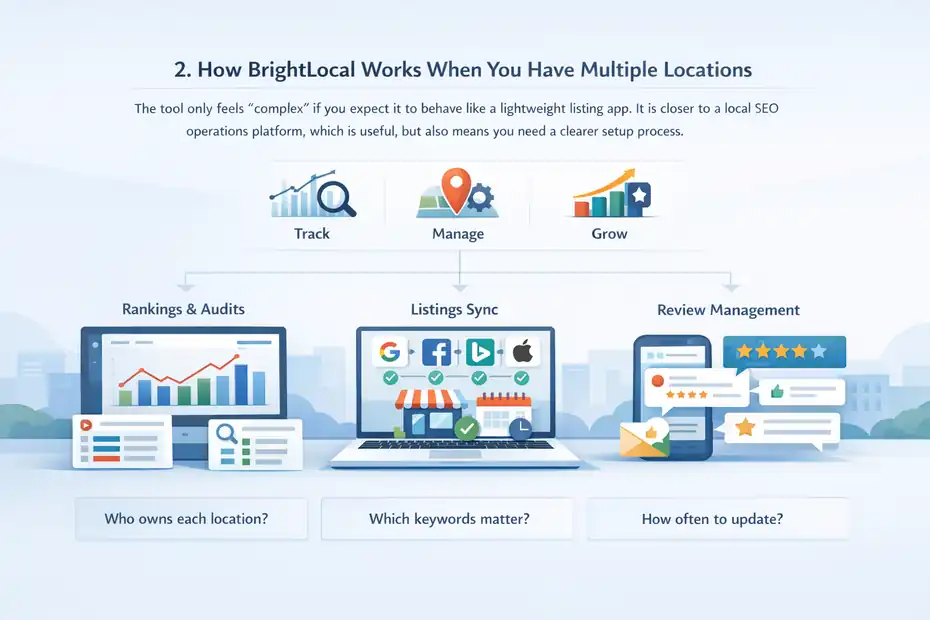
The tool only feels “complex” if you expect it to behave like a lightweight listing app.
It is closer to a local SEO operations platform, which is useful, but also means you need a clearer setup process.
The Core Modules You’ll Actually Use
BrightLocal’s current plans revolve around three main levels: Track, Manage, and Grow.
According to BrightLocal’s pricing and help pages, pricing starts at $39 per month, costs scale by active location count, annual billing discounts are around 25%, and Citation Builder is separate as a pay-as-you-go service rather than bundled usage.
BrightLocal’s pricing page also states that Citation Builder submissions cost $3.20 each, or $2 with bulk credits.
The feature structure is more important than the plan names:
- Track: Rank tracking, citation tracking, GBP audit, local search audit, performance monitoring, competitor insights.
- Manage: Adds listings management features such as syncing business data across Google, Bing, Facebook, and Apple, suppressing external edits, and scheduling GBP posts.
- Grow: Adds fuller review management, including monitoring and responding to reviews, review generation campaigns, and review widgets.
That setup tells you a lot about who BrightLocal is for. If your pain is visibility reporting, the Track plan is the starting point. If your pain is location data consistency, you need Manage.
If your pain is reputation management across many branches, Grow is where the product becomes more complete.
Where The Learning Curve Comes From
BrightLocal is not hard in the “technical implementation” sense. It is hard in the “there are several moving parts and you need process discipline” sense.
Most multi location teams do not struggle because a platform is impossible to click through. They struggle because they have not decided:
- Who owns each location?
- Which keywords matter by market?
- Which locations deserve individual reporting?
- How often listings get reviewed
- What counts as a priority issue versus a nice-to-fix issue
BrightLocal exposes those decisions. That is useful, but it can feel overwhelming if your operations are already messy.
I believe this is the biggest misunderstanding people have when they read a BrightLocal review for multi location businesses. The software is not “too complex” by default. It simply makes local SEO complexity visible.
For organized teams, that is a strength. For under-resourced teams, it can feel like extra work because it reveals how much was being missed.
The Biggest Advantages For Multi Location Brands
This is where BrightLocal earns its keep. Not in flashy AI promises, but in solving several annoying local SEO problems inside one system.
Better Visibility Across Locations, Not Just One Dashboard
BrightLocal’s local rank tracking is one of its more practical features for multi location setups. The official rank tracking page specifically calls out roll-up reports for users managing multiple locations or clients, which is exactly what regional chains and franchise groups need.
That matters because multi location performance is rarely evenly distributed. Imagine you run 18 dental clinics:
- Five locations dominate “emergency dentist near me.”
- Six show in the map pack inconsistently.
- Seven barely rank outside branded searches.
Without location-level ranking data, you end up assuming the whole brand is doing “fine” because a few strong branches hide the weak ones.
What I like here is the operational clarity. You can group performance by location, compare markets, and stop making broad decisions based on one flagship store. That is especially useful when leadership asks why one city is underperforming even though “the brand ranks well.”
Listings Control Is More Useful Than Most Teams Expect
Listings management sounds boring until you have 30 locations with holiday-hour changes, department phone numbers, relocations, or duplicate listings floating around the web.
BrightLocal’s Active Sync product is positioned as a way to keep important listings accurate, push updates when needed, and keep major listings synced across Google, Apple, Facebook, Yelp, and Bing. BrightLocal also says it can block rogue edits from external sources.
That is a serious operational benefit for multi location businesses because inconsistent business data is one of those problems that quietly damages trust. A wrong phone number or old address does not just hurt rankings. It creates friction for real customers.
In practice, this is the kind of feature that saves time for:
- Healthcare groups updating provider hours
- Restaurant brands rolling seasonal hours across branches
- Service-area businesses correcting local profile details after staffing changes
- Retail chains standardizing holiday updates across markets
I would not buy BrightLocal only for listings control if you have very few locations. But once the location count climbs, this feature becomes much more valuable.
Review Monitoring Becomes A Real Growth Lever At Scale
BrightLocal says its review monitoring covers 80+ review sites, and its review tools support monitoring, generation, and showcase widgets. That is more useful than it first sounds because multi location reputation problems are usually not global; they are local and uneven.
Its own 2026 Local Consumer Review Survey also found that 97% of consumers read reviews, 85% say positive reviews make them more likely to use a business, 77% say negative reviews make them less likely to choose one, and 65% wrote a review after being asked when they received a request.
That gives BrightLocal’s review layer a real business case. For many location-based brands, reviews are not just brand reputation. They are conversion assets.
A practical scenario looks like this: Your best-performing location is getting a steady stream of recent Google reviews, while three nearby branches have old reviews and almost no fresh feedback. BrightLocal helps you spot that pattern and push a repeatable review-request process instead of leaving each branch to handle it however they want.
Where BrightLocal Can Feel Too Complex
This is the part many reviews skip. BrightLocal can absolutely feel like too much, depending on the business stage, team structure, and expectations.
It Is Not A “Set It And Forget It” Tool
Some business owners want one thing: fix listings, get more reviews, show me the basics, and do not make me think about local SEO every week.
BrightLocal is not really that kind of product. Even though the interface is built for local marketing tasks, the platform still assumes you will actively use audits, ranking data, listing workflows, review monitoring, and reporting.
If you only log in once a month, parts of the platform will feel underused. That is when people start calling software “too complex,” when the real issue is mismatch. They bought an operations tool but wanted a minimal maintenance service.
I suggest being honest here. If nobody on your team will own local search consistently, BrightLocal may be more platform than you need.
Multi Location Setup Still Requires Good Internal Structure
BrightLocal can organize and surface issues, but it cannot fix broken internal ownership.
You still need answers to things like:
- Who approves listing changes?
- Who replies to reviews?
- Who decides target keywords by market?
- Who checks location page quality?
- Who escalates duplicate listings or bad data?
If that governance does not exist, even a good platform becomes noisy. One location gets love, another gets ignored, and then the software feels messy when the actual problem is process.
This is especially true in franchises, regional healthcare, automotive groups, and home-service businesses where each branch has some local autonomy. BrightLocal helps, but it does not remove the need for a clear operating model.
Country Coverage May Be A Limitation For Some Brands
BrightLocal’s pricing page says its local SEO tools are configured for the USA, UK, Canada, and Australia. That is a perfectly workable footprint for many businesses, but it is still a real limitation if you manage locations outside those primary markets.
So if you are an international brand with heavy location coverage across Europe, Latin America, or Asia-Pacific beyond those core markets, you need to check fit carefully. In those cases, BrightLocal may still be useful in some workflows, but it may not be the universal platform you hoped for.
That is not a dealbreaker for everyone. It is just one of those details that should show up in an honest review.
Pricing, Value, And Whether The Cost Makes Sense
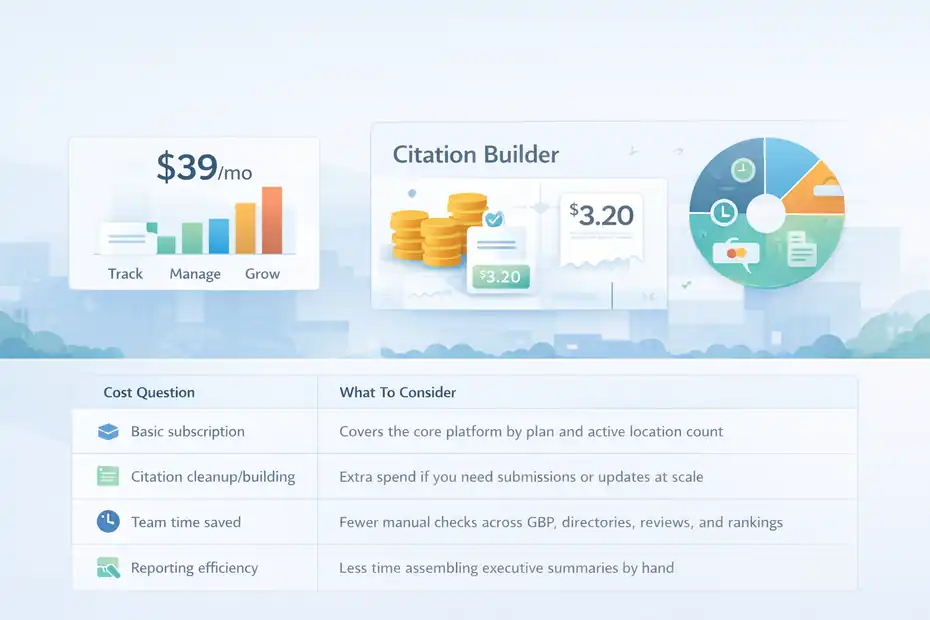
Price is where a lot of software decisions go sideways, because teams compare subscription cost without comparing workflow savings.
What You’re Really Paying For
BrightLocal’s software starts at $39 per month, scales by active location count, and offers Track, Manage, and Grow plans with around 25% savings on annual billing.
It also separates Citation Builder into a pay-as-you-go model, with submissions costing $3.20 each or $2 via bulk credits.
Here is the more useful way to think about the spend:
| Cost Question | What To Consider |
|---|---|
| Basic subscription | Covers the core platform by plan and active location count |
| Citation cleanup/building | Extra spend if you need submissions or updates at scale |
| Team time saved | Fewer manual checks across GBP, directories, reviews, and rankings |
| Reporting efficiency | Less time assembling executive summaries by hand |
| Error reduction | Fewer missed listing issues, duplicate inconsistencies, and stale data |
If you manage a small number of locations with low activity, BrightLocal can feel expensive relative to use. But if you are replacing scattered spreadsheets, manual listing audits, and fragmented review monitoring, the value picture changes quickly.
When BrightLocal Feels Expensive
In my experience, BrightLocal feels expensive in three situations:
- You only use one or two features: For example, you just want review monitoring and nothing else.
- Your team lacks follow-through: You pay for depth but never build a workflow around it.
- Your locations do not vary much: If every branch is practically identical and local competition is weak, you may not need advanced tracking as urgently.
That does not make BrightLocal overpriced. It just means the cost makes less sense when the operational need is light.
When The Platform Pays For Itself
BrightLocal looks much better when you value staff time and local visibility together.
Let’s say a regional service brand has 22 locations. Before BrightLocal, the marketing team spends hours each month checking profiles, collecting review data, chasing listing problems, and answering leadership questions location by location.
After implementing a clearer workflow, even a modest reduction in manual reporting and issue-tracking can justify the software faster than most people expect.
I believe this is the fairest pricing conclusion: BrightLocal is not the cheapest path if you want only one narrow function, but it can be cost-effective if you truly need a local SEO operating layer for multiple locations.
Who BrightLocal Is Best For And Who Should Skip It
This is where the “worth it or too complex” question becomes easier. The answer depends less on software quality and more on business stage.
Best Fit: Businesses With Real Location Complexity
BrightLocal is a strong fit for:
- Multi location brands with 5+ active branches
- Businesses that care about Google Maps visibility by market
- Teams that need listings, reviews, audits, and reporting in one system
- Marketing managers who need location-level accountability
- Agencies or in-house teams supporting a large local footprint
It is especially good when your pain sounds like this: “We know local search matters, but we do not have a clean way to monitor everything across locations.”
That is BrightLocal’s sweet spot.
Weak Fit: Teams Looking For Extreme Simplicity
You may want to skip it if:
- You manage one location and only need very basic local SEO
- Nobody on your team will own the platform weekly
- You only want one function, such as citation cleanup
- Your local competition is low and performance is already stable
- You want a done-for-you service more than a working platform
I think that last point matters a lot. BrightLocal helps teams that are willing to operate a process. It is less ideal for owners who want software to quietly “handle local SEO” in the background with almost no internal effort.
A Simple Decision Table
| Situation | BrightLocal Fit |
|---|---|
| 1–3 locations, low competition, limited time | Probably too much |
| 5–20 locations, inconsistent local performance | Strong fit |
| 20+ locations, reporting and listings pain | Very strong fit |
| Need only Google profile basics | Likely overkill |
| Need local rank tracking, listings control, and review workflows | Worth serious consideration |
How To Use BrightLocal Without Getting Overwhelmed
The best way to avoid complexity is to start with a narrower use case and expand only after the basics are under control.
Start With Visibility And Data Accuracy First
Do not try to switch on everything at once. For most multi location businesses, the first practical priorities are:
- Audit all locations
- Fix high-impact listing inconsistencies
- Set up rank tracking for your most important non-branded local keywords
- Create a review monitoring baseline
- Build one executive summary view
That alone gives you a much clearer picture of where the real problems are.
I recommend resisting the urge to obsess over every report right away. Most brands get better results by starting with the branches that matter most, such as their top markets, weakest-performing locations, or most competitive metros.
Build A Tiered Location Strategy
Not every location deserves the same level of attention.
A simple structure can look like this:
- Tier 1: Top revenue or flagship markets; tracked weekly with the deepest optimization.
- Tier 2: Stable branches; monitored monthly with issue-based fixes.
- Tier 3: New or low-priority locations; baseline tracking and listings control.
This is one of the easiest ways to make BrightLocal feel manageable. You stop treating 40 locations like 40 separate emergencies.
Use Reporting To Drive Accountability, Not Vanity
BrightLocal becomes much more useful when reporting leads to action.
A healthy reporting rhythm might include:
- Monthly leadership summary: Overall visibility, reviews, listings health, biggest wins and risks.
- Location manager scorecard: Reviews, profile issues, ranking movement, operational follow-ups.
- Quarterly optimization review: Which markets need deeper content, GBP work, or citation fixes.
The mistake I see often is turning local SEO reporting into a pretty PDF exercise. The better use is accountability. Which locations improved? Which are slipping? Which fixes are overdue?
That is how the platform stays valuable instead of becoming another dashboard everyone ignores.
Common Mistakes Multi Location Businesses Make With BrightLocal
Most BrightLocal disappointment comes from implementation mistakes, not from the software failing.
Mistake 1: Tracking Too Many Keywords Too Early
When teams first get access to rank tracking, they often throw in every imaginable term. That creates noise fast.
A better approach is:
- Start with core commercial keywords
- Separate branded and non-branded terms
- Track by real service and geography combinations
- Add long-tail terms only after the baseline is stable
Too much keyword data does not create clarity. It usually creates paralysis.
Mistake 2: Treating Every Location The Same
A downtown clinic, suburban branch, and rural service office should not be evaluated the same way. Competition, customer behavior, and search patterns differ.
I suggest setting different expectations based on market type. That makes BrightLocal’s reporting more meaningful and prevents false alarms.
Mistake 3: Ignoring Review Operations
BrightLocal’s own research shows review recency and ratings matter more than ever, with 97% of consumers reading reviews and 41% saying they always read reviews when browsing for businesses in 2026.
So if you invest in the platform but do not build a repeatable review-request and response process, you are leaving one of the highest-impact local levers underused.
Mistake 4: Expecting Software To Replace Local SEO Strategy
BrightLocal helps you see what is happening. It does not automatically create stronger location pages, better local content, cleaner franchise governance, or smarter review-response policies.
That strategy still has to come from you or your team.
Final Verdict: Worth It Or Too Complex?
BrightLocal is worth it for multi location businesses that genuinely need structure across rankings, listings, reviews, and local reporting.
Its official feature set is clearly built around that use case, with location audits, roll-up rank reporting, listings sync across major platforms, review monitoring across 80+ sites, and tiered plans that scale by active location count.
But it can feel too complex for businesses that want a lightweight “fix my local presence and leave me alone” tool. That is not really a BrightLocal flaw. It is a mismatch between the platform and the operating style of the business.
My honest take is this:
- If you have a handful of locations and weak internal ownership, BrightLocal may feel like more system than you need.
- If you have meaningful local competition, several branches, scattered review and listing issues, and leadership asking for location-level performance clarity, BrightLocal is one of the more practical platforms to consider.
- If your biggest fear is complexity, start small: audits, listings accuracy, and a focused rank tracking setup. That alone can give you most of the value without making the platform feel heavy.
So, for a true brightlocal review for multi location businesses, the answer is not “yes” or “no.” It is this: worth it when local SEO is already operationally messy, too complex only when the business expects software to replace process.
FAQ
Is BrightLocal good for multi location businesses?
BrightLocal is a strong choice for multi location businesses that need centralized control over rankings, listings, and reviews. It helps track performance across locations and simplifies reporting. However, it works best for teams with clear processes, as it requires ongoing management to deliver full value.
Is BrightLocal too complex for beginners?
BrightLocal is not overly technical, but it can feel complex if you expect a simple, hands-off tool. The platform includes multiple features like audits, tracking, and listings management. Beginners can still use it effectively by starting with basic functions and gradually expanding usage.
What features does BrightLocal offer for multiple locations?
BrightLocal offers rank tracking by location, listings management, review monitoring, and local SEO audits. These features help businesses manage visibility and consistency across multiple branches. It also provides reporting tools that combine data from all locations into one clear performance overview.
How much does BrightLocal cost for multi location businesses?
BrightLocal pricing starts at $39 per month and increases based on the number of locations and features used. Additional services like citation building cost extra. For multi location businesses, the total cost depends on scale, but it can be cost-effective when replacing manual SEO work.
Is BrightLocal worth it compared to simpler tools?
BrightLocal is worth it if you need deeper insights and control across multiple locations. Simpler tools may handle basic listings or reviews, but BrightLocal combines several functions in one platform. It may feel like overkill for small setups but valuable for growing or complex businesses.

I’m Juxhin, the voice behind The Justifiable.
I’ve spent 6+ years building blogs, managing affiliate campaigns, and testing the messy world of online business. Here, I cut the fluff and share the strategies that actually move the needle — so you can build income that’s sustainable, not speculative.
Related posts:
 BrightLocal Review For Citation Building: Is It Worth Your Money?
 BrightLocal Review For Google Business Profile Tracking: Better Insights?
 BrightLocal Honest Review For Freelancers: Smart Investment Or Waste?
 BrightLocal Review For Small Business Local SEO: Is It Worth Paying For?
 BrightLocal Review For Local SEO Agencies: Is It Worth The Cost?
 BrightLocal Reviews: Why Marketers Trust This SEO Tool