
Table of Contents
Some links on The Justifiable are affiliate links, meaning we may earn a small commission at no extra cost to you. Read full disclaimer.
CallRail features overview is really about one thing: helping you see which marketing turns into real conversations, real leads, and real revenue.
If you have ever looked at your campaign dashboard and thought, “That click count is nice, but what actually made the phone ring?” this is the kind of platform built for that problem.
CallRail today centers its product around call tracking, form tracking, messaging, AI-powered conversation analysis, integrations, and workflow automation, with a 14-day trial and plans that start at $45 per month plus usage.
What CallRail Is And Why Its Feature Set Matters
At a high level, CallRail is a lead engagement and attribution platform.
The company positions itself as software that helps businesses track calls, texts, and forms, connect those interactions back to marketing sources, and then use AI to understand which leads are actually worth pursuing.
That matters because a lot of businesses still optimize around clicks, impressions, or form counts, even when phone calls are the highest-intent conversion they get.
How CallRail Fits Into The Marketing Stack
If you run a service business, agency, multi-location company, or any business where a phone call can turn into booked revenue, CallRail sits between your marketing and your sales process.
It gives you unique tracking numbers, captures call and text activity, records and transcribes conversations, and pushes data into other tools through integrations and its API. The practical benefit is simple: you stop guessing which channel worked.
I think this is where many people misunderstand call tracking software. They assume it is just a phone-number swap tool. In reality, CallRail has expanded into a broader lead intelligence platform.
On its homepage, CallRail says it helps businesses “track calls, texts, and forms with clear attribution,” and its current product line includes Call Tracking, Form Tracking, Premium Conversation Intelligence, Messaging, and Voice Assist. That puts it closer to a revenue visibility tool than a basic telecom add-on.
The Kind Of Business That Gets The Most Value
From what I’ve seen, CallRail is most useful when your buying journey is messy. Maybe someone clicks a Google ad, browses two pages, leaves, comes back from direct traffic three days later, and then calls.
Or maybe your leads prefer texting instead of filling out forms. Or maybe your team misses calls after hours and never sees the hidden revenue loss. These are exactly the situations where CallRail’s visitor tracking, call routing, messaging, and AI summaries become valuable.
CallRail also says it serves more than 200,000 companies worldwide, which gives you a sense of how mainstream the platform has become among SMB and agency users. That does not automatically make it right for you, but it does suggest the product is mature enough to support common attribution and lead-handling workflows.
The Core Tracking Features That Most Users Start With
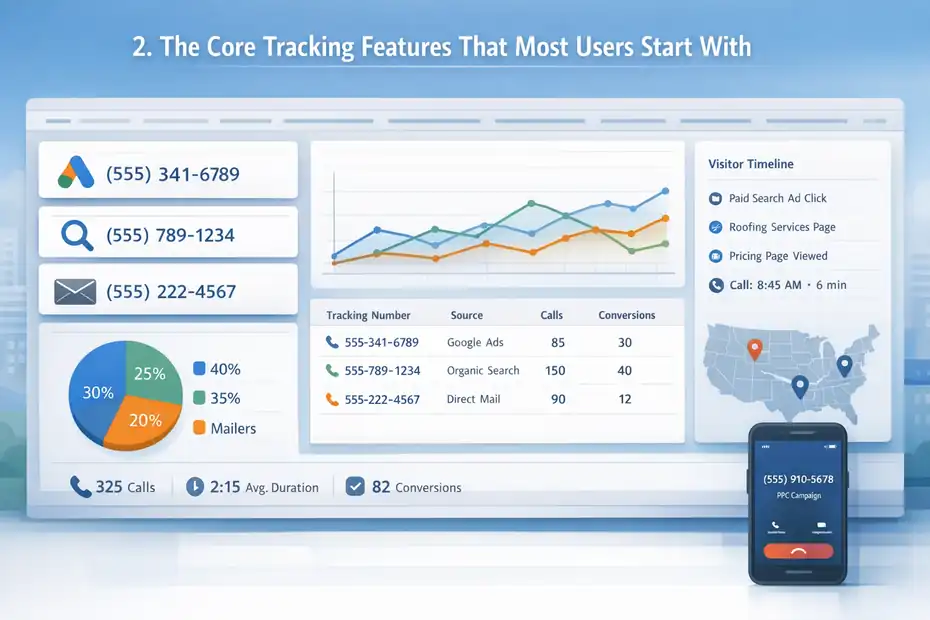
The center of any CallRail features overview should be its tracking layer, because that is the foundation everything else depends on.
Before you can analyze conversations or improve lead handling, you need clean attribution.
Call Tracking Numbers And Attribution
CallRail’s call tracking product is built around unique phone numbers that let you measure which campaigns, pages, and sources drive inbound calls and texts.
You can purchase local and toll-free tracking numbers, and the platform says those numbers are available across the US and Canada, with international options also available.
Once assigned, those numbers feed activity into your reporting dashboard so you can connect each call back to a source.
Here is the practical shortcut I usually recommend: do not start by assigning a different number to every tiny tactic. Start with channel-level clarity first.
or example, use separate numbers for Google Ads, organic search, offline campaigns, and major landing page groups. Once you trust the reporting, then go narrower. That setup usually gives you cleaner attribution without creating operational confusion for your team.
A realistic example looks like this: Imagine you are running a roofing company. You place one tracking number on your PPC landing pages, another on local SEO pages, and a third on mailers. After a month, your dashboard shows that PPC produced fewer calls than SEO, but the PPC calls lasted longer and converted at a higher rate. That is exactly the kind of decision-making signal call tracking is supposed to create. The platform’s calls-by-number reporting is designed for that kind of analysis.
Visitor-Level Tracking And Dynamic Number Insertion
One of CallRail’s more important capabilities is visitor-level call tracking. According to CallRail support documentation, this uses a website pool and a JavaScript snippet to swap numbers for different visitors, which helps attribute calls back to the marketing source, search keywords, campaigns, and pages that led to the call. CallRail specifically notes this is needed for keyword-level PPC conversion reporting.
This matters more than most beginners realize. Without dynamic number insertion, you may know that a call came from your website, but you may not know whether it came from branded search, non-branded search, paid search, or a returning direct visit.
Visitor-level tracking closes that gap. The timeline view then adds context such as touchpoints, page views, and visit history around the caller.
In my experience, this is the feature that moves CallRail from “nice reporting tool” to “serious attribution system.” It is also the feature most likely to be implemented poorly if your site setup is messy.
If you use multiple domains, aggressive caching, or tag-manager workarounds, test carefully. Attribution problems often come from setup friction, not from the reporting concept itself.
The Features That Improve Call Handling, Not Just Measurement
Good tracking is only half the story. A solid CallRail features overview also needs to cover what happens after the phone rings, because the platform includes tools for routing and handling inbound communication more intelligently.
Call Flow Builder And Routing Logic
CallRail’s Call Flow Builder lets you create routing paths for tracking numbers. Its support docs say you can use call flows to build schedules, menus, voicemail paths, and department-based routing so calls reach the right person. There are also templates that help speed up setup across multiple numbers.
That may sound basic, but it solves a very expensive problem. If marketing is doing its job and operations is not, you still lose revenue. A missed or misrouted call can turn a high-intent lead into nothing. CallRail’s routing options help reduce that by connecting the tracking layer to actual lead response workflows.
A practical setup might look like this:
- Business Hours Route: Send weekday calls to your front desk or sales line.
- After-Hours Route: Send evening calls to voicemail, a backup number, or Voice Assist.
- Department Menu: Let callers choose sales, support, or billing.
- Location Split: Route based on the number a prospect called for each branch or office.
That kind of structure is especially useful for law firms, home services, clinics, and franchise businesses where one number alone does not reflect how calls should be distributed. The feature is less about fancy phone trees and more about protecting the value of each tracked lead.
Messaging, Text Tracking, And Outbound Dialing
CallRail now supports in-app messaging for tracking numbers, along with text analytics, auto-replies, message flows, and an outbound dialer. Support documentation says users can send and receive texts from created tracking numbers, view text-message analytics, and use message flows for inbound texting experiences, while the outbound dialer lets teams call leads using existing tracking numbers.
This is an important current-state update because Lead Center has been sunset, and CallRail has been guiding users toward Messaging and Dialers instead. The company’s migration documentation also notes that Messaging is billed as part of the base Call Tracking plan, with 25 messages included and additional messages priced at $0.03 each.
There are also compliance limits you need to know. CallRail says businesses that want to respond to text leads must register for texting, and support documentation notes that local US and Canadian numbers can send and receive texts, while international numbers cannot. If you ignore that operational detail, your “great lead response strategy” can break before it starts.
The Form Tracking Features That Fill Attribution Gaps
Not every prospect calls first. Some people submit a form, then call later. Others text after reading a service page.
That is why form tracking matters in a serious CallRail features overview.
What Form Tracking Actually Does
CallRail’s Form Tracking product captures form submissions and attributes them back to marketing efforts. The company says the same line of code can be used to track both calls and forms, and support documentation explains that CallRail can capture form contents and instantly alert you by phone, text, or email when someone submits a form.
That sounds simple, but it closes a very common reporting gap. Many businesses know how many forms they received, but not which channels, ads, or keywords created those submissions in a reliable way.
When form tracking is tied to the same attribution system as call tracking, you get a more complete picture of lead generation rather than two disconnected datasets.
I suggest thinking of form tracking as “lead continuity.” It helps you avoid the classic situation where paid search looks weak in one dashboard, SEO looks strong in another, and nobody knows which source is actually producing qualified leads.
Where Form Tracking Helps Most
Form tracking becomes especially useful in three situations. First, it helps when your buyers research quietly before speaking to you. Second, it helps when multiple locations or landing pages collect leads in different ways.
Third, it helps agencies prove value beyond phone-call counts. CallRail’s pricing page shows that the Lead Tracking Complete plan adds form tracking, attribution, a custom form builder, and multi-touch cost-per-lead reporting, which tells you how central forms have become in the platform’s current packaging.
A realistic scenario: Imagine a med spa running Google Ads to a booking page. Half the prospects call. Half submit a consultation form after browsing treatment FAQs. Without form tracking, you would under-credit the campaign. With it, you can see that the page is producing more total demand than call-only reports suggest.
This also helps operationally. Support docs note that CallRail can alert your team instantly after submission, which matters because lead speed still affects conversion. Tracking without rapid follow-up is better than nothing, but not by much.
The AI And Conversation Intelligence Features
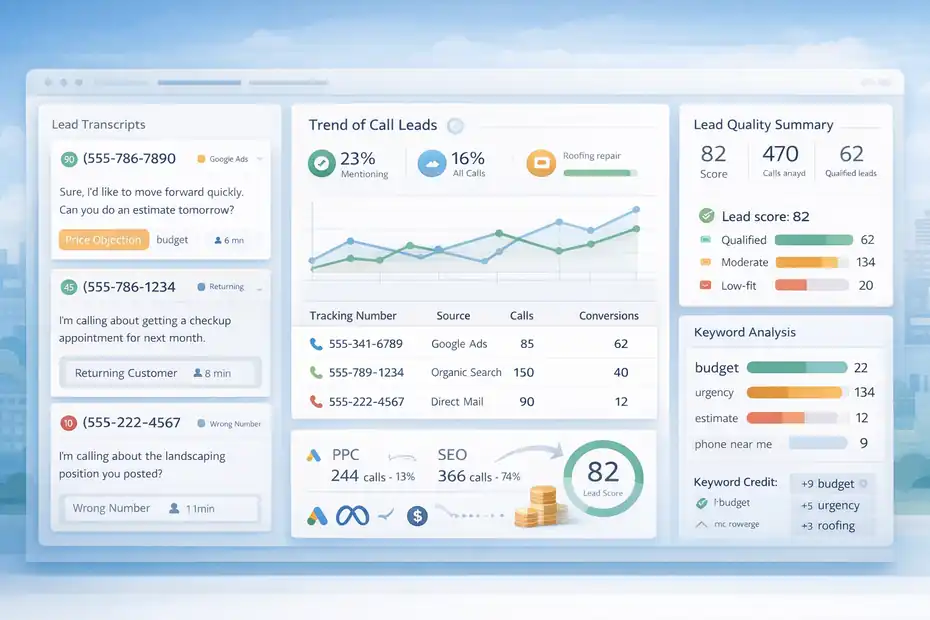
This is where CallRail has clearly moved beyond classic call tracking.
Its AI layer is one of the biggest reasons the platform is positioned today as lead intelligence software rather than just attribution software.
Conversation Intelligence And Premium Conversation Intelligence
CallRail’s pricing and product pages show that Conversation Intelligence features include call transcripts, keyword analysis, call summaries, sentiment analysis, conversation trend reports, and automatic conversion tagging within its higher-tier offering.
Its Premium Conversation Intelligence page says the platform can use call data to improve marketing and operations, while support docs note that the premium version adds AI-driven features on top of the base conversation tools.
I believe this is the most valuable upgrade for teams that already have plenty of leads but poor visibility into lead quality. Tracking call volume is useful.
Understanding which calls mention price objections, urgency, booking intent, competitor comparisons, or location issues is far more useful. That is the difference between “We got 80 calls” and “We got 80 calls, but only 18 matched our ideal customer profile.”
CallRail also says Premium Conversation Intelligence can transcribe calls, identify key terms, assign lead scores, and feed insights into integrations such as Google Ads. That makes the AI features directly relevant to campaign optimization, not just call review.
Why AI Features Matter In Real Campaign Optimization
Let me break this down in a practical way. If you run campaigns for a personal injury law firm, a home service business, or a dental office, not every call is equally valuable.
Some are wrong numbers. Some are existing customers. Some are low-fit inquiries. Some are ideal new leads. Premium Conversation Intelligence helps classify that mess into something you can actually use.
A good optimization loop looks like this:
- Step 1: Track which channels generate the most calls.
- Step 2: Review transcripts, summaries, and keyword patterns.
- Step 3: Tag or score lead quality.
- Step 4: Push those signals into ad platforms or reporting.
- Step 5: Reallocate budget toward sources producing better conversations, not just more activity.
That approach is far more mature than judging performance based on surface-level conversions. It is also where CallRail’s feature set starts to justify its cost for teams spending serious money on lead generation.
If you only need a phone number and a call log, you probably do not need the full AI stack. If you need attribution plus quality signals, you probably do.
Voice Assist, Automation, And Workflow Features
CallRail has also pushed into AI-assisted lead handling with Voice Assist and workflow automation. These features are not necessary for everyone, but they can be powerful when missed calls are costing you real money.
Voice Assist And After-Hours Coverage
CallRail launched Voice Assist in April 2025 as an AI assistant designed to answer calls, engage in natural conversations, and handle routine lead-capture tasks. Its current site says Voice Assist can answer calls 24/7, qualify leads, and book appointments, while support docs explain setup happens in the Workflow area and is enabled through a call flow.
This is the kind of feature that is either overkill or a lifesaver, depending on your business model. If you are open 9 to 5, answer every call live, and have low call volume, you may not need it.
But if you are losing high-intent leads at night, on weekends, or during peak periods, an AI answer layer can protect revenue you are already paying to generate. That is the real use case.
CallRail’s pricing page lists Voice Assist starting at $95 per month, with additional call-based pricing after included usage. So I would treat this as a margin-protection tool, not a default add-on. Use it when the value of one saved lead is clearly higher than the monthly spend.
Automation Rules And Response Speed
CallRail’s pricing page also lists automation rules as part of its Lead Tracking package. Combined with messaging, call flows, form alerts, and AI analysis, this gives you a workflow layer that can reduce manual follow-up delays.
In practical terms, automation helps you do things like flag missed calls, send alerts when a form arrives, route texts to the right team, or create follow-up steps around qualified leads.
The exact configuration varies, but the strategic point is consistent: speed matters. If two businesses buy the same traffic and only one responds fast, the faster one usually wins more revenue.
I would not over-automate in the beginning, though. Start with one or two high-value workflows, such as missed-call alerts and instant form-submission notifications. Once those are working, add more advanced routing or AI-assisted handling. Too many businesses try to automate everything at once and create a brittle system nobody on the team trusts.
Reporting, Integrations, And Developer-Friendly Features
A feature is only as useful as the decisions it supports. That is why reporting and integrations deserve their own section in this CallRail features overview.
Reporting That Helps You Prove ROI
CallRail’s reporting includes tools like the Calls by Number report and custom reports that break down call types, volumes, and performance by tracking number. Its homepage also highlights dashboard cards for calls, texts, forms, and conversation insights.
This matters for two reasons. First, it gives internal teams a way to connect spend with outcomes. Second, it gives agencies a cleaner way to justify retainers or media budgets. A monthly report that says, “Traffic increased 18%” is fine.
A report that says, “Organic search drove 46 qualified calls, 19 form submissions, and 11 first-time callers with higher average duration than paid social” is a lot more convincing.
I recommend deciding early which metrics will actually matter to you. For most teams, that will be some mix of first-time callers, answered calls, missed calls, qualified leads, form fills, and source-level conversion quality. If you report on everything, you usually learn nothing.
Integrations And API Access
CallRail’s integrations page highlights connections with platforms such as HubSpot, Salesforce, Google, Meta, Bing, RingCentral, Zapier, Jobber, Unbounce, and Clio. Its HubSpot integration page says CallRail can automatically create new leads from inbound calls or text messages or add activities to existing contacts. For custom workflows, the company also offers a REST API through CallRail API v3.
That flexibility matters because attribution data becomes much more useful when it reaches the systems your team already uses. Marketing wants source data. Sales wants contact history. Leadership wants revenue visibility. Integrations are how you stop that information from staying trapped in one dashboard.
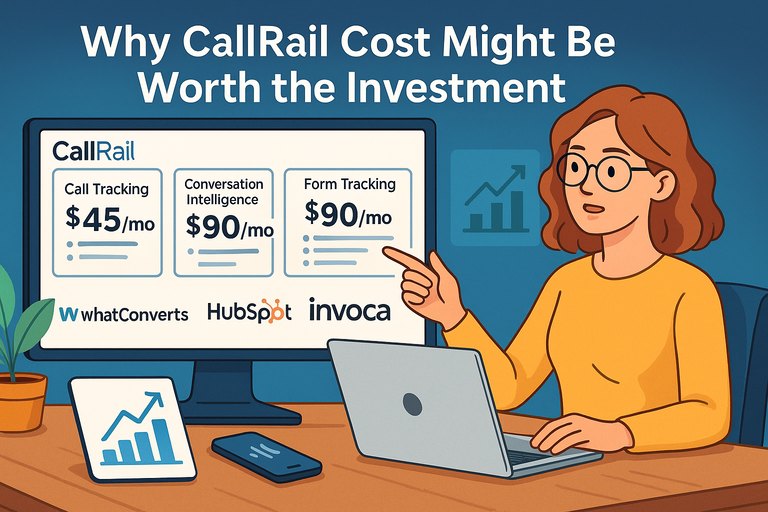
Here is a simple comparison table to make the feature tiers easier to understand:
| Plan / Add-On | Starting Price | Best For | Standout Features |
|---|---|---|---|
| Lead Tracking | $50/month + usage | Businesses that need call and text attribution | 5 numbers, 250 minutes, call and text tracking, call recording and routing, transcription and analysis, automation rules |
| Lead Tracking Complete | $95/month + usage | Teams that also rely on forms | Everything in Lead Tracking plus form tracking, custom form builder, multi-touch CPL reporting |
| Lead Conversion | $150/month + usage | Teams optimizing for lead quality, not just lead volume | Call transcripts, keyword analysis, summaries, sentiment analysis, trend reports, automatic conversion tagging, Convert Assist tools |
| Voice Assist | Starts at $95/month | Teams losing leads outside business hours | 24/7 AI answering, lead qualification, appointment booking support |
Source pricing and included features are from CallRail’s official pricing page.
Common Mistakes, Best-Fit Use Cases, And My Final Take
A complete guide should not just praise the software. It should also tell you where people go wrong.
Common Mistakes When Using CallRail
The biggest mistake is treating CallRail like a passive reporting tool. If you install tracking numbers and never adjust routing, follow-up speed, campaign allocation, or lead scoring, you will get data without much business impact. CallRail’s feature set is built to influence action, not just create prettier dashboards.
The second mistake is poor implementation. Visitor-level tracking depends on the correct website pool and JavaScript setup. Messaging depends on registration and compliance. Call routing depends on logic that matches your actual business hours and team structure.
AI insights only help if someone reviews and applies them. Most “the platform didn’t work” complaints really mean “the workflow around the platform didn’t work.”
The third mistake is chasing too much granularity too soon. I suggest starting with a clear measurement framework:
- Channel-Level Attribution First: Paid search, SEO, direct, offline.
- Lead Handling Second: Routing, missed-call coverage, alerts.
- Quality Signals Third: Transcripts, keywords, summaries, scoring.
- Advanced Automation Last: AI answering, deeper workflow rules, API-based syncing.
That order usually keeps the rollout manageable.
Who Should And Should Not Use It
I believe CallRail is a strong fit for businesses where inbound calls or texts matter to revenue and where marketing attribution is still fuzzy.
Agencies, law firms, home service companies, clinics, franchises, and local businesses with meaningful phone-driven conversion paths are obvious examples. CallRail’s own positioning leans heavily toward SMB and lead-driven marketing use cases, and its product lineup reflects that.
It is less compelling if your business is almost entirely self-serve ecommerce with minimal phone contact, or if you only need a generic business phone system. In that situation, you may not use enough of the tracking, attribution, and AI stack to justify the spend.
My honest takeaway is this: CallRail is most valuable when you use it as a system, not a feature. The strongest part of the platform is not any single tool. It is the way call tracking, form tracking, messaging, routing, reporting, AI analysis, and integrations work together to answer one hard question: which marketing actually drives the leads you want, and what should you do next because of that?
If that is the question you are trying to answer, CallRail’s current feature set is built for it.
FAQ
What is CallRail used for?
CallRail is used to track calls, texts, and form submissions from marketing campaigns. It helps businesses understand which channels generate leads and how those leads convert. By connecting conversations to specific sources, it improves marketing decisions and lead management strategies.
How does CallRail call tracking work?
CallRail assigns unique tracking numbers to different campaigns or channels. When someone calls, the system records the interaction and links it to the source, such as Google Ads or organic search. This allows businesses to see exactly which marketing efforts are driving phone leads.
What features does CallRail offer?
CallRail offers call tracking, form tracking, text messaging, call recording, conversation intelligence, and reporting tools. It also includes automation features and integrations with marketing platforms. These features work together to give a complete view of lead generation and customer interactions.
Is CallRail good for small businesses?
CallRail is a strong option for small businesses that rely on phone calls or form leads. It helps track marketing performance, improve response times, and understand customer conversations. Many small businesses use it to optimize advertising and increase conversions.
Does CallRail integrate with other tools?
CallRail integrates with platforms like CRMs, analytics tools, and advertising networks. These integrations allow data from calls, texts, and forms to sync across systems. This helps businesses manage leads more efficiently and improve marketing attribution accuracy.

I’m Juxhin, the voice behind The Justifiable.
I’ve spent 6+ years building blogs, managing affiliate campaigns, and testing the messy world of online business. Here, I cut the fluff and share the strategies that actually move the needle — so you can build income that’s sustainable, not speculative.
Related posts:
 CallRail Pricing Explained: Plans, Costs, Hidden Fees
 CallRail Pros And Cons For Businesses: What Matters Most
 What is CallRail? Discover the Power of Call Tracking and Analytics
 Top 7 CallRail Alternatives for Affordable Call Tracking
 CallRail Call Tracking: How It Works and Why It Matters
 Why CallRail Cost Might Be Worth the Investment