
Table of Contents
Some links on The Justifiable are affiliate links, meaning we may earn a small commission at no extra cost to you. Read full disclaimer.
A doba supplier marketplace review matters more than most beginner sellers realize, because this platform can look simple on the surface while hiding the real math underneath.
If you are trying to decide whether Doba is worth your money, time, and margin, you need more than a generic “yes or no.”
You need to know how the marketplace works, where the costs really show up, who it fits best, and where people usually get disappointed.
I went through the current plans, policies, and user feedback, and this guide will help you see the truth before you commit.
What Doba Supplier Marketplace Actually Is
Doba is not just a product directory. It is a supplier marketplace plus automation layer, and that difference is important if you are comparing it with a basic wholesale list or a lighter dropshipping tool.
What You Are Really Paying For
When people first hear about Doba, they often assume they are paying for access to products. That is only partly true. Doba describes itself as a marketplace where retailers can locate and purchase products from suppliers, while Doba acts as the facilitator between both sides.
In plain English, it sits in the middle and tries to make sourcing, listing, syncing, and order handling easier for you.
That middleman role is the key to this whole review. You are not paying only for product access. You are paying for convenience, reduced manual work, store integrations, listing limits, inventory syncing, and some level of supplier filtering.
On the pricing page, Doba positions its plans around store integrations, one-click listings, inventory capacity, product downloads, AI research tools, and API access on higher tiers.
I believe this is where many bad expectations begin. Some sellers join expecting “cheap wholesale pricing,” when the real value pitch is “centralized operations.” Those are not the same thing.
So if you are evaluating Doba, the right question is not “Can I find products here?” You probably can. The better question is “Does the time I save and the structure I gain justify the subscription and the product economics?”
How The Marketplace Fits Into A Dropshipping Workflow
Let me break it down simply. A normal dropshipping workflow has five moving parts: finding products, checking supplier reliability, importing listings, syncing stock, and pushing orders to fulfillment.
Doba tries to cover most of that inside one system. Its homepage and Shopify app materials emphasize one-click listing, automated order handling, and real-time inventory and price syncing.
That can be genuinely useful. Imagine you are running a small Shopify store with 80 active SKUs. If you manage suppliers manually, you may spend hours every week checking stock, updating prices, and dealing with broken listings. A platform like Doba can reduce that friction.
But here is the catch: Operational ease does not guarantee product competitiveness. Automation can save you time, but it cannot magically create great margins, unique products, or a better brand. That is still your job.
From what I’ve seen, Doba works best when you treat it as an operations tool first and a product discovery source second. If you reverse that mindset, you may end up disappointed.
What You Get With Doba Right Now
The current version of Doba is more structured than many older reviews suggest, and that matters because outdated reviews often judge a platform based on plan details that have already changed.
Current Plans, Limits, And Feature Tiers
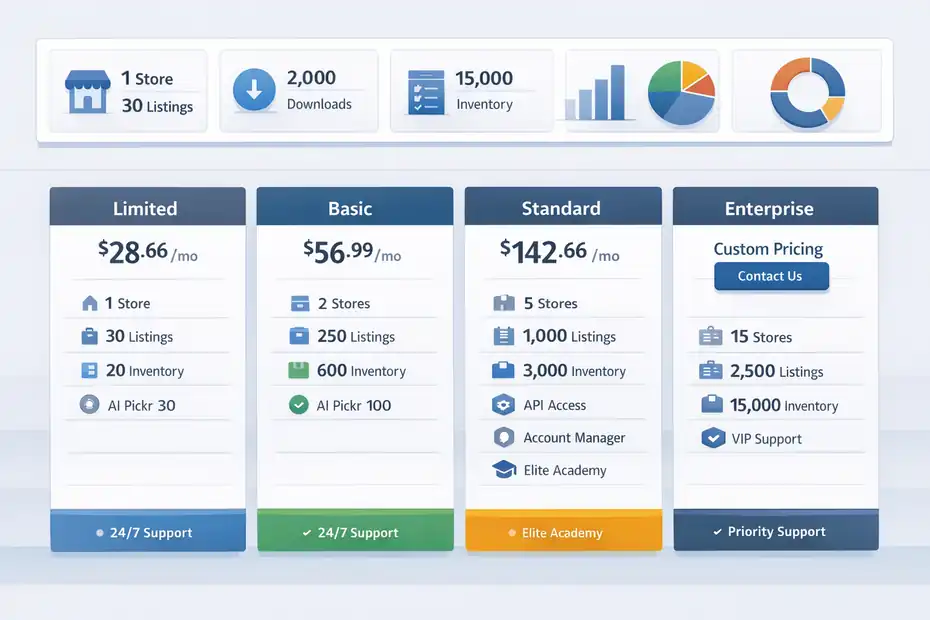
Doba currently shows four main plans: Limited, Basic, Standard, and Enterprise. The pricing page lists the Limited plan at $28.66 per month billed quarterly, the Basic plan at $56.99 per month billed quarterly, and the Standard plan at $142.66 per month billed quarterly.
Enterprise is available on monthly or annual terms, but the public pricing page does not show a simple flat monthly number in the text extract.
The practical differences matter a lot:
- Limited: 1 store integration, 30 one-click listings, 20 inventory list capacity, 30 AI Pickr uses per month, and 24/7 customer service.
- Basic: 2 store integrations, 250 one-click listings, 600 inventory list capacity, 450 monthly product downloads, 100 AI Pickr uses, 30 AI auto-listings, and advanced product research.
- Standard: 5 store integrations, 1,000 one-click listings, 3,000 inventory list capacity, 2,000 product downloads, more AI usage, API access, featured product selection, a dedicated account manager, and Doba Elite Academy.
- Enterprise: 15 store integrations, 2,500 one-click listings, 15,000 inventory capacity, 5,000 product downloads, more AI allowances, and faster API access.
I suggest paying close attention to limits, not just plan names. The word “marketplace” can make a platform sound open and unlimited, but your day-to-day use is heavily gated by listings, inventory capacity, downloads, and integrations.
The Features That Actually Matter In Real Use
A lot of shiny features look impressive on a pricing page. In real life, only a few tend to move the needle.
The first is inventory and price sync. Doba prominently promotes real-time syncing to help prevent out-of-stock issues and stale pricing. That is useful because bad sync is one of the fastest ways to create refunds, angry customers, and account stress.
The second is store integration count. If you are selling on one channel only, a low-tier plan may be enough. If you are running Shopify plus a marketplace channel, or multiple storefronts, you will hit the upgrade wall quickly.
The third is listing and download limits. This is where hidden friction starts. Many beginners think they can test hundreds of products cheaply.
In practice, lower tiers push you into tighter selection and slower experimentation. That is not always bad, but you should know it going in.
The fourth is support and account management. Doba markets 24/7 support generally, and higher plans include more dedicated help. Shopify app reviews also repeatedly mention customer support and ease of use as positives.
That combination can be valuable, especially if you are not technical.
The Hidden Costs Most Reviews Skip
This is the part many readers actually care about. Not because subscription price is unimportant, but because subscription price is rarely the full story.
Subscription Cost Is Only The First Layer
Doba’s fees policy states clearly that subscription fees are not inclusive of product costs, shipping rates, drop or handling fees, and transaction charges, which are paid separately at purchase. Suppliers can also list product price, drop-ship fees, handling fees, and shipping costs separately to retailers.
That one detail changes the whole economics of the platform.
Here is a simple example. Let’s say you find a product that looks profitable at first glance:
- Supplier product cost: $18
- Shipping: $7
- Handling or drop fee: $3
- Doba subscription allocation per sale: maybe $2 to $10 depending on volume
- Marketplace or payment fees on your selling channel: another layer
That $18 product is not really an $18 product anymore. It may be a $30-plus landed cost before you even think about ad spend, returns, discounts, or customer support time.
This does not mean Doba is a bad platform. It means margin planning on Doba has to be more disciplined than many beginners expect. I recommend calculating “all-in delivered cost” before you import anything. If you skip that step, your store may look busy while your profit quietly disappears.
Commitment Terms, Refund Friction, And Billing Risk
The second hidden cost is not a product cost. It is a billing and cancellation risk.
Doba’s fees page says canceled subscriptions lose site access, and once a subscription fee has been successfully charged for over 72 hours, you are not entitled to a full refund on monthly, quarterly, or annual plans.
The same page also explains that commitment-period offers may prevent cancellation during the term, and Doba may impose a cancellation fee equal to 100% of the remaining plan fees for that commitment period unless the promotional terms say otherwise.
That is a big deal.
For many of us, the real danger with SaaS-style ecommerce tools is not one monthly charge. It is forgetting how quickly tool stacks pile up. Doba plus your ecommerce platform plus apps plus ads plus domain plus email plus samples can easily turn a “low-cost test” into a serious monthly spend.
My opinion here is simple: Doba is safest when you enter with a written test budget and a firm exit date. Do not subscribe because you feel excited. Subscribe because you know exactly what success would need to look like by day 30 or day 60.
Product Quality, Supplier Access, And Marketplace Reality
A marketplace lives or dies on supplier quality.
Fancy dashboards are nice, but weak suppliers will destroy your customer experience faster than any software can fix it.
Supplier Vetting Sounds Good, But You Still Need To Verify
Doba’s site emphasizes vetted or selected suppliers, and its marketplace agreement states suppliers must be reviewed and approved by Doba’s Supplier Team before listing. That is better than a totally open directory. It suggests some level of gatekeeping exists.
Still, I would not treat “vetted” as “perfect.”
In my experience, supplier vetting reduces chaos, but it does not remove variability in product quality, shipping speed, packaging, communication, or return handling. A supplier can pass platform review and still be a poor fit for your specific niche or customer expectations.
Imagine you sell home organization products. A supplier may be perfectly fine for low-ticket utility items, but terrible for giftable products where presentation matters. Another supplier might ship fast but use plain packaging that damages brand perception.
That is why I suggest a basic three-step validation process before scaling a Doba product:
- Step 1: Order a sample to your own address.
- Step 2: Test the packaging, delivery speed, and item accuracy.
- Step 3: Contact support with one pre-sale question and one post-order question to judge responsiveness.
Marketplace vetting is a starting point, not your final due diligence.
Why Product Selection Can Feel Strong And Weak At The Same Time
This is one of the more confusing truths about Doba. The platform can feel rich and limited at the same time.
It feels strong because Doba offers a centralized catalog, expert-curated or AI-assisted product discovery, and a lot of operational tooling around selection and imports. That can be a huge relief if you hate manual supplier hunting.
It can feel weak because central marketplaces often create overlap. If you can find a trendy item easily, many other sellers can too.
That makes competing on the exact same product difficult unless you bring better merchandising, stronger creative, smarter bundling, or a more focused niche angle.
So the hidden truth is this: Doba may help you find products faster, but speed does not automatically create defensibility.
I believe the best way to use Doba’s catalog is to look for “marketable enough” products, then improve the offer yourself. Bundle two related items
Create a stronger product page. Add usage education. Sell to a tighter audience. That is where your margin and conversion edge often comes from.
Ease Of Use And Day-To-Day Workflow
A platform can be profitable on paper and still be miserable to use. So let’s talk about daily practicality.
Where Doba Looks Genuinely Helpful
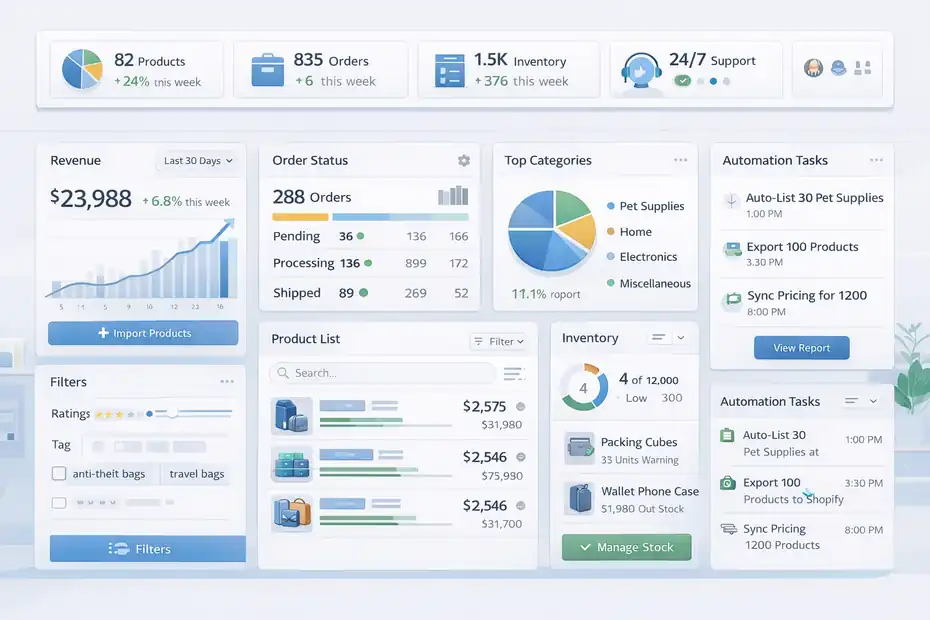
Shopify app feedback highlights several positives: user-friendly design, automated inventory and order processes, bulk editing, advanced filtering, and helpful customer support.
Those are exactly the categories that matter when you are running a lean operation and cannot spend half your week fixing catalog issues.
From a workflow perspective, Doba’s current setup appears designed for sellers who want:
- Faster product imports
- Fewer manual stock updates
- Fewer moving parts between supplier and store
- A more centralized dashboard for sourcing and management
That convenience is real value. If your alternative is a messy stack of spreadsheets, supplier emails, and manual uploads, Doba can feel like a meaningful upgrade.
I especially like that even the lower plans are framed around concrete operational limits. That gives you a clearer idea of what you can actually do before you pay, which is more useful than vague “starter” or “pro” language alone.
Where Users Still Run Into Friction
The less glamorous truth shows up in review details. On the Shopify app review page, one January 2026 review mentions the learning curve around shipping rates, inventory limits by plan, immediate order-payment expectations, and the lack of truly hands-on live help in some situations.
I find that believable.
Most dropshipping platforms become harder the moment money starts moving. Listing products is easy. Managing shipping logic, margin accuracy, order timing, and marketplace-specific requirements is where confusion begins.
Doba may simplify the pipeline, but it does not remove the need to understand:
- Your shipping settings
- Supplier lead times
- Your selling channel’s policies
- Cash flow timing between customer payments and supplier charges
If you are brand new, that complexity can feel like “the platform is broken” when really it is ecommerce friction showing up for the first time. Still, Doba is partly responsible for reducing that confusion, so buyer education and onboarding matter a lot.
Who Doba Is Best For And Who Should Avoid It
This is where most reviews become too vague. I do not think Doba is universally good or universally bad. It is highly dependent on seller type.
The Sellers Most Likely To Benefit
I would put Doba in the “structured convenience” category. That means it fits best when you value centralized sourcing and reduced manual work more than ultra-low operating costs.
Doba may be a good fit if you are:
- A beginner with budget: You want a cleaner system, and you are willing to pay for simplicity while you learn.
- A small team managing multiple channels: Store integration limits and automation become more valuable as complexity grows.
- A seller who hates supplier outreach: Doba reduces the need to build every relationship from scratch.
- A workflow-focused operator: You care more about speed, sync, and catalog management than about scraping every possible penny from margins.
Imagine you run a niche pet accessories store and want to test 40 curated products without chasing five separate suppliers manually. Doba could make that process much easier.
In that scenario, the platform is not your competitive advantage by itself. It is your shortcut to operational clarity.
The Sellers Most Likely To Feel Burned
Doba is much riskier if you are:
- Extremely price-sensitive: The subscription plus layered order costs can feel heavy fast.
- Looking for exclusive products: Centralized marketplaces often mean overlap.
- Expecting instant high margins: Convenience usually comes with margin pressure.
- Unclear on your niche: Paying for a marketplace before validating demand can be expensive noise.
- Not ready to do product math: Doba does not replace financial discipline.
I would be especially cautious if your business model depends on impulse-purchase products with thin margins. In those cases, a few hidden fees or shipping mismatches can wipe out your profit completely.
My honest take: Doba is a stronger fit for organized sellers than for hopeful gamblers.
Common Mistakes People Make With Doba
A lot of bad Doba experiences are not caused by one dramatic scam-style problem. They come from stacking small mistakes.
Mistake 1 Through 4 That Hurt Profit Fast
Here are the biggest ones I see:
- Mistake 1: Confusing access with advantage. Just because Doba gives you easy access to products does not mean those products are strong offers in your market.
- Mistake 2: Ignoring all-in cost. Subscription, shipping, handling, selling fees, returns, and ad costs all count.
- Mistake 3: Importing too many similar products. A bloated catalog usually lowers focus and increases management mess.
- Mistake 4: Trusting supplier pages more than customer reality. You still need samples and quality checks.
I recommend starting with 10 to 20 carefully chosen products, not 200 random ones. Most stores do not fail because they had too few products. They fail because they had too many mediocre ones and no clear angle.
A tighter launch lets you write better product pages, set cleaner pricing, and notice operational problems earlier.
Mistake 5 Through 8 That Create Operational Headaches
The second group is more operational:
- Mistake 5: Choosing a plan based on optimism instead of actual usage.
- Mistake 6: Not understanding billing terms, renewal, or commitment rules before subscribing.
- Mistake 7: Treating automation as “set and forget.”
- Mistake 8: Testing products without a margin floor.
A margin floor is the minimum gross margin you require before considering ad spend. For example, you might decide that any product under a 55% gross margin before advertising is not worth testing. That one rule can save you from importing attractive-looking losers.
I believe this is one of the simplest ways to use Doba intelligently: let the platform save you time, but let your financial rules decide what gets listed.
How To Evaluate A Doba Product Before You List It
This is the part that separates serious sellers from people who burn cash and blame the tool.
A Simple Product Vetting Framework
Before adding any product from Doba to your store, run it through this quick framework:
- Step 1: Check the landed cost. Add product price, shipping, handling, and likely platform fees.
- Step 2: Compare against realistic selling price, not fantasy price.
- Step 3: Search competing offers and note delivery promises.
- Step 4: Evaluate whether the product solves a clear problem or has obvious gift appeal.
- Step 5: Ask whether you can improve the offer through bundling, education, or positioning.
Let’s say you find a kitchen storage item. If three giant marketplaces already sell similar versions at near-identical pricing with faster delivery, you will need a very sharp niche angle to compete.
On the other hand, if you can bundle it with a related organizer and present it as a “small-apartment setup kit,” suddenly the product becomes more marketable.
That is the mindset shift I recommend: do not ask only “Is this available?” Ask “Can I turn this into a compelling offer?”
The Metrics I Would Watch First
You do not need a huge analytics stack to make smarter decisions.
I would start with:
- Gross margin before ads: Your first survival metric.
- Delivered shipping time: Because customer patience is shorter than many sellers assume.
- Return risk: Especially for fragile, seasonal, or sizing-sensitive items.
- Content potential: Can you make convincing images, hooks, or demonstrations?
- Customer support burden: Will this create confusing questions or repeat complaints?
A product with a slightly lower margin but fewer support problems can outperform a “high-margin” headache product over time. That is something many beginners learn too late.
Doba can help you source and sync products, but it cannot fix a bad product choice. That decision still belongs to you.
Advanced Optimization If You Decide To Use Doba
If you do move forward with Doba, the goal should not be “list more products.” The goal should be “build a smarter, cleaner catalog that earns better.”
How To Use Doba Without Becoming Generic
The easiest way to look like every other dropshipper is to import products and leave them mostly unchanged. That is exactly what you should avoid.
Instead:
- Strategy 1: Rewrite product titles for clarity and buyer intent.
- Strategy 2: Replace weak supplier descriptions with benefit-driven copy.
- Strategy 3: Use bundles or collections to create a more branded shopping path.
- Strategy 4: Limit the number of SKUs per category so your store feels curated.
- Strategy 5: Prioritize products that fit one audience, not random trend chasing.
For example, instead of running a broad “home goods” store, you could build a compact store around dorm-room organization, compact kitchen living, or first-apartment essentials. The same marketplace becomes more powerful when your positioning becomes more specific.
That is where I think many Doba sellers leave money on the table. They use the marketplace like a warehouse. The better approach is to use it like a source library for a focused brand idea.
When It Makes Sense To Upgrade Plans
Upgrading should happen only when a plan limit is actively slowing profitable work, not because you feel more “serious” with a bigger subscription.
A move from Limited to Basic makes sense when your listing cap, inventory capacity, or second store need is genuinely blocking you. A move to Standard makes sense when multi-store operations, product throughput, and API-related workflow benefits are supporting a business that is already proving traction.
I would not rush into higher tiers based on hope.
A simple rule I like is this: only upgrade when the next plan either saves enough labor time to justify itself or directly supports revenue you are already close to capturing. Otherwise, the bigger plan is just a nicer-looking expense.
Final Verdict: Is Doba Worth It?
This review would be incomplete without a clear answer. So here is mine.
The Honest Bottom Line
Doba is a legitimate supplier marketplace and automation platform, not just a random product list. It has been positioning itself around curated supplier access, integrations, product discovery tools, and inventory syncing, and there is current user feedback praising ease of use and customer support.
But the hidden truth is that Doba is often more expensive in practice than it first appears. Subscription fees are only part of the total cost, and the billing, commitment, refund, and order-level fee structure mean careless sellers can lose margin faster than they expect.
So is it worth it?
My answer is yes, for the right seller.
It can be worth it if you value structure, want to reduce manual work, and have enough margin discipline to treat every product like a real business decision. It is probably not worth it if you are looking for the cheapest path, the most exclusive catalog, or an effortless shortcut to ecommerce success.
My Recommendation By Seller Type
Here is my practical take:
- Try Doba cautiously if you are a beginner with some budget and you want centralized operations.
- Use Doba strategically if you already understand margin math and need a more efficient supplier workflow.
- Avoid Doba for now if you are underfunded, unclear on your niche, or still chasing random winning products.
If I were starting with Doba today, I would do this:
- Pick one niche.
- Choose 10 to 15 products only.
- Sample the top 3.
- Set a strict margin floor.
- Review all billing and cancellation terms before the trial converts.
That is the difference between using Doba as a tool and letting it become an expensive distraction.
The best doba supplier marketplace review is not one that says the platform is perfect. It is one that helps you see the trade-off clearly. Doba sells convenience and structure. Whether that becomes a smart investment or a hidden-cost trap depends on how disciplined you are with product selection, margins, and expectations.
FAQ
What is Doba supplier marketplace and how does it work?
Doba is a dropshipping supplier marketplace that connects online sellers with vetted suppliers. It allows you to find products, import them into your store, and automate order fulfillment and inventory updates from one centralized dashboard.
Is Doba worth it for beginners in dropshipping?
Doba can be worth it for beginners who want a simplified workflow and are willing to pay for convenience. However, new sellers should carefully calculate total costs, including subscription fees, shipping, and supplier pricing, before committing.
What are the hidden costs of using Doba?
The main hidden costs include supplier shipping fees, handling charges, and platform subscription fees. These costs are not bundled together, so your actual profit margin can be lower than expected if you don’t calculate the full product cost upfront.
Does Doba offer reliable suppliers and product quality?
Doba works with approved suppliers, but product quality and shipping reliability can still vary. It is important to order samples, test delivery times, and verify supplier responsiveness before scaling any product in your store.
How does Doba compare to other dropshipping platforms?
Doba focuses on centralized supplier management and automation, while other platforms may offer cheaper product sourcing. It is best suited for sellers who prioritize ease of use and workflow efficiency over the lowest possible product costs.

I’m Juxhin, the voice behind The Justifiable.
I’ve spent 6+ years building blogs, managing affiliate campaigns, and testing the messy world of online business. Here, I cut the fluff and share the strategies that actually move the needle — so you can build income that’s sustainable, not speculative.
Related posts:
 Dropshipping for Beginners: The Complete No-Fluff Guide
 Discover 5 Best Dropshipping Sites: Boost Your Sales Now!
 The Best Way to Start Dropshipping With Little to No Money
 Why the Salehoo Wholesale Directory Helps You Scale
 Doba Review: Honest Pros, Cons, and Real Costs
 Doba for Beginners: What to Expect Before Signing Up