
Table of Contents
Some links on The Justifiable are affiliate links, meaning we may earn a small commission at no extra cost to you. Read full disclaimer.
Ecommerce automation is one of those things most store owners want, but quietly worry about using the wrong way
I’ve seen too many brands save time only to lose conversions, customers, or control in the process. This is for ecommerce founders, operators, and marketers who want to work faster without damaging revenue or customer experience.
The big question we’re answering here is simple: how do you automate your ecommerce operations in a way that protects sales instead of putting them at risk?
Order Processing Automation That Reduces Errors And Delays
Order processing is where ecommerce automation can either quietly save you hours or silently destroy customer trust. When automation is set up with clear rules and human guardrails, it removes friction without removing control.
This section focuses on automations that protect accuracy, speed, and revenue at the same time.
Automating Order Routing Without Losing Fulfillment Control
Automated order routing decides where an order goes the moment it’s placed. That could mean sending it to the closest warehouse, a specific 3PL, or an in-house team. Done right, this alone can cut fulfillment time by 20–40%.
Here’s the part people miss: routing should never be fully “set and forget.”
Key elements I recommend building in:
- Rule-based routing: Route orders by location, SKU type, inventory level, or shipping speed.
- Manual override logic: Flag edge cases like high-value orders, first-time customers, or international shipments.
- Fallback rules: If Warehouse A is out of stock, auto-route to Warehouse B without canceling the order.
For example, in Shopify, you can combine Shopify Flow with fulfillment locations to route orders automatically, while still holding risky orders for review. That balance keeps automation fast but not reckless.
In my experience, brands that skip override logic see more fulfillment mistakes, not fewer. Automation should support decisions, not blindly replace them.
Smart Payment Confirmation Workflows That Prevent Failed Orders
Payment automation isn’t about charging faster. It’s about confirming payments correctly before orders move forward.
A smart payment confirmation workflow does three things well:
- Verifies payment status: Paid, authorized, pending, or failed.
- Pauses fulfillment automatically: Orders don’t ship until funds are confirmed.
- Triggers recovery flows: Failed or pending payments kick off follow-ups.
Tools like Stripe and PayPal already send real-time payment webhooks. Ecommerce automation connects those signals to your order system so nothing slips through.
A practical example: If a payment is authorized but not captured, automation can:
- Hold fulfillment
- Send a confirmation email
- Auto-capture after fraud checks pass
According to Stripe data, up to 8% of ecommerce payments fail on the first attempt. Automation that catches and recovers even half of those failures can add meaningful revenue without extra traffic.
Handling Refunds And Cancellations With Rule-Based Automation
Refunds feel emotional to customers but operational to systems. Automation helps keep them fair, fast, and consistent.
Rule-based refund automation usually includes:
- Eligibility rules: Time since purchase, fulfillment status, product type.
- Auto-approval thresholds: Low-value refunds processed instantly.
- Escalation triggers: High-value or abuse-prone refunds sent to humans.
For instance, you might auto-approve refunds under $50 if the order hasn’t shipped, while flagging anything over that for review.
What I’ve seen work best: Automation handles the decision logic, humans handle the exceptions.
This reduces response times dramatically. Many brands go from 24–48 hour refund delays to under 5 minutes, which directly improves customer trust and repeat purchase rates.
Preventing Overselling With Real-Time Order Sync Systems
Overselling isn’t just an inventory problem. It’s a synchronization problem.
Real-time order sync automation ensures that the moment a product is sold:
- Inventory updates everywhere
- Listings adjust instantly
- Backorder rules activate if needed
This matters even more if you sell on multiple channels like Shopify, Amazon, and Etsy. Without real-time sync, delays of even a few minutes can cause oversells during traffic spikes.
Tools like Stock Sync, Netstock, or native Shopify inventory APIs help keep everything aligned. The key is setting update frequency to real time, not hourly batches.
Overselling leads to cancellations, refunds, and lost trust. Ecommerce automation here isn’t optional—it’s defensive infrastructure.
Inventory Automation That Prevents Stockouts And Lost Sales
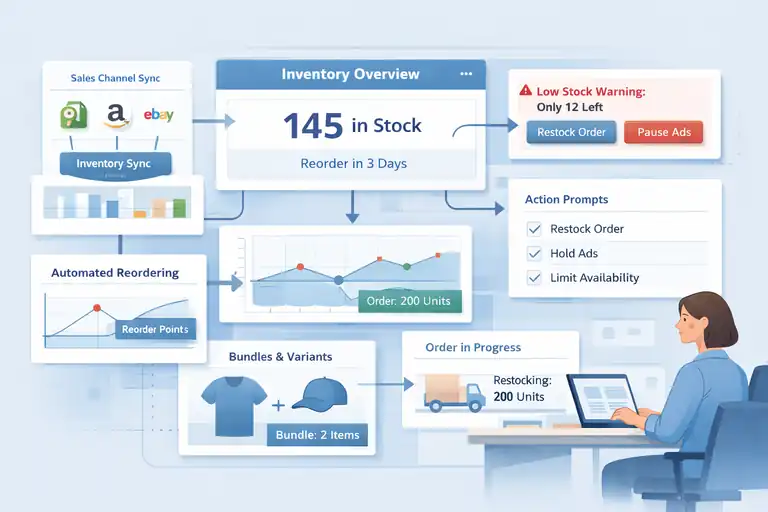
Inventory automation isn’t about predicting the future perfectly. It’s about reacting faster than humans can.
When inventory data flows cleanly and triggers the right actions, you protect sales without constantly checking dashboards.
Real-Time Inventory Sync Across Multiple Sales Channels
If you sell on more than one channel, inventory sync is the foundation of ecommerce automation.
Real-time sync means:
- One inventory source of truth
- Instant updates across all channels
- No manual reconciliation
Without this, you’re relying on delayed data and guesswork. With it, your system reacts the second a unit sells.
I usually suggest syncing every channel to your primary store platform, not the other way around. Shopify, for example, can act as the inventory brain while marketplaces listen.
This setup dramatically reduces overselling and customer service tickets tied to “out of stock” surprises.
Low-Stock Alert Automation That Triggers Action Early
Low-stock alerts should not just notify you. They should trigger decisions.
Effective low-stock automation includes:
- Threshold-based alerts: Different levels for fast- vs slow-moving SKUs.
- Channel-specific alerts: Separate warnings for ads, marketplaces, and bundles.
- Action prompts: Reorder, pause ads, or hide listings automatically.
For example, when stock drops below 15 units:
- Email the operations team
- Pause paid ads for that SKU
- Switch the product page to “limited availability”
According to retail inventory studies, stockouts can cost brands 4–10% in annual revenue. Automation helps you react before customers ever see the problem.
Automated Reordering Rules Based On Sales Velocity
Sales velocity-based reordering is where inventory automation gets smart.
Instead of static reorder points, automation looks at:
- Average daily sales
- Lead time from suppliers
- Seasonal trends
Then it calculates when to reorder automatically.
Let’s say a product sells 10 units per day and takes 14 days to restock. Automation can trigger a reorder when inventory hits 140 units, not when someone remembers to check.
This reduces emergency reorders, rush shipping fees, and stress. I’ve seen teams reclaim hours every week by letting the system handle this math.
Managing Bundles And Variants With Inventory Logic
Bundles and variants are where inventory automation often breaks if not planned carefully.
Good automation logic ensures:
- Bundle sales deduct component SKUs correctly
- Variant stock updates independently
- Low stock on one variant doesn’t hide all options
For example, if a bundle includes one shirt and one hat, selling the bundle should reduce both inventories instantly. If the hat runs out, the bundle should auto-disable.
This kind of logic prevents phantom inventory and customer disappointment. It takes setup time, but once done, it runs quietly in the background and saves endless cleanup work.
Expert tip: If you’re starting with ecommerce automation, automate visibility and alerts before automating irreversible actions. Seeing problems early almost always saves more money than trying to fully automate decisions too fast.
Ecommerce Email Automation That Supports Sales Not Spam
Ecommerce automation inside email is where brands either build long-term trust or burn their list fast.
The goal here isn’t more emails. It’s better-timed, more relevant messages that support buying decisions without annoying people.
Abandoned Cart Automation That Feels Helpful Not Pushy
Abandoned cart emails work because they remind, not because they pressure. On average, well-built abandoned cart automation recovers 5–10% of lost carts, but only when it feels human.
What I’ve found works best is restraint plus relevance.
A healthy abandoned cart automation usually includes:
- One gentle reminder: Sent 1–3 hours after abandonment with the exact product viewed.
- One reassurance email: Shipping info, returns, or social proof—not discounts.
- Optional incentive: Only for repeat abandoners or high-intent shoppers.
Tools like Klaviyo or Kit (formerly ConvertKit) let you trigger emails based on cart activity and product views. That sounds technical, but it just means “send the right message when someone leaves.”
Personal opinion: If your abandoned cart flow has more than three emails, you’re probably training customers to wait you out. Automation should reduce friction, not create a staring contest.
Post-Purchase Email Automation That Increases Repeat Orders
Post-purchase automation is one of the most underused revenue drivers in ecommerce automation. This is where repeat purchases are quietly made.
Strong post-purchase automation focuses on:
- Order confirmation clarity: Shipping timelines and next steps.
- Product education: How to use, care for, or get better results.
- Smart cross-sells: Based on what they actually bought.
For example, if someone buys skincare, automation can wait 10 days and send usage tips before suggesting a refill or complementary product.
According to data from Omnisend, customers who receive post-purchase emails are 30% more likely to buy again. That’s not magic. It’s relevance and timing.
I always suggest mapping post-purchase emails to product lifecycle, not a generic timeline. Automation works best when it mirrors real usage behavior.
Behavioral Segmentation Rules That Protect Deliverability
Deliverability is the quiet killer of email performance. If automation ignores behavior, inbox providers notice.
Behavioral segmentation uses actions, not guesses:
- Opened emails recently
- Clicked links
- Purchased in the last 30, 60, or 90 days
Instead of blasting everyone, ecommerce automation narrows who gets what.
A simple but powerful rule:
- Engaged subscribers get promotional flows
- Unengaged subscribers get fewer emails or re-engagement only
This protects sender reputation and keeps emails landing in inboxes, not spam folders. Gmail and Yahoo both reward engagement-based sending, especially since their 2024 deliverability updates.
Less email to the wrong people often means more revenue from the right ones.
Timing Automation Based On Customer Buying Patterns
Timing automation answers one question: when does this person usually buy or engage?
Advanced platforms track:
- Time of day opens
- Day-of-week purchases
- Delay between first visit and checkout
Automation can then send emails when each subscriber is most likely to act. Not everyone checks email at 9 a.m., and treating them like they do hurts performance.
In one setup I worked on, shifting send times based on past engagement increased click rates by over 20% with zero content changes.
That’s ecommerce automation at its best. Same message. Better moment.
Customer Support Automation That Speeds Up Response Times
Customer support automation isn’t about replacing people. It’s about removing bottlenecks so real humans can focus on real problems.
Speed matters here because response time directly impacts satisfaction and repeat buying.
Using Automated Replies Without Sounding Robotic
Automated replies should buy time, not frustrate customers.
A good automated response does three things:
- Confirms receipt: Letting customers know they’re heard.
- Sets expectations: Clear response timeframe.
- Offers instant help: Links to order status or FAQs.
For example: Instead of “We received your ticket,” say: “We’ve got your message. Most order issues are solved in under 10 minutes—here’s where you can check your order status now.”
Zendesk and Gorgias both allow conditional auto-replies based on keywords like “where is my order.” That’s automation doing emotional labor for your team.
My rule: If an automated reply doesn’t reduce anxiety, rewrite it.
Ticket Routing Automation Based On Order And Intent Data
Routing automation decides who handles what, instantly.
Smart routing uses:
- Order value
- Customer history
- Keywords or intent
For example:
- High-value orders go to senior agents
- Shipping questions go to logistics-trained reps
- Refund requests route differently than product questions
Gorgias integrates directly with Shopify, meaning agents see order details inside the ticket. Automation uses that data to route tickets correctly without manual sorting.
Brands using routing automation often cut first response time by 40–60%. Faster replies don’t just feel better. They reduce follow-ups and ticket volume overall.
Self-Service Automation Through Order Status And FAQs
Most support tickets are predictable. Order status, delivery times, returns.
Self-service automation solves this by:
- Auto-inserting order tracking links
- Suggesting relevant FAQ articles
- Allowing customers to resolve issues without waiting
This can be done through:
- Help centers
- Chat widgets
- Email auto-responses
According to Zendesk, 67% of customers prefer self-service when it’s fast and accurate. Ecommerce automation here doesn’t remove support. It removes waiting.
If customers can solve simple issues themselves, your team gets breathing room for complex cases.
Escalation Rules That Protect High-Value Customers
Not all tickets are equal. Automation should recognize that.
Escalation rules flag:
- VIP customers
- Large orders
- Repeated issues
- Negative sentiment keywords
Those tickets bypass queues and go straight to experienced agents or managers.
I strongly believe this is one of the highest ROI automations you can build. Losing one high-value customer costs far more than automating a smarter escalation path.
Automation doesn’t make decisions coldly when you teach it what matters most.
Best practice: In ecommerce automation, always automate speed first, personalization second, and judgment last. The closer automation gets to irreversible decisions, the more guardrails it needs.
Pricing And Promotion Automation That Protects Margins
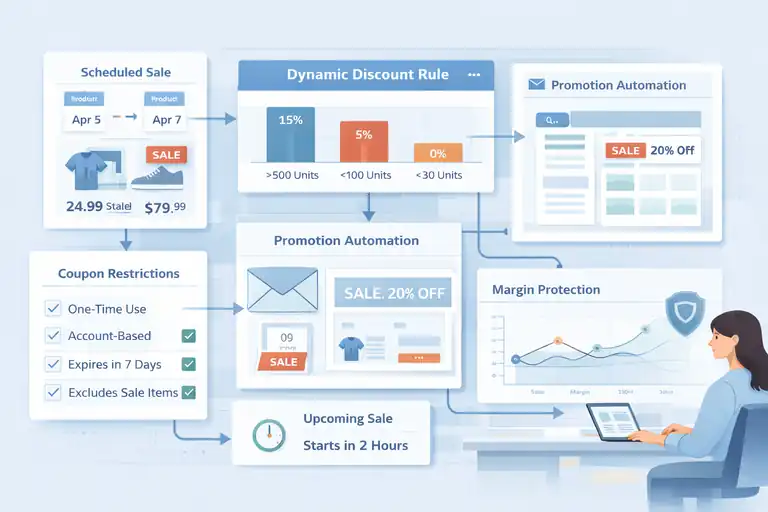
Pricing is where ecommerce automation can quietly help or loudly hurt. Automating discounts and promotions without guardrails is one of the fastest ways I’ve seen brands train customers to wait for sales.
The goal here is control, not constant markdowns.
Scheduled Pricing Automation For Sales And Campaigns
Scheduled pricing automation lets you plan price changes in advance and stop babysitting launches. This is especially useful for seasonal sales, product drops, or short campaigns.
What this automation usually handles:
- Price changes start and end automatically
- Sale prices revert without manual cleanup
- Campaign timing stays consistent across channels
In Shopify, scheduled price changes can be handled through apps like Launchpad (for Plus stores) or third-party pricing tools. The simple explanation: you tell the system when prices change, and it executes on time, every time.
A real-world example: You schedule a 20% weekend sale. Automation lowers prices Friday night and restores them Sunday night. No panic. No forgetting. No “oops, the sale is still live.”
My honest take: Scheduled pricing saves less money than it saves sanity. Fewer mistakes mean fewer margin leaks.
Dynamic Discount Rules Based On Inventory Levels
Dynamic discount automation adjusts promotions based on how much inventory you have, not how you feel that day.
Instead of blanket sales, automation can:
- Increase discounts on slow-moving SKUs
- Reduce discounts when stock runs low
- Pause promotions automatically when inventory hits a threshold
For example:
- If inventory is above 500 units, offer 15% off.
- If it drops below 100 units, reduce the discount to 5%.
- If it hits 30 units, stop discounting entirely.
This kind of ecommerce automation protects margins while still helping clear stock. It also prevents the classic mistake of selling out discounted products you could have sold at full price.
I’ve seen brands improve gross margin by 3–6% simply by tying discounts to inventory logic instead of fixed campaigns.
Automating Coupon Restrictions To Prevent Abuse
Coupon abuse is more common than most brands want to admit. Automation is how you stop it without policing customers manually.
Smart coupon automation includes:
- One-time use per customer
- Email or account-based restrictions
- Expiration dates enforced automatically
- Exclusions for already-discounted products
Most ecommerce platforms support this natively, but the key is actually using the rules. “Unlimited uses” is almost always a mistake.
A small scenario: A coupon leaks to a deal forum. Without restrictions, it eats margin for weeks. With automation, it expires, caps usage, or disables itself after a threshold.
This is one of those unglamorous automations that quietly saves thousands over time.
Promotion Automation Across Email And On-Site Channels
Promotions shouldn’t live in silos. Automation keeps messaging consistent everywhere customers see it.
Promotion automation can sync:
- Email campaigns
- On-site banners
- Product page badges
- Exit-intent popups
When a sale starts, everything updates together. When it ends, everything shuts off together.
This matters because nothing kills trust faster than conflicting messages. “Sale ended” in email but still live on-site is a credibility hit.
In my experience, alignment automation doesn’t increase conversion directly, but it prevents confusion that quietly lowers it.
Marketing Workflow Automation That Scales What Works
Marketing automation is about repeating what already works, not chasing every new idea. Ecommerce automation here should amplify proven behavior, not invent complexity.
Automating Campaign Triggers Based On Customer Behavior
Behavior-based triggers activate campaigns when customers do something, not when your calendar says so.
Common triggers include:
- Product views
- Category browsing
- Cart additions
- Repeat purchases
For example: If someone views the same product twice in 48 hours, automation can trigger a follow-up email or ad. That’s intent-based marketing, not guessing.
Platforms like Brevo (formerly Sendinblue) make this accessible without heavy tech work. You’re basically saying, “When this happens, do that.”
From what I’ve seen, behavior-triggered campaigns consistently outperform scheduled blasts, often by 2–3x in click-through rates.
Content And Offer Automation Using Purchase History
Purchase history is one of the most underused assets in ecommerce automation.
Automation can use it to:
- Recommend complementary products
- Suppress offers customers don’t need
- Personalize messaging tone and timing
If someone just bought a high-end item, automation shouldn’t immediately push discounts. Instead, it can offer education, accessories, or replenishment reminders.
A simple example: Customer buys running shoes. Automation waits 30 days, then suggests socks or replacement insoles.
This feels thoughtful, not salesy. And it works because it respects context.
Retargeting Automation That Aligns With Funnel Stages
Not everyone should see the same ads. Retargeting automation fixes that.
Funnel-aware retargeting separates:
- Browsers who never added to cart
- Cart abandoners
- Past purchasers
Each group gets different messaging. Browsers get education. Abandoners get reassurance. Past buyers get loyalty-based offers.
Ad platforms like Meta and Google Ads already support this. Ecommerce automation simply keeps audiences updated automatically as behavior changes.
This alignment reduces wasted ad spend and improves conversion efficiency without increasing budgets.
Cross-Channel Automation Between Ads And Email
The most effective automation connects ads and email so they don’t fight each other.
Cross-channel automation can:
- Suppress email subscribers from seeing intro ads
- Sync promotional timing across channels
- Adjust ad messaging based on email engagement
For example: If someone clicks an email promotion but doesn’t buy, automation can retarget them with the same offer in ads. That consistency reinforces the message instead of resetting it.
I’ll be honest: This is advanced automation. But when done well, it creates a smooth customer experience instead of a noisy one.
Pro tip: If automation ever makes you feel disconnected from your customers, pause and simplify. The best ecommerce automation feels invisible to shoppers and obvious to operators.
Analytics And Reporting Automation For Faster Decisions
Ecommerce automation without analytics is just busywork at scale. Reporting automation exists so you can see problems early, act faster, and stop guessing what’s actually working.
This is where automation pays for itself if it’s set up with the right signals.
Automated Sales Reports That Highlight Revenue Risks
Automated sales reports should surface risks, not just totals. Revenue looks fine right up until it isn’t.
What I like to automate here:
- Daily revenue vs trailing averages
- SKU-level revenue drops
- Channel-specific performance changes
- Refund and cancellation spikes
Instead of opening five dashboards, automation delivers a single report on a schedule you choose. Tools like Google Looker Studio or Triple Whale can pull this data automatically from Shopify and ad platforms.
A practical example: If refunds spike above 3% day-over-day, the report flags it. You don’t need to notice it manually. The system nudges you.
From what I’ve seen, teams using automated revenue risk reports catch issues days earlier than teams relying on weekly reviews. Those days matter when traffic is expensive.
Performance Dashboards For Automation Monitoring
Automation should be monitored like a system, not trusted blindly.
Performance dashboards answer one question:
Is automation helping or hurting right now?
Useful automation dashboards track:
- Conversion rates before and after automation changes
- Email revenue per recipient
- Fulfillment time averages
- Customer support response time trends
The trick is separating automation performance from overall business noise. A dashboard focused purely on automated flows makes that possible.
I recommend one “automation health” dashboard that updates in real time. It’s boring data, but boring data prevents expensive surprises.
Alert-Based Automation For Conversion Rate Drops
Alerts are automation watching automation.
Instead of waiting for weekly reviews, alert-based automation sends notifications when:
- Conversion rate drops below a threshold
- Checkout abandonment spikes
- Payment failures increase
- Traffic rises but revenue doesn’t follow
For example: If conversion rate drops 20% compared to the previous week, automation sends a Slack or email alert. No digging required.
This is especially powerful during promotions or site changes. I’ve personally avoided multi-day revenue losses because alerts caught issues within hours.
Tracking Automation Impact Without Vanity Metrics
Vanity metrics make automation look good without proving value.
Instead of opens and clicks alone, track:
- Revenue per automated flow
- Incremental lift compared to control groups
- Time saved operationally
- Error reduction rates
A simple approach: Pause one automation for a small segment. Compare results. If performance doesn’t change, that automation isn’t pulling its weight.
Here’s a quick reference table I use when auditing automation impact:
| Metric Type | Vanity Metric | Meaningful Metric |
| Open rate | Revenue per recipient | |
| Ads | Clicks | Cost per purchase |
| Support | Tickets closed | First-response time |
| Fulfillment | Orders shipped | Error rate |
If automation can’t show real-world impact, it needs rethinking.
Safeguards That Keep Ecommerce Automation From Hurting Sales
Automation failures usually don’t happen all at once. They happen quietly. Safeguards are how you protect revenue while still moving fast.
Manual Override Systems For Critical Automation Flows
Some automations should always have an emergency brake.
Manual overrides are essential for:
- Pricing changes
- Inventory sync
- Fulfillment routing
- Payment capture
This can be as simple as a toggle or approval step. Shopify Flow, for example, allows conditions that pause automation when certain thresholds are hit.
I believe any automation that can directly affect revenue should be stoppable in under five minutes. If it isn’t, it’s too risky.
Testing Automation Changes Without Full Rollouts
Testing automation doesn’t require chaos.
Safer testing methods include:
- Running automation on a small product set
- Applying it to a percentage of traffic
- Testing during low-volume periods
- Using draft or preview modes
For example: Test a new pricing automation on one collection before rolling it storewide.
This protects you from learning lessons at full scale. Automation should earn trust gradually, not demand it upfront.
Automation Audits To Catch Revenue Leaks Early
Automation audits are boring. They’re also incredibly profitable.
A basic audit checks:
- Are rules still relevant?
- Are conditions outdated?
- Are exceptions piling up?
- Are automations overlapping?
I recommend quarterly audits for growing stores and monthly reviews during heavy promotion periods.
One brand I worked with recovered thousands per month simply by removing old discount automations no one remembered existed. Automation ages. Audits keep it honest.
Setting Automation Limits Based On Business Maturity
Not every store needs the same level of automation.
Early-stage brands should automate:
- Visibility
- Alerts
- Simple workflows
Larger brands can automate:
- Decisions
- Cross-channel coordination
- Advanced segmentation
Trying to automate complex logic too early often creates fragility. In my experience, it’s better to automate slowly and sleep better.
Scaling Ecommerce Automation Without Losing Human Touch
As order volume grows, automation becomes necessary. But empathy doesn’t scale automatically. This section is about keeping humanity in the system as automation expands.
Gradually Layering Automation As Order Volume Grows
Automation should grow with complexity, not ahead of it.
A sensible progression looks like:
- Alerts and reporting
- Simple workflow automation
- Decision-based automation
- Cross-system automation
This keeps teams confident and reduces resistance. Sudden automation overload usually backfires, even if the tools are good.
Blending Human Review With High-Risk Automations
High-risk automation deserves human eyes.
Examples include:
- Large refunds
- Pricing changes
- Fraud-related decisions
- VIP customer handling
Automation can prepare the decision. Humans finalize it.
I’ve seen this hybrid approach outperform full automation because it balances speed with judgment. Machines are fast. People are contextual.
Training Teams To Manage Automation Instead Of Fight It
Automation fails when teams don’t trust it.
Training should cover:
- What the automation does
- When it triggers
- How to override it
- Who owns it
When teams understand automation, they stop working around it. That’s when efficiency actually improves.
I always suggest documenting automation in plain language. If it can’t be explained simply, it’s probably too complex.
Knowing When Not To Automate A Sales-Critical Process
Some things shouldn’t be automated yet. Or ever.
Usually those include:
- High-emotion customer situations
- Complex B2B deals
- Custom product orders
- Brand-sensitive communication
If automation risks tone, trust, or nuance, pause.
My honest opinion: The best ecommerce automation is invisible to customers and empowering for teams. If it does the opposite, it’s time to rethink it.

I’m Juxhin, the voice behind The Justifiable.
I’ve spent 6+ years building blogs, managing affiliate campaigns, and testing the messy world of online business. Here, I cut the fluff and share the strategies that actually move the needle — so you can build income that’s sustainable, not speculative.
Related posts:
 How to Make Money Dropshipping: 7 Secrets to a $10K/Month
 Viral Launch Chrome Extension: The Ultimate Tool for Sellers
 How to Use Dsers Shopify for Seamless Dropshipping
 Dropshipping Marketing Strategies That Actually Drive Sales
 Connective Ecommerce Explained: Build Without Inventory
 How the Salehoo Catalog Helps You Spot Winning Items Quickly