
Table of Contents
Some links on The Justifiable are affiliate links, meaning we may earn a small commission at no extra cost to you. Read full disclaimer.
Setting the right price for your freelance graphic design work can feel like walking a tightrope—too low, and you undervalue your skills; too high, and clients might hesitate to hire you.
How do you find that sweet spot where your rates reflect your talent, experience, and the value you bring?
This guide breaks down the process of pricing your design work strategically, helping you charge with confidence and clarity while staying competitive in a crowded market.
Understanding the Value of Your Freelance Graphic Design Work
Before you can set fair and confident rates for your freelance graphic design work, you need to understand what makes your skills valuable.
Pricing isn’t just about what others charge—it’s about what you bring to the table that others don’t.
Assessing Your Skill Level and Experience
Start by asking yourself what level of designer you truly are—beginner, intermediate, or advanced. Your experience directly impacts your earning power.
If you’ve spent years mastering Adobe Illustrator or Figma, and have a portfolio that demonstrates results (not just visuals), you can charge accordingly.
For example, an entry-level freelancer might charge between $25–$50/hour, while experienced designers with proven branding or UX results can confidently go up to $100/hour or more.
I recommend tracking your time using tools like Toggl Track to see how efficiently you work; it helps justify rate increases over time.
Think of experience not only in years but in the complexity of work handled. Designing a social media post is different from creating a brand identity system—clients pay more for impact, not time.
Evaluating the Market Demand for Your Niche
Certain niches command higher rates because of specialized skills or limited competition. For instance, UI/UX design and motion graphics are in high demand, while basic logo design markets are oversaturated.
You can check demand using Upwork’s search filters or Google Trends. Type in “freelance UX designer” versus “logo designer” and compare the interest over time. If your niche is growing, position yourself early with strong branding and content on platforms like Behance or Dribbble.
Understanding where demand is heading helps you future-proof your pricing.
Identifying the Value You Provide to Clients
Clients don’t just buy designs—they buy results. A simple logo might bring in thousands in brand recognition, while a landing page redesign could increase conversions by 40%.
I always suggest tying your work to measurable outcomes when presenting rates.
Ask yourself:
- Does my work improve visibility, engagement, or revenue?
- Can I show ROI through past projects?
If the answer is yes, your value surpasses time spent—it’s tied to the impact created. The clearer you communicate this, the easier it is to charge premium prices.
Recognizing the Difference Between Price and Worth
Price is what clients pay; worth is what they receive. It’s a psychological game. You can charge two clients different amounts for the same project based on perceived value.
For example, a startup designing its first brand identity may pay $500, while a funded tech company might happily pay $5,000 because the design’s influence on perception is much greater.
When pricing, focus on worth creation:
- Who is the client, and what’s the potential business impact?
- How urgent or complex is the project?
- Does your expertise save them time, money, or mistakes?
Once you master this mindset, pricing feels less like guessing and more like strategic positioning.
Choosing the Right Pricing Model for Your Services
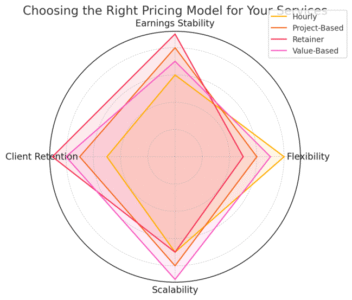
Every designer needs a pricing model that aligns with both client expectations and personal workflow.
Let’s explore the most common (and effective) structures for freelance graphic design work.
Hourly Rates vs. Project-Based Pricing
Hourly rates are simple and transparent but can cap your income if you work efficiently. They work best for open-ended tasks like revisions or design support.
Project-based pricing, on the other hand, shifts focus from hours to outcomes. You quote a flat rate for the whole job—say, $800 for a logo package. Clients love the predictability, and you get rewarded for efficiency.
I suggest:
- Use hourly pricing for undefined tasks.
- Use project pricing for deliverables with clear scope and timeline.
Many designers eventually switch to project pricing because it rewards skill and speed, not just time spent.
Retainer Agreements for Ongoing Clients
A retainer means a client pays a set monthly fee for ongoing work—like $1,000/month for up to 20 hours of design support. It’s stability for you and convenience for them.
Retainers work best for long-term collaborations where consistent output is needed (e.g., social media graphics, brand maintenance).
Quick tip: Clearly outline what’s included. For instance, “Includes up to 20 hours/month; extra work billed at $50/hour.” Tools like Bonsai can automate retainer contracts and invoicing to make management effortless.
Value-Based Pricing and When It Works Best
Value-based pricing ties your fee to the results you generate, not the time or deliverables. If your design helps a client earn $10,000, charging $2,000 is entirely reasonable.
This approach requires deep understanding of the client’s goals. For instance, redesigning a website that boosts conversions from 1% to 3% could justify a higher price than a simple redesign for aesthetic purposes.
Value-based pricing works best when:
- You can clearly define measurable outcomes.
- The client understands the connection between design and revenue.
- You have confidence in your ability to deliver results.
Hybrid Models and How to Apply Them Strategically
Hybrid models blend multiple pricing structures—for example, a flat project fee plus hourly rates for revisions.
This is ideal when clients want flexibility without open-ended budgets.
For example:
- Logo package: $1,000 flat
- Extra revisions: $60/hour
You can also combine retainers with value-based bonuses (e.g., $2,000/month + a 5% performance bonus if conversions exceed targets).
I believe hybrid models offer the best of both worlds: steady income and fair compensation for extra effort.
Calculating Your Base Rate the Smart Way
You can’t price your freelance graphic design work wisely without knowing your baseline costs and goals. Your base rate is the foundation—it ensures you’re profitable even at your lowest price point.
Factoring in Business Expenses and Overhead Costs
Every expense that supports your business—software, subscriptions, equipment, and workspace—must factor into your rate.
Make a list:
- Adobe Creative Cloud: $60/month
- Domain + hosting: $20/month
- Laptop depreciation: $100/month
- Internet, workspace, utilities: $100/month
Add it all up, and you’ll know your monthly operating cost. Divide that by your expected working hours (say, 80/month), and you get your minimum hourly cost. From there, mark it up for profit.
Even if you’re working from home, never ignore hidden costs like electricity, upgrades, or insurance.
Setting an Income Goal That Matches Your Lifestyle
What’s your target monthly income? Let’s say you want $5,000/month. Add your monthly expenses ($400), taxes (~20%), and downtime buffer. Your required income might be around $6,200/month.
Now divide that by how many billable hours you realistically work. If you bill 80 hours a month, your minimum rate should be $77.50/hour.
I suggest reviewing this every 6–12 months. As your skills grow, your lifestyle changes, and so should your income targets.
Accounting for Taxes, Software, and Tools
Many freelancers forget to account for taxes until it’s too late. Depending on your country, taxes can eat 20–30% of your income.
A simple rule: Set aside at least 25% of every payment in a separate account. Use tools like QuickBooks Self-Employed or Wave Accounting to track tax obligations automatically.
Also, consider the cost of software (Adobe, Figma, Notion), stock assets (Envato, Shutterstock), and marketing tools (Kit, Buffer). These costs are part of your rate—not extras.
Building a Profit Margin Into Your Rates
Profit isn’t greed—it’s growth fuel. It allows you to invest in better tools, courses, and downtime.
After covering expenses and taxes, add 10–30% profit margin depending on your goals.
For example:
- Base cost: $50/hour
- With 20% profit margin → $60/hour
I recommend setting profit targets quarterly. It helps you stay sustainable rather than reactive.
Expert Tip: The smartest freelancers don’t price based on competition—they price based on clarity. When you know exactly what your time, skill, and results are worth, your pricing stops feeling uncertain and starts feeling strategic.
Researching Industry Standards and Competitor Rates
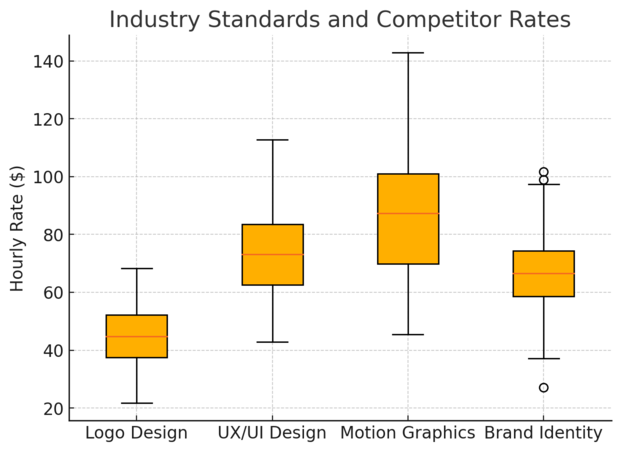
Before setting or adjusting the rates for your freelance graphic design work, it’s crucial to understand what the market currently pays.
This helps you avoid undercharging, overpricing, or getting stuck in the “guesswork” zone that many freelancers fall into early on.
Finding Reliable Data on Freelance Design Pricing
Start with data from trusted sources, not random blog posts or forum threads.
I suggest checking:
- Upwork and Fiverr profiles: Filter by designers in your niche and experience level. For example, in Upwork, go to Find Work → My Stats → Market Insights to see what similar designers charge.
- Design industry surveys: Platforms like Dribbble’s Freelance Report or AIGA’s Design Census publish annual data showing average rates by role and location.
- Freelance pricing tools: Try Glassdoor, Payscale, or Bonsai’s Freelance Rate Explorer, which let you filter by skill, location, and experience.
Combine data from at least three reliable sources before setting a benchmark. This creates a realistic picture instead of chasing outliers.
Analyzing Competitors Without Copying Their Rates
Competitor research is about positioning, not imitation. Just because another designer charges $60/hour doesn’t mean you should too.
I recommend:
- Study portfolios and clients. If a designer’s work is conceptually strong or backed by big brands, they’ve earned higher rates.
- Check offer depth. Does the competitor include strategy sessions, mood boards, or brand guidelines? Add-ons justify higher pricing.
- Understand their branding. Are they marketing as a premium brand designer or a quick-delivery freelancer? That context changes everything.
Copying competitor rates can trap you in someone else’s business model. Instead, use insights to differentiate your value. For instance, if others sell only static logo design, position yourself as a “brand identity specialist” offering consistency across all platforms.
Adjusting for Geographic and Skill-Level Differences
Geography still affects freelance rates, but not as much as it used to. A talented designer in Albania or the Philippines can easily charge U.S. rates if the work and communication quality match global standards.
To balance this, adjust your rates based on:
- Client location: U.S. and U.K. businesses expect to pay more than local startups.
- Project scope: A brand launch for a $10M company deserves higher rates than a one-person shop logo.
- Skill specialization: UX/UI, motion graphics, and packaging design tend to pay 30–60% more than basic design services.
I advise setting a global baseline (your minimum acceptable rate) and then scaling up depending on client geography and project complexity.
Benchmarking Your Rates Against Market Expectations
Once you’ve collected data and competitor insights, benchmark your rate.
A simple way is to:
- Take the average market rate for your niche.
- Adjust 10–20% higher or lower based on your skill and client type.
- Test for 3–6 months and review response rates.
Example: If brand identity designers charge around $80/hour globally, and your experience is mid-level, start at $65–70/hour. If clients accept without hesitation, test $80–90/hour next quarter.
Benchmarking is ongoing—not a one-time setup. Track acceptance rates, client feedback, and project demand to refine your strategy.
Communicating Your Pricing Confidently to Clients
Even well-researched pricing fails if you can’t communicate it with confidence. The key is to own your value—clients mirror your confidence level.
Presenting Rates Without Apology or Hesitation
When sharing your rates, state them directly. Avoid phrases like “I usually charge…” or “I hope this fits your budget.” They make you sound unsure.
A stronger approach looks like this:
“Based on the scope we discussed, the investment for your brand identity package is $1,500. This includes two concept directions, revisions, and complete brand guidelines.”
Here’s what helps:
- Present a clear value summary before sharing the price.
- Use the term investment instead of cost. It reframes the conversation toward ROI.
- Keep your tone calm and factual—no justifications or nervous chatter.
I’ve seen clients respond far better to confidence than to discounts.
Handling Price Objections with Professionalism
Clients will question your price—it’s part of business. The trick is to stay composed and logical.
Here’s how I usually handle it:
- Listen first. Let them explain their concern without interruption.
- Reframe value. “I understand your budget concern. Most clients find this rate fair once they see the quality and strategy behind the work.”
- Offer scaled options. Instead of lowering your price, reduce deliverables: “If $1,200 is your cap, I can provide one logo concept instead of two.”
You’ll find that real clients respect flexibility, not cheapness.
Using Proposals and Contracts to Justify Your Rates
A detailed proposal makes your pricing look legitimate. Use Notion, Bonsai, or HoneyBook to send branded proposals that include:
- Project overview
- Deliverables and timelines
- Investment breakdown
- Terms and payment structure
Contracts protect both sides and eliminate ambiguity. I suggest using a milestone-based payment plan (e.g., 50% upfront, 25% mid-project, 25% on completion).
When clients see structure and professionalism, they’re less likely to question your rates.
Framing Your Value in Terms Clients Understand
Clients rarely care about how long you worked—they care about what changes for them after the project. Frame your value in outcomes they understand.
Example: Instead of saying, “I’ll design your landing page,” say, “I’ll design a conversion-focused page aimed at increasing your sales inquiries by 20%.”
Translate creative work into business language. I believe this shift alone can justify a 30–50% rate increase.
Adjusting Your Rates Over Time as You Grow
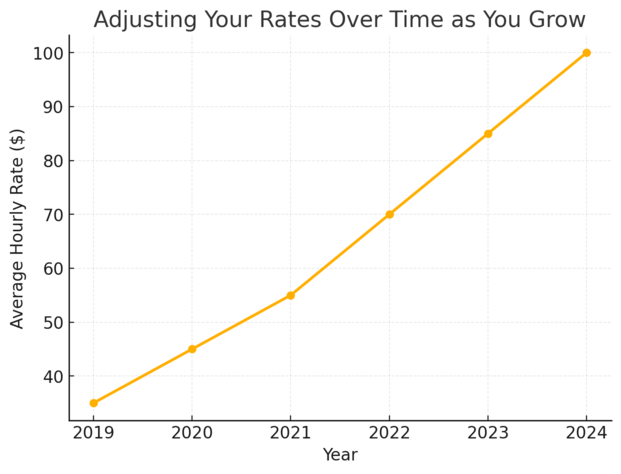
Pricing isn’t static—it’s a reflection of your growth, results, and confidence. The longer you work as a freelance designer, the more your value compounds.
Knowing When It’s Time to Raise Your Prices
The easiest indicator: demand exceeds supply. If you’re consistently booked out or getting referrals faster than you can manage, it’s time.
Other clear signals include:
- Improved skill level or new certifications
- Consistent positive feedback from clients
- Expanded service offerings (e.g., adding strategy or brand audits)
I recommend reviewing your pricing every 6–12 months. Even a small 10–15% increase annually keeps you aligned with inflation and market growth.
Communicating Rate Increases Without Losing Clients
Raising prices doesn’t have to scare clients off—it’s all in how you position it.
Use this approach:
“Since our last project, I’ve expanded my services and improved my workflow. Starting next quarter, my rates will be updated to reflect that growth.”
Offer existing clients a short grace period at your old rate or a loyalty discount. Most will appreciate the transparency and stay on.
Remember: confident communication reduces friction more than low pricing ever will.
Tracking Your Progress and Updating Your Pricing Strategy
Keep a spreadsheet or Notion board tracking:
- Project types
- Time spent
- Profit per hour
- Client feedback
This helps identify which projects are most profitable. If small website redesigns take 40 hours but yield less than $1,000, you’ll know to either increase pricing or drop that service.
I suggest reviewing data quarterly and adjusting pricing or offers accordingly. It’s a business health check, not a one-time decision.
Building a Long-Term Plan for Sustainable Growth
Think beyond immediate income—build pricing that scales with your business vision.
Here’s a roadmap I often recommend:
- Phase 1: Start with project-based pricing for flexibility.
- Phase 2: Transition to retainers for recurring income.
- Phase 3: Introduce value-based packages or consulting tiers.
- Phase 4: Add scalable products (courses, templates, brand kits).
Each phase lifts your income ceiling while reducing time-for-money dependency.
I believe the goal isn’t to charge more just for the sake of it—it’s to charge right so your business can grow sustainably without burnout.
Expert Tip: Revisit your pricing structure every six months as a business ritual. Think of it as your financial performance review—because every great designer deserves a raise for progress, not just output.
Common Pricing Mistakes Freelance Designers Should Avoid
Pricing your freelance graphic design work isn’t just about numbers—it’s about mindset, awareness, and self-worth.
Many talented designers lose money not because they lack skill, but because they make small but costly pricing mistakes. Let’s break down the most common ones and how to fix them.
Undercharging Due to Lack of Confidence
This is easily the most damaging trap. I’ve seen incredible designers charge $30 for projects worth $500 simply because they fear rejection. The problem isn’t just losing money—it’s setting the wrong expectation.
When you undercharge, clients assume your work is low-value. They’re less likely to respect timelines, processes, or creative input. I suggest starting with a minimum viable rate—the lowest you’re willing to work for without resentment—and never go below it.
Confidence comes from clarity. Know your worth, document your wins, and communicate your impact (for example, “My redesign increased conversions by 18%”). Numbers make confidence easier to justify.
Ignoring Hidden Costs in Your Business
Many freelancers price based on the time spent designing but forget all the “invisible work” that supports a project—emails, meetings, research, revisions, and software.
Here’s how to catch those costs:
- Track your non-billable hours weekly using Toggl or Clockify.
- Include expenses like Adobe subscriptions, taxes, and workspace costs.
- Add 10–20% to your rate to cover overhead.
If you charge $60/hour but spend 30% of your time managing projects, your real hourly income drops to around $42. When you include hidden costs, you price for sustainability—not survival.
Offering Too Many Discounts or Free Revisions
Generosity is good, but endless discounts and revisions can quietly destroy your profitability. Many designers think “I’ll do this one for cheap, and they’ll come back later,” but that rarely happens.
Here’s what I recommend:
- Offer one small “new client” discount if needed, but make it conditional (for example, prepayment or testimonial in exchange).
- Limit revisions to two rounds, and charge for extras. State this clearly in your proposal or contract.
- Say “I’d love to make that adjustment—additional rounds are billed at $50/hour.”
Boundaries aren’t unkind; they show professionalism. Clients often take you more seriously when they see you value your time.
Failing to Revisit and Reassess Your Pricing Regularly
If your rates have been the same for over a year, you’re likely undercharging. Inflation, skill improvement, and new tools all affect your value.
Make pricing reviews a regular habit—every 6–12 months, ask:
- Has my skill or niche improved?
- Do I have more demand than before?
- Am I consistently booked or getting instant yeses?
Even a 10% increase each year compounds over time. I believe raising rates gradually is better than sudden jumps—it keeps clients comfortable while reflecting your growth.
Tools to Help You Price Your Freelance Design Work
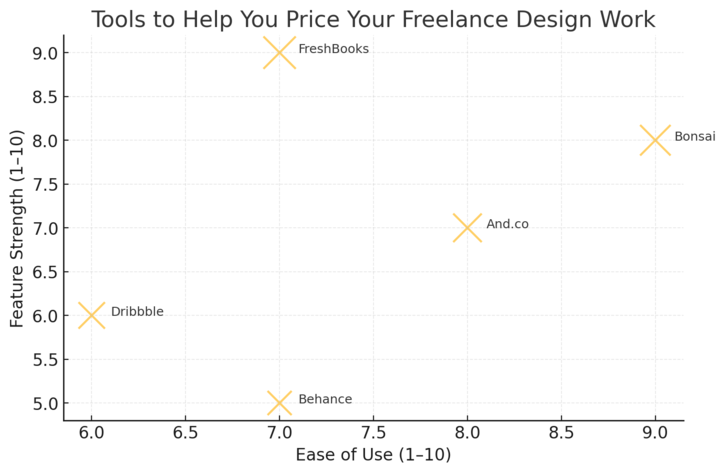
Pricing doesn’t have to be guesswork. There are excellent tools that help you calculate rates, track time, compare market trends, and manage invoices—all in one place.
Using Bonsai and And.co for Rate Calculation and Invoicing
Bonsai and Fiverr Workspace are powerful platforms built for freelancers.
- Bonsai offers a Rate Calculator that considers your experience, location, and expenses to suggest an accurate hourly or project rate. It also automates contracts and invoices—saving hours of admin work.
- Example: Go to Bonsai → Tools → Rate Calculator to see your ideal hourly rate.
- Fiverr Workspace combines invoicing, contracts, and time tracking in one dashboard.
- You can see how much time you’re spending per client and ensure your billable hours match your effort.
Both tools help you price confidently by combining data and automation—essential for scaling your design business efficiently.
Exploring FreshBooks for Tracking Time and Expenses
FreshBooks is an accounting and time-tracking platform built specifically for freelancers. It’s great for understanding real profitability.
In the dashboard, you can:
- Track billable and non-billable hours for each project.
- Log expenses automatically from bank accounts.
- Generate reports showing income versus time spent.
For example, if you notice a project consuming 20 hours but generating less income than expected, you’ll know exactly where to adjust pricing next time.
I advise setting weekly “profit check-ins” on FreshBooks—it’s a small habit that prevents silent income leaks.
Leveraging Dribbble and Behance for Market Comparison
These aren’t just portfolio platforms—they’re goldmines for pricing research.
Search for designers in your niche on Dribbble or Behance, and look at their project types, quality level, and listed clients. While most don’t show rates, you can infer value based on client size and project scope.
For instance, a designer creating work for Nike or Adobe isn’t charging $50 per logo—they’ve positioned themselves at a higher tier. Use this to gauge what tier you belong in (entry, mid-level, or premium).
I suggest updating your own portfolio to match the tier you want to charge for—clients pay what they perceive you’re worth.
Using Excel or Notion Templates for Pricing Analysis
If you prefer manual control, Excel or Notion can be surprisingly effective.
You can build a simple Pricing Tracker with columns like:
- Project Type
- Time Spent
- Income
- Hourly Profit
- Notes (what worked / what didn’t)
In Notion, create a “Rate Optimization Dashboard” to log projects and calculate profit margins automatically. I personally use Notion for this because it keeps design, admin, and growth data all in one place.
The goal isn’t just tracking—it’s spotting patterns. You’ll quickly see which projects are profitable and which drain time without reward.
Building a Pricing Strategy That Scales With You
The best pricing strategy grows with your experience, demand, and ambition. Think of it as a living system, not a fixed chart. The more intentional you are, the faster your income compounds over time.
Creating Tiered Packages for Different Client Types
Tiered pricing gives clients choice while letting you serve multiple budgets without discounting your work.
Here’s a simple structure:
- Starter Package: One logo concept, one revision, basic guidelines ($500).
- Growth Package: Two logo concepts, full brand kit, three revisions ($1,200).
- Premium Package: Full strategy session, multi-platform brand system ($2,500+).
Tiering does two things—it highlights value differences and nudges clients toward higher tiers. I recommend naming packages creatively (e.g., “Launch,” “Scale,” “Elite”) to add perceived sophistication.
Balancing Consistency and Flexibility in Your Pricing
Consistency builds trust, but flexibility helps you win opportunities. Keep a standard pricing sheet but allow a small buffer (about 10–15%) for negotiations, urgency, or special circumstances.
Example: A rush project might cost 25% more, while a long-term client might get a modest loyalty discount.
The key is to document exceptions—don’t rely on memory. Use a spreadsheet or Notion database to log who received what and why. That way, your flexibility stays strategic, not emotional.
Incorporating Passive Income Through Templates or Courses
As you grow, shift part of your income to scalable sources like:
- Selling design templates on Creative Market or Etsy.
- Offering workshops on Skillshare or Gumroad.
- Packaging brand assets or social kits for resale.
This doesn’t just diversify income—it strengthens authority. Clients view designers with digital products as established professionals, which supports higher pricing for custom projects too.
Planning for Future Growth and Outsourcing Opportunities
You can’t scale alone forever. As your client load grows, consider outsourcing routine tasks (like resizing graphics or prepping files) to other freelancers.
Use platforms like Upwork or Designhill to find skilled support. Start small—delegate 10–20% of your workload and focus on higher-value strategy or creative direction.
This approach transforms your freelance practice into a small creative business. You’ll eventually move from being “the designer” to “the brand strategist” overseeing multiple projects.
Pro Tip: A scalable pricing strategy isn’t about charging more—it’s about charging smarter. The more you automate, delegate, and structure your pricing, the more freedom you create to focus on what truly matters: creative excellence and sustainable growth.

I’m Juxhin, the voice behind The Justifiable.
I’ve spent 6+ years building blogs, managing affiliate campaigns, and testing the messy world of online business. Here, I cut the fluff and share the strategies that actually move the needle — so you can build income that’s sustainable, not speculative.
Related posts:
 Fiverr How to Make Money Before It’s Too Late!
 Why Work With a Freelance Designer Instead of an Agency?
 7 Smart Tips to Hire Graphic Designer for Your Business
 How to Make Money Fast as an IT Freelancer
 10 Freelancer Programmer Strategies to Boost Your Income
 Freelance Finance Guide to Building High-Value Income