
Table of Contents
Some links on The Justifiable are affiliate links, meaning we may earn a small commission at no extra cost to you. Read full disclaimer.
GoDaddy ecommerce often comes up when beginners tell me they want to start selling online without feeling overwhelmed.
I’ve seen a lot of first-time store owners look for something that feels familiar, forgiving, and fast to launch—and that’s usually where this platform enters the conversation.
Simple Store Setup That Makes GoDaddy Ecommerce Easy
When people ask me why beginners gravitate toward GoDaddy ecommerce, setup is almost always the first reason.
The platform is clearly designed to get you moving without forcing you to understand how ecommerce “normally” works behind the scenes.
Guided Onboarding That Walks Beginners Through Each Step
The onboarding feels more like a conversation than a checklist. Instead of dumping you into a blank dashboard, GoDaddy asks simple questions about what you’re selling, how you plan to deliver it, and what your goals are.
Here’s why that matters for beginners. Most new sellers don’t actually know what settings they need yet. Guided onboarding reduces decision fatigue by only showing relevant options.
If you say you’re selling physical products, shipping-related steps appear. If you choose digital products, those steps quietly disappear.
I’ve noticed this approach shortens launch time dramatically. In internal GoDaddy data shared publicly, small businesses using guided onboarding often publish a live site the same day.
From my experience, that’s realistic. You’re not stopping every five minutes to Google what a term means.
It also builds confidence. Each completed step feels like progress, which matters more than people admit when they’re nervous about launching their first store.
No Technical Configuration Required To Launch A Store
This is where GoDaddy ecommerce quietly shines. You don’t configure servers, install software, or touch anything that looks technical.
Behind the scenes, ecommerce platforms usually require:
- Hosting setup
- SSL security configuration
- Payment gateway connections
- Store structure decisions
With GoDaddy, these pieces are pre-handled. You don’t see them unless you go looking. That means you can focus on your product instead of infrastructure.
I’ve worked with beginners who assumed “online store” meant learning tech skills. Watching their relief when they realize none of that is required is honestly one of my favorite moments.
This isn’t about limiting power. It’s about removing early friction so momentum isn’t lost before the store even exists.
See how GoDaddy ecommerce handles hosting, SSL, security, and setup so you can publish your store without technical hurdles. Explore plans and test setup workflows directly from the dashboard. Link: https://thejustifiable.com/godaddy
Prebuilt Store Structure That Reduces Setup Decisions
Decision overload kills beginner projects fast. GoDaddy solves this by giving you a prebuilt store structure that already makes sense.
Your store automatically includes:
- Product pages with standard layouts
- A cart and checkout flow
- Account and order confirmation pages
- Basic legal and footer sections
You’re not forced to ask, “Do I need this page?” at every turn. The structure is already aligned with how buyers expect ecommerce sites to work.
From what I’ve seen, this reduces early mistakes like missing checkout steps or confusing navigation. You’re learning ecommerce by using a proven structure, not inventing one from scratch.
Clear Dashboard Layout That Avoids Feature Overload
One thing I appreciate about GoDaddy ecommerce is how calm the dashboard feels. You’re not greeted by dozens of menu items competing for attention.
Instead, the interface prioritizes:
- Products
- Orders
- Marketing basics
- Store appearance
Advanced features stay out of the way until you’re ready. That’s intentional. Beginners don’t need analytics graphs and automation rules on day one.
This kind of layout supports learning by doing. You discover features as your store grows, not all at once when you’re least prepared.
Fast Publishing Flow From Idea To Live Store
Speed matters more than perfection early on. GoDaddy’s publishing flow is designed to get your store live quickly, even if everything isn’t “finished.”
You can:
- Publish with a small product list
- Edit content after going live
- Adjust design without downtime
I often tell beginners this: your first version should feel slightly unfinished. GoDaddy makes that mindset practical by removing penalties for publishing early.
For many sellers, the hardest part is pressing publish. Anything that lowers that barrier is doing something right.
Built-In Design Tools That Remove Visual Guesswork
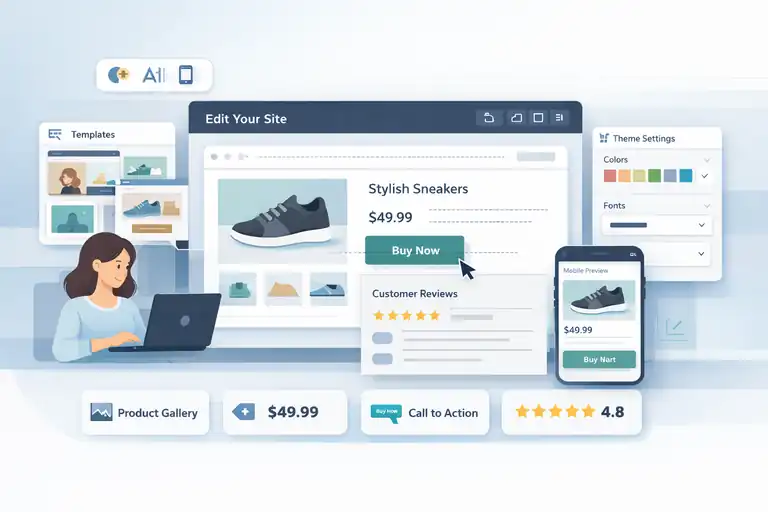
Design is where many beginners freeze. GoDaddy ecommerce focuses on making your store look credible without asking you to be creative or technical at the same time.
Ready-Made Templates Designed For Online Selling
GoDaddy’s templates aren’t just “pretty.” They’re structured for ecommerce behavior.
Each template already accounts for:
- Product image hierarchy
- Clear call-to-action placement
- Readable pricing sections
- Trust signals like reviews and policies
This matters because design mistakes directly impact conversions. According to multiple ecommerce studies, users form a first impression of a website in under one second. Templates remove the risk of making the wrong one.
In my experience, beginners often underestimate how much structure affects sales. Templates quietly handle that for you.
Visual Editors That Eliminate The Need For Coding
The visual editor works on a what-you-see-is-what-you-get model. When you move something, you’re seeing exactly how it will look live.
That means:
- No guessing how changes will render
- No broken layouts from small edits
- No dependency on technical help
I’ve watched store owners make design updates confidently because the editor doesn’t punish experimentation. If you can drag, click, and type, you can customize your store.
That freedom encourages learning instead of fear.
Mobile-Responsive Layouts Without Manual Adjustments
Mobile traffic often accounts for over 60 percent of ecommerce visits. Beginners rarely plan for this. GoDaddy does it for them.
Templates automatically adapt to phones and tablets.
You don’t need to:
- Create separate mobile designs
- Adjust spacing manually
- Test dozens of screen sizes
This built-in responsiveness removes a huge blind spot for first-time sellers. You’re not accidentally building a desktop-only store in a mobile-first world.
Brand Customization Options That Stay Beginner-Safe
You can customize colors, fonts, and layouts, but within guardrails. This is a good thing.
Instead of unlimited choices, GoDaddy limits combinations to ones that work well together. That prevents common issues like unreadable text or clashing colors.
I personally like this approach. Total freedom sounds nice, but for beginners it often leads to design regret. Controlled flexibility keeps your store looking professional while still feeling like yours.
Consistent Design Rules That Prevent Costly Mistakes
Design consistency builds trust, especially for new brands. GoDaddy enforces design rules that keep spacing, fonts, and layout patterns uniform.
This consistency:
- Improves readability
- Makes stores feel more established
- Reduces bounce rates caused by visual confusion
You’re learning good design habits without needing to study design theory. Over time, those habits carry into future projects.
Product Management Features That Are Easy To Learn
Product management is where beginners either gain confidence fast or feel stuck.
GoDaddy ecommerce leans into simplicity here, making it easy to add, organize, and adjust products without learning complex systems or ecommerce jargon.
Simple Product Upload Process With Minimal Fields
Adding a product in GoDaddy ecommerce feels refreshingly straightforward. You’re not forced to fill out dozens of fields just to get something live.
The core setup focuses on what actually matters at the start:
- Product name and description
- Price
- Image
- Basic category
That’s it. You can publish with just the essentials and refine later.
I’ve seen beginners get tripped up by platforms that treat product creation like data entry.
Here, the flow feels more like writing a short product listing than configuring software. That matters because momentum is everything early on.
There’s also a subtle psychological win. When uploading a product takes minutes instead of an hour, people add more products. More products mean more chances to sell.
According to common ecommerce benchmarks, stores with 10+ products tend to convert better than single-product stores because shoppers like having options.
This setup encourages action instead of perfection.
Inventory Controls That Make Sense For First-Time Sellers
Inventory management sounds intimidating, but GoDaddy keeps it grounded in real-world logic. You’re not managing warehouses. You’re just answering one simple question: how many do I have?
You can:
- Set available quantities
- See when stock is running low
- Prevent overselling automatically
There’s no need to understand inventory formulas or forecasting tools. For first-time sellers, that’s a relief.
I’ve worked with small sellers who track inventory in their heads or notebooks at first. GoDaddy’s inventory controls feel like a natural next step, not a leap into complexity.
The biggest benefit here is trust. When customers see accurate stock levels, they feel safer buying. And when sellers don’t oversell, they avoid stressful refund situations that can kill confidence early on.
Digital And Physical Product Support In One Interface
Many beginners sell more than one type of product without realizing it. A coach might sell a physical workbook and a downloadable guide. GoDaddy supports both in the same interface.
You don’t need separate systems or stores. You simply choose how the product is delivered.
This flexibility makes experimenting easier. I’ve seen sellers test digital add-ons alongside physical products with almost no extra setup. That kind of experimentation is hard on platforms that treat digital products as “advanced.”
Having everything in one place keeps management simple and reduces mental overhead.
Pricing And Variations Setup Without Complex Logic
Pricing variations like size or color often scare beginners away. GoDaddy handles variations using plain logic instead of layered rules.
You define:
- The variation type
- The available options
- Any price differences
That’s all.
There’s no dependency mapping or conditional logic. If a shirt costs more in a larger size, you set it and move on.
This approach reduces pricing errors, which are surprisingly common for new sellers. Clear variation setup also improves customer trust because buyers see exactly what they’re paying for before checkout.
Bulk Editing Options That Save Time As Stores Grow
As stores grow, small tasks add up. GoDaddy introduces bulk editing in a way that feels optional, not overwhelming.
You can update:
- Prices
- Stock levels
- Product visibility
This becomes valuable once you’re managing more than a handful of products. I like that you don’t need bulk tools at the start, but they’re there when you’re ready.
It’s a quiet way of supporting growth without forcing advanced workflows too early.
Walk through a simple product upload, test variations, and see how GoDaddy ecommerce guides you through pricing, stock, and delivery options. New sellers usually publish their first item in minutes.
GoDaddy Ecommerce Payments And Checkout Simplicity
Payments and checkout are where beginners usually feel the most anxiety. I’ve seen people abandon solid business ideas simply because the payment side felt “too risky” or confusing.
GoDaddy ecommerce takes a very different approach here, focusing on clarity first and flexibility second.
Built-In Payment Options Without Third-Party Setup Stress
One of the quiet wins with GoDaddy ecommerce is that payments are built in from the start. You’re not pushed into researching providers, comparing fees, or figuring out integrations before you can sell.
For beginners, this removes several hidden blockers:
- No separate merchant account applications
- No manual API connections
- No guesswork about compatibility
You choose your payment method during setup, confirm a few details, and you’re ready to accept money. That’s it.
I’ve worked with first-time sellers who went live the same afternoon because they didn’t need to “wait on payments.” That speed matters.
According to Baymard Institute, nearly 18 percent of users abandon checkout because it feels too complicated. Fewer steps upfront lowers that risk before you even get traffic.
Streamlined Checkout Experience That Reduces Abandonment
Checkout design isn’t just about looks. It’s about removing hesitation at the exact moment someone is ready to buy.
GoDaddy keeps checkout clean by:
- Limiting the number of required fields
- Avoiding unnecessary account creation
- Showing progress clearly from start to finish
This is especially helpful for mobile shoppers, who now account for over half of ecommerce purchases globally. Fewer taps, fewer screens, fewer chances to quit.
I’ve noticed that beginner stores using simpler checkouts often outperform more “custom” setups early on. Buyers don’t want clever here. They want familiar and fast.
Tax And Shipping Settings Explained In Plain Language
Taxes and shipping are usually where eyes glaze over. GoDaddy explains both using plain language instead of legal or logistics jargon.
Instead of asking you to define complex rules upfront, the platform guides you through:
- Where you’re selling
- How you want to charge shipping
- Whether taxes apply automatically or manually
You’re not expected to be an accountant. You’re just making reasonable choices based on your situation.
I always tell beginners this: you can refine taxes and shipping later. The goal early on is correctness, not perfection. GoDaddy’s explanations make that mindset possible.
Secure Transactions Without Manual Security Configuration
Security is one of those things people worry about but don’t want to manage. GoDaddy handles this in the background.
Your store includes:
- Encrypted checkout pages
- Secure payment handling
- Automatic compliance with basic ecommerce security standards
You don’t install certificates or manage settings. It’s simply there.
For new sellers, this matters more than advanced features. Trust is fragile when you’re unknown. Visible security indicators reassure buyers even if they’ve never heard of your brand before.
Order Management Tools That Are Easy To Track And Fulfill
Once orders start coming in, clarity matters more than complexity. GoDaddy’s order management tools focus on visibility.
You can:
- See new orders at a glance
- Track payment and fulfillment status
- Update orders without jumping between screens
I’ve seen beginners confidently fulfill their first 10 or 20 orders without feeling overwhelmed. That early success builds momentum, which is often more valuable than automation at this stage.
Marketing Tools That Help Beginners Get First Sales
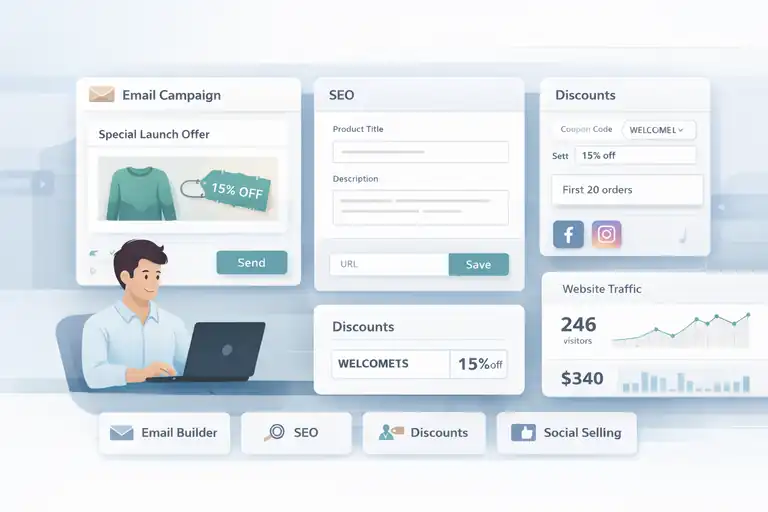
Getting traffic is intimidating when you’re new. GoDaddy ecommerce approaches marketing with a “start small, win early” philosophy, which I honestly think more platforms should adopt.
Built-In Email And Promo Tools For Early Outreach
Email marketing sounds complex, but GoDaddy simplifies it by focusing on basics. You can send simple promotional emails without designing full campaigns.
This works well for:
- Announcing your launch
- Promoting a first-time discount
- Re-engaging past customers
I’ve seen stores generate their first sales from a single short email sent to friends, family, or early supporters. You don’t need funnels yet. You need visibility.
SEO Basics Integrated Directly Into Product Pages
Search engine optimization can feel like a dark art. GoDaddy keeps it practical by integrating SEO basics directly into product and page settings.
You’re guided to:
- Write clear product titles
- Add simple descriptions
- Customize page URLs when needed
No plugins. No technical audits. Just straightforward guidance.
From what I’ve seen, beginner stores that follow these basics consistently tend to index faster in Google, especially for brand-name searches and local terms.
Discount And Coupon Creation Without Extra Apps
Discounts are one of the easiest ways to test demand. GoDaddy lets you create coupons in minutes.
You can:
- Set percentage or fixed discounts
- Limit usage to new customers
- Schedule start and end dates
This makes it easy to run low-risk experiments. For example, offering a small launch discount for the first 20 orders often creates urgency without hurting margins.
I like that discounts don’t feel like an advanced feature. They’re treated as a normal part of selling.
Social Selling Integrations That Expand Visibility Fast
Social selling simply means letting people shop where they already spend time. GoDaddy supports this by connecting your products to social channels without manual syncing.
That helps beginners:
- Reach audiences faster
- Avoid duplicate product management
- Maintain consistent pricing and inventory
For sellers who already post on social platforms, this feels like a natural extension instead of a separate marketing project.
Simple Analytics That Focus On What Actually Matters
Analytics overwhelm beginners when too much data shows up too early. GoDaddy focuses on metrics that answer simple questions:
- Are people visiting?
- Are they buying?
- Which products perform best?
You’re not digging through charts. You’re looking at trends.
I always suggest beginners watch behavior, not vanity numbers. These simplified analytics make that easier.
Support And Learning Resources Built For New Users
Even with an easy platform, questions will come up. What matters is how quickly you get unstuck. This is an area where GoDaddy ecommerce quietly supports beginners well.
24/7 Support Access Without Technical Barriers
Support is available around the clock, which matters when you’re working on your store outside normal business hours.
What I appreciate is that support doesn’t assume technical knowledge. You can explain your problem in plain language and still get help.
For beginners launching late at night or on weekends, this alone can prevent days of delay.
Help Docs Written For Non-Technical Store Owners
Documentation is only helpful if people actually read it. GoDaddy’s help articles are written for store owners, not developers.
They focus on:
- What a feature does
- Why you might need it
- How to use it step by step
This reduces the intimidation factor. You’re learning ecommerce concepts without feeling like you’re studying a manual.
In-Editor Tips That Explain Features While You Work
Instead of sending you to external guides, GoDaddy explains features directly inside the editor.
These small prompts:
- Explain why a setting exists
- Suggest best practices
- Warn against common mistakes
I’ve found this kind of contextual learning sticks better. You learn by doing, not by reading theory first.
Scalable Features That Grow With Beginner Confidence
One thing beginners fear is outgrowing their platform too quickly. GoDaddy handles this by gradually unlocking more advanced features as needs evolve.
You’re not forced into complexity early, but you’re not boxed in either.
This progression helps confidence grow naturally instead of overwhelming you upfront.
Clear Upgrade Paths Without Platform Lock-In
Upgrades are presented clearly, without pressure or hidden trade-offs.
You can:
- Start small
- Upgrade when revenue supports it
- Understand exactly what you’re paying for
That transparency builds trust. I believe beginners stick longer with platforms that don’t make them feel trapped.
If I had to sum this up honestly: GoDaddy ecommerce doesn’t try to impress beginners with complexity. It earns trust by removing friction, explaining decisions, and letting confidence build one win at a time.

I’m Juxhin, the voice behind The Justifiable.
I’ve spent 6+ years building blogs, managing affiliate campaigns, and testing the messy world of online business. Here, I cut the fluff and share the strategies that actually move the needle — so you can build income that’s sustainable, not speculative.
Related posts:
 How To Start A Dropshipping Business With No Money
 Get Your Alidropship Custom Store Done Right Today!
 Best Ecommerce Website Builder for Beginners in 2025
 The Best Way to Dropship Without Wasting Money
 Dropshipping How to Start: Your Complete Beginner’s Guide
 Starting an Ecommerce Business: A Realistic Step-By-Step Guide