
Table of Contents
Some links on The Justifiable are affiliate links, meaning we may earn a small commission at no extra cost to you. Read full disclaimer.
Learning how to use Brand24 for brand monitoring gets a lot easier once you stop treating it like a simple alert tool and start using it like a decision-making system.
That is the shift most teams miss. Brand24 can track mentions across social media, news, blogs, videos, forums, podcasts, reviews, and more, then layer in sentiment, reach, trends, and AI-powered insights so you can spot what matters faster.
Brand24 says it tracks mentions across 25 million-plus sources, which is why setup quality matters so much from day one.
Understand What Brand24 Is Actually Best At
Brand24 is strongest when you use it to monitor public conversations around your brand, products, campaigns, competitors, and industry terms in one place.
That makes it useful for reputation management, campaign tracking, customer feedback analysis, and competitive monitoring instead of just “seeing mentions.”
What Brand24 Tracks And Why That Matters
When most people first open Brand24, they focus on the mentions feed. That is useful, but it is only the surface. The real value comes from the fact that Brand24 pulls in public mentions from a very wide source set, including social media, news, blogs, forums, videos, podcasts, and reviews.
On its official site and FAQ pages, Brand24 describes itself as a media monitoring and social listening platform built to help businesses track what people say online in real time.
That matters because brand monitoring is rarely about one viral post. In practice, you are usually trying to answer bigger questions. Are customers getting frustrated with shipping delays? Is a campaign getting picked up by journalists? Are people mentioning your product but tagging the wrong account? Are review sites suddenly turning negative?
I suggest thinking of Brand24 as a pattern detector, not a dashboard. One mention rarely changes your strategy. Twenty similar mentions across several channels usually should.
A simple example: Imagine you run a skincare brand. One complaint about packaging damage is noise. Fifteen complaints across reviews, TikTok comments, and Reddit threads is a packaging problem. Brand24 helps you see the difference faster because the data is centralized rather than scattered across platforms.
The Difference Between Brand Monitoring And Social Listening
A lot of teams use those terms like they mean the same thing. They overlap, but they are not identical.
Brand monitoring is the act of tracking mentions of your brand, products, people, or campaigns. Social listening goes one step further. It looks for meaning inside those mentions, such as sentiment shifts, recurring complaints, influencer impact, and conversation trends.
Brand24 is positioned as both a media monitoring and social listening tool, which is an important distinction. Its filters, sentiment tagging, reach indicators, reports, and AI-driven summaries are what turn raw mentions into something more strategic.
In my experience, this is where many beginners leave value on the table. They set alerts, skim a few mentions, and move on. A better approach is to ask one operational question for every project you create.
For example: “What decision will this monitoring project help me make?” That keeps the setup focused.
Use that rule and you will avoid one of the biggest mistakes in social listening: collecting far more data than you can actually act on.
Set Up Your First Brand24 Project The Right Way
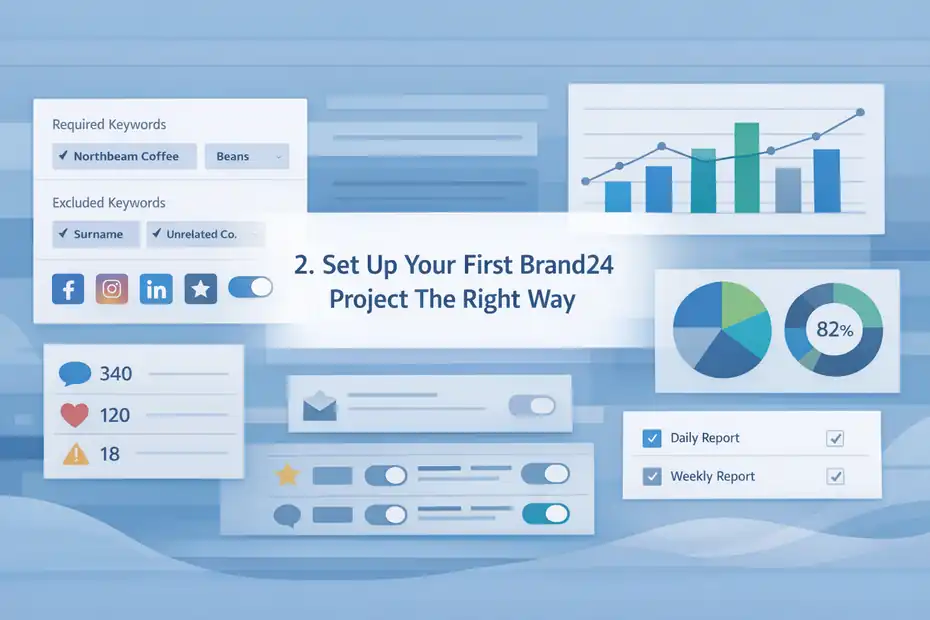
Your first project determines whether Brand24 becomes useful or noisy.
The main goal is to track the right keywords, exclude irrelevant ones, connect important sources, and set reporting expectations before the mentions start flowing.
Start With One Core Brand Project
Brand24’s help documentation repeatedly recommends starting with a project centered on your brand name, then adding required and excluded keywords to improve accuracy. It also supports email reports and extra source connections during setup.
This is the cleanest way to begin.
Your first project should usually include:
- Brand Name: Your company name in its most common public form.
- Product Names: Only the ones people actually search or mention independently.
- Campaign Terms: Hashtags, slogans, or launch names if they are unique enough.
- Executive Or Founder Name: Useful if your leadership is part of the brand story.
- Misspellings: Common typos, spacing errors, or merged versions of your name.
Let me give you a practical setup. If your brand is “Northbeam Coffee,” your project might include Northbeam Coffee, Northbeam, Northbeam beans, and your seasonal product names. If “Northbeam” is also a surname or unrelated company in another country, you would immediately need exclusions.
I recommend starting narrow, then expanding. A too-broad setup creates junk data fast. A narrow setup is easier to refine.
Use Required And Excluded Keywords To Cut Noise
This is the part that separates beginners from people who actually know how to use Brand24 for brand monitoring efficiently.
Brand24 lets you use required and excluded keywords in projects and reports, which is one of the most practical accuracy controls in the platform.
Here is how to think about it:
- Required keywords force Brand24 to include a term alongside your main query.
- Excluded keywords remove unrelated contexts that pollute the feed.
Example: if your brand is “Apple Tree,” you may need to exclude recipes, orchards, and gardening phrases. If your software product is called “Pulse,” you may need required terms like app, platform, SaaS, or analytics to avoid health-monitor noise.
A good rule is to review your first 100 to 200 mentions manually. Count how many are irrelevant. If more than 15% to 20% are noise, your keyword logic needs work.
That small review can save hours later. I believe this is one of the highest-return tasks in the entire setup process because every downstream chart, report, and sentiment trend depends on clean data.
Connect Additional Sources And Reporting Preferences
Brand24’s help center also points users toward linking additional sources such as review sites and integrating social channels like Facebook, Instagram, and LinkedIn where relevant for broader monitoring. Email reporting can be set to daily or weekly depending on how actively you want summaries delivered.
This matters because a brand can look healthy on social media while getting hammered in reviews, or vice versa.
For most businesses, I suggest:
- Daily email reports if you have active campaigns, PR exposure, or frequent customer conversation.
- Weekly reports if you are doing steady-state brand health monitoring.
- Review source linking if reviews materially affect conversions.
- Social profile connections if public engagement and direct brand tags matter to your workflow.
Think like an operator here. You are not setting up software. You are creating an early-warning system.
Build A Monitoring Keyword Strategy That Reflects Reality
The best Brand24 projects do not just track a brand name.
They track how real people actually refer to the brand, its products, its competitors, and the problems it solves.
Track Brand Terms, Product Terms, And Intent Terms Separately
A lot of users dump everything into one giant project. I understand why, but it makes analysis messy.
A smarter structure is to separate monitoring into categories:
- Brand terms: Your company name, brand hashtag, founder name, branded campaign phrases.
- Product terms: Individual product names, feature names, product bundles, SKU families if those are publicly discussed.
- Intent terms: Problem-focused phrases like “alternative to,” “looking for,” “review,” “worth it,” or “issue with.”
Brand24’s own use cases for competitive analysis, customer feedback, lead generation, and market research all point toward setting up focused projects and keyword sets rather than relying on one catch-all stream.
Here is why it helps. A brand-term project tells you how visible and discussed you are. A product-term project tells you what customers think after exposure. An intent-term project can uncover buying signals or pain points.
Imagine you sell project management software. Your brand project may show positive press and influencer mentions. Your product project may reveal recurring confusion about onboarding.
Your intent project may surface prospects asking for recommendations in Reddit threads. Those are three completely different business opportunities.
Add Competitor And Category Monitoring Without Mixing It In
Brand24 is also often used for competitor analysis, and the platform’s help content specifically suggests refining competitor projects with excluded keywords, tags, saved filters, and customized alerts.
I recommend creating separate competitor projects rather than combining all brands in one stream. That makes it easier to compare:
- Share of discussion
- Sentiment trend differences
- Influencer overlap
- Campaign spikes
- Recurring complaints customers mention publicly
For example, if you monitor your own brand and two competitors separately, you can compare whether negative spikes happen after feature launches, price changes, shipping delays, or PR events.
This is where brand monitoring becomes strategic. You stop asking, “What are people saying about us?” and start asking, “What patterns are shaping buyer perception in our category?”
That second question is much more valuable.
Learn To Read Mentions Instead Of Just Scrolling Them
Once the project is live, the temptation is to scroll endlessly through mentions.
That feels productive, but it is not analysis. You need a repeatable method for sorting, tagging, and interpreting what matters.
Use Filters To Segment Conversation Fast
Brand24 has a robust filtering system, and its official content highlights filtering by sentiment, sources, language, and date to help analyze social listening metrics more accurately.
Filters matter because raw mention volume is misleading without context.
I suggest starting every review session with four quick slices:
- By sentiment: Separate positive, neutral, and negative mentions.
- By source: Compare social media against news, forums, reviews, and blogs.
- By language or market: Useful for multi-country brands.
- By date range: Essential after campaigns, launches, or incidents.
Let me break down why this helps. A negative sentiment spike on review sites usually implies a product or service problem. A negative spike on X or Reddit may be more narrative-driven, such as a perception issue or a viral complaint. A neutral spike in news may simply mean increased media exposure.
Without filters, those situations all look like “more mentions.” With filters, they tell different stories.
In my experience, this is the fastest way to make Brand24 useful for weekly decision-making instead of passive monitoring.
Tag Mentions By Theme, Not Just Emotion
Sentiment tells you whether the mention feels positive or negative. It does not always tell you why.
That is why I recommend building a light tagging framework. Brand24’s competitor-analysis help content references tags and saved filters as workflow tools, and that is exactly how advanced users stay organized.
Useful tag examples include:
- Support issue
- Shipping complaint
- Feature request
- Influencer mention
- Press coverage
- Purchase intent
- Comparison mention
- UGC opportunity
A simple weekly process works well. Review your highest-reach mentions first, then your newest negative mentions, then your intent-driven mentions. Apply tags as you go.
After two to four weeks, those tags become a mine of insight. You can see whether “feature request” mentions are rising, whether “comparison mention” content appears near launches, or whether “support issue” clusters around one region or channel.
That is the point where monitoring becomes operational intelligence.
Use Sentiment, Reach, And AI Insights To Prioritize What Matters
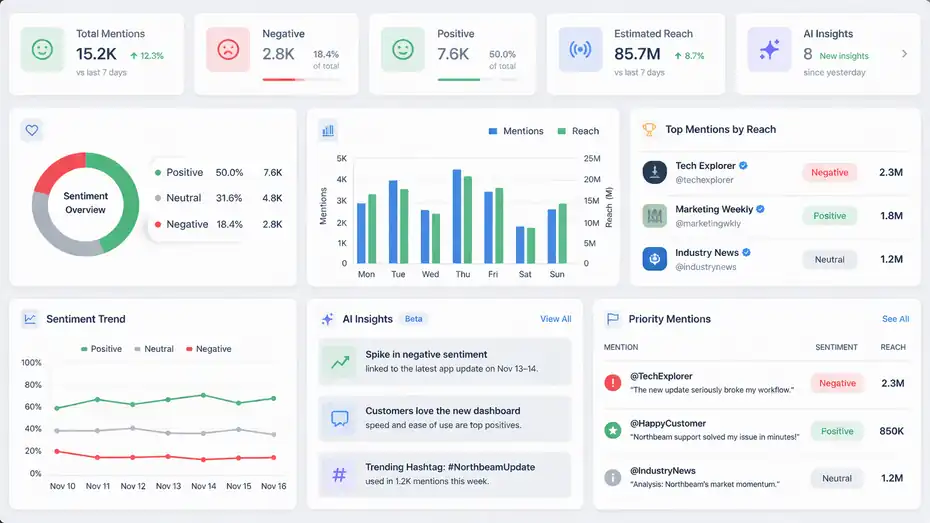
Brand24 is not just useful because it collects mentions. It is useful because it helps you decide which mentions deserve attention first.
That is where sentiment, reach indicators, and AI-powered summaries become practical.
Treat Sentiment As A Triage Tool, Not Absolute Truth
Brand24 includes AI sentiment analysis in its plans and describes sentiment tagging as a way to classify positive and negative mentions automatically.
That is helpful, but here is my honest take: sentiment is best used for prioritization, not blind trust.
Automatic sentiment is very good at surfacing patterns quickly. It is less perfect with sarcasm, slang, context-heavy posts, and mixed feedback. So use it like this:
- Review negative mentions daily.
- Spot-check high-reach positive mentions for advocacy opportunities.
- Investigate sudden sentiment shifts after campaigns or incidents.
- Manually review borderline mentions before escalating them.
Imagine someone posts, “Great, another update that broke everything.” A system may classify that differently depending on wording and context. That does not mean the tool failed. It means human review still matters.
I believe the best workflow is hybrid: let Brand24 surface sentiment patterns, then let your team validate what is strategically important.
Use Reach And Influence To Prevent Overreaction
One of the easiest mistakes in brand monitoring is overreacting to loud but low-impact chatter.
That is why reach matters. Brand24 surfaces metrics and top mentions that help users find the most popular or visible conversations rather than treating every mention equally. Its official materials also emphasize trending hashtags, top public profiles, and broader online presence indicators.
A negative comment from a tiny account may not deserve a formal response. A critical review from a respected creator or major publication probably does.
I suggest a simple priority model:
- High reach + negative: Review immediately.
- High reach + positive: Amplify, engage, or save for advocacy.
- Low reach + repeated theme: Look for pattern, not single-post panic.
- High intent + neutral tone: Route to sales or community team.
This prevents a common failure mode where teams chase every mention equally and miss the ones shaping public perception.
Use AI Insights To Find Patterns Faster
Brand24 has increasingly leaned into AI-driven summaries and insights, with its official content describing AI Insights as a way to surface patterns, summaries, and recommendations without manually reviewing every mention.
That is genuinely useful when volume gets heavy.
For example, after a product launch, AI summaries can help you answer questions like:
- What themes are driving the conversation?
- Are complaints clustered around one issue?
- Which audience segments are reacting most positively?
- Are competitors getting pulled into the same discussion?
I would still verify important conclusions manually. But for weekly reviews, AI summaries can save a lot of time and help non-analysts get to the signal faster.
Turn Brand24 Into A Weekly Operating System
The biggest upgrade you can make is moving from reactive monitoring to a simple recurring workflow.
When that happens, Brand24 stops being a dashboard you occasionally check and becomes part of how your team runs marketing, support, PR, and product feedback.
Build A Simple Weekly Review Routine
Brand24 supports daily or weekly email reporting and comprehensive reports, making it well suited to recurring review workflows. Its help center specifically recommends project setup, keyword refining, exclusions, and report use as part of ongoing monitoring.
A simple weekly routine looks like this:
- Monday: Review volume, sentiment, top mentions, and any spikes.
- Midweek: Check competitor projects and campaign terms.
- Friday: Tag themes, summarize patterns, and export or share findings.
I recommend that you document four questions every week:
- What increased?
- What turned negative?
- What is repeatedly requested or complained about?
- What should we do next?
That last question matters most. Monitoring without action becomes a vanity habit.
For a small team, one 30-minute review can be enough. For a larger brand with ongoing campaigns, PR exposure, and active support issues, daily scanning plus a weekly synthesis is usually better.
Route Insights To The Right Teams
Brand monitoring becomes valuable when insights move to the people who can act on them.
Here is a practical routing model:
- Marketing: Campaign reception, creator mentions, UGC opportunities, branded hashtag trends.
- PR: Journalist mentions, media spikes, potential reputation issues.
- Support: Repeated complaints, bug reports, refund frustration, service delays.
- Product: Feature requests, usability friction, comparison comments.
- Sales: Purchase-intent mentions and competitor-switching signals.
Imagine your monitoring shows repeated comments like “I like the product, but setup takes forever.” That is not just a support issue. Marketing can improve messaging, product can simplify onboarding, and sales can address objections earlier.
This is why I often say brand monitoring is really cross-functional listening. Brand24 just gives you the system to see it.
Use Brand24 For Campaigns, Reputation, And Competitive Advantage
Once the basics are working, Brand24 becomes much more powerful.
You can use it to evaluate campaigns, manage reputation risk, and monitor competitors in ways that directly affect revenue and brand trust.
Track Campaign Performance Beyond Vanity Metrics
A lot of campaign reporting lives inside ad platforms and social analytics tools. That is fine for clicks and impressions. It is not enough for understanding conversation quality.
Brand24 helps by showing how campaigns spill into broader public discussion. Because it monitors public mentions across multiple channels, you can see whether a campaign generated press pickup, forum discussion, review chatter, creator content, or backlash beyond your owned accounts.
A strong campaign review in Brand24 should look at:
- Mention volume before, during, and after launch
- Sentiment change over the campaign window
- Top authors or creators amplifying the message
- Emerging hashtags or repeated audience language
- Negative misunderstandings that need clarification
Here is a realistic example. A DTC brand launches a sustainability campaign. Paid metrics look good. Brand24, however, shows repeated skeptical comments in forums questioning packaging claims. That changes the next step. Instead of celebrating CTR alone, the team publishes clearer sourcing documentation and creator FAQs.
That is better marketing because it responds to actual perception, not just platform performance.
Protect Reputation Before A Small Issue Grows
Brand24’s help documentation includes online reputation management as a core use case, and that makes sense. Real-time mention tracking, alerts, exclusions, and targeted filtering all support early issue detection.
Here is the practical mindset: do not wait for a crisis label. Watch for signals.
Common early warning signals include:
- Repeated mentions of the same product issue
- Negative sentiment spikes from a specific source
- Influential users criticizing the same policy
- News mentions framing your brand differently than expected
- Competitor comparisons suddenly turning against you
I suggest setting internal escalation rules before you need them.
For example, three high-reach negative mentions in 24 hours about the same issue should trigger a review. Ten similar customer complaints in one week should trigger support and product investigation.
The value here is speed with context. You are not just alerted that something happened. You can see where it started, how widely it spread, and what language people are using.
Avoid The Common Mistakes That Make Brand24 Feel Useless
Most failures with Brand24 are not caused by the software. They come from setup errors, poor workflow design, or unrealistic expectations.
Fix those, and the platform usually becomes much more effective.
Mistake 1: Tracking Too Broadly Too Soon
This is probably the biggest one. Users add every keyword variation, every product term, every competitor, and every generic industry word on day one. The result is chaos.
A better approach is phased expansion.
Start with:
- Your main brand terms
- A few high-value product terms
- Clear exclusions
- One reporting cadence
Then expand once you understand the data quality.
Brand24’s pricing structure is also tied to keyword counts and mention volume across plans, so broad tracking is not just messy. It can become inefficient operationally and financially.
As of the current pricing page, plans vary by number of keywords, mentions per month, and update frequency, from individual through team and higher tiers.
I recommend being intentional. More data is not always better data.
Mistake 2: Ignoring Manual Review
AI summaries, sentiment tagging, and filters save time, but they do not replace judgment.
You still need to read actual mentions, especially when:
- reach is high,
- tone is ambiguous,
- a complaint looks serious,
- a journalist or creator is involved,
- or a trend suddenly appears.
From what I have seen, the best teams combine automation with short manual review windows. Even 15 focused minutes a day can catch nuance that a dashboard misses.
Mistake 3: Monitoring Without Action Rules
This is the quiet killer. Teams collect mentions, maybe export a report, then do nothing with it.
If no one knows what to do with a negative spike, a feature request cluster, or a competitor trend, monitoring becomes a passive habit.
Create action rules like:
- Negative spike = support review
- Creator praise = outreach opportunity
- Repeated feature request = product backlog note
- Comparison thread = sales enablement content idea
That one change makes the entire system more valuable.
Scale Your Brand24 Workflow Like A Pro
Once the basics are stable, scaling is about structure. You want cleaner segmentation, faster reporting, and better cross-team use without turning the process into a full-time analytics job.
Create Separate Projects For Distinct Business Questions
The most scalable setup is usually a project portfolio, not one giant project.
A mature structure might include:
- Main brand health project
- Product feedback project
- Competitor A project
- Competitor B project
- Campaign or launch project
- Purchase-intent or category opportunity project
This mirrors how Brand24’s documented use cases split work across reporting, customer feedback, competitor analysis, lead generation, and market research.
The advantage is clarity. Each project answers one business question well.
I believe this is the point where Brand24 starts feeling “pro-level.” You stop forcing one feed to do everything and instead build a clean monitoring architecture.
Use Reports To Show Trends, Not Just Activity
Brand24’s comprehensive reporting features are designed to help users package findings clearly, including required and excluded keywords, project setup context, and regular report delivery.
When reporting upward, avoid sharing raw screenshots without interpretation. Focus on:
- What changed from the last period
- What themes repeated
- Which channels mattered most
- What action you recommend
For example, instead of saying “mentions increased 32%,” say “mentions increased 32%, driven by press coverage and creator reviews, while negative sentiment stayed flat. The main opportunity is to repurpose creator language into landing-page copy.”
That is a decision-ready insight.
Watch Newer AI Visibility Use Cases Carefully
One newer direction in Brand24’s recent content is monitoring brand visibility in AI-generated environments and LLM-related mentions, alongside broader media intelligence use cases.
I would not replace classic brand monitoring with that. But I would absolutely watch it.
If your brand depends on category discovery, high-consideration buying, or reputation-sensitive search behavior, AI visibility is becoming increasingly relevant.
People are discovering products through AI assistants, summaries, and answer engines more often, and brand mention data can help you spot whether your visibility narrative is improving or fading.
That is one of the most interesting advanced areas to experiment with right now.
What Good Brand24 Usage Looks Like In Practice
At the pro level, Brand24 usage becomes boring in the best way. It is consistent, structured, and tied to decisions. You are not checking it because you feel anxious.
You are checking it because it reliably tells you what to fix, amplify, or investigate next.
A Simple Pro-Level Workflow You Can Copy
Here is the version I would use for many brands:
- Daily: Review high-reach negative mentions, support-related themes, and unusual spikes.
- Twice weekly: Check campaign terms, competitor sentiment, and influencer mentions.
- Weekly: Tag themes, summarize patterns, and share one-page recommendations.
- Monthly: Refine exclusions, expand keyword sets, archive weak signals, and assess whether each project still answers a useful business question.
That workflow is simple enough for a lean team and strong enough for most mid-market brands.
The real secret is not complexity. It is consistency.
The End Goal Of Brand Monitoring
The end goal is not to collect mentions. It is to understand how your brand is perceived, where that perception is changing, and what your team should do about it.
That is why learning how to use Brand24 for brand monitoring matters. Used casually, it is an alert stream. Used well, it becomes an insight engine for marketing, PR, support, and product decisions.
If you want the biggest win, start here: clean up your keywords, review mentions by sentiment and source, tag recurring themes, and turn your weekly findings into actions. Do that for a month, and Brand24 will feel a lot more like a strategic asset than just another dashboard.
FAQ
What is Brand24 used for in brand monitoring?
Brand24 is used to track and analyze online mentions of your brand across social media, news, blogs, and forums. It helps you understand public sentiment, identify trends, and respond quickly to customer feedback or reputation issues before they grow into larger problems.
How do you set up Brand24 for accurate monitoring?
To set up Brand24 effectively, start with your brand name and key products, then refine results using required and excluded keywords. This reduces irrelevant mentions and ensures the data reflects real conversations about your business instead of unrelated content.
Can Brand24 help with competitor analysis?
Yes, Brand24 allows you to monitor competitor mentions by creating separate projects for each brand. This helps you compare sentiment, identify strengths and weaknesses, and uncover opportunities where your competitors may be underperforming or receiving negative feedback.
How often should you check Brand24 data?
You should review Brand24 daily for high-impact mentions and weekly for trends and patterns. Regular monitoring helps you catch issues early, track campaign performance, and make informed decisions based on real-time audience feedback.
Is Brand24 suitable for small businesses?
Brand24 works well for small businesses because it centralizes brand mentions and simplifies monitoring. Even with limited resources, small teams can track reputation, engage with customers, and gain insights that improve marketing and product decisions.

I’m Juxhin, the voice behind The Justifiable.
I’ve spent 6+ years building blogs, managing affiliate campaigns, and testing the messy world of online business. Here, I cut the fluff and share the strategies that actually move the needle — so you can build income that’s sustainable, not speculative.
Related posts:
 Brand24 Pros And Cons For Businesses: Honest Breakdown
 Brand24 Missing Mentions Troubleshooting: Quick Fix Guide
 Top Brand24 Competitors Offering Excellent Value
 Sprout Social Listening: How It Works for Brands
 ClickMagick Pricing: How to Get the Most for Your Money
 Why CallRail Cost Might Be Worth the Investment