
Table of Contents
Some links on The Justifiable are affiliate links, meaning we may earn a small commission at no extra cost to you. Read full disclaimer.
A later review for freelancers usually comes down to one practical question: will this tool actually make client work easier, or will it just give you one more dashboard to babysit? I’ve looked at Later from that exact angle.
If you manage social media for clients, create content calendars, or need a cleaner approval and scheduling workflow, Later can be genuinely useful. But it is not automatically a profit multiplier.
The value depends on your service model, how many clients you handle, and whether visual planning is the bottleneck in your workflow or just a nice extra.
What Later Is And Why Freelancers Look At It
Later is best known as a social media scheduling and planning platform. For freelancers, that matters because content work is rarely just “post and go.”
You are usually juggling planning, approvals, scheduling, light reporting, and client communication at the same time.
What Later Actually Helps You Do
At its core, Later helps you plan, schedule, and publish content across multiple social channels from one place. That sounds simple, but for freelancers, simplicity is usually where money is made. If you are hopping between native apps all day, you are losing time you cannot bill cleanly.
What I like about Later’s positioning is that it is built around workflow, not just publishing. That distinction matters. A freelancer does not just need a “post scheduler.” You need a system that reduces context switching. If your brain is moving from Instagram captions to TikTok reminders to Pinterest timing to client feedback, the day disappears quickly.
In practical terms, Later is most useful when your job includes:
- planning posts ahead of time
- organizing visual content on a calendar
- keeping a client’s posting cadence consistent
- pulling together lightweight reporting
- managing several social profiles without logging in and out all day
That said, Later is not magic. It does not remove strategy work. It does not invent strong creative direction for you. It does not make weak client offers more profitable. It helps most when your work is already structured and you need better operational support.
My view is simple: If your freelance bottleneck is publishing consistency, workflow visibility, and calendar management, Later solves a real problem. If your bottleneck is lead generation, positioning, or client communication, it will not rescue that.
Why Freelancers Are Even Considering It
Most freelancers reach for a tool like Later when one of two things happens. First, they sign client number two or three and suddenly realize manual posting is becoming a mess. Second, they want to look more professional without immediately building a full agency stack.
That is where Later becomes attractive. It feels approachable. It is easier to understand than some enterprise-style social media platforms, and that matters when you are working solo. You do not want to spend half a day learning software that is supposed to save you time.
Here is the real appeal for freelancers:
- it can help you centralize posting
- it can make your process look more polished
- it can reduce deadline panic
- it can support recurring retainers better than purely manual workflows
Imagine you manage content for a fitness coach, a local café, and a beauty brand. Those three clients may need very different tones, visuals, and posting schedules. Without a central planning system, your week becomes reactive.
With a platform like Later, you can batch more of the work and stop relying on memory.
I think that is the real reason freelancers keep searching for Later reviews. They are not asking, “Is this software nice?” They are asking, “Will this help me handle more clients without losing my mind?”
That is the question that actually matters, and the rest of this review should be judged through that lens.
Who Later Is Best For And Who Should Skip It
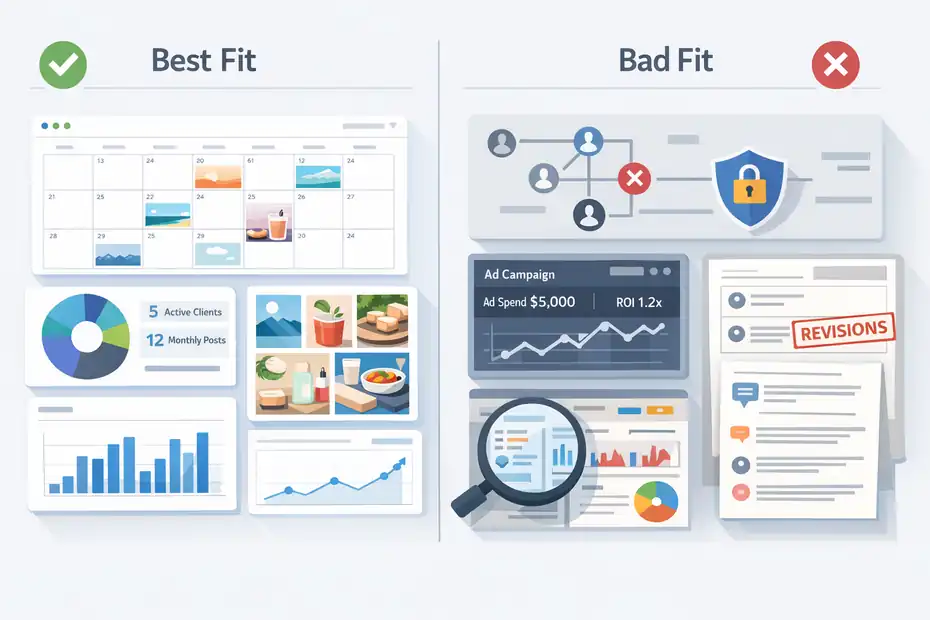
Later is not for every freelancer. I believe one of the biggest mistakes in software reviews is pretending a tool is either “great” or “bad” for everyone.
In reality, most platforms are excellent for a narrow type of user and mediocre for everyone else.
Best Fit: Freelancers Managing Ongoing Social Content
Later makes the most sense for freelancers who sell recurring social media services. If your offer includes monthly content calendars, scheduled publishing, repurposing, and simple reporting, the platform fits naturally into your workflow.
The strongest use case is a freelancer who already has:
- at least 2 to 5 recurring clients
- multiple social profiles per client
- a repeatable monthly delivery process
- visual content that benefits from calendar planning
- a need to batch work in advance
This matters because tools only save time when the underlying process is stable. If you have a retainer model where every month includes 12 posts, 4 Reels, caption writing, scheduling, and a short analytics summary, Later can help you standardize the middle of that process.
It is especially helpful if you work with visually driven brands. Think fashion, beauty, travel, wellness, food, events, or personal brands that rely on an aesthetic feed. In those cases, seeing content on a calendar is not just convenient. It helps you catch creative mismatches before they go live.
From what I’ve seen, freelancers who feel the most relief with Later are the ones moving from “I personally remember everything” to “I need a system because memory is no longer enough.” That is a healthy stage to be in. It usually means your freelance business is growing.
Bad Fit: Freelancers Who Need Deep Strategy Or Heavy Team Ops
Later is a weaker fit when your work is less about scheduling and more about full-service marketing strategy, complex approvals, paid social, or large-team collaboration. It can support parts of that environment, but it is not where I would build a very layered agency operation first.
You may want to skip it if:
- you mostly do one-off consulting, not recurring posting
- your clients still post manually and do not want a system
- you need advanced cross-team permissions and enterprise workflows
- your reporting needs are deep and highly customized
- your main work is ad management rather than organic social
Here is a common example. Say you are a brand strategist who helps founders build messaging, launch plans, and content direction, but you do not actually own the monthly publishing process. Later will probably feel like overkill. You are paying for workflow infrastructure you are not fully using.
Another example is the freelancer with many demanding clients who want extensive review layers, revision tracking, and polished stakeholder approvals. In that situation, you may outgrow Later faster than expected and start looking for a more operations-heavy platform.
So yes, Later can help freelancers get more clients, but only if those clients fit the kind of service delivery the platform supports. Otherwise, it can create more work because now you are maintaining software that does not match the real job.
The Features That Matter Most For Freelancers
Freelancers do not need every feature. They need the right features. A bloated platform can actually slow you down if the essentials are buried under tools you never touch.
Visual Planning, Scheduling, And Content Organization
This is the area where Later usually makes the strongest first impression. The visual planning experience is a big reason people choose it over more plain-looking scheduling tools. If your freelance work is content-heavy and image-led, that visual layer is not just cosmetic. It changes how you catch mistakes.
When you can see a client’s posts arranged on a calendar, several things become easier:
- spotting repetitive content themes
- balancing promotional and educational posts
- checking visual consistency
- avoiding awkward posting gaps
- planning around launches or seasonal pushes
I think this is one of Later’s most practical advantages for freelancers who serve aesthetic-first brands. A messy content flow is easier to hide in spreadsheets than in a visual planner. That is good for quality control. It forces you to notice whether every post looks like the same template with different text.
Scheduling itself is not revolutionary anymore because most social tools can do that. What matters is how little friction the workflow creates. If content goes from asset to caption to calendar to publish with minimal back-and-forth, you save mental energy. That matters more than flashy features.
For a solo freelancer, reduced mental clutter is a real business advantage. You do not have account managers or coordinators. You are the system. So when a platform organizes your week more clearly, it is not just saving clicks. It is protecting your focus.
Analytics, Link In Bio, And Client-Friendly Value
Freelancers often get stuck in a strange middle zone with reporting. Clients want proof of progress, but many do not need advanced analytics dashboards. They mostly want to know whether the work is moving in the right direction. That is where Later can be useful.
Its lighter analytics style makes sense for freelancers who need practical summaries rather than deep data science. You can use that information to support monthly check-ins, identify which content themes are landing, and explain next-step recommendations more confidently.
For example, imagine you manage a wellness creator’s Instagram and TikTok. A monthly report does not need to look like enterprise software output. It just needs to answer:
- what content performed best
- what posting times worked
- whether reach, saves, clicks, or engagement improved
- what to test next month
That is enough to make your service feel measured, not random.
Later also includes Link in Bio functionality in its plans, which can be valuable if you manage creator-style accounts or personal brands that rely on traffic from social platforms.
That gives you one more deliverable you can package into your service without stacking another separate tool.
According to Later’s official pricing and plan details, its plans include features such as scheduling, analytics access, Link in Bio, and varying profile, user, and post limits depending on the tier.
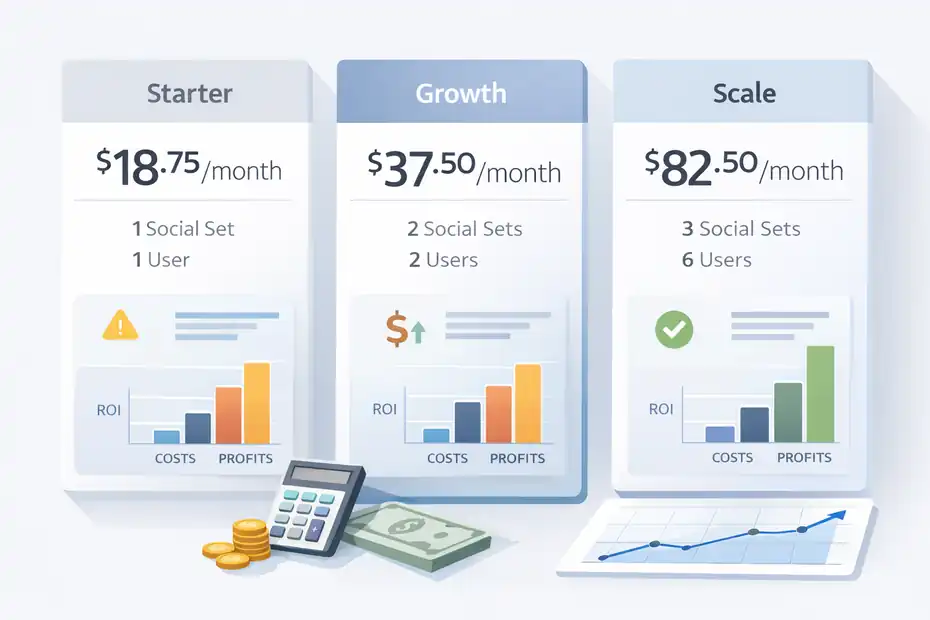
The current pricing page lists Starter at $18.75 per month billed yearly, Growth at $37.50, and Scale at $82.50, with a 14-day free trial and different “Social Set” limits by plan.
That said, analytics are only useful if you translate them. Software can provide numbers. You still need to tell the client what the numbers mean. If you are not doing that part, no platform will make reporting impressive.
What Using Later Feels Like In A Real Freelance Workflow
A tool review becomes useful only when we stop speaking in feature lists and start asking how the platform behaves inside an actual month of client work.
That is where the good and bad parts usually become obvious.
Month-To-Month Workflow For A Solo Freelancer
Let me break down a realistic workflow. Say you manage three retainer clients. Each one gets 12 to 16 posts per month across two platforms.
Without a scheduling system, your month may look like this: collect assets, chase captions, update spreadsheets, log into social accounts, manually schedule, remember deadlines, and then scramble when the client asks what is going live next week.
With Later, the workflow becomes more centralized. A smoother version often looks like:
- week 1: plan topics and collect assets
- week 2: write captions and organize posts on the calendar
- week 3: schedule content and review gaps
- week 4: monitor results and prepare a simple report
That does not mean the work becomes tiny. It means the work becomes easier to batch.
In my experience, batching is where freelancers protect margin. If you can schedule half a month of content in one focused block instead of touching each client every day, your business feels less chaotic. You also look more professional because your process becomes predictable.
This is especially useful if you tend to lose time in micro-tasks. Opening five tabs, checking post dates, hunting captions, and confirming assets may not feel like much in the moment. But across a month, those micro-tasks eat hours. Later helps when it reduces that low-level friction.
The catch is that you need to set up your content operation well. If your files are disorganized and client approvals are inconsistent, software will expose the mess rather than fix it.
Client Approvals, Revisions, And Communication Gaps
This is where many freelance tools either shine or disappoint. Scheduling is easy. Approvals are where profit goes to die.
Later can support a more organized content review process, but it will not replace clear communication. You still need approval deadlines, revision rules, and a way to stop endless “one tiny tweak” messages.
A healthy freelancer workflow around Later usually includes:
- one planned content submission date
- one approval deadline
- one revision round
- a buffer before publishing
- a simple explanation of what happens if the client is late
Imagine a client gets content on the 20th, ignores it for six days, then asks for changes on the day posts were meant to go live. That is not a Later problem. That is a boundary problem. I say this because freelancers often blame tools for issues caused by weak process design.
Later helps most when it sits inside a disciplined workflow. For example, you might tell a client: “Your monthly content calendar is delivered in Later by the 22nd. Revisions are due within 48 hours. Approved content is then scheduled for the following month.”
That sounds small, but it changes your whole business. Now the platform is reinforcing your operating system rather than becoming another place for random feedback.
So, does Later reduce communication headaches? Somewhat. But only when you pair it with strong client management. Without that, it can become one more place where feedback gets delayed and tasks pile up.
Pricing, Value, And Whether The Cost Makes Sense
Freelancers do not buy software in theory. We buy it against margin.
That is why the real pricing question is not “Is Later expensive?” It is “Will it save or generate enough value to justify the cost?”
What You’re Paying For
Later’s pricing is not outrageous, but it also is not insignificant if you are still early in your freelance business. The official plan structure currently includes Starter, Growth, and Scale tiers, with differences in social profile limits, user access, analytics depth, and scheduling features.
Starter includes 1 Social Set and 1 user, Growth includes 2 Social Sets and 2 users, and Scale increases those limits further.
Here is a simplified view of the freelancer angle:
| Plan | Best For | Main Limitation For Freelancers | My Honest Take |
|---|---|---|---|
| Starter | One freelancer with a very small client load | Profile and posting limits can feel tight fast | Fine for testing, easy to outgrow |
| Growth | Freelancers with a few recurring clients | Still requires careful client packaging | Usually the most realistic option |
| Scale | Small agencies or advanced freelancers | Cost only makes sense with strong recurring revenue | Better when you already have margin |
I would not choose based on feature envy. I would choose based on how many clients the plan supports before creating awkward constraints. For many freelancers, the wrong move is buying the cheapest plan, hitting limits quickly, and then rebuilding workflow mid-month.
A smarter test is this: Divide the monthly software cost by your retainer clients. If the tool costs less than what you lose in time, missed deadlines, or manual admin, it is probably justified.
ROI: More Clients Or Just More Overhead?
This is the headline question, so let’s answer it clearly. Later can help you take on more clients, but only if you use it to increase delivery efficiency rather than expand unnecessary service complexity.
Here is what good ROI looks like:
- you batch work faster
- you reduce manual posting time
- you create cleaner client reporting
- you improve consistency enough to retain clients longer
- you package social management in a more premium way
Here is what bad ROI looks like:
- you spend hours setting up every tiny feature
- you create complicated workflows clients never asked for
- you add dashboards but do not save time
- you pay for capacity you are not using
- you confuse “using better software” with “having a better business”
Let’s use a simple scenario. If Later costs roughly the price of a small add-on service and saves you even 2 to 3 hours per month, it may already pay for itself. If your effective freelance rate is $50 per hour, that efficiency matters quickly.
But if you only manage one small client and manually posting takes 20 minutes a week, the math is weaker.
This is why I believe Later is best viewed as a margin tool, not a growth miracle. It supports scale when your offer is already working. It does not create demand by itself.
Common Mistakes Freelancers Make With Later
A lot of bad software experiences are not caused by bad software.
They come from mismatched expectations, weak systems, or trying to automate before the basics are stable.
Mistake 1: Using Later Before Defining Your Service Model
One of the most common freelance mistakes is buying a platform before defining what is actually included in the client offer. That usually leads to over-delivery.
For example, a freelancer signs up for Later and suddenly starts promising:
- monthly planning
- cross-platform posting
- visual feed design
- detailed analytics
- content repurposing
- bio link management
That sounds impressive, but if the client is only paying for light scheduling support, you have created extra unpaid work.
I recommend mapping your service before your software. Ask:
- How many posts are included?
- Which platforms are included?
- Are revisions limited?
- Do you provide analytics summaries?
- Are you handling publishing or only planning?
Once those answers are clear, Later becomes easier to evaluate. You can judge whether the tool supports your package instead of accidentally expanding it.
This matters because software can make more work look organized. A clean dashboard may hide the fact that you are now doing twice as much labor for the same retainer. That is not efficiency. That is polished burnout.
In most cases, freelancers do better when they use Later to support a defined productized service. The more vague your offer is, the more likely the tool becomes a container for endless extras.
Mistake 2: Confusing Scheduling With Strategy
Scheduling content neatly does not mean the content is strategically strong. I say this because many freelancers start feeling “productive” inside a scheduler while avoiding the harder work of messaging, hooks, creative direction, and content angles.
A polished calendar can still be full of weak ideas.
This is where discipline matters. Later should be the place where strategy gets executed, not the place where strategy gets invented at the last minute. If you are staring at an empty content planner hoping inspiration appears, the tool is not helping. It is just showing you the problem more clearly.
A better workflow is:
- define themes first
- align content to a goal
- draft concepts and hooks
- gather assets
- then use Later for planning and publishing
Imagine you work with a local skincare clinic. The content should probably serve different purposes: trust-building, education, social proof, and conversion. If you fill the calendar with random before-and-after posts and generic quotes, Later will help you publish that weak strategy consistently. That is not a win.
I believe freelancers get the best results when they separate thinking from scheduling. Strategy happens before the calendar. The platform then gives structure to that strategy.
When you reverse the order, you often create more work because you end up revising content after it is already halfway prepared.
How To Get The Most Out Of Later As A Freelancer
A tool becomes valuable when you use it with intention. The freelancers who love Later are usually not the ones clicking every feature.
They are the ones building a repeatable system around it.
Build A Lean Monthly Workflow Around It
The easiest way to make Later profitable is to keep your workflow lean. You do not need a giant agency-style process. You need a clear one.
A simple monthly system could look like this:
- Content planning: Decide topics, goals, and campaign priorities.
- Asset collection: Gather images, videos, testimonials, and brand updates.
- Caption production: Write in one block instead of one by one.
- Calendar staging: Organize the month visually and spot gaps.
- Approval window: Give clients one clean chance to review.
- Scheduling and QA: Final check links, tags, dates, and media.
- Monthly report: Share what worked and what changes next month.
This kind of structure can dramatically reduce reactive work. Instead of checking every client every day, you operate in focused production windows. That is how freelancers protect both time and energy.
I also suggest creating a checklist you repeat every month. That may sound basic, but it reduces errors more than most people expect. Missed tags, wrong thumbnails, duplicated captions, and forgotten dates usually come from relying on memory.
The more your process repeats, the more useful Later becomes. Repetition is where tools earn their keep.
Use It To Improve Retention, Not Just Capacity
Many freelancers think software helps only with getting more clients. I think the bigger opportunity is retention. A client who feels your process is organized is less likely to question your value every month.
Later can help you create that feeling of professional consistency. For example:
- content goes out on time
- the visual flow makes sense
- approvals feel structured
- reports are cleaner
- your recommendations look tied to actual performance
That does not just make life easier. It makes your service look more intentional.
Let’s say a client is deciding whether to keep you for another quarter. If all they feel is “posts happened somehow,” your value is fragile. If they feel, “There is a real system behind this, and I can see how decisions are being made,” your position becomes stronger.
I think that is one of the most underrated benefits of tools like Later. They can support client confidence, not just internal efficiency.
So when you measure value, do not only ask whether Later helps you add clients. Ask whether it helps you keep clients longer, reduce confusion, and make your service easier to trust. In freelance work, that can be even more profitable than pure capacity.
Final Verdict: Is Later Worth It For Freelancers?
For the right freelancer, Later is absolutely worth considering. But the right freelancer is not “everyone who touches social media.”
It is someone with recurring content delivery, a few active clients, a need for better workflow structure, and a business model that benefits from batching and consistency.
When The Answer Is Yes
I would say yes to Later if you are in one of these situations:
- you manage multiple client profiles monthly
- visual planning genuinely improves your content quality
- your current process is too manual
- you need a cleaner scheduling and reporting workflow
- you want a more polished retainer delivery system
In that setup, Later can reduce chaos, save time, and make your service more professional. It may not double your income overnight, but it can absolutely make your operation easier to scale responsibly.
I also think it is a good fit for freelancers who are moving toward a mini-agency model but are not ready for heavy enterprise tools. It gives you some structure without demanding a full operations department.
The best-case scenario is not “I bought Later and instantly got more clients.” It is “I built a better delivery system, which let me handle clients more reliably, retain them longer, and say yes to new work without panicking.” That is a much more believable and useful outcome.
When The Answer Is No
I would probably skip Later if your freelance work is still highly custom, mostly strategic, or too small to justify workflow software. If you have one low-ticket client and post manually without much friction, the platform may feel like more system than you need.
I would also be cautious if you are hoping the tool will fix weak offers, poor client boundaries, or messy approvals. It will not. It may actually make those weaknesses more visible.
So, more clients or just more work?
My honest answer is this: Later creates more clients only when it removes enough operational friction to let you serve more people well. If you use it without a clear offer, pricing logic, and approval process, it can absolutely become more work.
That is why I see Later as an amplifier. It amplifies a solid freelance system. It also amplifies a messy one.
If your workflow is already creaking under repeat social media tasks, Later is probably worth testing. If your freelance business still lacks structure, fix that first. The tool works best when it has something strong to support.
FAQ
What is Later and how does it help freelancers?
Later is a social media scheduling tool that helps freelancers plan, organize, and publish content across platforms. It simplifies content calendars, reduces manual posting, and improves workflow efficiency. For freelancers managing multiple clients, it can save time and create a more structured, professional delivery system.
Is Later worth it for freelancers with small client loads?
Later can be useful for freelancers with small client loads, but the value depends on workflow complexity. If you manage only one or two clients with minimal posting, it may feel unnecessary. However, as your workload grows, it becomes more valuable for batching tasks and staying organized.
Can Later help freelancers get more clients?
Later does not directly bring in new clients, but it can support growth by improving your workflow and consistency. When your content delivery becomes more reliable and professional, clients are more likely to stay longer and refer others, which indirectly helps you grow your freelance business.
What are the biggest drawbacks of Later for freelancers?
The biggest drawback is that it can add unnecessary complexity if your workflow is not well defined. Freelancers without clear processes may end up doing more work instead of less. It also may not suit those focused on strategy or consulting rather than ongoing content scheduling.
How do freelancers use Later effectively?
Freelancers use Later effectively by building a clear monthly workflow around it, including planning, content creation, approvals, and scheduling. The key is to batch tasks and avoid overcomplicating the process. When used with structure, it helps reduce stress and improve client retention.

I’m Juxhin, the voice behind The Justifiable.
I’ve spent 6+ years building blogs, managing affiliate campaigns, and testing the messy world of online business. Here, I cut the fluff and share the strategies that actually move the needle — so you can build income that’s sustainable, not speculative.
Related posts:
 Sprout Social Competitors You Didn’t Know Existed
 Later Review For Ecommerce Brands: More Sales Or Just More Posts?
 Later Review For Small Business: Can It Actually Save You Time?
 Honest Later Review For Instagram Marketing: Real Growth Or Hype?
 Sprout Social Media Tools You’ll Actually Use
 Later Review For Agencies: Scale Clients Faster Or Hit Limits?